What's your Internet Speed?

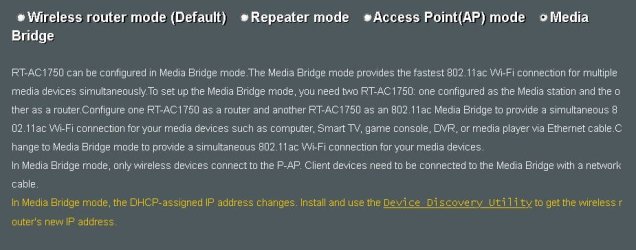
Are you using WiFi? And if so, are you using a WiFi repeater? Because those will cut your speed in half.

Finally, you may want to give your modem and maybe your router a restart.
 

My Computer My Computer

At a glance

Windows 7 Ultimate x64
Computer type
PC/Desktop
OS
Windows 7 Ultimate x64
No, CAT5.
 

My Computer My Computer

At a glance

Win 7 Ultimate x642.8 GHz8GBATI Radeon HD 4650
Computer type
PC/Desktop
Computer Manufacturer/Model Number
HP NP206AA-A2L-p6102f
OS
Win 7 Ultimate x64
CPU
2.8 GHz
Memory
8GB
Graphics Card(s)
ATI Radeon HD 4650
Sound Card
AMD High Definition Audio Device
Monitor(s) Displays
HP x20LED Series Wide LCD Monitor
Hard Drives
WDC WD20 SCSI
External Samsung Portable SSD T5 USB
Keyboard
HID Keyboard Device
Mouse
Gaming Optical Mouse16
Internet Speed
50Mbps
Browser
Firefox 71
Reset the modem once and see if that helps. Also, is your NIC drivers updated and is the network driver software using some kind of optimization for so-called streaming content and what not?
 

My Computer My Computer

At a glance

Windows 7 Ultimate x64
Computer type
PC/Desktop
OS
Windows 7 Ultimate x64
I powered off/on the ASUS router and Comcast modem

NVIDIA nForce driver has latest update
ASUS router firmware is running latest firmware.


48Mbps is the best, 3Mbps the worst.
 

My Computer My Computer

At a glance

Win 7 Ultimate x642.8 GHz8GBATI Radeon HD 4650
Computer type
PC/Desktop
Computer Manufacturer/Model Number
HP NP206AA-A2L-p6102f
OS
Win 7 Ultimate x64
CPU
2.8 GHz
Memory
8GB
Graphics Card(s)
ATI Radeon HD 4650
Sound Card
AMD High Definition Audio Device
Monitor(s) Displays
HP x20LED Series Wide LCD Monitor
Hard Drives
WDC WD20 SCSI
External Samsung Portable SSD T5 USB
Keyboard
HID Keyboard Device
Mouse
Gaming Optical Mouse16
Internet Speed
50Mbps
Browser
Firefox 71
Absent of any speed settings and other fancy stuff in the network driver software, you might want to do a smokeping test to see if you have a bad drop to your house. In order for smokeping to work however, you'll need to go into your router and allow ICMP ping echo requests for 24 hours temporally.

Did you make sure to put the modem in bridging mode when you connected the ASUS router to it?


smokeping tool - packet loss test | DSLReports, ISP Information
 

My Computer My Computer

At a glance

Windows 7 Ultimate x64
Computer type
PC/Desktop
OS
Windows 7 Ultimate x64
Oh, don't power off the modem, you want to reset it. There is a small recessed hole there and you can use a small pointy thing to press the button. Press and hold the reset button for at least 5 seconds. Once done, log into the modem with IP of 10.0.0.1 username admin and I think the password is password and make sure bridging mode is on again.
 

My Computer My Computer

At a glance

Windows 7 Ultimate x64
Computer type
PC/Desktop
OS
Windows 7 Ultimate x64
Oh, ok. That's interesting. I've never used bridge mode, just the standard one for beginners. Do I need 2 routers to run bridge? Or just one is enough to improve throughput. Thanks.
 

Attachments

  • router.JPG
    router.JPG
    55.2 KB · Views: 0

My Computer My Computer

At a glance

Win 7 Ultimate x642.8 GHz8GBATI Radeon HD 4650
Computer type
PC/Desktop
Computer Manufacturer/Model Number
HP NP206AA-A2L-p6102f
OS
Win 7 Ultimate x64
CPU
2.8 GHz
Memory
8GB
Graphics Card(s)
ATI Radeon HD 4650
Sound Card
AMD High Definition Audio Device
Monitor(s) Displays
HP x20LED Series Wide LCD Monitor
Hard Drives
WDC WD20 SCSI
External Samsung Portable SSD T5 USB
Keyboard
HID Keyboard Device
Mouse
Gaming Optical Mouse16
Internet Speed
50Mbps
Browser
Firefox 71
No, no, and more no. You need to enable bridging mode in the Comcast modem. Not the router. Read my post again on the IP address used to get into the modem.
 

My Computer My Computer

At a glance

Windows 7 Ultimate x64
Computer type
PC/Desktop
OS
Windows 7 Ultimate x64
My modem is an ARRIS Surfboard SB6141 and has no reset button. ARRIS says to reset it by pulling the power:

Consumers - SB6141: Factory Reset


I can access the Internet, but I tried all these ARRIS default IPs and they all timed out in Firefox and Chrome:


10.0.0.1
192.168.0.1

192.168.100.1
192.168.100.0
192.168.7.254
192.168.1.254


If I just power the modem off/on but don't revert to factory settings, do you think I'll able to connect to the Internet?


Also, does it matter that my ASUS router's IP is 192.168.1.1 (subnet issue)?
 

My Computer My Computer

At a glance

Win 7 Ultimate x642.8 GHz8GBATI Radeon HD 4650
Computer type
PC/Desktop
Computer Manufacturer/Model Number
HP NP206AA-A2L-p6102f
OS
Win 7 Ultimate x64
CPU
2.8 GHz
Memory
8GB
Graphics Card(s)
ATI Radeon HD 4650
Sound Card
AMD High Definition Audio Device
Monitor(s) Displays
HP x20LED Series Wide LCD Monitor
Hard Drives
WDC WD20 SCSI
External Samsung Portable SSD T5 USB
Keyboard
HID Keyboard Device
Mouse
Gaming Optical Mouse16
Internet Speed
50Mbps
Browser
Firefox 71
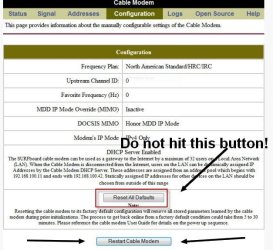
The reason why you can't access the modem with the proper IP of 192.168.100.1 is because the modem is not in bridging mode. I should have saw this earlier. What you need to do is pull the ethernet cable from the router to the modem and plug an ethernet cable connected to your PC to the modem directly where the router was plugged in at into the modem. Now try 192.168.100.1 to access the modem.

Once in the modem go in and hit the Restart Cable Modem button shown in the pic. DO NOT hit the Reset All Defaults button. That would reset your ISPs configuration for the modem and you'll lose Internet access.

Once the modem is reset, go into the modem's options and find something for bridging mode. Since you're using a router with your modem the modem needs to be in bridging mode. Once the modem is in bridging mode you can now reconnect the router.

The reason why you want to reset the modem is because if you have a speed upgrade, this is generally what you need to do in order to obtain that new speed. Comcast (Your ISP) updated the profile in your modem and thus your modem needs to be rest to take advantage of it.

If you still don't get 100 Mbps on download, then try that smokping test I gave a link to. But read what I said about allowing pings in your router for 24 hours temporally. If the line is good from Smokeping then I suspect the router or modem is at fault with your bandwidth. It may even be the NIC in your computer. Does the network card in your PC use some kind of software? And if so, are there speed enhancements and what have you in that software? I asked this like twice now with no answer. NVIDIA nForce is a GPU driver, not a network driver. Run this program and tell me what it says under Network. Take a screenshot of the information and post here.

Finally, instead of speedtest.net, try SpeedOf.Me | Internet speed test instead.

 

Attachments

  • 1.jpg
    1.jpg
    58.3 KB · Views: 31
Last edited:

My Computer My Computer

At a glance

Windows 7 Ultimate x64
Computer type
PC/Desktop
OS
Windows 7 Ultimate x64
Well, here's a wrench in the gears. It appears your modem is already by default in bridging mode. Motorola SB6141 in Bridged mode?? - Comcast Business Support Community

So why you can't access the IP of your modem I don't know. If it is a double NAT condition, then my instructions of pulling the router temporally from the modem and connecting directly to the modem would elevate that. If it is a double NAT condition, this could be in fact why your bandwidth is cut in half. Speculation on my part though as I would think a double NAT would just nullify your Internet connection altogether.

First let me see if you have a double NAT condition. To do this go to the Start orb bottom left and in search enter:
Code:
cmd
Now in the black DOS looking box enter:
Code:
tracert google.com
.

What does it say for the first two hops? The exact first two IP addresses.
 

My Computer My Computer

At a glance

Windows 7 Ultimate x64
Computer type
PC/Desktop
OS
Windows 7 Ultimate x64
Before you go on with resetting the modem, tell me what the tracert results are. If you see the first two IPs as a class C private IP address like 192.168.1.1 and 192.168.100.1 or something like that then you have a double NAT. To elevate this, plug the ethernet cable from the modem to your router's LAN port rather than the router's WAN port.


So router's LAN port to modem.

Not router's WAN port to modem.
 

My Computer My Computer

At a glance

Windows 7 Ultimate x64
Computer type
PC/Desktop
OS
Windows 7 Ultimate x64
Thank you VERY much for the troubleshooting tips. But before I do that, speaking of things I should have mentioned, I'm using a VPN. I disconnected it and the download speed is 100Mbps. Reconnected it, and it drops to 10-45Mbps DL, and the double VPN is only getting around 3Mbps DL.

So does that tell us the modem and router are working as designed? If it is, does the troubleshooting shift to the VPN, or is the speed drop due to the VPN usually that severe?
 

My Computer My Computer

At a glance

Win 7 Ultimate x642.8 GHz8GBATI Radeon HD 4650
Computer type
PC/Desktop
Computer Manufacturer/Model Number
HP NP206AA-A2L-p6102f
OS
Win 7 Ultimate x64
CPU
2.8 GHz
Memory
8GB
Graphics Card(s)
ATI Radeon HD 4650
Sound Card
AMD High Definition Audio Device
Monitor(s) Displays
HP x20LED Series Wide LCD Monitor
Hard Drives
WDC WD20 SCSI
External Samsung Portable SSD T5 USB
Keyboard
HID Keyboard Device
Mouse
Gaming Optical Mouse16
Internet Speed
50Mbps
Browser
Firefox 71
Good grief, man. You should have mentioned you were using a VPN from the get go. Yes, a VPN will slow your connection down. That is inherit of a a VPN. The VPN I use actually doesn't have much of a slow down at all.

You may want to run that command and still make sure you don't have a double NAT. If you do, try plugging the modem to the LAN port of the router instead of the WAN port of the router. Go back and read my instructions on running the tracert command. Disconnect from the VPN first.

As to VPNs, you need to know a few things about those. I've written a post on my own forum about that here: https://cyberpcforum.com/viewtopic.php?p=1491#p1491

Also, you have to have a certain sense of blind trust in the VPN and if they adhere to what they say about not logging, etc.
 

My Computer My Computer

At a glance

Windows 7 Ultimate x64
Computer type
PC/Desktop
OS
Windows 7 Ultimate x64
If you have the option to use UDP in the VPN over TCP, then use UDP. That would be faster. The location you connect to would also have a bearing on speed. As well as how many people are connected to that server.
 

My Computer My Computer

At a glance

Windows 7 Ultimate x64
Computer type
PC/Desktop
OS
Windows 7 Ultimate x64
Still here, working on some backup stuff. NordVPN says if I use UDP I won't have double VPN. I'm talking to ASUS for help setting up a VPN on the router. Hoping to use that in addition to use them in series...?
 

My Computer My Computer

At a glance

Win 7 Ultimate x642.8 GHz8GBATI Radeon HD 4650
Computer type
PC/Desktop
Computer Manufacturer/Model Number
HP NP206AA-A2L-p6102f
OS
Win 7 Ultimate x64
CPU
2.8 GHz
Memory
8GB
Graphics Card(s)
ATI Radeon HD 4650
Sound Card
AMD High Definition Audio Device
Monitor(s) Displays
HP x20LED Series Wide LCD Monitor
Hard Drives
WDC WD20 SCSI
External Samsung Portable SSD T5 USB
Keyboard
HID Keyboard Device
Mouse
Gaming Optical Mouse16
Internet Speed
50Mbps
Browser
Firefox 71
NO! Do not setup a VPN in the router. And You don't want to use the VPN client with a VPN client setup in the router at the same time. Plus, it may not even work since in effect you'll be connecting to the same IP twice which probably won't work.

You don't want TCP. Use UDP and forget about the double hop. I gave you a link on my forum about VPNs. If Nord is based in the U.S it's worthless. Plus, I bet they log.

Another thing. If you use the router full time with a VPN setup, you can and will run across sites that don't allow your VPN and I've read PayPal will delete your account if it sees strange IPs. Then to top it off, Google search and Gmail can give you hell. That's why it's best to use the VPN client on a per use basis.

If you wanted to have a full time router VPN setup, I'd get another router for that. Or use the third-party firmware ASUS Merlin. Stay abreast of its updates as well. You can buy routers on eBay with ASUS Merlin already installed. Just search for ASUS Merlin in eBay. Once you get the router either reflash it, or update its firmware. I wouldn't trust someone else's flash.
 

My Computer My Computer

At a glance

Windows 7 Ultimate x64
Computer type
PC/Desktop
OS
Windows 7 Ultimate x64
I don't know if mine is good or bad.
 

Attachments

  • speed test.jpg
    speed test.jpg
    6.4 KB · Views: 8

My Computer My Computer

At a glance

Windows 7 Ultimate x641.86 GHz Intrel Core 23 GB Dual Channel DDR2 @ 3.32 MHzIntel Q965/Q963 Express chipset
Computer type
PC/Desktop
Computer Manufacturer/Model Number
refurb in an HP/Compaq case
OS
Windows 7 Ultimate x64
CPU
1.86 GHz Intrel Core 2
Motherboard
HP 0A60h XU1
Memory
3 GB Dual Channel DDR2 @ 3.32 MHz
Graphics Card(s)
Intel Q965/Q963 Express chipset
Monitor(s) Displays
Dell CRT
Hard Drives
977GB Samsung HD 103 SI ATA
Case
HP Compaq DC5800
Mouse
wired optical
Antivirus
Microsoft Security Essentials, MalwareBytes, Spyware Blaster
Browser
Firefox 32-bit
Pretty much depends on what you're paying for and what your ISP is advertising on what you are paying for. But looking at that I can tell you your download rate is only 2.8 MBps (8/23=2.8xxx) There are 8 bits in a byte and to be more technical 4 bits in a nibble. LOL Your upload is very poor at only 291 KBps. Though, a massive upload rate isn't needed much to a general Internet user unless you do lots of uploading like to the cloud for backups and that kind of thing. Your chief use of the Internet as you go from one website to the next is mostly from a download perspective. You're in fact "downloading" that web page as you surf the Internet. But although, you are still sending small packets of date upstream your "upload" while that happens.

I don't know what ISP that is, where you're located, the type of Internet you have or whether that's being used with a VPN or a phone's Internet connection for a cell tower, but it's pretty poor considering what most people have. I'm by no means knowledgeable about the marketing of Internet speeds and what have you based on a location, etc. But if you're paying $50 or more a month for that it's a complete and utter rip off. Unless of course you're using the aforementioned VPN or a Sat Internet connection, DSL where you're too far from the DSLAM, etc.

Who's your ISP and what are you paying a month along with any bundled packages?
 

My Computer My Computer

At a glance

Windows 7 Ultimate x64
Computer type
PC/Desktop
OS
Windows 7 Ultimate x64
My ISP is Spectrum. My modem is a Motorola SB5101. My cable bill is "bundled" which includes phone and TV and the bottom line per month is $213.29. The itemized invoice shows I am paying $59.99 for Internet connection plus a $10 modem lease fee.
 

My Computer My Computer

At a glance

Windows 7 Ultimate x641.86 GHz Intrel Core 23 GB Dual Channel DDR2 @ 3.32 MHzIntel Q965/Q963 Express chipset
Computer type
PC/Desktop
Computer Manufacturer/Model Number
refurb in an HP/Compaq case
OS
Windows 7 Ultimate x64
CPU
1.86 GHz Intrel Core 2
Motherboard
HP 0A60h XU1
Memory
3 GB Dual Channel DDR2 @ 3.32 MHz
Graphics Card(s)
Intel Q965/Q963 Express chipset
Monitor(s) Displays
Dell CRT
Hard Drives
977GB Samsung HD 103 SI ATA
Case
HP Compaq DC5800
Mouse
wired optical
Antivirus
Microsoft Security Essentials, MalwareBytes, Spyware Blaster
Browser
Firefox 32-bit
Back
Top