What's your memory assessment speed?

Status
Not open for further replies.
[QUOTE
It may help but its not a guarantee. I once went from 1333 to 1866 DDR3 DRAM and I saw only a slight improvement. One thing to look for with RAM is a lower CL or CAS number than what you have now. that is Column Access Strobe Latency and is an idicator ofr RAM performance as well as the frequency.
Good RAM is fairly cheap if you want to give it a try. The lower the CL is the higher the price usually.[/QUOTE]

Wow! You lost me completely here. Lets go one step at a time.

let me repeat my system info
- Windows 7 64 pro
- Motherboard: Asus P5B ... Documentation say that it as fully control of the overclock parameters
- CPU: Q6600
- Ram: Kinston: 2 X 2Gb + 2 * 1Gb Total: 6Gig Speed 400Mhz

Now, If I want to see increasing performance without changing the motherboard and CPU. I already incresed my clock from 2.4 to 3.2 MHz
- Should I get faster memory
- Overclock my actual one or tweak the parameters
- Get faster memory and overclock the new one.

Once this answer, I will try to understand the information that you wrote

Martin :geek:
 

My Computer My Computer

At a glance

windows 7 Pro x64Intel I5 34508 GB DDR3 dual chanelAsus Radeon 4870 Nevedi Gforce GTX 500Ti
Computer Manufacturer/Model Number
Home made
OS
windows 7 Pro x64
CPU
Intel I5 3450
Motherboard
Gefabye B75M-D3H
Memory
8 GB DDR3 dual chanel
Graphics Card(s)
Asus Radeon 4870 Nevedi Gforce GTX 500Ti
Sound Card
None
Monitor(s) Displays
4 L206W, Synckmaster, Acer X203W, X223W
Screen Resolution
1680 X 1050
Hard Drives
SSD 120G from Intel

640 GB
PSU
Cooler Master 600W
Case
Antec
Cooling
Regular fan
Keyboard
Microsoft Multimedia Bilingual
Mouse
Microsoft Optical 3000
Sorry 'bout that confusion, just giving some info about how RAM works, it's not all in the frequency.
Since there are so many variables one can't say if RAM with a higher frequency will improve performance. All systems will react differently so it is down to you giving it a try.
My best suggestion however, is to save your money for now toward some upgrade parts.
As for me saying I went from DDR3-1333MHz RAM to DDR3-1866MHz RAM was to say that it had only a minor performance increase and wasn't woth the money, but I had to give it a shot. Sure my winsat mem and other benchmark numbers went up noticeably, but the PC still ran about the same.:)
 

My Computer My Computer

At a glance

Windows 7 Ultimate X64 SP1Intel i5-2550K, Differing ~4.4-4.8GHz No buil...16GB G.Skill Sniper 1866MHz @ 2133MHz 2x8GBASUS GTX650TIB-DC2OC-2GD5, (650TI Boost)
Computer type
PC/Desktop
Computer Manufacturer/Model Number
Home Built Desktop By DataTech
OS
Windows 7 Ultimate X64 SP1
CPU
Intel i5-2550K, Differing ~4.4-4.8GHz No built in GPU
Motherboard
ASUS P8Z68-V PRO/GEN3
Memory
16GB G.Skill Sniper 1866MHz @ 2133MHz 2x8GB
Graphics Card(s)
ASUS GTX650TIB-DC2OC-2GD5, (650TI Boost)
Sound Card
Onboard Realtek 5-1
Monitor(s) Displays
Samsung P2570HD
Screen Resolution
1920x1080
Hard Drives
Samsung 840 Pro 256GB SSD for OS, 500GB Seagate Constellation (Enterprise drive) for Data
PSU
Corsair HX650W
Case
Inwin Dragon Rider
Cooling
Hyper 212 EVO w/two Noctua fans, push-pull, @1300 RPM
Keyboard
E-Z Eyes, bright yellow keys with large characters
Mouse
steelseries SENSEI Laser Pro Gaming
Internet Speed
48-51Mbs Mbs down, 11 Mbs up Xfinity Cable
Antivirus
Norton Internet Security 2013
Browser
IE 10, Opera, Pale Moon if needed
Other Info
4 case fans, LG BluRay-RE, ASUS DVD-RW, Mr. Fusion power supply, 1.21 gigawatts.
Hi Martin, going from 266 to 320 do you notice the machine runs faster, apps open quicker? I suspect your hardware is limiting what you can do with clocking.

Hello Britton

Yes system is running a bit faster, I did no change in the bios other than increasing the clock to 320 MHz. All other parameter as been left to auto

Could I get another increase in performance if I install faster memory? That is my interrogation

Martin
It may help but its not a guarantee. I once went from 1333 to 1866 DDR3 DRAM and I saw only a slight improvement. One thing to look for with RAM is a lower CL or CAS number than what you have now. that is Column Access Strobe Latency and is an idicator ofr RAM performance as well as the frequency.
Good RAM is fairly cheap if you want to give it a try. The lower the CL is the higher the price usually.

Sorry 'bout that confusion, just giving some info about how RAM works, it's not all in the frequency.
Since there are so many variables one can't say if RAM with a higher frequency will improve performance. All systems will react differently so it is down to you giving it a try.
My best suggestion however, is to save your money for now toward some upgrade parts.
As for me saying I went from DDR3-1333MHz RAM to DDR3-1866MHz RAM was to say that it had only a minor performance increase and wasn't woth the money, but I had to give it a shot. Sure my winsat mem and other benchmark numbers went up noticeably, but the PC still ran about the same.:)

Understood
Martin
 

My Computer My Computer

At a glance

windows 7 Pro x64Intel I5 34508 GB DDR3 dual chanelAsus Radeon 4870 Nevedi Gforce GTX 500Ti
Computer Manufacturer/Model Number
Home made
OS
windows 7 Pro x64
CPU
Intel I5 3450
Motherboard
Gefabye B75M-D3H
Memory
8 GB DDR3 dual chanel
Graphics Card(s)
Asus Radeon 4870 Nevedi Gforce GTX 500Ti
Sound Card
None
Monitor(s) Displays
4 L206W, Synckmaster, Acer X203W, X223W
Screen Resolution
1680 X 1050
Hard Drives
SSD 120G from Intel

640 GB
PSU
Cooler Master 600W
Case
Antec
Cooling
Regular fan
Keyboard
Microsoft Multimedia Bilingual
Mouse
Microsoft Optical 3000
Now, If I want to see increasing performance without changing the motherboard and CPU. I already incresed my clock from 2.4 to 3.2 MHz


-
Should I get faster memory

No. You won't really notice much difference.

- Overclock my actual one or tweak the parameters

Oc/tweak

- Ram: Kinston: 2 X 2Gb + 2 * 1Gb Total: 6Gig Speed 400Mhz

Remove the 2 *1 GB sticks. Chances are they are mismatched (to the Kingston modules) and may be hurting your Rams speed overall.
 

My Computer My Computer

At a glance

8 Pro x64i7 3770K 4.6GHz16GB G.Skill Trident X 2666mhzx2 EVGA 780 Ti Superclocked SLI
Computer type
PC/Desktop
Computer Manufacturer/Model Number
Systems by SmartEyeball
OS
8 Pro x64
CPU
i7 3770K 4.6GHz
Motherboard
ASUS P8Z77 WS
Memory
16GB G.Skill Trident X 2666mhz
Graphics Card(s)
x2 EVGA 780 Ti Superclocked SLI
Sound Card
SB X-FI Surround 5.1 PRO USB / ATH-AD900 Headphones
Monitor(s) Displays
x3 Dell U2410 / 58" Samsung
Screen Resolution
5760*1200/ 1920*1200
Hard Drives
2x Intel 520 240GB (RAID 0) * 2x WD Caviar Blacks 2TB (RAID 0) * 2TB WD Caviar Black * Sony Optirac DVD
PSU
Silverstone Strider Evolution 1200W
Case
Thermaltake Level 10 GT Snow Edition
Cooling
Noctua NH-D14
Keyboard
Topre Realforce // Ducky Shine MX Black // Filco Ninja TKL
Mouse
Thermaltake Theron (Highly Recommended) + Razer Imperator
Antivirus
MSE
Browser
IE, FF, WaterFox
Other Info
GT Extreme V2 Sim Racing Cockpit + 40" LCD and K/B Mouse stand ▼
Fanatec CSR Elite Wheel + Clubsport V1 Pedals + CSR shifter/7G-H ▼Saitek X52 Pro ▼ TrackIR 5 Pro
Buttkicker v2 Seat Rumbler with Dedicated 5.1 and Sub Woofer attached to frame ▼
=
Bloody Big Grin
memspeed.png


16Gb Corsair Vengeance 1600MHz 9-9-9-24
 

My Computer My Computer

At a glance

Windows 7 Ultimate 64-BitIntel i7 2600K @ 4.2GHz8GB Corsair VengeanceSLI NVIDIA GTX465
Computer Manufacturer/Model Number
Custom
OS
Windows 7 Ultimate 64-Bit
CPU
Intel i7 2600K @ 4.2GHz
Motherboard
Gigabyte Z68X-UD5-B3
Memory
8GB Corsair Vengeance
Graphics Card(s)
SLI NVIDIA GTX465
Sound Card
Onboard 7.1
Monitor(s) Displays
Samsung Syncmaster 2333SW
Hard Drives
2 x OCZ Vertex Agility 3 in Raid 0
1 x 2TB Seagate Green
1 x 1TB Samsung F3
PSU
Coolermaster 1000w Silent Pro Gold
Case
Coolermaster HAF-X
Cooling
Fully Watercooled
Keyboard
Razer Lycosa
Mouse
Razer Copperhead
Internet Speed
50Mb
Other Info
I Love my pc!! <--Said when I registered
I Love my PC More! <--Now
Now, If I want to see increasing performance without changing the motherboard and CPU. I already incresed my clock from 2.4 to 3.2 MHz


- Ram: Kinston: 2 X 2Gb + 2 * 1Gb Total: 6Gig Speed 400Mhz

Remove the 2 *1 GB sticks. Chances are they are mismatched (to the Kingston modules) and may be hurting your Rams speed overall.

Hello/ Thanks
- How can I verify that they are mismatch?
- Witch memory module should I install ?
- How should they be install On my board, I got 4 banks 2 yellow & 2 black

Martin :)
 

My Computer My Computer

At a glance

windows 7 Pro x64Intel I5 34508 GB DDR3 dual chanelAsus Radeon 4870 Nevedi Gforce GTX 500Ti
Computer Manufacturer/Model Number
Home made
OS
windows 7 Pro x64
CPU
Intel I5 3450
Motherboard
Gefabye B75M-D3H
Memory
8 GB DDR3 dual chanel
Graphics Card(s)
Asus Radeon 4870 Nevedi Gforce GTX 500Ti
Sound Card
None
Monitor(s) Displays
4 L206W, Synckmaster, Acer X203W, X223W
Screen Resolution
1680 X 1050
Hard Drives
SSD 120G from Intel

640 GB
PSU
Cooler Master 600W
Case
Antec
Cooling
Regular fan
Keyboard
Microsoft Multimedia Bilingual
Mouse
Microsoft Optical 3000
Remove the 2 *1 GB sticks. Chances are they are mismatched (to the Kingston modules) and may be hurting your Rams speed overall.
Hello/ Thanks
- How can I verify that they are mismatch?
- Witch memory module should I install ?
- How should they be install On my board, I got 4 banks 2 yellow & 2 black

Martin :)
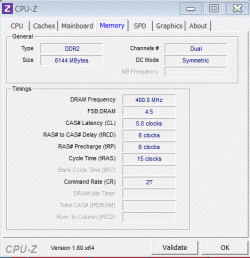
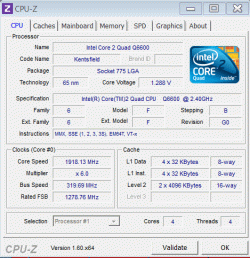
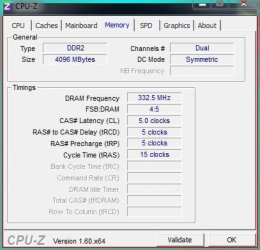
Did include snap picture om CPUID

Does it give a clue for the pertinence to upgrade or overclock memory

Martin
 

Attachments

  • CPUZ_1.gif
    CPUZ_1.gif
    16.8 KB · Views: 5
  • CPUZ.gif
    CPUZ.gif
    25.5 KB · Views: 5

My Computer My Computer

At a glance

windows 7 Pro x64Intel I5 34508 GB DDR3 dual chanelAsus Radeon 4870 Nevedi Gforce GTX 500Ti
Computer Manufacturer/Model Number
Home made
OS
windows 7 Pro x64
CPU
Intel I5 3450
Motherboard
Gefabye B75M-D3H
Memory
8 GB DDR3 dual chanel
Graphics Card(s)
Asus Radeon 4870 Nevedi Gforce GTX 500Ti
Sound Card
None
Monitor(s) Displays
4 L206W, Synckmaster, Acer X203W, X223W
Screen Resolution
1680 X 1050
Hard Drives
SSD 120G from Intel

640 GB
PSU
Cooler Master 600W
Case
Antec
Cooling
Regular fan
Keyboard
Microsoft Multimedia Bilingual
Mouse
Microsoft Optical 3000
...Does it give a clue for the pertinence to upgrade or overclock memory

Martin
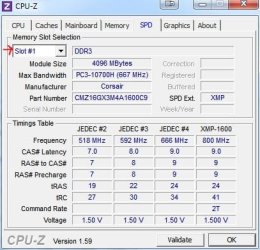
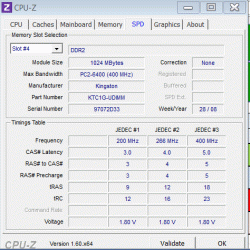
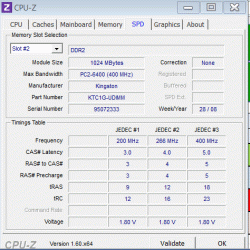
Go to the SPD tab and post a screenshot for each slot. :)
 

Attachments

  • spd.JPG
    spd.JPG
    40.1 KB · Views: 2

My Computer My Computer

At a glance

Main - Windows 7 Pro SP1 64-Bit; 2nd - Window...Main - Core i7 2600K; 2nd - Core i7 920Main - 16GB Corsair Vengeance; 2nd - 12GB Cor...Main - XFX Radeon 6870 1GB; 2nd - XFX Radeon ...
Computer Manufacturer/Model Number
Self
OS
Main - Windows 7 Pro SP1 64-Bit; 2nd - Windows Server 2008 R2
CPU
Main - Core i7 2600K; 2nd - Core i7 920
Motherboard
Main - Asus P8Z68-V Pro/Gen3; 2nd - Gigabyte GA-EX58-UDR3
Memory
Main - 16GB Corsair Vengeance; 2nd - 12GB Corsair Vengeance
Graphics Card(s)
Main - XFX Radeon 6870 1GB; 2nd - XFX Radeon 4870 1GB
Sound Card
Both: Onboard Realtek Azalia
Monitor(s) Displays
Main - Hann 25" + I-INC 25" + Acer 23"; 2nd - Upgrading Soon
Screen Resolution
Main - 1920x1080 (All Three Monitors); 2nd - Upgrading Soon
Hard Drives
Main - (1) Crucial M4 128GB (Boot)
Main - (1) Seagate 2TB 64MB Cache (Data)
Main - (1) Seagate 2TB 64MB Cache (Data Backup)
2nd - (1) Intel X25-M SSD 80GB (Boot)
2nd - (3) Seagate 1TB 32MB Cache (Data Backup)
2nd - (1) Seagate 320GB (Because)
PSU
Main - OCZ 600W Modular; 2nd - OCZ 600W
Case
Main - Thermaltake Element G; 2nd - NZXT something or other
Cooling
Main - Corsair H80; 2nd - Prolimatech Megahalems
Keyboard
Main - Razer Reclusa; 2nd - Old MS Keyboard
Mouse
Main - Logitech MX Revolution; 2nd - Old MS Mouse
Internet Speed
20Mbps Time-Warner Cable

Attachments

  • Slot4.gif
    Slot4.gif
    20 KB · Views: 5
  • Slot3.gif
    Slot3.gif
    19.7 KB · Views: 5
  • Slot2.gif
    Slot2.gif
    20.1 KB · Views: 6
  • Slot1.gif
    Slot1.gif
    19.7 KB · Views: 6

My Computer My Computer

At a glance

windows 7 Pro x64Intel I5 34508 GB DDR3 dual chanelAsus Radeon 4870 Nevedi Gforce GTX 500Ti
Computer Manufacturer/Model Number
Home made
OS
windows 7 Pro x64
CPU
Intel I5 3450
Motherboard
Gefabye B75M-D3H
Memory
8 GB DDR3 dual chanel
Graphics Card(s)
Asus Radeon 4870 Nevedi Gforce GTX 500Ti
Sound Card
None
Monitor(s) Displays
4 L206W, Synckmaster, Acer X203W, X223W
Screen Resolution
1680 X 1050
Hard Drives
SSD 120G from Intel

640 GB
PSU
Cooler Master 600W
Case
Antec
Cooling
Regular fan
Keyboard
Microsoft Multimedia Bilingual
Mouse
Microsoft Optical 3000
As an experiment, I would try removing the two 1GB modules and see if you notice a difference in speed. If you look at the numbers they are lower in rated speed, but better (lower number is good here) in CAS Latency.

Run a few benchmarks that way and see how the numbers compare with having all four sticks in there. I would also keep in mind that how you use your computer is more important than just a benchmark score. If you regularly do things that require a lot of RAM, 6GB instead of 4GB would be better, even if it runs a wee bit slower. If you regularly do things that require fast RAM, 4GB instead of 6GB would be better, even if you don't have quite as much of it. :)
 

My Computer My Computer

At a glance

Main - Windows 7 Pro SP1 64-Bit; 2nd - Window...Main - Core i7 2600K; 2nd - Core i7 920Main - 16GB Corsair Vengeance; 2nd - 12GB Cor...Main - XFX Radeon 6870 1GB; 2nd - XFX Radeon ...
Computer Manufacturer/Model Number
Self
OS
Main - Windows 7 Pro SP1 64-Bit; 2nd - Windows Server 2008 R2
CPU
Main - Core i7 2600K; 2nd - Core i7 920
Motherboard
Main - Asus P8Z68-V Pro/Gen3; 2nd - Gigabyte GA-EX58-UDR3
Memory
Main - 16GB Corsair Vengeance; 2nd - 12GB Corsair Vengeance
Graphics Card(s)
Main - XFX Radeon 6870 1GB; 2nd - XFX Radeon 4870 1GB
Sound Card
Both: Onboard Realtek Azalia
Monitor(s) Displays
Main - Hann 25" + I-INC 25" + Acer 23"; 2nd - Upgrading Soon
Screen Resolution
Main - 1920x1080 (All Three Monitors); 2nd - Upgrading Soon
Hard Drives
Main - (1) Crucial M4 128GB (Boot)
Main - (1) Seagate 2TB 64MB Cache (Data)
Main - (1) Seagate 2TB 64MB Cache (Data Backup)
2nd - (1) Intel X25-M SSD 80GB (Boot)
2nd - (3) Seagate 1TB 32MB Cache (Data Backup)
2nd - (1) Seagate 320GB (Because)
PSU
Main - OCZ 600W Modular; 2nd - OCZ 600W
Case
Main - Thermaltake Element G; 2nd - NZXT something or other
Cooling
Main - Corsair H80; 2nd - Prolimatech Megahalems
Keyboard
Main - Razer Reclusa; 2nd - Old MS Keyboard
Mouse
Main - Logitech MX Revolution; 2nd - Old MS Mouse
Internet Speed
20Mbps Time-Warner Cable
As an experiment, I would try removing the two 1GB modules and see if you notice a difference in speed. If you look at the numbers they are lower in rated speed, but better (lower number is good here) in CAS Latency.

Run a few benchmarks that way and see how the numbers compare with having all four sticks in there. I would also keep in mind that how you use your computer is more important than just a benchmark score. If you regularly do things that require a lot of RAM, 6GB instead of 4GB would be better, even if it runs a wee bit slower. If you regularly do things that require fast RAM, 4GB instead of 6GB would be better, even if you don't have quite as much of it. :)

OK, witch benchmark should I use

I use my machine at is maximum. I don't play game, but I have 4 screens and I display charts with lots of calculation. Excel is use for External communication and applications controls. So yes, I do use a lot of ram

Martin
 

My Computer My Computer

At a glance

windows 7 Pro x64Intel I5 34508 GB DDR3 dual chanelAsus Radeon 4870 Nevedi Gforce GTX 500Ti
Computer Manufacturer/Model Number
Home made
OS
windows 7 Pro x64
CPU
Intel I5 3450
Motherboard
Gefabye B75M-D3H
Memory
8 GB DDR3 dual chanel
Graphics Card(s)
Asus Radeon 4870 Nevedi Gforce GTX 500Ti
Sound Card
None
Monitor(s) Displays
4 L206W, Synckmaster, Acer X203W, X223W
Screen Resolution
1680 X 1050
Hard Drives
SSD 120G from Intel

640 GB
PSU
Cooler Master 600W
Case
Antec
Cooling
Regular fan
Keyboard
Microsoft Multimedia Bilingual
Mouse
Microsoft Optical 3000
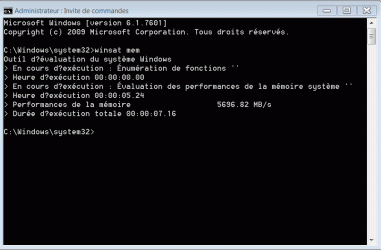
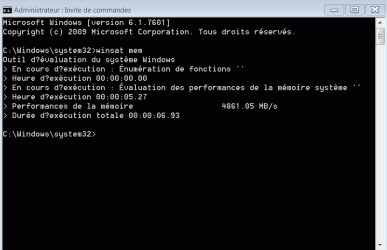
Go to start, in the search box type cmd, in the entry that comes up, right click it and select run as administrator. In the window that comes up, type winsat mem post a screenshot of the result. Both ways.
 

My Computers My Computers

  • At a glance

    Windows 11 ProRyzen 9 5900X32GB G Skill DDR4-3600EVGA RTX 3080 FTW 3 Ultra
    Computer type
    PC/Desktop
    Computer Manufacturer/Model Number
    ALWAYS UNDER CONSTRUCTION
    OS
    Windows 11 Pro
    CPU
    Ryzen 9 5900X
    Motherboard
    Asus X570 Crosshair Viii Hero
    Memory
    32GB G Skill DDR4-3600
    Graphics Card(s)
    EVGA RTX 3080 FTW 3 Ultra
    Sound Card
    On Board/Sennheiser PC37X Headset
    Monitor(s) Displays
    3 X Asus 27"
    Screen Resolution
    2560x1440
    Hard Drives
    2 X 1 TB NVME drives
    PSU
    EVGA 850
    Case
    Phanteks Eclipse P400A
    Cooling
    EVGA 280 AIO
    Keyboard
    Logitech G510s/ Logitech G13
    Mouse
    Logitech G502
    Internet Speed
    24/1
    Antivirus
    ESET/MBAM Pro/SAS Pro
    Browser
    Chrome/ Firefox/ Edge
  • At a glance

    Windows 11 ProIntel Ultra 9 288V32 GB LPDDR5X 8533
    Computer type
    Laptop
    System Manufacturer/Model Number
    Dell 16 Plus
    OS
    Windows 11 Pro
    CPU
    Intel Ultra 9 288V
    Memory
    32 GB LPDDR5X 8533
    Monitor(s) Displays
    16" Mini-LED HDR600 Touch 90 Hz
    Screen Resolution
    2560X1600
    Hard Drives
    1 TB NVME
Go to start, in the search box type cmd, in the entry that comes up, right click it and select run as administrator. In the window that comes up, type winsat mem post a screenshot of the result. Both ways.

here is the result

Martin
 

Attachments

  • WinSat With 6 Gig.gif
    WinSat With 6 Gig.gif
    16 KB · Views: 24
  • WinSat With 4.Gig.gif
    WinSat With 4.Gig.gif
    15.1 KB · Views: 21

My Computer My Computer

At a glance

windows 7 Pro x64Intel I5 34508 GB DDR3 dual chanelAsus Radeon 4870 Nevedi Gforce GTX 500Ti
Computer Manufacturer/Model Number
Home made
OS
windows 7 Pro x64
CPU
Intel I5 3450
Motherboard
Gefabye B75M-D3H
Memory
8 GB DDR3 dual chanel
Graphics Card(s)
Asus Radeon 4870 Nevedi Gforce GTX 500Ti
Sound Card
None
Monitor(s) Displays
4 L206W, Synckmaster, Acer X203W, X223W
Screen Resolution
1680 X 1050
Hard Drives
SSD 120G from Intel

640 GB
PSU
Cooler Master 600W
Case
Antec
Cooling
Regular fan
Keyboard
Microsoft Multimedia Bilingual
Mouse
Microsoft Optical 3000
The higher number is better
 

My Computers My Computers

  • At a glance

    Windows 11 ProRyzen 9 5900X32GB G Skill DDR4-3600EVGA RTX 3080 FTW 3 Ultra
    Computer type
    PC/Desktop
    Computer Manufacturer/Model Number
    ALWAYS UNDER CONSTRUCTION
    OS
    Windows 11 Pro
    CPU
    Ryzen 9 5900X
    Motherboard
    Asus X570 Crosshair Viii Hero
    Memory
    32GB G Skill DDR4-3600
    Graphics Card(s)
    EVGA RTX 3080 FTW 3 Ultra
    Sound Card
    On Board/Sennheiser PC37X Headset
    Monitor(s) Displays
    3 X Asus 27"
    Screen Resolution
    2560x1440
    Hard Drives
    2 X 1 TB NVME drives
    PSU
    EVGA 850
    Case
    Phanteks Eclipse P400A
    Cooling
    EVGA 280 AIO
    Keyboard
    Logitech G510s/ Logitech G13
    Mouse
    Logitech G502
    Internet Speed
    24/1
    Antivirus
    ESET/MBAM Pro/SAS Pro
    Browser
    Chrome/ Firefox/ Edge
  • At a glance

    Windows 11 ProIntel Ultra 9 288V32 GB LPDDR5X 8533
    Computer type
    Laptop
    System Manufacturer/Model Number
    Dell 16 Plus
    OS
    Windows 11 Pro
    CPU
    Intel Ultra 9 288V
    Memory
    32 GB LPDDR5X 8533
    Monitor(s) Displays
    16" Mini-LED HDR600 Touch 90 Hz
    Screen Resolution
    2560X1600
    Hard Drives
    1 TB NVME
The higher number is better
So it was faster with 6 gig than with 4 gig

Is it normal?
Is it possible that my 4 gig bank is slower than my 2 gig? With GPU-Z, both show 400 MHz

On my board, I got 4 slots
Yellow Black Yellow Black

Actually, my 2 memory stick are placed on both yellow slots

Martin :)
 

My Computer My Computer

At a glance

windows 7 Pro x64Intel I5 34508 GB DDR3 dual chanelAsus Radeon 4870 Nevedi Gforce GTX 500Ti
Computer Manufacturer/Model Number
Home made
OS
windows 7 Pro x64
CPU
Intel I5 3450
Motherboard
Gefabye B75M-D3H
Memory
8 GB DDR3 dual chanel
Graphics Card(s)
Asus Radeon 4870 Nevedi Gforce GTX 500Ti
Sound Card
None
Monitor(s) Displays
4 L206W, Synckmaster, Acer X203W, X223W
Screen Resolution
1680 X 1050
Hard Drives
SSD 120G from Intel

640 GB
PSU
Cooler Master 600W
Case
Antec
Cooling
Regular fan
Keyboard
Microsoft Multimedia Bilingual
Mouse
Microsoft Optical 3000
Some boards are nore demanding thatn othere. Look in your manual and see which slots they recommend you pitting the 2 sticks in. They will be the same color slots which will enable dual chanel mode. It will be either the 2 sticks in the yellow slots or the black slots. But, you will see little difference in the performance of the machine with faster memory.
 

My Computers My Computers

  • At a glance

    Windows 11 ProRyzen 9 5900X32GB G Skill DDR4-3600EVGA RTX 3080 FTW 3 Ultra
    Computer type
    PC/Desktop
    Computer Manufacturer/Model Number
    ALWAYS UNDER CONSTRUCTION
    OS
    Windows 11 Pro
    CPU
    Ryzen 9 5900X
    Motherboard
    Asus X570 Crosshair Viii Hero
    Memory
    32GB G Skill DDR4-3600
    Graphics Card(s)
    EVGA RTX 3080 FTW 3 Ultra
    Sound Card
    On Board/Sennheiser PC37X Headset
    Monitor(s) Displays
    3 X Asus 27"
    Screen Resolution
    2560x1440
    Hard Drives
    2 X 1 TB NVME drives
    PSU
    EVGA 850
    Case
    Phanteks Eclipse P400A
    Cooling
    EVGA 280 AIO
    Keyboard
    Logitech G510s/ Logitech G13
    Mouse
    Logitech G502
    Internet Speed
    24/1
    Antivirus
    ESET/MBAM Pro/SAS Pro
    Browser
    Chrome/ Firefox/ Edge
  • At a glance

    Windows 11 ProIntel Ultra 9 288V32 GB LPDDR5X 8533
    Computer type
    Laptop
    System Manufacturer/Model Number
    Dell 16 Plus
    OS
    Windows 11 Pro
    CPU
    Intel Ultra 9 288V
    Memory
    32 GB LPDDR5X 8533
    Monitor(s) Displays
    16" Mini-LED HDR600 Touch 90 Hz
    Screen Resolution
    2560X1600
    Hard Drives
    1 TB NVME
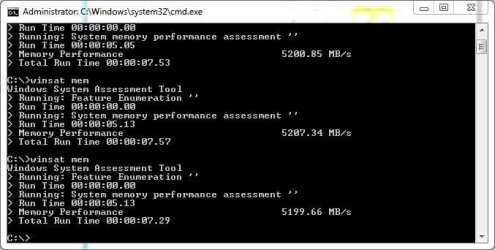
Here's what I have on my notebook.
 

Attachments

  • Capture.jpg
    Capture.jpg
    33.9 KB · Views: 15
  • Capture2.jpg
    Capture2.jpg
    26.9 KB · Views: 7

My Computer My Computer

At a glance

Windows 7 Ultimate SP1 x64Intel Mobile Core 2 Duo P8400 2.26GHz4GB (2x2GB) DDR2 333MHz256MB DDR2 NVIDIA Quadro NVS 160M
Computer Manufacturer/Model Number
Dell Latitude E6400
OS
Windows 7 Ultimate SP1 x64
CPU
Intel Mobile Core 2 Duo P8400 2.26GHz
Motherboard
Intel PM45 Express
Memory
4GB (2x2GB) DDR2 333MHz
Graphics Card(s)
256MB DDR2 NVIDIA Quadro NVS 160M
Sound Card
IDT
Monitor(s) Displays
Samsung 14.1" WXGA+ LED Display
Screen Resolution
1440x900
Hard Drives
Samsung 830 128GB SSD +
250GB Western Digital Scorpio Black 7200RPM
PSU
9-cell 84Whr battery
Case
Black
Keyboard
Backlit
Internet Speed
3mbps
Mine.

winsat_mem.JPG
 

My Computer My Computer

At a glance

Windows 7 Home Premium x64Core i5Switchable
Computer Manufacturer/Model Number
Acer 7750G
OS
Windows 7 Home Premium x64
CPU
Core i5
Graphics Card(s)
Switchable
The higher number is better
So it was faster with 6 gig than with 4 gig

Is it normal?
Is it possible that my 4 gig bank is slower than my 2 gig? With GPU-Z, both show 400 MHz

Your Kingston 2x2GB kit has a cas Latency of 6-6-6-18-24
(They look like the 'value' range)

And your 2x 1GB modules have a lower Cas latency of 5-5-5-18-23
(Which is better. The lower the Cas latency, the quicker the RAM)

Basically your two individual 1GB sticks are faster than your 2x2GB kit. The 2x2GB sticks are bringing the score down.


Realistically, you've got two options:

Option One:

Try to 'tighten' the timings of your 2x2Gb kit.

(The slower kit. Tightening means adjusting the default Cas latency speeds to a lower and faster number.)

Ie instead of the 2x2GB kit running at 6-6-6-18-24, lower them to 5-5-5-18-24

Test for stability using memtest+.


If Unstable at those timings, try something like 5-6-6-24 etc.

If the kit runs stable at 5-5-5-24 or 5-6-6-24, add the other two 1GB sticks.

When all sticks are in use (6GB) they all run at the speed of the 'lowest' module. That's why you can try to 'tighten' the timings of the 2x2GB kit to improve speed.


Option Two:

Just use the 6GB as you have been doing. The speed difference, whilst there - is not going to be 'Wow - it runs like a rocket now'.
 

My Computer My Computer

At a glance

8 Pro x64i7 3770K 4.6GHz16GB G.Skill Trident X 2666mhzx2 EVGA 780 Ti Superclocked SLI
Computer type
PC/Desktop
Computer Manufacturer/Model Number
Systems by SmartEyeball
OS
8 Pro x64
CPU
i7 3770K 4.6GHz
Motherboard
ASUS P8Z77 WS
Memory
16GB G.Skill Trident X 2666mhz
Graphics Card(s)
x2 EVGA 780 Ti Superclocked SLI
Sound Card
SB X-FI Surround 5.1 PRO USB / ATH-AD900 Headphones
Monitor(s) Displays
x3 Dell U2410 / 58" Samsung
Screen Resolution
5760*1200/ 1920*1200
Hard Drives
2x Intel 520 240GB (RAID 0) * 2x WD Caviar Blacks 2TB (RAID 0) * 2TB WD Caviar Black * Sony Optirac DVD
PSU
Silverstone Strider Evolution 1200W
Case
Thermaltake Level 10 GT Snow Edition
Cooling
Noctua NH-D14
Keyboard
Topre Realforce // Ducky Shine MX Black // Filco Ninja TKL
Mouse
Thermaltake Theron (Highly Recommended) + Razer Imperator
Antivirus
MSE
Browser
IE, FF, WaterFox
Other Info
GT Extreme V2 Sim Racing Cockpit + 40" LCD and K/B Mouse stand ▼
Fanatec CSR Elite Wheel + Clubsport V1 Pedals + CSR shifter/7G-H ▼Saitek X52 Pro ▼ TrackIR 5 Pro
Buttkicker v2 Seat Rumbler with Dedicated 5.1 and Sub Woofer attached to frame ▼
=
Bloody Big Grin
I'm voting for Option Two, above.

...Does it give a clue for the pertinence to upgrade or overclock memory

Martin
Go to the SPD tab and post a screenshot for each slot. :)

Done

Martin :)


Your 'Memory' tab shows your RAM (6GB) running at 5-6-6-15 and 2T.

The SPD tabs show you the JEDEC settings, which are a standard used by the manufacturer to give the timing settings that the RAM 'should' work at, this info is also used by the BIOS to set the RAM when in Auto mode.

Since the 'Memory' tab information isn't the same as any SPD tab, someone has set it at these timings.
When you have two different RAM cards, with different SPD timings, they will use the SPD timings from the lower card (the higher numbers).

Your RAM is likely set at the best speed and timings already.
Unless you are getting errors or crashes, then just leave it as it is now.

Any small increase in performance gained by tightening timings (adjusting for more performance) will not be noticeable on your system.

Since you already have a SSD, it should be performing well.

The only noticeable performance increase you can do would be a new CPU, motherboard and RAM, like a i5/i7 system.
 

My Computer My Computer

At a glance

Windows 7 Ult x64 - SP1/ Windows 8 Pro x64Intel Core i5-3570K 4.6GHz8GB (2X4GB) DDR3 1600 Corsair Vengeance CL8 1.5vSapphire HD 7770 Vapor-X OC 1GB DDR5
Computer type
PC/Desktop
Computer Manufacturer/Model Number
76~2.0
OS
Windows 7 Ult x64 - SP1/ Windows 8 Pro x64
CPU
Intel Core i5-3570K 4.6GHz
Motherboard
Gigabyte GA-Z77X UD3H, f18
Memory
8GB (2X4GB) DDR3 1600 Corsair Vengeance CL8 1.5v
Graphics Card(s)
Sapphire HD 7770 Vapor-X OC 1GB DDR5
Sound Card
Onboard VIA VT2021
Monitor(s) Displays
22" LCD Dell
Screen Resolution
1680x1050
Hard Drives
Samsung 840Pro 128GB SSD,
Seagate Barracuda 500GB SATA2 7200rpm 32MB cache, Seagate Barracuda 1TB SATA2 7200rpm 32MB cache,
PSU
Corsair HX650W
Case
Cooler Master Storm Scout
Cooling
Corsair H80 2x12cm Noctua NF P12 , 2x14cm case fans
Keyboard
Logitech Wave
Mouse
CM Sentinel
Internet Speed
Dismal
Antivirus
Avast
Browser
Opera Next
Other Info
Haswell laptop: HP Envy 17t-j, i7-4700MQ, GeForce 740M 2GB DDR3, 17.3" Full HD 1920x1080, 16GB RAM, Samsung 840 Pro 128GB, 1TB Hitachi 7200 HDD,
Desktop: eSATA ports,
External eSATA Seagate 500GB SATA2 7200rpm,
External WD USB 500GB
Status
Not open for further replies.
Back
Top