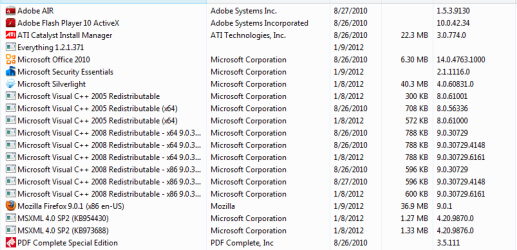
Which bloatware should I eliminated?

Miguel95

New member
Local time
10:07 AM
Messages
1
Greetings
I have recently restored my laptop back to factory setting and thereby forgot all the software that I installed and disposed of. My question regarding bloatware is ,which one do I get rid of?
 

Attachments

  • Untitled.jpg
    Untitled.jpg
    111 KB · Views: 132

My Computer My Computer

OS
Windows 7 Home Premium x64
There are quite a few pieces of bloat ware on there for sure...

The trouble is, removing them all may end up destabilising your system so it's hard to make a recommendation. :(
And maybe some of the things on there you actually installed.

But things that do not exist in a plain windows install include anything that starts "HP", "Cinema Now..." "Cyberlink ", (/may/ need this to play DVDs, but I am pretty sure that windows plays DVDs by default now. Maybe leave this one installed anyway) "DVD Menu Pack", "Java", "hulu desktop", "Label Print", "MS office home and student" (That may only be a trial if it came for free), "Microsoft Works", "Movie theme pack", "Firefox", "MSN tool bar", "Norton..."(Replace with MS Security Essentials for free) "Photo Now" "Power to go", possibly "Power director", "Windows Live"

ALL of those things are added. Others too but are more useful like flash and adobe reader, hardware drivers etc and would probably be installed anyway.

But like I said, you may have installed some of those already and uninstalling any one or number of them has a chance to cause problems so I can't say that any one or more are "safe" to uninstall... Course if you do break something you can start over again :)

Some of them you may even find a use for. (i.e. Windows live is your only mail program installed, uninstalling it you will have no mail till you install something else)
 

My Computer My Computer

Computer Manufacturer/Model Number
Scratch built
OS
Windows 7 x64 Ultimate
CPU
i7 960
Motherboard
Asus P6X58D
Memory
12 Gig Corsair Dominator
Graphics Card(s)
Nvidia 480
Sound Card
Maudio Delta 44 + breakout box
Monitor(s) Displays
Dell UltraSharp U2410 24in and Samsung 21 dual monitors
Screen Resolution
1920x1200 and 1280x1024
Hard Drives
Primary: Intel X-25M G2 160G SSD
Secondary: Segate baracuda 1.0 TB
HDs in AHCI mode.
PSU
Corasair TX850
Case
Cooler Master HAF
Cooling
Corsair H50
Keyboard
Logitech G15 + N52 game pad
Mouse
Logitech MX518
Internet Speed
15kbs down 4.5kbps up
Other Info
WEI 7.6
CPU & RAM 7.6
Graphics 7.9
Hard disk 7.7
Cyberlink is usually used for Blu-ray support now-a-days. If you have a blu-ray player, keep it. Everything with HP in it can usually be removed, but I would be more concerned with just keeping them from running at start up. The one for web cam might actually be needed. MSN toolbar, CinemaNow, PhotoNow, Power2Go, and Power Director are pretty much worthless junk. Hulu Desktop, HP Netflix, and Norton all depend on if you actually use their service. If you don't use it, get rid of it. Everything that I did not specifically mention you should keep. Also, make sure to make a restore point before delete a bunch of software just in case you need an easy way to get some of it back.
 

My Computer My Computer

Computer type
Laptop
Computer Manufacturer/Model Number
Toshiba P775-S7100
OS
Windows 7 Professional SP1 64-bit
CPU
Intel Core i5-2450M @2.5 GHz
Memory
6 GB DDR3 1333MHz
Graphics Card(s)
Intel HD 3000
Monitor(s) Displays
Built-in 17.3" LED; 22" Insignia NS-L22Q-10A
Screen Resolution
1600x900; 1360x768
Hard Drives
750 GB Hitachi
1TB Seagate FreeAgent External
Internet Speed
Verizon DSL Speed(Down/Up): 3360 Kbps / 800 Kbps
Antivirus
MSE and MBAM Pro
Browser
IE10
Bloatware is in the eye of the beholder - it depends on what you like and don't like for software. Some people consider AV's to be bloatware so..... :confused:

Anyway before you arbitrarily start removing stuff you'd best find out if other programs/hardware is tied into them. I was going to do this with my daughter's laptop until I found that some of the "bloatware" was essential for her laptop.

This is another reason why I like building my own PC's. Yeah I know notebooks are different, but....

My two cents.
 

My Computer My Computer

Computer type
PC/Desktop
Computer Manufacturer/Model Number
Custom built by me.
OS
Windows 10 Pro
CPU
Intel Core i7-4770K (3.5Ghz)
Motherboard
Gigabyte G1 Sniper 5 (F10 Bios)
Memory
32 gig Corsair Dominator Platinum (4x8Gig)
Graphics Card(s)
Sapphire Tri-X R9 Fury
Sound Card
Soundblaster ZXR
Monitor(s) Displays
NEC PA242W 24" LCD Monitor
Screen Resolution
1920 x 1200
Hard Drives
Primary - Samsung 850 Pro (512gig), Samsung 840 Pro (256gig), 2TB WD Caviar Black.
PSU
EVGA Supernova 1000 G2
Case
Cooler Master HAF X
Cooling
Corsair H100i with Corsair Air Series SP120 Quiet Fans
Keyboard
Logitech Wireless Wave
Mouse
Logitech Performance MX
Internet Speed
High Speed Cable
Antivirus
Norton Security
Browser
IE11
Other Info
Memory Timings - 1866MHz @ 9-9-9-27-1T @ 1.5 volts
Acrobat.com - This is just a shortcut linking you to the acrobat.com website.
CinemaNOW Media Manager - You could use VLC Player or another alternative (for example CyberLink).
All HP Software - Personally I would remove everything except the Wireless Manager but just remove what you don't use.
Hulu Desktop.
LabelPrint.
Microsoft Office Powerpoint Viewer - Microsoft Office Home can do that.
Java Update 18 (old update).
Microsoft Office Suite Activation Assistant.
Microsoft Works - Same sort of thing as MS Office but free.
Movie Theme Pack for HP MediaSmart Video.
MSN Toolbar.
Norton - Norton Removal Tool
PhotoNow!
Power2Go
PowerDirector
Validity Sensors SDK
Windows Live.

Unless you need what I stated, feel free to remove but make a backup before proceeding,.
 

My Computer My Computer

Computer Manufacturer/Model Number
iRush Pro
OS
Windows 7 Ultimate x64
CPU
Intel Core i5 2500K Processor
Motherboard
Intel H67 Chipset Motherboard (Micro ATX)
Memory
2x4GB DDR3 1333Mhz Memory
Graphics Card(s)
Novatech Radeon 6770 1GB Graphics Card
Hard Drives
1TB
PSU
Novatech 500W
Case
Novatech ATX Gaming Case
Cooling
-
Keyboard
Novatech Wired Keyboard
Mouse
Novatech Wired Mouse
Internet Speed
VirginMedia 10MB/s
Try this, good tool, trusted and free.
 

My Computer My Computer

Computer Manufacturer/Model Number
Custom
OS
Windows 8 Professional 64-bit
CPU
Intel Core i3-2100
Motherboard
ASRock Intel Z68M/USB3
Memory
4GB
Graphics Card(s)
GeForece GTX 550 Ti
Screen Resolution
1680 x 1050
PSU
750w
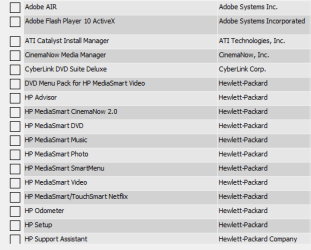
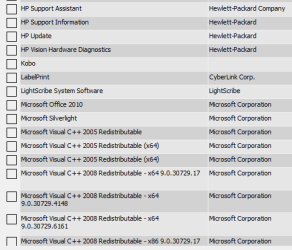
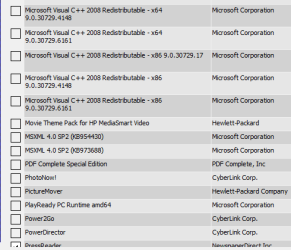
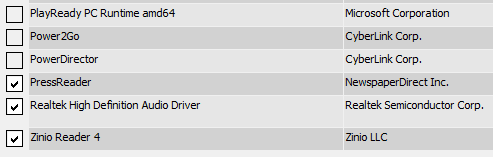
Well, solid answers finally. I'm on another forum and I haven't been able to get much in the way of concrete and specific direction. I'm on an HP and I'm trying to slim it down before I get back to work. I already ran the decrapifier, but I needed to identify what was truly crap. Just for form, I'll post the decrapifier's checklist. For information's sake, I'm just starting as a game publisher (yes, I'm a gamer, just table-top though or online on virtual tables; don't do video gaming or computer gaming) and in internet marketing. Speaking of games, I'll strip all of them off of here, but I broke this thing once and went back to a factory reset. I've already done a backup and system image for that, now I'll need one for the stripped down unit before I start adding software again.
 

Attachments

  • Capture1.PNG
    Capture1.PNG
    6.8 KB · Views: 24
  • Capture2.PNG
    Capture2.PNG
    8.6 KB · Views: 17
  • Capture3.PNG
    Capture3.PNG
    11.4 KB · Views: 15
  • Capture4.PNG
    Capture4.PNG
    3.5 KB · Views: 13

My Computer My Computer

Computer Manufacturer/Model Number
HP p6620f
OS
Win 7 Home Premium 64bit
CPU
AMD Phenom II X4 830 2.8GHz
Memory
6 GB
I would not delete Norton. Use it for the 3 trial months and decide then. In my book, it is the best AV program around.
 

My Computer My Computer

Computer Manufacturer/Model Number
HP, Dell, Gateway, Toshiba - 4 laptops and 2 desktops
OS
Vista, Windows7, Mint Mate, Zorin, Windows 8
CPU
from 1.6GHz Duo to i7
Monitor(s) Displays
2x HP w2207
Hard Drives
5x HDD, 7x SSD, 12x Externals
Keyboard
with trackball - no mices
Mouse
Trackball mice
Internet Speed
DSL 6000
I would not delete Norton. Use it for the 3 trial months and decide then. In my book, it is the best AV program around.

WHS,
Finally found something you and I agree to disagree...Norton being the best AV around!
Common Sense and MSE AV, Malwarebytes and Ccleaner is all I use along with WOT.
But that is my opinion and we all know what opinions are like!
THW
 

My Computer My Computer

Computer Manufacturer/Model Number
HP M9077c
OS
Windows 7 Home Premium 64bit
CPU
Intel(R)Core(TM)2 quad [email protected] 2.39GHz
Motherboard
ASUSeK
Memory
6GB DDR2 6400
Graphics Card(s)
GeForce 8500/512MB
Sound Card
Realtek High Def Audio
Monitor(s) Displays
HP w2408 LCD 24" widescreen
Screen Resolution
1920x1200
Cooling
6 pack of Bud
Keyboard
MS wireless Inteli
Mouse
MS wireless Inteli
Dennis, I don't want to hear about MSE. Caught 2 nasties when it was on guard - or what they call 'on guard'. And I had it only for a couple of weeks. Thought I could save some money. I quickly signed up again with Norton for 3 years and 3 systems. Had been using Norton for years without any problems.

The wife still uses MSE. But all she does is AOL (even the browser) and Word.
 

My Computer My Computer

Computer Manufacturer/Model Number
HP, Dell, Gateway, Toshiba - 4 laptops and 2 desktops
OS
Vista, Windows7, Mint Mate, Zorin, Windows 8
CPU
from 1.6GHz Duo to i7
Monitor(s) Displays
2x HP w2207
Hard Drives
5x HDD, 7x SSD, 12x Externals
Keyboard
with trackball - no mices
Mouse
Trackball mice
Internet Speed
DSL 6000
Done!

Here's what my programs look like now (see below).

However, I also want to delete IE and game folders from my Program and Program x86 folders, but one says I need permission from TrustedInstaller and the other requires permission from SYSTEM.

I'm the only user of this machine and the administrator. How do I get rid of this stuff (and if I need to login as the administrator, please tell me how).

Thanks.
 

Attachments

  • Capture6.PNG
    Capture6.PNG
    13.2 KB · Views: 25
  • Capture7.PNG
    Capture7.PNG
    5.9 KB · Views: 22
Last edited:

My Computer My Computer

Computer Manufacturer/Model Number
HP p6620f
OS
Win 7 Home Premium 64bit
CPU
AMD Phenom II X4 830 2.8GHz
Memory
6 GB
IE is an integral part of the system. If you delete it, you will have a lot of trouble in the future because many programs/websites look for it.

Games is another story. I delete those too - but not the folder. Who cares, it takes such a small bit of disk space.

I also deleted Adobe Air. Lots of luck with MSE. It got me into trouble.
 

My Computer My Computer

Computer Manufacturer/Model Number
HP, Dell, Gateway, Toshiba - 4 laptops and 2 desktops
OS
Vista, Windows7, Mint Mate, Zorin, Windows 8
CPU
from 1.6GHz Duo to i7
Monitor(s) Displays
2x HP w2207
Hard Drives
5x HDD, 7x SSD, 12x Externals
Keyboard
with trackball - no mices
Mouse
Trackball mice
Internet Speed
DSL 6000
I run Mozilla, but I can't trash IE? Oh well. What I'm trying to do is remove all distractions on this beast before I rebuild so the games and such need to go. I'd really like to just delete the folders. Once it's all squeaky clean, I'll burn a system image and backup.
 

My Computer My Computer

Computer Manufacturer/Model Number
HP p6620f
OS
Win 7 Home Premium 64bit
CPU
AMD Phenom II X4 830 2.8GHz
Memory
6 GB
Greetings
I have recently restored my laptop back to factory setting and thereby forgot all the software that I installed and disposed of. My question regarding bloatware is ,which one do I get rid of?

If you knew what you got rid of before why can't you duplicate it again? You're the best person to recognize which software you want and don't want since you use it everyday.
 

My Computer My Computer

Computer type
PC/Desktop
Computer Manufacturer/Model Number
Custom Build
OS
Windows 7 Pro 64bit build 7601 SP1
CPU
Intel Core I5 3570K 3.4Ghz w/ Zalman CNPS9900NT RT
Motherboard
MSI Z77A-G45 Gaming
Memory
G.Skill F3-12800CL9D-8GbXL ; 4Gx2
Graphics Card(s)
EVGA Geforce GTX 770 Superclocked
Sound Card
Creative Sound Blaster Z
Monitor(s) Displays
Dual ViewSonic VX2770Smh-LED Black 27"IPS-Panel
Screen Resolution
1920x1080
Hard Drives
Kingston Hyper X 240GB SSD Win8 Pro 64bit 6GB/s Sata III
Intel 335 Series SSD 240GB Win8 Storage 6GB/s Sata III
Intel 320 Series SSD 600GB Storage 3GB/s Sata II
Western Digital Scorpio Black 1TB - Docked via Esata
PSU
Coolermaster GX 750W
Case
Corsair Vengence C70
Cooling
Coolermaster 120mm and Enermax 140mm
Keyboard
Corsair Vengence K70
Mouse
Logitech G500
Internet Speed
22mbps+
Browser
Firefox, Chrome, IE
Other Info
Swan M50W 2.1 speakers
APC UPS
Thermaltake BlacX HDD Dock
Samsung BD Optical Drive
Netgear WNDR4500
Back
Top