Solved Which HD Should Be The Boot Drive

hawkeye62

New member
Member
Local time
7:50 PM
Messages
47
Location
Utah
My wife's Win 7 Boot HD failed. I installed a new HD to replace it. But, I am going crazy trying to get a working Win 7 OS. The desktop PC has two HDs. When I use a Win 7 installation CD it asks which HD I want to use for the installation. And it shows the two HDs. It labels one HD (0) and the other HD (1). If I select HD (0), installation proceeds and installs Win 7. But if I use Win 7 Disk Manager later to check the drive, it shows Win 7 on HD (1). So, I am confused. Does it matter which HD is used as the boot drive? And which HD in the daisy chain should be the boot drive? And why the difference between what the Win 7 installation disk says is HD(0) and what Win 7 Disk manager says is HD (0)? The reason for my concern is that I have a Macrium Reflect backup that I want to use to restore the system and I am not sure how Macrium will handle the restore if the HDs numbers are different.


Anyway this is just one reason I am going crazy. The second reason is that the Win 7 installation doesn't have drivers for the network adapter and several other PCI devices. And none that I have tried to install are found by Device Manager. The network adapter is a Marvell, not sure which model. The Macrium backup image is on a network HD (NAS), so, I am dead in the water on getting the PC returned to service.

Thanks for any advice. Regards, Jim
 

My Computer My Computer

Computer Manufacturer/Model Number
Puget Custom Computers
OS
Windows 7 Professional 64bit SP1
CPU
Intel Core i7 QUAD CORE 930 2.8 GHz
Motherboard
Asus P6X58D Premium
Memory
Kingston DDR3-1333 6GB
Graphics Card(s)
XFX Radeon HD 5700 1GB
Sound Card
On Board
Monitor(s) Displays
Samsung SyncMaster 226 BW
Screen Resolution
1680x1050
Hard Drives
2 Western Digital Cavier Blue 500GB
PSU
Antec CP-850 850 Watt
Case
Antec P183
Cooling
Gelid Tranquillo
Keyboard
Microsoft Wirelsss 3000
Mouse
Kensington Expert Mouse K64325
Internet Speed
20 Mbps
Disk 0 is connected to the first sata port ideally it should be the boot drive. do you not have an install cd for the motherbird as that should have drivers. Failing that have you go another pc to download the network drivers and you can then get online to get the rest.


Did you make a MRrescue boot drive if so if you boot that it should have the network card installed so you can recover the backup image
 

My Computer My Computer

Computer type
PC/Desktop
OS
win 8 32 bit
Disk 0 is connected to the first sata port ideally it should be the boot drive. do you not have an install cd for the motherbird as that should have drivers. Failing that have you go another pc to download the network drivers and you can then get online to get the rest.


Did you make a MRrescue boot drive if so if you boot that it should have the network card installed so you can recover the backup image

I am not sure what you mean by "first SATA port". I have one cable with two HD connectors. The first connector is at the bottom of the HD enclosure, the second is a couple of HD slots up. I have found Marvell network adapters in a couple of places including another PC with a Marvel adapter. When I try to install using Device Manager I always get a fail message about not being able to find a suitable driver.


Yes, I do have a MR Rescue boot disk. I didn't see any reference to a network card. I will give it another try.


Regards, Jim
 

My Computer My Computer

Computer Manufacturer/Model Number
Puget Custom Computers
OS
Windows 7 Professional 64bit SP1
CPU
Intel Core i7 QUAD CORE 930 2.8 GHz
Motherboard
Asus P6X58D Premium
Memory
Kingston DDR3-1333 6GB
Graphics Card(s)
XFX Radeon HD 5700 1GB
Sound Card
On Board
Monitor(s) Displays
Samsung SyncMaster 226 BW
Screen Resolution
1680x1050
Hard Drives
2 Western Digital Cavier Blue 500GB
PSU
Antec CP-850 850 Watt
Case
Antec P183
Cooling
Gelid Tranquillo
Keyboard
Microsoft Wirelsss 3000
Mouse
Kensington Expert Mouse K64325
Internet Speed
20 Mbps
Are your drives the old ide drives with a wide cable for both drives
 

My Computer My Computer

Computer type
PC/Desktop
OS
win 8 32 bit
Are your drives the old ide drives with a wide cable for both drives

No, they are new WD drives with round cables.


Regards, Jim
 

My Computer My Computer

Computer Manufacturer/Model Number
Puget Custom Computers
OS
Windows 7 Professional 64bit SP1
CPU
Intel Core i7 QUAD CORE 930 2.8 GHz
Motherboard
Asus P6X58D Premium
Memory
Kingston DDR3-1333 6GB
Graphics Card(s)
XFX Radeon HD 5700 1GB
Sound Card
On Board
Monitor(s) Displays
Samsung SyncMaster 226 BW
Screen Resolution
1680x1050
Hard Drives
2 Western Digital Cavier Blue 500GB
PSU
Antec CP-850 850 Watt
Case
Antec P183
Cooling
Gelid Tranquillo
Keyboard
Microsoft Wirelsss 3000
Mouse
Kensington Expert Mouse K64325
Internet Speed
20 Mbps
More information on my issues. I have one WD Blue 500GB hard drive and one WD Black 1 TB hard drive. Wife wanted the 1 TB drive as the "main drive", so when I installed Win7, I selected the 1 TB drive as the place to install. After installation I checked the HDs with Windows Disk Manager. The installation put all of the Win 7 stuff on the 1TB drive, but the 100 MB system partition was put at the beginning of the 500GB drive. Now I have doubts that Macrium will be able to restore the image to this configuration.


Regards, Jim
 

My Computer My Computer

Computer Manufacturer/Model Number
Puget Custom Computers
OS
Windows 7 Professional 64bit SP1
CPU
Intel Core i7 QUAD CORE 930 2.8 GHz
Motherboard
Asus P6X58D Premium
Memory
Kingston DDR3-1333 6GB
Graphics Card(s)
XFX Radeon HD 5700 1GB
Sound Card
On Board
Monitor(s) Displays
Samsung SyncMaster 226 BW
Screen Resolution
1680x1050
Hard Drives
2 Western Digital Cavier Blue 500GB
PSU
Antec CP-850 850 Watt
Case
Antec P183
Cooling
Gelid Tranquillo
Keyboard
Microsoft Wirelsss 3000
Mouse
Kensington Expert Mouse K64325
Internet Speed
20 Mbps
I have one cable with two HD connectors. The first connector is at the bottom of the HD enclosure, the second is a couple of HD slots up.
Daisy chaining drives was possible with IDE (PATA) drives, which had a wide flat grey cable, but daisy chaining is not possible with SATA drives.

The motherboard listed in your specs does not support IDE drives. Therefore I'm betting that you are referring to the power cable which is daisy chained, not the data cable (which is sata).
 

My Computer My Computer

Computer type
PC/Desktop
Computer Manufacturer/Model Number
diy
OS
Win7 pro x64
CPU
stock i7 7700k
Motherboard
Gigabyte Z270N-WIFI mini-ITX
Memory
Corsair Vengeance LPX 16GB (2x8GB) DDR4 @ 3200MHz
Graphics Card(s)
integrated Intel HD 630
Sound Card
onboard Realtek ALC1220
Monitor(s) Displays
two vertically mounted samsung 55" 4k un55mu8000
Screen Resolution
1920x1280
Hard Drives
256GB Samsung EVO 960 M.2 pci-e NVMe SSD
PSU
SilverStone Nightjar ST45NF 450Watt Fanless
Case
No case. Motherboard is mounted directly onto power supply
Cooling
Evercool low profile 815EP with Panaflow 12L fan at 7v
Keyboard
Ortek MCK-86 mini
Mouse
Belkin 5-button USB
Internet Speed
spectrum 400mbps
After installation I checked the HDs with Windows Disk Manager. The installation put all of the Win 7 stuff on the 1TB drive, but the 100 MB system partition was put at the beginning of the 500GB drive. Now I have doubts that Macrium will be able to restore the image to this configuration.

Try disconnecting the 500GB drive and see if the system will boot using only the 1TB drive. If not, try a repair install using your win7 install dvd or usb, again without the 500GB drive connected. Worth a try.
 
Last edited:

My Computer My Computer

Computer type
PC/Desktop
Computer Manufacturer/Model Number
diy
OS
Win7 pro x64
CPU
stock i7 7700k
Motherboard
Gigabyte Z270N-WIFI mini-ITX
Memory
Corsair Vengeance LPX 16GB (2x8GB) DDR4 @ 3200MHz
Graphics Card(s)
integrated Intel HD 630
Sound Card
onboard Realtek ALC1220
Monitor(s) Displays
two vertically mounted samsung 55" 4k un55mu8000
Screen Resolution
1920x1280
Hard Drives
256GB Samsung EVO 960 M.2 pci-e NVMe SSD
PSU
SilverStone Nightjar ST45NF 450Watt Fanless
Case
No case. Motherboard is mounted directly onto power supply
Cooling
Evercool low profile 815EP with Panaflow 12L fan at 7v
Keyboard
Ortek MCK-86 mini
Mouse
Belkin 5-button USB
Internet Speed
spectrum 400mbps
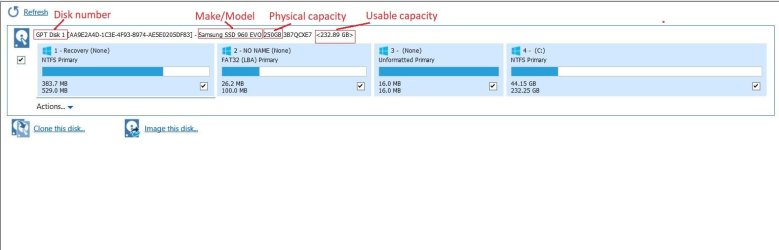
The reason for my concern is that I have a Macrium Reflect backup that I want to use to restore the system and I am not sure how Macrium will handle the restore if the HDs numbers are different.
One of the many nice features of macrium is that it spells out your disk identification in several ways, making it easy to be sure exactly what macrium is using as your source and target disk.
 

Attachments

  • Clipboard01.jpg
    Clipboard01.jpg
    44.2 KB · Views: 3

My Computer My Computer

Computer type
PC/Desktop
Computer Manufacturer/Model Number
diy
OS
Win7 pro x64
CPU
stock i7 7700k
Motherboard
Gigabyte Z270N-WIFI mini-ITX
Memory
Corsair Vengeance LPX 16GB (2x8GB) DDR4 @ 3200MHz
Graphics Card(s)
integrated Intel HD 630
Sound Card
onboard Realtek ALC1220
Monitor(s) Displays
two vertically mounted samsung 55" 4k un55mu8000
Screen Resolution
1920x1280
Hard Drives
256GB Samsung EVO 960 M.2 pci-e NVMe SSD
PSU
SilverStone Nightjar ST45NF 450Watt Fanless
Case
No case. Motherboard is mounted directly onto power supply
Cooling
Evercool low profile 815EP with Panaflow 12L fan at 7v
Keyboard
Ortek MCK-86 mini
Mouse
Belkin 5-button USB
Internet Speed
spectrum 400mbps
Daisy chaining drives was possible with IDE (PATA) drives, which had a wide flat grey cable, but daisy chaining is not possible with SATA drives.

The motherboard listed in your specs does not support IDE drives. Therefore I'm betting that you are referring to the power cable which is daisy chained, not the data cable (which is sata).

Yeah, on closer examination I see one flat cable about 1/4 inch wide to one connector on the HD and a second connector with three wires, which must be the power supply.

Regards, Jim
 

My Computer My Computer

Computer Manufacturer/Model Number
Puget Custom Computers
OS
Windows 7 Professional 64bit SP1
CPU
Intel Core i7 QUAD CORE 930 2.8 GHz
Motherboard
Asus P6X58D Premium
Memory
Kingston DDR3-1333 6GB
Graphics Card(s)
XFX Radeon HD 5700 1GB
Sound Card
On Board
Monitor(s) Displays
Samsung SyncMaster 226 BW
Screen Resolution
1680x1050
Hard Drives
2 Western Digital Cavier Blue 500GB
PSU
Antec CP-850 850 Watt
Case
Antec P183
Cooling
Gelid Tranquillo
Keyboard
Microsoft Wirelsss 3000
Mouse
Kensington Expert Mouse K64325
Internet Speed
20 Mbps
One of the many nice features of macrium is that it spells out your disk identification in several ways, making it easy to be sure exactly what macrium is using as your source and target disk.

Yes, I see that. I guess a more basic question is does it matter which HD is the system/boot drive?

Anyway, I made a new MR Rescue CD on the Win 7 installation and it opened the image file on the local HD. I was able to restore the system to what is was about 2 months ago. The only one thing left to fix is the boot process. It now goes through bios screens and a "press any key to boot from a CD" screen before finally booting to Win 7.

Regards, Jim
 

My Computer My Computer

Computer Manufacturer/Model Number
Puget Custom Computers
OS
Windows 7 Professional 64bit SP1
CPU
Intel Core i7 QUAD CORE 930 2.8 GHz
Motherboard
Asus P6X58D Premium
Memory
Kingston DDR3-1333 6GB
Graphics Card(s)
XFX Radeon HD 5700 1GB
Sound Card
On Board
Monitor(s) Displays
Samsung SyncMaster 226 BW
Screen Resolution
1680x1050
Hard Drives
2 Western Digital Cavier Blue 500GB
PSU
Antec CP-850 850 Watt
Case
Antec P183
Cooling
Gelid Tranquillo
Keyboard
Microsoft Wirelsss 3000
Mouse
Kensington Expert Mouse K64325
Internet Speed
20 Mbps
Are you intending on keeping Win7 on the 500GB and dual-booting? If so, that's a different question.

If not, I'd fix the boot configuration. Right now it sounds like your System partition is on the 500GB and the Boot partition is on the 1TB. (Windows Disk Management will show you which is System and which is Boot.) I'd fix it so your OS partition is both System and Boot.

Easiest way to do that is to temporarily remove the 500GB so there is only one hard drive in the computer. You can optionally move the 1TB to the SATA channel you want it to be on if it isn't there already, but at a minimum make sure the 1TB is set to be the first boot device in your BIOS setup. Then boot your Macrium Rescue media and use Macrium's "Fix Windows Boot Problems" function. (See steps 11-15 in my tutorial for screenshots.)

Once Windows is functioning completely from the 1TB, you can reinstall the 500GB drive if you want to use it for additional storage. After reinstalling the 500GB, double-check to make sure the 1TB is still set first in your BIOS boot order.

BTW, the "press any key to boot from a CD" sounds like you still have the Macrium Rescue media in your CD drive.
 

My Computer My Computer

Computer type
PC/Desktop
Computer Manufacturer/Model Number
Dell Optiplex 7050
OS
Windows 7/8.1/10 multiboot
CPU
Intel Core i7-7700
Motherboard
Dell, Intel Q270 chipset
Memory
48GB (2x16GB Crucial DDR4-3200 + 2x8GB Hynix DDR4-2400)
Graphics Card(s)
Intel HD630 + AMD Radeon R7 450 PCIe
Monitor(s) Displays
Asus VC279 (27")
Screen Resolution
1920x1080
Hard Drives
Toshiba M.2 NVMe (256GB),
Samsung 960 Evo (500GB),
WD Red Plus 80EFBX (8TB)
Are you intending on keeping Win7 on the 500GB and dual-booting? If so, that's a different question.

If not, I'd fix the boot configuration. Right now it sounds like your System partition is on the 500GB and the Boot partition is on the 1TB. (Windows Disk Management will show you which is System and which is Boot.) I'd fix it so your OS partition is both System and Boot.

Easiest way to do that is to temporarily remove the 500GB so there is only one hard drive in the computer. You can optionally move the 1TB to the SATA channel you want it to be on if it isn't there already, but at a minimum make sure the 1TB is set to be the first boot device in your BIOS setup. Then boot your Macrium Rescue media and use Macrium's "Fix Windows Boot Problems" function. (See steps 11-15 in my tutorial for screenshots.)

Once Windows is functioning completely from the 1TB, you can reinstall the 500GB drive if you want to use it for additional storage. After reinstalling the 500GB, double-check to make sure the 1TB is still set first in your BIOS boot order.

BTW, the "press any key to boot from a CD" sounds like you still have the Macrium Rescue media in your CD drive.

Thanks for your reply. No, I don't plan on dual booting.

Yes, the Rescue CD was in the drive. I think I will restore the image to the 1 TB drive. Does it make any difference which SATA channel it should be on?

Regards, Jim
 

My Computer My Computer

Computer Manufacturer/Model Number
Puget Custom Computers
OS
Windows 7 Professional 64bit SP1
CPU
Intel Core i7 QUAD CORE 930 2.8 GHz
Motherboard
Asus P6X58D Premium
Memory
Kingston DDR3-1333 6GB
Graphics Card(s)
XFX Radeon HD 5700 1GB
Sound Card
On Board
Monitor(s) Displays
Samsung SyncMaster 226 BW
Screen Resolution
1680x1050
Hard Drives
2 Western Digital Cavier Blue 500GB
PSU
Antec CP-850 850 Watt
Case
Antec P183
Cooling
Gelid Tranquillo
Keyboard
Microsoft Wirelsss 3000
Mouse
Kensington Expert Mouse K64325
Internet Speed
20 Mbps
Does it make any difference which SATA channel it should be on?
If you only have one bootable drive, no it does not matter. But its a good practice to use the lowest numbered sata port for your boot drive which assures that bios will treat it as the main boot drive. On your motherboard itself are small labels right next to your sata ports, labelled Sata1, Sata2, etc, so just choose the lowest number you find (might be 0 or might be 1). You can also find their labels in your user manual from your motherboard site. Its also good to make sure your bios is set to use this drive as the main boot drive. But like I said, if you only have one bootable drive all of this is moot and you can just use any sata port you want.
 

My Computer My Computer

Computer type
PC/Desktop
Computer Manufacturer/Model Number
diy
OS
Win7 pro x64
CPU
stock i7 7700k
Motherboard
Gigabyte Z270N-WIFI mini-ITX
Memory
Corsair Vengeance LPX 16GB (2x8GB) DDR4 @ 3200MHz
Graphics Card(s)
integrated Intel HD 630
Sound Card
onboard Realtek ALC1220
Monitor(s) Displays
two vertically mounted samsung 55" 4k un55mu8000
Screen Resolution
1920x1280
Hard Drives
256GB Samsung EVO 960 M.2 pci-e NVMe SSD
PSU
SilverStone Nightjar ST45NF 450Watt Fanless
Case
No case. Motherboard is mounted directly onto power supply
Cooling
Evercool low profile 815EP with Panaflow 12L fan at 7v
Keyboard
Ortek MCK-86 mini
Mouse
Belkin 5-button USB
Internet Speed
spectrum 400mbps
OK, the 1TB hard drive has the 100 MB system partition and the ~1TB (C:) partition. Macrium only used about 400GB for (C:) since that was the size of the image, then I expanded (C:) to use the rest of the 1TB.

And I edited the Boot Manager to eliminate the system that used to be on the 500GB HD. The system now boots OK, but still has about three screens that ask if I want to enter the BIOS (EFI). They last about 3 seconds, then continue booting.

Regards, Jim
 

My Computer My Computer

Computer Manufacturer/Model Number
Puget Custom Computers
OS
Windows 7 Professional 64bit SP1
CPU
Intel Core i7 QUAD CORE 930 2.8 GHz
Motherboard
Asus P6X58D Premium
Memory
Kingston DDR3-1333 6GB
Graphics Card(s)
XFX Radeon HD 5700 1GB
Sound Card
On Board
Monitor(s) Displays
Samsung SyncMaster 226 BW
Screen Resolution
1680x1050
Hard Drives
2 Western Digital Cavier Blue 500GB
PSU
Antec CP-850 850 Watt
Case
Antec P183
Cooling
Gelid Tranquillo
Keyboard
Microsoft Wirelsss 3000
Mouse
Kensington Expert Mouse K64325
Internet Speed
20 Mbps
Can't you just reinstall removing the 500GB Drive and install to the 1TB Drive? Hopefully you didn't run all your updates?

Make sure Disk 0 is set First in boot order in the BIOS just in case. I'm most likely wrong, but this is what I was thinking your problem was the first time around. Perhaps Disk 1 was First in Boot Order and that's why the 100 MB system partition was put on the wrong drive.

Which Drive is Disk0?

Which Drive is Disk1?

What was on the 500GB Drive prior to the install? I assume nothing because you said the System Partition was placed at the beginning.
 

My Computer My Computer

Computer type
Laptop
Computer Manufacturer/Model Number
HP Pavilion dv7-6c23cl
OS
Windows 7 Home Premium 64bit
CPU
AMD A8-3520M
Motherboard
Hewlett-Packard 180B (Socket FS1)
Memory
6.00GB DDR3 @ 674MHz (9-9-9-24)
Graphics Card(s)
512MB ATI AMD Radeon HD 6620G
Sound Card
IDT High Definition Audio CODEC
Monitor(s) Displays
Generic PnP Monitor
Screen Resolution
(1600x900@60Hz)
Hard Drives
Samsung 850 EVO 250GB SSD
Mouse
Logitec M525
Internet Speed
30-75Mbps
Antivirus
Avast Free, Unfortunately
Browser
Google Chrome, Firefox, IE
Can't you just reinstall removing the 500GB Drive and install to the 1TB Drive? Hopefully you didn't run all your updates?

Make sure Disk 0 is set First in boot order in the BIOS just in case. I'm most likely wrong, but this is what I was thinking your problem was the first time around. Perhaps Disk 1 was First in Boot Order and that's why the 100 MB system partition was put on the wrong drive.

Which Drive is Disk0?

Which Drive is Disk1?

What was on the 500GB Drive prior to the install? I assume nothing because you said the System Partition was placed at the beginning.

Well, the 500GB drive actually had the system partition and OS. But for some reason the system partition had been assigned a drive letter of (G:). After I restored the image to the 1TB drive, it has a system partition, no drive letter, and an OS partition (C:), and the 500GB drive still had the OS partition, now (D:), but the system partition was unallocated. I combined the two partitions into one 500GB (D:) partition. According to Windows Disk Manager (D): is disk (0) and (C:) is disk (1). Everything seems to be working correctly.

Regards, Jim
 

My Computer My Computer

Computer Manufacturer/Model Number
Puget Custom Computers
OS
Windows 7 Professional 64bit SP1
CPU
Intel Core i7 QUAD CORE 930 2.8 GHz
Motherboard
Asus P6X58D Premium
Memory
Kingston DDR3-1333 6GB
Graphics Card(s)
XFX Radeon HD 5700 1GB
Sound Card
On Board
Monitor(s) Displays
Samsung SyncMaster 226 BW
Screen Resolution
1680x1050
Hard Drives
2 Western Digital Cavier Blue 500GB
PSU
Antec CP-850 850 Watt
Case
Antec P183
Cooling
Gelid Tranquillo
Keyboard
Microsoft Wirelsss 3000
Mouse
Kensington Expert Mouse K64325
Internet Speed
20 Mbps
Choices

I've been a computer tech for over 39 years, and one of the first pitfalls that I fell into years ago, was:


If you give an OS installer a choice of which of two drives to install the OS to, it will always pick the wrong one. Worse case was when an OS installer overwrote my data drive with the new OS. All the date files were erased in the process.


So that day, many years ago, I learned my lesson....Always UNPLUG any extra drives in a system when installing a new OS. Force the installer to go to the one drive that you've left plugged in.
Then there will be no confusion about which drive to use as the Boot Drive.

OH, and that drive (in a SATA environment) must be plugged into the 0 (zero) socket on the motherboard.
Because, the BIOS always looks at that port on the motherboard FIRST when booting up the PC. And if it finds a boot sector on the zero port, that's where the boot process will proceed.


Following such simple rules, will make life a lot simpler. And, you won't be left screaming for help. :rolleyes:


Cheers Mates!
:cool:
 

My Computer My Computer

Computer type
PC/Desktop
Computer Manufacturer/Model Number
Various
OS
Win 7 Pro, SP1, x86, Win-11/Pro/64
CPU
AMD
Motherboard
Various
Memory
8GB Crucial
Graphics Card(s)
Various
Sound Card
OnBoard
Monitor(s) Displays
Acer 21.5"
Hard Drives
Crucial SSD, 500 GB
PSU
OEM
Case
SFF Slim Line Case
Cooling
OEM
Keyboard
eMachines
Mouse
Logitech Wireless
Internet Speed
varies
Antivirus
Windows Defender/Super Anti-Spyware
Browser
Firefox
Back
Top