Which is the best free backup program?

Robert Cartman

New member
Power User
Local time
1:11 PM
Messages
303
Location
Belgium & Hungary
Currently I use the Win7 built in backup tool and I'm not too satisfied with it.
It is too slow, not enough customizable etc.
What do you use?
 

My Computer

Computer Manufacturer/Model Number
home made
OS
Windows 7 RTM x64
CPU
AMD X2 5000+
Motherboard
Asrock
Memory
4GB
Graphics Card(s)
Nvidia 9400GT
Sound Card
onboard 6Ch
Monitor(s) Displays
Medion 22" + HannSpree 22"
Screen Resolution
1680X1050 + 1920X1080
Hard Drives
Intel SSD 80GB
WD 1.5 TB
WD 1 TB
Samsung 1TB X 3
PSU
noname
Case
noname
Cooling
Zalman
Keyboard
DeLUX multimedia keyboard
Mouse
Microsoft
Internet Speed
25MB/s

My Computer

Computer Manufacturer/Model Number
Too many to list.
OS
XP, Seven, 2008R2
CPU
AMD, Intel, VIA
Motherboard
Various
Memory
Corsair, Kingston, etc.
Graphics Card(s)
ATI, NVIDIA
Monitor(s) Displays
Samsung
Hard Drives
Maxtor, Western Digital
Keyboard
qwerty
Internet Speed
22 Mb/s @ home, 1 Gb/s @ server
Other Info
All of my systems still run fastest on XP 32-bit for the most part. Win7 is fun to play with, but I still prefer XP for raw speed, security, and functionality.
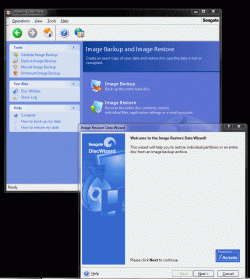
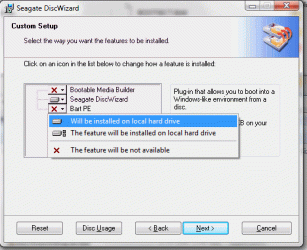
Right here: http://www.seagate.com/support/discwizard/DiscWizardSetup.en.exe

it's acronis for free, some options or greyed out but you can make images of disks and partitions and it's free.

I'm not 100% sure if you need a "Seagate" drive for it to run or not.

You can open the Images and copy files or restore the whole partition with it.
 

Attachments

  • Phen II Win 7044.gif
    Phen II Win 7044.gif
    70.5 KB · Views: 331
  • Phen II Win 7045.gif
    Phen II Win 7045.gif
    24.2 KB · Views: 178

My Computer

Computer Manufacturer/Model Number
ME!
OS
Windows 7 SP1 Ultimate 64bit
CPU
AMD Phenom II X4 940
Motherboard
ASUS M4A79 Deluxe (BIOS 3603)
Memory
OCZ PC8500 Platinum 4GB
Graphics Card(s)
Sapphire HD4870 1GB 256-bit GDDR5
Sound Card
HT Omega Claro
Monitor(s) Displays
ViewSonic G220fb still rocks
Screen Resolution
1600x1200@85hz
Hard Drives
160GB Seagate 7200.10 Sata
150GB WD Raptor 10,000rpm Sata
PSU
Corsair TX950W
Cooling
Zalman 9700NT
Keyboard
Logitech Standard
Mouse
Microsoft SideWinder
Internet Speed
5.26MB down 0.86MB up
Other Info
APC BackUps 900VA
If you are looking for a traditional file based backup solution you may want to have a look here ...

Free backup software for Windows - GFI Backup Home Edition

I've been using it for a while without issues, totally free for personal use

If you are looking for an "image" based solution the options are many but I personally like those on offer from Paragon software - many available for free :D
 

My Computers

System One System Two

  • Computer type
    PC/Desktop
    Computer Manufacturer/Model Number
    ChillBlast - Custom to my design
    OS
    Windows 11 Pro x64 [Latest Release and Release Preview]
    CPU
    Ryzen 9 5950X, 3.8 - 5.2 MHz
    Motherboard
    Asus Prime X570-Pro
    Memory
    64GB [2 x 32GB] DDR4 3200MHz
    Graphics Card(s)
    4GB NVIDIA GEFORCE GTX 1650 Ti
    Sound Card
    On-board SPDIF to 5.1 System + HDMI [5.1 system]
    Monitor(s) Displays
    32" UHD 32 Bit HDR Monitor + 43" UHD 4K 32Bit HDR TV
    Screen Resolution
    2 x 3840 x 2160 @60Hz
    Hard Drives
    1TB M2 SSD OS, 500GB Fast Access SSD, 2 x 8TB Data + Various Externals from 1TB to 4TB, 10TB NAS
    PSU
    NZXT C750 80 PLUS Gold 750W Modular PSU
    Case
    Workstation Case [Matt Black]
    Cooling
    NZXT Kraken X63 280mm CPU Cooler +2x Quiet Case fans
    Keyboard
    Logitech Wireless MX Keys & K400 + others
    Mouse
    Logitech Wireless MX Master 3S
    Internet Speed
    920 MB Down 50 MB Up
    Antivirus
    BitDefender Total Security Pro
    Browser
    Chrome (always run latest Non-Beta)
    Other Info
    Also run ...
    Laptop - Quad 8GB - Windows 10 Pro x64
    Nexus 7 Android tablet x2
    Samsung 10.2" tablet
    Blackview TAB 8 4G Android Tablet c/w Keyboard
    Wacom Intuos Pro Medium Pen Pad
    Wacom Intuos Pro Small Pen Pad
    Wacom Expresskeys Remote
    Loopdeck+ Graphics Controller
    Shuttle Pro v2 Control
  • Computer type
    Laptop
    System Manufacturer/Model Number
    Dell XPS 17 10750H
    OS
    Windows 11 Pro x64 Latest RP
    CPU
    Intel I7 10750H 5.0GHz
    Motherboard
    Dell XPS
    Memory
    32GB [2x16GB] DDR4 2933 MHz
    Graphics Card(s)
    nVidia GTX1650Ti 4 GB GDDR6
    Sound Card
    Stock [Realtek] 4 Speaker
    Monitor(s) Displays
    17" IPS UHD+ Infinity Edge Touchscreen
    Screen Resolution
    3840 x 2400
    Hard Drives
    2TB M2 NVMe, 4TB External + various 500GB & 1TB External NVMe (also have access to spinner HDD from
    PSU
    Stock
    Case
    Stock XPS Aluminium & Carbon Fibre
    Cooling
    Stock - Active Fan Control
    Keyboard
    Backlit + Various Logitech
    Mouse
    Stock Track Pad + Logitech MX Trackball
    Internet Speed
    72 MB Down 18MB Up
    Browser
    Chrome
    Other Info
    Also run ...
    Laptop - Quad 8GB - Windows 10 Pro x64
    Nexus 7 Android tablet x2
    10.2" tablet
    Sony Z3 Android Smartphone
    Wacom Intuos Pro Medium Pen Pad
    Wacom Intuos Pro Small Pen Pad
    Wacom Expresskeys Remote
    Loopdeck+ Graphics Controller
    Shuttle Pro v2 Control Pad
    10TB NAS
Hi,

Here are some free options:

Cartel already mentioned - Seagate DiskWizard/Maxblast - you must have at least 1 Seagate/Maxtor drive. You can make backup images of drives/ partitions manually. There is no scheduling. There is no file/folder backup. I found it large and heavy on resources - but hey, it's free.

Macrium Reflect Free Edition. Images Drives / partitions - allows scheduling , mounting and restoring individual files from the mounted image. There is no separate separate file/folder backup with the Free Editon. Extremely small, fast relatively light - I have found it totally reliable.

Paragon do free Drive Backup Express version on their website - does a good job and is reliable - but very limited features.

Paragon also do a free promo. version , which is much better - it images drives/ partitions, and files and folders, and includes scheduling. Not as fulll featured as their paid versions - fantastic for a free product.

It is called Paragon Drive Backup 9.0 Personal SE. You might find it if you look around.

For individual file / folder backup ( not drives/partitions), GFI is well liked, as Barman58 pointed out.

Hope it helps
 

My Computers

System One System Two

  • Computer type
    PC/Desktop
    OS
    7 X64
    CPU
    i5 8400
    Motherboard
    gigabyte b365m ds3h
    Memory
    2x8gb 3200mhz
    Hard Drives
    various
    PSU
    pure power 11 400w cm
    Case
    Coolermaster
    Cooling
    cryorig m9i
  • Computer type
    PC/Desktop
    OS
    7x64
    CPU
    g5400
    Motherboard
    ga b365m ds3h
    Memory
    8gb ddr4 2400
    PSU
    xfx pro 450w
I've been using SyncBackSE in XP and Vista for many years without any issues. I liked it so much that I bought the payware version.

Others have like Cobian backup.

My backup tool in Win7 is Windows Explorer. Just not that much to save while waiting for the RTM to come out.
 

My Computer

Computer Manufacturer/Model Number
Home built (x64), Lenovo x61s Tablet, Samsung Netbook
OS
Win7 x64 + x86
CPU
Intel i7 920, other Intel chips, and the Atom in the netbook
Motherboard
Asus P6T Deluxe
Memory
12 gB; 4 gB Lenovo; 1 gB Samsung netbook
Graphics Card(s)
ATI 4870
Sound Card
Yes, I have one of these
Monitor(s) Displays
32" Sharp Aquos TV
Screen Resolution
800x600 - I have vision issues
Hard Drives
4 - 150 gB Velociraptors in RAID 5
Promise controller
PSU
1000 watt (can't recall the brand)
Case
Antec 300
Cooling
Big honking cooler that was rated highly at Toms Hardware
Keyboard
Microsoft Natural
Mouse
Logitech Trackman
Internet Speed
Cable
Other Info
GeekSquad UPS
CyberPower UPS
DLink DNS-323 NAS (2 tB)
Netgear wireless router as an access point
Netgear wired router FSV-318
Home network consists of
4 desktop computers (2 Vista, 2 Win7)
1 netbook (Win7)
4 laptop computers (XP, 2-Vista, Win7)
Wii and XBox 360
My backup tool in Win7 is Windows Explorer. Just not that much to save while waiting for the RTM to come out.

Exactly! For now, I've remapped day-to-day things like photos, downloads and docs to a separate drive....waiting for another build and then the final.

I've used various versions of Acronis True Image for a few years. I like it but when installed it runs a lot of schedulers and crap that can't easily be turned off. For that reason I usually just make backups from what they call "Bootable Recovery Media" which is basically the program on a Flash Drive (I put Acronis Disk Director 10 on the Flash Drive also). Like most of the not-free backup software, Acronis allows a 30-day free trial.
 

My Computer

Computer type
PC/Desktop
Computer Manufacturer/Model Number
Dell: XPS 420 (2), XPS M1330 (several), XPS 14z, Mini 9, Mini 10v
OS
W8 Pro, W7 Ultimate, XP Pro x64, Vista x64, Ubuntu
CPU
Q6600, Q6700, T7500, T7500, N270, N270
Motherboard
Dell
Memory
8GB, 8GB, 4GB, 4GB, 2GB, 2GB
Graphics Card(s)
ATI, nVidia, nVidia, nVidia, Intel, Intel
Monitor(s) Displays
Dell 2408WFP
Hard Drives
A drawer full. OCZ Vertex's in RAID 0. Vertex 3's, Vertex 4, Samsung 830's, Samsung 840's, Intel 330. Don't use dino drives any more except for servers.
Keyboard
Logitech Wave
Internet Speed
29 Mbps DL / .95 Mbps UL
Other Info
New project(2013)...Another low power server. Zotac H67ITX, i3-2100T, Windows Server 2012 Essentials on Samsung SSD.
Previous project...Low power (38-40 watts using Kill-a-Watt) Windows Home Server. Zotac ION (Atom 330, GeForce9400), 4GB RAM, 2x2TB WD Green, IN WIM miniITX Case. Fits on a shelf in laundry closet, practically silent.
have any of you actually used any of these to do a full restore from backup? I used to Norton Ghost 14 with the recovery disk when I had Vista, and it worked great. I heard it does not work so well on w7. So, back to the original ?, any successfull restore from backup?
 

My Computer

Computer Manufacturer/Model Number
Gigabyte
OS
Windows 7 Ultimate
CPU
Intel Core(TM)2 Quad- Q9550, 2.83GHz
Motherboard
G31M-ES2L
Memory
4GB
Graphics Card(s)
ATI Radeon HD4600
Sound Card
On Board:
Monitor(s) Displays
Acer AL2223W, Acer AL1916
Screen Resolution
1680 x 1050, 1280 x 1024
Hard Drives
160GB
350GB
250GB
250GB
PSU
600W
Case
Cooler Master
Keyboard
Microsoft Laser 6000
Mouse
Logitech Optical Trackman
Internet Speed
1.5MB
Other Info
I am also running a quasar gamatron flux capacitor with twin pulse tronic phasers......jk, I have no such stuff.
I have restored numerous times with the Macrium and Paragon products - perfectly.
 

My Computers

System One System Two

  • Computer type
    PC/Desktop
    OS
    7 X64
    CPU
    i5 8400
    Motherboard
    gigabyte b365m ds3h
    Memory
    2x8gb 3200mhz
    Hard Drives
    various
    PSU
    pure power 11 400w cm
    Case
    Coolermaster
    Cooling
    cryorig m9i
  • Computer type
    PC/Desktop
    OS
    7x64
    CPU
    g5400
    Motherboard
    ga b365m ds3h
    Memory
    8gb ddr4 2400
    PSU
    xfx pro 450w
I'm quite happy with the Windows backup program myself, I selected what I wanted backed up and when and it just does it. I've done many clean installs of the new builds and it restores my stuff just fine. Subsequent backups save changes to your selected folders and are not as large as the initial. I don't use the imaging option, when I do a clean install I want it clean, only restore my data.
 

My Computer

OS
Windows 7 x64
The image option is useful for recovering from a non - booting/ infected pc - puts you back where you were at the time you made the image.

A lifesaver for many who would have a massive amount to set up after a clean reinstall.

Also great for those of us who experiment a lot - hose your install - put the image back in 10 mins - no need to d/l lots of updates, reinstall programs - enter all the product keys, etc.

I advise people that making backups of the drive is the most important thing they can do.
 

My Computers

System One System Two

  • Computer type
    PC/Desktop
    OS
    7 X64
    CPU
    i5 8400
    Motherboard
    gigabyte b365m ds3h
    Memory
    2x8gb 3200mhz
    Hard Drives
    various
    PSU
    pure power 11 400w cm
    Case
    Coolermaster
    Cooling
    cryorig m9i
  • Computer type
    PC/Desktop
    OS
    7x64
    CPU
    g5400
    Motherboard
    ga b365m ds3h
    Memory
    8gb ddr4 2400
    PSU
    xfx pro 450w
But, to date, which app creates good images that one can restore a w7 machine successfully. I am looking for one that can make an image, then I can just run the image and restore my machine in little time. Not one that you have to install the OS, then run a program to restore your files.
 

My Computer

Computer Manufacturer/Model Number
Gigabyte
OS
Windows 7 Ultimate
CPU
Intel Core(TM)2 Quad- Q9550, 2.83GHz
Motherboard
G31M-ES2L
Memory
4GB
Graphics Card(s)
ATI Radeon HD4600
Sound Card
On Board:
Monitor(s) Displays
Acer AL2223W, Acer AL1916
Screen Resolution
1680 x 1050, 1280 x 1024
Hard Drives
160GB
350GB
250GB
250GB
PSU
600W
Case
Cooler Master
Keyboard
Microsoft Laser 6000
Mouse
Logitech Optical Trackman
Internet Speed
1.5MB
Other Info
I am also running a quasar gamatron flux capacitor with twin pulse tronic phasers......jk, I have no such stuff.
Macrium Reflect - i have used it many times on 7 x64.

The installer contains 32 and 64 bit version - the correct one automatically installs.

Macrium Reflect FREE Edition - Information and download

Will image and restore the whole drive - or just your 7 partition - up to you.
 

My Computers

System One System Two

  • Computer type
    PC/Desktop
    OS
    7 X64
    CPU
    i5 8400
    Motherboard
    gigabyte b365m ds3h
    Memory
    2x8gb 3200mhz
    Hard Drives
    various
    PSU
    pure power 11 400w cm
    Case
    Coolermaster
    Cooling
    cryorig m9i
  • Computer type
    PC/Desktop
    OS
    7x64
    CPU
    g5400
    Motherboard
    ga b365m ds3h
    Memory
    8gb ddr4 2400
    PSU
    xfx pro 450w
I have used Acronis True Image Home v11 MANY times to do image backup and restores with Win7 v7100, 7127 and 7232. The backups I do from the desktop. The restores, since it is the OS partition, I do from the Acronis "Emergency" Boot disk.

I have NOT tried a network backup/restore.

I have NOT tried a "default" clone operation as Acronis wants to wipe and re-partition the entire hard disk proportionally to the number and size of the partitions in the backup image.

I attempted a "custom" clone operation in Acronis but found it clumsy in allocating space where I wanted it. So I used GParted to re-partition in the order and size I wanted and THEN used Acronis to to the restore operations.

So for local backup/restore operations I can attest that it has worked very well.
 

My Computer

OS
XP Pro & Vista Home Premium (x86); Windows Ultimate 7600 x64 Retail
Which of these programs support incremental, and network locations for backups?

I have a nas with 500 gigs, and I want to backup to an external usb.
 

My Computer

OS
7264x64/7260x86
Now one thing I can say about Acronis, they have a feature that allows you to image a computer and restore it to a totally different computer (even if all the hardware is different). It is an addittional addon you have to purchase. The addon is called Univeral Restore, but I will look at Macrium as an option. Did the free version have any limitations that had you wanting the full version? I know sometimes free version give you just enough, but leave you wanting. Kind of a like a girl getting naked, then tell you no (don't you hate that.)

@Copernicus: Acronis supports what you are asking. Even the builtin backup and restore for w7 will do network and or incremental backups.
 

My Computer

Computer Manufacturer/Model Number
Gigabyte
OS
Windows 7 Ultimate
CPU
Intel Core(TM)2 Quad- Q9550, 2.83GHz
Motherboard
G31M-ES2L
Memory
4GB
Graphics Card(s)
ATI Radeon HD4600
Sound Card
On Board:
Monitor(s) Displays
Acer AL2223W, Acer AL1916
Screen Resolution
1680 x 1050, 1280 x 1024
Hard Drives
160GB
350GB
250GB
250GB
PSU
600W
Case
Cooler Master
Keyboard
Microsoft Laser 6000
Mouse
Logitech Optical Trackman
Internet Speed
1.5MB
Other Info
I am also running a quasar gamatron flux capacitor with twin pulse tronic phasers......jk, I have no such stuff.
Which of these programs support incremental, and network locations for backups?

I have a nas with 500 gigs, and I want to backup to an external usb.


Acronis True Image Home 11 does both (incremental and network), I was just pointing out that I had not actually tried it in the Windows 7 RC XXXX environment.

NAS is something I have never tried even in an XP/Vista environment. The real test would be to try a NAS restore when booting to an Acronis Emergency Recovery cd. The ATI "HOME" version differs somewhat from the ATI workstation version with regards to network support (drivers etc) so you might be wise to investigate further.

For a typical home setup the ATI Home 11 boot disk works fine. For more complex network access I created a UBCD4WIN (Bart PE) boot disk with the ATI Home 11 PE Plugin (actual plugin feature is on the ATI Home Install CD).

Why the need for a Bart PE plugin? The UBCD4WIN (Bart PE) cd incorporates the various network drivers included in a Windows XP SP2 (3?) boot CD. The ATI Home 11 boot disk may not have all of the latest drivers. Once a network connection is established and drive access shared/mapped by whatever means the Acronis backup/restore will function.

The latest ATI is ATI Home 2009. You can download a trial version here:

Complete hard disk recovery solution, backup, drive copy, clone and image computer software

(the specs list network storage supportm but to me that is vague.... :huh:)

If you get a chance to test the NAS functionality please post the results! :D
 

My Computer

OS
XP Pro & Vista Home Premium (x86); Windows Ultimate 7600 x64 Retail
The free version of Macrium is not time limited - you can use it forever for free.

Macrium Reflect FREE Edition - Information and download

Obviously it does not include all the functions of the paid version, which are listed here:

Macrium Reflect Disk Imaging and Backup - Features

Another alternative is Paragon.

They have a range of products - depending on your needs.

They have the "Adaptive Restore" feature for moving o/s to new hardware.

The Hard Disk Manager range combines Backup and partitioning in one product.

PARAGON Software Group - Featured Products
 

My Computers

System One System Two

  • Computer type
    PC/Desktop
    OS
    7 X64
    CPU
    i5 8400
    Motherboard
    gigabyte b365m ds3h
    Memory
    2x8gb 3200mhz
    Hard Drives
    various
    PSU
    pure power 11 400w cm
    Case
    Coolermaster
    Cooling
    cryorig m9i
  • Computer type
    PC/Desktop
    OS
    7x64
    CPU
    g5400
    Motherboard
    ga b365m ds3h
    Memory
    8gb ddr4 2400
    PSU
    xfx pro 450w
Another alternative is Paragon.
They have a range of products - depending on your needs.
They have the "Adaptive Restore" feature for moving o/s to new hardware.
The Hard Disk Manager range combines Backup and partitioning in one product.
PARAGON Software Group - Featured Products

I have the full Paragon Hard Disk Manager 2009 (I was given it!) - this is an extraordinary program, solid, reliable, unmatched range of features from partitioning, cloning, defragmentation (which I haven't used), all types of back-up, drive management and set-up on different hardware.

Actually getting to some of the tools is harder than using them as the wizards are no brainers (unlike Acronis).

Its $US50 but if there are free components I'd be pretty sure that they'd be excellent.
 

My Computer

Computer Manufacturer/Model Number
AMD Athlon 64 3200+, Lenovo G560 i3
OS
Windows 7 Ultimate, Ubuntu
Motherboard
Gigabyte K8T8000
Memory
DDR 2Gb (!)
Graphics Card(s)
6600GT
Monitor(s) Displays
MultiMonitor (2) LCD
Hard Drives
Old Seagate 75
Big Western Digital
Samsung 500Gb pulled out of an external drive and installed
Ext: Maxtor (Firewire), 1Gb Lacie (Samsung)
Mouse
Logitech MX620 Cordless
Hi Charles,

I agree - I use the Paragon products myself - terrific range of features.

I have used most of the functions, including the Partition Undelete - it worked superbly.

Oddly - the one feature I wasn't keen on was the Defragger. It is very low level - goes into boot time mode and takes a long while.

The average home user doesn't need something like that and may try and stop it during the process ( not recommended). They would have been better putting it only on the server editions.

The image backup and restore functions work very well too.

The bootable disc is also excellent, with all the Backup and partioning functions.
 

My Computers

System One System Two

  • Computer type
    PC/Desktop
    OS
    7 X64
    CPU
    i5 8400
    Motherboard
    gigabyte b365m ds3h
    Memory
    2x8gb 3200mhz
    Hard Drives
    various
    PSU
    pure power 11 400w cm
    Case
    Coolermaster
    Cooling
    cryorig m9i
  • Computer type
    PC/Desktop
    OS
    7x64
    CPU
    g5400
    Motherboard
    ga b365m ds3h
    Memory
    8gb ddr4 2400
    PSU
    xfx pro 450w
Back
Top