
which OS to install

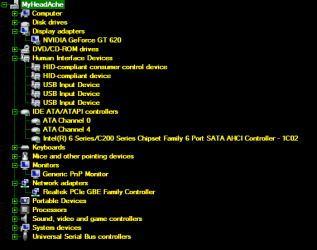
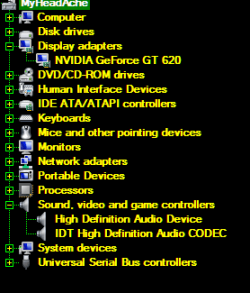
These are from the Device Manager
Ethernet controller driver is not installed.
PCI simple communications controller is not installed
SM Bus Controller is not installed

I have no idea if the PC has a wired or not wired network card
Remember I can NOT get on the internet to update these drivers.
I don't think I would be able to do that on my Wifes Dell.
I have been unable to find the Ethernet controller driver on the HP site.

I will check out your latest suggestion for drivers on the HP site.

I could try this but have no idea if it would work.
Back up the new window 7 OS. Install the old OS. Then look for the
drivers. Install the new OS and install any drivers.

Did you connect a network cable to the computer, so computer has been connected to your router?
This is the network driver
Original Realtek Network Controller Driver 2012-05-23 , Version7.53.216.2012 Rev. A, 1.75M
This package provides the original driver for the Realtek PCIe Family network controller solutions in supported models that are running a supported operating system.
(More details) Download
 

My Computer

Computer type
Laptop
Computer Manufacturer/Model Number
ACER ASPIRE 5742G
OS
Microsoft Windows 7 Home Premium 64-bits 7601 Multiprocessor Free Service Pack 1
CPU
Intel(R) Core(TM) i3 CPU M 370 @ 2.40GHz
Motherboard
Acer Aspire 5742G
Memory
4,00 GB
Graphics Card(s)
ATI Mobility Radeon HD 5400 Series
Sound Card
(1) AMD High Definition Audio Device (2) Realtek High Defi
Screen Resolution
1366 x 768 x 32 bits (4294967296 colors) @ 60 Hz
Hard Drives
WDC WD5000BEVT-22ZAT0
The connection to the computer has been the same for over a year.
On the Wifes Dell windows 7 pro 32-bit under Device Manager (network adapters)
is Broadcom Netxtreme 57xx gigabit controller.

driver sp57372 almost wiped out the new OS on the HP.

Still have to try the other 3 drivers. Working
 

My Computer

Computer type
PC/Desktop
Computer Manufacturer/Model Number
had the system built by PCsandParts
OS
windows 7 Pro 64 bit
CPU
mini tower
Motherboard
h110m-k (lga1151)
Memory
4g
Graphics Card(s)
nvidia geforce gt730 graphics card
Sound Card
high definition audio device
Monitor(s) Displays
19" dell ultra sharp
Screen Resolution
1280 x 800
Hard Drives
Kingston SSD
PSU
?
Case
?
Cooling
?
Keyboard
standard ps/2 keyboard
Mouse
ps/2 compatible optical
Internet Speed
fiber optics
Antivirus
ESET Smart Security
Browser
IE11
Other Info
no Wifi. Bose speakers, optical drive tsstcorp dvd+-RW

My Computer

Computer type
Laptop
Computer Manufacturer/Model Number
ACER ASPIRE 5742G
OS
Microsoft Windows 7 Home Premium 64-bits 7601 Multiprocessor Free Service Pack 1
CPU
Intel(R) Core(TM) i3 CPU M 370 @ 2.40GHz
Motherboard
Acer Aspire 5742G
Memory
4,00 GB
Graphics Card(s)
ATI Mobility Radeon HD 5400 Series
Sound Card
(1) AMD High Definition Audio Device (2) Realtek High Defi
Screen Resolution
1366 x 768 x 32 bits (4294967296 colors) @ 60 Hz
Hard Drives
WDC WD5000BEVT-22ZAT0
The connection to the computer has been the same for over a year.
On the Wifes Dell windows 7 pro 32-bit under Device Manager (network adapters)
is Broadcom Netxtreme 57xx gigabit controller.

I don't care if it's the same for a year, a month or a decade ;-) I just want to know what connection it is. Is it wired or not?
Not interested in what your wife has.
 

My Computer

Computer type
Laptop
Computer Manufacturer/Model Number
ACER ASPIRE 5742G
OS
Microsoft Windows 7 Home Premium 64-bits 7601 Multiprocessor Free Service Pack 1
CPU
Intel(R) Core(TM) i3 CPU M 370 @ 2.40GHz
Motherboard
Acer Aspire 5742G
Memory
4,00 GB
Graphics Card(s)
ATI Mobility Radeon HD 5400 Series
Sound Card
(1) AMD High Definition Audio Device (2) Realtek High Defi
Screen Resolution
1366 x 768 x 32 bits (4294967296 colors) @ 60 Hz
Hard Drives
WDC WD5000BEVT-22ZAT0
Some success I think. The internet started to work and downloaded updates.
I was able to access the Microsoft site. I tried your driver sites and they all
failed, so that wasn't it.
I'm going to have trouble with sound. I think I am going to have to install the "Beats"
program from HP. I guess that will work ok.
I certainly appreciate your patience with helping me.
Generally I am very happy with the new OS. Only time will tell if I have any
more problems.
 

My Computer

Computer type
PC/Desktop
Computer Manufacturer/Model Number
had the system built by PCsandParts
OS
windows 7 Pro 64 bit
CPU
mini tower
Motherboard
h110m-k (lga1151)
Memory
4g
Graphics Card(s)
nvidia geforce gt730 graphics card
Sound Card
high definition audio device
Monitor(s) Displays
19" dell ultra sharp
Screen Resolution
1280 x 800
Hard Drives
Kingston SSD
PSU
?
Case
?
Cooling
?
Keyboard
standard ps/2 keyboard
Mouse
ps/2 compatible optical
Internet Speed
fiber optics
Antivirus
ESET Smart Security
Browser
IE11
Other Info
no Wifi. Bose speakers, optical drive tsstcorp dvd+-RW
Why are you still not answering #12 ?
 

My Computer

Computer type
Laptop
Computer Manufacturer/Model Number
ACER ASPIRE 5742G
OS
Microsoft Windows 7 Home Premium 64-bits 7601 Multiprocessor Free Service Pack 1
CPU
Intel(R) Core(TM) i3 CPU M 370 @ 2.40GHz
Motherboard
Acer Aspire 5742G
Memory
4,00 GB
Graphics Card(s)
ATI Mobility Radeon HD 5400 Series
Sound Card
(1) AMD High Definition Audio Device (2) Realtek High Defi
Screen Resolution
1366 x 768 x 32 bits (4294967296 colors) @ 60 Hz
Hard Drives
WDC WD5000BEVT-22ZAT0
Some success I think. The internet started to work and downloaded updates.
I was able to access the Microsoft site. I tried your driver sites and they all
failed, so that wasn't it.
I'm going to have trouble with sound. I think I am going to have to install the "Beats"
program from HP. I guess that will work ok.
I certainly appreciate your patience with helping me.
Generally I am very happy with the new OS. Only time will tell if I have any
more problems.

"I tried your driver sites and they all failed, so that wasn't it."=>How come you can access internet now... you say "they all failed".
 

My Computer

Computer type
Laptop
Computer Manufacturer/Model Number
ACER ASPIRE 5742G
OS
Microsoft Windows 7 Home Premium 64-bits 7601 Multiprocessor Free Service Pack 1
CPU
Intel(R) Core(TM) i3 CPU M 370 @ 2.40GHz
Motherboard
Acer Aspire 5742G
Memory
4,00 GB
Graphics Card(s)
ATI Mobility Radeon HD 5400 Series
Sound Card
(1) AMD High Definition Audio Device (2) Realtek High Defi
Screen Resolution
1366 x 768 x 32 bits (4294967296 colors) @ 60 Hz
Hard Drives
WDC WD5000BEVT-22ZAT0
Not sure what #12 is. If it is message 12 I will resend a picture of my
Device Manager if you want me to.
I haven't the vaguest idea why it is working now. Guess it's one of those things
I will never know.
I see we are running different versions of windows 7, so maybe that is why your
terminology and mine are different.
I will keep monitoring this thread for awhile to see if you post more.
Many Thanks,
 

My Computer

Computer type
PC/Desktop
Computer Manufacturer/Model Number
had the system built by PCsandParts
OS
windows 7 Pro 64 bit
CPU
mini tower
Motherboard
h110m-k (lga1151)
Memory
4g
Graphics Card(s)
nvidia geforce gt730 graphics card
Sound Card
high definition audio device
Monitor(s) Displays
19" dell ultra sharp
Screen Resolution
1280 x 800
Hard Drives
Kingston SSD
PSU
?
Case
?
Cooling
?
Keyboard
standard ps/2 keyboard
Mouse
ps/2 compatible optical
Internet Speed
fiber optics
Antivirus
ESET Smart Security
Browser
IE11
Other Info
no Wifi. Bose speakers, optical drive tsstcorp dvd+-RW
Please do what I asked in post 12. so click on this
 

My Computer

Computer type
Laptop
Computer Manufacturer/Model Number
ACER ASPIRE 5742G
OS
Microsoft Windows 7 Home Premium 64-bits 7601 Multiprocessor Free Service Pack 1
CPU
Intel(R) Core(TM) i3 CPU M 370 @ 2.40GHz
Motherboard
Acer Aspire 5742G
Memory
4,00 GB
Graphics Card(s)
ATI Mobility Radeon HD 5400 Series
Sound Card
(1) AMD High Definition Audio Device (2) Realtek High Defi
Screen Resolution
1366 x 768 x 32 bits (4294967296 colors) @ 60 Hz
Hard Drives
WDC WD5000BEVT-22ZAT0
I hope this is what you have asked for. If not tell me what is wrong and I will try again.
See attached.
 

Attachments

  • 2013-12-04_072317.png
    2013-12-04_072317.png
    10.4 KB · Views: 9

My Computer

Computer type
PC/Desktop
Computer Manufacturer/Model Number
had the system built by PCsandParts
OS
windows 7 Pro 64 bit
CPU
mini tower
Motherboard
h110m-k (lga1151)
Memory
4g
Graphics Card(s)
nvidia geforce gt730 graphics card
Sound Card
high definition audio device
Monitor(s) Displays
19" dell ultra sharp
Screen Resolution
1280 x 800
Hard Drives
Kingston SSD
PSU
?
Case
?
Cooling
?
Keyboard
standard ps/2 keyboard
Mouse
ps/2 compatible optical
Internet Speed
fiber optics
Antivirus
ESET Smart Security
Browser
IE11
Other Info
no Wifi. Bose speakers, optical drive tsstcorp dvd+-RW
I see the REALTEK PCIe GBE Family controller. Your network and internet is working!
Nvidia graphics has been installed.... maybe due to "windows update"
Anything I requested has been installed.... or better said... all hardware in your machine has a working driver.
No "other devices" anymore I assume?

So far so good.

Expand branch "sound, video and game controllers". Does it list you sound card and is sound working?

All drivers were just on HP site... easy to find. Don't understand why it took so long to install them. But anyway it seems to work now
 

My Computer

Computer type
Laptop
Computer Manufacturer/Model Number
ACER ASPIRE 5742G
OS
Microsoft Windows 7 Home Premium 64-bits 7601 Multiprocessor Free Service Pack 1
CPU
Intel(R) Core(TM) i3 CPU M 370 @ 2.40GHz
Motherboard
Acer Aspire 5742G
Memory
4,00 GB
Graphics Card(s)
ATI Mobility Radeon HD 5400 Series
Sound Card
(1) AMD High Definition Audio Device (2) Realtek High Defi
Screen Resolution
1366 x 768 x 32 bits (4294967296 colors) @ 60 Hz
Hard Drives
WDC WD5000BEVT-22ZAT0
Here are the changes you requested to the Device Manager.
 

Attachments

  • 2013-12-04_075731.png
    2013-12-04_075731.png
    7 KB · Views: 22

My Computer

Computer type
PC/Desktop
Computer Manufacturer/Model Number
had the system built by PCsandParts
OS
windows 7 Pro 64 bit
CPU
mini tower
Motherboard
h110m-k (lga1151)
Memory
4g
Graphics Card(s)
nvidia geforce gt730 graphics card
Sound Card
high definition audio device
Monitor(s) Displays
19" dell ultra sharp
Screen Resolution
1280 x 800
Hard Drives
Kingston SSD
PSU
?
Case
?
Cooling
?
Keyboard
standard ps/2 keyboard
Mouse
ps/2 compatible optical
Internet Speed
fiber optics
Antivirus
ESET Smart Security
Browser
IE11
Other Info
no Wifi. Bose speakers, optical drive tsstcorp dvd+-RW
Sound, network, keyboard ,mouse, dvd drive all is working fine? No more problems?
 

My Computer

Computer type
Laptop
Computer Manufacturer/Model Number
ACER ASPIRE 5742G
OS
Microsoft Windows 7 Home Premium 64-bits 7601 Multiprocessor Free Service Pack 1
CPU
Intel(R) Core(TM) i3 CPU M 370 @ 2.40GHz
Motherboard
Acer Aspire 5742G
Memory
4,00 GB
Graphics Card(s)
ATI Mobility Radeon HD 5400 Series
Sound Card
(1) AMD High Definition Audio Device (2) Realtek High Defi
Screen Resolution
1366 x 768 x 32 bits (4294967296 colors) @ 60 Hz
Hard Drives
WDC WD5000BEVT-22ZAT0
Have another message on here about this same subject but have
received no answers. Thought maybe you could shed some light.

While I was going through the install process windows update was
active. I usually run it in the manual state. So it loaded the latest
Nividia drivers and IMHO messed up the puter.
Is there a way I could delete the last 2 or 3 Nvidia drivers without
messing up the OS? On the Old one I NEVER updated drivers,
especially for Nvidia.
What I like is an off white background with black text.
Thank you.
 

My Computer

Computer type
PC/Desktop
Computer Manufacturer/Model Number
had the system built by PCsandParts
OS
windows 7 Pro 64 bit
CPU
mini tower
Motherboard
h110m-k (lga1151)
Memory
4g
Graphics Card(s)
nvidia geforce gt730 graphics card
Sound Card
high definition audio device
Monitor(s) Displays
19" dell ultra sharp
Screen Resolution
1280 x 800
Hard Drives
Kingston SSD
PSU
?
Case
?
Cooling
?
Keyboard
standard ps/2 keyboard
Mouse
ps/2 compatible optical
Internet Speed
fiber optics
Antivirus
ESET Smart Security
Browser
IE11
Other Info
no Wifi. Bose speakers, optical drive tsstcorp dvd+-RW
I'm sorry for the wild goose chase you've gone on the past few days. We have a tutorial here that has helped tens of thousands of users to get and keep a perfect http://www.sevenforums.com/tutorials/219487-clean-reinstall-factory-oem-windows-7-a.html#post1839164.

It explains that after install you should first enable Automatically deliver drivers via Windows Update (Step 3) then run all rounds of Important and Optional Windows Updates until there are no more. Only then should you import any drivers still missing in Device Manager, which are causing performance issues or if you are experiencing problems or deficiencies in performance.

What are the exact problems with Updates drivers which you think are giving you problems? Please post back the drive date and version from Device Manager, and again the HP make and model.
 
Last edited:
I don't think I need this now as the OS is mostly working.
BUT, a year or two from now I would like to use it if I need
to do another install. So how am I going to find this software
at a later date? There are so many ads that I am not really
sure what I am downloading. Could you please help with this?

I uninstalled one of the NVidia updates and that solved some of
my display problems.
Hp Pavilion p7-1380t
Generally I am very pleased with the new install.
Only two things that I am aware of at this time:
1. very slow startup
2. my Oki printer isn't working. I think I will uninstall it
and reinstall it to see if that solves the problem.

Thank God for Windows 7 pro 64-bit - live long and prosper......
 
Last edited:

My Computer

Computer type
PC/Desktop
Computer Manufacturer/Model Number
had the system built by PCsandParts
OS
windows 7 Pro 64 bit
CPU
mini tower
Motherboard
h110m-k (lga1151)
Memory
4g
Graphics Card(s)
nvidia geforce gt730 graphics card
Sound Card
high definition audio device
Monitor(s) Displays
19" dell ultra sharp
Screen Resolution
1280 x 800
Hard Drives
Kingston SSD
PSU
?
Case
?
Cooling
?
Keyboard
standard ps/2 keyboard
Mouse
ps/2 compatible optical
Internet Speed
fiber optics
Antivirus
ESET Smart Security
Browser
IE11
Other Info
no Wifi. Bose speakers, optical drive tsstcorp dvd+-RW
Just bookmark Clean Reinstall - Factory OEM Windows 7.

For specific help to get a software downloaded, ask back and someone will help you avoid any spyware. This can be tricky even for experienced downloaders. Basically you need to avoid any large download buttons which may be labeled Advertisement, weigh all the Download buttons on page to determine which is correct. If it doesn't immediately start downloading what you want, cancel it. Also look for "Download Mirrors" which are normally the real deal.

To help with the slow boot and go over your install thoroughly learning about better ways to do things, work through these Troubleshooting Steps for Windows 7 .

Uninstall the printer software in Control Panel>Programs and Features. Unplug printer first. Then enable Automatically deliver drivers via Windows Update (Step 3) , plug in the printer to see whether the driver Windows installs is enough for it to function as you wish. If you need to scan from printer top to desktop then you may need to run the latest full software package for the printer from its Support Downloads webpage. The disk may be out of date. All such software is online now in the latest versions.
 
This Windows 7 Forum is here 24/7 and as far as I know will be here as long as Window 7 itself is being used.
All good programs that work with Windows 7 now should have a method of keep them up to date.
That way you will always be able to Google the newest version from the mother site to install as needed.
Looking ahead in the computer world 2 or 3 years is impossible so I just try to keep up with things day or week at a time.
This Forum also does a great job of keeping it's Tutorials updated.
That help us all down the road when changes have been made.
 

My Computer

Computer type
PC/Desktop
Computer Manufacturer/Model Number
Home made Desktop
OS
Windows 10 Pro. 64/ version 1709 Windows 7 Pro/64
CPU
Intel i7-6800K @ 4.3
Motherboard
ASUS X-99 Deluxe II
Memory
Corsair Platinum 16 gig @2400
Graphics Card(s)
EVGA GTX 1070 OC
Monitor(s) Displays
Asus 27" LED LCD/VE278Q
Screen Resolution
1920-1080 or 1280-720 HDMI
Hard Drives
INTEL SSD 730-240 Gb Sata 3.0/
PSU
EVGA Platium 1200W
Case
Phanteks Luxe Tempered Glass 8 fans/ one radiator
Cooling
XSPC/ Water Cooled CPU
Keyboard
Das 4 Professional
Mouse
Logitech M705/MX Anywhere 2-S
Internet Speed
100 mbits
Antivirus
Microsoft Security Essentials/ Malwarebytes Premium 3.0/ SAS
Browser
I.E. 11 default/Firefox/ ISP Time Warner Cable/Spectrum
Other Info
LG BluRay Burner/
Sound system-KLipsch-THX/
Icy Dock ssd Hot Swap bays.
I am going through "Troubleshooting Steps for Windows 7".
Number 4 "Event Viewer Administrative and Custom" shows hundreds
of items I have no idea what to do with.
 

My Computer

Computer type
PC/Desktop
Computer Manufacturer/Model Number
had the system built by PCsandParts
OS
windows 7 Pro 64 bit
CPU
mini tower
Motherboard
h110m-k (lga1151)
Memory
4g
Graphics Card(s)
nvidia geforce gt730 graphics card
Sound Card
high definition audio device
Monitor(s) Displays
19" dell ultra sharp
Screen Resolution
1280 x 800
Hard Drives
Kingston SSD
PSU
?
Case
?
Cooling
?
Keyboard
standard ps/2 keyboard
Mouse
ps/2 compatible optical
Internet Speed
fiber optics
Antivirus
ESET Smart Security
Browser
IE11
Other Info
no Wifi. Bose speakers, optical drive tsstcorp dvd+-RW
That's why it says to only focus on the repeat errors - ones which repeat regularly, like every time you start the PC. It also says how to resolve them, by googling the text and error number to see how others have done this.
 
Back
Top