why cant i open many picture at once?

dext14

New member
Local time
11:19 PM
Messages
7
can some1 explain to me....

...why cant i select many picture and right click and open them all AT ONCE with the same program ...

...instead of clicking them to open one by one?

...i mean if i'd have a thoursand picture i'd have to click a thoursand time...
instead of like 1
 

My Computer My Computer

At a glance

32
OS
32
Hello Dext, and welcome to Seven Forums.

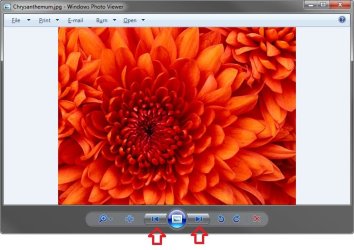
There's no need to. When you open a picture in a folder, you can click on the left and right arrows in Windows Photo Viewer to scroll through and view all images in that same folder.

Next.jpg


You could also select a larger icon size for that folder view to see them better as well.

Hope this helps,
Shawn
 

My Computer My Computer

At a glance

64-bit Windows 11 Pro for WorkstationsIntel i7-8700K OC'd to 5 GHz64 GB (4x16GB) G.SKILL TridentZ RGB DDR4 3600...ASUS ROG-STRIX-GTX1080TI-O11G-GAMING
Computer type
PC/Desktop
Computer Manufacturer/Model Number
Self built custom
OS
64-bit Windows 11 Pro for Workstations
CPU
Intel i7-8700K OC'd to 5 GHz
Motherboard
ASUS ROG Maximus XI Formula Z390
Memory
64 GB (4x16GB) G.SKILL TridentZ RGB DDR4 3600 MHz
Graphics Card(s)
ASUS ROG-STRIX-GTX1080TI-O11G-GAMING
Sound Card
Integrated
Monitor(s) Displays
2 x Samsung Odyssey G7 27"
Screen Resolution
2560x1440
Hard Drives
1TB Samsung 990 PRO M.2,
4TB Samsung 990 PRO PRO M.2,
TerraMaster F8 SSD Plus NAS
PSU
Seasonic Prime Titanium 850W
Case
Thermaltake Core P3
Cooling
Corsair Hydro H115i
Keyboard
Logitech wireless K800
Mouse
Logitech MX Master 4
Internet Speed
2 Gb/s Download and 100 Mb/s Upload
Antivirus
Malwarebyte Anti-Malware Premium
Browser
Google Chrome
Other Info
Logitech Z625 speaker system,
Logitech BRIO 4K Pro webcam,
HP Color LaserJet Pro MFP M477fdn,
APC SMART-UPS RT 1000 XL - SURT1000XLI,
Galaxy S23 Plus phone
yea...but u cant umm compress ur picture with that program no?....so u still need to open them all in a picture compressor program?
 

My Computer My Computer

At a glance

32
OS
32
Most decent image editor programs allow you to select multiple images and open them at once. But not 1000 :D

What you need is a batch image processor. Maybe something like Adobe Lightroom? There may be others. Google "Batch Image Compression" or something...
 

My Computer My Computer

At a glance

Windows 7 x64 Ultimatei7 96012 Gig Corsair DominatorNvidia 480
Computer Manufacturer/Model Number
Scratch built
OS
Windows 7 x64 Ultimate
CPU
i7 960
Motherboard
Asus P6X58D
Memory
12 Gig Corsair Dominator
Graphics Card(s)
Nvidia 480
Sound Card
Maudio Delta 44 + breakout box
Monitor(s) Displays
Dell UltraSharp U2410 24in and Samsung 21 dual monitors
Screen Resolution
1920x1200 and 1280x1024
Hard Drives
Primary: Intel X-25M G2 160G SSD
Secondary: Segate baracuda 1.0 TB
HDs in AHCI mode.
PSU
Corasair TX850
Case
Cooler Master HAF
Cooling
Corsair H50
Keyboard
Logitech G15 + N52 game pad
Mouse
Logitech MX518
Internet Speed
15kbs down 4.5kbps up
Other Info
WEI 7.6
CPU & RAM 7.6
Graphics 7.9
Hard disk 7.7
mmm...good point i didnt try from the program...
...yea from the program it work...(hold shift while selecting pricture)
but its still few more step i mean finding back the folder from the program and stuff

thx for the anwser i might not though about it
 

My Computer My Computer

At a glance

32
OS
32
Photoshop and other adobe tools allow you to specify a folder of images and then a set of rules to apply to them. Like load, resize to 808x600 and resave at different settings.

There may be other programs that are free or cheaper that do that also. Though I'd have to research to find out. GIMP may have some batch processing capabilities and it's free.

If you really want to get into it yourself. There is a command line image tool library called "Image Magick". You can then use a scripting lanuage like Python to iterate over a directory full of images and call Image Magick programs to do all kind of crazy stuff :) Resizing, recompressing, and tons more fancy things. :)
 

My Computer My Computer

At a glance

Windows 7 x64 Ultimatei7 96012 Gig Corsair DominatorNvidia 480
Computer Manufacturer/Model Number
Scratch built
OS
Windows 7 x64 Ultimate
CPU
i7 960
Motherboard
Asus P6X58D
Memory
12 Gig Corsair Dominator
Graphics Card(s)
Nvidia 480
Sound Card
Maudio Delta 44 + breakout box
Monitor(s) Displays
Dell UltraSharp U2410 24in and Samsung 21 dual monitors
Screen Resolution
1920x1200 and 1280x1024
Hard Drives
Primary: Intel X-25M G2 160G SSD
Secondary: Segate baracuda 1.0 TB
HDs in AHCI mode.
PSU
Corasair TX850
Case
Cooler Master HAF
Cooling
Corsair H50
Keyboard
Logitech G15 + N52 game pad
Mouse
Logitech MX518
Internet Speed
15kbs down 4.5kbps up
Other Info
WEI 7.6
CPU & RAM 7.6
Graphics 7.9
Hard disk 7.7

My Computer My Computer

At a glance

Windows 7 Home Premium x64AMD Phenom II X6 1600T16GB PC3-10700 (1342MHz)ATI Radeon 5770 HD (x2) CrossFire
Computer Manufacturer/Model Number
OEM - Me
OS
Windows 7 Home Premium x64
CPU
AMD Phenom II X6 1600T
Motherboard
GigaByte GZ-990FXA-UD3
Memory
16GB PC3-10700 (1342MHz)
Graphics Card(s)
ATI Radeon 5770 HD (x2) CrossFire
Sound Card
On-board RealTek chipset
Monitor(s) Displays
3x Hanns-G 1920x1080 Monitors
Screen Resolution
3x Hanns-G 1920x1080 Monitors
Hard Drives
Intel 25-V SSD 40GB: 218 MB/s AT: 0.1ms
Intel X-25M SSD 80GB: 230MB/s AT: 0.1ms
Seagate 750GB: 133 MB/s AT: 13ms (perpendicular storage)
Buffalo HD-PCTU3 1TB External drive
PSU
OCZ Stealth X Stream 750W
Case
Cheap (unknown)
Cooling
Stock
Keyboard
HP USB
Mouse
LogiTech USB
Internet Speed
1.5 Mbps - Slow - At the tail-end of a rural network
Other Info
Printer: Epson Stylus C-84
Scanner: HP 3500C Flatbed
DVD-RW: Plextor
DVD-ROM: Unknown
WEI: 7.4
amazing software, can change quality of compression and size of picture/open many at once n stuff....though i didnt try 9k picture yet...but if what u say is true then it would be worth a try to see if i can do all my picture at once =3
 

My Computer My Computer

At a glance

32
OS
32
Back
Top