Solved Why? Long load times from each mailbox!

soho1

New member
Power User
Local time
9:58 AM
Messages
458
Location
Earth, Mostly Chicago and London
OK, I admit that on the bell curve of Outlook users, I may not be in the norm. However, I seem to have done something (applied an update, grown a PST file, who knows what) that is causing very long load times.

I am running 64-bit Windows Ultimate with Office 2007 (and want to resolve this problem before upgrading to 2010) on an Intel i3 530 @ 2.93 GHz w/6 GB. (FYI, my windows performance rating is 7 for the proc, 7 for the memory, 6 for the disk, graphics and gaming are just so-so at 5 and 5), so the machine should perform adequately.

It takes about 2 seconds for Outlook to launch and display all the graphics, which I am NOTcomplaining about. Although that's a LOT slower than Word or Excel, I realize Outlook does a lot of "stuff" on startup. What is annoying is that it takes about 10 to 15 seconds to display the message list in the Inbox.

Now, the problem is REALLY annoying because I have multiple email accounts and EACH Inbox takes about 10 to 15 seconds to load every time that I switch between them.

Note two things. 1) The load time is APPROXIMATELY the same for each mail folder and 2) the number of email messages is very different in each account.

So, this long load time appears independent of the number of email messages in the inboxes (would could be from 3 or less to 5000 or more). My default email account has only three emails in the inbox.

Outlook seems to work fine otherwise, except for the long delay switching from inbox to inbox, or to/from junk email folder or to/from other PST data files (I move a lot of messages offline into other PST files instead of my inbox, well, except for the one email account with 5k messages).

Last point: the speed problem did not exist a few months ago. Somewhere along the timeline of my busy life, this turned into a problem and I just didn't have the time to investigate. Thankfully, the holidays are giving me time to catch up.

Suggestions?
 

My Computer My Computer

Computer type
Laptop
Computer Manufacturer/Model Number
Dell Insprion 7559 next to a Toshiba Portege
OS
Win 7 Pro 64-bit
CPU
Intel Core i5
Motherboard
Intel
Memory
16 GB Dell, 6 GB Toshiba
Graphics Card(s)
Intel crap on both but Dell also has nVidia GeForce GTX960M
Sound Card
RealTek
Monitor(s) Displays
internal and external ACER KA270H 27"
Screen Resolution
1920x1080
Hard Drives
SSD 256 GB plus numerous WD Red or Purple on USB3 docks. Used to buy a lot of Seagate but tossed them the second time I got unrecoverable disc corruption in the midst of use.
Keyboard
Garage Mouse SW and some cheap Amazon China made USB device
Mouse
Garage Mouse and some cheap Amazon China made USB device
Internet Speed
50 Mbps (allegedly, depends on server)
Antivirus
Defender, Malwarebytes Premium and Kaspersky
Browser
IE 11, and Chrome something
you can run outlook.exe /resetnavpane to speed up your load times, you'll probably lose your .n2k file (cached email addresses).
 

My Computer My Computer

OS
7 Pro
What consequences are implied by loosing the cached email addresses?
 

My Computer My Computer

Computer type
Laptop
Computer Manufacturer/Model Number
Dell Insprion 7559 next to a Toshiba Portege
OS
Win 7 Pro 64-bit
CPU
Intel Core i5
Motherboard
Intel
Memory
16 GB Dell, 6 GB Toshiba
Graphics Card(s)
Intel crap on both but Dell also has nVidia GeForce GTX960M
Sound Card
RealTek
Monitor(s) Displays
internal and external ACER KA270H 27"
Screen Resolution
1920x1080
Hard Drives
SSD 256 GB plus numerous WD Red or Purple on USB3 docks. Used to buy a lot of Seagate but tossed them the second time I got unrecoverable disc corruption in the midst of use.
Keyboard
Garage Mouse SW and some cheap Amazon China made USB device
Mouse
Garage Mouse and some cheap Amazon China made USB device
Internet Speed
50 Mbps (allegedly, depends on server)
Antivirus
Defender, Malwarebytes Premium and Kaspersky
Browser
IE 11, and Chrome something
when you open a new email and start typing in a common address, normally you'll have 'options' to choose from that show up in a drop down box... these will most likely be gone. (you can get them back, they're not gone for ever) it just changes the .n2k file name.
 

My Computer My Computer

OS
7 Pro
Tried it.

1st: important note to future readers: That also has the effect of wiping all your Favorite Folders, so later I will have to mark all my commonly used inboxes, junk foders, PST archives that I reference every day.

2nd: no effect on the load times. They are still just as long.
 

My Computer My Computer

Computer type
Laptop
Computer Manufacturer/Model Number
Dell Insprion 7559 next to a Toshiba Portege
OS
Win 7 Pro 64-bit
CPU
Intel Core i5
Motherboard
Intel
Memory
16 GB Dell, 6 GB Toshiba
Graphics Card(s)
Intel crap on both but Dell also has nVidia GeForce GTX960M
Sound Card
RealTek
Monitor(s) Displays
internal and external ACER KA270H 27"
Screen Resolution
1920x1080
Hard Drives
SSD 256 GB plus numerous WD Red or Purple on USB3 docks. Used to buy a lot of Seagate but tossed them the second time I got unrecoverable disc corruption in the midst of use.
Keyboard
Garage Mouse SW and some cheap Amazon China made USB device
Mouse
Garage Mouse and some cheap Amazon China made USB device
Internet Speed
50 Mbps (allegedly, depends on server)
Antivirus
Defender, Malwarebytes Premium and Kaspersky
Browser
IE 11, and Chrome something
Are these 2 different pop accounts? Are you running in a cached mode for these 2 accounts?

I would attempt to create a new profile and add 1 account at a time: You'll be able to import your old account info back into the new profile(s).
 

My Computer My Computer

OS
7 Pro
Sorry Brady, but I am unfamiliar with what you mean by "cached mode".

As to the accounts, I have several, actually about dozen, email accounts. Each is POP/SMTP with it's own inbox, folder, etc. managed either by Outlook > Tools > Account Settings, or by Mail under the Control panel.

BTW, I just put all my favorites back.
 

My Computer My Computer

Computer type
Laptop
Computer Manufacturer/Model Number
Dell Insprion 7559 next to a Toshiba Portege
OS
Win 7 Pro 64-bit
CPU
Intel Core i5
Motherboard
Intel
Memory
16 GB Dell, 6 GB Toshiba
Graphics Card(s)
Intel crap on both but Dell also has nVidia GeForce GTX960M
Sound Card
RealTek
Monitor(s) Displays
internal and external ACER KA270H 27"
Screen Resolution
1920x1080
Hard Drives
SSD 256 GB plus numerous WD Red or Purple on USB3 docks. Used to buy a lot of Seagate but tossed them the second time I got unrecoverable disc corruption in the midst of use.
Keyboard
Garage Mouse SW and some cheap Amazon China made USB device
Mouse
Garage Mouse and some cheap Amazon China made USB device
Internet Speed
50 Mbps (allegedly, depends on server)
Antivirus
Defender, Malwarebytes Premium and Kaspersky
Browser
IE 11, and Chrome something
Under exchange settings (where you put the server info) you'll have a check box that says "use cached exchange mode"

Are you using an outlook anywhere proxy? Check the account settings under "connection" tab and see if "outlook anywhere" is checked.
 

My Computer My Computer

OS
7 Pro
I am not using exchange. These are all pop accounts on a home computer.
 

My Computer My Computer

Computer type
Laptop
Computer Manufacturer/Model Number
Dell Insprion 7559 next to a Toshiba Portege
OS
Win 7 Pro 64-bit
CPU
Intel Core i5
Motherboard
Intel
Memory
16 GB Dell, 6 GB Toshiba
Graphics Card(s)
Intel crap on both but Dell also has nVidia GeForce GTX960M
Sound Card
RealTek
Monitor(s) Displays
internal and external ACER KA270H 27"
Screen Resolution
1920x1080
Hard Drives
SSD 256 GB plus numerous WD Red or Purple on USB3 docks. Used to buy a lot of Seagate but tossed them the second time I got unrecoverable disc corruption in the midst of use.
Keyboard
Garage Mouse SW and some cheap Amazon China made USB device
Mouse
Garage Mouse and some cheap Amazon China made USB device
Internet Speed
50 Mbps (allegedly, depends on server)
Antivirus
Defender, Malwarebytes Premium and Kaspersky
Browser
IE 11, and Chrome something
instead of "exchange", think server/account settings.

The server setting where you put in your pop.whatever.com
There is a checkbox, is that checked?
 

My Computer My Computer

OS
7 Pro
Out of sight out of mind, I never really paid attention to the "Outlook Connector" menu option. Since you mentioned it I took a look at it. That appears to be for HOTMAIL which is not an account type that I use. I have various other accounts, gmail, comcast, live, etc. but I have never configured anything through the connector. That jogs my memory that Outlook connectors were are added to my machine some months ago. Sidebar: I will have to look to see if that's a feature I can uninstall, perhaps something there is slowing me down. In any case, that menu item only allows adding accounts, I see nothing about maintaining or editing accounts there.

As stated previously, in Outlook I use Tools > Account Settings... to maintain account configurations.

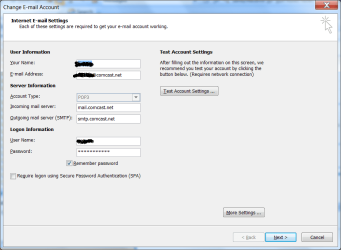
I do not see any proxy related questions in any of the dialogs. Attached is the primary dialog screen snapshot. I brushed out the account name in this example.
 

Attachments

  • Outlook account settings.png
    Outlook account settings.png
    28.1 KB · Views: 10

My Computer My Computer

Computer type
Laptop
Computer Manufacturer/Model Number
Dell Insprion 7559 next to a Toshiba Portege
OS
Win 7 Pro 64-bit
CPU
Intel Core i5
Motherboard
Intel
Memory
16 GB Dell, 6 GB Toshiba
Graphics Card(s)
Intel crap on both but Dell also has nVidia GeForce GTX960M
Sound Card
RealTek
Monitor(s) Displays
internal and external ACER KA270H 27"
Screen Resolution
1920x1080
Hard Drives
SSD 256 GB plus numerous WD Red or Purple on USB3 docks. Used to buy a lot of Seagate but tossed them the second time I got unrecoverable disc corruption in the midst of use.
Keyboard
Garage Mouse SW and some cheap Amazon China made USB device
Mouse
Garage Mouse and some cheap Amazon China made USB device
Internet Speed
50 Mbps (allegedly, depends on server)
Antivirus
Defender, Malwarebytes Premium and Kaspersky
Browser
IE 11, and Chrome something
I think it's under the "more settings" button - not 100% sure if it will actually fix your issue.
 

My Computer My Computer

OS
7 Pro
Sorry, I do NOT see anything related under any of the other screens.
 

My Computer My Computer

Computer type
Laptop
Computer Manufacturer/Model Number
Dell Insprion 7559 next to a Toshiba Portege
OS
Win 7 Pro 64-bit
CPU
Intel Core i5
Motherboard
Intel
Memory
16 GB Dell, 6 GB Toshiba
Graphics Card(s)
Intel crap on both but Dell also has nVidia GeForce GTX960M
Sound Card
RealTek
Monitor(s) Displays
internal and external ACER KA270H 27"
Screen Resolution
1920x1080
Hard Drives
SSD 256 GB plus numerous WD Red or Purple on USB3 docks. Used to buy a lot of Seagate but tossed them the second time I got unrecoverable disc corruption in the midst of use.
Keyboard
Garage Mouse SW and some cheap Amazon China made USB device
Mouse
Garage Mouse and some cheap Amazon China made USB device
Internet Speed
50 Mbps (allegedly, depends on server)
Antivirus
Defender, Malwarebytes Premium and Kaspersky
Browser
IE 11, and Chrome something
Brady, from what I can tell browsing the web, you are talking about a configuration option available for use with EXCHANGE accounts. These are all POP accounts.
 

My Computer My Computer

Computer type
Laptop
Computer Manufacturer/Model Number
Dell Insprion 7559 next to a Toshiba Portege
OS
Win 7 Pro 64-bit
CPU
Intel Core i5
Motherboard
Intel
Memory
16 GB Dell, 6 GB Toshiba
Graphics Card(s)
Intel crap on both but Dell also has nVidia GeForce GTX960M
Sound Card
RealTek
Monitor(s) Displays
internal and external ACER KA270H 27"
Screen Resolution
1920x1080
Hard Drives
SSD 256 GB plus numerous WD Red or Purple on USB3 docks. Used to buy a lot of Seagate but tossed them the second time I got unrecoverable disc corruption in the midst of use.
Keyboard
Garage Mouse SW and some cheap Amazon China made USB device
Mouse
Garage Mouse and some cheap Amazon China made USB device
Internet Speed
50 Mbps (allegedly, depends on server)
Antivirus
Defender, Malwarebytes Premium and Kaspersky
Browser
IE 11, and Chrome something
I see some web comments in my searches about grief with Outlook Connectors. I am going to try to remove that option via the control panel.
 

My Computer My Computer

Computer type
Laptop
Computer Manufacturer/Model Number
Dell Insprion 7559 next to a Toshiba Portege
OS
Win 7 Pro 64-bit
CPU
Intel Core i5
Motherboard
Intel
Memory
16 GB Dell, 6 GB Toshiba
Graphics Card(s)
Intel crap on both but Dell also has nVidia GeForce GTX960M
Sound Card
RealTek
Monitor(s) Displays
internal and external ACER KA270H 27"
Screen Resolution
1920x1080
Hard Drives
SSD 256 GB plus numerous WD Red or Purple on USB3 docks. Used to buy a lot of Seagate but tossed them the second time I got unrecoverable disc corruption in the midst of use.
Keyboard
Garage Mouse SW and some cheap Amazon China made USB device
Mouse
Garage Mouse and some cheap Amazon China made USB device
Internet Speed
50 Mbps (allegedly, depends on server)
Antivirus
Defender, Malwarebytes Premium and Kaspersky
Browser
IE 11, and Chrome something
this should fix it:

You'll need to uninstall KB2412171. How depends a little upon your operating system.
  • Win7/Vista: Start > Control Panel > Uninstall a Program > View Installed Updates...find KB2412171 and remove it.
  • WinXP: Start > Control Panel > Add/Remove Programs. Make sure "Show updates" (at the bottom) is checked. Find KB2412171 and remove it.
After uninstalling KB2412171, if you are still having errors sending and receiving mail you may have to go to the settings for your e-mail account (Tools > Account Settings > E-mail accounts) and change the Secure Password Authentication setting. Once you do that, service should be restored
 

My Computer My Computer

Computer Manufacturer/Model Number
Alienware AREA-51 M17x
OS
windows 7 ultimate 64bit
CPU
Intel Core2 Extreme x9000 2.8GHZ
Motherboard
Asus P965 Intel chipset
Memory
4Gig
Graphics Card(s)
2 NVidia GeForce 8800M GTX (SLi)
Sound Card
onboard
Monitor(s) Displays
17in. built-in, 47in JVC LCD
Screen Resolution
1080p
Hard Drives
2 250Gig Hitachi (RAID 0) @ 7200RPM
Case
17in. laptop
Mouse
touchpad, Logitech Anywhere Mouse cordless laser
Internet Speed
cable
OMG, I just went into Control Panel and uninstalled the Outlook Connector feature! Outlook now has no delays! This thing sings again! Those quarter minute delays everytime I switched folders are GONE! OMG OMG OMG!

OUTLOOK IS GREAT WITHOUT OUTLOOK CONNECTORS!

Thanks for the inspiration, friends!


My Computer My Computer

Computer type
Laptop
Computer Manufacturer/Model Number
Dell Insprion 7559 next to a Toshiba Portege
OS
Win 7 Pro 64-bit
CPU
Intel Core i5
Motherboard
Intel
Memory
16 GB Dell, 6 GB Toshiba
Graphics Card(s)
Intel crap on both but Dell also has nVidia GeForce GTX960M
Sound Card
RealTek
Monitor(s) Displays
internal and external ACER KA270H 27"
Screen Resolution
1920x1080
Hard Drives
SSD 256 GB plus numerous WD Red or Purple on USB3 docks. Used to buy a lot of Seagate but tossed them the second time I got unrecoverable disc corruption in the midst of use.
Keyboard
Garage Mouse SW and some cheap Amazon China made USB device
Mouse
Garage Mouse and some cheap Amazon China made USB device
Internet Speed
50 Mbps (allegedly, depends on server)
Antivirus
Defender, Malwarebytes Premium and Kaspersky
Browser
IE 11, and Chrome something
Back
Top