Why my PC couldn't wake up from sleep?

ben07

New member
Power User
Local time
9:06 AM
Messages
111
I'm using the default "Balance" plan, which after 30 mins... it goes to sleep, well I practically hit every keys on the keyboard, moved the mouse right/left clicks, nada....hit the power button once, nada...and eventually hitting the power button on the 3rd time and PC restarted and I got an error message the PC was not shutdown properly previously:confused:.

What else could I try? How do you guys wake up your PC from sleep? or is there something I need to change in the power plan/bios?

Thanks.
 

My Computer My Computer

OS
Windows 7 Pro x64 RTM
CPU
Intel
I'd love to help, but you need to fill out your specs first.. Help us help you.. :D
 

My Computer My Computer

Computer type
PC/Desktop
Computer Manufacturer/Model Number
LENOVO K450 @3.0GHZ
OS
64-bit Windows 8.1 Pro
CPU
Core(TM) i5 CPU 4330 Haswell @ 3.20GHz
Motherboard
LENOVO
Memory
12.00 GB
Graphics Card(s)
Intel(R) HD Graphics
Sound Card
Intel HD integtrated
Monitor(s) Displays
HP 25' ISP Monitor
Screen Resolution
1900/1020
Hard Drives
(1) ST1000DM003-1CH162 (2) Generic STORAGE DEVICE USB Device (3) Generic STORAGE DEVICE USB Device
Internet Speed
100mb down/10mb up
I'd love to help, but you need to fill out your specs first.. Help us help you.. :D

Thanks!:geek:

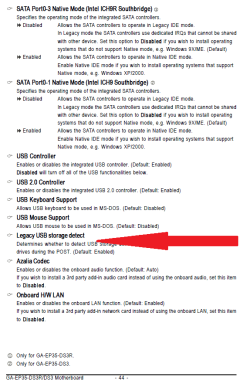
You could disable the stupid USB legacy support in the stupid BIOS. I would know if this was a stupid suggestion if you filled out the stupid system specs.
NO USB!

OK, I've got:
Q6600
4GB Ram
GA-P35 DS3R Gigabyte Motherboard
Radeon 2600 Pro video card
WD Black Edition Hard drives
Linksys WRT54GL router with Tomato firmware (not using wireless function)


Oh, I just tried again just now and somehow by selecting "No password is needed to wake up the PC" under Password protection on wakeup, I now can wake my PC by pressing the mouse:D, but I'm getting this error Event ID 12 HAL:confused:, how?

Thanks in advance for helping, just got too excited about this new RTM and trying too many things at one time, lol....but it's a wonderful OS, Windows 7 that is!


Log Name: System
Source: Microsoft-Windows-HAL
Date: 8/23/2009 6:36:41 PM
Event ID: 12
Task Category: None
Level: Error
Keywords: (1)
User: N/A
Computer: C2Q-01
Description:
The platform firmware has corrupted memory across the previous system power transition. Please check for updated firmware for your system.
Event Xml:
<Event xmlns="http://schemas.microsoft.com/win/2004/08/events/event">
<System>
<Provider Name="Microsoft-Windows-HAL" Guid="{63D1E632-95CC-4443-9312-AF927761D52A}" />
<EventID>12</EventID>
<Version>0</Version>
<Level>2</Level>
<Task>0</Task>
<Opcode>0</Opcode>
<Keywords>0x8000000000000001</Keywords>
<TimeCreated SystemTime="2009-08-24T01:36:41.528139200Z" />
<EventRecordID>2431</EventRecordID>
<Correlation />
<Execution ProcessID="4" ThreadID="3808" />
<Channel>System</Channel>
<Computer>C2Q-01</Computer>
<Security />
</System>
<EventData>
<Data Name="Count">1</Data>
<Data Name="FirstPage">14</Data>
<Data Name="LastPage">14</Data>
</EventData>
</Event>

 

My Computer My Computer

OS
Windows 7 Pro x64 RTM
CPU
Intel
ok hear is what you do get a air horn put it next to your speaker and blow and then shout wake up you darn lazy pc :p
 

My Computer My Computer

OS
Windows 7 rtm
Ops, sorry Antman:o. I thought you meant removing any USB devices connected to my PC...OK I will go into bios to disable that USB Legacy and will test and report back.

Thanks again for helping.
 

My Computer My Computer

OS
Windows 7 Pro x64 RTM
CPU
Intel
OK, disabling the Legacy USB has no effect, still HAL 12 Error:shock:...

I think maybe this is a case of my MB not liking S3(STR) in ACPI Suspend Type under bios, cause using S1(POS), I got no Error:), but my PC is not really "Sleep", here is why:


Bios - Power Management - ACPI Suspend Type = S3(STR) (Default)
Error 12 HAL
PC goes into full sleep, everything is shutdown, can wake up PC ONLY by double clicking the mouse.

Bios - Power Management - ACPI Suspend Type = S1(POS)
NO Error
However, I could still hear all the fans spinning, wake up PC by simply touching the keyboard or mouse.

What ACPI in bios are you guys using? S3 or S1?

Thanks.
 

My Computer My Computer

OS
Windows 7 Pro x64 RTM
CPU
Intel
Thanks!:geek:

NO USB!

OK, I've got:
Q6600
4GB Ram
GA-P35 DS3R Gigabyte Motherboard
Radeon 2600 Pro video card
WD Black Edition Hard drives
Linksys WRT54GL router with Tomato firmware (not using wireless function)


Oh, I just tried again just now and somehow by selecting "No password is needed to wake up the PC" under Password protection on wakeup, I now can wake my PC by pressing the mouse:D, but I'm getting this error Event ID 12 HAL:confused:, how?

Thanks in advance for helping, just got too excited about this new RTM and trying too many things at one time, lol....but it's a wonderful OS, Windows 7 that is!


Log Name: System
Source: Microsoft-Windows-HAL
Date: 8/23/2009 6:36:41 PM
Event ID: 12
Task Category: None
Level: Error
Keywords: (1)
User: N/A
Computer: C2Q-01
Description:
The platform firmware has corrupted memory across the previous system power transition. Please check for updated firmware for your system.
Event Xml:
<Event xmlns="http://schemas.microsoft.com/win/2004/08/events/event">
<System>
<Provider Name="Microsoft-Windows-HAL" Guid="{63D1E632-95CC-4443-9312-AF927761D52A}" />
<EventID>12</EventID>
<Version>0</Version>
<Level>2</Level>
<Task>0</Task>
<Opcode>0</Opcode>
<Keywords>0x8000000000000001</Keywords>
<TimeCreated SystemTime="2009-08-24T01:36:41.528139200Z" />
<EventRecordID>2431</EventRecordID>
<Correlation />
<Execution ProcessID="4" ThreadID="3808" />
<Channel>System</Channel>
<Computer>C2Q-01</Computer>
<Security />
</System>
<EventData>
<Data Name="Count">1</Data>
<Data Name="FirstPage">14</Data>
<Data Name="LastPage">14</Data>
</EventData>
</Event>

by filling out you specs they meant on your profile so they just have to click the button under your posts and they seem them.
 

My Computer My Computer

Computer Manufacturer/Model Number
Seanix Desktop PC
OS
Windows 7 Ultimate 32 bit
CPU
Intel Core 2 Duo CPU E4500 2.20 GHz
Memory
1.99 GB
Graphics Card(s)
Intel G33/G31 Express Chipset Family (256 MB)
Sound Card
Realtek ALC888/1200
Monitor(s) Displays
DELL
Screen Resolution
1280 X 1024
Hard Drives
320GB Internal
200GB External
Case
Seanix
Keyboard
Seanix USB Keyboard
Mouse
Seanix USB Keyboard
Internet Speed
Broadband
Other Info
Getting close to 3 years old.
Woot, I got it to work now:D in S3(STR) with NO Error.....at first I thought updating the Bios to the latest would solve the problem, I updated to the latest F13 and still the same Error 12 HAL.

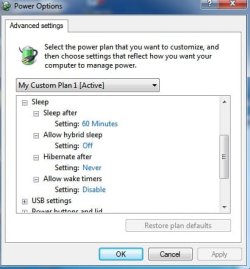
Simply by changing the "Allow hybrid sleep" from ON to OFF (Under Balance Plan) solves the problem:p, no error and everything shutdown and can wake/resume by double clicking of the mouse!

I hope this is useful for those who are also experiencing the same problem!
 

Attachments

  • PP1.jpg
    PP1.jpg
    25.8 KB · Views: 109

My Computer My Computer

OS
Windows 7 Pro x64 RTM
CPU
Intel
Back
Top