Wifi antennae adaption - will it work? Please help!

Music Guy123

New member
Member
VIP
Local time
9:04 AM
Messages
197
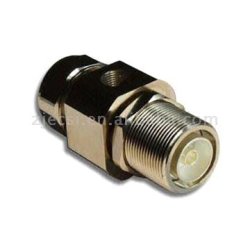
Hi there, this may sound mad, I am hoping it will work, i have no money to spend on a usb dongle or similar. My wifi card (pictured below, sorry for the rubbish picture!) is an Atheros adapter and I need to boost my receiving range! I guess the white and black cables coming of the top are for the antennas but i don't really know much about it! I have a good antenna that I can plug into a rf connector (example of which is pictured below). I have a couple of spare wires that connect the the card where the white and black ones do if that is needed. I know this sounds confusing and I hope someone could help or explain this to me! If you are confused, please tell me and I will try to explain what I am trying to do in more detail! Any help much appreciated, here are the pics:
 

Attachments

  • photo.jpg
    photo.jpg
    45.4 KB · Views: 28
  • RF connector.jpg
    RF connector.jpg
    10 KB · Views: 15

My Computer My Computer

Computer Manufacturer/Model Number
Packard Bell
OS
Windows 7 Home Premium 64bit
CPU
AMD Turion(tm) Dual-Core Mobile M500
Motherboard
Packard Bell EasyNote LJ71
Memory
4GB (2x2GB) DDR2
Graphics Card(s)
AMD M880G with ATI Mobility Radeon HD 4200
Sound Card
ATI High Definition Audio Device (Integrated)
Monitor(s) Displays
1st: Built in 17.3" 16:9 2nd: Philips 17.1" 4:3
Screen Resolution
1st: 1600x900 2nd: 1280x1024
Hard Drives
2x WD blue scorpio 500GB
PSU
Laptop battery/power brick
Case
Laptop
Cooling
Custom built cooling stand
Keyboard
Integrated
Mouse
Touchpad & logitek wireless mouse M205
Internet Speed
0.2mb/s download
Other Info
Wireless adapter:
Atheros AR5B39 Wireless Network Adapter

My Computer My Computer

Computer Manufacturer/Model Number
Packard Bell
OS
Windows 7 Home Premium 64bit
CPU
AMD Turion(tm) Dual-Core Mobile M500
Motherboard
Packard Bell EasyNote LJ71
Memory
4GB (2x2GB) DDR2
Graphics Card(s)
AMD M880G with ATI Mobility Radeon HD 4200
Sound Card
ATI High Definition Audio Device (Integrated)
Monitor(s) Displays
1st: Built in 17.3" 16:9 2nd: Philips 17.1" 4:3
Screen Resolution
1st: 1600x900 2nd: 1280x1024
Hard Drives
2x WD blue scorpio 500GB
PSU
Laptop battery/power brick
Case
Laptop
Cooling
Custom built cooling stand
Keyboard
Integrated
Mouse
Touchpad & logitek wireless mouse M205
Internet Speed
0.2mb/s download
Other Info
Wireless adapter:
Atheros AR5B39 Wireless Network Adapter
Any help?
 

My Computer My Computer

Computer Manufacturer/Model Number
Packard Bell
OS
Windows 7 Home Premium 64bit
CPU
AMD Turion(tm) Dual-Core Mobile M500
Motherboard
Packard Bell EasyNote LJ71
Memory
4GB (2x2GB) DDR2
Graphics Card(s)
AMD M880G with ATI Mobility Radeon HD 4200
Sound Card
ATI High Definition Audio Device (Integrated)
Monitor(s) Displays
1st: Built in 17.3" 16:9 2nd: Philips 17.1" 4:3
Screen Resolution
1st: 1600x900 2nd: 1280x1024
Hard Drives
2x WD blue scorpio 500GB
PSU
Laptop battery/power brick
Case
Laptop
Cooling
Custom built cooling stand
Keyboard
Integrated
Mouse
Touchpad & logitek wireless mouse M205
Internet Speed
0.2mb/s download
Other Info
Wireless adapter:
Atheros AR5B39 Wireless Network Adapter
Bump! Please help!
 

My Computer My Computer

Computer Manufacturer/Model Number
Packard Bell
OS
Windows 7 Home Premium 64bit
CPU
AMD Turion(tm) Dual-Core Mobile M500
Motherboard
Packard Bell EasyNote LJ71
Memory
4GB (2x2GB) DDR2
Graphics Card(s)
AMD M880G with ATI Mobility Radeon HD 4200
Sound Card
ATI High Definition Audio Device (Integrated)
Monitor(s) Displays
1st: Built in 17.3" 16:9 2nd: Philips 17.1" 4:3
Screen Resolution
1st: 1600x900 2nd: 1280x1024
Hard Drives
2x WD blue scorpio 500GB
PSU
Laptop battery/power brick
Case
Laptop
Cooling
Custom built cooling stand
Keyboard
Integrated
Mouse
Touchpad & logitek wireless mouse M205
Internet Speed
0.2mb/s download
Other Info
Wireless adapter:
Atheros AR5B39 Wireless Network Adapter
You can not guess about the wiring or else you will fry the card, and quite possibly your machine. See post #9 in your link.

Can you find any information on that Atheros adapter? I did try to look, but the site is nothing but bells and whistles, no real information.

Search for extend atheros adapter range or substitute wi-fi for atheros.

Found this, but I am not sure it will be helpful: Extend Atheros adapter range | Instructables
 

My Computer My Computer

Computer type
PC/Desktop
Computer Manufacturer/Model Number
Gateway DX4831-01e (Mid-Tower Desktop)
OS
Originally Win 7 Hm Prem x64 Ver 6.1.7600 Build 7601-SP1 | Upgraded to Windows 10 December 14, 2019
CPU
Intel i3 530 2.93GHz, 2933MHz 2 Cores 4 Logical Processors
Motherboard
Gateway H57M01 133 megahertz
Memory
6GB of 1,333MHz DDR3 SDRAM
Graphics Card(s)
32MB Intel Graphics Media Accelerator HD IGChip
Sound Card
Realtek High Definition Audio
Monitor(s) Displays
Gateway HX2000 20inch TFT active matrix TN
Screen Resolution
1600 x 900 x 59 hertz
Hard Drives
WDC WD10EADS-00M2B0 [HDD] (1000.20 GB) -- drive 0,
HL-DT-ST DVDRAM GH41N [CD-ROM dr]
Four card readers, and Four USB 2.0
PSU
300watts.
Case
Mid-Tower Desktop
Cooling
Stock from Gateway
Keyboard
Natural Ergonomic Keyboard 4000, see Other Info
Mouse
Orig. Gateway wore out now using Insignia USB wired optical
Internet Speed
Vz FIOS 10ms png 57.64Mbps down 65.53Mbps up Speedtest.org
Antivirus
Zamana Anti-logger with Anti-malware, MSE, Windows Firewall,
Browser
IE11.0.9600.19399-Upd ver11.0.135, Firefox 68.0.1 x64
Other Info
System Specs by Belarc.

BIOS: American Megatrends Inc. P01-A0 11/17/2009

Replaced the MS 'Natural' Standard PS/2 Enhanced 101-102 Keyboard with a new Natural Ergonomic Keyboard 4000 on August 1st 2014.

Canon Pixma MG3222 Printer.

Updated to IE11 on 12102015 | Fios Quantum Router g1100

Additional AV: SpywareBlaster, manual Mbam, SAS
Thank you very much for replying, it is much appreciated! My wifi card is an atheros AR5B93. I have seperate connectors to the white and black cables connect and my intention was to swap the cables with my ones and connect that to an external anntenna. This is similar to what the internal antenna looks like: Redirect Notice

I was guessing that I had to antennas and that if I did this: How to hack a satellite dish into a WiFi signal booster | Video « Wonder How To twice, I would be able to use both antennas. tbh, it won't be quite like that video but you get the idea!
 

My Computer My Computer

Computer Manufacturer/Model Number
Packard Bell
OS
Windows 7 Home Premium 64bit
CPU
AMD Turion(tm) Dual-Core Mobile M500
Motherboard
Packard Bell EasyNote LJ71
Memory
4GB (2x2GB) DDR2
Graphics Card(s)
AMD M880G with ATI Mobility Radeon HD 4200
Sound Card
ATI High Definition Audio Device (Integrated)
Monitor(s) Displays
1st: Built in 17.3" 16:9 2nd: Philips 17.1" 4:3
Screen Resolution
1st: 1600x900 2nd: 1280x1024
Hard Drives
2x WD blue scorpio 500GB
PSU
Laptop battery/power brick
Case
Laptop
Cooling
Custom built cooling stand
Keyboard
Integrated
Mouse
Touchpad & logitek wireless mouse M205
Internet Speed
0.2mb/s download
Other Info
Wireless adapter:
Atheros AR5B39 Wireless Network Adapter
You may not get good results if you would be using a dish, as they are not omnidirectional.

btw; your Wonder link does not work for me.
 

My Computer My Computer

Computer type
PC/Desktop
Computer Manufacturer/Model Number
Gateway DX4831-01e (Mid-Tower Desktop)
OS
Originally Win 7 Hm Prem x64 Ver 6.1.7600 Build 7601-SP1 | Upgraded to Windows 10 December 14, 2019
CPU
Intel i3 530 2.93GHz, 2933MHz 2 Cores 4 Logical Processors
Motherboard
Gateway H57M01 133 megahertz
Memory
6GB of 1,333MHz DDR3 SDRAM
Graphics Card(s)
32MB Intel Graphics Media Accelerator HD IGChip
Sound Card
Realtek High Definition Audio
Monitor(s) Displays
Gateway HX2000 20inch TFT active matrix TN
Screen Resolution
1600 x 900 x 59 hertz
Hard Drives
WDC WD10EADS-00M2B0 [HDD] (1000.20 GB) -- drive 0,
HL-DT-ST DVDRAM GH41N [CD-ROM dr]
Four card readers, and Four USB 2.0
PSU
300watts.
Case
Mid-Tower Desktop
Cooling
Stock from Gateway
Keyboard
Natural Ergonomic Keyboard 4000, see Other Info
Mouse
Orig. Gateway wore out now using Insignia USB wired optical
Internet Speed
Vz FIOS 10ms png 57.64Mbps down 65.53Mbps up Speedtest.org
Antivirus
Zamana Anti-logger with Anti-malware, MSE, Windows Firewall,
Browser
IE11.0.9600.19399-Upd ver11.0.135, Firefox 68.0.1 x64
Other Info
System Specs by Belarc.

BIOS: American Megatrends Inc. P01-A0 11/17/2009

Replaced the MS 'Natural' Standard PS/2 Enhanced 101-102 Keyboard with a new Natural Ergonomic Keyboard 4000 on August 1st 2014.

Canon Pixma MG3222 Printer.

Updated to IE11 on 12102015 | Fios Quantum Router g1100

Additional AV: SpywareBlaster, manual Mbam, SAS

My Computer My Computer

Computer Manufacturer/Model Number
Packard Bell
OS
Windows 7 Home Premium 64bit
CPU
AMD Turion(tm) Dual-Core Mobile M500
Motherboard
Packard Bell EasyNote LJ71
Memory
4GB (2x2GB) DDR2
Graphics Card(s)
AMD M880G with ATI Mobility Radeon HD 4200
Sound Card
ATI High Definition Audio Device (Integrated)
Monitor(s) Displays
1st: Built in 17.3" 16:9 2nd: Philips 17.1" 4:3
Screen Resolution
1st: 1600x900 2nd: 1280x1024
Hard Drives
2x WD blue scorpio 500GB
PSU
Laptop battery/power brick
Case
Laptop
Cooling
Custom built cooling stand
Keyboard
Integrated
Mouse
Touchpad & logitek wireless mouse M205
Internet Speed
0.2mb/s download
Other Info
Wireless adapter:
Atheros AR5B39 Wireless Network Adapter
Bump?
 

My Computer My Computer

Computer Manufacturer/Model Number
Packard Bell
OS
Windows 7 Home Premium 64bit
CPU
AMD Turion(tm) Dual-Core Mobile M500
Motherboard
Packard Bell EasyNote LJ71
Memory
4GB (2x2GB) DDR2
Graphics Card(s)
AMD M880G with ATI Mobility Radeon HD 4200
Sound Card
ATI High Definition Audio Device (Integrated)
Monitor(s) Displays
1st: Built in 17.3" 16:9 2nd: Philips 17.1" 4:3
Screen Resolution
1st: 1600x900 2nd: 1280x1024
Hard Drives
2x WD blue scorpio 500GB
PSU
Laptop battery/power brick
Case
Laptop
Cooling
Custom built cooling stand
Keyboard
Integrated
Mouse
Touchpad & logitek wireless mouse M205
Internet Speed
0.2mb/s download
Other Info
Wireless adapter:
Atheros AR5B39 Wireless Network Adapter
Sure, its still possible that I could still help.

What more do you need?

You have the general idea of what you want to build. You need to gather the materials, and build it.

The only thing I see that may hold you up is you do not know for sure how to connect your project to your wi-fi card.

It does look like those black, and white wires are for the antenna connection.
See pixs 4,5,6 at : Part 3: Installing an atheros wlan card
They slide/snap on to a antenna connection.

What do yours connect to? Can you show more pixs? Need more pixs!

It would also help if you filled out your System Specs, especially the make/model/serial number of that Atheros adapter.
 

My Computer My Computer

Computer type
PC/Desktop
Computer Manufacturer/Model Number
Gateway DX4831-01e (Mid-Tower Desktop)
OS
Originally Win 7 Hm Prem x64 Ver 6.1.7600 Build 7601-SP1 | Upgraded to Windows 10 December 14, 2019
CPU
Intel i3 530 2.93GHz, 2933MHz 2 Cores 4 Logical Processors
Motherboard
Gateway H57M01 133 megahertz
Memory
6GB of 1,333MHz DDR3 SDRAM
Graphics Card(s)
32MB Intel Graphics Media Accelerator HD IGChip
Sound Card
Realtek High Definition Audio
Monitor(s) Displays
Gateway HX2000 20inch TFT active matrix TN
Screen Resolution
1600 x 900 x 59 hertz
Hard Drives
WDC WD10EADS-00M2B0 [HDD] (1000.20 GB) -- drive 0,
HL-DT-ST DVDRAM GH41N [CD-ROM dr]
Four card readers, and Four USB 2.0
PSU
300watts.
Case
Mid-Tower Desktop
Cooling
Stock from Gateway
Keyboard
Natural Ergonomic Keyboard 4000, see Other Info
Mouse
Orig. Gateway wore out now using Insignia USB wired optical
Internet Speed
Vz FIOS 10ms png 57.64Mbps down 65.53Mbps up Speedtest.org
Antivirus
Zamana Anti-logger with Anti-malware, MSE, Windows Firewall,
Browser
IE11.0.9600.19399-Upd ver11.0.135, Firefox 68.0.1 x64
Other Info
System Specs by Belarc.

BIOS: American Megatrends Inc. P01-A0 11/17/2009

Replaced the MS 'Natural' Standard PS/2 Enhanced 101-102 Keyboard with a new Natural Ergonomic Keyboard 4000 on August 1st 2014.

Canon Pixma MG3222 Printer.

Updated to IE11 on 12102015 | Fios Quantum Router g1100

Additional AV: SpywareBlaster, manual Mbam, SAS
Ok, will fill that in later. I have spare white and black wires from another laptop that I was going to use. Both wires are coaxial style so does that mean that I can just make two of those aerials shown in the vid and put them side by side, would that work? I don't have time now, but when I do, I will fill in the system specs, thank you very much for your help, much appreciated!

P.S. Am trying to rep you but it won't allow me, apparently I need to spread it round or something, some lucky people are getting random rep!
 
Last edited:

My Computer My Computer

Computer Manufacturer/Model Number
Packard Bell
OS
Windows 7 Home Premium 64bit
CPU
AMD Turion(tm) Dual-Core Mobile M500
Motherboard
Packard Bell EasyNote LJ71
Memory
4GB (2x2GB) DDR2
Graphics Card(s)
AMD M880G with ATI Mobility Radeon HD 4200
Sound Card
ATI High Definition Audio Device (Integrated)
Monitor(s) Displays
1st: Built in 17.3" 16:9 2nd: Philips 17.1" 4:3
Screen Resolution
1st: 1600x900 2nd: 1280x1024
Hard Drives
2x WD blue scorpio 500GB
PSU
Laptop battery/power brick
Case
Laptop
Cooling
Custom built cooling stand
Keyboard
Integrated
Mouse
Touchpad & logitek wireless mouse M205
Internet Speed
0.2mb/s download
Other Info
Wireless adapter:
Atheros AR5B39 Wireless Network Adapter
Maybe I didnt make myself clear. I just need help to check to see if I just make two of those antennas, one for the black, one for the white. Is that right? Hope you can help and as before, thanks very much for your help.
 

My Computer My Computer

Computer Manufacturer/Model Number
Packard Bell
OS
Windows 7 Home Premium 64bit
CPU
AMD Turion(tm) Dual-Core Mobile M500
Motherboard
Packard Bell EasyNote LJ71
Memory
4GB (2x2GB) DDR2
Graphics Card(s)
AMD M880G with ATI Mobility Radeon HD 4200
Sound Card
ATI High Definition Audio Device (Integrated)
Monitor(s) Displays
1st: Built in 17.3" 16:9 2nd: Philips 17.1" 4:3
Screen Resolution
1st: 1600x900 2nd: 1280x1024
Hard Drives
2x WD blue scorpio 500GB
PSU
Laptop battery/power brick
Case
Laptop
Cooling
Custom built cooling stand
Keyboard
Integrated
Mouse
Touchpad & logitek wireless mouse M205
Internet Speed
0.2mb/s download
Other Info
Wireless adapter:
Atheros AR5B39 Wireless Network Adapter

My Computer My Computer

Computer type
PC/Desktop
Computer Manufacturer/Model Number
Gateway DX4831-01e (Mid-Tower Desktop)
OS
Originally Win 7 Hm Prem x64 Ver 6.1.7600 Build 7601-SP1 | Upgraded to Windows 10 December 14, 2019
CPU
Intel i3 530 2.93GHz, 2933MHz 2 Cores 4 Logical Processors
Motherboard
Gateway H57M01 133 megahertz
Memory
6GB of 1,333MHz DDR3 SDRAM
Graphics Card(s)
32MB Intel Graphics Media Accelerator HD IGChip
Sound Card
Realtek High Definition Audio
Monitor(s) Displays
Gateway HX2000 20inch TFT active matrix TN
Screen Resolution
1600 x 900 x 59 hertz
Hard Drives
WDC WD10EADS-00M2B0 [HDD] (1000.20 GB) -- drive 0,
HL-DT-ST DVDRAM GH41N [CD-ROM dr]
Four card readers, and Four USB 2.0
PSU
300watts.
Case
Mid-Tower Desktop
Cooling
Stock from Gateway
Keyboard
Natural Ergonomic Keyboard 4000, see Other Info
Mouse
Orig. Gateway wore out now using Insignia USB wired optical
Internet Speed
Vz FIOS 10ms png 57.64Mbps down 65.53Mbps up Speedtest.org
Antivirus
Zamana Anti-logger with Anti-malware, MSE, Windows Firewall,
Browser
IE11.0.9600.19399-Upd ver11.0.135, Firefox 68.0.1 x64
Other Info
System Specs by Belarc.

BIOS: American Megatrends Inc. P01-A0 11/17/2009

Replaced the MS 'Natural' Standard PS/2 Enhanced 101-102 Keyboard with a new Natural Ergonomic Keyboard 4000 on August 1st 2014.

Canon Pixma MG3222 Printer.

Updated to IE11 on 12102015 | Fios Quantum Router g1100

Additional AV: SpywareBlaster, manual Mbam, SAS
Right, now I am really confused! Thank you so much for replying and all that info! I understand that where to solder the wires but I have two cables coming of the wifi card, I know these go to antennas and I know the white is the main and the black is the aux but I don't know what that means! what do you mean by a way to connect wires to the transformer? And finally, from the wiki pages you posted, I understand that the wires have to be a certain distance apart, is that true? Thank you very much for replying, much appreciated! Sorry this reply was late, i am in the UK so was fast asleep when you posted! I am trying to plus rep you but it is quite hard!
 

My Computer My Computer

Computer Manufacturer/Model Number
Packard Bell
OS
Windows 7 Home Premium 64bit
CPU
AMD Turion(tm) Dual-Core Mobile M500
Motherboard
Packard Bell EasyNote LJ71
Memory
4GB (2x2GB) DDR2
Graphics Card(s)
AMD M880G with ATI Mobility Radeon HD 4200
Sound Card
ATI High Definition Audio Device (Integrated)
Monitor(s) Displays
1st: Built in 17.3" 16:9 2nd: Philips 17.1" 4:3
Screen Resolution
1st: 1600x900 2nd: 1280x1024
Hard Drives
2x WD blue scorpio 500GB
PSU
Laptop battery/power brick
Case
Laptop
Cooling
Custom built cooling stand
Keyboard
Integrated
Mouse
Touchpad & logitek wireless mouse M205
Internet Speed
0.2mb/s download
Other Info
Wireless adapter:
Atheros AR5B39 Wireless Network Adapter
Right, now I am really confused! Thank you so much for replying and all that info! I understand that where to solder the wires but I have two cables coming of the wifi card, I know these go to antennas and I know the white is the main and the black is the aux but I don't know what that means!
They can be different, but in your case "White the main" means that it is the lead that is "hot", and should be connected to the copper center lead of the coax. "Black the aux" is the ground, and should be connected to the braided silver shielding of the coax.

Don't be too concerned about hot, and ground. The voltages are so low, they won't present a problem if you touch them, and they shouldn't cause a problem with the card either because all your dealing with is the signal strength, although there are exceptions.

A directional antenna transmitter with a sufficient amount of signal power can fry equipment if it is aimed at the equipment's antenna.

what do you mean by a way to connect wires to the transformer?
If you are going to use coax, the coax connector will thread onto the transformer, and you need a way to make a reliable connection from the two wire lead of the wi-fi card to the two wire lead of the transformer. Male/Female spade connectors should work, and will allow you to change them.
It will also allow you to swap them around to see if you get better reception.


And finally, from the wiki pages you posted, I understand that the wires have to be a certain distance apart, is that true?
Yes in the case of the twin lead. This is already built-in by the manufacturer.
Twin-lead is constructed of two multistranded copper or copperclad steel wires, held a precise distance apart by a plastic (usually polyethylene) ribbon. The uniform spacing of the wires is the key to the cable's function as a parallel transmission line; any abrupt changes in spacing would reflect radio frequency power back toward the source. The plastic also covers and insulates the wires.
Source: Twin-lead - Wikipedia, the free encyclopedia
It won't affect the white, and black wi-fi wires or the coax.


Thank you very much for replying, much appreciated! Sorry this reply was late, i am in the UK so was fast asleep when you posted! I am trying to plus rep you but it is quite hard!
Your welcome!

Do not worry about the time or the rep. The time difference is an inherent "nature of the beast" when dealing with posting on a forum.

And, rep is rep. You can't come back to me until after you've rep-ed at least 15 other members.
Try to relax, and enjoy your project.

See: http://www.sevenforums.com/chillout-room/197622-reputation-badges-7-a.html

Please! I would like to see your System Specs!
 

My Computer My Computer

Computer type
PC/Desktop
Computer Manufacturer/Model Number
Gateway DX4831-01e (Mid-Tower Desktop)
OS
Originally Win 7 Hm Prem x64 Ver 6.1.7600 Build 7601-SP1 | Upgraded to Windows 10 December 14, 2019
CPU
Intel i3 530 2.93GHz, 2933MHz 2 Cores 4 Logical Processors
Motherboard
Gateway H57M01 133 megahertz
Memory
6GB of 1,333MHz DDR3 SDRAM
Graphics Card(s)
32MB Intel Graphics Media Accelerator HD IGChip
Sound Card
Realtek High Definition Audio
Monitor(s) Displays
Gateway HX2000 20inch TFT active matrix TN
Screen Resolution
1600 x 900 x 59 hertz
Hard Drives
WDC WD10EADS-00M2B0 [HDD] (1000.20 GB) -- drive 0,
HL-DT-ST DVDRAM GH41N [CD-ROM dr]
Four card readers, and Four USB 2.0
PSU
300watts.
Case
Mid-Tower Desktop
Cooling
Stock from Gateway
Keyboard
Natural Ergonomic Keyboard 4000, see Other Info
Mouse
Orig. Gateway wore out now using Insignia USB wired optical
Internet Speed
Vz FIOS 10ms png 57.64Mbps down 65.53Mbps up Speedtest.org
Antivirus
Zamana Anti-logger with Anti-malware, MSE, Windows Firewall,
Browser
IE11.0.9600.19399-Upd ver11.0.135, Firefox 68.0.1 x64
Other Info
System Specs by Belarc.

BIOS: American Megatrends Inc. P01-A0 11/17/2009

Replaced the MS 'Natural' Standard PS/2 Enhanced 101-102 Keyboard with a new Natural Ergonomic Keyboard 4000 on August 1st 2014.

Canon Pixma MG3222 Printer.

Updated to IE11 on 12102015 | Fios Quantum Router g1100

Additional AV: SpywareBlaster, manual Mbam, SAS
Well, what can I say but thank you! It is almost explained, I guess what you mean by frying the card is if I go right up to a router or with in 10m of it and stick the antenna pointing at it? My reason for this is because I like to work outside and I can't get internet, hopefully I could use this. I am still confused about one thing though, the wires have two copper connections to the card, does this mean that each wire has to cables in it (probably in a coaxial style?)? I think you have seen the connectors, they have two copper connectors. Just hope you can clear this up for me! I also did my system specs! Thank you so much again!
 

My Computer My Computer

Computer Manufacturer/Model Number
Packard Bell
OS
Windows 7 Home Premium 64bit
CPU
AMD Turion(tm) Dual-Core Mobile M500
Motherboard
Packard Bell EasyNote LJ71
Memory
4GB (2x2GB) DDR2
Graphics Card(s)
AMD M880G with ATI Mobility Radeon HD 4200
Sound Card
ATI High Definition Audio Device (Integrated)
Monitor(s) Displays
1st: Built in 17.3" 16:9 2nd: Philips 17.1" 4:3
Screen Resolution
1st: 1600x900 2nd: 1280x1024
Hard Drives
2x WD blue scorpio 500GB
PSU
Laptop battery/power brick
Case
Laptop
Cooling
Custom built cooling stand
Keyboard
Integrated
Mouse
Touchpad & logitek wireless mouse M205
Internet Speed
0.2mb/s download
Other Info
Wireless adapter:
Atheros AR5B39 Wireless Network Adapter
Well, what can I say but thank you! It is almost explained, I guess what you mean by frying the card is if I go right up to a router or with in 10m of it and stick the antenna pointing at it?
If you mean the antenna you are trying to build no, it is only used as a receiver not a transmitter.

If you mean something industrial like a television or radio tower then yes.
You have to have a generator, amplifiers, and RF equipment to transmit the amplified signal.
Again, yours is only used as a receiver not a transmitter.

I remember years ago when we were young, and dumb, crazy Eddie a friend of mine climbed a television tower that also had Microwave repeaters/transmitters on it to get a look at the view.
Within a few days he wasn't acting right, and his parents took him to the doctors.

They found out his brain waves weren't right, and he was slow from that time on. His body apparently intercepted some of the frequencies. Its why we called him crazy Eddie.


My reason for this is because I like to work outside and I can't get internet, hopefully I could use this. I am still confused about one thing though, the wires have two copper connections to the card, does this mean that each wire has to <--(Did you mean two, not, to, here?) cables in it (probably in a coaxial style?)?
I think you have seen the connectors, they have two copper connectors. Just hope you can clear this up for me! I also did my system specs! Thank you so much again!
Do you see my underline in your quote?

No, each one of the wires, white, and black have only one conductor usually stranded copper.


Thank you for the specs. It will help me in looking for you.


I gotta go, will check back around 9, 10pm your time.
 

My Computer My Computer

Computer type
PC/Desktop
Computer Manufacturer/Model Number
Gateway DX4831-01e (Mid-Tower Desktop)
OS
Originally Win 7 Hm Prem x64 Ver 6.1.7600 Build 7601-SP1 | Upgraded to Windows 10 December 14, 2019
CPU
Intel i3 530 2.93GHz, 2933MHz 2 Cores 4 Logical Processors
Motherboard
Gateway H57M01 133 megahertz
Memory
6GB of 1,333MHz DDR3 SDRAM
Graphics Card(s)
32MB Intel Graphics Media Accelerator HD IGChip
Sound Card
Realtek High Definition Audio
Monitor(s) Displays
Gateway HX2000 20inch TFT active matrix TN
Screen Resolution
1600 x 900 x 59 hertz
Hard Drives
WDC WD10EADS-00M2B0 [HDD] (1000.20 GB) -- drive 0,
HL-DT-ST DVDRAM GH41N [CD-ROM dr]
Four card readers, and Four USB 2.0
PSU
300watts.
Case
Mid-Tower Desktop
Cooling
Stock from Gateway
Keyboard
Natural Ergonomic Keyboard 4000, see Other Info
Mouse
Orig. Gateway wore out now using Insignia USB wired optical
Internet Speed
Vz FIOS 10ms png 57.64Mbps down 65.53Mbps up Speedtest.org
Antivirus
Zamana Anti-logger with Anti-malware, MSE, Windows Firewall,
Browser
IE11.0.9600.19399-Upd ver11.0.135, Firefox 68.0.1 x64
Other Info
System Specs by Belarc.

BIOS: American Megatrends Inc. P01-A0 11/17/2009

Replaced the MS 'Natural' Standard PS/2 Enhanced 101-102 Keyboard with a new Natural Ergonomic Keyboard 4000 on August 1st 2014.

Canon Pixma MG3222 Printer.

Updated to IE11 on 12102015 | Fios Quantum Router g1100

Additional AV: SpywareBlaster, manual Mbam, SAS
  • Like
Reactions: 2xg
Yes I did mean two! I didn't realise each wire had only one wire inside it, I thought there were two as I only looked at the connectors. This makes a lot more sense now! Thank you so, so much! Is that story of your Eddie actually true? Also, I know this isn't the right place to post this but I have picked up a 52 in 1 mem card reader for £2! Bargain! The only problem was that the connector is one of those 9 port usb internal headers. Is there any way to possibly convert this to a standard male usb plug? This is what the connector looks like: Redirect Notice

I want to just connect it to a standard usb male plug. Here is a diagram of the uses of that internal header: Redirect Notice

I don't know whether this would help but it looks helpful: Redirect Notice
 

My Computer My Computer

Computer Manufacturer/Model Number
Packard Bell
OS
Windows 7 Home Premium 64bit
CPU
AMD Turion(tm) Dual-Core Mobile M500
Motherboard
Packard Bell EasyNote LJ71
Memory
4GB (2x2GB) DDR2
Graphics Card(s)
AMD M880G with ATI Mobility Radeon HD 4200
Sound Card
ATI High Definition Audio Device (Integrated)
Monitor(s) Displays
1st: Built in 17.3" 16:9 2nd: Philips 17.1" 4:3
Screen Resolution
1st: 1600x900 2nd: 1280x1024
Hard Drives
2x WD blue scorpio 500GB
PSU
Laptop battery/power brick
Case
Laptop
Cooling
Custom built cooling stand
Keyboard
Integrated
Mouse
Touchpad & logitek wireless mouse M205
Internet Speed
0.2mb/s download
Other Info
Wireless adapter:
Atheros AR5B39 Wireless Network Adapter
Yes the story is true.

Not without some difficulty, it would be easier to get a suitable adapter cable. one that has an male end to match what your pix shows, to a standard male usb plug on the other end.
 

My Computer My Computer

Computer type
PC/Desktop
Computer Manufacturer/Model Number
Gateway DX4831-01e (Mid-Tower Desktop)
OS
Originally Win 7 Hm Prem x64 Ver 6.1.7600 Build 7601-SP1 | Upgraded to Windows 10 December 14, 2019
CPU
Intel i3 530 2.93GHz, 2933MHz 2 Cores 4 Logical Processors
Motherboard
Gateway H57M01 133 megahertz
Memory
6GB of 1,333MHz DDR3 SDRAM
Graphics Card(s)
32MB Intel Graphics Media Accelerator HD IGChip
Sound Card
Realtek High Definition Audio
Monitor(s) Displays
Gateway HX2000 20inch TFT active matrix TN
Screen Resolution
1600 x 900 x 59 hertz
Hard Drives
WDC WD10EADS-00M2B0 [HDD] (1000.20 GB) -- drive 0,
HL-DT-ST DVDRAM GH41N [CD-ROM dr]
Four card readers, and Four USB 2.0
PSU
300watts.
Case
Mid-Tower Desktop
Cooling
Stock from Gateway
Keyboard
Natural Ergonomic Keyboard 4000, see Other Info
Mouse
Orig. Gateway wore out now using Insignia USB wired optical
Internet Speed
Vz FIOS 10ms png 57.64Mbps down 65.53Mbps up Speedtest.org
Antivirus
Zamana Anti-logger with Anti-malware, MSE, Windows Firewall,
Browser
IE11.0.9600.19399-Upd ver11.0.135, Firefox 68.0.1 x64
Other Info
System Specs by Belarc.

BIOS: American Megatrends Inc. P01-A0 11/17/2009

Replaced the MS 'Natural' Standard PS/2 Enhanced 101-102 Keyboard with a new Natural Ergonomic Keyboard 4000 on August 1st 2014.

Canon Pixma MG3222 Printer.

Updated to IE11 on 12102015 | Fios Quantum Router g1100

Additional AV: SpywareBlaster, manual Mbam, SAS
Ok, thank you very much, I think this is finished now. Thank you very much for all your help, I can't thank you enough!
 

My Computer My Computer

Computer Manufacturer/Model Number
Packard Bell
OS
Windows 7 Home Premium 64bit
CPU
AMD Turion(tm) Dual-Core Mobile M500
Motherboard
Packard Bell EasyNote LJ71
Memory
4GB (2x2GB) DDR2
Graphics Card(s)
AMD M880G with ATI Mobility Radeon HD 4200
Sound Card
ATI High Definition Audio Device (Integrated)
Monitor(s) Displays
1st: Built in 17.3" 16:9 2nd: Philips 17.1" 4:3
Screen Resolution
1st: 1600x900 2nd: 1280x1024
Hard Drives
2x WD blue scorpio 500GB
PSU
Laptop battery/power brick
Case
Laptop
Cooling
Custom built cooling stand
Keyboard
Integrated
Mouse
Touchpad & logitek wireless mouse M205
Internet Speed
0.2mb/s download
Other Info
Wireless adapter:
Atheros AR5B39 Wireless Network Adapter
Back
Top