Solved WiFi - No Connections

stormygale

New member
Local time
9:19 PM
Messages
21
Hi...

A brief description what I was doing to get into this situation.

I've a Dell Studio 1555 running Windows 7 Home Premium 64bit, it's installed with a Dell Wireless mini card 1397 which I've been trying to change to an Intel 533AN_HMW ( type N ) which I was unable to get it to work.
Swopping between the 2 cards wasn't a problem until I removed all the wireless applications, Dell & Broadcom, whilst trying to get the new card working, thinking it shouldn't be a problem because I had all the original drivers.
Now after changing back to the original Dell card I now cannot get that to work, win7 has identified the card & installed 'Dell Wireless 1397 WLAN mini-card' driver, but there are no wireless connections visible.

  • I can connect via wifi to my router with my smartphone so I know that is working.
  • I'm not sure if the WLAN is switched on, normally done using the 'F2' function key.
  • I've tried downloading new drivers from Dell with no change in the state.
  • Tried a system restore but this fails suggesting problems with the AV - turning this off doesn't have any effect.
  • IPCONFIG /all doesn't show the adaptor.

Any further help greatly appreciated. Thanks Mick
 

My Computer

Computer Manufacturer/Model Number
Dell Studio 1555
OS
Windows 7 Home Premium 64bit. + SP1
CPU
Pentium Dual Core T4200@2GHz
You need to go to dell website and download driver for your adapter and possibly broadcom.
The dell site lets you enter your system details to search for drivers.

Download drivers from other computer if you can and transfer to the dell.

Hope this works,
 

My Computer

Computer Manufacturer/Model Number
Restored IQon Desktop
OS
Windows 7 Ultimate 64bit
CPU
Core 2 Duo OC 2.0GHz E2140
Motherboard
Gigabyte
Memory
2GB DDR2
Graphics Card(s)
Geforce 8400GS OC'd
Monitor(s) Displays
32" LCD and 19" Monitor
Hard Drives
2 x 160GB
1 x 80GB
1 x 1TB External (My Baby) :)
Internet Speed
24Mbps
Thanks for the suggestion but I've already tried several different drivers Broadcom & Dell none seem the change the symptoms...

The only other thing I can think of trying is reload Win7 but wanted to explore all other options first.
 

My Computer

Computer Manufacturer/Model Number
Dell Studio 1555
OS
Windows 7 Home Premium 64bit. + SP1
CPU
Pentium Dual Core T4200@2GHz
Hi...

A brief description what I was doing to get into this situation.

I've a Dell Studio 1555 running Windows 7 Home Premium 64bit, it's installed with a Dell Wireless mini card 1397 which I've been trying to change to an Intel 533AN_HMW ( type N ) which I was unable to get it to work.
Swopping between the 2 cards wasn't a problem until I removed all the wireless applications, Dell & Broadcom, whilst trying to get the new card working, thinking it shouldn't be a problem because I had all the original drivers.
Now after changing back to the original Dell card I now cannot get that to work, win7 has identified the card & installed 'Dell Wireless 1397 WLAN mini-card' driver, but there are no wireless connections visible.

  • I can connect via wifi to my router with my smartphone so I know that is working.
  • I'm not sure if the WLAN is switched on, normally done using the 'F2' function key.
  • I've tried downloading new drivers from Dell with no change in the state.
  • Tried a system restore but this fails suggesting problems with the AV - turning this off doesn't have any effect.
  • IPCONFIG /all doesn't show the adaptor.
Any further help greatly appreciated. Thanks Mick

This Dell article seems to relate to your problem. It might be worth while to try the suggestions there.

studio 1555 wifi driver problem - Networking, Internet, Wireless Forum - Networking, Internet, Wireless - Dell Community
 

My Computer

Computer type
PC/Desktop
Computer Manufacturer/Model Number
Home built
OS
Windows 7 Ult, Windows 8.1 Pro,
CPU
Q9650-4.275GHz, E8600 4.5GHz, E6750-3.8GHz
Motherboard
Evga 780i FTW
Memory
G.Skill PC2 9600 1200Mhz 5 5 5 15 2T
Graphics Card(s)
GTX480
Sound Card
Asus Xonar D2
Monitor(s) Displays
HannsG
Screen Resolution
1680X1050
Hard Drives
GSkill Phoenix Pro 120GB SSD
PSU
ThermalTake Toughpower 1000Watt modular
Case
ThermalTake XaserV
Cooling
Xigmatek S1283
Keyboard
Logitech G15
Mouse
Logitech G9
Internet Speed
T1
Thanks Chev & Roderunner

I'll take a look at your suggestions tomorrow & let you know the outcome.. I'm not at home at present.
 

My Computer

Computer Manufacturer/Model Number
Dell Studio 1555
OS
Windows 7 Home Premium 64bit. + SP1
CPU
Pentium Dual Core T4200@2GHz
Hi...

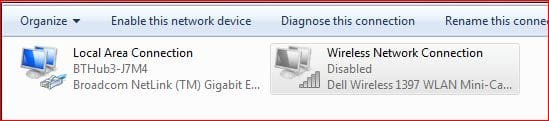
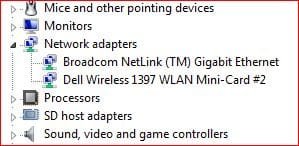
None of the above guides have helped I'm still unable to enable the wireless connection even though device manager is showing the adapter as enabled... I've attached screen shot to show what i mean.:cry:
 

Attachments

  • NetworkConns.JPG
    NetworkConns.JPG
    19.9 KB · Views: 27
  • DeviceMan.JPG
    DeviceMan.JPG
    18.3 KB · Views: 2,139

My Computer

Computer Manufacturer/Model Number
Dell Studio 1555
OS
Windows 7 Home Premium 64bit. + SP1
CPU
Pentium Dual Core T4200@2GHz
Further update - I've just installed a Belkin usb wifi adapter - this has installed OK & the wireless connection shows as 'enabled'.
The indicator on the adapter is flashing so seems to be working but there are no wireless connections available.

Just for clarification I can connected to my router via the smart-phone & can see my neighbors routers.

Is there something in windows stopping the connections ?
 

My Computer

Computer Manufacturer/Model Number
Dell Studio 1555
OS
Windows 7 Home Premium 64bit. + SP1
CPU
Pentium Dual Core T4200@2GHz
Thanks for the further input, I've already tried the settings but made no difference. Looks as though 's a re-install of win7.
 

My Computer

Computer Manufacturer/Model Number
Dell Studio 1555
OS
Windows 7 Home Premium 64bit. + SP1
CPU
Pentium Dual Core T4200@2GHz
What firewall do you use?
 

My Computer

Computer Manufacturer/Model Number
Look in my Signature.
OS
Win7 H.Prem. 32bit+SP1
I use Zone Alarm Extreme Security, tried turning it off & re-booting did'nt make any difference.
 

My Computer

Computer Manufacturer/Model Number
Dell Studio 1555
OS
Windows 7 Home Premium 64bit. + SP1
CPU
Pentium Dual Core T4200@2GHz
My Packard Bell Laptop has a wireless switch, does yours & is it ON?
 

My Computer

Computer Manufacturer/Model Number
Look in my Signature.
OS
Win7 H.Prem. 32bit+SP1
Yes, on my Dell it's < fn +F2 > I've tried turning it on but doesn't seem to have any effect. My initial diags was it's not working but don't know how to prove.

Strange thing I get the same result when I installed a Belkin USB adapter - no wireless conns. So it doesn't look like a driver or hardware problem with my original Dell card.
 

My Computer

Computer Manufacturer/Model Number
Dell Studio 1555
OS
Windows 7 Home Premium 64bit. + SP1
CPU
Pentium Dual Core T4200@2GHz
fn + F2 does nothing on mine. Are you sure their is not a dedicated switch ?
 

My Computer

Computer Manufacturer/Model Number
Look in my Signature.
OS
Win7 H.Prem. 32bit+SP1
I think fn+F2 is a Dell action, there isn't any other external switches. I'll check my user guide to see if there is any other way to activate the WLAN... Post the outcome.
 

My Computer

Computer Manufacturer/Model Number
Dell Studio 1555
OS
Windows 7 Home Premium 64bit. + SP1
CPU
Pentium Dual Core T4200@2GHz
No further WLAN switches found on my Dell.

In my device manager before removing my original driver the was an entry for 'Microsoft Virtual WiFi Miniport Adapter' which isn't there now could this be why there is not connections found ?

How can I re-install this driver.
 

My Computer

Computer Manufacturer/Model Number
Dell Studio 1555
OS
Windows 7 Home Premium 64bit. + SP1
CPU
Pentium Dual Core T4200@2GHz
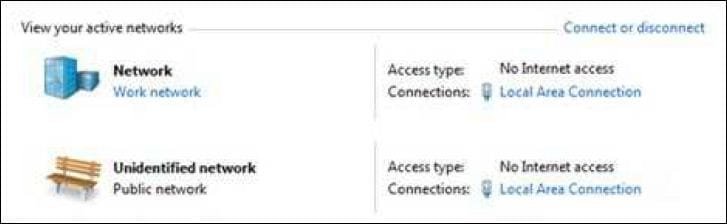
When you open 'Network and sharing center' does it look like this?

RR.JPG
 

My Computer

Computer Manufacturer/Model Number
Look in my Signature.
OS
Win7 H.Prem. 32bit+SP1
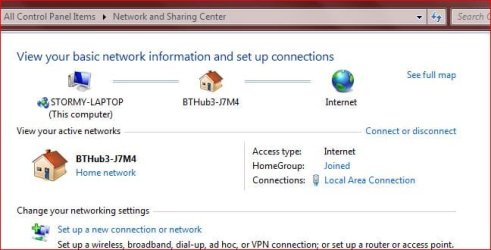
This is my network & sharing centre front screen when connected via ethernet.
 

Attachments

  • NetShare.JPG
    NetShare.JPG
    37 KB · Views: 23

My Computer

Computer Manufacturer/Model Number
Dell Studio 1555
OS
Windows 7 Home Premium 64bit. + SP1
CPU
Pentium Dual Core T4200@2GHz
Back
Top