
Solved WiFi - No Connections

You might try uninstalling the wireless NIC via device manager and then let the system find/install it again upon restart.
 

My Computer My Computer

Computer type
Laptop
Computer Manufacturer/Model Number
Employer provided Dell Latitude
OS
W7 Pro SP1 64bit
CPU
i7
Memory
8GB
Graphics Card(s)
Intel HD Graphics
Hard Drives
crappy SSD
Antivirus
Employer mandated Symantec Endpoint Protection
Browser
Pale Moon 64bit, IE11 64bit & Chrome 64bit
Roderunner thanks for another possible scenario but manually inputting IP addresses didn't work.

The problem I'm having is 'no connections' - no wifi networks detected not that I cannot connect to a network.
Actions taken already :
1) tried new drivers from Dell.
2) removed everything wireless in program & features, trying another install of the dell drivers.
3) installed a Belkin usb wifi adapter - still no connections visible
4) I can connect to my router & see my neighbors router with my smart phone.
5) The only difference I can see in device manager is that 'Microsoft Virtual WiFi Miniport is no longer under the 'Network Adapter' folder

I've hit a brick wall now - can only hope a re-install of windows works
 

My Computer My Computer

Computer Manufacturer/Model Number
Dell Studio 1555
OS
Windows 7 Home Premium 64bit. + SP1
CPU
Pentium Dual Core T4200@2GHz
Do you see the entry in the device manager for your wireless NIC? Right click on it and select uninstall then reboot.
 

My Computer My Computer

Computer type
Laptop
Computer Manufacturer/Model Number
Employer provided Dell Latitude
OS
W7 Pro SP1 64bit
CPU
i7
Memory
8GB
Graphics Card(s)
Intel HD Graphics
Hard Drives
crappy SSD
Antivirus
Employer mandated Symantec Endpoint Protection
Browser
Pale Moon 64bit, IE11 64bit & Chrome 64bit
Hi Username.. I've tried this many times just uninstalling & also deleting the driver software, just tried once more hoping it would resolve the issue. I'm afraid :cry: it didn't , Win 7 saw the new hardware on re-boot & installed the Dell 1397 driver.
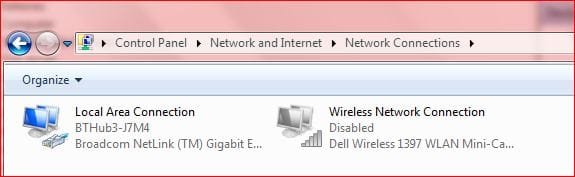
Under the Network connections the dell wireless connection is still shown as disabled but in device manager it's 'enabled'..

I cannot 'enable' wireless connection from the sharing center.
 

Attachments

  • NetworkConns.JPG
    NetworkConns.JPG
    22.7 KB · Views: 17

My Computer My Computer

Computer Manufacturer/Model Number
Dell Studio 1555
OS
Windows 7 Home Premium 64bit. + SP1
CPU
Pentium Dual Core T4200@2GHz
sorry - I did not see where that had been mentioned as having been tried.
If you are willing - before re-installing the OS - try this:
Uninstall the Dell drivers
Restart the computer
Uninstall that NIC via device manager
Restart the computer
Watch to see if it finds a copy of the Dell drivers... hopefully it will just use generic drivers from W7.
 

My Computer My Computer

Computer type
Laptop
Computer Manufacturer/Model Number
Employer provided Dell Latitude
OS
W7 Pro SP1 64bit
CPU
i7
Memory
8GB
Graphics Card(s)
Intel HD Graphics
Hard Drives
crappy SSD
Antivirus
Employer mandated Symantec Endpoint Protection
Browser
Pale Moon 64bit, IE11 64bit & Chrome 64bit
When you installed the Belkin USB WiFi adapter - did it show as disabled too?
edit: I see where you already said that the USB showed as enabled but found no APs.
:::scratches head:::

Have you got a LAN cable plugged in?
Do these wireless NICs have a feature like:
Disable Upon Wired Connect
 

My Computer My Computer

Computer type
Laptop
Computer Manufacturer/Model Number
Employer provided Dell Latitude
OS
W7 Pro SP1 64bit
CPU
i7
Memory
8GB
Graphics Card(s)
Intel HD Graphics
Hard Drives
crappy SSD
Antivirus
Employer mandated Symantec Endpoint Protection
Browser
Pale Moon 64bit, IE11 64bit & Chrome 64bit
Sorry - also have tried this, when i removed all the dell software drivers & un-install the Nic card, on reboot win 7 finds a basic dell driver, doesn't seem to find a generic one.

Niether this basic one or the updated ones work, but I don't think it's a driver issue because I've also installed a Belkin usb adapter. This also fails the find any wireless connections although in the network connections its shown a enabled.

I've also checked that network discovery is turned on.
 

My Computer My Computer

Computer Manufacturer/Model Number
Dell Studio 1555
OS
Windows 7 Home Premium 64bit. + SP1
CPU
Pentium Dual Core T4200@2GHz

My Computer My Computer

Computer type
Laptop
Computer Manufacturer/Model Number
Employer provided Dell Latitude
OS
W7 Pro SP1 64bit
CPU
i7
Memory
8GB
Graphics Card(s)
Intel HD Graphics
Hard Drives
crappy SSD
Antivirus
Employer mandated Symantec Endpoint Protection
Browser
Pale Moon 64bit, IE11 64bit & Chrome 64bit
Thanks Username for your input - I think it will be a re-install but will not be for a few days yet I want to make sure I've everything I need as a backup on another disc just in case I have to go for a clean install.

The laptop was supplied with vista & upgraded to Win 7 with a dell upgrade disc. So not sure if it will go as I hope. :(
 

My Computer My Computer

Computer Manufacturer/Model Number
Dell Studio 1555
OS
Windows 7 Home Premium 64bit. + SP1
CPU
Pentium Dual Core T4200@2GHz
Thanks for the info Roderunner, you can never have too much.

If the re-install doesn't cure the fault I will not be buying a new PC - I'll relocate the router so that I can sit comfortably when connected.

Thanks ALL for your suggestions
 

My Computer My Computer

Computer Manufacturer/Model Number
Dell Studio 1555
OS
Windows 7 Home Premium 64bit. + SP1
CPU
Pentium Dual Core T4200@2GHz
I wish you good luck, keep in touch.
 

My Computer My Computer

Computer Manufacturer/Model Number
Look in my Signature.
OS
Win7 H.Prem. 32bit+SP1
Hi Roderunner...

I've been trying to used the upgrade option in your process but the ISO files in the link seem to be older than my version of windows. I've tried 2 different files each report 'Your current version of Windows is more recent than the version you are trying to upgrade to. Windows cannot complete the upgrade.'..

Have you used the files to do the upgrade ?
 

My Computer My Computer

Computer Manufacturer/Model Number
Dell Studio 1555
OS
Windows 7 Home Premium 64bit. + SP1
CPU
Pentium Dual Core T4200@2GHz
Yes I have, once to do an upgrade as in the method described, on my desktop, plus once to do a clean install then upgrade on my Laptop.
Was the version you downloaded the same as your Operating System.?
 

My Computer My Computer

Computer Manufacturer/Model Number
Look in my Signature.
OS
Win7 H.Prem. 32bit+SP1
Yes. Home premium 64 bit. My version has SP1 + a few other updates since.
I also downloaded the proffesional version , taking out the config file so that it gave me the list of versions. This also gave the same results.
Could it be that my win7 was upgraded from vista using a Dell provided disc?
 

My Computer My Computer

Computer Manufacturer/Model Number
Dell Studio 1555
OS
Windows 7 Home Premium 64bit. + SP1
CPU
Pentium Dual Core T4200@2GHz
Yes. That was the image I tried to use.
 

My Computer My Computer

Computer Manufacturer/Model Number
Dell Studio 1555
OS
Windows 7 Home Premium 64bit. + SP1
CPU
Pentium Dual Core T4200@2GHz
It could be as you said above.
Could it be that my Windows 7 was upgraded from vista using a Dell provided disc?
 

My Computer My Computer

Computer Manufacturer/Model Number
Look in my Signature.
OS
Win7 H.Prem. 32bit+SP1
Thanks. Just getting the system ready for a Dell recovery tomorrrow.
 

My Computer My Computer

Computer Manufacturer/Model Number
Dell Studio 1555
OS
Windows 7 Home Premium 64bit. + SP1
CPU
Pentium Dual Core T4200@2GHz
If it also fails, try uninstalling SP1.
 

My Computer My Computer

Computer Manufacturer/Model Number
Look in my Signature.
OS
Win7 H.Prem. 32bit+SP1
Back
Top