Will not boot after requesting Windows updates

ItsMeJames

New member
Local time
5:49 AM
Messages
2
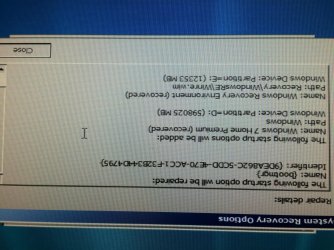
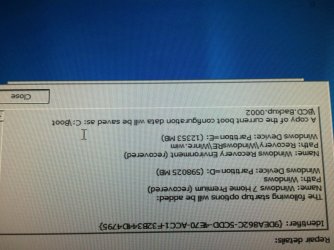
Working on a computer - chose to download and install all Windows updates - after about 80% installed the computer restarted and will no longer boot into Windows. Booting without a repair disk tries to go to a network boot instead (I have checked the boot order). Booting with a repair disk returns an error that the changes to "bootmgr" cannot be saved. Windows system files are stored on the D: drive, per the details of the error it is trying to save the new bootmgr to the C: drive. Please let me know what other information you need.
 

My Computer

Computer type
PC/Desktop
Computer Manufacturer/Model Number
HP
OS
Windows 7 - 32bit
Here are the errors.
 

Attachments

  • image1.jpg
    image1.jpg
    1.6 MB · Views: 1
  • image2.jpg
    image2.jpg
    1.6 MB · Views: 2

My Computer

Computer type
PC/Desktop
Computer Manufacturer/Model Number
HP
OS
Windows 7 - 32bit
This sounds like a faulty hard drive - I'd try backing up all data manually from the RE first, to external media.
Once you've done that, do a CHKDSK on the Windows partition (D:)

i.e.
CHKDSK D: /R
 

My Computer

Computer type
Laptop
Computer Manufacturer/Model Number
Asus K52F or Lenovo B51-80
OS
Win 7 x64 Home Premium (and x86 VirtualBox VM)/Win10
CPU
i3 370M/i7 6500U
Motherboard
Asus/Lenovo
Memory
8GB - finally :)/8GB
Graphics Card(s)
it's an i3, dude!/dual Intel&nVidia
Sound Card
onboard
Monitor(s) Displays
15.6" built-in
Screen Resolution
1366x768/1920x1080
Hard Drives
750GB Seagate internal
Sundry external drives attached to other computers on the local network
1TB SSD on the Lenovo
PSU
n/a
Internet Speed
as much as I can get - usually on a dongle/phone, so <1MB/s
Antivirus
MSE/Defender
Browser
IE11/12/Edge/Chrome/FF(if I must)
Back
Top