
Solved Will Not Load My User Profile

Have you tried my suggestion in post #8? It won't make your situation any worse than it already is.
 

My Computer My Computer

At a glance

Originally Win 7 Hm Prem x64 Ver 6.1.7600 Bui...Intel i3 530 2.93GHz, 2933MHz 2 Cores 4 Logic...6GB of 1,333MHz DDR3 SDRAM32MB Intel Graphics Media Accelerator HD IGChip
Computer type
PC/Desktop
Computer Manufacturer/Model Number
Gateway DX4831-01e (Mid-Tower Desktop)
OS
Originally Win 7 Hm Prem x64 Ver 6.1.7600 Build 7601-SP1 | Upgraded to Windows 10 December 14, 2019
CPU
Intel i3 530 2.93GHz, 2933MHz 2 Cores 4 Logical Processors
Motherboard
Gateway H57M01 133 megahertz
Memory
6GB of 1,333MHz DDR3 SDRAM
Graphics Card(s)
32MB Intel Graphics Media Accelerator HD IGChip
Sound Card
Realtek High Definition Audio
Monitor(s) Displays
Gateway HX2000 20inch TFT active matrix TN
Screen Resolution
1600 x 900 x 59 hertz
Hard Drives
WDC WD10EADS-00M2B0 [HDD] (1000.20 GB) -- drive 0,
HL-DT-ST DVDRAM GH41N [CD-ROM dr]
Four card readers, and Four USB 2.0
PSU
300watts.
Case
Mid-Tower Desktop
Cooling
Stock from Gateway
Keyboard
Natural Ergonomic Keyboard 4000, see Other Info
Mouse
Orig. Gateway wore out now using Insignia USB wired optical
Internet Speed
Vz FIOS 10ms png 57.64Mbps down 65.53Mbps up Speedtest.org
Antivirus
Zamana Anti-logger with Anti-malware, MSE, Windows Firewall,
Browser
IE11.0.9600.19399-Upd ver11.0.135, Firefox 68.0.1 x64
Other Info
System Specs by Belarc.

BIOS: American Megatrends Inc. P01-A0 11/17/2009

Replaced the MS 'Natural' Standard PS/2 Enhanced 101-102 Keyboard with a new Natural Ergonomic Keyboard 4000 on August 1st 2014.

Canon Pixma MG3222 Printer.

Updated to IE11 on 12102015 | Fios Quantum Router g1100

Additional AV: SpywareBlaster, manual Mbam, SAS
Anak, thanks, I just tried your suggestion in Post 8 (advanced boot to last known good configuration). Nothing changed...I am still not logged on with my old profile. I'll keep trying...

Diana
 

My Computer My Computer

At a glance

Windows 7 Home Premium 64 bit
Computer type
Laptop
Computer Manufacturer/Model Number
Dell
OS
Windows 7 Home Premium 64 bit
Antivirus
Microsoft Security Essentials
Okay at least that's out of the way. :(

You mentioned earlier that you weren't sure if you were using the built-in Administrator (BIA), lets make sure.
Open this tutorial: http://www.sevenforums.com/tutorials/507-built-administrator-account-enable-disable.html and since you have Home Premium go to Option Two.

Do steps 1. 2. 5. and 6. after logging off you do not see the BIA restart your machine if you see the BIA as noted in the tutorial proceed to this part of torchwood's post #11

  • If you have only one folder starting with S-1-5 that is followed by long numbers and ends with .bak. Right-click the folder, and then click Rename. Remove .bak at the end of the folder name, and then press ENTER.

  • Then finish out with step #2 in that post.

  • Later on when this is straightened out you'll need to go back and do step #4 to disable the BIA.
 

My Computer My Computer

At a glance

Originally Win 7 Hm Prem x64 Ver 6.1.7600 Bui...Intel i3 530 2.93GHz, 2933MHz 2 Cores 4 Logic...6GB of 1,333MHz DDR3 SDRAM32MB Intel Graphics Media Accelerator HD IGChip
Computer type
PC/Desktop
Computer Manufacturer/Model Number
Gateway DX4831-01e (Mid-Tower Desktop)
OS
Originally Win 7 Hm Prem x64 Ver 6.1.7600 Build 7601-SP1 | Upgraded to Windows 10 December 14, 2019
CPU
Intel i3 530 2.93GHz, 2933MHz 2 Cores 4 Logical Processors
Motherboard
Gateway H57M01 133 megahertz
Memory
6GB of 1,333MHz DDR3 SDRAM
Graphics Card(s)
32MB Intel Graphics Media Accelerator HD IGChip
Sound Card
Realtek High Definition Audio
Monitor(s) Displays
Gateway HX2000 20inch TFT active matrix TN
Screen Resolution
1600 x 900 x 59 hertz
Hard Drives
WDC WD10EADS-00M2B0 [HDD] (1000.20 GB) -- drive 0,
HL-DT-ST DVDRAM GH41N [CD-ROM dr]
Four card readers, and Four USB 2.0
PSU
300watts.
Case
Mid-Tower Desktop
Cooling
Stock from Gateway
Keyboard
Natural Ergonomic Keyboard 4000, see Other Info
Mouse
Orig. Gateway wore out now using Insignia USB wired optical
Internet Speed
Vz FIOS 10ms png 57.64Mbps down 65.53Mbps up Speedtest.org
Antivirus
Zamana Anti-logger with Anti-malware, MSE, Windows Firewall,
Browser
IE11.0.9600.19399-Upd ver11.0.135, Firefox 68.0.1 x64
Other Info
System Specs by Belarc.

BIOS: American Megatrends Inc. P01-A0 11/17/2009

Replaced the MS 'Natural' Standard PS/2 Enhanced 101-102 Keyboard with a new Natural Ergonomic Keyboard 4000 on August 1st 2014.

Canon Pixma MG3222 Printer.

Updated to IE11 on 12102015 | Fios Quantum Router g1100

Additional AV: SpywareBlaster, manual Mbam, SAS
Hello Anak...I am currently copying my files from the old user that won't load to a new user account that I created, re the Microsoft instructions referenced in post #19. I'm pretty nervous and pessimistic, but I did create a system restore point before beginning, and I copied my most important files to a USB drive. If this new user account doesn't work, I will tackle your advice in previous post. Thanks again!
 

My Computer My Computer

At a glance

Windows 7 Home Premium 64 bit
Computer type
Laptop
Computer Manufacturer/Model Number
Dell
OS
Windows 7 Home Premium 64 bit
Antivirus
Microsoft Security Essentials
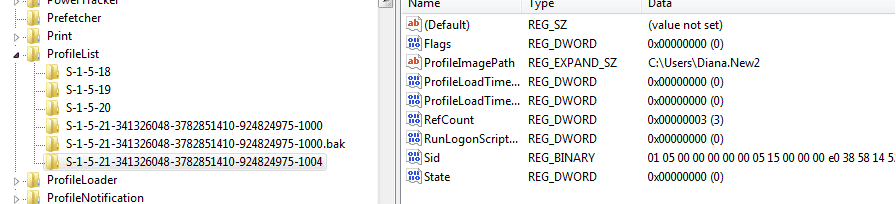
Well, some news! I copied files from Diana to Diana,New2, and when I logged off then logged on, my documents, photos, etc. are under that user name! Not my desktop or startup, but I'm getting there! Here is what the registry now looks like. the first long line is the temp user, the second is old Diana, and the third, as you can see, is Diana.New2. Should I delete Diana in the Control Panel's User Accounts, and in the Registry?

I'd like to get my desktop back. Did I miss something? On the desktop, I have two ghost-like icons; one says the following when I open it: [.ShellClassInfo]
LocalizedResourceName=@%SystemRoot%\system32\shell32.dll,-21769
IconResource=%SystemRoot%\system32\imageres.dll,-183

I'd also like to have Firefox again, and I'm afraid that if I download it, it won't have my bookmarks (years of work!)

Finally, how can I import Microsoft Outlook? Currently when I click on it, it just wants to set up the program. Again, I had a lot of files saved there...

Thanks for getting me this far...
 

Attachments

  • Registry Snip.PNG
    Registry Snip.PNG
    9.7 KB · Views: 0

My Computer My Computer

At a glance

Windows 7 Home Premium 64 bit
Computer type
Laptop
Computer Manufacturer/Model Number
Dell
OS
Windows 7 Home Premium 64 bit
Antivirus
Microsoft Security Essentials
Have a look at this website which may help you further. Scroll down to Windows 7 & there are some videos that could help & there is link to using Windows Easy Transfer as well. As the site mentions transferring user profiles in Windows 7 is not an easy job.

https://cwl.cc/2011/10/be-it-guy-movingcopying-user-profiles.html#EasyTransfer

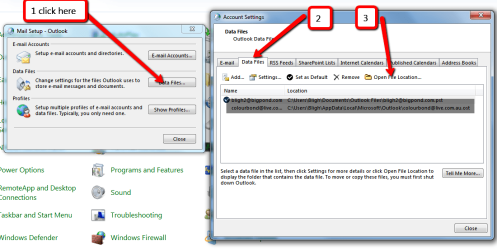
What version of Outlook are you using?. To get Outlook to find these files open the Mail (Microsoft Outlook) icon in Control Panel & click on the middle button & when that opens click on the Data Files tab & then on Open file location. You may have to point where the files are located. In Outlook 2013 & 2016 they are stored in your Documents Folder under Outlook Files.
When Outlook has found the files in question. Click on the Add icon & that will take you to Outlook file location & you can then add your email name etc..

Outlook_data_files,_how_to_find..png

If you have successfully set up your new User Profile, then your desktop should also be included at it is stored in your User files as well. Also your Firefox bookmark etc. should also be saved in your User Folder. Of course all these would be in your old user folder. If you have all your old user folders now in your new user folder, you should be able to transfer your saved bookmarks etc into either the existing Firefox install or a newly downloaded one. All browser that I am familiar with have an Import Bookmarks etc feature, so have a look in Firefox settings.
 
Last edited:

My Computer My Computer

At a glance

Windows 7 Home Premium 64 bit sp1Intel i5 3570 3.4Ghz Ivy Bridge SKT 1155 quad...G-Skill Rip Jaws 16Gb (8x2) DDR3 -1600 PC3 12...Gigabyte NVIDIA GT610 1Gb DDR3 810/1200 PCI-E...
Computer type
PC/Desktop
Computer Manufacturer/Model Number
Self built using existing case
OS
Windows 7 Home Premium 64 bit sp1
CPU
Intel i5 3570 3.4Ghz Ivy Bridge SKT 1155 quad core
Motherboard
Gigabyte Z77-HD3 SKT 1155 2xSata 3, 4x USB 3.0
Memory
G-Skill Rip Jaws 16Gb (8x2) DDR3 -1600 PC3 12800 CL 10 red
Graphics Card(s)
Gigabyte NVIDIA GT610 1Gb DDR3 810/1200 PCI-E 2.0 Silent
Sound Card
NVIDIA High Definition & Realtech High Definition Audio
Monitor(s) Displays
2 x Philips 226V4L 16:9 aspect ratio
Screen Resolution
1920 x 1080 HD
Hard Drives
Samsung 840 Pro 256gb SSD, SATA 3.
Hitachi Touro Portable 1tb, USB 3.0 HDD used for image b/ups.
PSU
Corsair VS450
Case
Codeng
Cooling
PSU fan & CPU fan
Keyboard
Logitech
Mouse
Logitech Wireless trackball M570
Internet Speed
Wireless 3G. 3mg down & 550kb up.
Antivirus
Bitdefender Internet Security 2020
Browser
Opera (Current Version) & Firefox
Other Info
MS Office 2013 Pro. Davis weather station software. MGE Nova 600 avr UPS.
Hello Ranger 4,

I followed the following Microsoft directions, referenced in post #19, not to copy these files from the old to new user profile:

  1. Select all of the files and folders in this folder, except the following files:
  2. Ntuser.dat
  • Ntuser.dat.log
  • Ntuser.ini
There are many files that began with those descriptions. Should I copy some of them to the new user profile? Sorry for all this hassle, but I want to be cautious before proceeding to the next steps you advised. Thanks!
Diana
 

My Computer My Computer

At a glance

Windows 7 Home Premium 64 bit
Computer type
Laptop
Computer Manufacturer/Model Number
Dell
OS
Windows 7 Home Premium 64 bit
Antivirus
Microsoft Security Essentials
Hi Diana. Is your computer on a domain or a work group or is it a stand alone. From what i can see form the MS website that you are using, that it has instructions for domain & work group computers, so if yours is a stand alone computer you might be on the wrong track.

As it says not to copy those files it would be advisable not to do so.
 

My Computer My Computer

At a glance

Windows 7 Home Premium 64 bit sp1Intel i5 3570 3.4Ghz Ivy Bridge SKT 1155 quad...G-Skill Rip Jaws 16Gb (8x2) DDR3 -1600 PC3 12...Gigabyte NVIDIA GT610 1Gb DDR3 810/1200 PCI-E...
Computer type
PC/Desktop
Computer Manufacturer/Model Number
Self built using existing case
OS
Windows 7 Home Premium 64 bit sp1
CPU
Intel i5 3570 3.4Ghz Ivy Bridge SKT 1155 quad core
Motherboard
Gigabyte Z77-HD3 SKT 1155 2xSata 3, 4x USB 3.0
Memory
G-Skill Rip Jaws 16Gb (8x2) DDR3 -1600 PC3 12800 CL 10 red
Graphics Card(s)
Gigabyte NVIDIA GT610 1Gb DDR3 810/1200 PCI-E 2.0 Silent
Sound Card
NVIDIA High Definition & Realtech High Definition Audio
Monitor(s) Displays
2 x Philips 226V4L 16:9 aspect ratio
Screen Resolution
1920 x 1080 HD
Hard Drives
Samsung 840 Pro 256gb SSD, SATA 3.
Hitachi Touro Portable 1tb, USB 3.0 HDD used for image b/ups.
PSU
Corsair VS450
Case
Codeng
Cooling
PSU fan & CPU fan
Keyboard
Logitech
Mouse
Logitech Wireless trackball M570
Internet Speed
Wireless 3G. 3mg down & 550kb up.
Antivirus
Bitdefender Internet Security 2020
Browser
Opera (Current Version) & Firefox
Other Info
MS Office 2013 Pro. Davis weather station software. MGE Nova 600 avr UPS.
Hi Ranger4. In the Control Panel\System Security\System, my computer is described as Workgroup. It's just my home computer, but I hope that description is accurate.
OK, I will not copy those files, per the MS instructions.

I'll try to fix Outlook now...stay tuned!
Diana
 

My Computer My Computer

At a glance

Windows 7 Home Premium 64 bit
Computer type
Laptop
Computer Manufacturer/Model Number
Dell
OS
Windows 7 Home Premium 64 bit
Antivirus
Microsoft Security Essentials
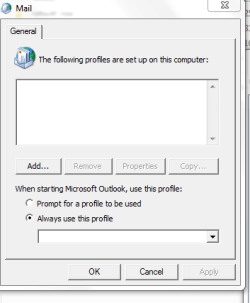
I guess something is wrong. This is the dialogue box that comes up when I click on Mail in the Control Panel:

I think I may have to set up Outlook again. Somehow it seems I did not transfer everything from the start menu.
 

Attachments

  • Mail snapshot.PNG
    Mail snapshot.PNG
    7.6 KB · Views: 16

My Computer My Computer

At a glance

Windows 7 Home Premium 64 bit
Computer type
Laptop
Computer Manufacturer/Model Number
Dell
OS
Windows 7 Home Premium 64 bit
Antivirus
Microsoft Security Essentials
It may just need to be added, does a list of Outlook folders/files show up after you click on the ADD Button and can you find the profile from the list?
 

My Computer My Computer

At a glance

Originally Win 7 Hm Prem x64 Ver 6.1.7600 Bui...Intel i3 530 2.93GHz, 2933MHz 2 Cores 4 Logic...6GB of 1,333MHz DDR3 SDRAM32MB Intel Graphics Media Accelerator HD IGChip
Computer type
PC/Desktop
Computer Manufacturer/Model Number
Gateway DX4831-01e (Mid-Tower Desktop)
OS
Originally Win 7 Hm Prem x64 Ver 6.1.7600 Build 7601-SP1 | Upgraded to Windows 10 December 14, 2019
CPU
Intel i3 530 2.93GHz, 2933MHz 2 Cores 4 Logical Processors
Motherboard
Gateway H57M01 133 megahertz
Memory
6GB of 1,333MHz DDR3 SDRAM
Graphics Card(s)
32MB Intel Graphics Media Accelerator HD IGChip
Sound Card
Realtek High Definition Audio
Monitor(s) Displays
Gateway HX2000 20inch TFT active matrix TN
Screen Resolution
1600 x 900 x 59 hertz
Hard Drives
WDC WD10EADS-00M2B0 [HDD] (1000.20 GB) -- drive 0,
HL-DT-ST DVDRAM GH41N [CD-ROM dr]
Four card readers, and Four USB 2.0
PSU
300watts.
Case
Mid-Tower Desktop
Cooling
Stock from Gateway
Keyboard
Natural Ergonomic Keyboard 4000, see Other Info
Mouse
Orig. Gateway wore out now using Insignia USB wired optical
Internet Speed
Vz FIOS 10ms png 57.64Mbps down 65.53Mbps up Speedtest.org
Antivirus
Zamana Anti-logger with Anti-malware, MSE, Windows Firewall,
Browser
IE11.0.9600.19399-Upd ver11.0.135, Firefox 68.0.1 x64
Other Info
System Specs by Belarc.

BIOS: American Megatrends Inc. P01-A0 11/17/2009

Replaced the MS 'Natural' Standard PS/2 Enhanced 101-102 Keyboard with a new Natural Ergonomic Keyboard 4000 on August 1st 2014.

Canon Pixma MG3222 Printer.

Updated to IE11 on 12102015 | Fios Quantum Router g1100

Additional AV: SpywareBlaster, manual Mbam, SAS
I'd like to get my desktop back. Did I miss something? On the desktop, I have two ghost-like icons; one says the following when I open it: [.ShellClassInfo]
LocalizedResourceName=@%SystemRoot%\system32\shell32.dll,-21769

IconResource=%SystemRoot%\system32\imageres.dll,-183
Are you showing your hidden files? http://www.sevenforums.com/tutorials/394-hidden-files-folders-show-hide.html
I have the same files and wording, plus a lot more because of the way I have my desktop set up. Your desktop should work whether they are showing or hidden.

I'd also like to have Firefox again, and I'm afraid that if I download it, it won't have my bookmarks (years of work!)
A FF profile is hard to lose, you can try the tool in this tutorial: http://www.sevenforums.com/tutorials/164526-mozbackup-create-backup-your-mozilla-profile.html or you can follow this one: https://Back up and restore information in Firefox profiles | support.mozilla.org

A bit more on Outlook, scroll down to (Re)creating a mail profile You might also try clicking on the Prompt radio button above "always use this profile". That might show your profiles.
I'm at a disadvantage because I don't use Outlook or any of the associated programming. Heck, I don't even have a Mail icon in control panel. :shock:
 

My Computer My Computer

At a glance

Originally Win 7 Hm Prem x64 Ver 6.1.7600 Bui...Intel i3 530 2.93GHz, 2933MHz 2 Cores 4 Logic...6GB of 1,333MHz DDR3 SDRAM32MB Intel Graphics Media Accelerator HD IGChip
Computer type
PC/Desktop
Computer Manufacturer/Model Number
Gateway DX4831-01e (Mid-Tower Desktop)
OS
Originally Win 7 Hm Prem x64 Ver 6.1.7600 Build 7601-SP1 | Upgraded to Windows 10 December 14, 2019
CPU
Intel i3 530 2.93GHz, 2933MHz 2 Cores 4 Logical Processors
Motherboard
Gateway H57M01 133 megahertz
Memory
6GB of 1,333MHz DDR3 SDRAM
Graphics Card(s)
32MB Intel Graphics Media Accelerator HD IGChip
Sound Card
Realtek High Definition Audio
Monitor(s) Displays
Gateway HX2000 20inch TFT active matrix TN
Screen Resolution
1600 x 900 x 59 hertz
Hard Drives
WDC WD10EADS-00M2B0 [HDD] (1000.20 GB) -- drive 0,
HL-DT-ST DVDRAM GH41N [CD-ROM dr]
Four card readers, and Four USB 2.0
PSU
300watts.
Case
Mid-Tower Desktop
Cooling
Stock from Gateway
Keyboard
Natural Ergonomic Keyboard 4000, see Other Info
Mouse
Orig. Gateway wore out now using Insignia USB wired optical
Internet Speed
Vz FIOS 10ms png 57.64Mbps down 65.53Mbps up Speedtest.org
Antivirus
Zamana Anti-logger with Anti-malware, MSE, Windows Firewall,
Browser
IE11.0.9600.19399-Upd ver11.0.135, Firefox 68.0.1 x64
Other Info
System Specs by Belarc.

BIOS: American Megatrends Inc. P01-A0 11/17/2009

Replaced the MS 'Natural' Standard PS/2 Enhanced 101-102 Keyboard with a new Natural Ergonomic Keyboard 4000 on August 1st 2014.

Canon Pixma MG3222 Printer.

Updated to IE11 on 12102015 | Fios Quantum Router g1100

Additional AV: SpywareBlaster, manual Mbam, SAS
I guess something is wrong. This is the dialogue box that comes up when I click on Mail in the Control Panel:

I think I may have to set up Outlook again. Somehow it seems I did not transfer everything from the start
menu.


Which version of Outlook are you using. Can you open Outlook in the usual way, if so you can access the files I mentioned in Post #26 by selecting File & then Account Settings. Then select the Tabs & the Add icon as mentioned in the Post.

If you can't open Outlook in the usual way, you may have to reinstall it, or you could try an Office Repair, if have MS Office installed. To do that, open Control Panel, select Programs & Features, scroll down to Microsoft Office, Right click on it & select Change & that should open a couple of Repair options you can try.
 

My Computer My Computer

At a glance

Windows 7 Home Premium 64 bit sp1Intel i5 3570 3.4Ghz Ivy Bridge SKT 1155 quad...G-Skill Rip Jaws 16Gb (8x2) DDR3 -1600 PC3 12...Gigabyte NVIDIA GT610 1Gb DDR3 810/1200 PCI-E...
Computer type
PC/Desktop
Computer Manufacturer/Model Number
Self built using existing case
OS
Windows 7 Home Premium 64 bit sp1
CPU
Intel i5 3570 3.4Ghz Ivy Bridge SKT 1155 quad core
Motherboard
Gigabyte Z77-HD3 SKT 1155 2xSata 3, 4x USB 3.0
Memory
G-Skill Rip Jaws 16Gb (8x2) DDR3 -1600 PC3 12800 CL 10 red
Graphics Card(s)
Gigabyte NVIDIA GT610 1Gb DDR3 810/1200 PCI-E 2.0 Silent
Sound Card
NVIDIA High Definition & Realtech High Definition Audio
Monitor(s) Displays
2 x Philips 226V4L 16:9 aspect ratio
Screen Resolution
1920 x 1080 HD
Hard Drives
Samsung 840 Pro 256gb SSD, SATA 3.
Hitachi Touro Portable 1tb, USB 3.0 HDD used for image b/ups.
PSU
Corsair VS450
Case
Codeng
Cooling
PSU fan & CPU fan
Keyboard
Logitech
Mouse
Logitech Wireless trackball M570
Internet Speed
Wireless 3G. 3mg down & 550kb up.
Antivirus
Bitdefender Internet Security 2020
Browser
Opera (Current Version) & Firefox
Other Info
MS Office 2013 Pro. Davis weather station software. MGE Nova 600 avr UPS.
Woo-hoo, I have Firefox back with all my bookmarks and home page. At least it seems that way for now...I may never sign off the computer again! Thanks Anak--I used the Mozilla Support page for restoriing old profile, just copied from the user profile that wouldn't load, to the new user profile created when I had to download Firefox again.

Later today I will try to recover my Outlook files, following the tips from all you helpful people. I will try the MS Office Repair, but I suspect I will have to download Outlook again comopletely. Keep your fingers crossed!

Diana
 

My Computer My Computer

At a glance

Windows 7 Home Premium 64 bit
Computer type
Laptop
Computer Manufacturer/Model Number
Dell
OS
Windows 7 Home Premium 64 bit
Antivirus
Microsoft Security Essentials
Hello all...I was able to get Outlook (2100) going again by adding a new account and the data files I copied to my new user profile. All my folders and saved emails were there--yay!! BUT, now I'm not receiving email in Outllook...there are no new ones since my iniitial problem 8 days ago (though it seems a lot longer!). I can SEND emails from Outlook, and I AM getting new emails on my phone and on the Charter (my ISP) web site. I called Charter, and they said the email settings look good, so it must be a problem with Outlook. They advised me to call Microsoft. The agent asked me to type a Run command (outlook \safe) but it was invalid, then he said he couldn't help unless I paid for a premium service. He did say I might need a new email user profile, or I might need to re-install Office. Heck....

I will keep researching, but as before, any suggestions would be most appreciated! You've really helped a tremendous amount.
Diana
 

My Computer My Computer

At a glance

Windows 7 Home Premium 64 bit
Computer type
Laptop
Computer Manufacturer/Model Number
Dell
OS
Windows 7 Home Premium 64 bit
Antivirus
Microsoft Security Essentials
If you can send emails, but you aren't receiving any, it's most likely your incoming mail settings are incorrect. These settings can easily be made incorrectly. Did Charter actually go through all your outgoing & incoming email settings. Sometimes support people at these places are not all that caring.

There might be some info in this Charter website that might help you. I notice that some parts of in refer to Charter & others to Spectrum. Is Charter owned by Spectrum? & are they the actual ISP for you.

Charter.net Set up Your Spectrum Email Account on Outlook 2010
 

My Computer My Computer

At a glance

Windows 7 Home Premium 64 bit sp1Intel i5 3570 3.4Ghz Ivy Bridge SKT 1155 quad...G-Skill Rip Jaws 16Gb (8x2) DDR3 -1600 PC3 12...Gigabyte NVIDIA GT610 1Gb DDR3 810/1200 PCI-E...
Computer type
PC/Desktop
Computer Manufacturer/Model Number
Self built using existing case
OS
Windows 7 Home Premium 64 bit sp1
CPU
Intel i5 3570 3.4Ghz Ivy Bridge SKT 1155 quad core
Motherboard
Gigabyte Z77-HD3 SKT 1155 2xSata 3, 4x USB 3.0
Memory
G-Skill Rip Jaws 16Gb (8x2) DDR3 -1600 PC3 12800 CL 10 red
Graphics Card(s)
Gigabyte NVIDIA GT610 1Gb DDR3 810/1200 PCI-E 2.0 Silent
Sound Card
NVIDIA High Definition & Realtech High Definition Audio
Monitor(s) Displays
2 x Philips 226V4L 16:9 aspect ratio
Screen Resolution
1920 x 1080 HD
Hard Drives
Samsung 840 Pro 256gb SSD, SATA 3.
Hitachi Touro Portable 1tb, USB 3.0 HDD used for image b/ups.
PSU
Corsair VS450
Case
Codeng
Cooling
PSU fan & CPU fan
Keyboard
Logitech
Mouse
Logitech Wireless trackball M570
Internet Speed
Wireless 3G. 3mg down & 550kb up.
Antivirus
Bitdefender Internet Security 2020
Browser
Opera (Current Version) & Firefox
Other Info
MS Office 2013 Pro. Davis weather station software. MGE Nova 600 avr UPS.
Woo-hoo, I have Firefox back with all my bookmarks and home page. At least it seems that way for now...I may never sign off the computer again! Thanks Anak--
You're welcome!

Yes, make sure all settings are compliant to what is shown on the page link that Ranger4 provided especially from step5 down, and #8, it sounds like the protocols (IMAP) or port number (143) may be wrong for your incoming mail from charters servers.

One last item:
D1.PNG

Check to make sure they match, I've had it here on Verizon Fios (Vz) where I had to reset the ID and password between Vz and my email client; They did match, I just reset them by clearing them out and re-entering the same ones and saving the "changes".

   Tip
You should change IDs and passwords periodically for security's sake, but if you want to keep the old one's for awhile, re-entering the same one's are acceptable at least it is on my Vz site.


If you never want to sign-off again :p; I believe we're at a point where it should be mentioned that you should start thinking about a back-up routine, there are several options in no particular order to pick from:


My Computer My Computer

At a glance

Originally Win 7 Hm Prem x64 Ver 6.1.7600 Bui...Intel i3 530 2.93GHz, 2933MHz 2 Cores 4 Logic...6GB of 1,333MHz DDR3 SDRAM32MB Intel Graphics Media Accelerator HD IGChip
Computer type
PC/Desktop
Computer Manufacturer/Model Number
Gateway DX4831-01e (Mid-Tower Desktop)
OS
Originally Win 7 Hm Prem x64 Ver 6.1.7600 Build 7601-SP1 | Upgraded to Windows 10 December 14, 2019
CPU
Intel i3 530 2.93GHz, 2933MHz 2 Cores 4 Logical Processors
Motherboard
Gateway H57M01 133 megahertz
Memory
6GB of 1,333MHz DDR3 SDRAM
Graphics Card(s)
32MB Intel Graphics Media Accelerator HD IGChip
Sound Card
Realtek High Definition Audio
Monitor(s) Displays
Gateway HX2000 20inch TFT active matrix TN
Screen Resolution
1600 x 900 x 59 hertz
Hard Drives
WDC WD10EADS-00M2B0 [HDD] (1000.20 GB) -- drive 0,
HL-DT-ST DVDRAM GH41N [CD-ROM dr]
Four card readers, and Four USB 2.0
PSU
300watts.
Case
Mid-Tower Desktop
Cooling
Stock from Gateway
Keyboard
Natural Ergonomic Keyboard 4000, see Other Info
Mouse
Orig. Gateway wore out now using Insignia USB wired optical
Internet Speed
Vz FIOS 10ms png 57.64Mbps down 65.53Mbps up Speedtest.org
Antivirus
Zamana Anti-logger with Anti-malware, MSE, Windows Firewall,
Browser
IE11.0.9600.19399-Upd ver11.0.135, Firefox 68.0.1 x64
Other Info
System Specs by Belarc.

BIOS: American Megatrends Inc. P01-A0 11/17/2009

Replaced the MS 'Natural' Standard PS/2 Enhanced 101-102 Keyboard with a new Natural Ergonomic Keyboard 4000 on August 1st 2014.

Canon Pixma MG3222 Printer.

Updated to IE11 on 12102015 | Fios Quantum Router g1100

Additional AV: SpywareBlaster, manual Mbam, SAS
I am encouraged that I got Outlook to receive...it was just a matter of the wrong username in the account setup. Somehow I have two usernames at Charter.... So I am making progress, for which I'm grateful, but I'm not out of the woods yet. For instance, just tried to open ITunes...it wasn't there. And when I tried to download it, I got an error saying ITunes Setup.exe is not a valid Win32 application. Working on that now....
 

My Computer My Computer

At a glance

Windows 7 Home Premium 64 bit
Computer type
Laptop
Computer Manufacturer/Model Number
Dell
OS
Windows 7 Home Premium 64 bit
Antivirus
Microsoft Security Essentials
If you're using Firefox (FF) and continue to have problems try downloading (DL) itunes with your InternetExplorer (IE) browser, it seems that using any browser other than IE can corrupt the itunes DL where IE and itunes are more compatible. It's one of those quirks where certain DL's and sites just work better using IE.

There is help here: If you can‘t install or update iTunes for Windows

  • In step #3 you can try either the XP, Vista 32bit DL or the Vista 64bit DL, but I've found out that since you have win7 64bit showing in your system specs you should use the 64bit version of itunes, see related below.

  • In step #4 if you have itunes installed either one of these DL's should offer to repair your existing itunes program.

  • Save these DL's for later because the next link has you removing anything related to the itunes installation.
iTunes: Windows reports that "iTunesSetup.exe is not a valid Win32 application" don't let the age of the FAQs page deter you.

Related:
Latest version of itunes for windows 12.5.1 64bit Click on system requirements to see 64bit requirement 5th line down: 64-bit editions of Windows 7 and Windows 8 require the iTunes 64-bit installer; for more information, visit www.itunes.com/download
   Note
You could try this DL to see if it could repair your installed version of itunes, and I would use this DL more so than the ones listed in the first bullet "In step #3".
Except for the downloading, make sure you do any removal process of programs and browsing history as administrator, and any repairs or installs as administrator also. When you're running the repairs or installs all you have to do is right click on the program and you'll see Run as Administrator listed, usually it's the second item on the list, cilck on that. And you'll have to OK (click on Yes) a UAC prompt to continue.
 

My Computer My Computer

At a glance

Originally Win 7 Hm Prem x64 Ver 6.1.7600 Bui...Intel i3 530 2.93GHz, 2933MHz 2 Cores 4 Logic...6GB of 1,333MHz DDR3 SDRAM32MB Intel Graphics Media Accelerator HD IGChip
Computer type
PC/Desktop
Computer Manufacturer/Model Number
Gateway DX4831-01e (Mid-Tower Desktop)
OS
Originally Win 7 Hm Prem x64 Ver 6.1.7600 Build 7601-SP1 | Upgraded to Windows 10 December 14, 2019
CPU
Intel i3 530 2.93GHz, 2933MHz 2 Cores 4 Logical Processors
Motherboard
Gateway H57M01 133 megahertz
Memory
6GB of 1,333MHz DDR3 SDRAM
Graphics Card(s)
32MB Intel Graphics Media Accelerator HD IGChip
Sound Card
Realtek High Definition Audio
Monitor(s) Displays
Gateway HX2000 20inch TFT active matrix TN
Screen Resolution
1600 x 900 x 59 hertz
Hard Drives
WDC WD10EADS-00M2B0 [HDD] (1000.20 GB) -- drive 0,
HL-DT-ST DVDRAM GH41N [CD-ROM dr]
Four card readers, and Four USB 2.0
PSU
300watts.
Case
Mid-Tower Desktop
Cooling
Stock from Gateway
Keyboard
Natural Ergonomic Keyboard 4000, see Other Info
Mouse
Orig. Gateway wore out now using Insignia USB wired optical
Internet Speed
Vz FIOS 10ms png 57.64Mbps down 65.53Mbps up Speedtest.org
Antivirus
Zamana Anti-logger with Anti-malware, MSE, Windows Firewall,
Browser
IE11.0.9600.19399-Upd ver11.0.135, Firefox 68.0.1 x64
Other Info
System Specs by Belarc.

BIOS: American Megatrends Inc. P01-A0 11/17/2009

Replaced the MS 'Natural' Standard PS/2 Enhanced 101-102 Keyboard with a new Natural Ergonomic Keyboard 4000 on August 1st 2014.

Canon Pixma MG3222 Printer.

Updated to IE11 on 12102015 | Fios Quantum Router g1100

Additional AV: SpywareBlaster, manual Mbam, SAS

OK, I did it, re-installed iTunes by using Internet Explorer and the 64-bit version for Windows 7. Seems to be working well, whew. I don't know how to thank everyone, especially Anak and Ranger 4. Tomorrow I will try the back up, then I can mark this thread solved! Thanks again!
 

My Computer My Computer

At a glance

Windows 7 Home Premium 64 bit
Computer type
Laptop
Computer Manufacturer/Model Number
Dell
OS
Windows 7 Home Premium 64 bit
Antivirus
Microsoft Security Essentials
Back
Top