Win 7 64b

Movingtarget

New member
Local time
4:01 PM
Messages
10
Every time I try restoring my laptop I end up with a 2008 server mbr. This is using restore disks from the factory. Is this what win 7 64bit uses?
 

My Computer

Computer type
Laptop
Computer Manufacturer/Model Number
Toshiba Satellite P105-S6177
OS
Windows 7 Home Premium 32bit
Memory
4g
Graphics Card(s)
Intel 8945
Please fill out your system specs through User Control Panel/Edit System Specs. We know nothing about your PC.

Where exactly are you seeing this "2008 server mbr" information?
 

My Computer

Computer type
PC/Desktop
Computer Manufacturer/Model Number
Ignatz Special; 4 speed manual gearbox; factory air conditioning; one of one
OS
Windows 7 Home Premium SP1, 64-bit
CPU
Intel Skylake i5-6600K, not overclocked
Motherboard
AsRock Z170M Extreme 4, micro ATX
Memory
8 GB HyperX DDR4-2666 (2 x 4 GB)
Graphics Card(s)
none; graphics are integrated on CPU
Sound Card
onboard: Realtek ALC1150; external: USB Behringer UF0-202
Monitor(s) Displays
Dell S2340M 23 inch IPS
Screen Resolution
1600 x 900
Hard Drives
System: Crucial MX100 series SSD, 128 GB;
Data: Samsung Spinpoint 103SJ, 1 TB;
Backup: WD Caviar Green WD30EZRX-00D8PB0, 3 TB
PSU
Rosewill SilentNight 500 watt fanless, semi-modular
Case
Antec Solo II
Cooling
Noctua NH-U12S; Noctua F12 intake, Noctua S12A exhaust
Keyboard
Microsoft 200 6JH-00001 USB
Mouse
Dell or Microsoft optical wired; USB
Antivirus
Microsoft Security Essentials and Malwarebytes Premium
Browser
Pale Moon
Other Info
All fans PWM; speeds at idle: CPU circa 500 rpm; intake circa 600 rpm; exhaust circa 600 rpm; CPU temps 27 idle and 47 C load in a warm room (27 C/81 F) when running Intel Extreme Tuning Utility stress test.
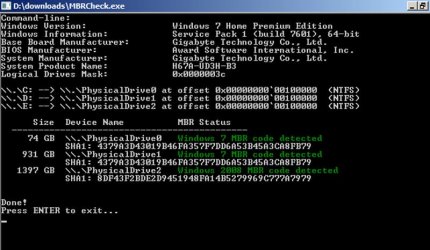
Checked with mbr checker.
 

My Computer

Computer type
Laptop
Computer Manufacturer/Model Number
Toshiba Satellite P105-S6177
OS
Windows 7 Home Premium 32bit
Memory
4g
Graphics Card(s)
Intel 8945
I just downloaded and ran a program called mbrcheck.exe. Below is the output. I don't see anything about Server 2008. I am using Win 7 64-bit. I can't speak for the application you ran.
 

Attachments

  • 3940_P1010018_43.jpg
    3940_P1010018_43.jpg
    74 KB · Views: 11

My Computer

Computer type
PC/Desktop
Computer Manufacturer/Model Number
Ignatz Special; 4 speed manual gearbox; factory air conditioning; one of one
OS
Windows 7 Home Premium SP1, 64-bit
CPU
Intel Skylake i5-6600K, not overclocked
Motherboard
AsRock Z170M Extreme 4, micro ATX
Memory
8 GB HyperX DDR4-2666 (2 x 4 GB)
Graphics Card(s)
none; graphics are integrated on CPU
Sound Card
onboard: Realtek ALC1150; external: USB Behringer UF0-202
Monitor(s) Displays
Dell S2340M 23 inch IPS
Screen Resolution
1600 x 900
Hard Drives
System: Crucial MX100 series SSD, 128 GB;
Data: Samsung Spinpoint 103SJ, 1 TB;
Backup: WD Caviar Green WD30EZRX-00D8PB0, 3 TB
PSU
Rosewill SilentNight 500 watt fanless, semi-modular
Case
Antec Solo II
Cooling
Noctua NH-U12S; Noctua F12 intake, Noctua S12A exhaust
Keyboard
Microsoft 200 6JH-00001 USB
Mouse
Dell or Microsoft optical wired; USB
Antivirus
Microsoft Security Essentials and Malwarebytes Premium
Browser
Pale Moon
Other Info
All fans PWM; speeds at idle: CPU circa 500 rpm; intake circa 600 rpm; exhaust circa 600 rpm; CPU temps 27 idle and 47 C load in a warm room (27 C/81 F) when running Intel Extreme Tuning Utility stress test.
That is the same application I have used. I had to manually change the mbr with easy bcd as attempts to change it on cmd fail. Any time I restore using factory disks the mbr is win 2008 server. Just noticed this but thinking that is why a lot of apps that are being loaded never show up again after install. This was bought as a refurbished unit from Toshiba directly. Could it have belonged to a company at some point?
 

My Computer

Computer type
Laptop
Computer Manufacturer/Model Number
Toshiba Satellite P105-S6177
OS
Windows 7 Home Premium 32bit
Memory
4g
Graphics Card(s)
Intel 8945
Any time I restore using factory disks the mbr is win 2008 server........This was bought as a refurbished unit from Toshiba directly. Could it have belonged to a company at some point?

Yeah, who knows who owned it previously or what OS it may have had at one time or another. Do you even know if your product key works to activate a clean installation of Windows 7?

If you know that the key works on Windows 7, I'd be inclined to download a Windows 7 ISO, burn it, and install from it. I'm assuming you don't have a regulation Windows 7 install disc.
 

My Computer

Computer type
PC/Desktop
Computer Manufacturer/Model Number
Ignatz Special; 4 speed manual gearbox; factory air conditioning; one of one
OS
Windows 7 Home Premium SP1, 64-bit
CPU
Intel Skylake i5-6600K, not overclocked
Motherboard
AsRock Z170M Extreme 4, micro ATX
Memory
8 GB HyperX DDR4-2666 (2 x 4 GB)
Graphics Card(s)
none; graphics are integrated on CPU
Sound Card
onboard: Realtek ALC1150; external: USB Behringer UF0-202
Monitor(s) Displays
Dell S2340M 23 inch IPS
Screen Resolution
1600 x 900
Hard Drives
System: Crucial MX100 series SSD, 128 GB;
Data: Samsung Spinpoint 103SJ, 1 TB;
Backup: WD Caviar Green WD30EZRX-00D8PB0, 3 TB
PSU
Rosewill SilentNight 500 watt fanless, semi-modular
Case
Antec Solo II
Cooling
Noctua NH-U12S; Noctua F12 intake, Noctua S12A exhaust
Keyboard
Microsoft 200 6JH-00001 USB
Mouse
Dell or Microsoft optical wired; USB
Antivirus
Microsoft Security Essentials and Malwarebytes Premium
Browser
Pale Moon
Other Info
All fans PWM; speeds at idle: CPU circa 500 rpm; intake circa 600 rpm; exhaust circa 600 rpm; CPU temps 27 idle and 47 C load in a warm room (27 C/81 F) when running Intel Extreme Tuning Utility stress test.
I have a factory disk from Toshiba that I ordered. Also, I have an image I made when I turned it on for the first time. I am able to see that the product key is activated during installation. However, upon first boot the programs that were available were gone upon reboot. The startup booted into a pro version, I think, with xp mode visible. I have the home premium 64bit key. I see that virtual disk and xp mode is being installed along with a few other applications however they are never listed as installed. Seems I've got the wrong disk for the wrong machine or something. I do find it strange that my image matches the restore media I ordered.
 

My Computer

Computer type
Laptop
Computer Manufacturer/Model Number
Toshiba Satellite P105-S6177
OS
Windows 7 Home Premium 32bit
Memory
4g
Graphics Card(s)
Intel 8945
Back
Top