Solved win 7 downloading updates, no progress

pleiades357

New member
Member
Local time
10:02 AM
Messages
74
Location
Southern CA
this is my third attempt to download updates since February

I wait and nothing happens

I selected the 3 crucial updates and the non-essential updates, shows "Downloading Updates, downloading 3 updates (0 KB, 0% complete) for hours

I did read advice from 2016 to install... didn't note them, looked and I do have those

Windows Microsoft Security essentials does update

last time I tried to install updates, not only did it show nothing installed but would not stop and, had problems restarting my computer

I have looked at the error code, but, everything I find is a bit over my head...
not unsual to have a problem with updates... but, usually the next goes ok...

looking at update history shows:

2019-09 Security Monthly Quality Rollup for Windows 7 for x64-based Systems (KB4516065)

Installation date: ‎9/‎20/‎2019 9:12 PM

Installation status: Failed

Error details: Code 80092004
2019-09 Security Monthly Quality Rollup for Windows 7 for x64-based Systems (KB4516065)

Installation date: ‎11/‎26/‎2019 9:32 PM

Installation status: Failed

Error details: Code 80092004

Update type: Important

2019-09 Security Monthly Quality Rollup for Windows 7 for x64-based Systems (KB4516065)

Installation date: ‎2/‎13/‎2020 11:07 AM

Installation status: Canceled

Error details: Code 8024000B


thank you
 

My Computer

Computer type
PC/Desktop
Computer Manufacturer/Model Number
PoweSpec B409
OS
Windows 7 Home Premium x64
CPU
Intel(R) Core(TM) 2 Quad CPU Q830
Graphics Card(s)
Intel (R) G33/G31 Express Chipset family
Antivirus
MS Security Essentials
Browser
FireFox
Last edited:

My Computer

Computer type
PC/Desktop
Computer Manufacturer/Model Number
HP Desktop & Compaq Laptop
OS
Win 10 x64, Linux Lite, Win 7 x64, BlackArch, & Kali
Hard Drives
Samsung 850 Pro 256Gb,
Hitachi HDD 1Tb,
Crucial MX SSD 250Gb
Segate 3Tb USB 3.0 Ext. Backup HDD
Internet Speed
150Mbps dn, 20Mbps up
Antivirus
Avast Free, Malwarebytes Anti-Exploit & Anti-Ransomware
Browser
Firefox, Chrome, Opera, & VPN

My Computers

System One System Two

  • Computer type
    PC/Desktop
    OS
    7 X64
    CPU
    i5 8400
    Motherboard
    gigabyte b365m ds3h
    Memory
    2x8gb 3200mhz
    Hard Drives
    various
    PSU
    pure power 11 400w cm
    Case
    Coolermaster
    Cooling
    cryorig m9i
  • Computer type
    PC/Desktop
    OS
    7x64
    CPU
    g5400
    Motherboard
    ga b365m ds3h
    Memory
    8gb ddr4 2400
    PSU
    xfx pro 450w

My Computer

Computer type
PC/Desktop
Computer Manufacturer/Model Number
HP Desktop & Compaq Laptop
OS
Win 10 x64, Linux Lite, Win 7 x64, BlackArch, & Kali
Hard Drives
Samsung 850 Pro 256Gb,
Hitachi HDD 1Tb,
Crucial MX SSD 250Gb
Segate 3Tb USB 3.0 Ext. Backup HDD
Internet Speed
150Mbps dn, 20Mbps up
Antivirus
Avast Free, Malwarebytes Anti-Exploit & Anti-Ransomware
Browser
Firefox, Chrome, Opera, & VPN
two posts to try

should I do both? or one first than the other?

last night, left running all night, also a fail


I have about 4/5 hours of designated tasks, then will be back

thank you both
 

Attachments

  • windows update 4 2 2020 fail.JPG
    windows update 4 2 2020 fail.JPG
    106.4 KB · Views: 1
Last edited:

My Computer

Computer type
PC/Desktop
Computer Manufacturer/Model Number
PoweSpec B409
OS
Windows 7 Home Premium x64
CPU
Intel(R) Core(TM) 2 Quad CPU Q830
Graphics Card(s)
Intel (R) G33/G31 Express Chipset family
Antivirus
MS Security Essentials
Browser
FireFox
Volume Z
Not necessarily true! Microsoft articles on Win Update issues are woefully inadequate/useless!
 
Last edited:

My Computer

Computer type
PC/Desktop
Computer Manufacturer/Model Number
HP Desktop & Compaq Laptop
OS
Win 10 x64, Linux Lite, Win 7 x64, BlackArch, & Kali
Hard Drives
Samsung 850 Pro 256Gb,
Hitachi HDD 1Tb,
Crucial MX SSD 250Gb
Segate 3Tb USB 3.0 Ext. Backup HDD
Internet Speed
150Mbps dn, 20Mbps up
Antivirus
Avast Free, Malwarebytes Anti-Exploit & Anti-Ransomware
Browser
Firefox, Chrome, Opera, & VPN
day did not go the way I hoped, will give it a try Sunday... better, will have several days in a row, just in case...

my computer has shut down a couple times, turns it's self off and restarts...
wondering if this might be part of the issue, hopefully, shopping (on the list for months) or repair will be challenging now, that was going to be my second project, advice for new computer and/or shut down issue

thank you, all
see you in a couple days
 

My Computer

Computer type
PC/Desktop
Computer Manufacturer/Model Number
PoweSpec B409
OS
Windows 7 Home Premium x64
CPU
Intel(R) Core(TM) 2 Quad CPU Q830
Graphics Card(s)
Intel (R) G33/G31 Express Chipset family
Antivirus
MS Security Essentials
Browser
FireFox
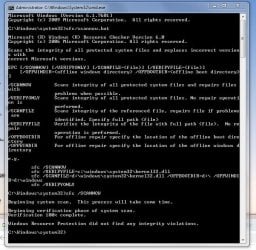
ran SFC/scannow
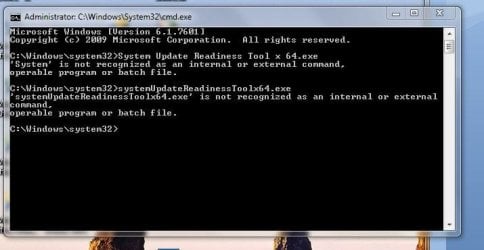
couldn't run
SFCfix.exe
System Update Readiness Tool x64.exe


not sure what I did wrong, response below
 

Attachments

  • Win 7 update fail SFC scannow  4-4-2020 2nd result.JPG
    Win 7 update fail SFC scannow 4-4-2020 2nd result.JPG
    118.4 KB · Views: 9
  • Win 7 update fail SFCfix.exe result 4-4-2020.JPG
    Win 7 update fail SFCfix.exe result 4-4-2020.JPG
    17.3 KB · Views: 9
  • Win 7 update fail SFC system Update readiness tool result 4-4-2020.JPG
    Win 7 update fail SFC system Update readiness tool result 4-4-2020.JPG
    52 KB · Views: 9

My Computer

Computer type
PC/Desktop
Computer Manufacturer/Model Number
PoweSpec B409
OS
Windows 7 Home Premium x64
CPU
Intel(R) Core(TM) 2 Quad CPU Q830
Graphics Card(s)
Intel (R) G33/G31 Express Chipset family
Antivirus
MS Security Essentials
Browser
FireFox
pleiades357

You copied and pasted the executable instead of downloading and running.

The text is blue because they are hypertext links.

You click on them, download the executable, place them on your desktop and run them. Click click!

Snick
 

My Computer

Computer type
PC/Desktop
Computer Manufacturer/Model Number
HP Desktop & Compaq Laptop
OS
Win 10 x64, Linux Lite, Win 7 x64, BlackArch, & Kali
Hard Drives
Samsung 850 Pro 256Gb,
Hitachi HDD 1Tb,
Crucial MX SSD 250Gb
Segate 3Tb USB 3.0 Ext. Backup HDD
Internet Speed
150Mbps dn, 20Mbps up
Antivirus
Avast Free, Malwarebytes Anti-Exploit & Anti-Ransomware
Browser
Firefox, Chrome, Opera, & VPN
downloading and running from where?

no, I didn't copy and paste, I typed them into cmd

I don't want to run non Mircosoft software, did that some many many years ago and downloaded a serious problem
 

My Computer

Computer type
PC/Desktop
Computer Manufacturer/Model Number
PoweSpec B409
OS
Windows 7 Home Premium x64
CPU
Intel(R) Core(TM) 2 Quad CPU Q830
Graphics Card(s)
Intel (R) G33/G31 Express Chipset family
Antivirus
MS Security Essentials
Browser
FireFox
Please keep in mind that Code 80092004 cannot be fixed with KB4490628 missing, whatever assistance those exes may provide.

before I click on the link, can you tell me what it is?
a search typing what is shown of the link brings up "ending support" messages... one says KB4490628 is a security update, but, MS security updates are installing...
so, I'm confused

Regards, VZ

Code 80092004 indicates KB4490628 missing. The right place to start is

https://support.microsoft.com/en-us/...server-2008-r2

Regards, VZ
 

My Computer

Computer type
PC/Desktop
Computer Manufacturer/Model Number
PoweSpec B409
OS
Windows 7 Home Premium x64
CPU
Intel(R) Core(TM) 2 Quad CPU Q830
Graphics Card(s)
Intel (R) G33/G31 Express Chipset family
Antivirus
MS Security Essentials
Browser
FireFox

My Computer

Computer type
PC/Desktop
Computer Manufacturer/Model Number
PoweSpec B409
OS
Windows 7 Home Premium x64
CPU
Intel(R) Core(TM) 2 Quad CPU Q830
Graphics Card(s)
Intel (R) G33/G31 Express Chipset family
Antivirus
MS Security Essentials
Browser
FireFox
Doing things wrong won't help you. Click the original link, not the quote, or click

http://download.windowsupdate.com/c..._d3de52d6987f7c8bdc2c015dca69eac96047c76e.msu

I just did, says, installing...

so you really think I am choosing to do things wrong to make things more difficult for myself?

instructions that are not clear to a person with less knowledge than yourself, are not helpful also


I'm trying to deal with this while, among other problems, I have no income, so, if you can, be helpful and not be insulting, ok?

I was proud of myself for doing the research on how to do a command from the desktop
I spent some time learning how to be the "administrator"
I'm a senior lady, I like learning but this is new to me... from the other advice...

very willing to learn, but, I need some clues to research instructions that are outside current knowledge


installed, now what? try update again?

and, thank you
 

My Computer

Computer type
PC/Desktop
Computer Manufacturer/Model Number
PoweSpec B409
OS
Windows 7 Home Premium x64
CPU
Intel(R) Core(TM) 2 Quad CPU Q830
Graphics Card(s)
Intel (R) G33/G31 Express Chipset family
Antivirus
MS Security Essentials
Browser
FireFox
Are you sure?

And likely fixed, as in
KB4516065 Installation Fails with Error 80092004 - Microsoft Community
Remember which update fails for her?

Erm yes, try update again. :-)

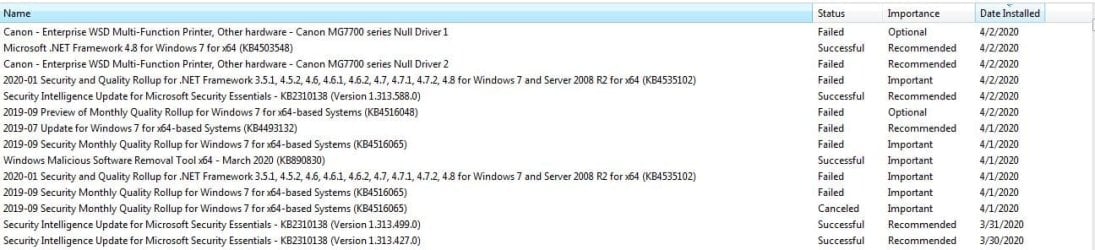
update successful except canon driver, will look at canon site and see if any fix there, thank you
very much

for my information, what went wrong?
KB4490628... what do I call that? a "KB"? one of my problems is not having the vocabulary...

was that part of an earlier update that did not install, so, future updates would not?
it does not show up in the list of "failed" on update history, so... perplexed

thank you again...
 

Attachments

  • windows update 4-5-2020 mostly sucessful.JPG
    windows update 4-5-2020 mostly sucessful.JPG
    95.3 KB · Views: 1
Last edited:

My Computer

Computer type
PC/Desktop
Computer Manufacturer/Model Number
PoweSpec B409
OS
Windows 7 Home Premium x64
CPU
Intel(R) Core(TM) 2 Quad CPU Q830
Graphics Card(s)
Intel (R) G33/G31 Express Chipset family
Antivirus
MS Security Essentials
Browser
FireFox
Are you sure?

And likely fixed, as in
KB4516065 Installation Fails with Error 80092004 - Microsoft Community
Remember which update fails for her?

Erm yes, try update again. :-)

No, you are never sure without logs. Why do you think cars have diagnostic programs? Because you don't guess at the problem. Microsoft error codes are very generic! There are a plethora of underlying issues that can prevent an update to install. Forcing it to install is not the answer. Because something was successful for someone else, does not necessarily mean that it is correct.

I see how many posts you have here Volume Z!

Snick
 

My Computer

Computer type
PC/Desktop
Computer Manufacturer/Model Number
HP Desktop & Compaq Laptop
OS
Win 10 x64, Linux Lite, Win 7 x64, BlackArch, & Kali
Hard Drives
Samsung 850 Pro 256Gb,
Hitachi HDD 1Tb,
Crucial MX SSD 250Gb
Segate 3Tb USB 3.0 Ext. Backup HDD
Internet Speed
150Mbps dn, 20Mbps up
Antivirus
Avast Free, Malwarebytes Anti-Exploit & Anti-Ransomware
Browser
Firefox, Chrome, Opera, & VPN
Back
Top