Win 7 Pro PC does not access Win XP PC

billg226

New member
Member
Local time
6:40 PM
Messages
74
Location
Kentucky
I've a Windows 7 Pro 32/64bit Desktop PC, Say named BILLDT1, I've another Desktop PC with XP SP3 32bit named BILLDT2 and a Wireless Laptop with XP SP3 named BILLLT.
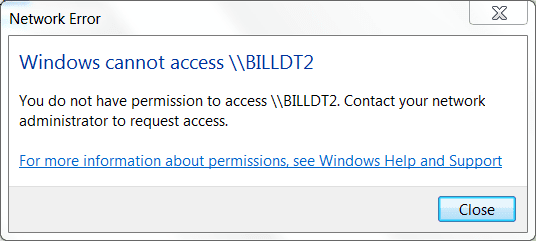
Okay, BILLDT1 sees both BILLDT2 & BILLLT however when I click on BILLDT2 from BILLDT1 it say \\BILLDT2 inaccessable. See System Admin............ Well I'm System Admin and I thought/think I got BILLDT2 permissions set for sharing. I can get on BILLDT2 and see/open files, use printer on BILLDT1 as can BILLLT but BILLDT1 can access files on BILLLT. BILLLT works both ways fine.

In Conclusion,my problem is BILLDT1 sees BILLDT2 but cannot access/read file on BILLDT2 but BILLDT2 can read/open files & use printer on BILLDT1.

Any help appreciated,
Bill
 

My Computer My Computer

At a glance

Windows 7 Professional 64 bitAthlon 640 quad core4gb DDR32
Computer Manufacturer/Model Number
HP
OS
Windows 7 Professional 64 bit
CPU
Athlon 640 quad core
Motherboard
quad core
Memory
4gb DDR3
Graphics Card(s)
2
Sound Card
1
Monitor(s) Displays
2
Hard Drives
1-1tb
1-80gb external
Hi
I'm not a network guru so I don't know WHY this works but it will often do so when you can't connect to a Shared disk / printer on a computer on your LAN in other ways.

1) say the local address of machine 2 is 198.168.0.3

2) connect Network drive via \\198.168.0.3\D (assuming Drive D is what you want to connect to - or whatever its share name is)

This will usually work.

Might be something to do with DNS / Host name resolution -- don't ask me to go into any more details than that -- Windows Networking is a TOTAL MYSTERY that only the privileged few can understand how it all works.

Cheers
jimbo
 

My Computer My Computer

At a glance

Linux CENTOS 7 / various Windows OS'es and se...Intel i7 Intel i58GB, 16GBOn Motherboard
Computer type
PC/Desktop
Computer Manufacturer/Model Number
Custom built, several laptops HP/ASUS
OS
Linux CENTOS 7 / various Windows OS'es and servers
CPU
Intel i7 Intel i5
Memory
8GB, 16GB
Graphics Card(s)
On Motherboard
Sound Card
Realtek HD audio
Monitor(s) Displays
Apple Cinema display, Samsung LCD
Screen Resolution
1920 X 1080
Hard Drives
4 X 1TB SATA
Mouse
Toshiba wireless laser
Internet Speed
> 20MB up
Sounds to me like a permission issue. What folders are you trying to share from the XP machine, and have you set up sharing for them?
 

My Computer My Computer

At a glance

W7 Professional x64Core 2 Duo 2.932 GBATI Radeon 4695
Computer Manufacturer/Model Number
HP 6000 Pro Micro Tower
OS
W7 Professional x64
CPU
Core 2 Duo 2.93
Memory
2 GB
Graphics Card(s)
ATI Radeon 4695
Monitor(s) Displays
Two HP 17's
Hard Drives
150GB Sata Drive
Case
Tiny. Kinda cute.
Keyboard
HP Supplied. Surprisingly nice.
Mouse
Gateway Mouse from an E2610D
Internet Speed
45 mbps
Sounds to me like a permission issue. What folders are you trying to share from the XP machine, and have you set up sharing for them?
My Docs, My music, & My Pictures. Permission to Share has been set & that PC was my primary PC bfore getting this newone.
 

My Computer My Computer

At a glance

Windows 7 Professional 64 bitAthlon 640 quad core4gb DDR32
Computer Manufacturer/Model Number
HP
OS
Windows 7 Professional 64 bit
CPU
Athlon 640 quad core
Motherboard
quad core
Memory
4gb DDR3
Graphics Card(s)
2
Sound Card
1
Monitor(s) Displays
2
Hard Drives
1-1tb
1-80gb external
Hi
I'm not a network guru so I don't know WHY this works but it will often do so when you can't connect to a Shared disk / printer on a computer on your LAN in other ways.

1) say the local address of machine 2 is 198.168.0.3

2) connect Network drive via \\198.168.0.3\D (assuming Drive D is what you want to connect to - or whatever its share name is)

This will usually work.

Might be something to do with DNS / Host name resolution -- don't ask me to go into any more details than that -- Windows Networking is a TOTAL MYSTERY that only the privileged few can understand how it all works.

Cheers
jimbo
How can I find local address on it & Map to it as I used to could?
 

My Computer My Computer

At a glance

Windows 7 Professional 64 bitAthlon 640 quad core4gb DDR32
Computer Manufacturer/Model Number
HP
OS
Windows 7 Professional 64 bit
CPU
Athlon 640 quad core
Motherboard
quad core
Memory
4gb DDR3
Graphics Card(s)
2
Sound Card
1
Monitor(s) Displays
2
Hard Drives
1-1tb
1-80gb external
I just thought of something: if you're getting "inaccessable" then I would try turning your firewall on the XP machine off, and then trying.
 

My Computer My Computer

At a glance

W7 Professional x64Core 2 Duo 2.932 GBATI Radeon 4695
Computer Manufacturer/Model Number
HP 6000 Pro Micro Tower
OS
W7 Professional x64
CPU
Core 2 Duo 2.93
Memory
2 GB
Graphics Card(s)
ATI Radeon 4695
Monitor(s) Displays
Two HP 17's
Hard Drives
150GB Sata Drive
Case
Tiny. Kinda cute.
Keyboard
HP Supplied. Surprisingly nice.
Mouse
Gateway Mouse from an E2610D
Internet Speed
45 mbps
I just thought of something: if you're getting "inaccessable" then I would try turning your firewall on the XP machine off, and then trying.
I tried but still getting this:
Capture.PNG
 

My Computer My Computer

At a glance

Windows 7 Professional 64 bitAthlon 640 quad core4gb DDR32
Computer Manufacturer/Model Number
HP
OS
Windows 7 Professional 64 bit
CPU
Athlon 640 quad core
Motherboard
quad core
Memory
4gb DDR3
Graphics Card(s)
2
Sound Card
1
Monitor(s) Displays
2
Hard Drives
1-1tb
1-80gb external
Hello billg226,

Make sure that Netbios is enabled on all your computers.
Windows XP Network Troubleshooting

Verify that DHCP is also enabled.
How to Enable DHCP in Windows XP | eHow.com

Try sharing the C Drive and call it 'C' in BILLDT2 and give it a full access permission for now.
Once that's done, from BILLDT1 computer, click on Start, on run type this: \\BILLDT2\C or \\BILLDT2 IP Address\C press enter, and see if you are able to access the C drive.

It's also recommended to create Identical UserNames and Passwords on all the computers in your Network.

Please give us an update.
 

My Computer My Computer

At a glance

Win7 & Win8 64bitIntel i5
Computer Manufacturer/Model Number
Lenovo Desktop/Samsung Laptop
OS
Win7 & Win8 64bit
CPU
Intel i5
Internet Speed
Charter-20 Mbps
Antivirus
Avast
Browser
FF, IE9 and Chrome
Hello billg226,

Make sure that Netbios is enabled on all your computers.
Windows XP Network Troubleshooting

Verify that DHCP is also enabled.
How to Enable DHCP in Windows XP | eHow.com

Try sharing the C Drive and call it 'C' in BILLDT2 and give it a full access permission for now.
Once that's done, from BILLDT1 computer, click on Start, on run type this: \\BILLDT2\C or \\BILLDT2 IP Address\C press enter, and see if you are able to access the C drive.

It's also recommended to create Identical UserNames and Passwords on all the computers in your Network.

Please give us an update.
Enabled Netbios
DHCP already enabled
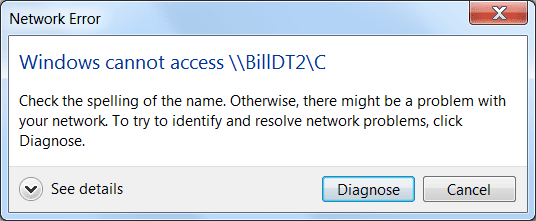
Get the below when typing in \\BILLDT2\C.............
Capture1.PNG
Then when I click Diagnose, get this...............
Capture2.PNG

I've triple checked PC names & Network name on all PCs, they same (Network Name I use is MSHOME. The Permissions on BILLDT2\C are set to Share.
Note, BILLDT2 used to be my primary with Linksys Router connected to it. Router now on BILLDT1.
I also tried it with ";" & ":" at end of C.

Thanks.............Bill
 

My Computer My Computer

At a glance

Windows 7 Professional 64 bitAthlon 640 quad core4gb DDR32
Computer Manufacturer/Model Number
HP
OS
Windows 7 Professional 64 bit
CPU
Athlon 640 quad core
Motherboard
quad core
Memory
4gb DDR3
Graphics Card(s)
2
Sound Card
1
Monitor(s) Displays
2
Hard Drives
1-1tb
1-80gb external
Could you toss in a screenshot of the share settings, as they're presently configured?

Also, in addition to having shared the directory, have you gone into Network and Sharing Center (it's in Control Panel) and turned on Network Discovery, and File Sharing?
 

My Computer My Computer

At a glance

W7 Professional x64Core 2 Duo 2.932 GBATI Radeon 4695
Computer Manufacturer/Model Number
HP 6000 Pro Micro Tower
OS
W7 Professional x64
CPU
Core 2 Duo 2.93
Memory
2 GB
Graphics Card(s)
ATI Radeon 4695
Monitor(s) Displays
Two HP 17's
Hard Drives
150GB Sata Drive
Case
Tiny. Kinda cute.
Keyboard
HP Supplied. Surprisingly nice.
Mouse
Gateway Mouse from an E2610D
Internet Speed
45 mbps
Hi Bill,

Sometimes the problem is with a new network technology that came out in Vista called Link-layer Topology Discovery. Vista and Win7 both require this protocol in order to communicate over a local network. You might make sure LLTD has been installed via Windows Update on your XP machine to ensure its compatibility. You can do this by checking its network properties...LLTD is located in the same place as IPv4 and IPv6 configuration. Make sure it is there.

Also, another issue that commonly affects network communication between XP and Win7 is encryption levels; if you lower the level in Win-win, that can help as well. That is found in Network and Sharing Center, Advanced sharing settings, then it is toward the bottom.

Hope this helps! Let us know. :)

Heather

Sent from my PC36100 using Tapatalk
 

My Computer My Computer

At a glance

Win7 Ultimate x64, Server 2008 R2AMD Phenom II X6 1055T Thuban 2.8GHz8GB G.SKILL Ripjaws Series DDR3 1600 (PC3 12800)2x HIS/Sapphire ATI Radeon HD 5830 in CrossfireX
Computer Manufacturer/Model Number
Myself
OS
Win7 Ultimate x64, Server 2008 R2
CPU
AMD Phenom II X6 1055T Thuban 2.8GHz
Motherboard
GIGABYTE GA-890FXA-UD5
Memory
8GB G.SKILL Ripjaws Series DDR3 1600 (PC3 12800)
Graphics Card(s)
2x HIS/Sapphire ATI Radeon HD 5830 in CrossfireX
Sound Card
Sound Blaster X-Fi Xtreme
Monitor(s) Displays
Dell 2407WFP 24", Dell 22"
Screen Resolution
1920x1200
Hard Drives
Patriot Torqx 128GB SSD
3TB other HD
PSU
CORSAIR HX Series CMPSU-750HX 750W
Case
Antec Nine Hundred
Cooling
Cooler Master Hyper 212 Plus CPU cooler
Keyboard
SteelSeries MercStealth
Mouse
Razer Lachesis
Internet Speed
HAHA NO MOAR COMCAST. Now, FiOS :D
Other Info
I am a virtualization enthusiast. I like Hyper-V. It's free.
I'm a Windows 7 fangirl. I will teach a class for you or write a custom course for you RIGHT NOW.
I love EVE Online. I'm Sayra Sainer. I play Starcraft II. My gamertag is Tal0nn. I'm trying not to play Minecraft.
I also like coffee. I'll take a basic triple grande extra-hot breve stirred ristretto caramel machiatto.

My Computer My Computer

At a glance

Windows 7 Ultimate SP1 64-BitIntel Core i7 870 @ 2.93GHz8Gb Dual-Channel DDR3 @ 664MHznVidia GeForce GTX 460 1024MB dedicated RAM
Computer Manufacturer/Model Number
HP Pavilion Elite 495UK
OS
Windows 7 Ultimate SP1 64-Bit
CPU
Intel Core i7 870 @ 2.93GHz
Motherboard
MSI 2A9C (CPU1)
Memory
8Gb Dual-Channel DDR3 @ 664MHz
Graphics Card(s)
nVidia GeForce GTX 460 1024MB dedicated RAM
Sound Card
Realtek HD Audio
Monitor(s) Displays
HP2310i
Screen Resolution
1920 x 1080
Hard Drives
1x1954GB Hitachi HDS22020ALA 330 (RAID), 1x1954GB Hitachi External for backup and storage
PSU
460W
Case
HP Elite
Cooling
Air cooled
Keyboard
Logitech K750 solar-powered keyboard
Mouse
Logitech Wireless M180 mouse
Internet Speed
2Mb
Other Info
Pure Avanti Flow Internet Radio with iPod Dock, 64Gb iPod, HP USB Speakers, Sony MDR-V500 Headphones, Sony Vaio F-Series Laptop
Hmmm, that "win-win" was supposed to be Win7. Gogo mobile phone forum access!

Sent from my PC36100 using Tapatalk
 

My Computer My Computer

At a glance

Win7 Ultimate x64, Server 2008 R2AMD Phenom II X6 1055T Thuban 2.8GHz8GB G.SKILL Ripjaws Series DDR3 1600 (PC3 12800)2x HIS/Sapphire ATI Radeon HD 5830 in CrossfireX
Computer Manufacturer/Model Number
Myself
OS
Win7 Ultimate x64, Server 2008 R2
CPU
AMD Phenom II X6 1055T Thuban 2.8GHz
Motherboard
GIGABYTE GA-890FXA-UD5
Memory
8GB G.SKILL Ripjaws Series DDR3 1600 (PC3 12800)
Graphics Card(s)
2x HIS/Sapphire ATI Radeon HD 5830 in CrossfireX
Sound Card
Sound Blaster X-Fi Xtreme
Monitor(s) Displays
Dell 2407WFP 24", Dell 22"
Screen Resolution
1920x1200
Hard Drives
Patriot Torqx 128GB SSD
3TB other HD
PSU
CORSAIR HX Series CMPSU-750HX 750W
Case
Antec Nine Hundred
Cooling
Cooler Master Hyper 212 Plus CPU cooler
Keyboard
SteelSeries MercStealth
Mouse
Razer Lachesis
Internet Speed
HAHA NO MOAR COMCAST. Now, FiOS :D
Other Info
I am a virtualization enthusiast. I like Hyper-V. It's free.
I'm a Windows 7 fangirl. I will teach a class for you or write a custom course for you RIGHT NOW.
I love EVE Online. I'm Sayra Sainer. I play Starcraft II. My gamertag is Tal0nn. I'm trying not to play Minecraft.
I also like coffee. I'll take a basic triple grande extra-hot breve stirred ristretto caramel machiatto.
Ah yes. And as part of the functionality of LLTD you must have network discovery turned on (the Win7 PC).

Sent from my PC36100 using Tapatalk
 

My Computer My Computer

At a glance

Win7 Ultimate x64, Server 2008 R2AMD Phenom II X6 1055T Thuban 2.8GHz8GB G.SKILL Ripjaws Series DDR3 1600 (PC3 12800)2x HIS/Sapphire ATI Radeon HD 5830 in CrossfireX
Computer Manufacturer/Model Number
Myself
OS
Win7 Ultimate x64, Server 2008 R2
CPU
AMD Phenom II X6 1055T Thuban 2.8GHz
Motherboard
GIGABYTE GA-890FXA-UD5
Memory
8GB G.SKILL Ripjaws Series DDR3 1600 (PC3 12800)
Graphics Card(s)
2x HIS/Sapphire ATI Radeon HD 5830 in CrossfireX
Sound Card
Sound Blaster X-Fi Xtreme
Monitor(s) Displays
Dell 2407WFP 24", Dell 22"
Screen Resolution
1920x1200
Hard Drives
Patriot Torqx 128GB SSD
3TB other HD
PSU
CORSAIR HX Series CMPSU-750HX 750W
Case
Antec Nine Hundred
Cooling
Cooler Master Hyper 212 Plus CPU cooler
Keyboard
SteelSeries MercStealth
Mouse
Razer Lachesis
Internet Speed
HAHA NO MOAR COMCAST. Now, FiOS :D
Other Info
I am a virtualization enthusiast. I like Hyper-V. It's free.
I'm a Windows 7 fangirl. I will teach a class for you or write a custom course for you RIGHT NOW.
I love EVE Online. I'm Sayra Sainer. I play Starcraft II. My gamertag is Tal0nn. I'm trying not to play Minecraft.
I also like coffee. I'll take a basic triple grande extra-hot breve stirred ristretto caramel machiatto.
Could you toss in a screenshot of the share settings, as they're presently configured?

Also, in addition to having shared the directory, have you gone into Network and Sharing Center (it's in Control Panel) and turned on Network Discovery, and File Sharing?
Share setting on this Windows 7 PC (BILLDT1)? BILLDT2 & BILLLT see all on here I've set for share including printer attached to BILLDT1.

If your speaking of this one BILLDT1) with Win 7, yes I've turned on "Network Discovery & File sharing.
 
Last edited:

My Computer My Computer

At a glance

Windows 7 Professional 64 bitAthlon 640 quad core4gb DDR32
Computer Manufacturer/Model Number
HP
OS
Windows 7 Professional 64 bit
CPU
Athlon 640 quad core
Motherboard
quad core
Memory
4gb DDR3
Graphics Card(s)
2
Sound Card
1
Monitor(s) Displays
2
Hard Drives
1-1tb
1-80gb external
Ah yes. And as part of the functionality of LLTD you must have network discovery turned on (the Win7 PC).

Sent from my PC36100 using Tapatalk
It's turned on.
 

My Computer My Computer

At a glance

Windows 7 Professional 64 bitAthlon 640 quad core4gb DDR32
Computer Manufacturer/Model Number
HP
OS
Windows 7 Professional 64 bit
CPU
Athlon 640 quad core
Motherboard
quad core
Memory
4gb DDR3
Graphics Card(s)
2
Sound Card
1
Monitor(s) Displays
2
Hard Drives
1-1tb
1-80gb external

My Computer My Computer

At a glance

Windows 7 Professional 64 bitAthlon 640 quad core4gb DDR32
Computer Manufacturer/Model Number
HP
OS
Windows 7 Professional 64 bit
CPU
Athlon 640 quad core
Motherboard
quad core
Memory
4gb DDR3
Graphics Card(s)
2
Sound Card
1
Monitor(s) Displays
2
Hard Drives
1-1tb
1-80gb external
Hi Bill,

Sometimes the problem is with a new network technology that came out in Vista called Link-layer Topology Discovery. Vista and Win7 both require this protocol in order to communicate over a local network. You might make sure LLTD has been installed via Windows Update on your XP machine to ensure its compatibility. You can do this by checking its network properties...LLTD is located in the same place as IPv4 and IPv6 configuration. Make sure it is there.

Also, another issue that commonly affects network communication between XP and Win7 is encryption levels; if you lower the level in Win-win, that can help as well. That is found in Network and Sharing Center, Advanced sharing settings, then it is toward the bottom.

Hope this helps! Let us know. :)

Heather

Sent from my PC36100 using Tapatalk
Heather,
Installed LLTD last week on XP desktop, laptop doing okay.

You mean lower encryption below 128? 128 Ticked right now.
Bill
 

My Computer My Computer

At a glance

Windows 7 Professional 64 bitAthlon 640 quad core4gb DDR32
Computer Manufacturer/Model Number
HP
OS
Windows 7 Professional 64 bit
CPU
Athlon 640 quad core
Motherboard
quad core
Memory
4gb DDR3
Graphics Card(s)
2
Sound Card
1
Monitor(s) Displays
2
Hard Drives
1-1tb
1-80gb external
Ah yes. And as part of the functionality of LLTD you must have network discovery turned on (the Win7 PC).

Sent from my PC36100 using Tapatalk
It is/has been on since last week.
 

My Computer My Computer

At a glance

Windows 7 Professional 64 bitAthlon 640 quad core4gb DDR32
Computer Manufacturer/Model Number
HP
OS
Windows 7 Professional 64 bit
CPU
Athlon 640 quad core
Motherboard
quad core
Memory
4gb DDR3
Graphics Card(s)
2
Sound Card
1
Monitor(s) Displays
2
Hard Drives
1-1tb
1-80gb external
Snapshots are very helpful. Can you please come back to the Sharing properties to make sure that the name of the Shared folder is called C?
Enabled Netbios
DHCP already enabled
Get the below when typing in \\BILLDT2\C.............
 

My Computer My Computer

At a glance

Win7 & Win8 64bitIntel i5
Computer Manufacturer/Model Number
Lenovo Desktop/Samsung Laptop
OS
Win7 & Win8 64bit
CPU
Intel i5
Internet Speed
Charter-20 Mbps
Antivirus
Avast
Browser
FF, IE9 and Chrome
Back
Top