Win 7 startup password - how to eliminate?

rdregnier

New member
Local time
8:16 AM
Messages
3
Please help eliminate the Windows7 startup password. I tried disenabling all but one Dell Support file in Startup tab in msconfig. Still comes up on screen after soft and hard boot. What else can I try?
 

My Computer My Computer

At a glance

windows 7 home premium 64bit
OS
windows 7 home premium 64bit
I followed your directions in .PDF. I still get Startup Password window before Windows launches. Any other ideas? I tried taking a screen shot but didn't work. I can try to take a picture with phone camera. Would that help to see the window that comes up?
 

My Computer My Computer

At a glance

windows 7 home premium 64bit
OS
windows 7 home premium 64bit
I followed your directions in .PDF. I still get Startup Password window before Windows launches. Any other ideas? I tried taking a screen shot but didn't work. I can try to take a picture with phone camera. Would that help to see the window that comes up?
To use the Auto Log On as in my pdf, you must have a password for your account. If their are other users on the computer, it does not matter, just highlight the account you want to log on automatically with then untick the box, click ok then enter password x 2.
 

My Computer My Computer

At a glance

Win7 H.Prem. 32bit+SP1
Computer Manufacturer/Model Number
Look in my Signature.
OS
Win7 H.Prem. 32bit+SP1
Just to clarify, Is it looking for a Windows Logon (account) password or a Computer BIOS password?
 

My Computer My Computer

At a glance

Windows 10 Education 64 bitAMD Phenom II X4 980 Black Edition Deneb 3.7GHz8GB 4GBx2 Kingston PC10600 DDR3 1333 MemoryZotac NVIDIA Geforce GT640 2 Gig DDR3 PCIe
Computer type
PC/Desktop
Computer Manufacturer/Model Number
Home Built
OS
Windows 10 Education 64 bit
CPU
AMD Phenom II X4 980 Black Edition Deneb 3.7GHz
Motherboard
Asus M4N68T-M V2 µATX Motherboard
Memory
8GB 4GBx2 Kingston PC10600 DDR3 1333 Memory
Graphics Card(s)
Zotac NVIDIA Geforce GT640 2 Gig DDR3 PCIe
Sound Card
VIA VT1708s High Definition Audio 8-channel Onboard
Monitor(s) Displays
22" LG E2242 1080p and 2 19" I-INC AG191D
Screen Resolution
1280x1024 - 1920x1080 - 1280x1024
Hard Drives
Crucial M100 256 GB SSD and 500 GB WD Blue SATA
PSU
Thermaltake TR 620
Case
Power Up Black ATX Mid-Tower Case
Cooling
Stock heatsink and fan
Keyboard
Logitech Wireless K350 Wave
Mouse
Logitech Wireless M570 Trackman Wheel
Internet Speed
80 Mbps Down 30 Mbps Up
Antivirus
Windows Defender
Browser
Internet Explorer 11
Other Info
HP DVD1040e Lightscribe - External USB2
I followed your directions in .PDF. I still get Startup Password window before Windows launches. Any other ideas? I tried taking a screen shot but didn't work. I can try to take a picture with phone camera. Would that help to see the window that comes up?
Yes I think a clear photo could help us understand what is generating the password prompt.

Just in case we need it can you please tell us your model number and if it's a desktop or laptop?
 

My Computer My Computer

At a glance

Windows 7 Ultimate x64Intel Pentium Dual Core E5200 2.5GHz (3.77GHz...Corsair 4GB DDR2 (4x1GB CM2X1024-6400C4)Palit GeForce GTS 250 (1024MB)
Computer Manufacturer/Model Number
Self built
OS
Windows 7 Ultimate x64
CPU
Intel Pentium Dual Core E5200 2.5GHz (3.77GHz OC)
Motherboard
Asus P5Q-E
Memory
Corsair 4GB DDR2 (4x1GB CM2X1024-6400C4)
Graphics Card(s)
Palit GeForce GTS 250 (1024MB)
Sound Card
On Board (ADI AD2000B 8ch HD)
Monitor(s) Displays
Samsung 32in LCD TV
Screen Resolution
1360x768
Hard Drives
2 x 1TB Samsung 103SJ (Raid0)
2 x External 500GB Samsung 502IJ (NexStar 3 HD Enclosures)
PSU
550W Antec Neo HE 550
Case
Antec P180
Cooling
Xigmatex Red Scorpion CPU Cooler. 3x120mm Fans
Keyboard
Logitech MX5000 Laser (Combo)
Mouse
Logitech MX5000 Laser (Combo)
Internet Speed
ADSL2+ (avg 10 Mbps Down, 0.80 Mbps up)
Other Info
Gigabyte GN-WP01GS 54g Wireless Lan Card
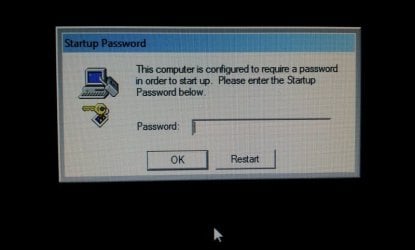
I don't know if its called a windows logon or computer bios password. Picture is attached. I was hacked into by two Indian guys saying that they were from Microsoft and rec'd msgs that my machine had an excess number of error and warning msgs. I let them in by using ammyy.com. I noticed they were running through files in DOS and then they locked me out with this startup password window, held me virtually hostage for about a half an hour, trying to get me to talk dirty to them. After pleading with them, they finally gave the password and I've been trying to get this password issue solved for a week now. I've backed up my hard drive and changed my password in my windows logon area. But can't solve this issue. Is it possibly in the system files or DOS code that they established or wrote in? I really don't need a lecture about hackers, believe me I feel very stupid and ashamed! I know better.

I have a Dell desktop 545S.
 

Attachments

  • Startup Password.jpg
    Startup Password.jpg
    35.7 KB · Views: 21

My Computer My Computer

At a glance

windows 7 home premium 64bit
OS
windows 7 home premium 64bit
Stop. Do not pass go. Do not collect $200.

You were hacked. You have no idea what they did. Do not waste time trying to change passwords, etc. Do a clean install of Windows ASAP.

In the future, give a complete history of what's going on with the computer. Had you done this in your first post, you would have received this type of recommendation immediately.
 

My Computer My Computer

At a glance

Windows 7 Ultimate x64 SP1Core i7-2670QM8GB DDR3 PC3-10600Intel HD Graphics 3000 + GeForce GT 540M
Computer Manufacturer/Model Number
Dell XPS 15 L502x
OS
Windows 7 Ultimate x64 SP1
CPU
Core i7-2670QM
Memory
8GB DDR3 PC3-10600
Graphics Card(s)
Intel HD Graphics 3000 + GeForce GT 540M
Screen Resolution
1920x1080
Hard Drives
1TB 5400RPM Seagate
From the image shown, this could be the actual Dell security that was set to on on some systems, but can at times set itself to on without the user doing anything.

If this is the case then you will need to contact Dell, with various information, Proof of Purchase, ID Tag, Serial etc. When Dell have this information they will be able to generate the unique password for that particular laptop, and yes they are all unique. As far as I am aware, this is not a charge for this service, but they will not provide the password without the qualifying information. This is to prevent stolen units from being sold on ETC.

This is also something that is only available from Dell Direct, so it is not a good idea to trust this to your local shop/Technician

 

My Computers My Computers

  • At a glance

    Windows 11 Pro x64 [Latest Release and Releas...Ryzen 9 5950X, 3.8 - 5.2 MHz64GB [2 x 32GB] DDR4 3200MHz4GB NVIDIA GEFORCE GTX 1650 Ti
    Computer type
    PC/Desktop
    Computer Manufacturer/Model Number
    ChillBlast - Custom to my design
    OS
    Windows 11 Pro x64 [Latest Release and Release Preview]
    CPU
    Ryzen 9 5950X, 3.8 - 5.2 MHz
    Motherboard
    Asus Prime X570-Pro
    Memory
    64GB [2 x 32GB] DDR4 3200MHz
    Graphics Card(s)
    4GB NVIDIA GEFORCE GTX 1650 Ti
    Sound Card
    On-board SPDIF to 5.1 System + HDMI [5.1 system]
    Monitor(s) Displays
    32" UHD 32 Bit HDR Monitor + 43" UHD 4K 32Bit HDR TV
    Screen Resolution
    2 x 3840 x 2160 @60Hz
    Hard Drives
    1TB M2 SSD OS, 500GB Fast Access SSD, 2 x 8TB Data + Various Externals from 1TB to 4TB, 10TB NAS
    PSU
    NZXT C750 80 PLUS Gold 750W Modular PSU
    Case
    Workstation Case [Matt Black]
    Cooling
    NZXT Kraken X63 280mm CPU Cooler +2x Quiet Case fans
    Keyboard
    Logitech Wireless MX Keys & K400 + others
    Mouse
    Logitech Wireless MX Master 3S
    Internet Speed
    920 MB Down 50 MB Up
    Antivirus
    BitDefender Total Security Pro
    Browser
    Chrome (always run latest Non-Beta)
    Other Info
    Also run ...
    Laptop - Quad 8GB - Windows 10 Pro x64
    Nexus 7 Android tablet x2
    Samsung 10.2" tablet
    Blackview TAB 8 4G Android Tablet c/w Keyboard
    Wacom Intuos Pro Medium Pen Pad
    Wacom Intuos Pro Small Pen Pad
    Wacom Expresskeys Remote
    Loopdeck+ Graphics Controller
    Shuttle Pro v2 Control
  • At a glance

    Windows 11 Pro x64 Latest RPIntel I7 10750H 5.0GHz32GB [2x16GB] DDR4 2933 MHznVidia GTX1650Ti 4 GB GDDR6
    Computer type
    Laptop
    System Manufacturer/Model Number
    Dell XPS 17 10750H
    OS
    Windows 11 Pro x64 Latest RP
    CPU
    Intel I7 10750H 5.0GHz
    Motherboard
    Dell XPS
    Memory
    32GB [2x16GB] DDR4 2933 MHz
    Graphics Card(s)
    nVidia GTX1650Ti 4 GB GDDR6
    Sound Card
    Stock [Realtek] 4 Speaker
    Monitor(s) Displays
    17" IPS UHD+ Infinity Edge Touchscreen
    Screen Resolution
    3840 x 2400
    Hard Drives
    2TB M2 NVMe, 4TB External + various 500GB & 1TB External NVMe (also have access to spinner HDD from
    PSU
    Stock
    Case
    Stock XPS Aluminium & Carbon Fibre
    Cooling
    Stock - Active Fan Control
    Keyboard
    Backlit + Various Logitech
    Mouse
    Stock Track Pad + Logitech MX Trackball
    Internet Speed
    72 MB Down 18MB Up
    Browser
    Chrome
    Other Info
    Also run ...
    Laptop - Quad 8GB - Windows 10 Pro x64
    Nexus 7 Android tablet x2
    10.2" tablet
    Sony Z3 Android Smartphone
    Wacom Intuos Pro Medium Pen Pad
    Wacom Intuos Pro Small Pen Pad
    Wacom Expresskeys Remote
    Loopdeck+ Graphics Controller
    Shuttle Pro v2 Control Pad
    10TB NAS
Before going any further I suggest somebody instructs a full malware scan.
 

My Computer My Computer

At a glance

Windows 11
Computer type
PC/Desktop
OS
Windows 11
Download to another computer and burn to CD or write to Flash stick Windows Defender Offline to try booting to run a full scan. Alternatives are here: FREE Bootable AntiVirus Rescue CDs Download List.

If a bootable disk or flash stick will boot then we can also help you copy out your files and Clean Reinstall - Factory OEM Windows 7. But in that case it should also run Factory Recovery from it's hotkey at boot: Dell Restoring Your Computer´s Software to the Factory Settings

Otherwise your best approach is Barman's above: contact Dell to obtain the password or ship it back to reflash the BIOS chip on the mobo. Explain fully what happened, if necessary to a supervisor.

You should not be ashamed of this and even report it to law enforcement as it is a type of creepy assault that gets prosecuted.
 
Last edited:
Stop. Do not pass go. Do not collect $200.

You were hacked. You have no idea what they did. Do not waste time trying to change passwords, etc. Do a clean install of Windows ASAP.

In the future, give a complete history of what's going on with the computer. Had you done this in your first post, you would have received this type of recommendation immediately.
Totally agree.
 

My Computer My Computer

At a glance

Windows 7 Ultimate x64Intel Pentium Dual Core E5200 2.5GHz (3.77GHz...Corsair 4GB DDR2 (4x1GB CM2X1024-6400C4)Palit GeForce GTS 250 (1024MB)
Computer Manufacturer/Model Number
Self built
OS
Windows 7 Ultimate x64
CPU
Intel Pentium Dual Core E5200 2.5GHz (3.77GHz OC)
Motherboard
Asus P5Q-E
Memory
Corsair 4GB DDR2 (4x1GB CM2X1024-6400C4)
Graphics Card(s)
Palit GeForce GTS 250 (1024MB)
Sound Card
On Board (ADI AD2000B 8ch HD)
Monitor(s) Displays
Samsung 32in LCD TV
Screen Resolution
1360x768
Hard Drives
2 x 1TB Samsung 103SJ (Raid0)
2 x External 500GB Samsung 502IJ (NexStar 3 HD Enclosures)
PSU
550W Antec Neo HE 550
Case
Antec P180
Cooling
Xigmatex Red Scorpion CPU Cooler. 3x120mm Fans
Keyboard
Logitech MX5000 Laser (Combo)
Mouse
Logitech MX5000 Laser (Combo)
Internet Speed
ADSL2+ (avg 10 Mbps Down, 0.80 Mbps up)
Other Info
Gigabyte GN-WP01GS 54g Wireless Lan Card
That picture looks like the startup lockscreen, which can be configured by using the syskey application. Hit the Windows key, type syskey, click update, then choose system generated password (store startup key locally).
 

My Computer My Computer

At a glance

Windows 7 Ultimate x64 SP1Core i7-2670QM8GB DDR3 PC3-10600Intel HD Graphics 3000 + GeForce GT 540M
Computer Manufacturer/Model Number
Dell XPS 15 L502x
OS
Windows 7 Ultimate x64 SP1
CPU
Core i7-2670QM
Memory
8GB DDR3 PC3-10600
Graphics Card(s)
Intel HD Graphics 3000 + GeForce GT 540M
Screen Resolution
1920x1080
Hard Drives
1TB 5400RPM Seagate
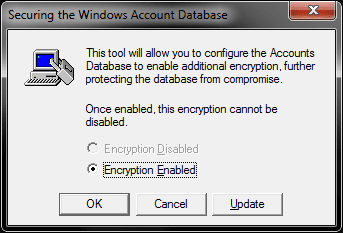
Kegger's Syskey prompt offers to enable irreversible encryption. This might be a way hackers are able to get it irreversibly passworded.

But since BIOS is not locked would OP be able to boot a disk to copy out data and then Reinstall, or run Factory Recovery from its partition? Or will data be encrypted even if attempt is made to copy it out with Rescue CD, as with BitLocker?
 
Kegger's Syskey prompt offers to enable irreversible encryption. This might be a way hackers are able to get it irreversibly passworded.

But since BIOS is not locked would OP be able to boot a disk to copy out data and then Reinstall, or run Factory Recovery from its partition? Or will data be encrypted even if attempt is made to copy it out with Rescue CD, as with BitLocker?

Yes, the data can be copied - I'd just slave the drive into another system and copy what I wanted to keep. Then, pop in the Windows 7 disc and do a custom clean install, formatting both the 100mb and the OS partition, then installing on the OS partition. Or, if his Dell has a restore partition that can be access during boot, a restore would also work, since it will completely erase and overwrite the OS partition with the original image.

BTW - syskey is just a tool that is used to secure the system accounts management (SAM) database.
 

My Computer My Computer

At a glance

Windows 7 Ultimate x64 SP1Core i7-2670QM8GB DDR3 PC3-10600Intel HD Graphics 3000 + GeForce GT 540M
Computer Manufacturer/Model Number
Dell XPS 15 L502x
OS
Windows 7 Ultimate x64 SP1
CPU
Core i7-2670QM
Memory
8GB DDR3 PC3-10600
Graphics Card(s)
Intel HD Graphics 3000 + GeForce GT 540M
Screen Resolution
1920x1080
Hard Drives
1TB 5400RPM Seagate
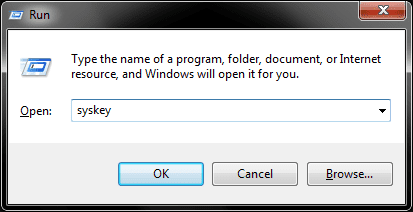
Disable Startup Password Prompt

Window Key + R to open the run prompt

Type syskey and hit enter

run_syskey.png

Select the option "Encryption Enabled" and click "Update"

Syskey_Encryption.png

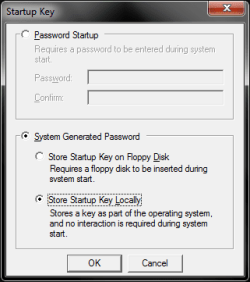
Select the options below and click OK

Startup_Key.png

You will be required to provide the current password. If you do not have it, you will need to seek alternative methods.

Hope this is helpful

Tim
 

My Computer My Computer

At a glance

Windows 7 Ultimate 64biti34GbIntel(R) HD Graphics
Computer Manufacturer/Model Number
Dell
OS
Windows 7 Ultimate 64bit
CPU
i3
Memory
4Gb
Graphics Card(s)
Intel(R) HD Graphics
Hard Drives
350G built-in, 1T Seagate External, 2T Buffalo External
Case
I prefer upper, but I will settle for lower
Internet Speed
Yes, I would like some please...
Other Info
Ham & Eggs - A days work for a chicken, but a lifetime of commitment for a pig.
I wonder if this person ever got their system fixed (if this wasn't some prank). But, what's rather bizarre about the original post is how the person didn't prefix the whole thing with this glaring problem of having been hacked! You've figure this would be foremost on their mind.
 

My Computer My Computer

At a glance

Windows 7 Home Premium x64AMD Vision A8-3500M 4 Core8GbAMD Radeon HD 6620G
Computer type
Laptop
Computer Manufacturer/Model Number
HP Pavillion dv6 (dv6-6165dx)
OS
Windows 7 Home Premium x64
CPU
AMD Vision A8-3500M 4 Core
Motherboard
AMD
Memory
8Gb
Graphics Card(s)
AMD Radeon HD 6620G
Screen Resolution
1366x768
Hard Drives
Hitachi Travelstar 500Gb
Internet Speed
Realtek RTL8188CE 802.11b/g/n
Back
Top