Win 7 Ultimate second monitor no video

when i right click the desktop on windows 7 ultimate there is no 'properties' selection making these fixes impossible. I get:
view
sort by
refresh
nvdia control panel
adobe drive cs4
new
screen resolution
gadgets
personalize
I've looked in gadgets screen resolution and personalize and cannot find the tabs mentioned in this article
OK, I think I found an answer for you, look for it on this thread on the NVIDIA site, something specific to the video card settings.
 

My Computer My Computer

At a glance

windos 7 ultimate2.67 GHTZ Intel Core 2 Quad Q94008192mb X 4NVIDIA Ge Force 9600 GT
Computer Manufacturer/Model Number
Kanai workstation
OS
windos 7 ultimate
CPU
2.67 GHTZ Intel Core 2 Quad Q9400
Motherboard
ASUSTeK Computer Inc P5E3 Deluxe Rev 1.xx
Memory
8192mb X 4
Graphics Card(s)
NVIDIA Ge Force 9600 GT
Sound Card
SoundMAX integrated digital hd audio
Monitor(s) Displays
LG W2042 X 2
Hard Drives
WDC WD1500BLFS-01YBUO ATA Device 150,04 gb
Promise 3+1 disc RAID 5 SCSI 1499.99GB
Promise 3+1 disc RAID 5 SCSI 1499.0GB
Case
Kanai workstation

My Computer My Computer

At a glance

windos 7 ultimate2.67 GHTZ Intel Core 2 Quad Q94008192mb X 4NVIDIA Ge Force 9600 GT
Computer Manufacturer/Model Number
Kanai workstation
OS
windos 7 ultimate
CPU
2.67 GHTZ Intel Core 2 Quad Q9400
Motherboard
ASUSTeK Computer Inc P5E3 Deluxe Rev 1.xx
Memory
8192mb X 4
Graphics Card(s)
NVIDIA Ge Force 9600 GT
Sound Card
SoundMAX integrated digital hd audio
Monitor(s) Displays
LG W2042 X 2
Hard Drives
WDC WD1500BLFS-01YBUO ATA Device 150,04 gb
Promise 3+1 disc RAID 5 SCSI 1499.99GB
Promise 3+1 disc RAID 5 SCSI 1499.0GB
Case
Kanai workstation
I just tested my system out,
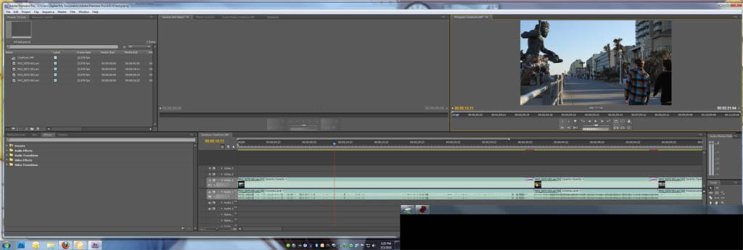
20" and 19" LG monitors, Premiere CS4, Win 7 64bit, GTX 285 and Premiere works fine across both screens, so I am not sure what your NLE Vendor means when they say it doesn't work.
 

Attachments

  • premiere.jpg
    premiere.jpg
    50.9 KB · Views: 25

My Computer My Computer

At a glance

Windows 7 Ultimate 64bitIntel i7 3770K16GB DDR3 1333 Corsair XMS3XFX HD6950 2GB EyeFinity
Computer Manufacturer/Model Number
HAL-9000
OS
Windows 7 Ultimate 64bit
CPU
Intel i7 3770K
Motherboard
Asus Sabertooth Z77
Memory
16GB DDR3 1333 Corsair XMS3
Graphics Card(s)
XFX HD6950 2GB EyeFinity
Sound Card
Logitech G35 & Sennheiser PC135 & VIA HD
Monitor(s) Displays
23" HP 2310e, 23" Samsung B2230, 21.5" Viewsonic
Screen Resolution
5760x1080
Hard Drives
16TB of Storage
128GB & 256GB Crucial M4 SSD's, 2X 1TB WD Black, 3x 2TB WD, 3x 2TB Samsung F4, 1.5TB Seagate, WD 500GB,
PSU
Antec True Power New 650watt
Case
Cooler Master HAF-932
Cooling
Corsair H60 Hydro Cooler, 3x 230mm Fans, 2x120mm Fan
Keyboard
Logitech G15 and G13
Mouse
Logitech G700 Gaming Mouse
Internet Speed
50/10 Mbit
Other Info
Speakers : Alesis M1 Active Mk2 Studio Monitors , APC RS 1200 UPS, HP 4500DN Color Laser, HP P1006 mono Laser, Kodak 8500 Dye-Sub, Epson 1280 inkjet, Epson Worforce 610 MFC
you have a program monitor on one screen and source monitor display on the other and both have motion?
I just tested my system out,
20" and 19" LG monitors, Premiere CS4, Win 7 64bit, GTX 285 and Premiere works fine across both screens, so I am not sure what your NLE Vendor means when they say it doesn't work.
 

My Computer My Computer

At a glance

windos 7 ultimate2.67 GHTZ Intel Core 2 Quad Q94008192mb X 4NVIDIA Ge Force 9600 GT
Computer Manufacturer/Model Number
Kanai workstation
OS
windos 7 ultimate
CPU
2.67 GHTZ Intel Core 2 Quad Q9400
Motherboard
ASUSTeK Computer Inc P5E3 Deluxe Rev 1.xx
Memory
8192mb X 4
Graphics Card(s)
NVIDIA Ge Force 9600 GT
Sound Card
SoundMAX integrated digital hd audio
Monitor(s) Displays
LG W2042 X 2
Hard Drives
WDC WD1500BLFS-01YBUO ATA Device 150,04 gb
Promise 3+1 disc RAID 5 SCSI 1499.99GB
Promise 3+1 disc RAID 5 SCSI 1499.0GB
Case
Kanai workstation
if i drag the vid to my secondary monitor it stops moving and displays a still image from the vid

what format and codec are the vids and what player are you using?
 

My Computer My Computer

At a glance

Windows 7 Ultimate 64bitIntel i7 3770K16GB DDR3 1333 Corsair XMS3XFX HD6950 2GB EyeFinity
Computer Manufacturer/Model Number
HAL-9000
OS
Windows 7 Ultimate 64bit
CPU
Intel i7 3770K
Motherboard
Asus Sabertooth Z77
Memory
16GB DDR3 1333 Corsair XMS3
Graphics Card(s)
XFX HD6950 2GB EyeFinity
Sound Card
Logitech G35 & Sennheiser PC135 & VIA HD
Monitor(s) Displays
23" HP 2310e, 23" Samsung B2230, 21.5" Viewsonic
Screen Resolution
5760x1080
Hard Drives
16TB of Storage
128GB & 256GB Crucial M4 SSD's, 2X 1TB WD Black, 3x 2TB WD, 3x 2TB Samsung F4, 1.5TB Seagate, WD 500GB,
PSU
Antec True Power New 650watt
Case
Cooler Master HAF-932
Cooling
Corsair H60 Hydro Cooler, 3x 230mm Fans, 2x120mm Fan
Keyboard
Logitech G15 and G13
Mouse
Logitech G700 Gaming Mouse
Internet Speed
50/10 Mbit
Other Info
Speakers : Alesis M1 Active Mk2 Studio Monitors , APC RS 1200 UPS, HP 4500DN Color Laser, HP P1006 mono Laser, Kodak 8500 Dye-Sub, Epson 1280 inkjet, Epson Worforce 610 MFC
you have a program monitor on one screen and source monitor display on the other and both have motion?
I just tested my system out,
20" and 19" LG monitors, Premiere CS4, Win 7 64bit, GTX 285 and Premiere works fine across both screens, so I am not sure what your NLE Vendor means when they say it doesn't work.

Ya both have motion
 

My Computer My Computer

At a glance

Windows 7 Ultimate 64bitIntel i7 3770K16GB DDR3 1333 Corsair XMS3XFX HD6950 2GB EyeFinity
Computer Manufacturer/Model Number
HAL-9000
OS
Windows 7 Ultimate 64bit
CPU
Intel i7 3770K
Motherboard
Asus Sabertooth Z77
Memory
16GB DDR3 1333 Corsair XMS3
Graphics Card(s)
XFX HD6950 2GB EyeFinity
Sound Card
Logitech G35 & Sennheiser PC135 & VIA HD
Monitor(s) Displays
23" HP 2310e, 23" Samsung B2230, 21.5" Viewsonic
Screen Resolution
5760x1080
Hard Drives
16TB of Storage
128GB & 256GB Crucial M4 SSD's, 2X 1TB WD Black, 3x 2TB WD, 3x 2TB Samsung F4, 1.5TB Seagate, WD 500GB,
PSU
Antec True Power New 650watt
Case
Cooler Master HAF-932
Cooling
Corsair H60 Hydro Cooler, 3x 230mm Fans, 2x120mm Fan
Keyboard
Logitech G15 and G13
Mouse
Logitech G700 Gaming Mouse
Internet Speed
50/10 Mbit
Other Info
Speakers : Alesis M1 Active Mk2 Studio Monitors , APC RS 1200 UPS, HP 4500DN Color Laser, HP P1006 mono Laser, Kodak 8500 Dye-Sub, Epson 1280 inkjet, Epson Worforce 610 MFC
im using adobe premier cs 4 and any codec compatible with the editing software gives same results
you have a program monitor on one screen and source monitor display on the other and both have motion?
I just tested my system out,
20" and 19" LG monitors, Premiere CS4, Win 7 64bit, GTX 285 and Premiere works fine across both screens, so I am not sure what your NLE Vendor means when they say it doesn't work.

if i drag the vid to my secondary monitor it stops moving and displays a still image from the vid

what format and codec are the vids and what player are you using?
 

My Computer My Computer

At a glance

windos 7 ultimate2.67 GHTZ Intel Core 2 Quad Q94008192mb X 4NVIDIA Ge Force 9600 GT
Computer Manufacturer/Model Number
Kanai workstation
OS
windos 7 ultimate
CPU
2.67 GHTZ Intel Core 2 Quad Q9400
Motherboard
ASUSTeK Computer Inc P5E3 Deluxe Rev 1.xx
Memory
8192mb X 4
Graphics Card(s)
NVIDIA Ge Force 9600 GT
Sound Card
SoundMAX integrated digital hd audio
Monitor(s) Displays
LG W2042 X 2
Hard Drives
WDC WD1500BLFS-01YBUO ATA Device 150,04 gb
Promise 3+1 disc RAID 5 SCSI 1499.99GB
Promise 3+1 disc RAID 5 SCSI 1499.0GB
Case
Kanai workstation
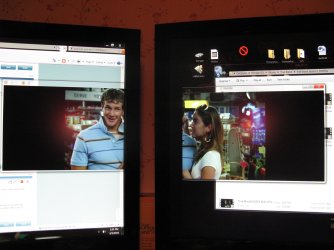
Here's a show across 2 of my monitors, it does work; someone hasn't been truthful with you.

IMG_0603.JPG
 

My Computer My Computer

At a glance

W 7 64-bit UltimateIntel Q9550 Yorkfield8GB Dominator 8500C5DATI : XFX 5870
Computer Manufacturer/Model Number
* BFK Customs *
OS
W 7 64-bit Ultimate
CPU
Intel Q9550 Yorkfield
Motherboard
ASUS P5Q Pro
Memory
8GB Dominator 8500C5D
Graphics Card(s)
ATI : XFX 5870
Sound Card
Realtek HD Audio 7-1
Monitor(s) Displays
1x 47" LCD HDMI & 3x 26" LCD HDMI
Screen Resolution
1920x1080P & 1920x1200
Hard Drives
1x 80GB Intel X25-M G2 SSD : 1x 500GB & 1x 640GB WD Caviar Black(s)
PSU
Corsair 620HX
Case
Cooler Master RC-690
Cooling
Tuniq Tower 120, 2x 140mm and 3x 120mm case fans
Keyboard
Microsoft 500
Mouse
Razer Diamondback 3G
Internet Speed
14 Mb/s
Other Info
1x Koutech 3Gb/s SATA HDD Hot Swap Rack
strange, thats all i want, just my right hand monitor back..., NLE claims they've researched this thoroughly and are convinced that it is not a graphics card issue rather a windows 7 issue
you have a program monitor on one screen and source monitor display on the other and both have motion?
I just tested my system out,
20" and 19" LG monitors, Premiere CS4, Win 7 64bit, GTX 285 and Premiere works fine across both screens, so I am not sure what your NLE Vendor means when they say it doesn't work.

Ya both have motion
 

My Computer My Computer

At a glance

windos 7 ultimate2.67 GHTZ Intel Core 2 Quad Q94008192mb X 4NVIDIA Ge Force 9600 GT
Computer Manufacturer/Model Number
Kanai workstation
OS
windos 7 ultimate
CPU
2.67 GHTZ Intel Core 2 Quad Q9400
Motherboard
ASUSTeK Computer Inc P5E3 Deluxe Rev 1.xx
Memory
8192mb X 4
Graphics Card(s)
NVIDIA Ge Force 9600 GT
Sound Card
SoundMAX integrated digital hd audio
Monitor(s) Displays
LG W2042 X 2
Hard Drives
WDC WD1500BLFS-01YBUO ATA Device 150,04 gb
Promise 3+1 disc RAID 5 SCSI 1499.99GB
Promise 3+1 disc RAID 5 SCSI 1499.0GB
Case
Kanai workstation
That is odd since our machines are almost the same. I haven't had any issues with the second screen at all, and I have been running Win 7 64 since august (got the RTM because I had a Technet Subscription) along with CS4.

the only thing I think it could be are the Drivers since the card should have no issues with dual screens.
 

My Computer My Computer

At a glance

Windows 7 Ultimate 64bitIntel i7 3770K16GB DDR3 1333 Corsair XMS3XFX HD6950 2GB EyeFinity
Computer Manufacturer/Model Number
HAL-9000
OS
Windows 7 Ultimate 64bit
CPU
Intel i7 3770K
Motherboard
Asus Sabertooth Z77
Memory
16GB DDR3 1333 Corsair XMS3
Graphics Card(s)
XFX HD6950 2GB EyeFinity
Sound Card
Logitech G35 & Sennheiser PC135 & VIA HD
Monitor(s) Displays
23" HP 2310e, 23" Samsung B2230, 21.5" Viewsonic
Screen Resolution
5760x1080
Hard Drives
16TB of Storage
128GB & 256GB Crucial M4 SSD's, 2X 1TB WD Black, 3x 2TB WD, 3x 2TB Samsung F4, 1.5TB Seagate, WD 500GB,
PSU
Antec True Power New 650watt
Case
Cooler Master HAF-932
Cooling
Corsair H60 Hydro Cooler, 3x 230mm Fans, 2x120mm Fan
Keyboard
Logitech G15 and G13
Mouse
Logitech G700 Gaming Mouse
Internet Speed
50/10 Mbit
Other Info
Speakers : Alesis M1 Active Mk2 Studio Monitors , APC RS 1200 UPS, HP 4500DN Color Laser, HP P1006 mono Laser, Kodak 8500 Dye-Sub, Epson 1280 inkjet, Epson Worforce 610 MFC
Only some videos, depending on the player and codec will play across both of my screens, most of the time the screen showing most of the video will play while the other portion will be black or show the last frame before the other screen got most of the video.

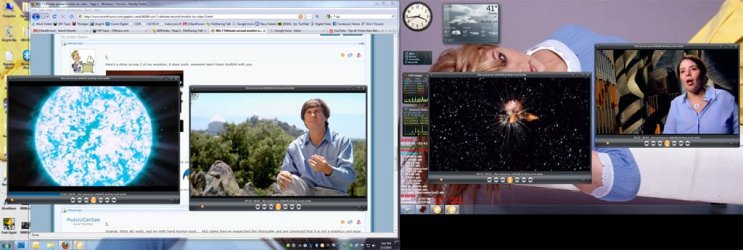
I have no issue playing multiple videos at the same time on both screens.
Here I am watching some episodes of the Universe on both screens,
 

Attachments

  • 4 vids.jpg
    4 vids.jpg
    82.9 KB · Views: 4

My Computer My Computer

At a glance

Windows 7 Ultimate 64bitIntel i7 3770K16GB DDR3 1333 Corsair XMS3XFX HD6950 2GB EyeFinity
Computer Manufacturer/Model Number
HAL-9000
OS
Windows 7 Ultimate 64bit
CPU
Intel i7 3770K
Motherboard
Asus Sabertooth Z77
Memory
16GB DDR3 1333 Corsair XMS3
Graphics Card(s)
XFX HD6950 2GB EyeFinity
Sound Card
Logitech G35 & Sennheiser PC135 & VIA HD
Monitor(s) Displays
23" HP 2310e, 23" Samsung B2230, 21.5" Viewsonic
Screen Resolution
5760x1080
Hard Drives
16TB of Storage
128GB & 256GB Crucial M4 SSD's, 2X 1TB WD Black, 3x 2TB WD, 3x 2TB Samsung F4, 1.5TB Seagate, WD 500GB,
PSU
Antec True Power New 650watt
Case
Cooler Master HAF-932
Cooling
Corsair H60 Hydro Cooler, 3x 230mm Fans, 2x120mm Fan
Keyboard
Logitech G15 and G13
Mouse
Logitech G700 Gaming Mouse
Internet Speed
50/10 Mbit
Other Info
Speakers : Alesis M1 Active Mk2 Studio Monitors , APC RS 1200 UPS, HP 4500DN Color Laser, HP P1006 mono Laser, Kodak 8500 Dye-Sub, Epson 1280 inkjet, Epson Worforce 610 MFC

My Computer My Computer

At a glance

W 7 64-bit UltimateIntel Q9550 Yorkfield8GB Dominator 8500C5DATI : XFX 5870
Computer Manufacturer/Model Number
* BFK Customs *
OS
W 7 64-bit Ultimate
CPU
Intel Q9550 Yorkfield
Motherboard
ASUS P5Q Pro
Memory
8GB Dominator 8500C5D
Graphics Card(s)
ATI : XFX 5870
Sound Card
Realtek HD Audio 7-1
Monitor(s) Displays
1x 47" LCD HDMI & 3x 26" LCD HDMI
Screen Resolution
1920x1080P & 1920x1200
Hard Drives
1x 80GB Intel X25-M G2 SSD : 1x 500GB & 1x 640GB WD Caviar Black(s)
PSU
Corsair 620HX
Case
Cooler Master RC-690
Cooling
Tuniq Tower 120, 2x 140mm and 3x 120mm case fans
Keyboard
Microsoft 500
Mouse
Razer Diamondback 3G
Internet Speed
14 Mb/s
Other Info
1x Koutech 3Gb/s SATA HDD Hot Swap Rack
I'm gonna get my 'team viewer' remote with NLE running and let them see if they can find a solution (again) now that I've spoken with someone who has seen it work. They were positive it was a windows issue because the system was working fine (both monitors) with XP. They did a complete instal of win 7, not an upgrade so im not sure how they made that determination. I will always defer to the guys who fix the machines for a living but I was hoping to find a quick fix and avoid the all consuming 'down time'.
I really appreciate all the feedback and suggestions and have high hopes that the answer is out there somewhere because life is cramped with only 1 monitor.
I don't know if pitching my music videos is allowed on these forums so I'll err on the side of safety and say, if anybody wants to check out some of LA's premier local blues bands get in touch with me.
THANKS AGAIN EVERYBODY,
Casey [musicucansee]
That is odd since our machines are almost the same. I haven't had any issues with the second screen at all, and I have been running Win 7 64 since august (got the RTM because I had a Technet Subscription) along with CS4.

the only thing I think it could be are the Drivers since the card should have no issues with dual screens.
 

My Computer My Computer

At a glance

windos 7 ultimate2.67 GHTZ Intel Core 2 Quad Q94008192mb X 4NVIDIA Ge Force 9600 GT
Computer Manufacturer/Model Number
Kanai workstation
OS
windos 7 ultimate
CPU
2.67 GHTZ Intel Core 2 Quad Q9400
Motherboard
ASUSTeK Computer Inc P5E3 Deluxe Rev 1.xx
Memory
8192mb X 4
Graphics Card(s)
NVIDIA Ge Force 9600 GT
Sound Card
SoundMAX integrated digital hd audio
Monitor(s) Displays
LG W2042 X 2
Hard Drives
WDC WD1500BLFS-01YBUO ATA Device 150,04 gb
Promise 3+1 disc RAID 5 SCSI 1499.99GB
Promise 3+1 disc RAID 5 SCSI 1499.0GB
Case
Kanai workstation

My Computer My Computer

At a glance

Windows 7 Ultimate 64bitIntel i7 3770K16GB DDR3 1333 Corsair XMS3XFX HD6950 2GB EyeFinity
Computer Manufacturer/Model Number
HAL-9000
OS
Windows 7 Ultimate 64bit
CPU
Intel i7 3770K
Motherboard
Asus Sabertooth Z77
Memory
16GB DDR3 1333 Corsair XMS3
Graphics Card(s)
XFX HD6950 2GB EyeFinity
Sound Card
Logitech G35 & Sennheiser PC135 & VIA HD
Monitor(s) Displays
23" HP 2310e, 23" Samsung B2230, 21.5" Viewsonic
Screen Resolution
5760x1080
Hard Drives
16TB of Storage
128GB & 256GB Crucial M4 SSD's, 2X 1TB WD Black, 3x 2TB WD, 3x 2TB Samsung F4, 1.5TB Seagate, WD 500GB,
PSU
Antec True Power New 650watt
Case
Cooler Master HAF-932
Cooling
Corsair H60 Hydro Cooler, 3x 230mm Fans, 2x120mm Fan
Keyboard
Logitech G15 and G13
Mouse
Logitech G700 Gaming Mouse
Internet Speed
50/10 Mbit
Other Info
Speakers : Alesis M1 Active Mk2 Studio Monitors , APC RS 1200 UPS, HP 4500DN Color Laser, HP P1006 mono Laser, Kodak 8500 Dye-Sub, Epson 1280 inkjet, Epson Worforce 610 MFC
yeah, i see it, not sure we're on the same page exactly but I can't even get my machine to do this, much less what i was asking about so hopefully NLE will get it worked out for me. Just a note for everyone who can't duplicate this problem, I've spoken with hundreds of users who are experiencing the identical problem who have also not been able to find a solution to this problem, really, im not halucinating, honest.
QUOTE=Bare Foot Kid;603922]Here's a show across 2 of my monitors, it does work; someone hasn't been truthful with you.

View attachment 58303[/QUOTE]
 

My Computer My Computer

At a glance

windos 7 ultimate2.67 GHTZ Intel Core 2 Quad Q94008192mb X 4NVIDIA Ge Force 9600 GT
Computer Manufacturer/Model Number
Kanai workstation
OS
windos 7 ultimate
CPU
2.67 GHTZ Intel Core 2 Quad Q9400
Motherboard
ASUSTeK Computer Inc P5E3 Deluxe Rev 1.xx
Memory
8192mb X 4
Graphics Card(s)
NVIDIA Ge Force 9600 GT
Sound Card
SoundMAX integrated digital hd audio
Monitor(s) Displays
LG W2042 X 2
Hard Drives
WDC WD1500BLFS-01YBUO ATA Device 150,04 gb
Promise 3+1 disc RAID 5 SCSI 1499.99GB
Promise 3+1 disc RAID 5 SCSI 1499.0GB
Case
Kanai workstation

My Computer My Computer

At a glance

W 7 64-bit UltimateIntel Q9550 Yorkfield8GB Dominator 8500C5DATI : XFX 5870
Computer Manufacturer/Model Number
* BFK Customs *
OS
W 7 64-bit Ultimate
CPU
Intel Q9550 Yorkfield
Motherboard
ASUS P5Q Pro
Memory
8GB Dominator 8500C5D
Graphics Card(s)
ATI : XFX 5870
Sound Card
Realtek HD Audio 7-1
Monitor(s) Displays
1x 47" LCD HDMI & 3x 26" LCD HDMI
Screen Resolution
1920x1080P & 1920x1200
Hard Drives
1x 80GB Intel X25-M G2 SSD : 1x 500GB & 1x 640GB WD Caviar Black(s)
PSU
Corsair 620HX
Case
Cooler Master RC-690
Cooling
Tuniq Tower 120, 2x 140mm and 3x 120mm case fans
Keyboard
Microsoft 500
Mouse
Razer Diamondback 3G
Internet Speed
14 Mb/s
Other Info
1x Koutech 3Gb/s SATA HDD Hot Swap Rack

I saw your post, that is why I stated that on my system not all videos will play across both screens.


I wasn't so much "talking to" you as to The OP; to show that it's NOT Windows 7.


@MusicUCanSee, so they didn't do an upgrade over XP, they did a http://www.sevenforums.com/tutorials/1649-clean-install-windows-7-a.html?ltr=C

Of course they did a clean install. There is no in-place upgrade for XP.
 

My Computer My Computer

At a glance

Windows 7 Ultimate 64bitIntel i7 3770K16GB DDR3 1333 Corsair XMS3XFX HD6950 2GB EyeFinity
Computer Manufacturer/Model Number
HAL-9000
OS
Windows 7 Ultimate 64bit
CPU
Intel i7 3770K
Motherboard
Asus Sabertooth Z77
Memory
16GB DDR3 1333 Corsair XMS3
Graphics Card(s)
XFX HD6950 2GB EyeFinity
Sound Card
Logitech G35 & Sennheiser PC135 & VIA HD
Monitor(s) Displays
23" HP 2310e, 23" Samsung B2230, 21.5" Viewsonic
Screen Resolution
5760x1080
Hard Drives
16TB of Storage
128GB & 256GB Crucial M4 SSD's, 2X 1TB WD Black, 3x 2TB WD, 3x 2TB Samsung F4, 1.5TB Seagate, WD 500GB,
PSU
Antec True Power New 650watt
Case
Cooler Master HAF-932
Cooling
Corsair H60 Hydro Cooler, 3x 230mm Fans, 2x120mm Fan
Keyboard
Logitech G15 and G13
Mouse
Logitech G700 Gaming Mouse
Internet Speed
50/10 Mbit
Other Info
Speakers : Alesis M1 Active Mk2 Studio Monitors , APC RS 1200 UPS, HP 4500DN Color Laser, HP P1006 mono Laser, Kodak 8500 Dye-Sub, Epson 1280 inkjet, Epson Worforce 610 MFC
My apologies if this issue has been hashed out in earlier posts but after hours of searching for an answer I hope to bring new attention to this problem with hopes of this time finding a solution.
I'm running Windows 7 Ultimate 64bit on my video editing workstation and can not get video on my second monitor. I've heard from lots of people who are experiencing the exact same problem but so far I haven't found one with a fix.
I have eliminated every firmware, driver and update issue and have been told by experts that this is a Windows issue, my graphics card checks out drivers check out everything checks out, cables, ports. I'm using Adobe premier premium creative suite 4 and the system worked fine with XP, Only after upgrading to Windows 7 did the secondary monitor refuse to display moving video.
ANY help will be greatly appreciated.
Casey [MusicUCanSee]


This is what I was going by, I know there's no upgrade path.
 

My Computer My Computer

At a glance

W 7 64-bit UltimateIntel Q9550 Yorkfield8GB Dominator 8500C5DATI : XFX 5870
Computer Manufacturer/Model Number
* BFK Customs *
OS
W 7 64-bit Ultimate
CPU
Intel Q9550 Yorkfield
Motherboard
ASUS P5Q Pro
Memory
8GB Dominator 8500C5D
Graphics Card(s)
ATI : XFX 5870
Sound Card
Realtek HD Audio 7-1
Monitor(s) Displays
1x 47" LCD HDMI & 3x 26" LCD HDMI
Screen Resolution
1920x1080P & 1920x1200
Hard Drives
1x 80GB Intel X25-M G2 SSD : 1x 500GB & 1x 640GB WD Caviar Black(s)
PSU
Corsair 620HX
Case
Cooler Master RC-690
Cooling
Tuniq Tower 120, 2x 140mm and 3x 120mm case fans
Keyboard
Microsoft 500
Mouse
Razer Diamondback 3G
Internet Speed
14 Mb/s
Other Info
1x Koutech 3Gb/s SATA HDD Hot Swap Rack
@MusicUCanSee, you may want to get a better video card.
 

My Computer My Computer

At a glance

W 7 64-bit UltimateIntel Q9550 Yorkfield8GB Dominator 8500C5DATI : XFX 5870
Computer Manufacturer/Model Number
* BFK Customs *
OS
W 7 64-bit Ultimate
CPU
Intel Q9550 Yorkfield
Motherboard
ASUS P5Q Pro
Memory
8GB Dominator 8500C5D
Graphics Card(s)
ATI : XFX 5870
Sound Card
Realtek HD Audio 7-1
Monitor(s) Displays
1x 47" LCD HDMI & 3x 26" LCD HDMI
Screen Resolution
1920x1080P & 1920x1200
Hard Drives
1x 80GB Intel X25-M G2 SSD : 1x 500GB & 1x 640GB WD Caviar Black(s)
PSU
Corsair 620HX
Case
Cooler Master RC-690
Cooling
Tuniq Tower 120, 2x 140mm and 3x 120mm case fans
Keyboard
Microsoft 500
Mouse
Razer Diamondback 3G
Internet Speed
14 Mb/s
Other Info
1x Koutech 3Gb/s SATA HDD Hot Swap Rack
exactly exactly exactly, i can play video from two different sources on either screen if I open two instances of youtube for example, i can watch both at once but if i 'full screen' either one it will only 'full screen to the size of my primary monitor and wont display across both monitors, now if i grab the edge of playing video from my primary monitor and drag it to the second monitor it will not display moving video on the secondary monitor.
THE issue with this is that the video editing interface in adobe cs4 has multiple 'monitors' within the program and any that appear on the secondary monitor have no motion. which is exactly as you describe in this post. This is indeed the root of my inquiry, how do i get the video to play on my secondary monitor ??

Only some videos, depending on the player and codec will play across both of my screens, most of the time the screen showing most of the video will play while the other portion will be black or show the last frame before the other screen got most of the video.

I have no issue playing multiple videos at the same time on both screens.
Here I am watching some episodes of the Universe on both screens,
 

My Computer My Computer

At a glance

windos 7 ultimate2.67 GHTZ Intel Core 2 Quad Q94008192mb X 4NVIDIA Ge Force 9600 GT
Computer Manufacturer/Model Number
Kanai workstation
OS
windos 7 ultimate
CPU
2.67 GHTZ Intel Core 2 Quad Q9400
Motherboard
ASUSTeK Computer Inc P5E3 Deluxe Rev 1.xx
Memory
8192mb X 4
Graphics Card(s)
NVIDIA Ge Force 9600 GT
Sound Card
SoundMAX integrated digital hd audio
Monitor(s) Displays
LG W2042 X 2
Hard Drives
WDC WD1500BLFS-01YBUO ATA Device 150,04 gb
Promise 3+1 disc RAID 5 SCSI 1499.99GB
Promise 3+1 disc RAID 5 SCSI 1499.0GB
Case
Kanai workstation
Back
Top