Win 7 - Very slow internet

UFF

New member
Local time
10:18 AM
Messages
10
Location
Lithuania, Kaunas
Hi all,
Before i installed windows 7 my internet speed was 2mb/s ( downloading at avg. 250kb/s ) but after i installed it speed became only 13-50kb/s and later ( now ) it's downloading at 3kb-10... i didn't installed new programs before it became to 3-10...

Information:
adapter
Realtek RTL8139/810x Family Fast Ethernet NIC
windows 7 Professional 32 bit version
Avast antivirus ( maybe will be usefull info.. )

what i tried:
in safe mode it's still slow
installing new network drivers - no effect
was searching these forums for help and disabled 2 services which i found on solution ( now forgot it's name ) but still no effect

Please help someone...

P.S sorry for mine english...
 

My Computer My Computer

OS
Win 7 professional
Hard Drives
320GB, 80GB
Keyboard
a4tech
Mouse
a4tech
Hi all,
Before i installed windows 7 my internet speed was 2mb/s ( downloading at avg. 250kb/s ) but after i installed it speed became only 13-50kb/s and later ( now ) it's downloading at 3kb-10... i didn't installed new programs before it became to 3-10...

Information:
adapter
Realtek RTL8139/810x Family Fast Ethernet NIC
windows 7 Professional 32 bit version
Avast antivirus ( maybe will be usefull info.. )

what i tried:
in safe mode it's still slow
installing new network drivers - no effect
was searching these forums for help and disabled 2 services which i found on solution ( now forgot it's name ) but still no effect

Please help someone...

P.S sorry for mine english...

Hi and welcome

your english is fine. I would bet you are using "homegroup" as your networking protocol. Homegroup has been shown to have problems on some computer networks. you can verify if that is the problem by creating a new network connection and using "workgroup" model.

Let us know if you need help

Ken
 

My Computer My Computer

Computer Manufacturer/Model Number
HP Pavillion dv-7 1005 Tx
OS
Win 8 Release candidate 8400
CPU
[email protected]
Memory
4 gigs
Graphics Card(s)
Nvidia 9600M
Sound Card
HD built-in
Monitor(s) Displays
17" Wxga
Screen Resolution
1440x900
Cooling
none
Internet Speed
45Mb down 5Mb up
Hi and welcome

your english is fine. I would bet you are using "homegroup" as your networking protocol. Homegroup has been shown to have problems on some computer networks. you can verify if that is the problem by creating a new network connection and using "workgroup" model.

Let us know if you need help

Ken
If i'm using "homegroup" it should be shown at control panel>network and internet>homegroup or not?
if yes there writes "this computer can't connect to a homegroup"
if not please give me a link with tutorial how to change it to "workgroup" or just tell that cuz i'm using win 7 not very long time and yet don't know how to do it...
 

My Computer My Computer

OS
Win 7 professional
Hard Drives
320GB, 80GB
Keyboard
a4tech
Mouse
a4tech
Hi and welcome

your english is fine. I would bet you are using "homegroup" as your networking protocol. Homegroup has been shown to have problems on some computer networks. you can verify if that is the problem by creating a new network connection and using "workgroup" model.

Let us know if you need help

Ken
If i'm using "homegroup" it should be shown at control panel>network and internet>homegroup or not?
if yes there writes "this computer can't connect to a homegroup"
if not please give me a link with tutorial how to change it to "workgroup" or just tell that cuz i'm using win 7 not very long time and yet don't know how to do it...


What is your network setup? do you have more than one computer on the network? do you have a router? etc
 

My Computer My Computer

Computer Manufacturer/Model Number
HP Pavillion dv-7 1005 Tx
OS
Win 8 Release candidate 8400
CPU
[email protected]
Memory
4 gigs
Graphics Card(s)
Nvidia 9600M
Sound Card
HD built-in
Monitor(s) Displays
17" Wxga
Screen Resolution
1440x900
Cooling
none
Internet Speed
45Mb down 5Mb up
What is your network setup? do you have more than one computer on the network? do you have a router? etc
Network setup? if i understand the question it's public network i think.
I have only 1 computer on the network.
Sure i have it. if you need the model of it well i don't know exactly model, but on it write edimax WDS or something like that. I thought there will be exact model, but i was wrong.
 
Last edited:

My Computer My Computer

OS
Win 7 professional
Hard Drives
320GB, 80GB
Keyboard
a4tech
Mouse
a4tech
What is your network setup? do you have more than one computer on the network? do you have a router? etc
Network setup? if i understand the question it's public network i think.
I have only 1 computer on the network.
Sure i have it. if you need the model of it well i don't know exactly model, but on it writes cumax WDS or something like that. I thought there will be exact model, but i was wrong.

Since you arent in a homegroup there is one thing you can check. In networl control panel>adaper setting>makeu sure IPv6 is unchecked

See pic


Ken
 
Last edited:

My Computer My Computer

Computer Manufacturer/Model Number
HP Pavillion dv-7 1005 Tx
OS
Win 8 Release candidate 8400
CPU
[email protected]
Memory
4 gigs
Graphics Card(s)
Nvidia 9600M
Sound Card
HD built-in
Monitor(s) Displays
17" Wxga
Screen Resolution
1440x900
Cooling
none
Internet Speed
45Mb down 5Mb up
it was checked.. now made unchecked, but still no very slow.
i made second photo cuz it's differient than yours and maybe it will help


you need to give me more details. go to a speedtest site and have your speed measured. use this one if you can Speedtest.net - The Global Broadband Speed Test

then type cmd in search>then ipconfig /all

use the build in snipping tool (type snipping in search) to make a screenshot and upload it.
 

My Computer My Computer

Computer Manufacturer/Model Number
HP Pavillion dv-7 1005 Tx
OS
Win 8 Release candidate 8400
CPU
[email protected]
Memory
4 gigs
Graphics Card(s)
Nvidia 9600M
Sound Card
HD built-in
Monitor(s) Displays
17" Wxga
Screen Resolution
1440x900
Cooling
none
Internet Speed
45Mb down 5Mb up
it was checked.. now made unchecked, but still no very slow.
i made second photo cuz it's differient than yours and maybe it will help


you need to give me more details. go to a speedtest site and have your speed measured. use this one if you can Speedtest.net - The Global Broadband Speed Test

then type cmd in search>then ipconfig /all

use the build in snipping tool (type snipping in search) to make a screenshot and upload it.
than i tried to test it was latency error or something like that well i tried it on other site:


but i don't know its right or not cuz i don't think my upload is 450~ it should be lower... but download should be something like that


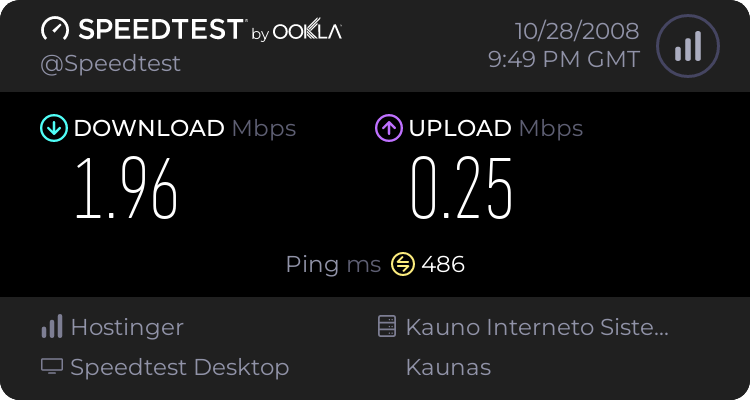
in speedtest site i found older test made with xp:


CMD:
 

My Computer My Computer

OS
Win 7 professional
Hard Drives
320GB, 80GB
Keyboard
a4tech
Mouse
a4tech
someone help please...?
 

My Computer My Computer

OS
Win 7 professional
Hard Drives
320GB, 80GB
Keyboard
a4tech
Mouse
a4tech
Hi UFF,

Try to reset your Internet Protocol TCP/IP.


  1. Open a command prompt, click Start and then click Run. Copy and paste (or type) the following command in the Open box and then press ENTER:cmd
  2. At the command prompt, copy and paste (or type) the following command and then press ENTER:netsh int ip reset c:\resetlog.txt
    Note If you do not want to specify a directory path for the log file, use the following command:netsh int ip reset resetlog.txt
  3. Reboot the computer.
Give that a try and see if there is any improvement.


Hope this helps.:)


.
 

My Computer My Computer

Computer Manufacturer/Model Number
Samsung R60 Plus
OS
Operating System Microsoft Windows 7 Ultimate Build 7600
CPU
Mobile DualCore Intel Core 2 Duo T5550, 1833 MHz (1
Motherboard
ATI Radeon Xpress 1100/1250
Memory
2GB (DDR2-667 DDR2 SDRAM)
Graphics Card(s)
ATI Radeon Xpress 1200 Series (256 MB)
Sound Card
Realtek ALC262 @ ATI SB600 - High Definition
Monitor(s) Displays
Samsung LTN154X3-L01 [15.4" LCD]
Screen Resolution
1280x800
PSU
na
Case
na
Cooling
na
Keyboard
na
Hi UFF,

Try to reset your Internet Protocol TCP/IP.


  1. Open a command prompt, click Start and then click Run. Copy and paste (or type) the following command in the Open box and then press ENTER:cmd
  2. At the command prompt, copy and paste (or type) the following command and then press ENTER:netsh int ip reset c:\resetlog.txt
    Note If you do not want to specify a directory path for the log file, use the following command:netsh int ip reset resetlog.txt
  3. Reboot the computer.
Give that a try and see if there is any improvement.


Hope this helps.:)


.

It's opening pages faster now :) downloading i'll try later. But maybe for speed is guilty this process? always i need to turn it off cuz it's lagging PC. There is any ways to fix this process? i don't think it should use so much CPU.


My Computer My Computer

OS
Win 7 professional
Hard Drives
320GB, 80GB
Keyboard
a4tech
Mouse
a4tech
That process provides support for the NetBIOS over TCP/IP (NetBT) service and NetBIOS name resolution for clients on the network, therefore enabling users to share files, print, and log on to the network.

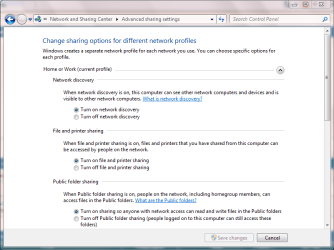
Turn off your sharing options here:

ha.PNG

Note: File and Printer sharing and Public folder sharing should be off.

See if that solves the problem.:)


.
 

My Computer My Computer

Computer Manufacturer/Model Number
Samsung R60 Plus
OS
Operating System Microsoft Windows 7 Ultimate Build 7600
CPU
Mobile DualCore Intel Core 2 Duo T5550, 1833 MHz (1
Motherboard
ATI Radeon Xpress 1100/1250
Memory
2GB (DDR2-667 DDR2 SDRAM)
Graphics Card(s)
ATI Radeon Xpress 1200 Series (256 MB)
Sound Card
Realtek ALC262 @ ATI SB600 - High Definition
Monitor(s) Displays
Samsung LTN154X3-L01 [15.4" LCD]
Screen Resolution
1280x800
PSU
na
Case
na
Cooling
na
Keyboard
na
  • Like
Reactions: UFF
That process provides support for the NetBIOS over TCP/IP (NetBT) service and NetBIOS name resolution for clients on the network, therefore enabling users to share files, print, and log on to the network.

Turn off your sharing options here:

View attachment 50181

Note: File and Printer sharing and Public folder sharing should be off.

See if that solves the problem.:)


.

it was already off. any more ides?
 

My Computer My Computer

OS
Win 7 professional
Hard Drives
320GB, 80GB
Keyboard
a4tech
Mouse
a4tech
Do you have another PC or laptop available to do a check on the line/download speed on a different machine?

It may well be that there is a problem with your line and that your laptops connection is perfect.:)

Could you tell me what drivers you are using for your Realtek NIC card.


.
 

My Computer My Computer

Computer Manufacturer/Model Number
Samsung R60 Plus
OS
Operating System Microsoft Windows 7 Ultimate Build 7600
CPU
Mobile DualCore Intel Core 2 Duo T5550, 1833 MHz (1
Motherboard
ATI Radeon Xpress 1100/1250
Memory
2GB (DDR2-667 DDR2 SDRAM)
Graphics Card(s)
ATI Radeon Xpress 1200 Series (256 MB)
Sound Card
Realtek ALC262 @ ATI SB600 - High Definition
Monitor(s) Displays
Samsung LTN154X3-L01 [15.4" LCD]
Screen Resolution
1280x800
PSU
na
Case
na
Cooling
na
Keyboard
na
Do you have another PC or laptop available to do a check on the line/download speed on a different machine?

It may well be that there is a problem with your line and that your laptops connection is perfect.:)

Could you tell me what drivers you are using for your Realtek NIC card.


.
no i dont have other pc.
Realtek RTL8139/810x Family Fast Ethernet NIC 6.111.723

what about that process?
 

My Computer My Computer

OS
Win 7 professional
Hard Drives
320GB, 80GB
Keyboard
a4tech
Mouse
a4tech
Try this... open msconfig :ar: startup .. disable all but your antivirus and firewall...reboot and test... if your speed significantly improves, you can re-enable the entries one by one until you find the guilty party.. let us know how it comes out...
 

My Computer My Computer

Computer type
PC/Desktop
Computer Manufacturer/Model Number
LENOVO K450 @3.0GHZ
OS
64-bit Windows 8.1 Pro
CPU
Core(TM) i5 CPU 4330 Haswell @ 3.20GHz
Motherboard
LENOVO
Memory
12.00 GB
Graphics Card(s)
Intel(R) HD Graphics
Sound Card
Intel HD integtrated
Monitor(s) Displays
HP 25' ISP Monitor
Screen Resolution
1900/1020
Hard Drives
(1) ST1000DM003-1CH162 (2) Generic STORAGE DEVICE USB Device (3) Generic STORAGE DEVICE USB Device
Internet Speed
100mb down/10mb up
Try this... open msconfig :ar: startup .. disable all but your antivirus and firewall...reboot and test... if your speed significantly improves, you can re-enable the entries one by one until you find the guilty party.. let us know how it comes out...
That lagging process has gone :) now need to try enabling one by one to know which was guilty..
thanks Tews
 

My Computer My Computer

OS
Win 7 professional
Hard Drives
320GB, 80GB
Keyboard
a4tech
Mouse
a4tech
Im glad its sorted out!! ;)
 

My Computer My Computer

Computer type
PC/Desktop
Computer Manufacturer/Model Number
LENOVO K450 @3.0GHZ
OS
64-bit Windows 8.1 Pro
CPU
Core(TM) i5 CPU 4330 Haswell @ 3.20GHz
Motherboard
LENOVO
Memory
12.00 GB
Graphics Card(s)
Intel(R) HD Graphics
Sound Card
Intel HD integtrated
Monitor(s) Displays
HP 25' ISP Monitor
Screen Resolution
1900/1020
Hard Drives
(1) ST1000DM003-1CH162 (2) Generic STORAGE DEVICE USB Device (3) Generic STORAGE DEVICE USB Device
Internet Speed
100mb down/10mb up
Back
Top