
System working fine this morning, checked email, forums ,couple of games, etc.; walked off for breakfast and shower, returned to find RegRun (anti-malware) pop-up on screen, odd because this only runs at start-up. Checked Task Manager to find system up only 40 minutes (should have shown about three hours), checked events and found "the computer has restarted from a bug check". Having never encountered this message before (been cursing computers since the days of TTY terminals and acoustic couplers), I'm off to the internet for research; seems a common event message, with the usual solutions - "update drivers", "run memory test", etc.
But I found a dump file from the time of the restart, though no idea how to open it (again, never had to previously). Eventually installed debug (dbg_x86.msi from MS site) and it refuses to cooperate, complaining that something is "not a valid win 32 application" (screenshot attached).
System is old Inspiron 1720 with Win7 Ultimate 32bit; I've had it three years and this is only spontaneous reboot in that time. (Originally had Vista, Win10 when I got it, immediately replaced with Win7.)
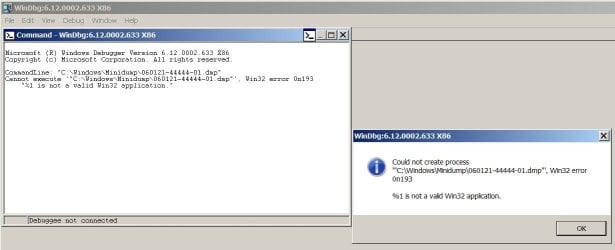
But I found a dump file from the time of the restart, though no idea how to open it (again, never had to previously). Eventually installed debug (dbg_x86.msi from MS site) and it refuses to cooperate, complaining that something is "not a valid win 32 application" (screenshot attached).
System is old Inspiron 1720 with Win7 Ultimate 32bit; I've had it three years and this is only spontaneous reboot in that time. (Originally had Vista, Win10 when I got it, immediately replaced with Win7.)
My Computers
System One System Two
-
- Computer type
- PC/Desktop
- Computer Manufacturer/Model Number
- custom
- OS
- win7 Pro SP1 x86
- CPU
- 64x2 6000+
- Motherboard
- winfast
- Memory
- 2gig
- Graphics Card(s)
- GTX950
- Antivirus
- Avast
- Browser
- Brave
-
- Computer type
- PC/Desktop
- Antivirus
- Avast

