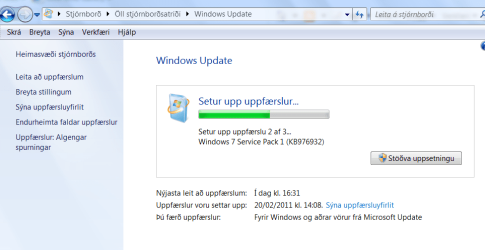
Win7 SP1 released to public

I found the download listed on my "Windows Update" from the Start Menu.

Just for the record, I performed the update with no problems whatsoever. :)
 

My Computer My Computer

At a glance

Windows 7 Home Premium 64bitIntel(R) Core(TM) i3-2120 CPU @ 3.30GHz3.00 GB(1) Intel(R) HD Graphics (2) VNC Mirror Driver
Computer type
PC/Desktop
Computer Manufacturer/Model Number
Packard Bell
OS
Windows 7 Home Premium 64bit
CPU
Intel(R) Core(TM) i3-2120 CPU @ 3.30GHz
Motherboard
Packard Bell IPISB-AG
Memory
3.00 GB
Graphics Card(s)
(1) Intel(R) HD Graphics (2) VNC Mirror Driver
Sound Card
Realtek High Definition Audio
Monitor(s) Displays
AIO LCD
Screen Resolution
1920 x 1080
Hard Drives
WDC WD10EADX-22TDHB0 ATA Device
Fixed hard disk media
4 partitions
931.51 GB
Keyboard
Wireless
Mouse
Wireless
Antivirus
Microsoft Security Essentials
Browser
IE; Firefox
Other Info
Also:
Samsung N220 Plus Netbook - Windows 7 Home
HP laptop
iPad 5
third time lucky just installed and had no problems mabye it was my virus protection i use bullguard
 

My Computer My Computer

At a glance

windows ultimate 7 64 bitintel core i7-2600 @3.40ghzg skill ripjaws 16 gig ddr3-1600 4,4 gigati radeon 5870
OS
windows ultimate 7 64 bit
CPU
intel core i7-2600 @3.40ghz
Motherboard
ASUS P8Z68-V
Memory
g skill ripjaws 16 gig ddr3-1600 4,4 gig
Graphics Card(s)
ati radeon 5870
Monitor(s) Displays
syncmaster 24inch and a asus 22 inch
Hi there
just upgraded 4 computers via standard Windows update while watching BBC's Match of the day program via their BBC Player and a UK proxy.

2 running w7 enterprise x-64, two running w7 Ultimate x-86.

No probs whatsoever --although note that the update stays at the 96% level while downloading for some while so some people might be tempted to think the process has stalled -- leave it running -- you should see Disk activity lights etc.

Upgrades all worked fine -- no probs at all.

Cheers
jimbo
 

Attachments

  • snip.png
    snip.png
    38.8 KB · Views: 17

My Computer My Computer

At a glance

Linux CENTOS 7 / various Windows OS'es and se...Intel i7 Intel i58GB, 16GBOn Motherboard
Computer type
PC/Desktop
Computer Manufacturer/Model Number
Custom built, several laptops HP/ASUS
OS
Linux CENTOS 7 / various Windows OS'es and servers
CPU
Intel i7 Intel i5
Memory
8GB, 16GB
Graphics Card(s)
On Motherboard
Sound Card
Realtek HD audio
Monitor(s) Displays
Apple Cinema display, Samsung LCD
Screen Resolution
1920 X 1080
Hard Drives
4 X 1TB SATA
Mouse
Toshiba wireless laser
Internet Speed
> 20MB up
I've had no problems with SP1 at all. After slipstreaming my retail version of W7 and creating a DVD, I re-installed just to make sure all was well, and it was.

Today I did a clean install with the original W7 disk, updated to SP1 with a DVD that I had made from the ISO, then created an image of the C:\ drive with Macrium. It will be a lot faster to restore that image if I ever need to re-install for any reason.
 

My Computer My Computer

At a glance

Windows 10 HomeIntel Core i5 3550Corsair Vengeance DDR3 16GBNvidia GEForce GTX 970 SSC
Computer type
PC/Desktop
Computer Manufacturer/Model Number
Self build
OS
Windows 10 Home
CPU
Intel Core i5 3550
Motherboard
ASUS P8Z77-V LX (LGA1155)
Memory
Corsair Vengeance DDR3 16GB
Graphics Card(s)
Nvidia GEForce GTX 970 SSC
Monitor(s) Displays
Hanns-G 23.6", Acer 17"
Screen Resolution
1920x1080, 1440x900
Hard Drives
Sandisk SSD 256 GB
WD500GB
WD640GB
Seagage Ultra + 1TB ext.
BWD 800GB
WD 1TB ext
PSU
Antec 650w
Case
Cooler Master Centurion 534
Cooling
COOLER MASTER GeminII S524, 3 120 mm case fans.
Keyboard
Logitech MK300
Mouse
Logitech MK300
Internet Speed
Cable
Antivirus
MSSE, Malwarebytes
Browser
IE 10, Chrome
I used Windows Update a few hours ago and got SP1 installed.
One thing that happened was after the install when I pressed "Restart" it did the normal "Logging off" and "Configuring Updates" stuff, but it stayed at "Shutting down" for an hour to I held the power button for 5 seconds to turn off the computer and pressed the power button again to turn it on and it continued on.
Any reason why it hung like that?

When any update or the SP hangs during the initial 30% configure and reboot simply hit the reset button if present to allow the remaining configuration to proceed. Sometimes when seeing a large number of small updates going on at once you run into a hang on restart where this will jog it along with powering down entirely.

Knew there must be changes with WMP since I had to set it up again. Sure enough it now has codecs to play MP4's. Still waiting for it to play Real files so I can get rid of that junk.

The SP apparently rolls into it a new update or additional support or fix for something causing the setup screen for WMP 12 to come up when first going to use it. I ran into the same thing today being the first time since SP1 I went to play some media and there that was.

It's not an oddity at all having seen this on previous occasions following an update where the first use sees that appear. Just a minor annoyance if anything.
 

My Computers My Computers

  • At a glance

    W7 Ultimate x64/W10 Pro x64/W11 Pro Triple Bo...AMD Phenom II X4 975 Deneb 3.6ghz - 965 2nd r...Kingston Hyper X DDR3 1600 1.5v 16gb - Hyper ...MSI HD Radeon 5750 1gb - MSI HD Radeon 6450 o...
    Computer type
    PC/Desktop
    Computer Manufacturer/Model Number
    Custom builds = 2
    OS
    W7 Ultimate x64/W10 Pro x64/W11 Pro Triple Boot - Main PC W7 Remote PC Micro ATX W7 Pro x64/W11 Pro
    CPU
    AMD Phenom II X4 975 Deneb 3.6ghz - 965 2nd remote pc
    Motherboard
    Gigabyte GA-790XTA-UD4-Gigabyte GA-880GM-D2H remote pc
    Memory
    Kingston Hyper X DDR3 1600 1.5v 16gb - Hyper X Fury 8gb 2nd
    Graphics Card(s)
    MSI HD Radeon 5750 1gb - MSI HD Radeon 6450 on mini tower
    Sound Card
    Creative Labs X-Fi Xtreme Audio P - Realtek onooard 2nd case
    Monitor(s) Displays
    ASUS VW199T-P 19" HP 2082a Main-HP 2082a 20" remote pc
    Screen Resolution
    Asus 1440x900 - HP 1600x900
    Hard Drives
    WD Black 1TB HD per OS W7, W10, and pending W11 presently on 500gb OS Drive - Pending Triple 1TB HDs for Spanned Storage/backup volume
    Single 2TB external USB enclosure, single 1TB System 7 Host/Boot drive, Pending 8TB external HD for system image b
    PSU
    Corsair 750TX - primary / Corsair CX600 - second
    Case
    Antec 900-2 - SSD compatible / NZXT Vulcan mini tower
    Cooling
    Zalman CNPS9900A
    Keyboard
    AZIO L70 Backlit Letters Gaming - ONN Cordless/USB
    Mouse
    MSI DS200 Programmable, Logitech Cordless
    Internet Speed
    30mbps upgrade - primary hard wired - mini tower usb WiFi
    Antivirus
    GFI VIPRE Internet Security 2014 on W7 2016 beta on W10,
    Browser
    Cyberfox, WaterFox 64bit FF variants, FireFox x64, Pale Moon
    Other Info
    Accomdata fan cooled usb 2.0 PIDE/Sata II, III external enclosure.
    Sambient usb/eSata PATA/Sata II, III external enclosure.
  • At a glance

    W7 Pro x64/W11 ProAMD Deneb 3.6ghz - 965Kingston Hyper X Fury 8gbMSI HD Radeon 6450 DVI Output
    Computer type
    PC/Desktop
    System Manufacturer/Model Number
    CUSTOM ASSEMBLY
    OS
    W7 Pro x64/W11 Pro
    CPU
    AMD Deneb 3.6ghz - 965
    Motherboard
    Gigabyte GA-880GM-D2H remote pc
    Memory
    Kingston Hyper X Fury 8gb
    Graphics Card(s)
    MSI HD Radeon 6450 DVI Output
    Sound Card
    Realtek onooard Creative or Other separate PENDING
    Monitor(s) Displays
    VIZIO 32" LCD TV Separate LCD Pending
    Screen Resolution
    1600x1080
    Hard Drives
    WD 500GB OS Host/Boot WD Green 1TB Storage/Backup
    PSU
    Corsair 600W - THERMALTAKE 600W spare case
    Case
    NZXT Vulcan mini tower
    Cooling
    Twin 120mm Top Fans - 240mm Side Cover
    Keyboard
    ONN Cordless/USB Logitech Cordless
    Mouse
    ONN USB/Cordless - Logitech Cordless
    Internet Speed
    DSL 5G
    Browser
    MS Edge, FireFox, WaterFox x64, FireFox Nightly
    Other Info
    OS Testing-Remote Access to Main TeamViewer
i just installed SP1 tonight as part of a standard windows update.. went through it with no issues, no hang ups, works as normal
 

My Computer My Computer

At a glance

Windows 7 Home Premium x64AMD Phenom II X4 955 Black EditionKingston 4GB DDR3 1333PNY GeForce 210 1GB DDR2 PCIe 2.0
Computer Manufacturer/Model Number
Self Built
OS
Windows 7 Home Premium x64
CPU
AMD Phenom II X4 955 Black Edition
Motherboard
ASUS M4A79XTD EVO
Memory
Kingston 4GB DDR3 1333
Graphics Card(s)
PNY GeForce 210 1GB DDR2 PCIe 2.0
Sound Card
Integrated Audio
Monitor(s) Displays
LG W2286L HDMI LED monitor
Screen Resolution
1680 x 1050
Hard Drives
500GB WD 7200rpm SATA (OS)
500GB WD 7200rpm SATA
250GB Seagate 7200rpm SATA
PSU
Rosewill RG700-S12 700W
Case
Rosewill Blackbone ATX Mid Tower
Cooling
COOLER MASTER Hyper N520, 3 case fans (front, back, side)
Keyboard
Basic
Mouse
Basic
Internet Speed
Cable
Other Info
Laptop - Toshiba Satellite P755, Intel i3 2.1GHz, 640GB HDD, 6GB RAM, Intel HD Video, 1366x768 Resolution, Windows 7 Home Premium x64
SP1 installed

After a failed update due to a dual-boot setup with Linux on the same disk, I am up and running now.
 

My Computer My Computer

At a glance

Windows 7 Professional x64i5 750OCZ DDR3 4GBNvidia GT 220
Computer Manufacturer/Model Number
Custom
OS
Windows 7 Professional x64
CPU
i5 750
Motherboard
Asus P7P55D
Memory
OCZ DDR3 4GB
Graphics Card(s)
Nvidia GT 220
Sound Card
Motherboard based
Monitor(s) Displays
Hanns-G 28" 1080p
Hard Drives
1.5TB Seagate Barracuda (2) in RAID 1
PSU
Antec 650W
Case
Cooler Master
Cooling
Antec 120mm
Hi Guys

Can some one tell me what the difference is between the 1.9gig iso and the 900mb x64 installer download.I used the 903Mb installer download and then copied it to dvd.Can i now do a clean install and then pop in the dvd to upgrade to sp1,Or should i copy the installer back out to the system from the dvd then run it.

Thankyou
 

My Computer My Computer

At a glance

Windows 7 Home Premium x64 SP1intel(R)core(TM)2 duo CPU T6600 @ 2.20GHz3 gb ddr3ati radeon hd4570/512mb
Computer Manufacturer/Model Number
acer aspire 5935g
OS
Windows 7 Home Premium x64 SP1
CPU
intel(R)core(TM)2 duo CPU T6600 @ 2.20GHz
Motherboard
intel gm45/gm47 revision 07
Memory
3 gb ddr3
Graphics Card(s)
ati radeon hd4570/512mb
Monitor(s) Displays
lop156wh2-tle1 15.3 flat
Screen Resolution
1366x768
Hard Drives
OCZ-Agility3 60gig ssd
320gig external hdd
500gig external hdd
Mouse
Optical
Internet Speed
30Mbps Down/30Mbps Up
Hi Guys

Can some one tell me what the difference is between the 1.9gig iso and the 900mb x64 installer download.I used the 903Mb installer download and then copied it to dvd.Can i now do a clean install and then pop in the dvd to upgrade to sp1,Or should i copy the installer back out to the system from the dvd then run it.

Thankyou
The iso contains both the 32 bit and the 64 bit installers.

As for running the installer from the dvd, yep just run it from the dvd.
 

My Computer My Computer

At a glance

Windows 7 x64 pro/ Windows 7 x86 Pro/ XP SP3 x86
Computer Manufacturer/Model Number
Too many to describe...
OS
Windows 7 x64 pro/ Windows 7 x86 Pro/ XP SP3 x86
Hi Guys

Can some one tell me what the difference is between the 1.9gig iso and the 900mb x64 installer download.I used the 903Mb installer download and then copied it to dvd.Can i now do a clean install and then pop in the dvd to upgrade to sp1,Or should i copy the installer back out to the system from the dvd then run it.

Thankyou
The iso contains both the 32 bit and the 64 bit installers.

As for running the installer from the dvd, yep just run it from the dvd.


Thanks Bill thats cleared that up for me

Danny
 

My Computer My Computer

At a glance

Windows 7 Home Premium x64 SP1intel(R)core(TM)2 duo CPU T6600 @ 2.20GHz3 gb ddr3ati radeon hd4570/512mb
Computer Manufacturer/Model Number
acer aspire 5935g
OS
Windows 7 Home Premium x64 SP1
CPU
intel(R)core(TM)2 duo CPU T6600 @ 2.20GHz
Motherboard
intel gm45/gm47 revision 07
Memory
3 gb ddr3
Graphics Card(s)
ati radeon hd4570/512mb
Monitor(s) Displays
lop156wh2-tle1 15.3 flat
Screen Resolution
1366x768
Hard Drives
OCZ-Agility3 60gig ssd
320gig external hdd
500gig external hdd
Mouse
Optical
Internet Speed
30Mbps Down/30Mbps Up
Is there any benefit doing a intergrated clean install over a upgrade install?
 

My Computer My Computer

At a glance

Windows 7 Home Premium 64 Bit
OS
Windows 7 Home Premium 64 Bit
Is there any benefit doing a intergrated clean install over a upgrade install?

A clean integrated install should be quicker and use less disk space. I would think it would give you the best odds for a no problem install too. The SP1 disk cleanup should get some of that used space back though. Worst case scenario I would think is doing the SP1 upgrade after running windows for a while, and not doing a clean install first. Windows backs up all the files needed to undo all the windows updates and hotfixes, this uses up disk space. Then when you install SP1 its going to do the same thing again in case you want to un-install it. I would think the majority of people having problems just did an in place upgrade to a system thats been running for a while. I did a clean install with integrated install media. It was quick and easy. :cool:
 

My Computer My Computer

At a glance

Windows 10 Education 64 bitAMD Phenom II X4 980 Black Edition Deneb 3.7GHz8GB 4GBx2 Kingston PC10600 DDR3 1333 MemoryZotac NVIDIA Geforce GT640 2 Gig DDR3 PCIe
Computer type
PC/Desktop
Computer Manufacturer/Model Number
Home Built
OS
Windows 10 Education 64 bit
CPU
AMD Phenom II X4 980 Black Edition Deneb 3.7GHz
Motherboard
Asus M4N68T-M V2 µATX Motherboard
Memory
8GB 4GBx2 Kingston PC10600 DDR3 1333 Memory
Graphics Card(s)
Zotac NVIDIA Geforce GT640 2 Gig DDR3 PCIe
Sound Card
VIA VT1708s High Definition Audio 8-channel Onboard
Monitor(s) Displays
22" LG E2242 1080p and 2 19" I-INC AG191D
Screen Resolution
1280x1024 - 1920x1080 - 1280x1024
Hard Drives
Crucial M100 256 GB SSD and 500 GB WD Blue SATA
PSU
Thermaltake TR 620
Case
Power Up Black ATX Mid-Tower Case
Cooling
Stock heatsink and fan
Keyboard
Logitech Wireless K350 Wave
Mouse
Logitech Wireless M570 Trackman Wheel
Internet Speed
80 Mbps Down 30 Mbps Up
Antivirus
Windows Defender
Browser
Internet Explorer 11
Other Info
HP DVD1040e Lightscribe - External USB2
Got SP1 installed on the desktop and 2 laptops with no problems as of yet. The download took the longest time on all 3 machines. In addition on Tuesday and Wednesday when I would try and begin the installation it would fail for reasons unknown. Probably the Microsoft servers were overrun.
 

My Computer My Computer

At a glance

Windows 7 Professional 64 Bit
OS
Windows 7 Professional 64 Bit
I think it's always better to do a clean install, with an integrated service pack. It saves alot of disc space. I just did one yesterday with Windows 7 Ultimate SP1. I also like to keep the automatic updates turned off immediately following a clean install. Then I install Internet Explorer 9, so I don't get all the IE-8 security updates. I do the same thing with Microsoft Office. I install Office, and then the latest Office service pack....THEN turn on automatic updates. I think I had maybe 5-6 automatic updates for all three applications combined. I like it nice and clean like that. It's an obsession....LOL
 

My Computer My Computer

At a glance

Windows 7 Ultimate SP1 x64 RTMAMD Athlon 64x2 3800+ Dual CoreOCZ Platinum Dual Channel 4x1GBPNY NVIDIA GeForce 9800 GT 1024MB DDR3 256 Bit
Computer Manufacturer/Model Number
NVIDIA
OS
Windows 7 Ultimate SP1 x64 RTM
CPU
AMD Athlon 64x2 3800+ Dual Core
Motherboard
NVIDIA GeForce 6100-M9
Memory
OCZ Platinum Dual Channel 4x1GB
Graphics Card(s)
PNY NVIDIA GeForce 9800 GT 1024MB DDR3 256 Bit
Sound Card
Creative Sound Blaster Audigy 24Bit
Monitor(s) Displays
Compaq 7500
Screen Resolution
1024x768
Hard Drives
C: 250GB Seagate Barracuda 7200.12 SATA-300
D: 500GB Seagate Barracuda 7200.12 SATA-300
PSU
OCZ 650Watt Dual 12-Volt Rails
Case
Thermaltake
Cooling
Fans, fans, and more fans
Keyboard
Logitech
Mouse
Logitech PS2
Internet Speed
300MBps
Other Info
LG CD-RW [IDE]
Pioneer DVD-RW [SATA-II]
I think it's always better to do a clean install, with an integrated service pack

Yeah I have to agree with that. Less headaches and peace of mind.

Go Steelers! Next year man....Next year.
 

My Computer My Computer

At a glance

Windows 8 ProIntel Centrino Dual Core P7450 2.13GHz4gbATI Mobility Raedon HD3650
Computer Manufacturer/Model Number
Toshiba P300
OS
Windows 8 Pro
CPU
Intel Centrino Dual Core P7450 2.13GHz
Memory
4gb
Graphics Card(s)
ATI Mobility Raedon HD3650
Hard Drives
Toshiba MK3252GSX ATA
Internet Speed
Wish it were faster
Go Steelers! Next year man....Next year.
Yep....that's my prediction too. I'll take AFC Champs for now, but next year we're takin' it ALL buddy! ;)

Maurkice Pouncy getting injured in the AFC Championship game killed us! Plus, you can't win football games turning the ball over THREE times. :(
 

My Computer My Computer

At a glance

Windows 7 Ultimate SP1 x64 RTMAMD Athlon 64x2 3800+ Dual CoreOCZ Platinum Dual Channel 4x1GBPNY NVIDIA GeForce 9800 GT 1024MB DDR3 256 Bit
Computer Manufacturer/Model Number
NVIDIA
OS
Windows 7 Ultimate SP1 x64 RTM
CPU
AMD Athlon 64x2 3800+ Dual Core
Motherboard
NVIDIA GeForce 6100-M9
Memory
OCZ Platinum Dual Channel 4x1GB
Graphics Card(s)
PNY NVIDIA GeForce 9800 GT 1024MB DDR3 256 Bit
Sound Card
Creative Sound Blaster Audigy 24Bit
Monitor(s) Displays
Compaq 7500
Screen Resolution
1024x768
Hard Drives
C: 250GB Seagate Barracuda 7200.12 SATA-300
D: 500GB Seagate Barracuda 7200.12 SATA-300
PSU
OCZ 650Watt Dual 12-Volt Rails
Case
Thermaltake
Cooling
Fans, fans, and more fans
Keyboard
Logitech
Mouse
Logitech PS2
Internet Speed
300MBps
Other Info
LG CD-RW [IDE]
Pioneer DVD-RW [SATA-II]
Yeah man.. I can't help but think if Ben didn't air that ball out.... Oh well

And that hit on Mendy, perfect hit. No way you don't fumble there.

We had our chances but came up short, hats off to Green Bay, they played a hell of a game.

Maybe next time our 2 minute offense will be on the same page. :shock:
 

My Computer My Computer

At a glance

Windows 8 ProIntel Centrino Dual Core P7450 2.13GHz4gbATI Mobility Raedon HD3650
Computer Manufacturer/Model Number
Toshiba P300
OS
Windows 8 Pro
CPU
Intel Centrino Dual Core P7450 2.13GHz
Memory
4gb
Graphics Card(s)
ATI Mobility Raedon HD3650
Hard Drives
Toshiba MK3252GSX ATA
Internet Speed
Wish it were faster
I think it's always better to do a clean install, with an integrated service pack. It saves alot of disc space. I just did one yesterday with Windows 7 Ultimate SP1. I also like to keep the automatic updates turned off immediately following a clean install. Then I install Internet Explorer 9, so I don't get all the IE-8 security updates. I do the same thing with Microsoft Office. I install Office, and then the latest Office service pack....THEN turn on automatic updates. I think I had maybe 5-6 automatic updates for all three applications combined. I like it nice and clean like that. It's an obsession....LOL

Can't you just love all those updates for the older version of something you just upgreade out of? :D

Before getting the SP on I ran a manual check for everything while already having the IE9 RC in use to avoid all the 8 stuff bringing the total number down to a half dozen including those for the W.Defender, Malicious tool, 64bit Windows, etc..

As for having any service pack integrated into the installation that's always the preferred over separate installs even when a clean install of Windows was just seen. Everything goes on at the same time more fluidly rather then risking any bad installs of this or that.

Not only with 7 but with the previous version as well the installation media was purchased on Day #1 without any SPs. When the need for a clean install arrives you then would have to add the SPs onto the total installation and update time frame.

7 now goes on faster then some SPs actually did for previous versions which took twice as long for a clean install. Why not take advantage of some of that "time saving" with the SP intergrated from the start?
 

My Computers My Computers

  • At a glance

    W7 Ultimate x64/W10 Pro x64/W11 Pro Triple Bo...AMD Phenom II X4 975 Deneb 3.6ghz - 965 2nd r...Kingston Hyper X DDR3 1600 1.5v 16gb - Hyper ...MSI HD Radeon 5750 1gb - MSI HD Radeon 6450 o...
    Computer type
    PC/Desktop
    Computer Manufacturer/Model Number
    Custom builds = 2
    OS
    W7 Ultimate x64/W10 Pro x64/W11 Pro Triple Boot - Main PC W7 Remote PC Micro ATX W7 Pro x64/W11 Pro
    CPU
    AMD Phenom II X4 975 Deneb 3.6ghz - 965 2nd remote pc
    Motherboard
    Gigabyte GA-790XTA-UD4-Gigabyte GA-880GM-D2H remote pc
    Memory
    Kingston Hyper X DDR3 1600 1.5v 16gb - Hyper X Fury 8gb 2nd
    Graphics Card(s)
    MSI HD Radeon 5750 1gb - MSI HD Radeon 6450 on mini tower
    Sound Card
    Creative Labs X-Fi Xtreme Audio P - Realtek onooard 2nd case
    Monitor(s) Displays
    ASUS VW199T-P 19" HP 2082a Main-HP 2082a 20" remote pc
    Screen Resolution
    Asus 1440x900 - HP 1600x900
    Hard Drives
    WD Black 1TB HD per OS W7, W10, and pending W11 presently on 500gb OS Drive - Pending Triple 1TB HDs for Spanned Storage/backup volume
    Single 2TB external USB enclosure, single 1TB System 7 Host/Boot drive, Pending 8TB external HD for system image b
    PSU
    Corsair 750TX - primary / Corsair CX600 - second
    Case
    Antec 900-2 - SSD compatible / NZXT Vulcan mini tower
    Cooling
    Zalman CNPS9900A
    Keyboard
    AZIO L70 Backlit Letters Gaming - ONN Cordless/USB
    Mouse
    MSI DS200 Programmable, Logitech Cordless
    Internet Speed
    30mbps upgrade - primary hard wired - mini tower usb WiFi
    Antivirus
    GFI VIPRE Internet Security 2014 on W7 2016 beta on W10,
    Browser
    Cyberfox, WaterFox 64bit FF variants, FireFox x64, Pale Moon
    Other Info
    Accomdata fan cooled usb 2.0 PIDE/Sata II, III external enclosure.
    Sambient usb/eSata PATA/Sata II, III external enclosure.
  • At a glance

    W7 Pro x64/W11 ProAMD Deneb 3.6ghz - 965Kingston Hyper X Fury 8gbMSI HD Radeon 6450 DVI Output
    Computer type
    PC/Desktop
    System Manufacturer/Model Number
    CUSTOM ASSEMBLY
    OS
    W7 Pro x64/W11 Pro
    CPU
    AMD Deneb 3.6ghz - 965
    Motherboard
    Gigabyte GA-880GM-D2H remote pc
    Memory
    Kingston Hyper X Fury 8gb
    Graphics Card(s)
    MSI HD Radeon 6450 DVI Output
    Sound Card
    Realtek onooard Creative or Other separate PENDING
    Monitor(s) Displays
    VIZIO 32" LCD TV Separate LCD Pending
    Screen Resolution
    1600x1080
    Hard Drives
    WD 500GB OS Host/Boot WD Green 1TB Storage/Backup
    PSU
    Corsair 600W - THERMALTAKE 600W spare case
    Case
    NZXT Vulcan mini tower
    Cooling
    Twin 120mm Top Fans - 240mm Side Cover
    Keyboard
    ONN Cordless/USB Logitech Cordless
    Mouse
    ONN USB/Cordless - Logitech Cordless
    Internet Speed
    DSL 5G
    Browser
    MS Edge, FireFox, WaterFox x64, FireFox Nightly
    Other Info
    OS Testing-Remote Access to Main TeamViewer
I will probably go and do a clean install with it integrated instead of a upgrade.. clean up the trial software that comes with HP and plus that will be gone anyway when windows 8 comes out :)
 

My Computer My Computer

At a glance

Windows 7 Home Premium 64 Bit
OS
Windows 7 Home Premium 64 Bit
So what does the sp1 version now read. Windows7 xxx x?? sp1 v????? (It has not been offered to me yet)
 

My Computer My Computer

At a glance

Windows 7 Professional X64 Service Pack 1AMD Phenom II X4 955 3.20GHz8GGX550 Ti
Computer type
PC/Desktop
Computer Manufacturer/Model Number
Self Build
OS
Windows 7 Professional X64 Service Pack 1
CPU
AMD Phenom II X4 955 3.20GHz
Motherboard
Gigabyte GA-MA790X-UD4P
Memory
8G
Graphics Card(s)
GX550 Ti
Sound Card
On board
Monitor(s) Displays
Asus VW246H & Syncmaster 2243swx
Screen Resolution
1920x1080 & 1920x1080
Hard Drives
M4-CT128 SSD2, Samsung 840 256GB, 1 WDC 1TB
PSU
Corsair TX750W-V2
Case
Antec
Cooling
2 120mm fan
Keyboard
Microsoft Wireless 3050
Mouse
Microsoft Wireless 5000
Internet Speed
72/6Mbs (Cable)
Other Info
Asus AC1900 router, 8 port Trendnet Switch - Logitech Webcam Pro 9000
Back
Top