
Win7 won't install onto SSD correctly

theboypugh

New member
Local time
8:07 PM
Messages
8
Hi,

I purchased an OCZ Vertex 2 60 gb drive in the hope of running Win7 on it and using my existing drive as a data drive.I have disconnected my existing drive, set the SATA mode on the BIOS to use AHCI mode, connected the new SSD and started the Win7 install to the SSD. All appears to go well initially, however at the end of the install process I get a message stating that a reboot is required and then when it restarts, it boots into Win7 and straight after it says "Starting Services" I get the following error message "Windows Setup experienced an unexpected error. To install Windows restart the installation". So I click OK, the computer restarts and I get the following error message "The computer restarted unexpectedly or encountered an unexpected error. Windows installation cannot proceed. To install Windows, click OK to restart the computer, and then restart the installation". I've never had any issues with installing an Operating System - this thing is driving me nuts. I've not posted to the Win7 forum before, but hope I've provided enough info for someone to suggest a way forward.
After the install I have connected the SSD to my current setup to see if I could glean any information from any log files. In the following file <<INSTALLDRIVE>>:\$Windows~BT\Sources\Panther\setupact.log I can see many entries as below, not sure whether they are a red herring or not?

<<TIME>>, INFO IBSLIB Copying files from c:\windows\boot\pcat\el-grto \\?\GLOBALROOT\Device\HarddiskVolume1c\Boot\el-GR....
<<TIME>>, INFO IBSLIB SetNamedSecurityInfo failed! Error code = 0x2
<<TIME>>, INFO IBSLIB Unable to open file \\?GLOBALROOT\Device\HarddiskVolume1\Boot\el-GR\bootmgr.exe.mui for read because the file or path does not exist.

I can see this file under <<INSTALLDRIVE>>:\Boot\el-GR\- so the above message seems strange.

Also don't think its an issue with a bad ssd as I've already sent one back to OCZ assuming it was a bad SSD, which they have replaced with this one.

Hope someone may be able to offer some pearls of wisdom;)

Thanks
Dave
 

My Computer My Computer

OS
ulimate 64 bit
CPU
Intel(R) Core(TM) i3 CPU 540 @ 3.07GHz
Motherboard
Gigabyte Technology Co., Ltd. H55M-S2
Memory
4.00 GB
Graphics Card(s)
ATI Radeon HD 5450
Sound Card
AMD High Definition Audio Device
Hard Drives
(1) SAMSUNG HD103UJ ATA Device (2) OCZ-VERTEX2 ATA Device
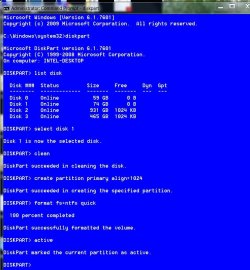
Try this. If it is confusing to you, please ask. Connect your Samsung drive to port 0 (or 1) however Gigabyte lists them, connect your SSD to port 1 (or 2). Go into bios and see if your SSD is recognized. Set optimized defaults, set your ram frequency, timings and voltage, set the sata mode to AHCI, set the boot order to DVD drive as 1st boot device and the Samsung to second boot device, save and exit. Do not have the installation DVD installed at this time. Boot into your current hard drive. Once loaded, click the start button, in the search box type cmd, in the cmd entry that appears, right click it and select 'run as administrator', you will have to give admin permission. In the window that appears type these and press enter after each.
diskpart (wait for the window to respond diskpart)
list disk (you should see your Samsung drive as disk 0 and the SSD as disk 1) If it lists your SSD as another number use that number instead of the one I give you.
select disk 1 (it will reply disk 1 is the selected disk)
clean ( it will notify you when done, takes a few seconds)
create partition primary align=1024 ( it will say the partition was created)
select partition 1
format fs=ntfs quick (it will take a few seconds, but wait it will tell you it is finished)
active
next type exit and press enter, do this twice and you will be back at the desktop. Put the installation drive into the DVD.
Shut the computer down, remove the data cable from the ssd and Samsung drive. Connect the data cable from the Samsung drive to the SSD. Leave the Samsung disconnected. Restart the computer. Select custom install and install to the SSD.
The diskpart commands I gave you will look like this. I just have more disks connected than you will.

clean-align-format SSD.JPG

Let us know how that works
 

My Computers My Computers

System One System Two

  • Computer type
    PC/Desktop
    Computer Manufacturer/Model Number
    ALWAYS UNDER CONSTRUCTION
    OS
    Windows 11 Pro
    CPU
    Ryzen 9 5900X
    Motherboard
    Asus X570 Crosshair Viii Hero
    Memory
    32GB G Skill DDR4-3600
    Graphics Card(s)
    EVGA RTX 3080 FTW 3 Ultra
    Sound Card
    On Board/Sennheiser PC37X Headset
    Monitor(s) Displays
    3 X Asus 27"
    Screen Resolution
    2560x1440
    Hard Drives
    2 X 1 TB NVME drives
    PSU
    EVGA 850
    Case
    Phanteks Eclipse P400A
    Cooling
    EVGA 280 AIO
    Keyboard
    Logitech G510s/ Logitech G13
    Mouse
    Logitech G502
    Internet Speed
    24/1
    Antivirus
    ESET/MBAM Pro/SAS Pro
    Browser
    Chrome/ Firefox/ Edge
  • Computer type
    Laptop
    System Manufacturer/Model Number
    Dell 16 Plus
    OS
    Windows 11 Pro
    CPU
    Intel Ultra 9 288V
    Memory
    32 GB LPDDR5X 8533
    Monitor(s) Displays
    16" Mini-LED HDR600 Touch 90 Hz
    Screen Resolution
    2560X1600
    Hard Drives
    1 TB NVME
Thank u I'll give it a try tonight and I'll let u know how I get on
 

My Computer My Computer

OS
ulimate 64 bit
CPU
Intel(R) Core(TM) i3 CPU 540 @ 3.07GHz
Motherboard
Gigabyte Technology Co., Ltd. H55M-S2
Memory
4.00 GB
Graphics Card(s)
ATI Radeon HD 5450
Sound Card
AMD High Definition Audio Device
Hard Drives
(1) SAMSUNG HD103UJ ATA Device (2) OCZ-VERTEX2 ATA Device
No good I'm afraid, still exactly the same error.Any other thoughts on how I can find the root cause of this issue?
 

My Computer My Computer

OS
ulimate 64 bit
CPU
Intel(R) Core(TM) i3 CPU 540 @ 3.07GHz
Motherboard
Gigabyte Technology Co., Ltd. H55M-S2
Memory
4.00 GB
Graphics Card(s)
ATI Radeon HD 5450
Sound Card
AMD High Definition Audio Device
Hard Drives
(1) SAMSUNG HD103UJ ATA Device (2) OCZ-VERTEX2 ATA Device
Where did you the Windows 7 DVD?
 

My Computers My Computers

System One System Two

  • Computer type
    PC/Desktop
    Computer Manufacturer/Model Number
    ALWAYS UNDER CONSTRUCTION
    OS
    Windows 11 Pro
    CPU
    Ryzen 9 5900X
    Motherboard
    Asus X570 Crosshair Viii Hero
    Memory
    32GB G Skill DDR4-3600
    Graphics Card(s)
    EVGA RTX 3080 FTW 3 Ultra
    Sound Card
    On Board/Sennheiser PC37X Headset
    Monitor(s) Displays
    3 X Asus 27"
    Screen Resolution
    2560x1440
    Hard Drives
    2 X 1 TB NVME drives
    PSU
    EVGA 850
    Case
    Phanteks Eclipse P400A
    Cooling
    EVGA 280 AIO
    Keyboard
    Logitech G510s/ Logitech G13
    Mouse
    Logitech G502
    Internet Speed
    24/1
    Antivirus
    ESET/MBAM Pro/SAS Pro
    Browser
    Chrome/ Firefox/ Edge
  • Computer type
    Laptop
    System Manufacturer/Model Number
    Dell 16 Plus
    OS
    Windows 11 Pro
    CPU
    Intel Ultra 9 288V
    Memory
    32 GB LPDDR5X 8533
    Monitor(s) Displays
    16" Mini-LED HDR600 Touch 90 Hz
    Screen Resolution
    2560X1600
    Hard Drives
    1 TB NVME
It's an iso from msdn. I did a check sum of the downloaded file and also verified the burn.can't understand why it's saying it can't see a files that I can see on the ssd seems very odd.
 

My Computer My Computer

OS
ulimate 64 bit
CPU
Intel(R) Core(TM) i3 CPU 540 @ 3.07GHz
Motherboard
Gigabyte Technology Co., Ltd. H55M-S2
Memory
4.00 GB
Graphics Card(s)
ATI Radeon HD 5450
Sound Card
AMD High Definition Audio Device
Hard Drives
(1) SAMSUNG HD103UJ ATA Device (2) OCZ-VERTEX2 ATA Device
I think the only logical conclusion is there is a problem with the SSD or it was a bad burn of the ISO. I can think of no other reason it would do that. I have a Vertex 2 drive, but have never had that kind of trouble with it. I've had others but I've never not been able to install to it. Therefore, I'm rather at a loss. The error message you get seems to be a hardware problem, as though your computer restarted unexpectedly. But your description indicates otherwise. My only recommendation would be to burn the ISO to disk again in case it was simply a bad burn, or try the Windows 7 USB/DVD download tool to burn it to a USB drive. You could also use that tool to burn it to a DVD as it will do either.

Please let us know the results. If it fails this time, I will see if I can get some more help.
 

My Computers My Computers

System One System Two

  • Computer type
    PC/Desktop
    Computer Manufacturer/Model Number
    ALWAYS UNDER CONSTRUCTION
    OS
    Windows 11 Pro
    CPU
    Ryzen 9 5900X
    Motherboard
    Asus X570 Crosshair Viii Hero
    Memory
    32GB G Skill DDR4-3600
    Graphics Card(s)
    EVGA RTX 3080 FTW 3 Ultra
    Sound Card
    On Board/Sennheiser PC37X Headset
    Monitor(s) Displays
    3 X Asus 27"
    Screen Resolution
    2560x1440
    Hard Drives
    2 X 1 TB NVME drives
    PSU
    EVGA 850
    Case
    Phanteks Eclipse P400A
    Cooling
    EVGA 280 AIO
    Keyboard
    Logitech G510s/ Logitech G13
    Mouse
    Logitech G502
    Internet Speed
    24/1
    Antivirus
    ESET/MBAM Pro/SAS Pro
    Browser
    Chrome/ Firefox/ Edge
  • Computer type
    Laptop
    System Manufacturer/Model Number
    Dell 16 Plus
    OS
    Windows 11 Pro
    CPU
    Intel Ultra 9 288V
    Memory
    32 GB LPDDR5X 8533
    Monitor(s) Displays
    16" Mini-LED HDR600 Touch 90 Hz
    Screen Resolution
    2560X1600
    Hard Drives
    1 TB NVME
I would agree with Steve - the symptoms sound like a bad Windows 7 installer/ISO. I have the same SSD and have never seen that problem either.
 

My Computer My Computer

Computer type
PC/Desktop
Computer Manufacturer/Model Number
Golden Mk. I.4
OS
Windows 10 Pro x64 ; Xubuntu x64
CPU
Intel i7 860 @ 2.80 GHz O/C'ed to 4.0GHz
Motherboard
Gigabyte P55A-UD3R Rev.1. Award BIOS F13
Memory
16GB Corsair Vengance DDR3 @ 661 MHz Dual Channel (9-9-9-24)
Graphics Card(s)
EVGA NVidia GTX 560 1024MB
Sound Card
Realtek Integrated
Monitor(s) Displays
Dual Samsung SyncMaster 2494HS
Screen Resolution
1920*1080 and 1920*1080
Hard Drives
1*Samsung 840 EVO 120GB SSD;
1*OCZ Vertex 2 60GB SSD;
2*Samsung F3 SpinPoint 1TB in RAID0;
1*Samsung F1 SpinPoint 1TB;
2*Western Digital 1TB External USB 3.0
1*Western Digital 500GB External USB 3.0
1*Seagate 500GB External USB 2.0
PSU
Thermaltake ToughPower QFan 750W
Case
Thermaltake Element S VK60001W2Z
Cooling
Corsair H60 Water Cooling, 2*230mm and 2*80mm case fans
Keyboard
Logitech G110
Mouse
Logitech MX518
Already thought it could be a dodgy iso, therefore I downloaded another iso did a check sum on it and then verified the burn. I have tried to put the installer onto a usb stick (using the guide you suggested), but then my pc didn't boot from it and start up even though I'd selected USB HDD as the first start up option in the bios. Instead I burned the iso to another dvd (with verify) and still had the same behaviour.
I'm struggling to see why the fact that it cant read a file that does appear to be on the SSD would be down to a bad installation, but I'll do anything to get this thing working - its driving me mad.
 

My Computer My Computer

OS
ulimate 64 bit
CPU
Intel(R) Core(TM) i3 CPU 540 @ 3.07GHz
Motherboard
Gigabyte Technology Co., Ltd. H55M-S2
Memory
4.00 GB
Graphics Card(s)
ATI Radeon HD 5450
Sound Card
AMD High Definition Audio Device
Hard Drives
(1) SAMSUNG HD103UJ ATA Device (2) OCZ-VERTEX2 ATA Device
I'm asking for some more help. For a test, if you have an extra hard drive, install it to that. See if it works. If that works, it would indicate to me that you have an SSD problem. Also, please read this tutorial ans see if there s anything in it that may help.http://www.sevenforums.com/tutorials/1649-clean-install-windows-7-a.html

I have our resident expert going to take a look here. He knows all things, Installation wise.
 
Last edited:

My Computers My Computers

System One System Two

  • Computer type
    PC/Desktop
    Computer Manufacturer/Model Number
    ALWAYS UNDER CONSTRUCTION
    OS
    Windows 11 Pro
    CPU
    Ryzen 9 5900X
    Motherboard
    Asus X570 Crosshair Viii Hero
    Memory
    32GB G Skill DDR4-3600
    Graphics Card(s)
    EVGA RTX 3080 FTW 3 Ultra
    Sound Card
    On Board/Sennheiser PC37X Headset
    Monitor(s) Displays
    3 X Asus 27"
    Screen Resolution
    2560x1440
    Hard Drives
    2 X 1 TB NVME drives
    PSU
    EVGA 850
    Case
    Phanteks Eclipse P400A
    Cooling
    EVGA 280 AIO
    Keyboard
    Logitech G510s/ Logitech G13
    Mouse
    Logitech G502
    Internet Speed
    24/1
    Antivirus
    ESET/MBAM Pro/SAS Pro
    Browser
    Chrome/ Firefox/ Edge
  • Computer type
    Laptop
    System Manufacturer/Model Number
    Dell 16 Plus
    OS
    Windows 11 Pro
    CPU
    Intel Ultra 9 288V
    Memory
    32 GB LPDDR5X 8533
    Monitor(s) Displays
    16" Mini-LED HDR600 Touch 90 Hz
    Screen Resolution
    2560X1600
    Hard Drives
    1 TB NVME
I'd have to agree it's the installer, but if you've confirmed the HASH then its the burn or write. Burn the ISO to DVD using ImgBurn at 4x, or write the flash stick using UltraISO Software To Create Bootable USB Flash Drive which always work for me.

Unplug all other HD's and peripherals,

Boot into BIOS setup to enable Legacy BIOS if present. Next check BIOS Boot order for an EFI Boot Disk and if present remove it, set DVD drive first to boot, HD second. Then set SATA controller to AHCI. Save changes and Exit.

At first installer screen Press Shift + F10 to open a Command Box, type:

DISKPART
LIST DISK
SELECT DISK 0 (after confirming Windows 7 target HD #)
CLEAN
CREATE PARTITION PRIMARY SIZE=102400
FORMAT FS=NTFS LABEL="WINDOWS 7"
ACTIVE
EXIT
EXIT

Next click Install Now, then Custom install to Clean Install Windows 7 to the partition you created. If it fails then report back at which step and the verbatim error message.

In addition read over these steps to understand the tools and methods which work best to get and maintain a perfect Clean Reinstall - Factory OEM Windows 7. The steps are the same for retail.
 
Last edited:
I haven't got another HDD that I can use, however I've just run the install on a Virtual Machine that I've created on my existing HDD and all is well - so I guess this rules out a bad iso download or bad burn. This would then indicate a bad SSD, however I sent a previous one back because of exactly the same behaviour. I'm really stumped????
 

My Computer My Computer

OS
ulimate 64 bit
CPU
Intel(R) Core(TM) i3 CPU 540 @ 3.07GHz
Motherboard
Gigabyte Technology Co., Ltd. H55M-S2
Memory
4.00 GB
Graphics Card(s)
ATI Radeon HD 5450
Sound Card
AMD High Definition Audio Device
Hard Drives
(1) SAMSUNG HD103UJ ATA Device (2) OCZ-VERTEX2 ATA Device
Please run through the steps I gave you which solve half of the install issues we've dealt with here.

If those fail then use the manufacturer's tool to test the SSD with their tech support's assistance so it is ready to be RMA'd if necessary. We do regularly see bad new SSD's here.
 
Ok did as you suggested.windows starts to install fine gets to completing installation then says windows needs to restart. Upon restart it says setup is updating registry components then setup is starting services and then I get an error dialogue saying windows setup experienced an unexpected error.to install windows, restart the installation.
 

My Computer My Computer

OS
ulimate 64 bit
CPU
Intel(R) Core(TM) i3 CPU 540 @ 3.07GHz
Motherboard
Gigabyte Technology Co., Ltd. H55M-S2
Memory
4.00 GB
Graphics Card(s)
ATI Radeon HD 5450
Sound Card
AMD High Definition Audio Device
Hard Drives
(1) SAMSUNG HD103UJ ATA Device (2) OCZ-VERTEX2 ATA Device
Disabled everything that had errors and restarted then got the following error after through restart the computer restarted unexpectedly or encountered an unexpected error.windows installation cannot proceed.to install windows click ok to restart the computer and then restart the installation.
Did you see the example of the errors i am getting in the setup log - one of my first posts on this thread.does this Shed any more light on what's happening
Many thanx
Dave
 

My Computer My Computer

OS
ulimate 64 bit
CPU
Intel(R) Core(TM) i3 CPU 540 @ 3.07GHz
Motherboard
Gigabyte Technology Co., Ltd. H55M-S2
Memory
4.00 GB
Graphics Card(s)
ATI Radeon HD 5450
Sound Card
AMD High Definition Audio Device
Hard Drives
(1) SAMSUNG HD103UJ ATA Device (2) OCZ-VERTEX2 ATA Device
Greg would probably be much more qualified than me to answer. But, several possibilities exist. The files could be corrupted, The installer could have put them in a different place than the OS is looking for them, The SSD could have unreadable (to the OS) sectors. Those would be my explanations. 1 and probably 2 are not very likely as the ISO was verified as correct.
 

My Computers My Computers

System One System Two

  • Computer type
    PC/Desktop
    Computer Manufacturer/Model Number
    ALWAYS UNDER CONSTRUCTION
    OS
    Windows 11 Pro
    CPU
    Ryzen 9 5900X
    Motherboard
    Asus X570 Crosshair Viii Hero
    Memory
    32GB G Skill DDR4-3600
    Graphics Card(s)
    EVGA RTX 3080 FTW 3 Ultra
    Sound Card
    On Board/Sennheiser PC37X Headset
    Monitor(s) Displays
    3 X Asus 27"
    Screen Resolution
    2560x1440
    Hard Drives
    2 X 1 TB NVME drives
    PSU
    EVGA 850
    Case
    Phanteks Eclipse P400A
    Cooling
    EVGA 280 AIO
    Keyboard
    Logitech G510s/ Logitech G13
    Mouse
    Logitech G502
    Internet Speed
    24/1
    Antivirus
    ESET/MBAM Pro/SAS Pro
    Browser
    Chrome/ Firefox/ Edge
  • Computer type
    Laptop
    System Manufacturer/Model Number
    Dell 16 Plus
    OS
    Windows 11 Pro
    CPU
    Intel Ultra 9 288V
    Memory
    32 GB LPDDR5X 8533
    Monitor(s) Displays
    16" Mini-LED HDR600 Touch 90 Hz
    Screen Resolution
    2560X1600
    Hard Drives
    1 TB NVME
Do you have an BIOS update available, or are there firmware updates or hotfixes for the SSD, or bulletins such as we sometimes see where manufacturers advise to install in IDE mode?

Earlier you said you couldn't boot when trying USB Flash stick install after setting USB HDD first in BIOS setup. Try this again with SSD set first to boot in BIOS, then trigger the stick to boot using the one-time BIOS Boot Menu key given on first screen, under USB, Removable or HD's. You may need to expand one of those listings to see your stick which is normally listed by it's make or model.

If this fails try writing the stick again using UltraISO Software To Create Bootable USB Flash Drive. Be sure to format the stick first with the format button, then Write.
which has always worked when all others fail, if USB can work at all.

If USB still won't boot, unplug the DVD drive. Remember to have all peripherals and other HD's unplugged.

If all else fails, can you install to the SSD in another PC, move it back to problem machine with your current Win7 HD plugged in, run from there Paragon Virtualization Manager (formerly Paragon Adaptive Restore) to PNP Adjust the SSD's Win7, supplying the SATA controller driver from chipset in Manual mode.
 
Back
Top