Solved Win8 upgrade experience

OK so let me get this right. I have Seven on an SSD and 8.1 on a spinner drive. They are separate and one should not know about the other except for boot entries and 8.1 is deleting and interfering with 7? I do not use that shadow copy except for back ups with Macrium. Is my 7 install OK or do I need to read up on this?
 

My Computer

Computer type
PC/Desktop
Computer Manufacturer/Model Number
Bluethunder II
OS
Windows 7 x64 Ultimate and numerous virtual machines
CPU
AMD FX-8350 Vishera 32nm Technology @ 4.2 GHz default
Motherboard
ASUSTeK COMPUTER INC. SABERTOOTH 990FX R2.0 (Socket 942)
Memory
G Skill 32.0GB Dual-Channel DDR3 @ 1204MHz (11-13-13-31)
Graphics Card(s)
EVGA GeForce GTX 960 4GB Super SC ACX 2.0+ with Back Plate
Sound Card
Creative X-Fi Titanium HD Audiophile PCIe
Monitor(s) Displays
LG L227WTG x 3
Screen Resolution
1680 x 1050 16:10
Hard Drives
238GB Samsung850 PRO SATA Disk Device (SSD)
1863GB Seagate ST2000DM 001-1CH164 (SATA)
1397GB Seagate ST1500DL 003-9VT16L(SATA)
466GB Western Digital WDC WD50 03AZEX-00K1GA0 (SATA) x 2
932GB Seagate ST310005 28AS SATA Disk Device (SATA)
PSU
Enermax Revolution87+ 1000 Watts Gold Certified Power Supply
Case
Rocketfish Full Tower
Cooling
Cooler Master Hyper 212 EVO Push Pull 120mm Fans
Keyboard
Logitech K740
Mouse
Logitech G100S Laser LED + Logitech Gamepad F310
Internet Speed
500 mbs down and 30mbs up
Antivirus
Malwarebytes Pro & Avast and MSE on certain Virtual Machines
Browser
Firefox (Main) Chrome, Internet Explorer (Back Up)
Other Info
Logitech X 230 2.1 Stereo System and 5.1 Yamaha RX V2090
B&W DM6 Monitor Speakers + Center and Surround Speakers
Using Mouse Without Borders (Google it)
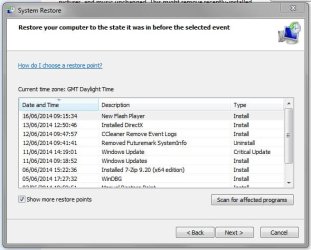
I have Restore Points turned off in Win 7, I turned them off a long time because I use (and trust) System Backup Images.
So I can't say for sure Win 8 will delete Win 7 Restore Points.
I have System Restore turned on in Win 8 as I've been testing and checking things ...
I can say for sure Booting Win 7 will delete Win 8 Restore Points.

You can test it by:
- Create a Win 7 Restore Point (or make sure you have some)
- Boot up Win 8
- Shut down Win 8
- Boot up Win 7
- See if you still have Restore Point(s)

It doesn't really matter if they are on separate drives.
Can you see the other OS drive in Windows Explorer and/or Disk Management ?
 

My Computer

Computer type
PC/Desktop
Computer Manufacturer/Model Number
home built
OS
Multi-Boot W7_Pro_x64 W8.1_Pro_x64 W10_Pro_x64 +Linux_VMs +Chromium_VM
CPU
AMD Athlon II x4 620
Motherboard
Gigabyte GA-MA785G-UD3H
Memory
6GB GSkill DDR2 800
Graphics Card(s)
AMD 4670 GPU + AMD 4200 IGP
Sound Card
on board Realtek ALC889A
Monitor(s) Displays
RCA 40" LCD TV, Insignia 32" LCD TV, HP 15" LCD monitor
Screen Resolution
1680 x 1050
Hard Drives
OCZ Vertex 3 120GB,
Samsung F3 1TB (3),
Several others - WD, Seagate, Hitachi, ...
PSU
Corsair 500 W
Case
Rosewill mid tower
Cooling
CM 90mm rifle
Keyboard
Gyration wireless, Logitech wireless, Dell USB wired
Mouse
Gyration wireless, Logitech wireless, V7 USB wired
Internet Speed
Spectrum - 100Mbps D / 10Mbps U
Antivirus
Avast, MBAM3, EMET, WinPatrol
Browser
Pale Moon, Firefox, IE
Other Info
2 multi-boot PC's
Mainly HTPC/Office/Gen purpose (no gaming).
Trendnet USB KVM.
LG DVD burner/Blue Ray Player.
Tray system for removable SATA backup drives.

Not currently OCd, under-volted.
I use Hybrid sleep, rarely re-boot or shutdown.

Hauppauge HD-PVR, Avermedia PCIe TV Tuner, Hauppauge PCI TV Tuner.
If W8 does delete 7's Restore Points, it hasn't been doing it to mine.

Capture.JPG
 

My Computer

Computer type
PC/Desktop
Computer Manufacturer/Model Number
Custom Build
OS
W7 Pro x64 SP1 | W10 Pro IP x64 | W8.1 Pro x64 VM | Linux Mint VM
CPU
i7-4790k @ 4GHz (4.4GHz Boost)
Motherboard
ASUS Sabertooth Z87 (BIOS Rev 2004)
Memory
16GB DDR3 Kingston HyperX Fury @ 1600MHz CL 9-9-9-27
Graphics Card(s)
EVGA GTX 980 Classified
Sound Card
Realtek Onboard
Monitor(s) Displays
Samsung S27D390
Screen Resolution
1920 x 1080
Hard Drives
240GB Intel 520 Series SSD |
Samsung 850 EVO 120GB SSD |
2TB WD Caviar Black |
2TB WD Caviar Green
PSU
Corsair HX850-80 Gold Modular
Case
Cooler Master Silencio 650
Cooling
Corsair H80i w/2 x Corsair SP120 | 2 x 120mm Noctua NF-S12B
Keyboard
Microsoft Sidewinder X4
Mouse
Gigabyte M6900 optical
Internet Speed
152mb
Antivirus
F-Secure
Browser
Firefox 38.0
Other Info
Backup Rig: Win 7 Pro 64-bit | AMD A10-5800k | ASUS F2A85-V Pro | 8GB Samsung DDR3 @1600MHz | 120GB Toshiba SDD | 2TB Seagate HDD | Cooler Master Silencio 550
Yea Bing desktop/ Bing bar and Silverlight are all optional updates I passed on no different than win-7,
All other optional updates got loaded though and of course important ones ;)
Interesting I came up with a blank on top right/ search all,
All I got was search online ?


That is odd. Just to be sure, you mean the Start menu search, right?

I modified the image to include the Search icon - it isn't a tweak, just shopped it with Gimp

Search.png

What do you have set for Search options?

Open an explorer window,
maximize the ribbon (untick minimize the ribbon)
select the view "tab"

(you might want to add options to the quick access toolbar - right click options)

click options (far right) (or that tiny icon on the title bar, near "file"
then click change folder and search options
you know where to go after that

I only have System files ticked.

There's probably some other Search settings, you might want to check EF tutorials.
 

My Computer

Computer type
Laptop
Computer Manufacturer/Model Number
HP Pavilion dv6-6c10us
OS
x64 (6.3.9600) Win8.1 Pro & soon dual boot x64 (6.1.7601) Win7_SP1 HomePrem
CPU
AMD A6-3420M APU with Radeon(tm) HD Graphics
Motherboard
Hewlett-Packard 1805
Memory
6.00 GB
Graphics Card(s)
AMD Radeon(TM) HD 6520G
Sound Card
(1) AMD High Definition Audio Device (2) IDT High Definiti
Monitor(s) Displays
HP W2072a 20" LCD (1600 x 900) @ 60 Hz
Screen Resolution
1366 x 768 x 32 bits (4294967296 colors) @ 60 Hz
Hard Drives
ST640LM0 00 HM641JI SATA Disk Device
Keyboard
Logitech k520 wireless KB
Mouse
Logitech m320 wireless mouse (bundled with KB)
Internet Speed
15/5 | 54 MB Wireless 'n'
Antivirus
Realtime: Defender or Avast | On-demand: Malwarebytes, ESET
Browser
IE 11 on Win8, IE 10 on win 7
Other Info
Media: [Gimp, Audacity, VLC] || Comm: [WEmail 2012, Skype] || Productivity: [OpenOffice,| Textpad] || Utils: [Sysinternals, cCleaner, Speccy, Defraggler]
While I was resetting the machine to "just the way I like it" and resolving issues I created by experimenting with a user profile not on C: - the machine became severely fragmented - 33%, and I noticed that I lost about 4GB.

I wasn't doing anything drastic... changing icons on shortcuts, changing permissions on same shortcuts...
I notices that some of my start menu shortcuts no longer worked (nope, these were not the shortcuts I changed permissions and icons - - Skype and MS store launch, but do nothing!)

The pagefile had grown (there's the "missing" space) and it was also what was fragmented.

I have 6 GB ram - I'm setting a initial (3072) and maximum (4098) pagefile. In other words, I'm not going to let Windows manage the pagefile. There's plenty of discussion about pagefile.... and I've played with it on many systems.

Windows recommends 3962 for my system and it is currently pegged at 5632.
It was 1600 before the fragmentation.

If you're not comfortable messing around with pagefile, just let Windows manage it. Both too small or too large have performance issues.
 

My Computer

Computer type
Laptop
Computer Manufacturer/Model Number
HP Pavilion dv6-6c10us
OS
x64 (6.3.9600) Win8.1 Pro & soon dual boot x64 (6.1.7601) Win7_SP1 HomePrem
CPU
AMD A6-3420M APU with Radeon(tm) HD Graphics
Motherboard
Hewlett-Packard 1805
Memory
6.00 GB
Graphics Card(s)
AMD Radeon(TM) HD 6520G
Sound Card
(1) AMD High Definition Audio Device (2) IDT High Definiti
Monitor(s) Displays
HP W2072a 20" LCD (1600 x 900) @ 60 Hz
Screen Resolution
1366 x 768 x 32 bits (4294967296 colors) @ 60 Hz
Hard Drives
ST640LM0 00 HM641JI SATA Disk Device
Keyboard
Logitech k520 wireless KB
Mouse
Logitech m320 wireless mouse (bundled with KB)
Internet Speed
15/5 | 54 MB Wireless 'n'
Antivirus
Realtime: Defender or Avast | On-demand: Malwarebytes, ESET
Browser
IE 11 on Win8, IE 10 on win 7
Other Info
Media: [Gimp, Audacity, VLC] || Comm: [WEmail 2012, Skype] || Productivity: [OpenOffice,| Textpad] || Utils: [Sysinternals, cCleaner, Speccy, Defraggler]
I don't use the system restore program.

However shadow copies are very useful. They are not the same thing.
 

My Computers

System One System Two

  • Computer type
    PC/Desktop
    OS
    7 X64
    CPU
    i5 8400
    Motherboard
    gigabyte b365m ds3h
    Memory
    2x8gb 3200mhz
    Hard Drives
    various
    PSU
    pure power 11 400w cm
    Case
    Coolermaster
    Cooling
    cryorig m9i
  • Computer type
    PC/Desktop
    OS
    7x64
    CPU
    g5400
    Motherboard
    ga b365m ds3h
    Memory
    8gb ddr4 2400
    PSU
    xfx pro 450w
Seems as though every time I login, the disk is fragmented 3-5% according to Defraggler (MS defrag flashes though the operation). This reminds me of days long gone and better forgotten.

I'm going to move on to other system "optimizations" and see what Black Viper has on 8.1 Services.
http://www.blackviper.com/service-configurations/black-vipers-windows-8-1-service-configurations/

I used his excellent work as a reference to "tune" my Win7 system. There are scripts, but each machine is different and results will vary. I think it's better to select the services manually and determine the startup type (or disable/enable state).

UPnP and it's companions, and TCPIP helper (NetBIOS) are two that I recall off the top of my head that I don't use and can safely disable.

There are a bunch more that I have no need to have running, but you might so I won't list those. A lot of it depends on how you use networks.
 

My Computer

Computer type
Laptop
Computer Manufacturer/Model Number
HP Pavilion dv6-6c10us
OS
x64 (6.3.9600) Win8.1 Pro & soon dual boot x64 (6.1.7601) Win7_SP1 HomePrem
CPU
AMD A6-3420M APU with Radeon(tm) HD Graphics
Motherboard
Hewlett-Packard 1805
Memory
6.00 GB
Graphics Card(s)
AMD Radeon(TM) HD 6520G
Sound Card
(1) AMD High Definition Audio Device (2) IDT High Definiti
Monitor(s) Displays
HP W2072a 20" LCD (1600 x 900) @ 60 Hz
Screen Resolution
1366 x 768 x 32 bits (4294967296 colors) @ 60 Hz
Hard Drives
ST640LM0 00 HM641JI SATA Disk Device
Keyboard
Logitech k520 wireless KB
Mouse
Logitech m320 wireless mouse (bundled with KB)
Internet Speed
15/5 | 54 MB Wireless 'n'
Antivirus
Realtime: Defender or Avast | On-demand: Malwarebytes, ESET
Browser
IE 11 on Win8, IE 10 on win 7
Other Info
Media: [Gimp, Audacity, VLC] || Comm: [WEmail 2012, Skype] || Productivity: [OpenOffice,| Textpad] || Utils: [Sysinternals, cCleaner, Speccy, Defraggler]
Interesting assessment I've personally never had any issues with windows system restore,
Don't use it but did use system cleanup to get rid of all but the last before shrinking my C-drive for win-8 partition,
Defrag was at 5% from 2% but shrinking it just increased the fragmentation which I;m running now,
I'll check out what's up with the 8 side later,
Cheers for the heads up ;)
 

My Computer

Computer type
PC/Desktop
Computer Manufacturer/Model Number
Custom assembled by me :}
OS
Win-7-Pro64bit 7-H-Prem-64bit
CPU
i7-5930K 2nd i9-9940x both water blocked VRM's too
Motherboard
ASUS SABERTOOTH X99 2nd ASUS x299 Apex
Memory
Trident-z 3200C14 2nd Trident-z 3600C16
Graphics Card(s)
EVGA 1080ti ftw3 2nd Titan Xp both water blocked
Sound Card
Built-in Realtek
Monitor(s) Displays
1-AOC G2460PG 24"G-Sync 144Hz/ 2nd 1-ASUS VG248QE 24" 144Hz
Screen Resolution
1920 x 1080 144Hz
Hard Drives
2-Samsung M.2 Evo & Evo Plus
2-Samsung 850 EVO 500GB SSD's/ 3-2.5 W.D. Black 1tb-&3-1tb/3-3.5 WD Black 1tb hdd's
PSU
EVGA SuperNOVA 1000-P2 2nd 1200-P2
Case
2-Corsair Obsidian Series 450D Black ATX Mid Tower
Cooling
Custom water loops
Keyboard
Logitech G710+/ 2nd Logitech G910
Mouse
2-RedDragon M901 Perdition 16400 dpi Gaming mouse = wired
Internet Speed
Comcast Ping 19ms 89.31mbps download speed 6.12mbps upload
Antivirus
Malwarebytes Pro/ Superantispyware Pro
Browser
FireFox & Pale moon
Other Info
2nd ASUS X299 Apex/Intel i9-9940x with Custom water loop/7H-Prem-x64/Corsair 450D case/Ram Trident-z 3600C16 4x8gb / Samsung970Evo plus 500gb SSD/Dual ssd EZ swap evo/PSU EVGA SuperNova 1200w-P2 80+Platinum/GPU Titan Xp /8-ML-140 on push-pull on 2-280GTX rads
Maybe if you move the Pagefile to a different partition you will experience less fragmentation.

I have my W7 Pagefile and Linux Mint Swap partitions on different HDDs from the operating systems.
My XP pagefile is on a RAM disk.
 

My Computer

Computer type
PC/Desktop
Computer Manufacturer/Model Number
n/a
OS
W7 Ultimate SP1, LM19.2 MATE, W10 Home 1703, W10 Pro 1703 VM, #All 64 bit
CPU
AMD Phenom II x6 1100T, 3.3 GHz
Motherboard
ASUS M4A88T-M/USB3 (AM3)
Memory
12GB DDR3 1333 G-Skill (4GB x 2), G-Skill (2GB x 2)
Graphics Card(s)
NVIDIA GeForce GTX 660
Sound Card
Realtek?
Monitor(s) Displays
Samsung S23B350
Screen Resolution
1920x1080
Hard Drives
WD Green 2TB (SATA), WD Green 3TB (SATA), WD Blue 4TB (SATA), WD Blue 6TB (SATA)
PSU
Cooler Master
Case
Antec GX300 Tower
Cooling
3x Antec TRICOOL 120mm Fans
Mouse
Wired Optical
Internet Speed
DSL
Antivirus
Avast
Browser
Pale Moon (64 bit)
Other Info
2018-12-27 Upgraded HDDs
2015-12-10 Upgraded case, graphics card, storage
2015-08-15 Upgraded motherboard & RAM
2015-07-15 Upgraded LM17.1 to LM17.2
I was getting used to windows 8 but it wasn't playing nice with a new pc I built. Oh well.
 

My Computer

Computer type
PC/Desktop
Computer Manufacturer/Model Number
HP
OS
Windows Seven Ultimate x64 SP1
CPU
Intel Core i7 x980 @ 3.33GHz
Memory
12.0 GB
Graphics Card(s)
Nvidia GeForce GTX 260
What advantages does Win8 really have over WIn7?

My experience with installing it a dozen times is that its ugly, the start screen is useless unless you want to pretend you're a phone, the crApps won't shut off and if you install a Start menu it still defaults to all the crApps. So by the time I get everything sorted its really worn out its welcome in my Dual Boot and I delete it.

I do not see it being faster at all. An SSD is fast. The Explorer copy graph is cool and would be welcome in the overdue SP2 for Win7.
 
Maybe if you move the Pagefile to a different partition you will experience less fragmentation.

I have my W7 Pagefile and Linux Mint Swap partitions on different HDDs from the operating systems.
My XP pagefile is on a RAM disk.

That's how I get a contiguous page file - move it, cleanup the drive, move it back. I've played around with agefiles long time ago and found that the page file does best on the boot drive between the OS and the Apps. Trying to keep it that way or redoing it every time I installed or upgraded was more trouble than it was worth.

Funny thing... I don't recall Win7 pagefile fragmenting much. but I had a static size on that. I'll see how Win8 plays with what I have now and try your suggestion if the pagefile continues to be fragmented beyond what I expect. This is a fairly new install (4 days) so it might take a while for Windows to optimize itself.

I just evaluated Lucid Puppy, Peppermint, and Linux Mint Mate. Peppermint wouldn't boot on my machine and Lucid Puppy wouldn't load some drivers. Mint Mate worked beautifully, but it's much larger.

Are you saying that you have Win Page and Linux Swap each on different parts or are you saying that both are not on the boot part, but on the same part? Curiosity only :geek:

Thanks

Bill
.
 

My Computer

Computer type
Laptop
Computer Manufacturer/Model Number
HP Pavilion dv6-6c10us
OS
x64 (6.3.9600) Win8.1 Pro & soon dual boot x64 (6.1.7601) Win7_SP1 HomePrem
CPU
AMD A6-3420M APU with Radeon(tm) HD Graphics
Motherboard
Hewlett-Packard 1805
Memory
6.00 GB
Graphics Card(s)
AMD Radeon(TM) HD 6520G
Sound Card
(1) AMD High Definition Audio Device (2) IDT High Definiti
Monitor(s) Displays
HP W2072a 20" LCD (1600 x 900) @ 60 Hz
Screen Resolution
1366 x 768 x 32 bits (4294967296 colors) @ 60 Hz
Hard Drives
ST640LM0 00 HM641JI SATA Disk Device
Keyboard
Logitech k520 wireless KB
Mouse
Logitech m320 wireless mouse (bundled with KB)
Internet Speed
15/5 | 54 MB Wireless 'n'
Antivirus
Realtime: Defender or Avast | On-demand: Malwarebytes, ESET
Browser
IE 11 on Win8, IE 10 on win 7
Other Info
Media: [Gimp, Audacity, VLC] || Comm: [WEmail 2012, Skype] || Productivity: [OpenOffice,| Textpad] || Utils: [Sysinternals, cCleaner, Speccy, Defraggler]
@Greg,

I don't think they are claiming any advantage. It is just something a bit different to have a play with for a little while.

Far too annoying for long term use.
 

My Computers

System One System Two

  • Computer type
    PC/Desktop
    OS
    7 X64
    CPU
    i5 8400
    Motherboard
    gigabyte b365m ds3h
    Memory
    2x8gb 3200mhz
    Hard Drives
    various
    PSU
    pure power 11 400w cm
    Case
    Coolermaster
    Cooling
    cryorig m9i
  • Computer type
    PC/Desktop
    OS
    7x64
    CPU
    g5400
    Motherboard
    ga b365m ds3h
    Memory
    8gb ddr4 2400
    PSU
    xfx pro 450w
@Greg,

I don't think they are claiming any advantage. It is just something a bit different to have a play with for a little while.

Far too annoying for long term use.

:ditto:
It's difficult to have an opinion if I never used win.8.1....
But for the most part it's just another toy I have disk space so I said what the heck win-8 was a freebie so there's really no out of pocket thanks for that Robin and Brink for the setup tutorials :D

One very odd thing is If I'm coming from win-7 and boot to win-8 it's very fast,
Coming from win-8 and booting to win-7 it's very slow,
Win-8 boot manager looks to me to be much slower than win-7 boot manager,
I did run system cleanup on the win-8 side and that got rid of allot of update files did defrag too,
So hopefully that will change,
Out for a few days so this weekend I'll be able to test more,
Cheers.
 

My Computer

Computer type
PC/Desktop
Computer Manufacturer/Model Number
Custom assembled by me :}
OS
Win-7-Pro64bit 7-H-Prem-64bit
CPU
i7-5930K 2nd i9-9940x both water blocked VRM's too
Motherboard
ASUS SABERTOOTH X99 2nd ASUS x299 Apex
Memory
Trident-z 3200C14 2nd Trident-z 3600C16
Graphics Card(s)
EVGA 1080ti ftw3 2nd Titan Xp both water blocked
Sound Card
Built-in Realtek
Monitor(s) Displays
1-AOC G2460PG 24"G-Sync 144Hz/ 2nd 1-ASUS VG248QE 24" 144Hz
Screen Resolution
1920 x 1080 144Hz
Hard Drives
2-Samsung M.2 Evo & Evo Plus
2-Samsung 850 EVO 500GB SSD's/ 3-2.5 W.D. Black 1tb-&3-1tb/3-3.5 WD Black 1tb hdd's
PSU
EVGA SuperNOVA 1000-P2 2nd 1200-P2
Case
2-Corsair Obsidian Series 450D Black ATX Mid Tower
Cooling
Custom water loops
Keyboard
Logitech G710+/ 2nd Logitech G910
Mouse
2-RedDragon M901 Perdition 16400 dpi Gaming mouse = wired
Internet Speed
Comcast Ping 19ms 89.31mbps download speed 6.12mbps upload
Antivirus
Malwarebytes Pro/ Superantispyware Pro
Browser
FireFox & Pale moon
Other Info
2nd ASUS X299 Apex/Intel i9-9940x with Custom water loop/7H-Prem-x64/Corsair 450D case/Ram Trident-z 3600C16 4x8gb / Samsung970Evo plus 500gb SSD/Dual ssd EZ swap evo/PSU EVGA SuperNova 1200w-P2 80+Platinum/GPU Titan Xp /8-ML-140 on push-pull on 2-280GTX rads
What advantages does Win8 really have over WIn7?

My experience with installing it a dozen times is that its ugly, the start screen is useless unless you want to pretend you're a phone, the crApps won't shut off and if you install a Start menu it still defaults to all the crApps. So by the time I get everything sorted its really worn out its welcome in my Dual Boot and I delete it.

I do not see it being faster at all. An SSD is fast. The Explorer copy graph is cool and would be welcome in the overdue SP2 for Win7.

@Greg,

I don't think they are claiming any advantage. It is just something a bit different to have a play with for a little while.

Far too annoying for long term use.

@Greg,

I don't think they are claiming any advantage. It is just something a bit different to have a play with for a little while.

Far too annoying for long term use.

:ditto:
It's difficult to have an opinion if I never used win.8.1....
But for the most part it's just another toy I have disk space so I said what the heck win-8 was a freebie so there's really no out of pocket thanks for that Robin and Brink for the setup tutorials :D

One very odd thing is If I'm coming from win-7 and boot to win-8 it's very fast,
Coming from win-8 and booting to win-7 it's very slow,
Win-8 boot manager looks to me to be much slower than win-7 boot manager,
I did run system cleanup on the win-8 side and that got rid of allot of update files did defrag too,
So hopefully that will change,
Out for a few days so this weekend I'll be able to test more,
Cheers.

Greg,

Si is correct, I started this thread as a post-mortem on updrating to Win8, nothing more.

I expressed my opinion on some things (no start menu - OMG!) but there isn't any Win8 advocacy or evangelism intended - just recording my experience.

Mike also has a valid point - how can any member come to their own conclusions and build an opinion on Win8 unless they try it.

I really don't see much difference between Win8 and Win7 - sure you have those crApps that bug me, but I don't use them. The desktop applications can be installed and they seem to run fine.

There are always detractors with any new Windows (except 1 -> 3 ... everyone liked that change ;))
(DOS -> Win3; 95 -> 98; 98 -> 2000, mill, or XP; XP -> Vista; XP -> Win7; Vista -> Win7)

The base OS hasn't changed all that much since Vista, but the GUI sure has.

There are things I like about Win8 and some things I don't like, but it's just an operating system.

Now I'll return to recording my experience updrading to Win8.
 

My Computer

Computer type
Laptop
Computer Manufacturer/Model Number
HP Pavilion dv6-6c10us
OS
x64 (6.3.9600) Win8.1 Pro & soon dual boot x64 (6.1.7601) Win7_SP1 HomePrem
CPU
AMD A6-3420M APU with Radeon(tm) HD Graphics
Motherboard
Hewlett-Packard 1805
Memory
6.00 GB
Graphics Card(s)
AMD Radeon(TM) HD 6520G
Sound Card
(1) AMD High Definition Audio Device (2) IDT High Definiti
Monitor(s) Displays
HP W2072a 20" LCD (1600 x 900) @ 60 Hz
Screen Resolution
1366 x 768 x 32 bits (4294967296 colors) @ 60 Hz
Hard Drives
ST640LM0 00 HM641JI SATA Disk Device
Keyboard
Logitech k520 wireless KB
Mouse
Logitech m320 wireless mouse (bundled with KB)
Internet Speed
15/5 | 54 MB Wireless 'n'
Antivirus
Realtime: Defender or Avast | On-demand: Malwarebytes, ESET
Browser
IE 11 on Win8, IE 10 on win 7
Other Info
Media: [Gimp, Audacity, VLC] || Comm: [WEmail 2012, Skype] || Productivity: [OpenOffice,| Textpad] || Utils: [Sysinternals, cCleaner, Speccy, Defraggler]
My external HD (Seagate GoFlex Desk 2 TB) goes to "sleep"

This was also an issue on Win7 when I first connected the drive. This really drags down performance when the drive has to "wake" up. I have Libraries locations on that drive, so the delay is very noticeable.

I don't recall what I changed to improve the disk up time (or prevent it from sleeping), but here are the steps I do remember
Seagate Dashboard - do not sleep
-> can't use on 8.1 (not for this OS @ install)
Win 7 / 8 - adjust power plan (never power down disk, sleep after 30 minutes, USB selective suspend=disabled)

I looked through the event logs (new Dev mgr tab takes you directly to the event log), but haven't found anything useful.

Can't think of anything else.
 

My Computer

Computer type
Laptop
Computer Manufacturer/Model Number
HP Pavilion dv6-6c10us
OS
x64 (6.3.9600) Win8.1 Pro & soon dual boot x64 (6.1.7601) Win7_SP1 HomePrem
CPU
AMD A6-3420M APU with Radeon(tm) HD Graphics
Motherboard
Hewlett-Packard 1805
Memory
6.00 GB
Graphics Card(s)
AMD Radeon(TM) HD 6520G
Sound Card
(1) AMD High Definition Audio Device (2) IDT High Definiti
Monitor(s) Displays
HP W2072a 20" LCD (1600 x 900) @ 60 Hz
Screen Resolution
1366 x 768 x 32 bits (4294967296 colors) @ 60 Hz
Hard Drives
ST640LM0 00 HM641JI SATA Disk Device
Keyboard
Logitech k520 wireless KB
Mouse
Logitech m320 wireless mouse (bundled with KB)
Internet Speed
15/5 | 54 MB Wireless 'n'
Antivirus
Realtime: Defender or Avast | On-demand: Malwarebytes, ESET
Browser
IE 11 on Win8, IE 10 on win 7
Other Info
Media: [Gimp, Audacity, VLC] || Comm: [WEmail 2012, Skype] || Productivity: [OpenOffice,| Textpad] || Utils: [Sysinternals, cCleaner, Speccy, Defraggler]
So they don't have a new version of Seagate Dashboard that works with 8.1 ?
 

My Computer

Computer type
PC/Desktop
Computer Manufacturer/Model Number
home built
OS
Multi-Boot W7_Pro_x64 W8.1_Pro_x64 W10_Pro_x64 +Linux_VMs +Chromium_VM
CPU
AMD Athlon II x4 620
Motherboard
Gigabyte GA-MA785G-UD3H
Memory
6GB GSkill DDR2 800
Graphics Card(s)
AMD 4670 GPU + AMD 4200 IGP
Sound Card
on board Realtek ALC889A
Monitor(s) Displays
RCA 40" LCD TV, Insignia 32" LCD TV, HP 15" LCD monitor
Screen Resolution
1680 x 1050
Hard Drives
OCZ Vertex 3 120GB,
Samsung F3 1TB (3),
Several others - WD, Seagate, Hitachi, ...
PSU
Corsair 500 W
Case
Rosewill mid tower
Cooling
CM 90mm rifle
Keyboard
Gyration wireless, Logitech wireless, Dell USB wired
Mouse
Gyration wireless, Logitech wireless, V7 USB wired
Internet Speed
Spectrum - 100Mbps D / 10Mbps U
Antivirus
Avast, MBAM3, EMET, WinPatrol
Browser
Pale Moon, Firefox, IE
Other Info
2 multi-boot PC's
Mainly HTPC/Office/Gen purpose (no gaming).
Trendnet USB KVM.
LG DVD burner/Blue Ray Player.
Tray system for removable SATA backup drives.

Not currently OCd, under-volted.
I use Hybrid sleep, rarely re-boot or shutdown.

Hauppauge HD-PVR, Avermedia PCIe TV Tuner, Hauppauge PCI TV Tuner.
3 HDDs

I just evaluated Lucid Puppy, Peppermint, and Linux Mint Mate. Peppermint wouldn't boot on my machine and Lucid Puppy wouldn't load some drivers. Mint Mate worked beautifully, but it's much larger.
On my PC, Linux Mint MATE's overall size (~8 GB) is much smaller than Windows 7 (~22 GB).
Both are 64 bit and those sizes include software.

I do have more programs in Windows, but the total size is only ~6 GB.

Are you saying that you have Win Page and Linux Swap each on different parts or are you saying that both are not on the boot part, but on the same part? Curiosity only :geek:
I have 3 HDDs:

  • (1.5 TB) 3 x OS + other partitions
  • (2.0 TB) Linux Swap + other partitions
  • (2.0 TB) W7 Pagefile + other partitions
The Swap file and Pagefiles have their partitions solely devoted to those functions.
 

My Computer

Computer type
PC/Desktop
Computer Manufacturer/Model Number
n/a
OS
W7 Ultimate SP1, LM19.2 MATE, W10 Home 1703, W10 Pro 1703 VM, #All 64 bit
CPU
AMD Phenom II x6 1100T, 3.3 GHz
Motherboard
ASUS M4A88T-M/USB3 (AM3)
Memory
12GB DDR3 1333 G-Skill (4GB x 2), G-Skill (2GB x 2)
Graphics Card(s)
NVIDIA GeForce GTX 660
Sound Card
Realtek?
Monitor(s) Displays
Samsung S23B350
Screen Resolution
1920x1080
Hard Drives
WD Green 2TB (SATA), WD Green 3TB (SATA), WD Blue 4TB (SATA), WD Blue 6TB (SATA)
PSU
Cooler Master
Case
Antec GX300 Tower
Cooling
3x Antec TRICOOL 120mm Fans
Mouse
Wired Optical
Internet Speed
DSL
Antivirus
Avast
Browser
Pale Moon (64 bit)
Other Info
2018-12-27 Upgraded HDDs
2015-12-10 Upgraded case, graphics card, storage
2015-08-15 Upgraded motherboard & RAM
2015-07-15 Upgraded LM17.1 to LM17.2
I was curious so I clicked on Maps in the Start Screen to see it ...
Now I cannot get Map.exe to stop running, and it also runs RuntimeBroker.exe
I unpinned it from Start, killed the process, but when I reboot it runs again.
How can I get this freaking program to not run all the time ?
I can't find it anywhere in Startup items - Task Manager, AutoRuns, ...
It's now listed as suspended in Process Explorer :confused:

View attachment 321936

It seems when you open an App Windows keeps the process active (suspended) in case you want to go back to it.
Windows will close it when it feels like it ...
I opened the Metro Help and App Store last night out of curiosity.
14 hours later and I still have these apps listed in Process Explorer (suspended).
I closed them last night.
This morning I woke the PC and noticed a new icon on my Taskbar.
It was the App Store - clicking it took me to the Metro App Store window.
 

My Computer

Computer type
PC/Desktop
Computer Manufacturer/Model Number
home built
OS
Multi-Boot W7_Pro_x64 W8.1_Pro_x64 W10_Pro_x64 +Linux_VMs +Chromium_VM
CPU
AMD Athlon II x4 620
Motherboard
Gigabyte GA-MA785G-UD3H
Memory
6GB GSkill DDR2 800
Graphics Card(s)
AMD 4670 GPU + AMD 4200 IGP
Sound Card
on board Realtek ALC889A
Monitor(s) Displays
RCA 40" LCD TV, Insignia 32" LCD TV, HP 15" LCD monitor
Screen Resolution
1680 x 1050
Hard Drives
OCZ Vertex 3 120GB,
Samsung F3 1TB (3),
Several others - WD, Seagate, Hitachi, ...
PSU
Corsair 500 W
Case
Rosewill mid tower
Cooling
CM 90mm rifle
Keyboard
Gyration wireless, Logitech wireless, Dell USB wired
Mouse
Gyration wireless, Logitech wireless, V7 USB wired
Internet Speed
Spectrum - 100Mbps D / 10Mbps U
Antivirus
Avast, MBAM3, EMET, WinPatrol
Browser
Pale Moon, Firefox, IE
Other Info
2 multi-boot PC's
Mainly HTPC/Office/Gen purpose (no gaming).
Trendnet USB KVM.
LG DVD burner/Blue Ray Player.
Tray system for removable SATA backup drives.

Not currently OCd, under-volted.
I use Hybrid sleep, rarely re-boot or shutdown.

Hauppauge HD-PVR, Avermedia PCIe TV Tuner, Hauppauge PCI TV Tuner.
So they don't have a new version of Seagate Dashboard that works with 8.1 ?

Win8 yes... downloaded and tried it :(

I don't know why or see a reason for that not to work other than the test for the install is just wrong.

Dashboard didn't have many settings and seemed more like bloatware than anything else anyway. But I did have that one setting I thought might affect this issue.

I'll see if there's a new firmware update on Seagate, but I'm fairly certain it's a Windows setting.
Sleep, spin down drive, USB suspend, Drive policy....can't find the one I'm looking for.

The driver is std Windows 6/21/06, but has a 6.3.9600 version tacked on.

Thanks

Bill
.
 

My Computer

Computer type
Laptop
Computer Manufacturer/Model Number
HP Pavilion dv6-6c10us
OS
x64 (6.3.9600) Win8.1 Pro & soon dual boot x64 (6.1.7601) Win7_SP1 HomePrem
CPU
AMD A6-3420M APU with Radeon(tm) HD Graphics
Motherboard
Hewlett-Packard 1805
Memory
6.00 GB
Graphics Card(s)
AMD Radeon(TM) HD 6520G
Sound Card
(1) AMD High Definition Audio Device (2) IDT High Definiti
Monitor(s) Displays
HP W2072a 20" LCD (1600 x 900) @ 60 Hz
Screen Resolution
1366 x 768 x 32 bits (4294967296 colors) @ 60 Hz
Hard Drives
ST640LM0 00 HM641JI SATA Disk Device
Keyboard
Logitech k520 wireless KB
Mouse
Logitech m320 wireless mouse (bundled with KB)
Internet Speed
15/5 | 54 MB Wireless 'n'
Antivirus
Realtime: Defender or Avast | On-demand: Malwarebytes, ESET
Browser
IE 11 on Win8, IE 10 on win 7
Other Info
Media: [Gimp, Audacity, VLC] || Comm: [WEmail 2012, Skype] || Productivity: [OpenOffice,| Textpad] || Utils: [Sysinternals, cCleaner, Speccy, Defraggler]
Back
Top