Solved Win8 upgrade experience

I just evaluated Lucid Puppy, Peppermint, and Linux Mint Mate. Peppermint wouldn't boot on my machine and Lucid Puppy wouldn't load some drivers. Mint Mate worked beautifully, but it's much larger.
On my PC, Linux Mint MATE's overall size (~8 GB) is much smaller than Windows 7 (~22 GB).
Both are 64 bit and those sizes include software.

I do have more programs in Windows, but the total size is only ~6 GB.

Are you saying that you have Win Page and Linux Swap each on different parts or are you saying that both are not on the boot part, but on the same part? Curiosity only :geek:
I have 3 HDDs:

  • (1.5 TB) 3 x OS + other partitions
  • (2.0 TB) Linux Swap + other partitions
  • (2.0 TB) W7 Pagefile + other partitions
The Swap file and Pagefiles have their partitions solely devoted to those functions.

Thanks - nice layout.

I'm on a laptop and don't have the luxury of additional internal drives. I think putting the page and swap files on the USB connected external would hurt performance, especially since I'm experiencing "stay awake" issues with the GoFlex.

I do like the way you think though.

Bill
.
 

My Computer

Computer type
Laptop
Computer Manufacturer/Model Number
HP Pavilion dv6-6c10us
OS
x64 (6.3.9600) Win8.1 Pro & soon dual boot x64 (6.1.7601) Win7_SP1 HomePrem
CPU
AMD A6-3420M APU with Radeon(tm) HD Graphics
Motherboard
Hewlett-Packard 1805
Memory
6.00 GB
Graphics Card(s)
AMD Radeon(TM) HD 6520G
Sound Card
(1) AMD High Definition Audio Device (2) IDT High Definiti
Monitor(s) Displays
HP W2072a 20" LCD (1600 x 900) @ 60 Hz
Screen Resolution
1366 x 768 x 32 bits (4294967296 colors) @ 60 Hz
Hard Drives
ST640LM0 00 HM641JI SATA Disk Device
Keyboard
Logitech k520 wireless KB
Mouse
Logitech m320 wireless mouse (bundled with KB)
Internet Speed
15/5 | 54 MB Wireless 'n'
Antivirus
Realtime: Defender or Avast | On-demand: Malwarebytes, ESET
Browser
IE 11 on Win8, IE 10 on win 7
Other Info
Media: [Gimp, Audacity, VLC] || Comm: [WEmail 2012, Skype] || Productivity: [OpenOffice,| Textpad] || Utils: [Sysinternals, cCleaner, Speccy, Defraggler]
Bill I always wipe external of any backup crapware that can interfere using Diskpart Clean to get rid of all of it since it is often also in boot and partition code.

You can use Seatools to diagnose and wipe it
 
Last edited:
BillI always wipe external of any backup crapware that can interfere using Diskpart Clean to get rid of all of it since it is often also in boot and partition code.

You can use Seatools to diagnose and wipe it

Thanks Greg, but I'm no going to wipe a working drive just because it goes to sleep.

I know this issue and I know I fixed it once without resorting to draconian measures.

A good point though for new drives - I didn't mention that when I originally connected the drive I did wipe it and initialized it as GPT. So none of the on disk Seagate "utilities" survived.
edit: Maybe this is what you meant, not that I should wipe my sleepy drive.

How do I know? I looked using a disk editor.

I should clarify that the Dashboard install is a Windows install (which did not work on 8.1 up1) and it isn't a "put the crap back on my external drive install" :)

I'll keep combing through the labyrinth of my memories and post a solution if I don't get lost in the maze. :geek:

Bill
.
 
Last edited:

My Computer

Computer type
Laptop
Computer Manufacturer/Model Number
HP Pavilion dv6-6c10us
OS
x64 (6.3.9600) Win8.1 Pro & soon dual boot x64 (6.1.7601) Win7_SP1 HomePrem
CPU
AMD A6-3420M APU with Radeon(tm) HD Graphics
Motherboard
Hewlett-Packard 1805
Memory
6.00 GB
Graphics Card(s)
AMD Radeon(TM) HD 6520G
Sound Card
(1) AMD High Definition Audio Device (2) IDT High Definiti
Monitor(s) Displays
HP W2072a 20" LCD (1600 x 900) @ 60 Hz
Screen Resolution
1366 x 768 x 32 bits (4294967296 colors) @ 60 Hz
Hard Drives
ST640LM0 00 HM641JI SATA Disk Device
Keyboard
Logitech k520 wireless KB
Mouse
Logitech m320 wireless mouse (bundled with KB)
Internet Speed
15/5 | 54 MB Wireless 'n'
Antivirus
Realtime: Defender or Avast | On-demand: Malwarebytes, ESET
Browser
IE 11 on Win8, IE 10 on win 7
Other Info
Media: [Gimp, Audacity, VLC] || Comm: [WEmail 2012, Skype] || Productivity: [OpenOffice,| Textpad] || Utils: [Sysinternals, cCleaner, Speccy, Defraggler]
I looked at device mgr and found some things that might provide clues.

All of the volumes are listed under Portable Devices - this is a change from Win7. Drilling down on the details tab points to the inf file - so I'll look at that.

I think Win8 is straightening out the classifications for ext drives and there are some noticeable differences. In this case the details for the Portable Device volumes don't match the Hardware policies. This might require some registry scripts, but I always try to use native Window solutions - if none are available or don't do what I expect, then editing the registry is the last resort.

Finding the correct key / value pair isn't all that easy. I have to focus on each of the data reported and then try to reconcile the disparities.

This is gonna be fun - or I'll live with it - or I'll get a new ext drive :P)
 

My Computer

Computer type
Laptop
Computer Manufacturer/Model Number
HP Pavilion dv6-6c10us
OS
x64 (6.3.9600) Win8.1 Pro & soon dual boot x64 (6.1.7601) Win7_SP1 HomePrem
CPU
AMD A6-3420M APU with Radeon(tm) HD Graphics
Motherboard
Hewlett-Packard 1805
Memory
6.00 GB
Graphics Card(s)
AMD Radeon(TM) HD 6520G
Sound Card
(1) AMD High Definition Audio Device (2) IDT High Definiti
Monitor(s) Displays
HP W2072a 20" LCD (1600 x 900) @ 60 Hz
Screen Resolution
1366 x 768 x 32 bits (4294967296 colors) @ 60 Hz
Hard Drives
ST640LM0 00 HM641JI SATA Disk Device
Keyboard
Logitech k520 wireless KB
Mouse
Logitech m320 wireless mouse (bundled with KB)
Internet Speed
15/5 | 54 MB Wireless 'n'
Antivirus
Realtime: Defender or Avast | On-demand: Malwarebytes, ESET
Browser
IE 11 on Win8, IE 10 on win 7
Other Info
Media: [Gimp, Audacity, VLC] || Comm: [WEmail 2012, Skype] || Productivity: [OpenOffice,| Textpad] || Utils: [Sysinternals, cCleaner, Speccy, Defraggler]
@Greg,

I don't think they are claiming any advantage. It is just something a bit different to have a play with for a little while.

Far too annoying for long term use.

Exactly.
 

My Computer

Computer type
PC/Desktop
Computer Manufacturer/Model Number
Bluethunder II
OS
Windows 7 x64 Ultimate and numerous virtual machines
CPU
AMD FX-8350 Vishera 32nm Technology @ 4.2 GHz default
Motherboard
ASUSTeK COMPUTER INC. SABERTOOTH 990FX R2.0 (Socket 942)
Memory
G Skill 32.0GB Dual-Channel DDR3 @ 1204MHz (11-13-13-31)
Graphics Card(s)
EVGA GeForce GTX 960 4GB Super SC ACX 2.0+ with Back Plate
Sound Card
Creative X-Fi Titanium HD Audiophile PCIe
Monitor(s) Displays
LG L227WTG x 3
Screen Resolution
1680 x 1050 16:10
Hard Drives
238GB Samsung850 PRO SATA Disk Device (SSD)
1863GB Seagate ST2000DM 001-1CH164 (SATA)
1397GB Seagate ST1500DL 003-9VT16L(SATA)
466GB Western Digital WDC WD50 03AZEX-00K1GA0 (SATA) x 2
932GB Seagate ST310005 28AS SATA Disk Device (SATA)
PSU
Enermax Revolution87+ 1000 Watts Gold Certified Power Supply
Case
Rocketfish Full Tower
Cooling
Cooler Master Hyper 212 EVO Push Pull 120mm Fans
Keyboard
Logitech K740
Mouse
Logitech G100S Laser LED + Logitech Gamepad F310
Internet Speed
500 mbs down and 30mbs up
Antivirus
Malwarebytes Pro & Avast and MSE on certain Virtual Machines
Browser
Firefox (Main) Chrome, Internet Explorer (Back Up)
Other Info
Logitech X 230 2.1 Stereo System and 5.1 Yamaha RX V2090
B&W DM6 Monitor Speakers + Center and Surround Speakers
Using Mouse Without Borders (Google it)
Yes Bill I meant to wipe the drive to get rid of the crapware, which may leave remnants if just deleted. These could be hidden or in the code. Some externals will load drivers in Device Manager so you might look there. There are some drives that load multiple drivers for their crap functions that seem to disappear when the drive is wiped and never reappear.


I have never dealt with an external that wants to sleep but if it is wiped clean and has no drivers in Device Manager then it must be in the firmware. If it's less than a year old it has tech support which may known this issue and its solutions.


We have users wipe "working drives" all the time here to overcome these blocking other drives including OD from booting. It's in the code in those cases, and the particular boot sector and partition table wiped by Clean Command quick wipe seem to do the job.

Is there a USB sleep setting in BIOS?
 
Last edited:
Where is our Windows 9 beta so we don't have to play with Windows 8.1 in the silly season? Too hot to go out at 33C.
 

My Computer

Computer type
PC/Desktop
Computer Manufacturer/Model Number
Bluethunder II
OS
Windows 7 x64 Ultimate and numerous virtual machines
CPU
AMD FX-8350 Vishera 32nm Technology @ 4.2 GHz default
Motherboard
ASUSTeK COMPUTER INC. SABERTOOTH 990FX R2.0 (Socket 942)
Memory
G Skill 32.0GB Dual-Channel DDR3 @ 1204MHz (11-13-13-31)
Graphics Card(s)
EVGA GeForce GTX 960 4GB Super SC ACX 2.0+ with Back Plate
Sound Card
Creative X-Fi Titanium HD Audiophile PCIe
Monitor(s) Displays
LG L227WTG x 3
Screen Resolution
1680 x 1050 16:10
Hard Drives
238GB Samsung850 PRO SATA Disk Device (SSD)
1863GB Seagate ST2000DM 001-1CH164 (SATA)
1397GB Seagate ST1500DL 003-9VT16L(SATA)
466GB Western Digital WDC WD50 03AZEX-00K1GA0 (SATA) x 2
932GB Seagate ST310005 28AS SATA Disk Device (SATA)
PSU
Enermax Revolution87+ 1000 Watts Gold Certified Power Supply
Case
Rocketfish Full Tower
Cooling
Cooler Master Hyper 212 EVO Push Pull 120mm Fans
Keyboard
Logitech K740
Mouse
Logitech G100S Laser LED + Logitech Gamepad F310
Internet Speed
500 mbs down and 30mbs up
Antivirus
Malwarebytes Pro & Avast and MSE on certain Virtual Machines
Browser
Firefox (Main) Chrome, Internet Explorer (Back Up)
Other Info
Logitech X 230 2.1 Stereo System and 5.1 Yamaha RX V2090
B&W DM6 Monitor Speakers + Center and Surround Speakers
Using Mouse Without Borders (Google it)
The custom size pagefile (3072-4098) is holding steady at 3072 and there has been no fragmentation the in the pagefile since I changed it. It seems as though the extremely high fragmentation was constrained to the pagefile - current fragmentation is 1%

I have always set a custom pagefile on every Windows version that allowed it (I don't recall if 3.1 or the 9x versions did, but I think so). I hadn't gotten around to that customization before I noticed the fragmentation "issue" - I also don't recall other versions fragmenting the pagefile when Windows managed it.

I'll take a guess here at why the native defrag screamed though the process - it didn't consider the page file fragmentation in it's calculations and just skipped it completely. Just a guess.
 

My Computer

Computer type
Laptop
Computer Manufacturer/Model Number
HP Pavilion dv6-6c10us
OS
x64 (6.3.9600) Win8.1 Pro & soon dual boot x64 (6.1.7601) Win7_SP1 HomePrem
CPU
AMD A6-3420M APU with Radeon(tm) HD Graphics
Motherboard
Hewlett-Packard 1805
Memory
6.00 GB
Graphics Card(s)
AMD Radeon(TM) HD 6520G
Sound Card
(1) AMD High Definition Audio Device (2) IDT High Definiti
Monitor(s) Displays
HP W2072a 20" LCD (1600 x 900) @ 60 Hz
Screen Resolution
1366 x 768 x 32 bits (4294967296 colors) @ 60 Hz
Hard Drives
ST640LM0 00 HM641JI SATA Disk Device
Keyboard
Logitech k520 wireless KB
Mouse
Logitech m320 wireless mouse (bundled with KB)
Internet Speed
15/5 | 54 MB Wireless 'n'
Antivirus
Realtime: Defender or Avast | On-demand: Malwarebytes, ESET
Browser
IE 11 on Win8, IE 10 on win 7
Other Info
Media: [Gimp, Audacity, VLC] || Comm: [WEmail 2012, Skype] || Productivity: [OpenOffice,| Textpad] || Utils: [Sysinternals, cCleaner, Speccy, Defraggler]
Are you saying that you have Win Page and Linux Swap each on different parts or are you saying that both are not on the boot part, but on the same part? Curiosity only :geek:
I have 3 HDDs:

  • (1.5 TB) 3 x OS + other partitions
  • (2.0 TB) Linux Swap + other partitions
  • (2.0 TB) W7 Pagefile + other partitions
The Swap file and Pagefiles have their partitions solely devoted to those functions.

Thanks - nice layout.

I'm on a laptop and don't have the luxury of additional internal drives. I think putting the page and swap files on the USB connected external would hurt performance, especially since I'm experiencing "stay awake" issues with the GoFlex.

I do like the way you think though.

Bill
My current setup is overkill, as I can only use 1 physically installed OS at a time. :)
I wanted to limit the number of partitions on my secondary HDDs.

Previously, I had the Linux Swap, XP & W7 Pagefiles all on the same HDD (different HDD from the OS though).

You should be able to create those partitions on the same HDD as your OS.
I use separate partitions because it was recommended in an article about XP (many years ago).
The article said to use a separate partition and if possible use a different HDD.

IIRC, the W2K8 text books we used in my Networking course, also recommended a separate partition for the Pagefile (and for some directories e.g. the one containing the log files).

When I rebuilt my setup in September 2012, I wish I had stuck to my usual practice of having a separate partition for my programs (due to issues my friends had with W98).
Moving the programs and Pagefile to different partitions:

  • Reduced the amount of fragmentation on the OS partition
  • Seemed to prevent the W98 "Bit Rot" issues my friends complained about.
Since operating systems and HDDs have improved since W98 & XP, there may now be no benefits to be gained from my preferred setup.
 

My Computer

Computer type
PC/Desktop
Computer Manufacturer/Model Number
n/a
OS
W7 Ultimate SP1, LM19.2 MATE, W10 Home 1703, W10 Pro 1703 VM, #All 64 bit
CPU
AMD Phenom II x6 1100T, 3.3 GHz
Motherboard
ASUS M4A88T-M/USB3 (AM3)
Memory
12GB DDR3 1333 G-Skill (4GB x 2), G-Skill (2GB x 2)
Graphics Card(s)
NVIDIA GeForce GTX 660
Sound Card
Realtek?
Monitor(s) Displays
Samsung S23B350
Screen Resolution
1920x1080
Hard Drives
WD Green 2TB (SATA), WD Green 3TB (SATA), WD Blue 4TB (SATA), WD Blue 6TB (SATA)
PSU
Cooler Master
Case
Antec GX300 Tower
Cooling
3x Antec TRICOOL 120mm Fans
Mouse
Wired Optical
Internet Speed
DSL
Antivirus
Avast
Browser
Pale Moon (64 bit)
Other Info
2018-12-27 Upgraded HDDs
2015-12-10 Upgraded case, graphics card, storage
2015-08-15 Upgraded motherboard & RAM
2015-07-15 Upgraded LM17.1 to LM17.2
See post above
I could put the parts on my internal HD, but I'm limited to 5 4 parts. The OS and my Data push the free space to the middle of the drive and then I'd have to create the part in the extended part. A little extras overheard and the arm distance .... maybe I'm working of habit .

Drives have improved but I don't think I'll going to do the analysis I did 20 years ago again to see if the old rules still apply.

It's been nice discussing the old days and how we got here. My next machine will be a desktop and I can add more drives. The laptop is nice, but it's a pain to reorganize.

Bill
.
 
Last edited:

My Computer

Computer type
Laptop
Computer Manufacturer/Model Number
HP Pavilion dv6-6c10us
OS
x64 (6.3.9600) Win8.1 Pro & soon dual boot x64 (6.1.7601) Win7_SP1 HomePrem
CPU
AMD A6-3420M APU with Radeon(tm) HD Graphics
Motherboard
Hewlett-Packard 1805
Memory
6.00 GB
Graphics Card(s)
AMD Radeon(TM) HD 6520G
Sound Card
(1) AMD High Definition Audio Device (2) IDT High Definiti
Monitor(s) Displays
HP W2072a 20" LCD (1600 x 900) @ 60 Hz
Screen Resolution
1366 x 768 x 32 bits (4294967296 colors) @ 60 Hz
Hard Drives
ST640LM0 00 HM641JI SATA Disk Device
Keyboard
Logitech k520 wireless KB
Mouse
Logitech m320 wireless mouse (bundled with KB)
Internet Speed
15/5 | 54 MB Wireless 'n'
Antivirus
Realtime: Defender or Avast | On-demand: Malwarebytes, ESET
Browser
IE 11 on Win8, IE 10 on win 7
Other Info
Media: [Gimp, Audacity, VLC] || Comm: [WEmail 2012, Skype] || Productivity: [OpenOffice,| Textpad] || Utils: [Sysinternals, cCleaner, Speccy, Defraggler]
See post above
I could put the parts on my internal HD, but I'm limited to 5 parts. The OS and my Data push the free space to the middle of the drive and then I'd have to create the part in the extended part. A little extras overheard and the arm distance .... maybe I'm working of habit .

Drives have improved but I don't think I'll going to do the analysis I did 20 years ago again to see if the old rules still apply.

It's been nice discussing the old days and how we got here. My next machine will be a desktop and I can add more drives. The laptop is nice, but it's a pain to reorganize.

Bill
.
I thought that there might have been issues with the way laptop HDDs are setup. :(
 

My Computer

Computer type
PC/Desktop
Computer Manufacturer/Model Number
n/a
OS
W7 Ultimate SP1, LM19.2 MATE, W10 Home 1703, W10 Pro 1703 VM, #All 64 bit
CPU
AMD Phenom II x6 1100T, 3.3 GHz
Motherboard
ASUS M4A88T-M/USB3 (AM3)
Memory
12GB DDR3 1333 G-Skill (4GB x 2), G-Skill (2GB x 2)
Graphics Card(s)
NVIDIA GeForce GTX 660
Sound Card
Realtek?
Monitor(s) Displays
Samsung S23B350
Screen Resolution
1920x1080
Hard Drives
WD Green 2TB (SATA), WD Green 3TB (SATA), WD Blue 4TB (SATA), WD Blue 6TB (SATA)
PSU
Cooler Master
Case
Antec GX300 Tower
Cooling
3x Antec TRICOOL 120mm Fans
Mouse
Wired Optical
Internet Speed
DSL
Antivirus
Avast
Browser
Pale Moon (64 bit)
Other Info
2018-12-27 Upgraded HDDs
2015-12-10 Upgraded case, graphics card, storage
2015-08-15 Upgraded motherboard & RAM
2015-07-15 Upgraded LM17.1 to LM17.2
Man.. I have to sleep - should be 4 parts, not 5.

Most OEMs make it difficult to change their schema. system, boot, recovery take up 3 parts. HP adds a fourth so that's it - you have to rip it apart to even make an extended part. I usually create the OEM Recovery media and then nuke the Recovery part (I've learned that the extra HP part can also be removed, but it's only a few gig. From there, it's easy to create a better part schema.

Anyway, the machine seems to be running fine with the static pagefile. The drive is still only 1% fragmented (no fragmentation in pagefile) so that's good. It has not grown into the extra meg I allocated either.
I think I'm happy with this.

I've also manage to correct all of the security issues (files on the ext drive) that I caused by tightening the screws when it was attached under Win7 (different fully qualified user names). So that too is good news.

I think the only thing that really needs to be resolved is finding the setting that keeps the ext drive awake. There's one setting that I always read backwards - off is good, when on is good. That's tomorrow or Thurs - I'm in no hurry.

Bill
.
 

My Computer

Computer type
Laptop
Computer Manufacturer/Model Number
HP Pavilion dv6-6c10us
OS
x64 (6.3.9600) Win8.1 Pro & soon dual boot x64 (6.1.7601) Win7_SP1 HomePrem
CPU
AMD A6-3420M APU with Radeon(tm) HD Graphics
Motherboard
Hewlett-Packard 1805
Memory
6.00 GB
Graphics Card(s)
AMD Radeon(TM) HD 6520G
Sound Card
(1) AMD High Definition Audio Device (2) IDT High Definiti
Monitor(s) Displays
HP W2072a 20" LCD (1600 x 900) @ 60 Hz
Screen Resolution
1366 x 768 x 32 bits (4294967296 colors) @ 60 Hz
Hard Drives
ST640LM0 00 HM641JI SATA Disk Device
Keyboard
Logitech k520 wireless KB
Mouse
Logitech m320 wireless mouse (bundled with KB)
Internet Speed
15/5 | 54 MB Wireless 'n'
Antivirus
Realtime: Defender or Avast | On-demand: Malwarebytes, ESET
Browser
IE 11 on Win8, IE 10 on win 7
Other Info
Media: [Gimp, Audacity, VLC] || Comm: [WEmail 2012, Skype] || Productivity: [OpenOffice,| Textpad] || Utils: [Sysinternals, cCleaner, Speccy, Defraggler]
That was interesting - just clicked on a file that had no app association and MS Store popped up
there is a more options hyperlink that show Desktop pmgs and at the end if the list, another hypertext for look for more apps on this pc.

interesting
 

My Computer

Computer type
Laptop
Computer Manufacturer/Model Number
HP Pavilion dv6-6c10us
OS
x64 (6.3.9600) Win8.1 Pro & soon dual boot x64 (6.1.7601) Win7_SP1 HomePrem
CPU
AMD A6-3420M APU with Radeon(tm) HD Graphics
Motherboard
Hewlett-Packard 1805
Memory
6.00 GB
Graphics Card(s)
AMD Radeon(TM) HD 6520G
Sound Card
(1) AMD High Definition Audio Device (2) IDT High Definiti
Monitor(s) Displays
HP W2072a 20" LCD (1600 x 900) @ 60 Hz
Screen Resolution
1366 x 768 x 32 bits (4294967296 colors) @ 60 Hz
Hard Drives
ST640LM0 00 HM641JI SATA Disk Device
Keyboard
Logitech k520 wireless KB
Mouse
Logitech m320 wireless mouse (bundled with KB)
Internet Speed
15/5 | 54 MB Wireless 'n'
Antivirus
Realtime: Defender or Avast | On-demand: Malwarebytes, ESET
Browser
IE 11 on Win8, IE 10 on win 7
Other Info
Media: [Gimp, Audacity, VLC] || Comm: [WEmail 2012, Skype] || Productivity: [OpenOffice,| Textpad] || Utils: [Sysinternals, cCleaner, Speccy, Defraggler]
Looked around in DevMgr for possible clues to the sleepy Seagate.

Safely removed the drive
Cleaned up all the ghost entries.
Uninstalled the portable devices associated with the drive.
Connected the drive
:note: I expected the drive letters to change , they didn't - I might have to go into Diskpart though and tell Windows to forget drive letters.

Performance is better, no apparent delays when the drive is accessed. Might be too early to tell. The thing is still "sleeping" or at least it's turned it's lights off.

The USB 3.0 controller drivers are now xHCI and are identified as AMD, but tagged with Provider: Microsoft.
AMD USB 3.0 eXtensible Host Controller - 0096 (Microsoft)

This might just be the way MS is managing drivers now. I haven't been on Win8 long enough to start mucking around at the device level yet. I tend to break things and then have to fix things.

Greg would tell me - don't mess around with drivers - let WU do it.
And he would be right.

But that's no fun at all ;)

I'm putting this sleepy Seagate "issue" on the back burner since the system is working well.
 

My Computer

Computer type
Laptop
Computer Manufacturer/Model Number
HP Pavilion dv6-6c10us
OS
x64 (6.3.9600) Win8.1 Pro & soon dual boot x64 (6.1.7601) Win7_SP1 HomePrem
CPU
AMD A6-3420M APU with Radeon(tm) HD Graphics
Motherboard
Hewlett-Packard 1805
Memory
6.00 GB
Graphics Card(s)
AMD Radeon(TM) HD 6520G
Sound Card
(1) AMD High Definition Audio Device (2) IDT High Definiti
Monitor(s) Displays
HP W2072a 20" LCD (1600 x 900) @ 60 Hz
Screen Resolution
1366 x 768 x 32 bits (4294967296 colors) @ 60 Hz
Hard Drives
ST640LM0 00 HM641JI SATA Disk Device
Keyboard
Logitech k520 wireless KB
Mouse
Logitech m320 wireless mouse (bundled with KB)
Internet Speed
15/5 | 54 MB Wireless 'n'
Antivirus
Realtime: Defender or Avast | On-demand: Malwarebytes, ESET
Browser
IE 11 on Win8, IE 10 on win 7
Other Info
Media: [Gimp, Audacity, VLC] || Comm: [WEmail 2012, Skype] || Productivity: [OpenOffice,| Textpad] || Utils: [Sysinternals, cCleaner, Speccy, Defraggler]
I've been playing around with running 8.1 in a VM with Win 7 as the Host.
As of now it seems installing VMware Player broke my auto Sleep in Win 7 :(
Win 7 can still manually sleep.

For you something sleeps that should stay awake, for me something stays awake that should sleep :p
 

My Computer

Computer type
PC/Desktop
Computer Manufacturer/Model Number
home built
OS
Multi-Boot W7_Pro_x64 W8.1_Pro_x64 W10_Pro_x64 +Linux_VMs +Chromium_VM
CPU
AMD Athlon II x4 620
Motherboard
Gigabyte GA-MA785G-UD3H
Memory
6GB GSkill DDR2 800
Graphics Card(s)
AMD 4670 GPU + AMD 4200 IGP
Sound Card
on board Realtek ALC889A
Monitor(s) Displays
RCA 40" LCD TV, Insignia 32" LCD TV, HP 15" LCD monitor
Screen Resolution
1680 x 1050
Hard Drives
OCZ Vertex 3 120GB,
Samsung F3 1TB (3),
Several others - WD, Seagate, Hitachi, ...
PSU
Corsair 500 W
Case
Rosewill mid tower
Cooling
CM 90mm rifle
Keyboard
Gyration wireless, Logitech wireless, Dell USB wired
Mouse
Gyration wireless, Logitech wireless, V7 USB wired
Internet Speed
Spectrum - 100Mbps D / 10Mbps U
Antivirus
Avast, MBAM3, EMET, WinPatrol
Browser
Pale Moon, Firefox, IE
Other Info
2 multi-boot PC's
Mainly HTPC/Office/Gen purpose (no gaming).
Trendnet USB KVM.
LG DVD burner/Blue Ray Player.
Tray system for removable SATA backup drives.

Not currently OCd, under-volted.
I use Hybrid sleep, rarely re-boot or shutdown.

Hauppauge HD-PVR, Avermedia PCIe TV Tuner, Hauppauge PCI TV Tuner.
Thanks David, as with every new system, I'll keep poking around for new or different stuff. There's always that extra bit that needs to be set

Read the manual? No way - poking things is much more fun.

I've been meaning to look a little deeper at this: Hyper-V - How to Use in Windows 8
- but that's two weeks away for me I think.
 

My Computer

Computer type
Laptop
Computer Manufacturer/Model Number
HP Pavilion dv6-6c10us
OS
x64 (6.3.9600) Win8.1 Pro & soon dual boot x64 (6.1.7601) Win7_SP1 HomePrem
CPU
AMD A6-3420M APU with Radeon(tm) HD Graphics
Motherboard
Hewlett-Packard 1805
Memory
6.00 GB
Graphics Card(s)
AMD Radeon(TM) HD 6520G
Sound Card
(1) AMD High Definition Audio Device (2) IDT High Definiti
Monitor(s) Displays
HP W2072a 20" LCD (1600 x 900) @ 60 Hz
Screen Resolution
1366 x 768 x 32 bits (4294967296 colors) @ 60 Hz
Hard Drives
ST640LM0 00 HM641JI SATA Disk Device
Keyboard
Logitech k520 wireless KB
Mouse
Logitech m320 wireless mouse (bundled with KB)
Internet Speed
15/5 | 54 MB Wireless 'n'
Antivirus
Realtime: Defender or Avast | On-demand: Malwarebytes, ESET
Browser
IE 11 on Win8, IE 10 on win 7
Other Info
Media: [Gimp, Audacity, VLC] || Comm: [WEmail 2012, Skype] || Productivity: [OpenOffice,| Textpad] || Utils: [Sysinternals, cCleaner, Speccy, Defraggler]
I've been playing around with running 8.1 in a VM with Win 7 as the Host.
As of now it seems installing VMware Player broke my auto Sleep in Win 7 :(
Win 7 can still manually sleep.

For you something sleeps that should stay awake, for me something stays awake that should sleep :p

To solve issues like these, set your vmware players services to manual start up, and then use this tool/bat I wrote here:


http://www.sevenforums.com/free-dev...ram-but-great-people-using-vmware-player.html

You will also have a little slightly faster startup time without those services. :)
 

My Computer

Computer type
PC/Desktop
Computer Manufacturer/Model Number
Custom Built
OS
Windows 10 Pro
CPU
AMD Ryzen 5 2400G Processor with Radeon RX Vega 11 Graphics
Motherboard
ASRock X470 Master SLI/AC AM4 AMD Promontory X470 SATA 6Gb/s
Memory
G.SKILL Ripjaws V Series 16GB (2 x 8GB) 288-Pin DDR4 SDRAM D
Graphics Card(s)
2047MB NVIDIA GeForce GTX 1060 6GB (EVGA)
Sound Card
Motherboard Built in
Monitor(s) Displays
Acer R240HY bidx 23.8-Inch IPS HDMI DVI VGA (1920 x 1080) Wi
Screen Resolution
1920 x 1080
Hard Drives
1TB Sandisk SSD PLUS (Main drive)
500 GB Seagate 7200 RPM (Games)
500 GB Western Digital 7200 RPM (Virtual Machines)
PSU
CORSAIR TX Series TX650M 650W 80+ Gold Modular Power Supply
Case
CORSAIR CARBIDE SPEC-02 Mid-Tower Gaming Case, Red LED Fan
Cooling
220mm, two 120mm, and four 60mm fans
Keyboard
Wired Dell keyboard
Mouse
Wireless Logitech mouse
Internet Speed
250mb down, 30mb up
Antivirus
Panda Cloud Antivirus
Browser
Chrome-ish x64
Other Info
Your awesome for reading this.
Just by chance I was seeing what search on Start did if I chose settings. Not knowing what to enter, I tried a few devices, then though of USB.

I had to hit enter surprisingly, but that took me to PC Settings (which is different if launched from the charm on Desktop.
Every device was listed under Other (wireless mouse & KB receiver, Monitor, and my ext HD).

I hopped back to Desktop and checked Devices and Printers - changed the grouping to see what it thought.

by Classification
Devices (4)
PC, ext HD, Monitor, and wireless receiver​
Printers (2)
Fax, XPS​

by Category
Devices with Storage (1)
ext HD​
the other devices were in expected categories​
That was a bit surprising, but ok... an ext drive is a device with storage

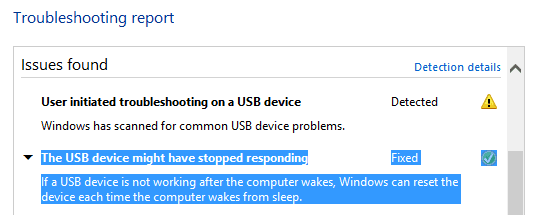
Following my right click everything "rule", I tried the ext drive. Nothing new there, but I decided to try the trouble shooter.
Another surprise - no advanced options to run as administrator or checkbox Fix automatically, so it fixed something.
WinTS_USB.PNG

The details weren't much help.

As I typed this the ext drive went to sleep. So that wasn't it.

Back to the back burner it goes.
 

My Computer

Computer type
Laptop
Computer Manufacturer/Model Number
HP Pavilion dv6-6c10us
OS
x64 (6.3.9600) Win8.1 Pro & soon dual boot x64 (6.1.7601) Win7_SP1 HomePrem
CPU
AMD A6-3420M APU with Radeon(tm) HD Graphics
Motherboard
Hewlett-Packard 1805
Memory
6.00 GB
Graphics Card(s)
AMD Radeon(TM) HD 6520G
Sound Card
(1) AMD High Definition Audio Device (2) IDT High Definiti
Monitor(s) Displays
HP W2072a 20" LCD (1600 x 900) @ 60 Hz
Screen Resolution
1366 x 768 x 32 bits (4294967296 colors) @ 60 Hz
Hard Drives
ST640LM0 00 HM641JI SATA Disk Device
Keyboard
Logitech k520 wireless KB
Mouse
Logitech m320 wireless mouse (bundled with KB)
Internet Speed
15/5 | 54 MB Wireless 'n'
Antivirus
Realtime: Defender or Avast | On-demand: Malwarebytes, ESET
Browser
IE 11 on Win8, IE 10 on win 7
Other Info
Media: [Gimp, Audacity, VLC] || Comm: [WEmail 2012, Skype] || Productivity: [OpenOffice,| Textpad] || Utils: [Sysinternals, cCleaner, Speccy, Defraggler]
Did you ever find a USB sleep setting in BIOS?

I'm not sure. HP doesn't give you much freedom with the BIOS and I don't recall having to change anything there before when it was first connected to Win7.

It's an Insyde BIOS that HP mod - purportedly UEFI, but HP mod (a hybrid- EFI diags only)

I'll take a look, thanks for the suggestion and the reminder. Still have firmware to check - I think I looked a while back and there was nada.

Bill
.
 

My Computer

Computer type
Laptop
Computer Manufacturer/Model Number
HP Pavilion dv6-6c10us
OS
x64 (6.3.9600) Win8.1 Pro & soon dual boot x64 (6.1.7601) Win7_SP1 HomePrem
CPU
AMD A6-3420M APU with Radeon(tm) HD Graphics
Motherboard
Hewlett-Packard 1805
Memory
6.00 GB
Graphics Card(s)
AMD Radeon(TM) HD 6520G
Sound Card
(1) AMD High Definition Audio Device (2) IDT High Definiti
Monitor(s) Displays
HP W2072a 20" LCD (1600 x 900) @ 60 Hz
Screen Resolution
1366 x 768 x 32 bits (4294967296 colors) @ 60 Hz
Hard Drives
ST640LM0 00 HM641JI SATA Disk Device
Keyboard
Logitech k520 wireless KB
Mouse
Logitech m320 wireless mouse (bundled with KB)
Internet Speed
15/5 | 54 MB Wireless 'n'
Antivirus
Realtime: Defender or Avast | On-demand: Malwarebytes, ESET
Browser
IE 11 on Win8, IE 10 on win 7
Other Info
Media: [Gimp, Audacity, VLC] || Comm: [WEmail 2012, Skype] || Productivity: [OpenOffice,| Textpad] || Utils: [Sysinternals, cCleaner, Speccy, Defraggler]
Back
Top