window 7 so slow even with good PC

sikorumbe

New member
Local time
2:19 AM
Messages
4
Hi guys,
I just formatted my PC today and it still really slow. I'm using window 7 64bit. The symptom are its every now and then everything slow down for like 15 minutes. Even if I'm not doing anything it's still so slow. I run CCleaner, spyware search & bot, Avast and it seemed clean.

It's very confusing since X4 equivalent like Quad Core but its seems very slow, even my Core 2 Duo with 2gb is faster than this :( I even updated the driver and everything. I'm not sure whether this is a virus or hardware problem? I was wondering if someone could help me fix this problem. Thank you very much :)

Here's my specs:
Phenom X4 955
4Gb Ram DD3
Asus M4A785TD V EVO
Zotac GTX9800+
1TB Seagate HDSEA-st31000528as-3
moz-screenshot.png
 

Attachments

  • system performance.jpg
    system performance.jpg
    95.2 KB · Views: 102

My Computer My Computer

OS
window 7
CPU
AMD Phenom X4 955
Motherboard
Asus M4A785TD-V EVO
Memory
4GB Team Elite
Graphics Card(s)
Zotack GTX9800+
Sound Card
OnBoard
Monitor(s) Displays
BenQ 24"

My Computer My Computer

Computer Manufacturer/Model Number
Custom
OS
Windows 7 Professional x64
CPU
Intel i7 2600K OC'd @ 4620 MHz
Motherboard
Asus P8Z68-V Pro
Memory
16GB GSkill Sniper 2133 Mhz (4x4GB)
Graphics Card(s)
EVGA GeForce GTX 480 SuperClocked+
Sound Card
Realtek High Definition Audio
Monitor(s) Displays
2x Acer S273HLbmii 27"
Screen Resolution
2 x 1920x1080
Hard Drives
64GB Crucial M4 SSD

Storage: Hitachi 1TB 5400RPM, Samsung 1.5TB 5400RPM
PSU
Corsair HW Series 750w (modular)
Case
Cooler Master HAF 932 Advanced Blue Edition
Cooling
CM Hyper 212+ CPU cooler, 3x 230mm + 1x 140mm case fans
Keyboard
Logitech MK320 (wireless)
Mouse
Logitech MK320 (wireless)
Internet Speed
30 Mb/s : 2 Mb/s
Thanxs for the prompt reply :)
Yeah i read the article already but no luck :(....somehow system still slow every now and then :(
 

My Computer My Computer

OS
window 7
CPU
AMD Phenom X4 955
Motherboard
Asus M4A785TD-V EVO
Memory
4GB Team Elite
Graphics Card(s)
Zotack GTX9800+
Sound Card
OnBoard
Monitor(s) Displays
BenQ 24"
How slow are we talking here? Speed is relative unless numbers are used.

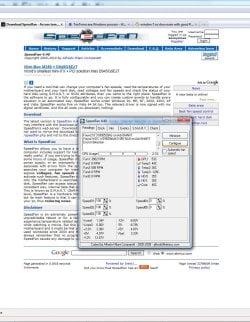
Make sure your CPU is not powering down to avoid heat. Test your temps with SpeedFan.
 

My Computer My Computer

Computer Manufacturer/Model Number
Custom
OS
Windows 7 Professional x64
CPU
Intel i7 2600K OC'd @ 4620 MHz
Motherboard
Asus P8Z68-V Pro
Memory
16GB GSkill Sniper 2133 Mhz (4x4GB)
Graphics Card(s)
EVGA GeForce GTX 480 SuperClocked+
Sound Card
Realtek High Definition Audio
Monitor(s) Displays
2x Acer S273HLbmii 27"
Screen Resolution
2 x 1920x1080
Hard Drives
64GB Crucial M4 SSD

Storage: Hitachi 1TB 5400RPM, Samsung 1.5TB 5400RPM
PSU
Corsair HW Series 750w (modular)
Case
Cooler Master HAF 932 Advanced Blue Edition
Cooling
CM Hyper 212+ CPU cooler, 3x 230mm + 1x 140mm case fans
Keyboard
Logitech MK320 (wireless)
Mouse
Logitech MK320 (wireless)
Internet Speed
30 Mb/s : 2 Mb/s
Hi,
Hmm how should i describe the slowness. Its like installing window Vista on Pentium 2 machine.
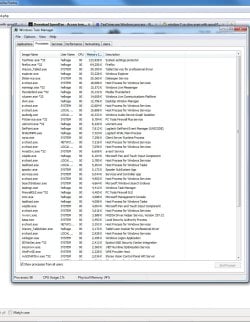
I attached the result from speedfan and my current process. My system used to fast even with window 7 64bit. But now it slow down significantly for no reason :(
 

Attachments

  • speed fan.jpg
    speed fan.jpg
    180.9 KB · Views: 67
  • current process.jpg
    current process.jpg
    179.8 KB · Views: 37

My Computer My Computer

OS
window 7
CPU
AMD Phenom X4 955
Motherboard
Asus M4A785TD-V EVO
Memory
4GB Team Elite
Graphics Card(s)
Zotack GTX9800+
Sound Card
OnBoard
Monitor(s) Displays
BenQ 24"
Open msconfig/startup and disable all, apply, reboot and see if your speed is still slow... If not re-enable the startup processes one by one until you find the offending culprit... ;)
 

My Computer My Computer

Computer type
PC/Desktop
Computer Manufacturer/Model Number
LENOVO K450 @3.0GHZ
OS
64-bit Windows 8.1 Pro
CPU
Core(TM) i5 CPU 4330 Haswell @ 3.20GHz
Motherboard
LENOVO
Memory
12.00 GB
Graphics Card(s)
Intel(R) HD Graphics
Sound Card
Intel HD integtrated
Monitor(s) Displays
HP 25' ISP Monitor
Screen Resolution
1900/1020
Hard Drives
(1) ST1000DM003-1CH162 (2) Generic STORAGE DEVICE USB Device (3) Generic STORAGE DEVICE USB Device
Internet Speed
100mb down/10mb up
My startup application is only Utorrent, WLM, spybot - search & destroy, avast! antivirus, PC tools.

My computer sort of freeze for almost a minute, like everything not responding then resume again. It happened again and again , its very annoying :(
 

My Computer My Computer

OS
window 7
CPU
AMD Phenom X4 955
Motherboard
Asus M4A785TD-V EVO
Memory
4GB Team Elite
Graphics Card(s)
Zotack GTX9800+
Sound Card
OnBoard
Monitor(s) Displays
BenQ 24"
I would wager that getting rid of spybot would help immensely. I have yet to see a windows 7 system with spybog installed that isn't slow.
 
What BIOS version are you using on your Asus?
 

My Computer My Computer

Computer Manufacturer/Model Number
DELL XPS Studio 435T
OS
Vista 64 Ultimate, Windows 7 64 Ultimate, Ubuntu 9.10
CPU
i7 975 3.3 GHz Extreme (Factory OC'd to 3.6 GHz)
Motherboard
DELL provided
Memory
18 Gb Tri-Channel 1066
Graphics Card(s)
ATI 5970 2048 Mb
Sound Card
X-Fi Extreme Gamer
Monitor(s) Displays
Vizio 37" HD-TV
Screen Resolution
1920 x 1080
Hard Drives
1.5 Tb HDD
1.5 Tb HDD
2.0 Tb Network Drive
512 Gb Crucial SSD
PSU
DELL Provided 475 watts
Case
DELL
Cooling
3 fans
Keyboard
Logitech Performance K350 Wireless
Mouse
Logitech Performance MX Wireless
Internet Speed
3 Mb up 750 Kb down
Other Info
Bamboo Fun Tablet, Belkin N+ Wireless router, Pioneer Dolby System Wireless Headphones, Bose 5.1 Dolby Surround Sound System, LifeCam VX 3000 Webcam, Blu-Ray/Hi Def DVD +RW combo and Blu-ray +RW,l 15 in 1 media card reader, Logitech Rumblepad 2, Hauppauge 2250 DTV Tuner with MS Media Center Remote

Laptop:Alienware M17x, Q9100 CPU, 8Gb RAM, 1920x1200 WUXGA LCD driven by 4870's in CrossFireX, Bl
What about drivers? Are you up to date with anything, or are you using Microsoft's default drivers?
 

My Computer My Computer

OS
Windows 7
Does your HD light come on and stay on every time during these freezes?
 

My Computer My Computer

Computer Manufacturer/Model Number
Scratch built
OS
Windows 7 x64 Ultimate
CPU
i7 960
Motherboard
Asus P6X58D
Memory
12 Gig Corsair Dominator
Graphics Card(s)
Nvidia 480
Sound Card
Maudio Delta 44 + breakout box
Monitor(s) Displays
Dell UltraSharp U2410 24in and Samsung 21 dual monitors
Screen Resolution
1920x1200 and 1280x1024
Hard Drives
Primary: Intel X-25M G2 160G SSD
Secondary: Segate baracuda 1.0 TB
HDs in AHCI mode.
PSU
Corasair TX850
Case
Cooler Master HAF
Cooling
Corsair H50
Keyboard
Logitech G15 + N52 game pad
Mouse
Logitech MX518
Internet Speed
15kbs down 4.5kbps up
Other Info
WEI 7.6
CPU & RAM 7.6
Graphics 7.9
Hard disk 7.7
I would have to agree about Spybot S&D. You should set that to scan on-demand and not have it load at start up.

Another thing is all those partitions you have; 8 on 1 drive. Since this is a new install, Windows is indexing them, and it's not like you have the spindles and heads of 8 drives, you only have the spindles and heads of 1... so it's going to take time, a lot more time.
 

My Computer My Computer

OS
7 Ultimate x64
CPU
i5-2500k
Motherboard
Asus P8P67 Pro
Memory
8GB G.Skill Ripjaws X F3-12800CL7D-8GBXH 1866MHz 8-9-8-24
Graphics Card(s)
EVGA GTX 570 SC
Sound Card
X-Fi Titanium Fatality
Monitor(s) Displays
Samsung S27A550H 27" LED
Screen Resolution
1920x1080
Hard Drives
OCZ Vertex 3 120GB.
1TB Samsung F3.
2TB Samsung F4.
PSU
PC Power & Cooling Silencer 760
Case
Lian Li Lancool K62
Cooling
Thermalright Venomous X Black/Scythe S-Flex/Shin-Etsu X23
Keyboard
MS Natural Elite 4000 Ergonomic
Mouse
Logitech G500
Internet Speed
6MB/768
Other Info
Logitech Z-5500 505 watts.
D-Link DGL-4500.
Tripp-Lite Smart Pro 1500.
You have utorrent, it does not need start up with your system, does the system only slow when it's running? Simply leave it alone whilst downloading, it will slow everything else down. Turn off seeding after you get a good share ratio. Only have one torrent running at a time, stop utorrent when you want to use your PC.

Turn off Spybot tea timer, run Spybot manually when you want to scan items/ system. Better still replace it with Malwarebytes.

Not sure what PC tools is but stop it running at start up and see if it helps.

As the slow downs are intermittent I guess it's down to utorrent running all the time.
 

My Computer My Computer

OS
Win7 7600 x64
Memory
8gig
Graphics Card(s)
Nvidia
Monitor(s) Displays
dual wide screen 22inch each
Hard Drives
2x 500gig
I too agree, remove spybot.
All your really need is a decent AV and Malwarebytes for periodic on-demand scans IMHO. This will help some also with disk performance.


As mentioned, you have a lot of partitions for a single drive.


--> Is your C (Win7) partition at the very beggining of the disk?

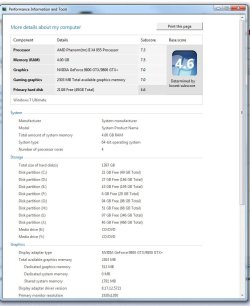
Granted WEI scores are to be taken with a grain of salt, however, 4.6 HD score is quite low for your drive I would think.
It should be scoring around 5.9 ((someone please correct me if Im wrong here or missing something))

It almost seems to me as if the OS is installed in the middle or near the end of your 1TB drive to score so low.
Just a thought, but that would impact performance.
Win7 should be at the very front of the drive, where performance is at its peak.

Also, partitions that follow should be in order as of how often its accessed as well ...

Meaning Anything that gets accessed fairly often, such as Documents,Pictures,Music etc, should be as close to the OS partition as possible. Storage that youll seldom access should be at the end of the drive (or last partitions)


This may help a bit. Also, you may consider disabling indexing on partitions where its not really needed.

IMO, you have too many partitons for a single drive. If I were you I would try to reduce the number of partitions to 4 or less. But thats just me.
 

My Computer My Computer

Computer Manufacturer/Model Number
Custom (Self Build)
OS
Windows 7 Home Premium 64bit
CPU
Intel Core i7 2700k
Motherboard
eVGA P67 SLI
Memory
8GB Mushkin Redline Ridgebacks @1866
Graphics Card(s)
EVGA GTX570 SC
Sound Card
XiFi Titanium HD
Monitor(s) Displays
LG W2453V
Screen Resolution
1920x1080
Hard Drives
Intel 320 80GB -- Intel X25-V 40GB --WD Black 1TB x2 -- WD Blue 640GB
PSU
Seasonic x750
Case
Corsair 600T SE White
Cooling
eVGA Superclocked CPU Cooler
Keyboard
Saitek Cyborg
Antivirus
Kaspersky
Browser
IE
Other Info
LG BD/DVD
Hi guys,
I just formatted my PC today and it still really slow. I'm using window 7 64bit. The symptom are its every now and then everything slow down for like 15 minutes. Even if I'm not doing anything it's still so slow. I run CCleaner, spyware search & bot, Avast and it seemed clean.

It's very confusing since X4 equivalent like Quad Core but its seems very slow, even my Core 2 Duo with 2gb is faster than this :( I even updated the driver and everything. I'm not sure whether this is a virus or hardware problem? I was wondering if someone could help me fix this problem. Thank you very much :)

Here's my specs:
Phenom X4 955
4Gb Ram DD3
Asus M4A785TD V EVO
Zotac GTX9800+
1TB Seagate HDSEA-st31000528as-3
moz-screenshot.png

I agree with Fumz. You basically have way too many partitions on that drive. You would be better off getting more harddrives instead of creating all those partitions. You also do not want to start Utorrent on start up, it's famous for slowing systems down because of ongoing uploads, that isn't a program you want running all the time. And also disable the real time spybot programs like SDhelper and tea timer. :)
 

My Computer My Computer

Computer type
PC/Desktop
Computer Manufacturer/Model Number
Home built
OS
Windows 7 Ult, Windows 8.1 Pro,
CPU
Q9650-4.275GHz, E8600 4.5GHz, E6750-3.8GHz
Motherboard
Evga 780i FTW
Memory
G.Skill PC2 9600 1200Mhz 5 5 5 15 2T
Graphics Card(s)
GTX480
Sound Card
Asus Xonar D2
Monitor(s) Displays
HannsG
Screen Resolution
1680X1050
Hard Drives
GSkill Phoenix Pro 120GB SSD
PSU
ThermalTake Toughpower 1000Watt modular
Case
ThermalTake XaserV
Cooling
Xigmatek S1283
Keyboard
Logitech G15
Mouse
Logitech G9
Internet Speed
T1
The OP stated that it is a new install and "installed driver," but which driver(s)? The motherboard chipset drivers should have been top of the list of driver installations after installing Windows -- have they been installed?

(As far as Spybot, have it set to not load at startup and use it on-demand. Spybot does not bog my system down in the least-- besides, there are good uses for it: added protection for Internet Explorer and the ability to add host files being especially important for me.)
And also disable the real time spybot programs like SDhelper and tea timer. :)
+1 for this statement.
 

My Computer My Computer

Computer Manufacturer/Model Number
Rig 1
OS
Windows 7 Ultimate x64
CPU
AMD Phenom II X4 940 Black Edition @ 3.4GHz (AM2+)
Motherboard
Gigabyte GA-MA790X-UD4P (AM2+)
Memory
Corsair CM2X4096-8500C5 (4 X 2GB)
Graphics Card(s)
XFX Radeon HD 5770 / Diamond Radeon HD 5770 CrossFireX
Sound Card
Asus Xonar DS (PCI)
Monitor(s) Displays
Samsung SyncMaster 932bw+ (3)
Screen Resolution
4320x900
Hard Drives
OCZ Vertex 2 80 GB - Windows 7 System --
WD Caviar Black 1TB - Music, Movies, Vids, Pics --
WD Caviar Black 640GB - User Profiles & Games --
WD My Book 320GB external
PSU
Corsair CMPSU-750TX
Case
Cooler Master HAF 932
Cooling
Corsair Hydro Series H50
Keyboard
Logitech Desktop Wave
Mouse
Logitech LX8 Laser
Internet Speed
20 down / 2 up
Other Info
LG GGC-H20L Blu-Ray / HDDVD combo --
Hauppauge HVR-1250 --
Silverstone MFP-51 --
Logitech Webcam C600
Another thing I forgot to mention is that your primary partition seems too small: only ~ 20GB free. I've seen the winsxs folder swell to 17GB's on occaision. I have no idea just how large it can get, but I like to have plenty of space just in case. Assuming you've left the swap file on C, you basically have little to no room left. It's less than an ideal situation. :(
 

My Computer My Computer

OS
7 Ultimate x64
CPU
i5-2500k
Motherboard
Asus P8P67 Pro
Memory
8GB G.Skill Ripjaws X F3-12800CL7D-8GBXH 1866MHz 8-9-8-24
Graphics Card(s)
EVGA GTX 570 SC
Sound Card
X-Fi Titanium Fatality
Monitor(s) Displays
Samsung S27A550H 27" LED
Screen Resolution
1920x1080
Hard Drives
OCZ Vertex 3 120GB.
1TB Samsung F3.
2TB Samsung F4.
PSU
PC Power & Cooling Silencer 760
Case
Lian Li Lancool K62
Cooling
Thermalright Venomous X Black/Scythe S-Flex/Shin-Etsu X23
Keyboard
MS Natural Elite 4000 Ergonomic
Mouse
Logitech G500
Internet Speed
6MB/768
Other Info
Logitech Z-5500 505 watts.
D-Link DGL-4500.
Tripp-Lite Smart Pro 1500.
Back
Top