Solved window 7 startup delay

AMRITBABINA

New member
Local time
5:46 PM
Messages
7
Hello,

This is my first time ever posting anything on any forum so please kindly ignore my mistakes. So I have this Sony Vaio VPCEB3L0E and from last month my laptop talking too long to startup. I am having no errors during the startup process its just its taking like 10+minutes to get to the point where I can use chrome. I tried everything I found on the internet but nothing make it go faster. I freshly reinstall window 3-4 times even different version like home basic and ultimate. I tried doing startup repair, malware scan,scf /now in safe mode, updating window and updating all the drivers from sony website for this specific laptop but nothing made this problem go away. I just installed a new window 7 home basic edition by making a whole new partition from drive c so that nothing left from the previous window. And also i tried msconfig to stop all the other services than the microsoft one just to make it faster but no luck. Even my friend old desktop with 300mb ram starts faster than this laptop. Here is the link of the video i recorded last night of the startup https://www.dropbox.com/s/03reqkuvs1ipn82/2013-07-24 01.49.20.mp4

Please help me in this thankyou.
 

My Computer

Computer type
Laptop
Computer Manufacturer/Model Number
sony
OS
window 7 ultimate 64bit
CPU
intel core i3 370m @2.4 ghz
Motherboard
intel chipset
Memory
3 GB DDR3
Graphics Card(s)
ATI Mobility Radeon HD 5470
Hard Drives
Around 500gb
Antivirus
Norton Internet security
Browser
chrome
Hello AMRITBABINA and welcome to Seven Forums.

Sorry to hear you're having a slow startup problem. Very frustrating, especially when there's no apparent errors. Couple of things you might do. First, could you post a screen shot of your Disk Management. This might provide a clue if there's anything on your hard drive that's interfering with startup.

http://www.sevenforums.com/tutorials/274797-disk-management-post-screen-capture-image.html

Have you tried running a clean boot (aka clean startup) to rule out application conflicts?

http://www.sevenforums.com/tutorial...ation-conflicts-performing-clean-startup.html

One of the Forum experts prepared a couple of troubleshooting guides to help diagnose problems. The first is general troubleshooting and the second is specifically for boot issues. Of particular note is his suggestion to also check hardware (RAM modules, hard drive, etc) as failing hardware can contribute to boot problems.

http://www.sevenforums.com/tutorials/220165-troubleshooting-steps-windows-7-a.html

http://www.sevenforums.com/tutorials/219533-troubleshooting-windows-7-failure-boot.html

Please post back if anything helped or not.
 

My Computer

Computer type
Laptop
Computer Manufacturer/Model Number
Sony Vaio VPCEB47GM Laptop
OS
Win 7 Pro 64-bit
CPU
Intel i5 2.4 Ghz
Memory
8GB DDR3
Graphics Card(s)
Intel HD 3000
Sound Card
IDT High Definition
Monitor(s) Displays
15.6 WGXA Anti-Glare LED
Screen Resolution
1280x800
Hard Drives
640Gb 7200rpm
Antivirus
MSE
Browser
Opera (primary) with IE9 backup
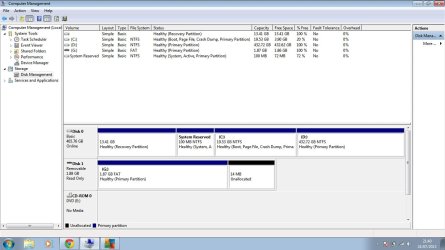
Thanks for the reply. I installed a new window 7 home basic and i made a whole new drive out of drive c so that it deleted everything remained from last installation like window.old. And after installing all the major update the start up time dropped from 10+ to 3-4 minutes. The window dvd i used is the same i used before so its nothing to do with dvd disk been damaged or something. However i tried mostly all the steps you gave to me but the startup time stood same 3+ minutes, which I think is still too much for a freshly installed window on my laptop because i used window 7 and 8 before and it took only under 2 minutes or mostly under 1 minute to start to the point where i can use internet or anything else. I attached a snapshot of Disk management as you asked.
 

Attachments

  • Untitled.jpg
    Untitled.jpg
    93.7 KB · Views: 8

My Computer

Computer type
Laptop
Computer Manufacturer/Model Number
sony
OS
window 7 ultimate 64bit
CPU
intel core i3 370m @2.4 ghz
Motherboard
intel chipset
Memory
3 GB DDR3
Graphics Card(s)
ATI Mobility Radeon HD 5470
Hard Drives
Around 500gb
Antivirus
Norton Internet security
Browser
chrome
Which version of WIn7 do you actually own? Why are you installing a bunch of different versions? These are all the same OS with just a few extra features in the higher versions. You should only install the version for which you are licensed. What does it say on the COA sticker on the bottom of your laptop?

Have you followed the steps in the http://www.sevenforums.com/tutorials/220165-troubleshooting-steps-windows-7-a.html to disable everything in msconfig>Startup and >Services (after hiding all MS Services) except your AV? You should also be running a lightweight performance AV like Microsoft Security Essentials - Microsoft Windows.

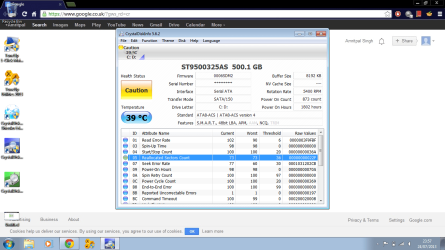
If doing this doesn't help install CrystalDiskInfo - Software - Crystal Dew World to check the condition of your HD, followed by running a full http://www.sevenforums.com/tutorials/433-disk-check.html.

If the HD is good then I'd wipe unplug all other HD's. wipe it with http://www.sevenforums.com/tutorials/52129-disk-clean-clean-all-diskpart-command.html, the follow these steps closely to http://www.sevenforums.com/tutorials/219487-clean-reinstall-factory-oem-windows-7-a.html#post1839164 with your licensed version on the COA sticker.
 
Thanks for the reply. I owned window 7 home edition which i am using now. I know its just some features but i was just trying to check with different disk just to make sure my one is not been damaged. I also have this window 7 universal installation disk from my friend which I used before but the same problem persist.

Okay so i did msconfig already many times but i gave it a shot and nothing different happened.

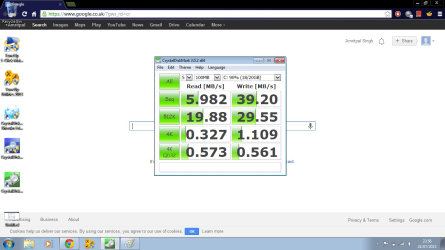
I installed the CrystalDiskInfo software and attached the screen shot down here.

And about the wipe clean installation which i already done with the last installation i did with window 7 home basic.

Although the start up time seems to decrease after the clean installation to about 3 minutes, its just increase significantly to its formal 10+ minutes :mad:

I am only using AVG AV which is light weight.
 

Attachments

  • Untitled.png
    Untitled.png
    83.3 KB · Views: 6
  • Untitled1.png
    Untitled1.png
    88.1 KB · Views: 7

My Computer

Computer type
Laptop
Computer Manufacturer/Model Number
sony
OS
window 7 ultimate 64bit
CPU
intel core i3 370m @2.4 ghz
Motherboard
intel chipset
Memory
3 GB DDR3
Graphics Card(s)
ATI Mobility Radeon HD 5470
Hard Drives
Around 500gb
Antivirus
Norton Internet security
Browser
chrome
AVG is bloatware. I'd uninstall it and install Microsoft Security Essentials.

It's unlikely you actually wiped the HD with Diskpart Clean Command when it still has a Recovery Partition which could be interfering. The step is important to clear boot code which can interfere with booting. Click the link to see how it is done accessing DISKPART At PC Startup

I would use the latest official Win7 installer for your version which is provided and this time follow the steps in Clean Reinstall - Factory OEM Windows 7. Only then will you know you've got a perfect install so you can focus on the hardware.

But if you want to start there then test the hardware and complete the other Troubleshooting Steps for Windows 7
 
Hi there
just another comment -- sometimes if you have USB devices (especially disks) plugged in at boot then the BIOS can take a LONG time in initialising the routines and checking for these. Try removing ALL external devices (except keyboard and mouse). Remove any cards in the internal reader too.

Also get rid of ANY 3rd party A/V security products (especially the FREE one's - they are just as good or bad - depending on your point of view - as MSE. No point also looking at the comparison statistics either since these are ALREADY OUT OF DATE by the time they are published --meanwhile totally different "nasties" might well be in existence rendering the previous statistics meaningless anyway).

Slow disks will also render a computer very horrible to use -- but a Sony VAIO should be OK-ish --of course an SSD would be far better.

Cheers
jimbo
 

My Computer

Computer type
PC/Desktop
Computer Manufacturer/Model Number
Custom built, several laptops HP/ASUS
OS
Linux CENTOS 7 / various Windows OS'es and servers
CPU
Intel i7 Intel i5
Memory
8GB, 16GB
Graphics Card(s)
On Motherboard
Sound Card
Realtek HD audio
Monitor(s) Displays
Apple Cinema display, Samsung LCD
Screen Resolution
1920 X 1080
Hard Drives
4 X 1TB SATA
Mouse
Toshiba wireless laser
Internet Speed
> 20MB up
Thank you everyone for the help you all provided to me i really appreciated it and I found many more things to learn. And thanks gregrockar for you post because that's what make it all happened. I used Diskpart clean and all clean command from a comand prompt at boot on the C drive where the window was installed (I also have only one drive HDD ) and it took a while to complete but finally its done now my system took only 1 to 1:50 minutes to start. All thanks to Sevenforums community.

Thankyou :):D:party:
 

My Computer

Computer type
Laptop
Computer Manufacturer/Model Number
sony
OS
window 7 ultimate 64bit
CPU
intel core i3 370m @2.4 ghz
Motherboard
intel chipset
Memory
3 GB DDR3
Graphics Card(s)
ATI Mobility Radeon HD 5470
Hard Drives
Around 500gb
Antivirus
Norton Internet security
Browser
chrome
That's still too long, Amrit.

Make sure you maintain a Clean Boot as described in Troubleshooting Steps for Windows 7 as well as the other steps for monitoring the System Resources, logs, testing your hardware.

You can take all the time you need if it's tolerable but I would work through all those steps provided, post back results as you go or if you need to ask us anything.
 
Back
Top