Window Color and Appearance - Change

How to Change the Window Color and Appearance in Windows 7


   Information
This will show you how to change the Window Color and Appearance settings for how windows, the Start Menu, and the taskbar are displayed in Windows 7.

   Warning
Aero Requirements to be Enabled in Windows 7

NOTE: If Aero is not enabled, then you will not see the Window Color and Appearance screen in step 3A of OPTION TWO below.
  • Aero is not included in Windows 7 Home Basic or Windows 7 Starter editions.
  • 1 GHz 32-bit or 64-bit processor
  • 1 GB of system memory
  • A graphics card with support for DirectX 9 graphics with at least 128 MB of memory.
  • The graphics card must support Pixel Shader 2.0 and the Windows Display Driver Model (WDDM).
  • Activate Windows 7.
  • You must be have True Color (32 bit) set instead of High Color (16 bit).
  • The Themes and Desktop Window Manager Session Manager Services are set to Start and Automatic.
  • The desktop composition and Animated controls and elements inside windows options enabled in Visual Effects.
  • Refresh or update your WEI score.
  • You must be using a "Aero" theme.
   Tip
All advanced appearance settings for a single user are stored in the three registry keys below.

  • HKEY_CURRENT_USER\Control Panel\Colors
  • HKEY_CURRENT_USER\Control Panel\Desktop\Colors
  • HKEY_CURRENT_USER\Control Panel\Desktop\WindowMetrics


OPTION ONE

To Change "Window Color and Appearance" in ONLY Windows 7 Starter and Home Basic


   Note
If you have the Windows 7 Home Premium, Professional, Ultimate, or Enterprise edition, then use OPTION TWO below instead.


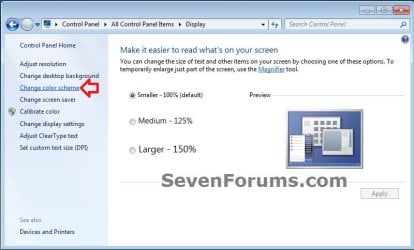
1. Open the Control Panel (icons view), and click on the Display icon.

2. In the left blue pane, click on the Change color scheme link. (see screenshot below)
Starter_Basic-1.jpg
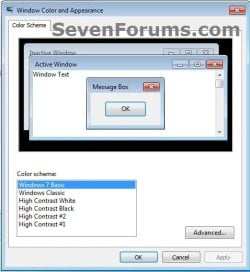
3. Click on the Advanced button. (see screenshot below)
NOTE: Aero themes are not available in the Windows 7 Starter and Home Basic editions.
Starter_Basic-2.jpg
4. Go to step 7B in OPTION TWO below to do steps 7B to 9.

5. When finished, click on OK. (see screenshot below step 3)

6. Close the Display window. (see screenshot below step 1)


OPTION TWO

To Change "Window Color and Appearance" in ONLY Windows 7 Home Premium, Professional, Ultimate, and Enterprise


   Note
If you have the Windows 7 Starter or Home Basic edition, then use OPTION ONE above instead.


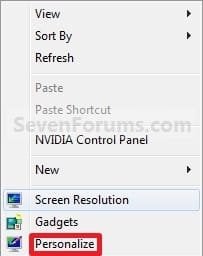
1. Right click on a empty space on the desktop and click on Personalize. (see screenshot below)
177d1230589847-window-color-appearance-change-right_click.jpg

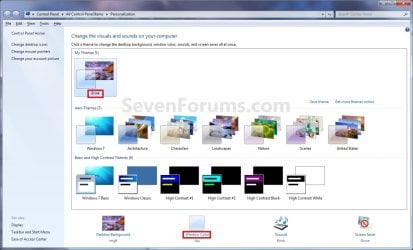
2. Click on the Window Color link at the bottom of the window. (see screenshot below)
NOTE: The name that is grayed out under Window Color, is the current color selected.
Personalize.jpg

   Warning

  • If you have selected from the Basic and High Contrast Themes , then you will not see the Window Color and Appearance screen below step 3A. Instead, go to step 7.
  • If you have selected from the Aero Themes, then you will see the Window Color and Appearance screen below step 3A. Continue to step 3.

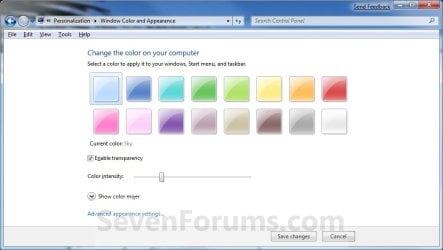
3. Select a Color
A) Click on an available color that you would like the Start Menu, window borders, and taskbar to be. (see screenshot below step 5A)
Color_and_Appearance-1.jpg
4. Enable or Disable Transparency
A) Check or uncheck Enable transparency to enable or disable transparency for the Start Menu, window borders, and taskbar. (see screenshot below step 3A)
5. Adjust Color Intensity
A) Slide the Color intensity slider to the left to lighten the color (step 3) or to the right to darken the color (step 3). (see screenshot below step 3A)
WARNING: If you slide the slider to far to the right, the Start menu, windows, and taskbar, may no longer be transparent (if enabled) since the color will be to dark. You would just need to slide it some to the left to lighten the color again.
6. To Adjust the Color Mixer Settings
NOTE: If you do not want to adjust the color mixer settings, then skip this step to keep the default color selected in step 3 and go to step 7 instead.
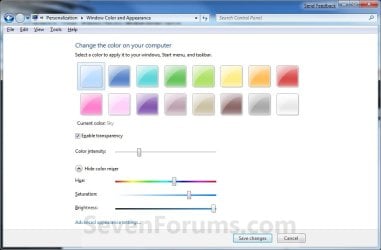
A) Click on the Show color mixer button. (see screenshot below)
NOTE: This is if you would like to adjust the color's (step 3A) hue, saturation, and brightness to create a custom color.

B) Slide the sliders to adjust the color.
NOTE: If you do not wish to continue to step 7, then click on the Save Changes button to apply the changes and close the window below. You're done.
Color_and_Appearance-2.jpg
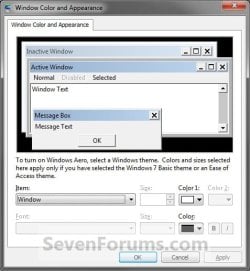
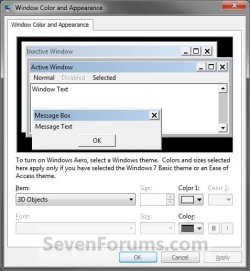
7. To Change the "Advanced Window Color and Appearance" Settings
WARNING: Colors and sizes selected for items will only be used if you have selected a Windows Classic or High Contrast theme. If any other theme is applied, you will not be able to change colors and sizes for items.
A) Click on the Advanced appearance settings link. (see screenshot above)
NOTE: You will not need to do this if you have a Basic and High Contrast Theme selected. Continue to step 7B instead.

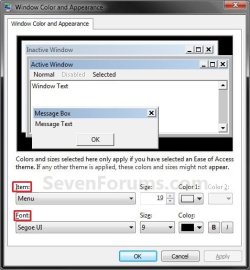
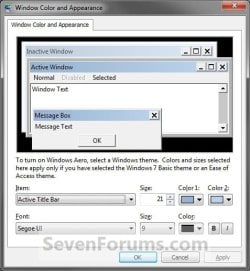
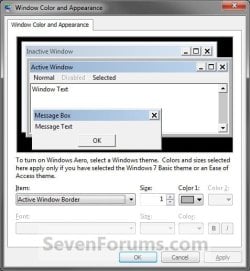
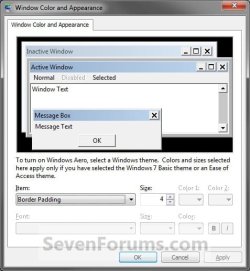
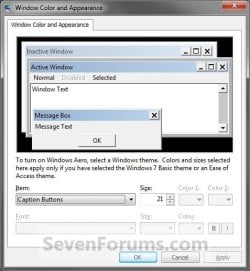
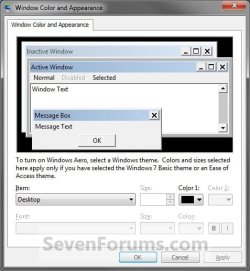
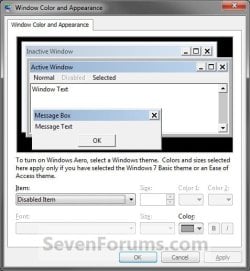
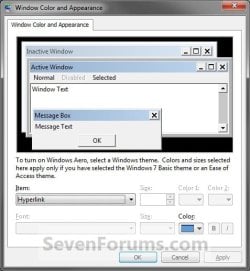
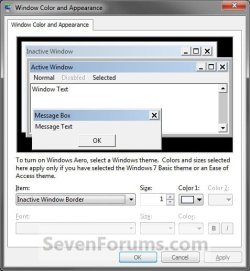
B) To Change a Window Item Setting

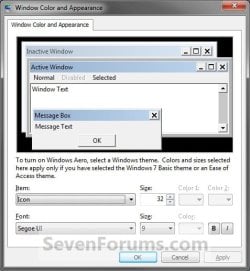
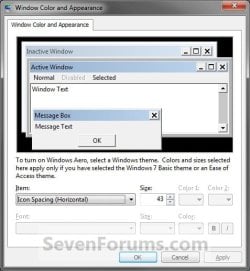
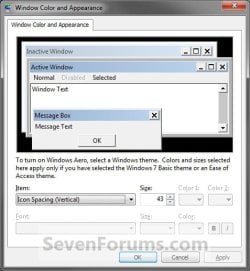
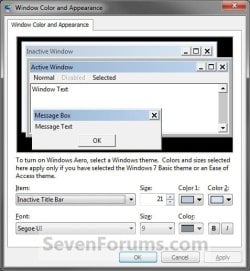
  • To Select a Item - Click on the Item drop down menu and select a window item you want to change. (See screenshots below step 7C)
    NOTE: You can also click on the different displayed windows at the top of the "Window Color and Appearance" window to select a Item to.
  • To Change the Item Size - Change the Size number to what you want.
  • To Change the Item Color - Click on the Color 1 and Color 2 drop down menu and select a color.
    NOTE: The color will only change if you have the Windows Classic theme selected.
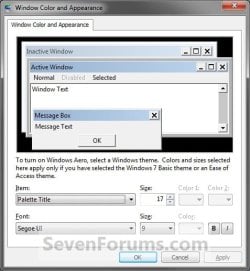
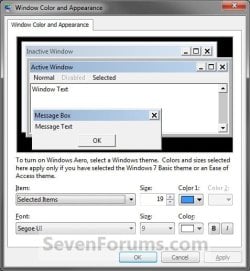
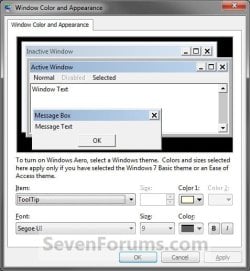
C) To Change the Font Settings for the Selected Item

  • To Change the Item Font - Click on the Font drop down menu and select a font. (See screenshotd below)
  • To Change the Item Font Size - Click on the Size drop down menu and select a number for the size. The higher the number, the larger the size.
  • To Change the Item Font Color - Click on the Color drop down menu and select a color.
  • To Have the Item Font in Bold - Click the B button to highlight it. If it is not highlighted, then the font will not be in bold.
  • To Have the Item Font in Italic - Click on the I button to highlight it. If it is not highlighted, then the font will not be in italic.
Classic_Color_and_Appearance-1.jpg

Classic_Color_and_Appearance-2.jpg
D) Repeat steps 7B and 7C until you change all the Items you wanted.
8. The Default Advanced Appearance Settings
3D_Objects.jpgActive_Tittle_Bar.jpg

Active_Window_Border.jpgApplication Background.jpg

Border_Padding.jpgCaption_Buttons.jpg

Desktop.jpgDisabled_Item.jpg

Hyperlink.jpgIcon.jpg

Icon_Spacing_Horizontal.jpgIcon_Spacing_Vertical.jpg

Inactive_Title_Bar.jpgInactive_Window_Border.jpg

Menu.jpgMessage_Box.jpg

Palette_Title.jpgScrollbar.jpg

Selected_Items.jpgToolTip.jpg

Window.jpg

9. When finished, click on OK. (see screenshots above or below step 7C)

10. Click on the Save Changes button in the Window Color and Appearance window. (see screenshot below step 6B)
NOTE: You will not have this to do if you have a Basic and High Contrast Theme selected.

11. Close the the Personalization window. (see screenshot below step 2)
That's it,
Shawn


Attachments

  • Right_Click.jpg
    Right_Click.jpg
    7.6 KB · Views: 470,417
Last edited:
Hmm I guess I will have to get used to it. Thanks anyways :)
 

My Computer My Computer

Computer type
Laptop
Computer Manufacturer/Model Number
compaq
OS
windows Ultimate
Hello @Brink
Do you know if this will work for changing control panel's and related applet's text size?
Thanks
 

My Computer My Computer

Computer Manufacturer/Model Number
Toshiba Satellite® L755D-S5348 15.6" widescreen Laptop
OS
Windows 7 Home Premium x64
CPU
AMD Dual-Core A4-3300M Accelerated Processor
Motherboard
AMD Torpedo
Memory
DDR3 6144 MBytes
Graphics Card(s)
AMD Radeon™ HD 6480G
Monitor(s) Displays
15.6" Widescreen, 1366x768 (HD), 16:9 aspect ratio
Hard Drives
Hitachi HTS547550A9E384 500 GB
Bongo in Customization can likely help you but you will need to take screen shots of exactly where you want larger text.
 

My Computer My Computer

Computer type
PC/Desktop
Computer Manufacturer/Model Number
Custom assembled by me :}
OS
Win-7-Pro64bit 7-H-Prem-64bit
CPU
i7-5930K 2nd i9-9940x both water blocked VRM's too
Motherboard
ASUS SABERTOOTH X99 2nd ASUS x299 Apex
Memory
Trident-z 3200C14 2nd Trident-z 3600C16
Graphics Card(s)
EVGA 1080ti ftw3 2nd Titan Xp both water blocked
Sound Card
Built-in Realtek
Monitor(s) Displays
1-AOC G2460PG 24"G-Sync 144Hz/ 2nd 1-ASUS VG248QE 24" 144Hz
Screen Resolution
1920 x 1080 144Hz
Hard Drives
2-Samsung M.2 Evo & Evo Plus
2-Samsung 850 EVO 500GB SSD's/ 3-2.5 W.D. Black 1tb-&3-1tb/3-3.5 WD Black 1tb hdd's
PSU
EVGA SuperNOVA 1000-P2 2nd 1200-P2
Case
2-Corsair Obsidian Series 450D Black ATX Mid Tower
Cooling
Custom water loops
Keyboard
Logitech G710+/ 2nd Logitech G910
Mouse
2-RedDragon M901 Perdition 16400 dpi Gaming mouse = wired
Internet Speed
Comcast Ping 19ms 89.31mbps download speed 6.12mbps upload
Antivirus
Malwarebytes Pro/ Superantispyware Pro
Browser
FireFox & Pale moon
Other Info
2nd ASUS X299 Apex/Intel i9-9940x with Custom water loop/7H-Prem-x64/Corsair 450D case/Ram Trident-z 3600C16 4x8gb / Samsung970Evo plus 500gb SSD/Dual ssd EZ swap evo/PSU EVGA SuperNova 1200w-P2 80+Platinum/GPU Titan Xp /8-ML-140 on push-pull on 2-280GTX rads
Thanks TZ. Is Bongo a user, a thread? where should I go to post the screenshots?
 

My Computer My Computer

Computer Manufacturer/Model Number
Toshiba Satellite® L755D-S5348 15.6" widescreen Laptop
OS
Windows 7 Home Premium x64
CPU
AMD Dual-Core A4-3300M Accelerated Processor
Motherboard
AMD Torpedo
Memory
DDR3 6144 MBytes
Graphics Card(s)
AMD Radeon™ HD 6480G
Monitor(s) Displays
15.6" Widescreen, 1366x768 (HD), 16:9 aspect ratio
Hard Drives
Hitachi HTS547550A9E384 500 GB
Hi,
Add the screen shots to your original thread
Yes Bongo is a forum member :)
 

My Computer My Computer

Computer type
PC/Desktop
Computer Manufacturer/Model Number
Custom assembled by me :}
OS
Win-7-Pro64bit 7-H-Prem-64bit
CPU
i7-5930K 2nd i9-9940x both water blocked VRM's too
Motherboard
ASUS SABERTOOTH X99 2nd ASUS x299 Apex
Memory
Trident-z 3200C14 2nd Trident-z 3600C16
Graphics Card(s)
EVGA 1080ti ftw3 2nd Titan Xp both water blocked
Sound Card
Built-in Realtek
Monitor(s) Displays
1-AOC G2460PG 24"G-Sync 144Hz/ 2nd 1-ASUS VG248QE 24" 144Hz
Screen Resolution
1920 x 1080 144Hz
Hard Drives
2-Samsung M.2 Evo & Evo Plus
2-Samsung 850 EVO 500GB SSD's/ 3-2.5 W.D. Black 1tb-&3-1tb/3-3.5 WD Black 1tb hdd's
PSU
EVGA SuperNOVA 1000-P2 2nd 1200-P2
Case
2-Corsair Obsidian Series 450D Black ATX Mid Tower
Cooling
Custom water loops
Keyboard
Logitech G710+/ 2nd Logitech G910
Mouse
2-RedDragon M901 Perdition 16400 dpi Gaming mouse = wired
Internet Speed
Comcast Ping 19ms 89.31mbps download speed 6.12mbps upload
Antivirus
Malwarebytes Pro/ Superantispyware Pro
Browser
FireFox & Pale moon
Other Info
2nd ASUS X299 Apex/Intel i9-9940x with Custom water loop/7H-Prem-x64/Corsair 450D case/Ram Trident-z 3600C16 4x8gb / Samsung970Evo plus 500gb SSD/Dual ssd EZ swap evo/PSU EVGA SuperNova 1200w-P2 80+Platinum/GPU Titan Xp /8-ML-140 on push-pull on 2-280GTX rads
Done

I added the pictures to my OP in that thread
 

My Computer My Computer

Computer Manufacturer/Model Number
Toshiba Satellite® L755D-S5348 15.6" widescreen Laptop
OS
Windows 7 Home Premium x64
CPU
AMD Dual-Core A4-3300M Accelerated Processor
Motherboard
AMD Torpedo
Memory
DDR3 6144 MBytes
Graphics Card(s)
AMD Radeon™ HD 6480G
Monitor(s) Displays
15.6" Widescreen, 1366x768 (HD), 16:9 aspect ratio
Hard Drives
Hitachi HTS547550A9E384 500 GB
Hi, Brink, I have changed some settings in the windows colour, which i could not revert back. Can i opt for default settings from the changed one. Where is the menu in windows ultimate 7
 

My Computer My Computer

Computer type
PC/Desktop
Computer Manufacturer/Model Number
custom build
OS
Microsoft Windows 7 Ultimate 64-bit 7601 Multiprocessor Free Service Pack 1
CPU
Intel(R) Core(TM)2 Duo CPU E7200 @ 2.53GHz
Motherboard
To be filled by O.E.M. To be filled by O.E.M.
Memory
4.00 GB
Graphics Card(s)
NVIDIA GeForce 210
Sound Card
(1) NVIDIA High Definition Audio (2) Realtek High Definiti
Screen Resolution
1920 x 1080 x 32 bits (4294967296 colors) @ 60 Hz
Hard Drives
ST3500312CS ATA Device
Hello jraju, :)

Using Option Two should allow you change Windows color.

If all else fails, you should be able to change the theme to use its default settings instead.
 

My Computer My Computer

Computer type
PC/Desktop
Computer Manufacturer/Model Number
Self built custom
OS
64-bit Windows 11 Pro for Workstations
CPU
Intel i7-8700K OC'd to 5 GHz
Motherboard
ASUS ROG Maximus XI Formula Z390
Memory
64 GB (4x16GB) G.SKILL TridentZ RGB DDR4 3600 MHz
Graphics Card(s)
ASUS ROG-STRIX-GTX1080TI-O11G-GAMING
Sound Card
Integrated
Monitor(s) Displays
2 x Samsung Odyssey G7 27"
Screen Resolution
2560x1440
Hard Drives
1TB Samsung 990 PRO M.2,
4TB Samsung 990 PRO PRO M.2,
TerraMaster F8 SSD Plus NAS
PSU
Seasonic Prime Titanium 850W
Case
Thermaltake Core P3
Cooling
Corsair Hydro H115i
Keyboard
Logitech wireless K800
Mouse
Logitech MX Master 4
Internet Speed
2 Gb/s Download and 100 Mb/s Upload
Antivirus
Malwarebyte Anti-Malware Premium
Browser
Google Chrome
Other Info
Logitech Z625 speaker system,
Logitech BRIO 4K Pro webcam,
HP Color LaserJet Pro MFP M477fdn,
APC SMART-UPS RT 1000 XL - SURT1000XLI,
Galaxy S23 Plus phone
hi, what is ask is i have changed some settings, which i do not want . I want to reset to the default windows settings on this. Is there any menu to revert back
 

My Computer My Computer

Computer type
PC/Desktop
Computer Manufacturer/Model Number
custom build
OS
Microsoft Windows 7 Ultimate 64-bit 7601 Multiprocessor Free Service Pack 1
CPU
Intel(R) Core(TM)2 Duo CPU E7200 @ 2.53GHz
Motherboard
To be filled by O.E.M. To be filled by O.E.M.
Memory
4.00 GB
Graphics Card(s)
NVIDIA GeForce 210
Sound Card
(1) NVIDIA High Definition Audio (2) Realtek High Definiti
Screen Resolution
1920 x 1080 x 32 bits (4294967296 colors) @ 60 Hz
Hard Drives
ST3500312CS ATA Device
In that case, what specific settings did you change, and what is preventing you from being able to change it again?

We may be able to tell you what the default is.
 

My Computer My Computer

Computer type
PC/Desktop
Computer Manufacturer/Model Number
Self built custom
OS
64-bit Windows 11 Pro for Workstations
CPU
Intel i7-8700K OC'd to 5 GHz
Motherboard
ASUS ROG Maximus XI Formula Z390
Memory
64 GB (4x16GB) G.SKILL TridentZ RGB DDR4 3600 MHz
Graphics Card(s)
ASUS ROG-STRIX-GTX1080TI-O11G-GAMING
Sound Card
Integrated
Monitor(s) Displays
2 x Samsung Odyssey G7 27"
Screen Resolution
2560x1440
Hard Drives
1TB Samsung 990 PRO M.2,
4TB Samsung 990 PRO PRO M.2,
TerraMaster F8 SSD Plus NAS
PSU
Seasonic Prime Titanium 850W
Case
Thermaltake Core P3
Cooling
Corsair Hydro H115i
Keyboard
Logitech wireless K800
Mouse
Logitech MX Master 4
Internet Speed
2 Gb/s Download and 100 Mb/s Upload
Antivirus
Malwarebyte Anti-Malware Premium
Browser
Google Chrome
Other Info
Logitech Z625 speaker system,
Logitech BRIO 4K Pro webcam,
HP Color LaserJet Pro MFP M477fdn,
APC SMART-UPS RT 1000 XL - SURT1000XLI,
Galaxy S23 Plus phone
Hi, I just went thro your tutorial and manipulated some menu which allowed me to change font colour and window colour .Once i changed, even windows menu explorer becomes invisible to eye, but on moving cursor, i could see the black menus as usual.
I thought that i could revert back, but could not.
For eg: the default notepad is white and the font is black, it was ulta in my case, as in cmd prompt.
Like wise, i did not remember what i changed, but the apperarance changed dramatically, with the url tab becoming black and font becoming white, but search shows as usual in white and green .
Please i would request you to make a download so that anybody inadvertantly changing the settings could restore to their default settings.
 

My Computer My Computer

Computer type
PC/Desktop
Computer Manufacturer/Model Number
custom build
OS
Microsoft Windows 7 Ultimate 64-bit 7601 Multiprocessor Free Service Pack 1
CPU
Intel(R) Core(TM)2 Duo CPU E7200 @ 2.53GHz
Motherboard
To be filled by O.E.M. To be filled by O.E.M.
Memory
4.00 GB
Graphics Card(s)
NVIDIA GeForce 210
Sound Card
(1) NVIDIA High Definition Audio (2) Realtek High Definiti
Screen Resolution
1920 x 1080 x 32 bits (4294967296 colors) @ 60 Hz
Hard Drives
ST3500312CS ATA Device

My Computer My Computer

Computer type
PC/Desktop
Computer Manufacturer/Model Number
Self built custom
OS
64-bit Windows 11 Pro for Workstations
CPU
Intel i7-8700K OC'd to 5 GHz
Motherboard
ASUS ROG Maximus XI Formula Z390
Memory
64 GB (4x16GB) G.SKILL TridentZ RGB DDR4 3600 MHz
Graphics Card(s)
ASUS ROG-STRIX-GTX1080TI-O11G-GAMING
Sound Card
Integrated
Monitor(s) Displays
2 x Samsung Odyssey G7 27"
Screen Resolution
2560x1440
Hard Drives
1TB Samsung 990 PRO M.2,
4TB Samsung 990 PRO PRO M.2,
TerraMaster F8 SSD Plus NAS
PSU
Seasonic Prime Titanium 850W
Case
Thermaltake Core P3
Cooling
Corsair Hydro H115i
Keyboard
Logitech wireless K800
Mouse
Logitech MX Master 4
Internet Speed
2 Gb/s Download and 100 Mb/s Upload
Antivirus
Malwarebyte Anti-Malware Premium
Browser
Google Chrome
Other Info
Logitech Z625 speaker system,
Logitech BRIO 4K Pro webcam,
HP Color LaserJet Pro MFP M477fdn,
APC SMART-UPS RT 1000 XL - SURT1000XLI,
Galaxy S23 Plus phone
Can't Change Areo Colors!

Hello!

For some reason, I cannot change my Windows 7 Areo Colors (Cant see what is on steps 1-6)

Is there a problem with my VM? (I'm running Windows 7 on VirtualBox)

Please Help!

(Virtual Machine Memory : 512)
 

My Computer My Computer

Computer type
PC/Desktop
Computer Manufacturer/Model Number
Lenovo IdeaPad
OS
Windows 10 Home x64Bit
Memory
1024 MegaBytes
Antivirus
Avast Free Antivirus
Browser
Mozilla FireFox / Microsoft Edge
Hello Milo, and welcome to Seven Forums. :-)

If you have the "Home Premium" edition, you would need to use Option Two instead.

In addition, double check the items in the red warning box at the top of the tutorial to see if you meet the requirements for Aero.
 

My Computer My Computer

Computer type
PC/Desktop
Computer Manufacturer/Model Number
Self built custom
OS
64-bit Windows 11 Pro for Workstations
CPU
Intel i7-8700K OC'd to 5 GHz
Motherboard
ASUS ROG Maximus XI Formula Z390
Memory
64 GB (4x16GB) G.SKILL TridentZ RGB DDR4 3600 MHz
Graphics Card(s)
ASUS ROG-STRIX-GTX1080TI-O11G-GAMING
Sound Card
Integrated
Monitor(s) Displays
2 x Samsung Odyssey G7 27"
Screen Resolution
2560x1440
Hard Drives
1TB Samsung 990 PRO M.2,
4TB Samsung 990 PRO PRO M.2,
TerraMaster F8 SSD Plus NAS
PSU
Seasonic Prime Titanium 850W
Case
Thermaltake Core P3
Cooling
Corsair Hydro H115i
Keyboard
Logitech wireless K800
Mouse
Logitech MX Master 4
Internet Speed
2 Gb/s Download and 100 Mb/s Upload
Antivirus
Malwarebyte Anti-Malware Premium
Browser
Google Chrome
Other Info
Logitech Z625 speaker system,
Logitech BRIO 4K Pro webcam,
HP Color LaserJet Pro MFP M477fdn,
APC SMART-UPS RT 1000 XL - SURT1000XLI,
Galaxy S23 Plus phone
Okay! Thanks for your help!

Bye!
 

My Computer My Computer

Computer type
PC/Desktop
Computer Manufacturer/Model Number
Lenovo IdeaPad
OS
Windows 10 Home x64Bit
Memory
1024 MegaBytes
Antivirus
Avast Free Antivirus
Browser
Mozilla FireFox / Microsoft Edge
You're most welcome.
 

My Computer My Computer

Computer type
PC/Desktop
Computer Manufacturer/Model Number
Self built custom
OS
64-bit Windows 11 Pro for Workstations
CPU
Intel i7-8700K OC'd to 5 GHz
Motherboard
ASUS ROG Maximus XI Formula Z390
Memory
64 GB (4x16GB) G.SKILL TridentZ RGB DDR4 3600 MHz
Graphics Card(s)
ASUS ROG-STRIX-GTX1080TI-O11G-GAMING
Sound Card
Integrated
Monitor(s) Displays
2 x Samsung Odyssey G7 27"
Screen Resolution
2560x1440
Hard Drives
1TB Samsung 990 PRO M.2,
4TB Samsung 990 PRO PRO M.2,
TerraMaster F8 SSD Plus NAS
PSU
Seasonic Prime Titanium 850W
Case
Thermaltake Core P3
Cooling
Corsair Hydro H115i
Keyboard
Logitech wireless K800
Mouse
Logitech MX Master 4
Internet Speed
2 Gb/s Download and 100 Mb/s Upload
Antivirus
Malwarebyte Anti-Malware Premium
Browser
Google Chrome
Other Info
Logitech Z625 speaker system,
Logitech BRIO 4K Pro webcam,
HP Color LaserJet Pro MFP M477fdn,
APC SMART-UPS RT 1000 XL - SURT1000XLI,
Galaxy S23 Plus phone
Oh And also,
Sorry I haven't replied in a while.
 

My Computer My Computer

Computer type
PC/Desktop
Computer Manufacturer/Model Number
Lenovo IdeaPad
OS
Windows 10 Home x64Bit
Memory
1024 MegaBytes
Antivirus
Avast Free Antivirus
Browser
Mozilla FireFox / Microsoft Edge
Hello again!

I have read the requirements for areo and realized that I haven't activated windows 7.

Anyways, Thanks for your help! Bye!
 

My Computer My Computer

Computer type
PC/Desktop
Computer Manufacturer/Model Number
Lenovo IdeaPad
OS
Windows 10 Home x64Bit
Memory
1024 MegaBytes
Antivirus
Avast Free Antivirus
Browser
Mozilla FireFox / Microsoft Edge
:thumbsup:
 

My Computer My Computer

Computer type
PC/Desktop
Computer Manufacturer/Model Number
Self built custom
OS
64-bit Windows 11 Pro for Workstations
CPU
Intel i7-8700K OC'd to 5 GHz
Motherboard
ASUS ROG Maximus XI Formula Z390
Memory
64 GB (4x16GB) G.SKILL TridentZ RGB DDR4 3600 MHz
Graphics Card(s)
ASUS ROG-STRIX-GTX1080TI-O11G-GAMING
Sound Card
Integrated
Monitor(s) Displays
2 x Samsung Odyssey G7 27"
Screen Resolution
2560x1440
Hard Drives
1TB Samsung 990 PRO M.2,
4TB Samsung 990 PRO PRO M.2,
TerraMaster F8 SSD Plus NAS
PSU
Seasonic Prime Titanium 850W
Case
Thermaltake Core P3
Cooling
Corsair Hydro H115i
Keyboard
Logitech wireless K800
Mouse
Logitech MX Master 4
Internet Speed
2 Gb/s Download and 100 Mb/s Upload
Antivirus
Malwarebyte Anti-Malware Premium
Browser
Google Chrome
Other Info
Logitech Z625 speaker system,
Logitech BRIO 4K Pro webcam,
HP Color LaserJet Pro MFP M477fdn,
APC SMART-UPS RT 1000 XL - SURT1000XLI,
Galaxy S23 Plus phone
Back
Top