Windows 7, another step backwards

I think if people just learnt to use the start search, they would never have trouble finding anything. It's so much simpler than navigating through the Windows Explorer or the Control Panel.
 

My Computer

OS
Windows 7 RTM x86
I disagree, the fact that novice's like myself could work and operate XP without any major problem, but struggle with Vista/7 is exactly where it's gone wrong. Microsoft should be making things easier for the home user not more complicated.
I agree with you for the most part since I hate the way Microsoft changes the look and feel of their software each time they update... hate it with a passion! :mad:

Now, usually changes are good but Vista came out with some bad juju from the get go (regardless of who you want to lay blame on) and the user Unfriendliness is HUGE, as Johnston perfectly stated... for the Novice, mere mortal or Non-PC Guru.

I do love Win 7 over XP but only because I have given it a big chance and because my main purpose is just playing PC games, internet and e-mail... I don't understand all that MS Mambo Jambo Movie Center thingy Do-Hickey.

One thing I have always heard is that Microsoft UPGRADES are a Big No-No's and this may have something do do with the problems you are experiencing right now with the Explore Issue.

Why don't you do yourself a favor and give us some screen shots of that particular problem? I do love the way Win 7 has the main icons on the taskbar for easy access that I couldn't have with XP.
 

My Computer

Computer type
PC/Desktop
Computer Manufacturer/Model Number
Custom Built... Intel/Nvidia/ASRock
OS
Windows 7 x64 (Ultimate)
CPU
Intel i5-4670K
Motherboard
ASRock Z87 Extreme 6
Memory
8GBs Ripjaws 2133Mhz
Graphics Card(s)
Asus GTX660 (2GBs)
Sound Card
Onboard Realtek HD
Monitor(s) Displays
Acer AL2216W
Screen Resolution
1680 x 1050
Hard Drives
Samsung 840 SSD 120GBs
Samsung 750GB 32MB cache
1.5 TB
PSU
PC Cooling 750w Silencer
Case
Thermaltake Spedo Advance
Cooling
Std Cooler
Keyboard
Logitech G15
Mouse
Logitech G9
Internet Speed
Comcast 20Mbit
Antivirus
Avast
Browser
Firefox
OP: I agree that there is a learning curve and it sounds like you're making no effort to learn. Go back to XP if that's what you want.
 

My Computer

Computer Manufacturer/Model Number
Sony VPCZ1390X CTO
OS
7 Pro x64
CPU
Intel Core i7-640M
Motherboard
Sony/Intel
Memory
8GB
Graphics Card(s)
GT330M
Monitor(s) Displays
Built-in 13" + 24" LG Flatron
Screen Resolution
1920x1080, 1920x1080
Hard Drives
Internal-2x128GB SSD (Raid 0), 500GB WD Caviar Green
External- 3TB WD
Keyboard
Logitech Illuminated
Mouse
Logitech Performance MX
Internet Speed
7 MB -- Sprint Overdrive on 4G
Other Info
Sprint EVO 3D (Synergy 2.3.4)
Anyone hep me stop the explorer window appearing at start up???


In the past (as in under XP) I have seen this behavior when there is a program in the startup folder or otherwise configured to start at Windows start-up that is no longer valid.

In this case, the Windows Explorer window would pop up, as if to say, "Okay, what did you want me to start again?"

There are two ways to check for this case:
1) Click on the ORB (lower left corner) and go to All Programs > Startup and see if there are any program shortcuts there that may be corrupted or not valid. Delete any bad ones.

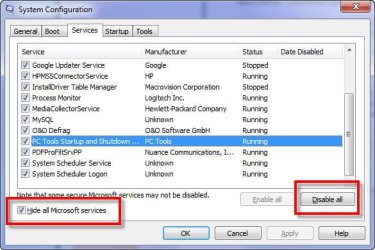
2) Click on the Orb again and at the "Search" box right there above the orb, type in "MSCONFIG" (without the quotes) and then hit ENTER.

When the window appears, click on the START UP tab, as seen in the attached screenshot, then scroll through the list and see if there are any odd entries.

As sort of a big bang test, you could simply click the DISABLE ALL button at the bottom right (annotated in the screenshot with the red box), then reboot your computer to see if the Windows Explorer window still appears.

If it does not, then something in your startup is amiss. Bring up MSCONFIG again (startup tab) and then add back one or two at a time manually, rebooting after each (click on the checkbox in this window). A bit tedious, yes, but you would find your answer.
Post your results to this iif it works or not.


Tried that Beech, disabled all, and still the explorer widow appears.
 

My Computer

OS
Windows 7
Tried that Beech, disabled all, and still the explorer widow appears.

Try the same thing with the services:
1) Orb > type "MSCONFIG" {Enter}
2) Click on the "Services Tab"
3) Click the "Hide all Microsoft Services" checkbox bottom left
4) Click the "Disable All"
5) Reboot

If that doesn't work, post a screenshot of the window that is appearing (without altering what folder or view to which it opens).
 

Attachments

  • SNAG-0041.jpg
    SNAG-0041.jpg
    45.7 KB · Views: 7

My Computer

Computer Manufacturer/Model Number
Dell Vostro 420
OS
Windows 7 Pro x64
CPU
3.00 GHz Intel Core2 Quad Q9650
Memory
4 GB
Graphics Card(s)
ATI Radeon HD 3400 Series
Monitor(s) Displays
DELL 2405FPW
Screen Resolution
1920x1200
Hard Drives
System: 80GB WDC WD800JD-22MSA1
Data: 500GB Hitachi HDP725050GLA360
Internet Speed
Verizon FiOS 20/5 mbps
Other Info
Computing is primarily business use with off-time troubleshooting practice: Remote desktop, scanning and producing invoices, some minor graphics work.
Hi Peter,

Still the same unfortuneately.

And just noticed Google search won't work.

Johnston
 

My Computer

OS
Windows 7
I think the OP expresses the opinion of a large vintage community. Their problem will be solved when they need new hardware for which no XP drivers exist. Then they will have to get moving and learn something new - which they refuse up to now. For most people change is bad - even if it is for the better.
 

My Computer

Computer Manufacturer/Model Number
HP, Dell, Gateway, Toshiba - 4 laptops and 2 desktops
OS
Vista, Windows7, Mint Mate, Zorin, Windows 8
CPU
from 1.6GHz Duo to i7
Monitor(s) Displays
2x HP w2207
Hard Drives
5x HDD, 7x SSD, 12x Externals
Keyboard
with trackball - no mices
Mouse
Trackball mice
Internet Speed
DSL 6000
whs.

I work all day and haven't time to mess on with new systems all night.

So how come you don't offer any solution to the problems I have?.

They are:

Explorer window appears every start up.

Google search isn't working.

I want to use outlook express or windows mail on my computer, whic has windows 7.
 

My Computer

OS
Windows 7
Still the same unfortuneately.

And just noticed Google search won't work.

Screenshots of both problems would be very helpful.

Where is the Google Search that is not working? Internet Explorer search bar? Firefox toolbar? Google's main page (i.e. www.google.com)?
 

My Computer

Computer Manufacturer/Model Number
Dell Vostro 420
OS
Windows 7 Pro x64
CPU
3.00 GHz Intel Core2 Quad Q9650
Memory
4 GB
Graphics Card(s)
ATI Radeon HD 3400 Series
Monitor(s) Displays
DELL 2405FPW
Screen Resolution
1920x1200
Hard Drives
System: 80GB WDC WD800JD-22MSA1
Data: 500GB Hitachi HDP725050GLA360
Internet Speed
Verizon FiOS 20/5 mbps
Other Info
Computing is primarily business use with off-time troubleshooting practice: Remote desktop, scanning and producing invoices, some minor graphics work.
Peter,

If I knew how to add screen shots I would.

The Google toolbar appears above the Bing toolbar.

Johnston
 

My Computer

OS
Windows 7
I do not know why Johnson can't figure out [no offence intended] the explorer window at startup ?? It's EXACTLY the same as the XP he loves !

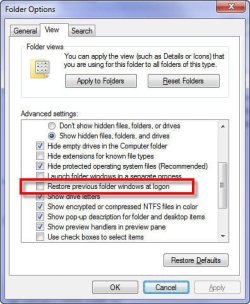
Go to Tools... Folder Options, View tab.
Un-check the "Restore previous folder windows at logon" box.
Click OK..
should be problem solved.

Now, google toolbar probably needs to be re-installed under IE8.
get it here
Google Toolbar

Since I have Outlook '07 under Win7, I haven't tried to put OE back on, but I use OE6 under my XP64 dual-boot.

[editorial]
Sure Win7 is different from XP, but if you've ever used Vista [ugh I detest that OS] you'll love Win7.
I understand that older folks have a tough time with grasping the UI's on a computer and do NOT like to re-learn an interface that they were comfortable with. And unless Johnson7 is a troll, then he's definitely in that "vintage" age bracket [or the other I alluded to below], as most non-vintage folks deal with technology on a daily basis. While I understand his frustrations, the solutions to his questions required just a LITTLE SELF-HELP [it took me less than a minute to find the answer to both questions BTW] - and is indicative of the trouble I see in the good 'ole US of A.. take a little personal responsibility and put some effort into finding a solution instead of holding out ones hand !:sick:
 

My Computer

OS
Win7 x64 Ultimate
Where do I access Tools?. I don't see it t start up.
 

My Computer

OS
Windows 7
Lift up your head and look at the top menu [of Explorer], please.

He's running Win7, not XP -

Johnston, at the top of Windows Explorer, it is Organize > Folders and Search options > View, and then the option he recommended.

My apologies for sending you on a wild goose chase. I never used that option myself so I was not aware of it.
 

My Computer

Computer Manufacturer/Model Number
Dell Vostro 420
OS
Windows 7 Pro x64
CPU
3.00 GHz Intel Core2 Quad Q9650
Memory
4 GB
Graphics Card(s)
ATI Radeon HD 3400 Series
Monitor(s) Displays
DELL 2405FPW
Screen Resolution
1920x1200
Hard Drives
System: 80GB WDC WD800JD-22MSA1
Data: 500GB Hitachi HDP725050GLA360
Internet Speed
Verizon FiOS 20/5 mbps
Other Info
Computing is primarily business use with off-time troubleshooting practice: Remote desktop, scanning and producing invoices, some minor graphics work.
Screenshot:
 

Attachments

  • SNAG-0042.jpg
    SNAG-0042.jpg
    42.1 KB · Views: 3

My Computer

Computer Manufacturer/Model Number
Dell Vostro 420
OS
Windows 7 Pro x64
CPU
3.00 GHz Intel Core2 Quad Q9650
Memory
4 GB
Graphics Card(s)
ATI Radeon HD 3400 Series
Monitor(s) Displays
DELL 2405FPW
Screen Resolution
1920x1200
Hard Drives
System: 80GB WDC WD800JD-22MSA1
Data: 500GB Hitachi HDP725050GLA360
Internet Speed
Verizon FiOS 20/5 mbps
Other Info
Computing is primarily business use with off-time troubleshooting practice: Remote desktop, scanning and producing invoices, some minor graphics work.
bing.png
 

My Computer

Computer Manufacturer/Model Number
HP, Dell, Gateway, Toshiba - 4 laptops and 2 desktops
OS
Vista, Windows7, Mint Mate, Zorin, Windows 8
CPU
from 1.6GHz Duo to i7
Monitor(s) Displays
2x HP w2207
Hard Drives
5x HDD, 7x SSD, 12x Externals
Keyboard
with trackball - no mices
Mouse
Trackball mice
Internet Speed
DSL 6000
Just to be clear, you only need to do this one time, not every time you want to use Google. This recommended procedure will change your default search engine in IE from Bing to Google which is what you said you wanted. (Good choice, btw. :))
 

My Computer

Computer Manufacturer/Model Number
HP DV8t quad
OS
Windows 7 Ultimate x64 (Retail)
CPU
i7-Q 720
Motherboard
Motherboard Chipset Intel Ibex Peak-M PM55, Intel Lynnfield
Memory
6 GB
Graphics Card(s)
nVidia GeForce GT 230M (1GB)
Sound Card
IDT High Definition Audio CODEC
Monitor(s) Displays
18.4 inch HP Infinity FHD (Samsung 184HT03-001)
Screen Resolution
1920 x 1080
Hard Drives
Hitachi 500GB 7200 rpm (x2)
Seagate FreeAgent 1.5 TB External USB (x2)
Thermaltake BlacX eSATA/USB 2.0 3.5/2.5 HD dock
Cooling
Zalman NC-2000 notebook cooling pad
Keyboard
laptop
Mouse
Logitech VX Revolution
Other Info
Backup Unit: Lenovo T61p
I do not know why Johnson can't figure out [no offence intended] the explorer window at startup ?? It's EXACTLY the same as the XP he loves !

Go to Tools... Folder Options, View tab.
Un-check the "Restore previous folder windows at logon" box.
Click OK..
should be problem solved.

Now, google toolbar probably needs to be re-installed under IE8.
get it here
Google Toolbar

Since I have Outlook '07 under Win7, I haven't tried to put OE back on, but I use OE6 under my XP64 dual-boot.

[editorial]
Sure Win7 is different from XP, but if you've ever used Vista [ugh I detest that OS] you'll love Win7.
I understand that older folks have a tough time with grasping the UI's on a computer and do NOT like to re-learn an interface that they were comfortable with. And unless Johnson7 is a troll, then he's definitely in that "vintage" age bracket [or the other I alluded to below], as most non-vintage folks deal with technology on a daily basis. While I understand his frustrations, the solutions to his questions required just a LITTLE SELF-HELP [it took me less than a minute to find the answer to both questions BTW] - and is indicative of the trouble I see in the good 'ole US of A.. take a little personal responsibility and put some effort into finding a solution instead of holding out ones hand !:sick:


sOc9 I'm 50 next birthday. Not exactly vintage, and certainly not a troll. Ive been rattlin my brains out to sort this and logged on here as a last resort.
You have taken the time to help, which is appreciated, but take a chill pill. You can be rude, and we all have our various skills, experience and feetime.

I asked the forum for help not insults.
 

My Computer

OS
Windows 7
Back
Top