Solved Windows 7 boots normally then freezes after 2 minutes

I ran the test again and it got to 100%with 1 error which was repaired so I'm not sure what this means but I'm guessing it doesn't mean everything is fixed?
 

My Computer My Computer

At a glance

Windows 7 Ultimate x64Intel i5 3570kCorsair DDR3 8 GBAMD 7850
Computer type
PC/Desktop
Computer Manufacturer/Model Number
Custom Build
OS
Windows 7 Ultimate x64
CPU
Intel i5 3570k
Motherboard
Asus z77
Memory
Corsair DDR3 8 GB
Graphics Card(s)
AMD 7850
Antivirus
AVG 2014
Browser
Chrome
What appears that the HDD is beyond fix. You need to replace it.
 

My Computer My Computer

At a glance

Microsoft Windows 10 Pro Insider Preview 64-bitIntel(R) Core(TM) i3-4130 CPU @ 3.40GHzCorsair Vengence 4GB x2 (8.00GB Dual-Channel ...2047MB GeForce GTS 450 (ZOTAC International)
Computer type
PC/Desktop
Computer Manufacturer/Model Number
Self Assembled
OS
Microsoft Windows 10 Pro Insider Preview 64-bit
CPU
Intel(R) Core(TM) i3-4130 CPU @ 3.40GHz
Motherboard
Gigabyte Technology Co., Ltd. B85M-D3H
Memory
Corsair Vengence 4GB x2 (8.00GB Dual-Channel DDR3 @ 798MHz)
Graphics Card(s)
2047MB GeForce GTS 450 (ZOTAC International)
Sound Card
Onboard (Realtek High Definition Audio)
Monitor(s) Displays
LG Flatron E2040T
Screen Resolution
1600x900
Hard Drives
Western Digital 1 TB
Seagate 500 GB
PSU
Corsair VS550
Case
Cooler Master K380
Cooling
Cooler Master Seidon 120V Plus
Keyboard
Logitech MK260r
Mouse
Logitech MK260r
Internet Speed
PMPL Broadband
Antivirus
Windows Defender + MBAM
Browser
Firefox
Other Info
Dell Studio 15" Laptop
It cant be, if Seatools said that it has been repaired then shouldnt it be a good thing. And now after changing back i cannot even get into safe mode, why is this problem getting worse? The hard drive was fine before the test and now i cant get into safe mode
 

My Computer My Computer

At a glance

Windows 7 Ultimate x64Intel i5 3570kCorsair DDR3 8 GBAMD 7850
Computer type
PC/Desktop
Computer Manufacturer/Model Number
Custom Build
OS
Windows 7 Ultimate x64
CPU
Intel i5 3570k
Motherboard
Asus z77
Memory
Corsair DDR3 8 GB
Graphics Card(s)
AMD 7850
Antivirus
AVG 2014
Browser
Chrome
It cant be, if Seatools said that it has been repaired then shouldnt it be a good thing. And now after changing back i cannot even get into safe mode, why is this problem getting worse? The hard drive was fine before the test and now i cant get into safe mode

From your post #8, the screenshot you attached there.

287319d1380147017-windows-7-boots-normally-then-freezes-after-2-minutes-error-1.png


The Hard Drive was never fine from the time you came here. And it is even bad that seatools cannot repair it.

There is no option left but replacing the hard drive.
 

My Computer My Computer

At a glance

Microsoft Windows 10 Pro Insider Preview 64-bitIntel(R) Core(TM) i3-4130 CPU @ 3.40GHzCorsair Vengence 4GB x2 (8.00GB Dual-Channel ...2047MB GeForce GTS 450 (ZOTAC International)
Computer type
PC/Desktop
Computer Manufacturer/Model Number
Self Assembled
OS
Microsoft Windows 10 Pro Insider Preview 64-bit
CPU
Intel(R) Core(TM) i3-4130 CPU @ 3.40GHz
Motherboard
Gigabyte Technology Co., Ltd. B85M-D3H
Memory
Corsair Vengence 4GB x2 (8.00GB Dual-Channel DDR3 @ 798MHz)
Graphics Card(s)
2047MB GeForce GTS 450 (ZOTAC International)
Sound Card
Onboard (Realtek High Definition Audio)
Monitor(s) Displays
LG Flatron E2040T
Screen Resolution
1600x900
Hard Drives
Western Digital 1 TB
Seagate 500 GB
PSU
Corsair VS550
Case
Cooler Master K380
Cooling
Cooler Master Seidon 120V Plus
Keyboard
Logitech MK260r
Mouse
Logitech MK260r
Internet Speed
PMPL Broadband
Antivirus
Windows Defender + MBAM
Browser
Firefox
Other Info
Dell Studio 15" Laptop
Would you like the re uploaded screenshot with the sliders to the left properly
 

My Computer My Computer

At a glance

Windows 7 Ultimate x64Intel i5 3570kCorsair DDR3 8 GBAMD 7850
Computer type
PC/Desktop
Computer Manufacturer/Model Number
Custom Build
OS
Windows 7 Ultimate x64
CPU
Intel i5 3570k
Motherboard
Asus z77
Memory
Corsair DDR3 8 GB
Graphics Card(s)
AMD 7850
Antivirus
AVG 2014
Browser
Chrome
As seatools failed to repair, no option is left there. You have to accept the fact.

Hardware corrupts. Its an universal scenario. Everybody faced it. It is not anything unique to you.

Check if the HDD is within warranty or not. If it is within warranty, RMA it. Otherwise buy a new one.

BTW, have you reverted back to AHCI mode after completing the test?
 

My Computer My Computer

At a glance

Microsoft Windows 10 Pro Insider Preview 64-bitIntel(R) Core(TM) i3-4130 CPU @ 3.40GHzCorsair Vengence 4GB x2 (8.00GB Dual-Channel ...2047MB GeForce GTS 450 (ZOTAC International)
Computer type
PC/Desktop
Computer Manufacturer/Model Number
Self Assembled
OS
Microsoft Windows 10 Pro Insider Preview 64-bit
CPU
Intel(R) Core(TM) i3-4130 CPU @ 3.40GHz
Motherboard
Gigabyte Technology Co., Ltd. B85M-D3H
Memory
Corsair Vengence 4GB x2 (8.00GB Dual-Channel DDR3 @ 798MHz)
Graphics Card(s)
2047MB GeForce GTS 450 (ZOTAC International)
Sound Card
Onboard (Realtek High Definition Audio)
Monitor(s) Displays
LG Flatron E2040T
Screen Resolution
1600x900
Hard Drives
Western Digital 1 TB
Seagate 500 GB
PSU
Corsair VS550
Case
Cooler Master K380
Cooling
Cooler Master Seidon 120V Plus
Keyboard
Logitech MK260r
Mouse
Logitech MK260r
Internet Speed
PMPL Broadband
Antivirus
Windows Defender + MBAM
Browser
Firefox
Other Info
Dell Studio 15" Laptop
I apologise for that. I did not realize i haven't uploaded it already
 

Attachments

  • 20130927_164834.jpg
    20130927_164834.jpg
    1,007.9 KB · Views: 0

My Computer My Computer

At a glance

Windows 7 Ultimate x64Intel i5 3570kCorsair DDR3 8 GBAMD 7850
Computer type
PC/Desktop
Computer Manufacturer/Model Number
Custom Build
OS
Windows 7 Ultimate x64
CPU
Intel i5 3570k
Motherboard
Asus z77
Memory
Corsair DDR3 8 GB
Graphics Card(s)
AMD 7850
Antivirus
AVG 2014
Browser
Chrome
Seatools didnt fail to repair, it said repairs have been completed and the HDD has passed the test. Yes i have
 

My Computer My Computer

At a glance

Windows 7 Ultimate x64Intel i5 3570kCorsair DDR3 8 GBAMD 7850
Computer type
PC/Desktop
Computer Manufacturer/Model Number
Custom Build
OS
Windows 7 Ultimate x64
CPU
Intel i5 3570k
Motherboard
Asus z77
Memory
Corsair DDR3 8 GB
Graphics Card(s)
AMD 7850
Antivirus
AVG 2014
Browser
Chrome
Seatools didnt fail to repair, it said repairs have been completed and the HDD has passed the test. Yes i have
Help me to relate this statement with that one below?
I ran the test again and it got to 100%with 1 error which was repaired so I'm not sure what this means but I'm guessing it doesn't mean everything is fixed?
 

My Computer My Computer

At a glance

Microsoft Windows 10 Pro Insider Preview 64-bitIntel(R) Core(TM) i3-4130 CPU @ 3.40GHzCorsair Vengence 4GB x2 (8.00GB Dual-Channel ...2047MB GeForce GTS 450 (ZOTAC International)
Computer type
PC/Desktop
Computer Manufacturer/Model Number
Self Assembled
OS
Microsoft Windows 10 Pro Insider Preview 64-bit
CPU
Intel(R) Core(TM) i3-4130 CPU @ 3.40GHz
Motherboard
Gigabyte Technology Co., Ltd. B85M-D3H
Memory
Corsair Vengence 4GB x2 (8.00GB Dual-Channel DDR3 @ 798MHz)
Graphics Card(s)
2047MB GeForce GTS 450 (ZOTAC International)
Sound Card
Onboard (Realtek High Definition Audio)
Monitor(s) Displays
LG Flatron E2040T
Screen Resolution
1600x900
Hard Drives
Western Digital 1 TB
Seagate 500 GB
PSU
Corsair VS550
Case
Cooler Master K380
Cooling
Cooler Master Seidon 120V Plus
Keyboard
Logitech MK260r
Mouse
Logitech MK260r
Internet Speed
PMPL Broadband
Antivirus
Windows Defender + MBAM
Browser
Firefox
Other Info
Dell Studio 15" Laptop
I ran the Seatools long test and found errors, Seatools then repaired the errors and tested again and gave the all clear so that there is no errors now because they have been repaired
 

My Computer My Computer

At a glance

Windows 7 Ultimate x64Intel i5 3570kCorsair DDR3 8 GBAMD 7850
Computer type
PC/Desktop
Computer Manufacturer/Model Number
Custom Build
OS
Windows 7 Ultimate x64
CPU
Intel i5 3570k
Motherboard
Asus z77
Memory
Corsair DDR3 8 GB
Graphics Card(s)
AMD 7850
Antivirus
AVG 2014
Browser
Chrome
I ran the Seatools long test and found errors, Seatools then repaired the errors and tested again and gave the all clear so that there is no errors now because they have been repaired
OK. Now it is clear. If a short test after a long test + repair says that it is free from errors, the HDD is usable for a few more days. I misunderstood your post #21.

Now what is the remaining problem? You cannot boot into even safe mode? See post #17 .... what is said by essenbe ....
If your bios is in AHCI mode, use the Seatools for DOS. First go into bios and change to IDE mode and change 1st boot device to CD/DVD and put the CD in, save and exit. It should boot straight into the CD and see the drives then. When finished, go straight into bios and change back to AHCI mode, or you probably will not boot into Windows. I had the same issue and that's what I did and it worked perfectly.
Please make it sure that you have changed the Storage controller mode to AHCI mode back.

As windows is installed in AHCI mode, this mode is to be kept to boot into windows, in safe mode, too.
 

My Computer My Computer

At a glance

Microsoft Windows 10 Pro Insider Preview 64-bitIntel(R) Core(TM) i3-4130 CPU @ 3.40GHzCorsair Vengence 4GB x2 (8.00GB Dual-Channel ...2047MB GeForce GTS 450 (ZOTAC International)
Computer type
PC/Desktop
Computer Manufacturer/Model Number
Self Assembled
OS
Microsoft Windows 10 Pro Insider Preview 64-bit
CPU
Intel(R) Core(TM) i3-4130 CPU @ 3.40GHz
Motherboard
Gigabyte Technology Co., Ltd. B85M-D3H
Memory
Corsair Vengence 4GB x2 (8.00GB Dual-Channel DDR3 @ 798MHz)
Graphics Card(s)
2047MB GeForce GTS 450 (ZOTAC International)
Sound Card
Onboard (Realtek High Definition Audio)
Monitor(s) Displays
LG Flatron E2040T
Screen Resolution
1600x900
Hard Drives
Western Digital 1 TB
Seagate 500 GB
PSU
Corsair VS550
Case
Cooler Master K380
Cooling
Cooler Master Seidon 120V Plus
Keyboard
Logitech MK260r
Mouse
Logitech MK260r
Internet Speed
PMPL Broadband
Antivirus
Windows Defender + MBAM
Browser
Firefox
Other Info
Dell Studio 15" Laptop
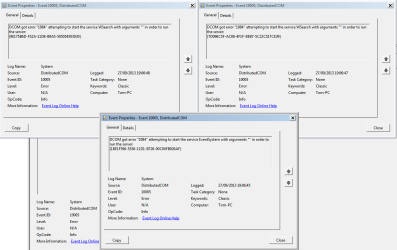
It must have been a glitch because i can now get into safe mode and it was set back to AHCI mode before that. These pictures are the only errors in event log

Also this is there:

The following boot-start or system-start driver(s) failed to load:
AsIO
AsUpIO
discache
spldr
VBoxDrv
VBoxUSBMon
vmm
Wanarpv6
 

Attachments

  • Untitled.png
    Untitled.png
    24.3 KB · Views: 2

My Computer My Computer

At a glance

Windows 7 Ultimate x64Intel i5 3570kCorsair DDR3 8 GBAMD 7850
Computer type
PC/Desktop
Computer Manufacturer/Model Number
Custom Build
OS
Windows 7 Ultimate x64
CPU
Intel i5 3570k
Motherboard
Asus z77
Memory
Corsair DDR3 8 GB
Graphics Card(s)
AMD 7850
Antivirus
AVG 2014
Browser
Chrome
Free up the startup and Services. Windows does not need any other program to auto start with it, but the auto start programs often conflicts and causes various problems including BSODs.

  1. Click on the Start button
  2. Type “msconfig (without quotes), click the resulting link. It will open the system configuration window, with the "general" tab selected.
    • Click the "startup" tab. Click "Disable all" > Apply > OK.
    • Click on "services" tab. Check the "Hide all Microsoft Services"; Click "Disable all" > Apply > OK
  3. Accept then restart.
Uninstall ASUS AI Suite. Its a good idea to not keep it in the system. I have noticed some people are there who consider it as bad as a malware.

Uninstall AVG. Use Microsoft Security Essentials as your antivirus with windows inbuilt firewall, and free MBAM as the on demand scanner.
Download, install and update those, and then run full system scans with both of them, one by one, for a safety reason.

Let us know the results.
 

My Computer My Computer

At a glance

Microsoft Windows 10 Pro Insider Preview 64-bitIntel(R) Core(TM) i3-4130 CPU @ 3.40GHzCorsair Vengence 4GB x2 (8.00GB Dual-Channel ...2047MB GeForce GTS 450 (ZOTAC International)
Computer type
PC/Desktop
Computer Manufacturer/Model Number
Self Assembled
OS
Microsoft Windows 10 Pro Insider Preview 64-bit
CPU
Intel(R) Core(TM) i3-4130 CPU @ 3.40GHz
Motherboard
Gigabyte Technology Co., Ltd. B85M-D3H
Memory
Corsair Vengence 4GB x2 (8.00GB Dual-Channel DDR3 @ 798MHz)
Graphics Card(s)
2047MB GeForce GTS 450 (ZOTAC International)
Sound Card
Onboard (Realtek High Definition Audio)
Monitor(s) Displays
LG Flatron E2040T
Screen Resolution
1600x900
Hard Drives
Western Digital 1 TB
Seagate 500 GB
PSU
Corsair VS550
Case
Cooler Master K380
Cooling
Cooler Master Seidon 120V Plus
Keyboard
Logitech MK260r
Mouse
Logitech MK260r
Internet Speed
PMPL Broadband
Antivirus
Windows Defender + MBAM
Browser
Firefox
Other Info
Dell Studio 15" Laptop
I have already uninstalled ASUS AI Suite long before these posts. Im just doing the clean boot now, ill let you know how i get on and how long it'll take me to freeze or if it even does freeze :)

Thank you :D
 

My Computer My Computer

At a glance

Windows 7 Ultimate x64Intel i5 3570kCorsair DDR3 8 GBAMD 7850
Computer type
PC/Desktop
Computer Manufacturer/Model Number
Custom Build
OS
Windows 7 Ultimate x64
CPU
Intel i5 3570k
Motherboard
Asus z77
Memory
Corsair DDR3 8 GB
Graphics Card(s)
AMD 7850
Antivirus
AVG 2014
Browser
Chrome
I have already uninstalled ASUS AI Suite long before these posts.
The uploaded data says it is present there.

And your last post says that PC Probe is present there. Uninstall ASUS PC Probe utility too. That is causing those boot time errors.

  • AsIO = ASUS PC Probe Utility
  • AsUpIO = ASUS Hardware Monitoring Software Component.
Enough trouble-causer.
 

My Computer My Computer

At a glance

Microsoft Windows 10 Pro Insider Preview 64-bitIntel(R) Core(TM) i3-4130 CPU @ 3.40GHzCorsair Vengence 4GB x2 (8.00GB Dual-Channel ...2047MB GeForce GTS 450 (ZOTAC International)
Computer type
PC/Desktop
Computer Manufacturer/Model Number
Self Assembled
OS
Microsoft Windows 10 Pro Insider Preview 64-bit
CPU
Intel(R) Core(TM) i3-4130 CPU @ 3.40GHz
Motherboard
Gigabyte Technology Co., Ltd. B85M-D3H
Memory
Corsair Vengence 4GB x2 (8.00GB Dual-Channel DDR3 @ 798MHz)
Graphics Card(s)
2047MB GeForce GTS 450 (ZOTAC International)
Sound Card
Onboard (Realtek High Definition Audio)
Monitor(s) Displays
LG Flatron E2040T
Screen Resolution
1600x900
Hard Drives
Western Digital 1 TB
Seagate 500 GB
PSU
Corsair VS550
Case
Cooler Master K380
Cooling
Cooler Master Seidon 120V Plus
Keyboard
Logitech MK260r
Mouse
Logitech MK260r
Internet Speed
PMPL Broadband
Antivirus
Windows Defender + MBAM
Browser
Firefox
Other Info
Dell Studio 15" Laptop
Booted successfully into windows at 19:30. Fully loaded at 19:31. Opened chrome 19:31. Clicked your Microsoft Essentials link 19:32. Started install at 19:33. System locks up at 19:33 before the install window appears and then BSOD at 19:36 :(
 

My Computer My Computer

At a glance

Windows 7 Ultimate x64Intel i5 3570kCorsair DDR3 8 GBAMD 7850
Computer type
PC/Desktop
Computer Manufacturer/Model Number
Custom Build
OS
Windows 7 Ultimate x64
CPU
Intel i5 3570k
Motherboard
Asus z77
Memory
Corsair DDR3 8 GB
Graphics Card(s)
AMD 7850
Antivirus
AVG 2014
Browser
Chrome
How can i uninstall PC probe because it doesn't come up under programs?


Also the above post has been edited
 

My Computer My Computer

At a glance

Windows 7 Ultimate x64Intel i5 3570kCorsair DDR3 8 GBAMD 7850
Computer type
PC/Desktop
Computer Manufacturer/Model Number
Custom Build
OS
Windows 7 Ultimate x64
CPU
Intel i5 3570k
Motherboard
Asus z77
Memory
Corsair DDR3 8 GB
Graphics Card(s)
AMD 7850
Antivirus
AVG 2014
Browser
Chrome
For a BSOD, we cannot say anything without seeing the dump data.

Not an ASUS user ... not sure how to uninstall PC probe. But it should be removed. If you dont find a way, opt for a clean reinstall without installing ASUS utilities.... A bloatware gathered windows installation can fail to run anytime. And AI suite is left over there, too.
 

My Computer My Computer

At a glance

Microsoft Windows 10 Pro Insider Preview 64-bitIntel(R) Core(TM) i3-4130 CPU @ 3.40GHzCorsair Vengence 4GB x2 (8.00GB Dual-Channel ...2047MB GeForce GTS 450 (ZOTAC International)
Computer type
PC/Desktop
Computer Manufacturer/Model Number
Self Assembled
OS
Microsoft Windows 10 Pro Insider Preview 64-bit
CPU
Intel(R) Core(TM) i3-4130 CPU @ 3.40GHz
Motherboard
Gigabyte Technology Co., Ltd. B85M-D3H
Memory
Corsair Vengence 4GB x2 (8.00GB Dual-Channel DDR3 @ 798MHz)
Graphics Card(s)
2047MB GeForce GTS 450 (ZOTAC International)
Sound Card
Onboard (Realtek High Definition Audio)
Monitor(s) Displays
LG Flatron E2040T
Screen Resolution
1600x900
Hard Drives
Western Digital 1 TB
Seagate 500 GB
PSU
Corsair VS550
Case
Cooler Master K380
Cooling
Cooler Master Seidon 120V Plus
Keyboard
Logitech MK260r
Mouse
Logitech MK260r
Internet Speed
PMPL Broadband
Antivirus
Windows Defender + MBAM
Browser
Firefox
Other Info
Dell Studio 15" Laptop
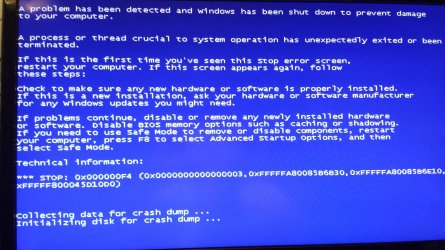
When the BSOD is shown, no dump file is saved into any folder that i told it to save to. But i have a picture if that helps
 

Attachments

  • 20130923_233733.jpg
    20130923_233733.jpg
    637.5 KB · Views: 0

My Computer My Computer

At a glance

Windows 7 Ultimate x64Intel i5 3570kCorsair DDR3 8 GBAMD 7850
Computer type
PC/Desktop
Computer Manufacturer/Model Number
Custom Build
OS
Windows 7 Ultimate x64
CPU
Intel i5 3570k
Motherboard
Asus z77
Memory
Corsair DDR3 8 GB
Graphics Card(s)
AMD 7850
Antivirus
AVG 2014
Browser
Chrome
I seem to remember that the first time that it froze was when i was downloading a game from steam. First time it did a chkdsk it removed the games that were currently downloading. Does it have anything to do with that?
 

My Computer My Computer

At a glance

Windows 7 Ultimate x64Intel i5 3570kCorsair DDR3 8 GBAMD 7850
Computer type
PC/Desktop
Computer Manufacturer/Model Number
Custom Build
OS
Windows 7 Ultimate x64
CPU
Intel i5 3570k
Motherboard
Asus z77
Memory
Corsair DDR3 8 GB
Graphics Card(s)
AMD 7850
Antivirus
AVG 2014
Browser
Chrome
Back
Top