
wellingtonboots
New member
- Local time
- 1:16 PM
- Messages
- 1
I recently installed avast internet security 2015 on my computer. Yesterday I used the bootup scan option. I normally use bootup scan without and problems but that was with Avast antivirus Free version.
After the scan finished I logged onto my usual profile only to be greeted with this message:
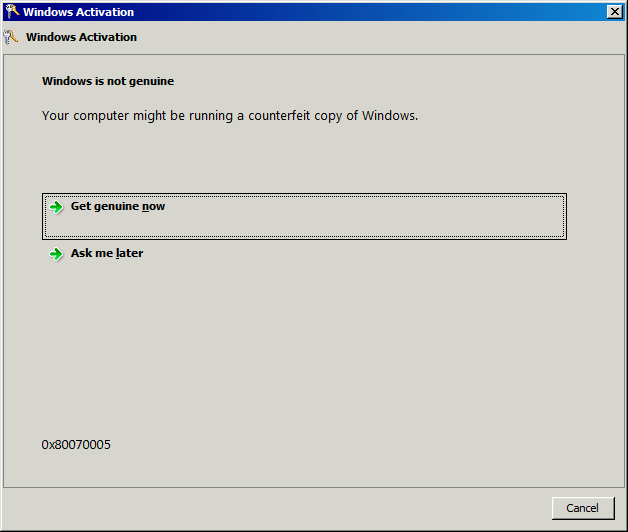
As I know that my windows is genuine and I never encountered this program before I automatically assumed it was a virus. I clicked cancel and ended up in a temporary profile unable to access any of my data.
I booted up my computer in safe mode and ran both Avast and Malwarebytes again. They found nothing new. I then rebooted the computer normally and the error message had gone and I was able to log in as myself again. However I am now too scared to ever turn off my computer in case this problem comes back to haunt me.
Here is the diagnostic report:
After the scan finished I logged onto my usual profile only to be greeted with this message:
As I know that my windows is genuine and I never encountered this program before I automatically assumed it was a virus. I clicked cancel and ended up in a temporary profile unable to access any of my data.
I booted up my computer in safe mode and ran both Avast and Malwarebytes again. They found nothing new. I then rebooted the computer normally and the error message had gone and I was able to log in as myself again. However I am now too scared to ever turn off my computer in case this problem comes back to haunt me.
Here is the diagnostic report:
Code:
Diagnostic Report (1.9.0027.0):
-----------------------------------------
Windows Validation Data-->

Validation Code: 0
Cached Online Validation Code: 0x0
Windows Product Key: *****-*****-T94F8-WDX7B-GB9BK
Windows Product Key Hash: LWqoFYrupN931+xSQ9FHREqUuFg=
Windows Product ID: 00371-177-9916334-85223
Windows Product ID Type: 5
Windows License Type: Retail
Windows OS version: 6.1.7601.2.00010100.1.0.048
ID: {60DAAA8E-10C8-414C-809D-9F538E9A20F7}(1)
Is Admin: Yes
TestCab: 0x0
LegitcheckControl ActiveX: N/A, hr = 0x80070002
Signed By: N/A, hr = 0x80070002
Product Name: Windows 7 Professional
Architecture: 0x00000009
Build lab: 7601.win7sp1_gdr.140303-2144
TTS Error:
Validation Diagnostic:
Resolution Status: N/A

Vista WgaER Data-->
ThreatID(s): N/A, hr = 0x80070002
Version: N/A, hr = 0x80070002

Windows XP Notifications Data-->
Cached Result: N/A, hr = 0x80070002
File Exists: No
Version: N/A, hr = 0x80070002
WgaTray.exe Signed By: N/A, hr = 0x80070002
WgaLogon.dll Signed By: N/A, hr = 0x80070002

OGA Notifications Data-->
Cached Result: N/A, hr = 0x80070002
Version: N/A, hr = 0x80070002
OGAExec.exe Signed By: N/A, hr = 0x80070002
OGAAddin.dll Signed By: N/A, hr = 0x80070002

OGA Data-->
Office Status: 109 N/A
OGA Version: N/A, 0x80070002
Signed By: N/A, hr = 0x80070002
Office Diagnostics: 025D1FF3-364-80041010_025D1FF3-229-80041010_025D1FF3-230-1_025D1FF3-517-80040154_025D1FF3-237-80040154_025D1FF3-238-2_025D1FF3-244-80070002_025D1FF3-258-3

Browser Data-->
Proxy settings: N/A
User Agent: Mozilla/4.0 (compatible; MSIE 8.0; Win32)
Default Browser: C:\Program Files (x86)\Google\Chrome\Application\chrome.exe
Download signed ActiveX controls: Prompt
Download unsigned ActiveX controls: Disabled
Run ActiveX controls and plug-ins: Allowed
Initialize and script ActiveX controls not marked as safe: Disabled
Allow scripting of Internet Explorer Webbrowser control: Disabled
Active scripting: Allowed
Script ActiveX controls marked as safe for scripting: Allowed

File Scan Data-->

Other data-->
Office Details: <GenuineResults><MachineData><UGUID>{60DAAA8E-10C8-414C-809D-9F538E9A20F7}</UGUID><Version>1.9.0027.0</Version><OS>6.1.7601.2.00010100.1.0.048</OS><Architecture>x64</Architecture><PKey>*****-*****-*****-*****-GB9BK</PKey><PID>00371-177-9916334-85223</PID><PIDType>5</PIDType><SID>S-1-5-21-3095081847-2811947968-4201784429</SID><SYSTEM><Manufacturer>Apple Inc.</Manufacturer><Model>MacBookPro8,1</Model></SYSTEM><BIOS><Manufacturer>Apple Inc.</Manufacturer><Version>   MBP81.88Z.0047.B27.1201241646</Version><SMBIOSVersion major="2" minor="4"/><Date>20120124000000.000000+000</Date></BIOS><HWID>AE1B3E07018400FE</HWID><UserLCID>0809</UserLCID><SystemLCID>0409</SystemLCID><TimeZone>GMT Standard Time(GMT+00:00)</TimeZone><iJoin>0</iJoin><SBID><stat>3</stat><msppid></msppid><name></name><model></model></SBID><OEM/><GANotification/></MachineData><Software><Office><Result>109</Result><Products/><Applications/></Office></Software></GenuineResults>

Spsys.log Content: 0x80070002

Licensing Data-->
Software licensing service version: 6.1.7601.17514

Name: Windows(R) 7, Professional edition
Description: Windows Operating System - Windows(R) 7, RETAIL channel
Activation ID: e838d943-63ed-4a0b-9fb1-47152908acc9
Application ID: 55c92734-d682-4d71-983e-d6ec3f16059f
Extended PID: 00371-00170-177-991633-00-2057-7601.0000-2372012
Installation ID: 003426259755477063899000424341320904858443019475423453
Processor Certificate URL: http://go.microsoft.com/fwlink/?LinkID=88338
Machine Certificate URL: http://go.microsoft.com/fwlink/?LinkID=88339
Use License URL: http://go.microsoft.com/fwlink/?LinkID=88341
Product Key Certificate URL: http://go.microsoft.com/fwlink/?LinkID=88340
Partial Product Key: GB9BK
License Status: Licensed
Remaining Windows rearm count: 2
Trusted time: 04/12/2014 12:47:55

Windows Activation Technologies-->
HrOffline: 0x00000000
HrOnline: 0x00000000
HealthStatus: 0x0000000000000000
Event Time Stamp: 11:26:2014 13:24
ActiveX: Registered, Version: 7.1.7600.16395
Admin Service: Registered, Version: 7.1.7600.16395
HealthStatus Bitmask Output:


HWID Data-->
HWID Hash Current: MgAAAAIAAgABAAEAAQABAAAAAgABAAEAln0iscShTjT4WNzL5EEyO96IRG8ga8JdLnM=

OEM Activation 1.0 Data-->
N/A

OEM Activation 2.0 Data-->
BIOS valid for OA 2.0: yes, but no SLIC table
Windows marker version: N/A
OEMID and OEMTableID Consistent: N/A
BIOS Information:
  ACPI Table Name	OEMID Value	OEMTableID Value
  APIC			APPLE 		Apple00
  FACP			APPLE 		Apple00
  HPET			APPLE 		Apple00
  MCFG			APPLE 		Apple00
  SBST			APPLE 		Apple00
  ECDT			APPLE 		Apple00
  SSDT			APPLE 		SmcDppt
  SSDT			APPLE 		SmcDppt
  SSDT			APPLE 		SmcDppt
  SSDT			APPLE 		SmcDppt
  SSDT			APPLE 		SmcDppt
  SSDT			APPLE 		SmcDppt
  SSDT			APPLE 		SmcDppt
  SSDT			APPLE 		SmcDppt
  SSDT			APPLE 		SmcDppt
  SSDT			APPLE 		SmcDppt
My Computer
At a glance
Windows 7 Profession x64 Service Pack 1Intel Core i7-2460M8GB
- Computer type
- Laptop
- Computer Manufacturer/Model Number
- MAc book pro
- OS
- Windows 7 Profession x64 Service Pack 1
- CPU
- Intel Core i7-2460M
- Memory
- 8GB
- Antivirus
- Avast Internet Security
- Browser
- Chrome

