Windows 7 cannot update, error 8024402F

My Computers

System One System Two

Hi ShiftF5,

Thats good news, obviously there was a server permissions problem.
Im a home user dont rarely get into the Business side of things, i do however have a couple of things for you to check
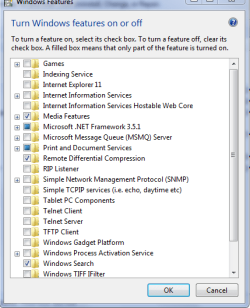
IIS permissions - via programs/features - Features, see screenshot
Compare the ALL internet/server settings on the Good to a bad one, including NetframeWork

As for dismantling the others - I'd make a system image of the updated machine and deploy it to the others
(not the staff one)

Off to check the report log


Roy
 

Attachments

  • shiftf5.PNG
    shiftf5.PNG
    46.2 KB · Views: 37
Last edited:

My Computer

Computer type
PC/Desktop
Computer Manufacturer/Model Number
medionl/Aspire 6930G/acer x55a
OS
W7 home premium 32bit/W7HP 64bit/w10 tp insider ring
CPU
E5300 dual core
Motherboard
medion MS7366
Memory
3gb
Graphics Card(s)
Nvidia Geforce 7100 Nforce 630i
Monitor(s) Displays
avixc
Internet Speed
n (isp resticted to 72)
Antivirus
mse/pands
Browser
palemoon
Other Info
Belkin Fd7050 n USB using Railink RT2870 drivers, more upto date
townsbg, don't believe Ports 80 or 443 are blocked on server. I had OP paste WU update address into url and it connected.
Nic
 

My Computer

Computer type
PC/Desktop
Computer Manufacturer/Model Number
HP Desktop & Compaq Laptop
OS
Win 10 x64, Linux Lite, Win 7 x64, BlackArch, & Kali
Hard Drives
Samsung 850 Pro 256Gb,
Hitachi HDD 1Tb,
Crucial MX SSD 250Gb
Segate 3Tb USB 3.0 Ext. Backup HDD
Internet Speed
150Mbps dn, 20Mbps up
Antivirus
Avast Free, Malwarebytes Anti-Exploit & Anti-Ransomware
Browser
Firefox, Chrome, Opera, & VPN
Hey all. Ports 80 and 443 are not blocked, although 80 is redirected at the firewall to our proxy server (squid) and has been for many years.

Today I hauled a second Windows 7 computer up to the server room and connected it directly to the ISP's modem. Lo and behold it also downloaded and installed updates - and continues to do so after I brought it back to its original location (behind the server/firewall/proxy). I'm hesitant to blame the server due to this. The only configuration changes I made to it was to have it connect to the new ISP and to block IPV6 connections, which were causing a slowdown issue. But if my non-updating issue was caused by the server, why do the 2 machines that were upstairs now work fine? And why do Windows 10 and Vista get their updates???

I compared the installed features list on one of the working computers and its non-working next-door neighbour and they have all the same settings checked off. EDIT: and IIS is not selected, just like in your screenshot.

So I now have two working computers and four non-working ones (including the staff computer). Any ideas would be welcomed!
 

My Computer

Computer type
PC/Desktop
Computer Manufacturer/Model Number
HP EliteDesk 705 G1 SFF
OS
Windows 7 Professional 64-bit
Memory
8 GB
No ideas as to why. :confused: Obviously it's not the server.
What updates were installed? May provide a clue. Best part, you now have two computers updating. :thumbsup:
Gotta love Microsoft! Not the tech solution we were hoping for, nonetheless, it's a solution for you.
You might want to try manually installing the updates those two computers received on a machine still connected to your server and see if WU starts working correctly.

Man, that's a new one on me. :-) Learn something new every day!
 

My Computer

Computer type
PC/Desktop
Computer Manufacturer/Model Number
HP Desktop & Compaq Laptop
OS
Win 10 x64, Linux Lite, Win 7 x64, BlackArch, & Kali
Hard Drives
Samsung 850 Pro 256Gb,
Hitachi HDD 1Tb,
Crucial MX SSD 250Gb
Segate 3Tb USB 3.0 Ext. Backup HDD
Internet Speed
150Mbps dn, 20Mbps up
Antivirus
Avast Free, Malwarebytes Anti-Exploit & Anti-Ransomware
Browser
Firefox, Chrome, Opera, & VPN
Hey all. Ports 80 and 443 are not blocked, although 80 is redirected at the firewall to our proxy server (squid) and has been for many years.

Today I hauled a second Windows 7 computer up to the server room and connected it directly to the ISP's modem. Lo and behold it also downloaded and installed updates - and continues to do so after I brought it back to its original location (behind the server/firewall/proxy). I'm hesitant to blame the server due to this. The only configuration changes I made to it was to have it connect to the new ISP and to block IPV6 connections, which were causing a slowdown issue. But if my non-updating issue was caused by the server, why do the 2 machines that were upstairs now work fine? And why do Windows 10 and Vista get their updates???

I compared the installed features list on one of the working computers and its non-working next-door neighbour and they have all the same settings checked off. EDIT: and IIS is not selected, just like in your screenshot.

So I now have two working computers and four non-working ones (including the staff computer). Any ideas would be welcomed!


I think that your proxy server is redirecting or blocking access to the update servers. I would disable the proxy and see if it works. If it does try allowing access to the websites listed in my link.

@torchwood what you IIS have to do with it? That only runs webpages on the computer.
 

My Computers

System One System Two

Wouldn't typing WU web address for a particular kb directly into the URL and receving the popup install window rule out proxy blocking WU?
 

My Computer

Computer type
PC/Desktop
Computer Manufacturer/Model Number
HP Desktop & Compaq Laptop
OS
Win 10 x64, Linux Lite, Win 7 x64, BlackArch, & Kali
Hard Drives
Samsung 850 Pro 256Gb,
Hitachi HDD 1Tb,
Crucial MX SSD 250Gb
Segate 3Tb USB 3.0 Ext. Backup HDD
Internet Speed
150Mbps dn, 20Mbps up
Antivirus
Avast Free, Malwarebytes Anti-Exploit & Anti-Ransomware
Browser
Firefox, Chrome, Opera, & VPN
Update

So here's the latest on this case.

I took a third computer up and plugged it directly into the modem to do updates. I noticed that the two last ones I did had difficulty connecting to the internet right away, and the "network troubleshooter" both times said I had modem issues. Both worked after I hard reset the modem (unplugged its power cable and plugged it back in). I have never had to do that when I plug into the Linux server.

Also, all 3 of them have since stopped updating and are again showing the dreaded 8024404F error. I am not sure at what point that happened but it was after at least 2 reboots.

I have uninstalled Reboot Restore Pro RX on some of them to rule that out (it had been preventing feature updates, but not other updates, on Windows 10, so I figured I should at least give it a go). No dice though.

I guess the server, the server/ISP combination, or the Windows 7's network configurations are all possibilities at this point.

I noticed that my Windows 7s have IPv6 and IPv4 selected in the adapter properties, and unchecking either one makes the network disconnect. I feel like I used to be able to connect with only IPv4 in the past, but am not sure.

Tomorrow when I have a couple hours to work on this without anyone using the network, I'll try the suggestion of turning all the server services off (firewall, proxy, DNS etc) and see if I can narrow this down. :huh:
 

My Computer

Computer type
PC/Desktop
Computer Manufacturer/Model Number
HP EliteDesk 705 G1 SFF
OS
Windows 7 Professional 64-bit
Memory
8 GB
Another Update

I set up my firewall to clear all its rules and pass everything, eliminated the forwarding to the proxy (so no proxy software was being used) and un-did the only change I made when changing ISPs which was to disable IPv6 lookups in our DNS service on the server. (IPv6 wasn't a problem with our old ISP, but with the new ISP it caused unacceptable performance issues).

Still get the same error!

My Windows 10 machines were still downloading and installing updates after all this. But not Windows 7.

Finally, I replaced the server with a hardware router. Windows 7 is now receiving updates!

So, some combination of the new ISP's settings and my server's settings are blocking updates for Windows 7 only.

Anyone know what the differences are between Windows 7 and the other OS's in terms of how updates are received? Even though it's a network issue, whatever the problem is seems to be unique to Windows 7.
 

My Computer

Computer type
PC/Desktop
Computer Manufacturer/Model Number
HP EliteDesk 705 G1 SFF
OS
Windows 7 Professional 64-bit
Memory
8 GB
sooo... no ideas anyone?

Well, I appreciate all the help so far. I looked in the WindowsUpdate.log file today (on the staff computer) and found this:

Code:
  + ServiceId = {7971F918-A847-4430-9279-4A52D1EFE18D}, Server URL = https://fe2.update.microsoft.com/v6/ClientWebService/client.asmx
2018-07-11	20:24:31:965	 316	1240	PT	WARNING: ECP: Failed to validate cab file digest downloaded from http://download.windowsupdate.com/c/msdownload/update/others/2016/09/22156688_56945434ed5b0b98ea1f2fccdc3d351082e47f3e.cab with error 0x80091007
2018-07-11	20:24:31:965	 316	1240	PT	WARNING: ECP: This roundtrip contained some optimized updates which failed. New Update count = 37, Old Count = 60
2018-07-11	20:24:34:304	 316	1240	PT	WARNING: Sync of Updates: 0x8024402f
2018-07-11	20:24:34:304	 316	1240	PT	WARNING: SyncServerUpdatesInternal failed: 0x8024402f

I navigated to those two URLs (the client.asmx one and the *.cab one). Both failed in Chrome (the client.asmx said "This site can't be reached" with "ERR_SPDY_INADEQUATE_TRANSPORT_SECURITY" - so I opened Internet Options and disabled TLS 1.0 and 1.1. The *.cab says "The service is unavailable"

Then I tried Internet Explorer. In IE, the client.asmx file loaded fine, but the *.cab failed with the same error.
 

My Computer

Computer type
PC/Desktop
Computer Manufacturer/Model Number
HP EliteDesk 705 G1 SFF
OS
Windows 7 Professional 64-bit
Memory
8 GB
Back
Top