
Windows 7 clean install - BIOS questions & system startup time

Actually if I tick the 'show urgent downloads only' box it just lists two of the above - the BIOS and one of the chipsets (Intel Management Engine Components Installer). Nearly sure that is the one that failed on me before if you remember. Maybe it needs the newer BIOS file installed first, before it can be run??
 

My Computer My Computer

At a glance

Microsoft Windows 7 Professional 64-bitDual Xeon(R) CPU E5-2687W v3 @ 3.10GHz32.00 GBNVIDIA Quadro K4200
Computer type
PC/Desktop
Computer Manufacturer/Model Number
Dell Precision Tower 7910 Workstation
OS
Microsoft Windows 7 Professional 64-bit
CPU
Dual Xeon(R) CPU E5-2687W v3 @ 3.10GHz
Motherboard
Dell Inc. 0215PR
Memory
32.00 GB
Graphics Card(s)
NVIDIA Quadro K4200
Sound Card
(1) NVIDIA High Definition Audio (2) High Definition Audio
Hard Drives
(1) SK hynix SC210 2.5 7MM 256GB ATA Device
(2) ATA WDC WD4003FZEX-0 SCSI Disk Device
Antivirus
Avast Free and Malwarebytes Free
Browser
Chrome
Other Info
BIOS: BIOS Date: 04/14/15 18:58:26 Ver: A07.00
RedLad,

I entered the service tag and got the following list.

I have looked through the updates. I would first install the ones I have listed below and then look in the Device Manager.

Some of those updates in the screenshot you posted you probably don't need [and will never use them]. It is like most OEM software that gets installed. It sits there just in case, but quite often does things you haven't asked the OS to do and annoys you with constant pop-ups!

Realtek High-Definition Audio Driver.
Dell Precision Workstation T7910 - THIS IS THE BIOS.
Intel Management Engine Components Installer - Installed as per post below.
Intel Chipset Device Software - Installed as per post below.
Intel USB 3.0 eXtensible Host Controller Driver for C610 series Chipset Family.
Intel 12xx/835xx 10/100/1000 Ethernet Network Drivers - Installed as per post below.
LSi 3008 Firmware, Ph15.
LSi SAS3008 Windows 7 64 bit driver.
NVIDIA Quadro Graphics Driver.

I hope this helps!
 
Last edited:

My Computer My Computer

At a glance

Win 7 HP SP1 64-bit Vista HB SP2 32-bit Linux...Intel(R) Pentium(R) CPU P6200 @ 2.13GHz4.00 GBIntel(R) Graphics Media Accelerator HD
Computer type
Laptop
Computer Manufacturer/Model Number
Fujitsu LIFEBOOK
OS
Win 7 HP SP1 64-bit Vista HB SP2 32-bit Linux Mint 18.3
CPU
Intel(R) Pentium(R) CPU P6200 @ 2.13GHz
Motherboard
FUJITSU FJNBB06
Memory
4.00 GB
Graphics Card(s)
Intel(R) Graphics Media Accelerator HD
Sound Card
[1] Realtek High Definition Audio [2] Intel(R) Display Audio
Screen Resolution
1366 x 768 x 32 bits (4294967296 colors) @ 59 Hz
Hard Drives
TOSHIBA MK5076GSX
Antivirus
AVG FREE
Hi RedLad,

Actually if I tick the 'show urgent downloads only' box it just lists two of the above - the BIOS and one of the chipsets (Intel Management Engine Components Installer). Nearly sure that is the one that failed on me before if you remember. Maybe it needs the newer BIOS file installed first, before it can be run??

OK, download and install those two. Then please look at my previous post!
 

My Computer My Computer

At a glance

Win 7 HP SP1 64-bit Vista HB SP2 32-bit Linux...Intel(R) Pentium(R) CPU P6200 @ 2.13GHz4.00 GBIntel(R) Graphics Media Accelerator HD
Computer type
Laptop
Computer Manufacturer/Model Number
Fujitsu LIFEBOOK
OS
Win 7 HP SP1 64-bit Vista HB SP2 32-bit Linux Mint 18.3
CPU
Intel(R) Pentium(R) CPU P6200 @ 2.13GHz
Motherboard
FUJITSU FJNBB06
Memory
4.00 GB
Graphics Card(s)
Intel(R) Graphics Media Accelerator HD
Sound Card
[1] Realtek High Definition Audio [2] Intel(R) Display Audio
Screen Resolution
1366 x 768 x 32 bits (4294967296 colors) @ 59 Hz
Hard Drives
TOSHIBA MK5076GSX
Antivirus
AVG FREE
Hi Paul,
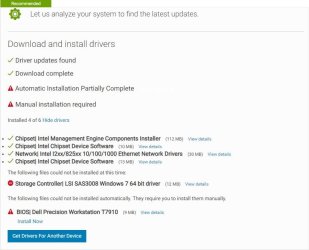
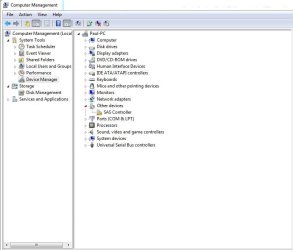
Just seeing your new post. Over the past few mins I went ahead and did the "Let us analyze your system to find the latest updates." I had to install their (Dell's) SupportAssistLauncher, so did that. It listed the drivers I needed and downloaded 6 of them, but could only install 4. I have attached a screengrab. I also will attach my updated device manager list, which is looking good at last! Well, better than it did earlier tonight.

I reckon I will need to update the BIOS to fix the last remaining exclamation mark?
 

Attachments

  • Drivers_SupportAssistLauncher.JPG
    Drivers_SupportAssistLauncher.JPG
    54.7 KB · Views: 0
  • Device_Manager4.JPG
    Device_Manager4.JPG
    47.8 KB · Views: 0

My Computer My Computer

At a glance

Microsoft Windows 7 Professional 64-bitDual Xeon(R) CPU E5-2687W v3 @ 3.10GHz32.00 GBNVIDIA Quadro K4200
Computer type
PC/Desktop
Computer Manufacturer/Model Number
Dell Precision Tower 7910 Workstation
OS
Microsoft Windows 7 Professional 64-bit
CPU
Dual Xeon(R) CPU E5-2687W v3 @ 3.10GHz
Motherboard
Dell Inc. 0215PR
Memory
32.00 GB
Graphics Card(s)
NVIDIA Quadro K4200
Sound Card
(1) NVIDIA High Definition Audio (2) High Definition Audio
Hard Drives
(1) SK hynix SC210 2.5 7MM 256GB ATA Device
(2) ATA WDC WD4003FZEX-0 SCSI Disk Device
Antivirus
Avast Free and Malwarebytes Free
Browser
Chrome
Other Info
BIOS: BIOS Date: 04/14/15 18:58:26 Ver: A07.00
Hi RedLad,

I reckon I will need to update the BIOS to fix the last remaining exclamation mark?

Yes, ONLY update the BIOS at this present time.

IMPORTANT: Pay very close attention to the instructions they give for the installation of the BIOS and follow them to the letter!

Can you also click the view details for the LSi SAS3008 Windows 7 64 bit driver and post the details plaese.
 

My Computer My Computer

At a glance

Win 7 HP SP1 64-bit Vista HB SP2 32-bit Linux...Intel(R) Pentium(R) CPU P6200 @ 2.13GHz4.00 GBIntel(R) Graphics Media Accelerator HD
Computer type
Laptop
Computer Manufacturer/Model Number
Fujitsu LIFEBOOK
OS
Win 7 HP SP1 64-bit Vista HB SP2 32-bit Linux Mint 18.3
CPU
Intel(R) Pentium(R) CPU P6200 @ 2.13GHz
Motherboard
FUJITSU FJNBB06
Memory
4.00 GB
Graphics Card(s)
Intel(R) Graphics Media Accelerator HD
Sound Card
[1] Realtek High Definition Audio [2] Intel(R) Display Audio
Screen Resolution
1366 x 768 x 32 bits (4294967296 colors) @ 59 Hz
Hard Drives
TOSHIBA MK5076GSX
Antivirus
AVG FREE
Hi RedLad,


Yes, ONLY update the BIOS at this present time.

IMPORTANT: Pay very close attention to the instructions they give for the installation of the BIOS and follow them to the letter!

Can you also click the view details for the LSi SAS3008 Windows 7 64 bit driver and post the details plaese.


Before I install the BIOS Paul, I recall you mentioned something about flashing the current state of the BIOS - would this be worth doing before I proceed to install it? Or even would it be ideal for me to note all of the settings in the current one before going ahead?
Here is the screengrab of the LSI driver.
 

Attachments

  • LSI SAS3008 Windows 7 64 bit driver details.JPG
    LSI SAS3008 Windows 7 64 bit driver details.JPG
    66.5 KB · Views: 0

My Computer My Computer

At a glance

Microsoft Windows 7 Professional 64-bitDual Xeon(R) CPU E5-2687W v3 @ 3.10GHz32.00 GBNVIDIA Quadro K4200
Computer type
PC/Desktop
Computer Manufacturer/Model Number
Dell Precision Tower 7910 Workstation
OS
Microsoft Windows 7 Professional 64-bit
CPU
Dual Xeon(R) CPU E5-2687W v3 @ 3.10GHz
Motherboard
Dell Inc. 0215PR
Memory
32.00 GB
Graphics Card(s)
NVIDIA Quadro K4200
Sound Card
(1) NVIDIA High Definition Audio (2) High Definition Audio
Hard Drives
(1) SK hynix SC210 2.5 7MM 256GB ATA Device
(2) ATA WDC WD4003FZEX-0 SCSI Disk Device
Antivirus
Avast Free and Malwarebytes Free
Browser
Chrome
Other Info
BIOS: BIOS Date: 04/14/15 18:58:26 Ver: A07.00
Hi RedLad,

Before I install the BIOS Paul, I recall you mentioned something about flashing the current state of the BIOS - would this be worth doing before I proceed to install it? Or even would it be ideal for me to note all of the settings in the current one before going ahead?

It is the same thing. It basically updates the BIOS with a new program. Noting the settings will make no difference.

IMPORTANT:The computer cannot boot without the BIOS. If the power supply goes out while the BIOS is being flashed, it can leave you with a permanently damaged BIOS, resulting in your computer becoming a useless box. Another way the BIOS can be severely damaged is if it is flashed with an incorrect update version.

Go ahead and update the BIOS. Just make sure you follow the instructions exactly.
 

My Computer My Computer

At a glance

Win 7 HP SP1 64-bit Vista HB SP2 32-bit Linux...Intel(R) Pentium(R) CPU P6200 @ 2.13GHz4.00 GBIntel(R) Graphics Media Accelerator HD
Computer type
Laptop
Computer Manufacturer/Model Number
Fujitsu LIFEBOOK
OS
Win 7 HP SP1 64-bit Vista HB SP2 32-bit Linux Mint 18.3
CPU
Intel(R) Pentium(R) CPU P6200 @ 2.13GHz
Motherboard
FUJITSU FJNBB06
Memory
4.00 GB
Graphics Card(s)
Intel(R) Graphics Media Accelerator HD
Sound Card
[1] Realtek High Definition Audio [2] Intel(R) Display Audio
Screen Resolution
1366 x 768 x 32 bits (4294967296 colors) @ 59 Hz
Hard Drives
TOSHIBA MK5076GSX
Antivirus
AVG FREE
Hi RedLad,


It is the same thing.

IMPORTANT: The computer cannot boot without the BIOS. If the power supply goes out while the BIOS is being flashed, it can leave you with a permanently damaged BIOS, resulting in your computer becoming a useless box. Another way the BIOS can be severely damaged is if it is flashed with an incorrect update version.

Go ahead and update the BIOS. Just make sure you follow the instructions exactly.

Oh man, now you have me shi*tting it! When you say read the instructions, do you mean the info displayed on the attached image? Or is there a ton of stuff to read and do upon the install - if this is the case, I am best leaving it till tomorrow with a fresh head, I am a little tired here now.

Also, what is that part I have circled in the image?
 

Attachments

  • Dell Precision Workstation T7910 BIOS.JPG
    Dell Precision Workstation T7910 BIOS.JPG
    86.8 KB · Views: 2

My Computer My Computer

At a glance

Microsoft Windows 7 Professional 64-bitDual Xeon(R) CPU E5-2687W v3 @ 3.10GHz32.00 GBNVIDIA Quadro K4200
Computer type
PC/Desktop
Computer Manufacturer/Model Number
Dell Precision Tower 7910 Workstation
OS
Microsoft Windows 7 Professional 64-bit
CPU
Dual Xeon(R) CPU E5-2687W v3 @ 3.10GHz
Motherboard
Dell Inc. 0215PR
Memory
32.00 GB
Graphics Card(s)
NVIDIA Quadro K4200
Sound Card
(1) NVIDIA High Definition Audio (2) High Definition Audio
Hard Drives
(1) SK hynix SC210 2.5 7MM 256GB ATA Device
(2) ATA WDC WD4003FZEX-0 SCSI Disk Device
Antivirus
Avast Free and Malwarebytes Free
Browser
Chrome
Other Info
BIOS: BIOS Date: 04/14/15 18:58:26 Ver: A07.00
Hi RedLad,

Oh man, now you have me shi*tting it! When you say read the instructions, do you mean the info displayed on the attached image?

No, I mean the instructions further down on the attached image titled Installation instructions.

I have just looked at it for you and it is a BIOS executable file so that is good.

This is what you need to do:

Updating the BIOS through Windows:-

1. Click Download File to download the file.
2. When the File Download window appears, click Save to save the file to your hard drive [I recommend the Desktop].
3. Browse to the location where you downloaded the file and double-click the new file.

The system automatically restarts and updates the BIOS during the system startup screen. After the BIOS update is complete, the system reboots again.

Good luck!
 
Last edited:

My Computer My Computer

At a glance

Win 7 HP SP1 64-bit Vista HB SP2 32-bit Linux...Intel(R) Pentium(R) CPU P6200 @ 2.13GHz4.00 GBIntel(R) Graphics Media Accelerator HD
Computer type
Laptop
Computer Manufacturer/Model Number
Fujitsu LIFEBOOK
OS
Win 7 HP SP1 64-bit Vista HB SP2 32-bit Linux Mint 18.3
CPU
Intel(R) Pentium(R) CPU P6200 @ 2.13GHz
Motherboard
FUJITSU FJNBB06
Memory
4.00 GB
Graphics Card(s)
Intel(R) Graphics Media Accelerator HD
Sound Card
[1] Realtek High Definition Audio [2] Intel(R) Display Audio
Screen Resolution
1366 x 768 x 32 bits (4294967296 colors) @ 59 Hz
Hard Drives
TOSHIBA MK5076GSX
Antivirus
AVG FREE
OK thanks Paul.

I am just reading this -

Important Information
A11 and all earlier BIOS releases are incompatible with Intel Xeon E5-16xx/26xx-v4 CPUs (Broadwell). Customers who wish to downgrade from A12 (minimum revision to support Broadwell) or higher must first go through A11 before going to their target BIOS rev. This is due to some significant changes required to enable v4 (Broadwell) CPUs and at the same time allowing Xeon E5-16XX/26XX v3 (Haswell) CPUs and v4 (Broadwell) CPUs BIOS to stay in one BIOS stream. All versions of the Broadwell CPU enabled BIOS (A12+) understand how to migrate the Haswell settings. There are no upgrade restrictions. To downgrade below A12, a user must flash to A11 first. It is the only V3 (Haswell) BIOS with v4 (Broadwell) downgrade logic in place.

My processors are dual Xeon E5-2687W v3 (I think - Haswell) I will check this tomorrow, to be sure.

I am knackered tired, I will pick this back up tomorrow Paul. Thanks for the help again, talk soon!
 

My Computer My Computer

At a glance

Microsoft Windows 7 Professional 64-bitDual Xeon(R) CPU E5-2687W v3 @ 3.10GHz32.00 GBNVIDIA Quadro K4200
Computer type
PC/Desktop
Computer Manufacturer/Model Number
Dell Precision Tower 7910 Workstation
OS
Microsoft Windows 7 Professional 64-bit
CPU
Dual Xeon(R) CPU E5-2687W v3 @ 3.10GHz
Motherboard
Dell Inc. 0215PR
Memory
32.00 GB
Graphics Card(s)
NVIDIA Quadro K4200
Sound Card
(1) NVIDIA High Definition Audio (2) High Definition Audio
Hard Drives
(1) SK hynix SC210 2.5 7MM 256GB ATA Device
(2) ATA WDC WD4003FZEX-0 SCSI Disk Device
Antivirus
Avast Free and Malwarebytes Free
Browser
Chrome
Other Info
BIOS: BIOS Date: 04/14/15 18:58:26 Ver: A07.00
Hi RedLad,

Thanks for the help again, talk soon!
You are very welcome :thumbsup:.
You are almost there. Once the updates are finished you can create a system image!
 

My Computer My Computer

At a glance

Win 7 HP SP1 64-bit Vista HB SP2 32-bit Linux...Intel(R) Pentium(R) CPU P6200 @ 2.13GHz4.00 GBIntel(R) Graphics Media Accelerator HD
Computer type
Laptop
Computer Manufacturer/Model Number
Fujitsu LIFEBOOK
OS
Win 7 HP SP1 64-bit Vista HB SP2 32-bit Linux Mint 18.3
CPU
Intel(R) Pentium(R) CPU P6200 @ 2.13GHz
Motherboard
FUJITSU FJNBB06
Memory
4.00 GB
Graphics Card(s)
Intel(R) Graphics Media Accelerator HD
Sound Card
[1] Realtek High Definition Audio [2] Intel(R) Display Audio
Screen Resolution
1366 x 768 x 32 bits (4294967296 colors) @ 59 Hz
Hard Drives
TOSHIBA MK5076GSX
Antivirus
AVG FREE
Hi Paul,
Just back at the PC now and about to attempt this BIOS update. I can see light at the end of this tunnel at last, hopefully the update goes smooth.

I just wanted to check something with you first. See the Important Information text in my post #90? Am I all OK for that do you think? My processors are dual Xeon E5-2687W v3
 

My Computer My Computer

At a glance

Microsoft Windows 7 Professional 64-bitDual Xeon(R) CPU E5-2687W v3 @ 3.10GHz32.00 GBNVIDIA Quadro K4200
Computer type
PC/Desktop
Computer Manufacturer/Model Number
Dell Precision Tower 7910 Workstation
OS
Microsoft Windows 7 Professional 64-bit
CPU
Dual Xeon(R) CPU E5-2687W v3 @ 3.10GHz
Motherboard
Dell Inc. 0215PR
Memory
32.00 GB
Graphics Card(s)
NVIDIA Quadro K4200
Sound Card
(1) NVIDIA High Definition Audio (2) High Definition Audio
Hard Drives
(1) SK hynix SC210 2.5 7MM 256GB ATA Device
(2) ATA WDC WD4003FZEX-0 SCSI Disk Device
Antivirus
Avast Free and Malwarebytes Free
Browser
Chrome
Other Info
BIOS: BIOS Date: 04/14/15 18:58:26 Ver: A07.00
Hi RedLad,

Just back at the PC now and about to attempt this BIOS update. I can see light at the end of this tunnel at last, hopefully the update goes smooth.
:thumbsup:

I just wanted to check something with you first. See the Important Information text in my post #90? Am I all OK for that do you think? My processors are dual Xeon E5-2687W v3

I have just read it again and I think you are OK to go. The thing is, it gave you that update after you put in your service tag, so it obviously needs to be updated for your OS.

Good luck!
 

My Computer My Computer

At a glance

Win 7 HP SP1 64-bit Vista HB SP2 32-bit Linux...Intel(R) Pentium(R) CPU P6200 @ 2.13GHz4.00 GBIntel(R) Graphics Media Accelerator HD
Computer type
Laptop
Computer Manufacturer/Model Number
Fujitsu LIFEBOOK
OS
Win 7 HP SP1 64-bit Vista HB SP2 32-bit Linux Mint 18.3
CPU
Intel(R) Pentium(R) CPU P6200 @ 2.13GHz
Motherboard
FUJITSU FJNBB06
Memory
4.00 GB
Graphics Card(s)
Intel(R) Graphics Media Accelerator HD
Sound Card
[1] Realtek High Definition Audio [2] Intel(R) Display Audio
Screen Resolution
1366 x 768 x 32 bits (4294967296 colors) @ 59 Hz
Hard Drives
TOSHIBA MK5076GSX
Antivirus
AVG FREE
OK, I will report back soon if all goes well, cheers!
 

My Computer My Computer

At a glance

Microsoft Windows 7 Professional 64-bitDual Xeon(R) CPU E5-2687W v3 @ 3.10GHz32.00 GBNVIDIA Quadro K4200
Computer type
PC/Desktop
Computer Manufacturer/Model Number
Dell Precision Tower 7910 Workstation
OS
Microsoft Windows 7 Professional 64-bit
CPU
Dual Xeon(R) CPU E5-2687W v3 @ 3.10GHz
Motherboard
Dell Inc. 0215PR
Memory
32.00 GB
Graphics Card(s)
NVIDIA Quadro K4200
Sound Card
(1) NVIDIA High Definition Audio (2) High Definition Audio
Hard Drives
(1) SK hynix SC210 2.5 7MM 256GB ATA Device
(2) ATA WDC WD4003FZEX-0 SCSI Disk Device
Antivirus
Avast Free and Malwarebytes Free
Browser
Chrome
Other Info
BIOS: BIOS Date: 04/14/15 18:58:26 Ver: A07.00

My Computer My Computer

At a glance

Win 7 HP SP1 64-bit Vista HB SP2 32-bit Linux...Intel(R) Pentium(R) CPU P6200 @ 2.13GHz4.00 GBIntel(R) Graphics Media Accelerator HD
Computer type
Laptop
Computer Manufacturer/Model Number
Fujitsu LIFEBOOK
OS
Win 7 HP SP1 64-bit Vista HB SP2 32-bit Linux Mint 18.3
CPU
Intel(R) Pentium(R) CPU P6200 @ 2.13GHz
Motherboard
FUJITSU FJNBB06
Memory
4.00 GB
Graphics Card(s)
Intel(R) Graphics Media Accelerator HD
Sound Card
[1] Realtek High Definition Audio [2] Intel(R) Display Audio
Screen Resolution
1366 x 768 x 32 bits (4294967296 colors) @ 59 Hz
Hard Drives
TOSHIBA MK5076GSX
Antivirus
AVG FREE
I'm back! All in good health too, it seems to have went well, thankfully!

I still have the yellow exclamation mark by the SAS Controller in Device Manager. So is the last part to install that LSI SAS3008 Storage Controller?
 

My Computer My Computer

At a glance

Microsoft Windows 7 Professional 64-bitDual Xeon(R) CPU E5-2687W v3 @ 3.10GHz32.00 GBNVIDIA Quadro K4200
Computer type
PC/Desktop
Computer Manufacturer/Model Number
Dell Precision Tower 7910 Workstation
OS
Microsoft Windows 7 Professional 64-bit
CPU
Dual Xeon(R) CPU E5-2687W v3 @ 3.10GHz
Motherboard
Dell Inc. 0215PR
Memory
32.00 GB
Graphics Card(s)
NVIDIA Quadro K4200
Sound Card
(1) NVIDIA High Definition Audio (2) High Definition Audio
Hard Drives
(1) SK hynix SC210 2.5 7MM 256GB ATA Device
(2) ATA WDC WD4003FZEX-0 SCSI Disk Device
Antivirus
Avast Free and Malwarebytes Free
Browser
Chrome
Other Info
BIOS: BIOS Date: 04/14/15 18:58:26 Ver: A07.00
Hi RedLad,

I'm back! All in good health too, it seems to have went well, thankfully!
Excellent :thumbsup:.

I still have the yellow exclamation mark by the SAS Controller in Device Manager. So is the last part to install that LSI SAS3008 Storage Controller?

Run the updates again from the Dell website by putting in your Service Tag.
 

My Computer My Computer

At a glance

Win 7 HP SP1 64-bit Vista HB SP2 32-bit Linux...Intel(R) Pentium(R) CPU P6200 @ 2.13GHz4.00 GBIntel(R) Graphics Media Accelerator HD
Computer type
Laptop
Computer Manufacturer/Model Number
Fujitsu LIFEBOOK
OS
Win 7 HP SP1 64-bit Vista HB SP2 32-bit Linux Mint 18.3
CPU
Intel(R) Pentium(R) CPU P6200 @ 2.13GHz
Motherboard
FUJITSU FJNBB06
Memory
4.00 GB
Graphics Card(s)
Intel(R) Graphics Media Accelerator HD
Sound Card
[1] Realtek High Definition Audio [2] Intel(R) Display Audio
Screen Resolution
1366 x 768 x 32 bits (4294967296 colors) @ 59 Hz
Hard Drives
TOSHIBA MK5076GSX
Antivirus
AVG FREE
You mean the driver help wizard thing through Dell's site?
 

My Computer My Computer

At a glance

Microsoft Windows 7 Professional 64-bitDual Xeon(R) CPU E5-2687W v3 @ 3.10GHz32.00 GBNVIDIA Quadro K4200
Computer type
PC/Desktop
Computer Manufacturer/Model Number
Dell Precision Tower 7910 Workstation
OS
Microsoft Windows 7 Professional 64-bit
CPU
Dual Xeon(R) CPU E5-2687W v3 @ 3.10GHz
Motherboard
Dell Inc. 0215PR
Memory
32.00 GB
Graphics Card(s)
NVIDIA Quadro K4200
Sound Card
(1) NVIDIA High Definition Audio (2) High Definition Audio
Hard Drives
(1) SK hynix SC210 2.5 7MM 256GB ATA Device
(2) ATA WDC WD4003FZEX-0 SCSI Disk Device
Antivirus
Avast Free and Malwarebytes Free
Browser
Chrome
Other Info
BIOS: BIOS Date: 04/14/15 18:58:26 Ver: A07.00
Last edited:

My Computer My Computer

At a glance

Win 7 HP SP1 64-bit Vista HB SP2 32-bit Linux...Intel(R) Pentium(R) CPU P6200 @ 2.13GHz4.00 GBIntel(R) Graphics Media Accelerator HD
Computer type
Laptop
Computer Manufacturer/Model Number
Fujitsu LIFEBOOK
OS
Win 7 HP SP1 64-bit Vista HB SP2 32-bit Linux Mint 18.3
CPU
Intel(R) Pentium(R) CPU P6200 @ 2.13GHz
Motherboard
FUJITSU FJNBB06
Memory
4.00 GB
Graphics Card(s)
Intel(R) Graphics Media Accelerator HD
Sound Card
[1] Realtek High Definition Audio [2] Intel(R) Display Audio
Screen Resolution
1366 x 768 x 32 bits (4294967296 colors) @ 59 Hz
Hard Drives
TOSHIBA MK5076GSX
Antivirus
AVG FREE
OK, so I triel to let the wizard help me to do it. It said there were two drivers to install. One instyalled, I think that was another Chipset one.

But, it failed on that LSI SAS one again.

I then downloaded it manually and tried to install, it said that 2 'Avago' components had been successfully installed, one is listed as 'Avago Adapter, SAS3 3008 Fury -StorPort' in the Device Manager (which now has no yellow flags!)

I am just thinking, the LSI thing may be something to do with the raid?? Which is what I had a fair bit of trouble trying to get to be off before. I will have to backtrack through the other thread from a few years back to confirm this. But, my guess is that because it is currently 'off' for whatever steps the guys helped me to do, it is not letting that LSI driver be installed?
 

My Computer My Computer

At a glance

Microsoft Windows 7 Professional 64-bitDual Xeon(R) CPU E5-2687W v3 @ 3.10GHz32.00 GBNVIDIA Quadro K4200
Computer type
PC/Desktop
Computer Manufacturer/Model Number
Dell Precision Tower 7910 Workstation
OS
Microsoft Windows 7 Professional 64-bit
CPU
Dual Xeon(R) CPU E5-2687W v3 @ 3.10GHz
Motherboard
Dell Inc. 0215PR
Memory
32.00 GB
Graphics Card(s)
NVIDIA Quadro K4200
Sound Card
(1) NVIDIA High Definition Audio (2) High Definition Audio
Hard Drives
(1) SK hynix SC210 2.5 7MM 256GB ATA Device
(2) ATA WDC WD4003FZEX-0 SCSI Disk Device
Antivirus
Avast Free and Malwarebytes Free
Browser
Chrome
Other Info
BIOS: BIOS Date: 04/14/15 18:58:26 Ver: A07.00
Back
Top