Solved Windows 7: "Device driver software was not successfully installed"

Wonder Reece

New member
Local time
5:04 AM
Messages
8
Windows 7: "Device driver software was not successfully installed"

Hey everyone,

Today I got myself a new webcam for my PC. Unfortunately, I am unable to get it to work. It is a TeckNet HD720p Webcam, and is supposed to be simple to set up -- you're supposed to plug it in and it's ready to go, but instead I see the above error message.

The lights on the webcam instantly light up, so I do know that there is power being supplied to the webcam. It also came with a disc, which contains an .exe file. When I follow the steps and hit Install, however, it comes up with the following message:

"Please plug-in UVC VIDEO CAMERA device".

I should point out that, as far as I can tell, this software isn't necessary for the webcam to function; I believe it's simply a means of recording. There is nothing else on the disc; no drivers, or any such important files.There is also nothing on the manufacturer's website.

In Control Panel's Devices and Printers, "TeckNet" appears under the Unspecified category (with a yellow warning symbol). When I attempt to "Update Driver" through Properties, I get this:

"Windows found driver software for your device but encountered an error while attempting to install it.

USB Composite Device

Access is denied."

I don't think the problem is specific to this device, either. The exact same problem actually applies to a memory stick owned by one of my relatives, at least when I put it in my machine. I put this in the other night, only for it to give the same "not successfully installed" error, but I shrugged it at the time thinking it would work the next day upon a reboot. Yet, the problem persists. The memory stick does work on my laptop, so it seems the issue is with my computer. All of my long-term devices, such as my mouse, keyboard, dongle and speakers, however, all function perfectly.

I have tried plugging it into different slots, multiple restarts, Microsoft's Fix It tool, hours of Google searching, and still nothing. At this point, I'm desperate for anyone's suggestions.

I am not sure if this is related or a separate issue, but I'll throw it in here in case it's of use: I am also strangely unable to install Windows' "optional" updates. I selected some described with the purpose of "resolving issues in Windows", but when I restart, they will not install correctly upon booting (I forget the exact pop-up error message right now, but I can find out if anyone wants it).

Thank you so much for reading, and thanks in advance to your responses!
 

My Computer

Computer type
PC/Desktop
Computer Manufacturer/Model Number
Overclockers UK
OS
Windows 7 Home Premium 64-bit
CPU
AMD FX-4100 Quad-Core Processor
Memory
8GB RAM
Graphics Card(s)
KFA2 GeForce™ GT620 2048MB GDDR3 64bit DVI/VGA/PCI-E
Hard Drives
465GB
Antivirus
Avast Antivirus
Browser
Google Chrome

My Computer

Computer type
PC/Desktop
Computer Manufacturer/Model Number
Home Built - Jan 2013
OS
Windows 7 64 Bit Home Premium SP1
CPU
i7-3820
Motherboard
Asus P9X79-PRO - Bios 4608
Memory
GSkill F3-14900CL9Q - 16GB
Graphics Card(s)
EVGA GeForce GTX660 - Driver 352.86
Sound Card
On board Realtek ALC898
Monitor(s) Displays
Acer S271HL
Screen Resolution
1920 x 1080
Hard Drives
#1- Samsung 840 Pro Series
#2- Western Digital WD1002FAEX Sata3 Black
#3- Western Digital WD1002FAEX Sata3 Black
PSU
Corsair CMPSU-850TX-V2 - 850 watt (by Seasonic)
Case
Corsair Obsidian 550D
Cooling
Standard 3 120mm case fans, Cooler Master Hyper 212 EVO
Keyboard
MS KC-0405
Mouse
Intellimouse 5-button
Internet Speed
56 Mbits/Sec (on a good day)
Antivirus
Avast & Malwarebytes
Browser
Firefox
Other Info
Asus DVD - DRW-24B1ST 24X
Thanks for your reply. I didn't happen upon that thread/solution, but I am willing to try it.

Am I right in assuming that I should try this part?

You can simply copy them from (C:\Windows\System32\DriverStore\FileRepository\usbstor.inf_x86_neutral_83027f5d5b2468d3) to C:\Windows\INF and it all seems to work great.

Now, I got as far as the FileRepository folder, but I couldn't find the exact "usbstor.inf_x86_neutral_83027f5d5b2468d3" one within that. Though I'm guessing that, if I have a similar folder, it might be named slightly differently? Here are the two closest-named folders I could find:

"usbstor.inf_amd64_neutral_26b33263a639795d"
"usbstor.inf_amd64_neutral_0725c2806a159a9d"

Those are the only two that begin with "usbstor". Would either of those work?

UPDATE: I went ahead and tried copying over the files from the first folder. This actually fixed my Xbox 360 wired controller, which wasn't being recognised. Unfortunately the webcam and memory stick are still the same. (Also tried the files from the second folder, but same result).
 
Last edited:

My Computer

Computer type
PC/Desktop
Computer Manufacturer/Model Number
Overclockers UK
OS
Windows 7 Home Premium 64-bit
CPU
AMD FX-4100 Quad-Core Processor
Memory
8GB RAM
Graphics Card(s)
KFA2 GeForce™ GT620 2048MB GDDR3 64bit DVI/VGA/PCI-E
Hard Drives
465GB
Antivirus
Avast Antivirus
Browser
Google Chrome
I think those folders may be found on your installation DVD.
 

My Computer

Computer type
PC/Desktop
Computer Manufacturer/Model Number
Home Built - Jan 2013
OS
Windows 7 64 Bit Home Premium SP1
CPU
i7-3820
Motherboard
Asus P9X79-PRO - Bios 4608
Memory
GSkill F3-14900CL9Q - 16GB
Graphics Card(s)
EVGA GeForce GTX660 - Driver 352.86
Sound Card
On board Realtek ALC898
Monitor(s) Displays
Acer S271HL
Screen Resolution
1920 x 1080
Hard Drives
#1- Samsung 840 Pro Series
#2- Western Digital WD1002FAEX Sata3 Black
#3- Western Digital WD1002FAEX Sata3 Black
PSU
Corsair CMPSU-850TX-V2 - 850 watt (by Seasonic)
Case
Corsair Obsidian 550D
Cooling
Standard 3 120mm case fans, Cooler Master Hyper 212 EVO
Keyboard
MS KC-0405
Mouse
Intellimouse 5-button
Internet Speed
56 Mbits/Sec (on a good day)
Antivirus
Avast & Malwarebytes
Browser
Firefox
Other Info
Asus DVD - DRW-24B1ST 24X
I think those folders may be found on your installation DVD.

Am I right in assuming you mean the Windows 7 installation disc? I had a quick look on there but I couldn't find any "usbstor" files. Where should I be looking?

Also, I just tried a System Restore. However, upon boot it gave me the following message:

"System Restore did not complete successfully. Your computer's system files and settings were not changed.

Details:
System Restore could not access a file. This is probably because an anti-virus program is running on the computer. Temporarily disable your antivirus program and retry System Restore.
An unspecified error occurred during System Restore. (0x80070005)

You can try System Restore again and choose a different restore point. If you continue to see this error, you can try an advanced recovery method."

I then disabled Avast Antivirus, attempted an earlier restore point, and received the same error. The issue may run deeper than just not recognising devices -- I find it odd that most errors I've seen so far appear to suggest Windows does not "have access" to necessary files.
 

My Computer

Computer type
PC/Desktop
Computer Manufacturer/Model Number
Overclockers UK
OS
Windows 7 Home Premium 64-bit
CPU
AMD FX-4100 Quad-Core Processor
Memory
8GB RAM
Graphics Card(s)
KFA2 GeForce™ GT620 2048MB GDDR3 64bit DVI/VGA/PCI-E
Hard Drives
465GB
Antivirus
Avast Antivirus
Browser
Google Chrome
Yes, I did mean the Windows 7 installation DVD.
You would need to extract the files/folders if they are in one of the cab folders. Can't recall how to extract specific files. If I find that I will post it.

Yes, it's sounding more like you have something bigger going on there.
That System Restore message is rather generic, it just means something is interfering with the restore. Sometimes it is because a device that was installed at the time of the restore point is no longer present. Which loops back onto your original troubles.
 

My Computer

Computer type
PC/Desktop
Computer Manufacturer/Model Number
Home Built - Jan 2013
OS
Windows 7 64 Bit Home Premium SP1
CPU
i7-3820
Motherboard
Asus P9X79-PRO - Bios 4608
Memory
GSkill F3-14900CL9Q - 16GB
Graphics Card(s)
EVGA GeForce GTX660 - Driver 352.86
Sound Card
On board Realtek ALC898
Monitor(s) Displays
Acer S271HL
Screen Resolution
1920 x 1080
Hard Drives
#1- Samsung 840 Pro Series
#2- Western Digital WD1002FAEX Sata3 Black
#3- Western Digital WD1002FAEX Sata3 Black
PSU
Corsair CMPSU-850TX-V2 - 850 watt (by Seasonic)
Case
Corsair Obsidian 550D
Cooling
Standard 3 120mm case fans, Cooler Master Hyper 212 EVO
Keyboard
MS KC-0405
Mouse
Intellimouse 5-button
Internet Speed
56 Mbits/Sec (on a good day)
Antivirus
Avast & Malwarebytes
Browser
Firefox
Other Info
Asus DVD - DRW-24B1ST 24X
I can't seem to find those cab folders you mentioned. Any ideas?
 

My Computer

Computer type
PC/Desktop
Computer Manufacturer/Model Number
Overclockers UK
OS
Windows 7 Home Premium 64-bit
CPU
AMD FX-4100 Quad-Core Processor
Memory
8GB RAM
Graphics Card(s)
KFA2 GeForce™ GT620 2048MB GDDR3 64bit DVI/VGA/PCI-E
Hard Drives
465GB
Antivirus
Avast Antivirus
Browser
Google Chrome
Not really. Let me see if anyone else can help.
 

My Computer

Computer type
PC/Desktop
Computer Manufacturer/Model Number
Home Built - Jan 2013
OS
Windows 7 64 Bit Home Premium SP1
CPU
i7-3820
Motherboard
Asus P9X79-PRO - Bios 4608
Memory
GSkill F3-14900CL9Q - 16GB
Graphics Card(s)
EVGA GeForce GTX660 - Driver 352.86
Sound Card
On board Realtek ALC898
Monitor(s) Displays
Acer S271HL
Screen Resolution
1920 x 1080
Hard Drives
#1- Samsung 840 Pro Series
#2- Western Digital WD1002FAEX Sata3 Black
#3- Western Digital WD1002FAEX Sata3 Black
PSU
Corsair CMPSU-850TX-V2 - 850 watt (by Seasonic)
Case
Corsair Obsidian 550D
Cooling
Standard 3 120mm case fans, Cooler Master Hyper 212 EVO
Keyboard
MS KC-0405
Mouse
Intellimouse 5-button
Internet Speed
56 Mbits/Sec (on a good day)
Antivirus
Avast & Malwarebytes
Browser
Firefox
Other Info
Asus DVD - DRW-24B1ST 24X

My Computer

Computer type
Laptop
Computer Manufacturer/Model Number
Asus K52F or Lenovo B51-80
OS
Win 7 x64 Home Premium (and x86 VirtualBox VM)/Win10
CPU
i3 370M/i7 6500U
Motherboard
Asus/Lenovo
Memory
8GB - finally :)/8GB
Graphics Card(s)
it's an i3, dude!/dual Intel&nVidia
Sound Card
onboard
Monitor(s) Displays
15.6" built-in
Screen Resolution
1366x768/1920x1080
Hard Drives
750GB Seagate internal
Sundry external drives attached to other computers on the local network
1TB SSD on the Lenovo
PSU
n/a
Internet Speed
as much as I can get - usually on a dongle/phone, so <1MB/s
Antivirus
MSE/Defender
Browser
IE11/12/Edge/Chrome/FF(if I must)
Hi Wonder Reece

Your USB Composite error in the first post may well be your webcam... fyi
  • Web cams have 2 different USB interfaces - one for audio, one for video
  • USB devices with multiple interfaces are, by definition, "Composite Devices"
  • So (maybe) that composite device error is your web cam

We can have a look. While we;re at it, plug your problematic USB flash drive in as well then list any Problem devices
  • Click the Start Orb, type msinfo32 in the search box. Hit Enter
  • Click the + sign next to Components to expand it
  • Click Problem Devices. Anything appear?
  • If yes, click on it, Ctrl-A to select all, Ctrl-C to copy it, Ctrl-V to paste into next post
  • On the other hand, if no devices are listed, tell me so
 

My Computer

Computer type
PC/Desktop
Computer Manufacturer/Model Number
Dell Optiplex 360 and Optiplex 755
OS
Desk 1: Win 7 Pro x32; Desk 2: Windows 10 x64
Hard Drives
500GB Crucial SSD in both Desktops
Other Info
Buffalo 6TB NAS, Raid 1
Hi everyone. I'm brand new to this forum, so hopefully I'm going about posting my problem the right way. If I'm not, please excuse the error, and let me know what I should do instead.

So the reason I'm posting in this thread is because I seem to be having the exact same problem as Wonder Reece. None of my USB ports work and I cannot install any of the optional Windows updates. For example, when I plug in one of my flash drives, I get a message saying that the driver for the device failed to install. The same thing happens with other devices. So I go out on the internet to try to solve the problem, but curiously, my NVIDIA network adapter controller is missing, so I can't get on the internet. (I'm using a different computer to post this). I previously downloaded the driver from NVIDIA's website, and it's sitting on my desktop, but it fails to reinstall every time. So bottom line, I can't install any non-Windows drivers, and nothing that I plug into a USB port works because the drivers won't install. Seems like the two issues must be related, but for the life of me, I can't figure out how.

Hopefully I'm not confusing the issue here. It just seemed so uncannily similar, that I thought I might add to the conversation. If I'm confusing matters, please tell me what the best process is to get my issue resolved, and I'll do it. Thanks!
 

My Computer

Computer type
PC/Desktop
Computer Manufacturer/Model Number
Compaq Presario
OS
Windows 7 Home Premium 32bit
Browser
IE
Hi everyone. I'm brand new to this forum, so hopefully I'm going about posting my problem the right way. If I'm not, please excuse the error, and let me know what I should do instead.

Please start a NEW thread of your own, and followthe WindowsUpdate Posting Instructions and post the requested data there.
 

My Computer

Computer type
Laptop
Computer Manufacturer/Model Number
Asus K52F or Lenovo B51-80
OS
Win 7 x64 Home Premium (and x86 VirtualBox VM)/Win10
CPU
i3 370M/i7 6500U
Motherboard
Asus/Lenovo
Memory
8GB - finally :)/8GB
Graphics Card(s)
it's an i3, dude!/dual Intel&nVidia
Sound Card
onboard
Monitor(s) Displays
15.6" built-in
Screen Resolution
1366x768/1920x1080
Hard Drives
750GB Seagate internal
Sundry external drives attached to other computers on the local network
1TB SSD on the Lenovo
PSU
n/a
Internet Speed
as much as I can get - usually on a dongle/phone, so <1MB/s
Antivirus
MSE/Defender
Browser
IE11/12/Edge/Chrome/FF(if I must)
Well my 2 cents for what it is worth the Tecknet site does not give any drivers for this device - that I can see only ones for two mice and I am just wondering if the device came with a install software maybe it or the device itself is bad.
It also seems to be quite a medium priced product as opposed to some of the higher end stuff and I am in no way criticising the thing re quality but perhaps a different brand even if it is slightly higher priced might be the go.

I am also wondering if the device works on another machine?? It would certainly be worth trying that or it is something that I would personally have bash at. If it does work on another machine it could point the finger at the machine itself??
 

My Computer

Computer type
PC/Desktop
Computer Manufacturer/Model Number
Own build (new) Desk1 / Asus ROG Win 7 / Desk2 1st build
OS
Desk1 7 Home Prem / Desk2 10 Pro / Main lap Asus ROG 10 Pro 2 laptop Toshiba 7 Pro Asus P2520 7 & 10
CPU
Desk1 i5 3750K / Laptop i7 GTX 860M / Desk2 i5 2500
Motherboard
Desk1 Asus P877-V / Desk2 Gigabyte H67 UD3H / Laptop ?
Memory
Desk1 8GB (1866) / Desk2 16GB (1333) / Laptop 8Gb DDR3
Graphics Card(s)
Desk 1& 2NVidia GTX 650 & Laptops on board Intel
Sound Card
Desk 1 & 2 -XONAR DG Realtek High Def audio Laptop
Monitor(s) Displays
Desk 1 Benq HD 2450 / Desk2 Philips 24" / Laptop 17.5"
Screen Resolution
1920x1080 D1 & D2 & Laptop 1
Hard Drives
Desk1 Samsung 120GB 830 SSD
Asus ROG 256GB 850 Pro SSD
Desk2 Samsung 840 256 SSD
Toshiba 120GB EVO
PSU
Desk 1 Corsair HX 1050/ Laptop ? / Desk 2 Corsair HX 650
Case
Desk 1 Cooler HAF XM ? Toshiba laptop / Desk2 Coolermaster
Cooling
Fans on all Desk1 -2 Desk2 - all Coolermasters 5 Laptop ?
Keyboard
Desk 1 MS Sidewinder X6 Desk 2 MS Sidewinder X 4
Mouse
Desk 1&2 - Gigabyte MS 900 gamer - laptop - Logitec wireless
Internet Speed
ADSL2+
Other Info
One other Desktop (tester) and spare Toshba laptop both with SSD's
Running Kaspersky 2016 ISS on all machines config'd identically
Logitec audio stereo systems on each machine (x3)
Canon MG5250MFC
Router/modem TP-Link running WPA2SK
Thanks a lot to both of you for replying.

@NoelDP: I tried the program three times, but every time it gave me the following:

Some updates were not installed

The following updates were not installed:
Hotfix for Windows (KB947821)

@ComputerGeek: I don't have the aforementioned memory stick any more, but I do have another one that doesn't work. So it may as well be the same. Here:

TeckNet USB\VID_058F&PID_3832\5&30AC598D&0&1 The drivers for this device are not installed.
USB DISK 2.0 USB\VID_13FE&PID_3600\07BA19013A4DE38B This device is not configured correctly.
 

My Computer

Computer type
PC/Desktop
Computer Manufacturer/Model Number
Overclockers UK
OS
Windows 7 Home Premium 64-bit
CPU
AMD FX-4100 Quad-Core Processor
Memory
8GB RAM
Graphics Card(s)
KFA2 GeForce™ GT620 2048MB GDDR3 64bit DVI/VGA/PCI-E
Hard Drives
465GB
Antivirus
Avast Antivirus
Browser
Google Chrome
You appear to have some major problems.
Please upload your entire CBS folder (see section 4 of the post I linked to)
 

My Computer

Computer type
Laptop
Computer Manufacturer/Model Number
Asus K52F or Lenovo B51-80
OS
Win 7 x64 Home Premium (and x86 VirtualBox VM)/Win10
CPU
i3 370M/i7 6500U
Motherboard
Asus/Lenovo
Memory
8GB - finally :)/8GB
Graphics Card(s)
it's an i3, dude!/dual Intel&nVidia
Sound Card
onboard
Monitor(s) Displays
15.6" built-in
Screen Resolution
1366x768/1920x1080
Hard Drives
750GB Seagate internal
Sundry external drives attached to other computers on the local network
1TB SSD on the Lenovo
PSU
n/a
Internet Speed
as much as I can get - usually on a dongle/phone, so <1MB/s
Antivirus
MSE/Defender
Browser
IE11/12/Edge/Chrome/FF(if I must)
Your result indicates possible Windows driver corruption

Control Panel->Folder Options->View. Uncheck "Hide extensions for known file types". Click OK

Now, check if each of the files below exist. Tell me if any are missing.
For each .sys file, right click->Properties->Details and report the File Version of each

C:\windows\inf\usbstor.inf
C:\windows\inf\usbstor.pnf
C:\windows\system32\drivers\usbstor.sys

C:\windows\inf\usb.inf
C:\windows\inf\usb.pnf
C:\windows\system32\drivers\usbccgp.sys

/* EDIT */
p.s. "Access denied" on the Composite device could also be why the Teknet USB won't install/has no driver. (your flash drive is still a different matter). Also, try right click on the installer and run as Admin
 
Last edited:

My Computer

Computer type
PC/Desktop
Computer Manufacturer/Model Number
Dell Optiplex 360 and Optiplex 755
OS
Desk 1: Win 7 Pro x32; Desk 2: Windows 10 x64
Hard Drives
500GB Crucial SSD in both Desktops
Other Info
Buffalo 6TB NAS, Raid 1
@ICit2lol: Sorry I missed your reply in my last comment. I have tested the webcam on my parents' computer and it installs first time.

Not that it matters now we know it's my PC at fault, but I've only just noticed that the installation disc says "Driver (720.V6.2)" on it. So I may be incorrect in my original post, and this disc is more of a requirement than I thought. It is odd that they don't offer these drivers on the website, though. The product is 4.5/5 stars on Amazon, and while I'm sure there are better alternatives, this is still meant to be a decent (and most importantly, working) product.

@NoelDP: I can't seem to upload it here, I keep getting server errors (my ZIP folder exceeded the upload size limit, but I also tried splitting it into two folders, tried RAR format, etc and still "server error"). So I have uploaded it here: https://www.dropbox.com/s/ewueluzr2okvaaz/CBS.zip

@ComputerGeek: I can confirm that all of those files exist on my computer. Here is the File Version info:

USBSTOR.SYS: 6.1.7601.17577
usbccgp.sys: 6.1.7601.18328

Also, I've tried running the installer using "Run as Administrator" before (and again just now to double-check), and the result is the same.
 

My Computer

Computer type
PC/Desktop
Computer Manufacturer/Model Number
Overclockers UK
OS
Windows 7 Home Premium 64-bit
CPU
AMD FX-4100 Quad-Core Processor
Memory
8GB RAM
Graphics Card(s)
KFA2 GeForce™ GT620 2048MB GDDR3 64bit DVI/VGA/PCI-E
Hard Drives
465GB
Antivirus
Avast Antivirus
Browser
Google Chrome

My Computer

Computer type
PC/Desktop
Computer Manufacturer/Model Number
Own build (new) Desk1 / Asus ROG Win 7 / Desk2 1st build
OS
Desk1 7 Home Prem / Desk2 10 Pro / Main lap Asus ROG 10 Pro 2 laptop Toshiba 7 Pro Asus P2520 7 & 10
CPU
Desk1 i5 3750K / Laptop i7 GTX 860M / Desk2 i5 2500
Motherboard
Desk1 Asus P877-V / Desk2 Gigabyte H67 UD3H / Laptop ?
Memory
Desk1 8GB (1866) / Desk2 16GB (1333) / Laptop 8Gb DDR3
Graphics Card(s)
Desk 1& 2NVidia GTX 650 & Laptops on board Intel
Sound Card
Desk 1 & 2 -XONAR DG Realtek High Def audio Laptop
Monitor(s) Displays
Desk 1 Benq HD 2450 / Desk2 Philips 24" / Laptop 17.5"
Screen Resolution
1920x1080 D1 & D2 & Laptop 1
Hard Drives
Desk1 Samsung 120GB 830 SSD
Asus ROG 256GB 850 Pro SSD
Desk2 Samsung 840 256 SSD
Toshiba 120GB EVO
PSU
Desk 1 Corsair HX 1050/ Laptop ? / Desk 2 Corsair HX 650
Case
Desk 1 Cooler HAF XM ? Toshiba laptop / Desk2 Coolermaster
Cooling
Fans on all Desk1 -2 Desk2 - all Coolermasters 5 Laptop ?
Keyboard
Desk 1 MS Sidewinder X6 Desk 2 MS Sidewinder X 4
Mouse
Desk 1&2 - Gigabyte MS 900 gamer - laptop - Logitec wireless
Internet Speed
ADSL2+
Other Info
One other Desktop (tester) and spare Toshba laptop both with SSD's
Running Kaspersky 2016 ISS on all machines config'd identically
Logitec audio stereo systems on each machine (x3)
Canon MG5250MFC
Router/modem TP-Link running WPA2SK
If I might also add this:

Re: your flash drive problem. See How to Cleanup and Remove old USB Mass Storage Drivers. Follow the instructions and try re-connecting your flash drive

Re: Your web cam issue / Composite Device Access Denied
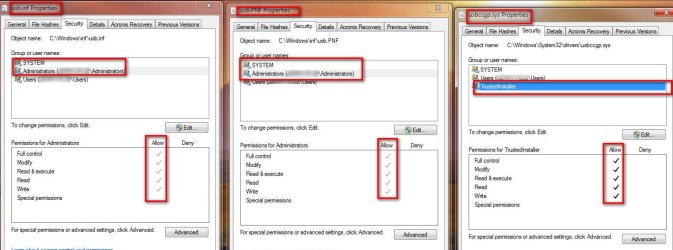
Let's go back and check the access permissions on these 3 files
> C:\windows\inf\usb.inf
> C:\windows\inf\usb.pnf
> C:\windows\system32\drivers\usbccgp.sys

For each file, right click->Properties->Security tab. (You'll see a snap shot for each below).
  1. For usb.inf; Select on SYSTEM and then Administrators. For each selection, verify you see the 5 check marks under Allow and nothing under Deny for each selection. (We don't care about Users)
  2. Check the same for usb.pnf: Select on SYSTEM and then Administrators, verify the 5 check marks under Allow and nothing under Deny. (We don't care about Users)
  3. For usbccgp.sys, select TrustedInstaller. verify the 5 check marks under Allow and nothing under Deny
 

Attachments

  • Properties.jpg
    Properties.jpg
    215.4 KB · Views: 5

My Computer

Computer type
PC/Desktop
Computer Manufacturer/Model Number
Dell Optiplex 360 and Optiplex 755
OS
Desk 1: Win 7 Pro x32; Desk 2: Windows 10 x64
Hard Drives
500GB Crucial SSD in both Desktops
Other Info
Buffalo 6TB NAS, Raid 1
Bonjour,

I had exactly the same problem with a HP Webcam HD 2300 and struggled a few weeks.
Bingo ICit2lol gave the right answer after passing the 3 spy/mal/ad ware removal tools I could install the driver
without any problem and the webcam works!

Thanks a lot.
 

My Computer

Computer type
Laptop
Computer Manufacturer/Model Number
Acer Aspire 7720G
OS
Windows 7 Ultimate x64
CPU
Centrino
Antivirus
Avast
Browser
Firefox
Back
Top