Windows 7 driver solution

The same here here since the Asus support site never came out with any Vista updates for the present board in use. The fresh install will see 5 items for chipset, sata/Raid controllers, Soundmax onboard, and such unless going direct to NVidia.

For the IE connection that was easy enough by simply replacing the ISP provided pece of work with a good modem without the need for any drivers! I simply click the home network item as any 7 installation completes or evern when booting into ubuntu or Knoppix the connection is instant.
 

My Computers

System One System Two

  • Computer type
    PC/Desktop
    Computer Manufacturer/Model Number
    Custom builds = 2
    OS
    W7 Ultimate x64/W10 Pro x64/W11 Pro Triple Boot - Main PC W7 Remote PC Micro ATX W7 Pro x64/W11 Pro
    CPU
    AMD Phenom II X4 975 Deneb 3.6ghz - 965 2nd remote pc
    Motherboard
    Gigabyte GA-790XTA-UD4-Gigabyte GA-880GM-D2H remote pc
    Memory
    Kingston Hyper X DDR3 1600 1.5v 16gb - Hyper X Fury 8gb 2nd
    Graphics Card(s)
    MSI HD Radeon 5750 1gb - MSI HD Radeon 6450 on mini tower
    Sound Card
    Creative Labs X-Fi Xtreme Audio P - Realtek onooard 2nd case
    Monitor(s) Displays
    ASUS VW199T-P 19" HP 2082a Main-HP 2082a 20" remote pc
    Screen Resolution
    Asus 1440x900 - HP 1600x900
    Hard Drives
    WD Black 1TB HD per OS W7, W10, and pending W11 presently on 500gb OS Drive - Pending Triple 1TB HDs for Spanned Storage/backup volume
    Single 2TB external USB enclosure, single 1TB System 7 Host/Boot drive, Pending 8TB external HD for system image b
    PSU
    Corsair 750TX - primary / Corsair CX600 - second
    Case
    Antec 900-2 - SSD compatible / NZXT Vulcan mini tower
    Cooling
    Zalman CNPS9900A
    Keyboard
    AZIO L70 Backlit Letters Gaming - ONN Cordless/USB
    Mouse
    MSI DS200 Programmable, Logitech Cordless
    Internet Speed
    30mbps upgrade - primary hard wired - mini tower usb WiFi
    Antivirus
    GFI VIPRE Internet Security 2014 on W7 2016 beta on W10,
    Browser
    Cyberfox, WaterFox 64bit FF variants, FireFox x64, Pale Moon
    Other Info
    Accomdata fan cooled usb 2.0 PIDE/Sata II, III external enclosure.
    Sambient usb/eSata PATA/Sata II, III external enclosure.
  • Computer type
    PC/Desktop
    System Manufacturer/Model Number
    CUSTOM ASSEMBLY
    OS
    W7 Pro x64/W11 Pro
    CPU
    AMD Deneb 3.6ghz - 965
    Motherboard
    Gigabyte GA-880GM-D2H remote pc
    Memory
    Kingston Hyper X Fury 8gb
    Graphics Card(s)
    MSI HD Radeon 6450 DVI Output
    Sound Card
    Realtek onooard Creative or Other separate PENDING
    Monitor(s) Displays
    VIZIO 32" LCD TV Separate LCD Pending
    Screen Resolution
    1600x1080
    Hard Drives
    WD 500GB OS Host/Boot WD Green 1TB Storage/Backup
    PSU
    Corsair 600W - THERMALTAKE 600W spare case
    Case
    NZXT Vulcan mini tower
    Cooling
    Twin 120mm Top Fans - 240mm Side Cover
    Keyboard
    ONN Cordless/USB Logitech Cordless
    Mouse
    ONN USB/Cordless - Logitech Cordless
    Internet Speed
    DSL 5G
    Browser
    MS Edge, FireFox, WaterFox x64, FireFox Nightly
    Other Info
    OS Testing-Remote Access to Main TeamViewer
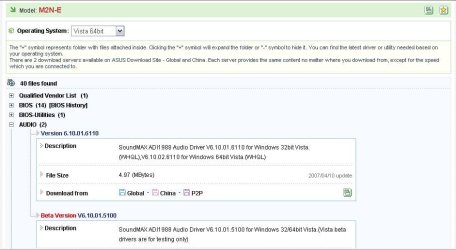
Does ASUS EVER come out with any updated drivers?
the Last driver they made for their Onboard Sound was years ago.
But anyways it should recognize a solid line right away since that's about all it asks for unless you tell it otherwise.
 

My Computer

OS
Win7 7100 / WinXP SP2
To answer that question I looked up what they had for the older AM2 model board in use here when first never finding Vista drivers. For a period of time I had to go the NVidia site for chipset, Soundmax for the onboard audio not used but to have onhand, and allow the Windows Update option in the Control Panel to find the rest except for one addon device.
 

Attachments

  • ASUS VISTA64 UPDATES.jpg
    ASUS VISTA64 UPDATES.jpg
    61.5 KB · Views: 902

My Computers

System One System Two

  • Computer type
    PC/Desktop
    Computer Manufacturer/Model Number
    Custom builds = 2
    OS
    W7 Ultimate x64/W10 Pro x64/W11 Pro Triple Boot - Main PC W7 Remote PC Micro ATX W7 Pro x64/W11 Pro
    CPU
    AMD Phenom II X4 975 Deneb 3.6ghz - 965 2nd remote pc
    Motherboard
    Gigabyte GA-790XTA-UD4-Gigabyte GA-880GM-D2H remote pc
    Memory
    Kingston Hyper X DDR3 1600 1.5v 16gb - Hyper X Fury 8gb 2nd
    Graphics Card(s)
    MSI HD Radeon 5750 1gb - MSI HD Radeon 6450 on mini tower
    Sound Card
    Creative Labs X-Fi Xtreme Audio P - Realtek onooard 2nd case
    Monitor(s) Displays
    ASUS VW199T-P 19" HP 2082a Main-HP 2082a 20" remote pc
    Screen Resolution
    Asus 1440x900 - HP 1600x900
    Hard Drives
    WD Black 1TB HD per OS W7, W10, and pending W11 presently on 500gb OS Drive - Pending Triple 1TB HDs for Spanned Storage/backup volume
    Single 2TB external USB enclosure, single 1TB System 7 Host/Boot drive, Pending 8TB external HD for system image b
    PSU
    Corsair 750TX - primary / Corsair CX600 - second
    Case
    Antec 900-2 - SSD compatible / NZXT Vulcan mini tower
    Cooling
    Zalman CNPS9900A
    Keyboard
    AZIO L70 Backlit Letters Gaming - ONN Cordless/USB
    Mouse
    MSI DS200 Programmable, Logitech Cordless
    Internet Speed
    30mbps upgrade - primary hard wired - mini tower usb WiFi
    Antivirus
    GFI VIPRE Internet Security 2014 on W7 2016 beta on W10,
    Browser
    Cyberfox, WaterFox 64bit FF variants, FireFox x64, Pale Moon
    Other Info
    Accomdata fan cooled usb 2.0 PIDE/Sata II, III external enclosure.
    Sambient usb/eSata PATA/Sata II, III external enclosure.
  • Computer type
    PC/Desktop
    System Manufacturer/Model Number
    CUSTOM ASSEMBLY
    OS
    W7 Pro x64/W11 Pro
    CPU
    AMD Deneb 3.6ghz - 965
    Motherboard
    Gigabyte GA-880GM-D2H remote pc
    Memory
    Kingston Hyper X Fury 8gb
    Graphics Card(s)
    MSI HD Radeon 6450 DVI Output
    Sound Card
    Realtek onooard Creative or Other separate PENDING
    Monitor(s) Displays
    VIZIO 32" LCD TV Separate LCD Pending
    Screen Resolution
    1600x1080
    Hard Drives
    WD 500GB OS Host/Boot WD Green 1TB Storage/Backup
    PSU
    Corsair 600W - THERMALTAKE 600W spare case
    Case
    NZXT Vulcan mini tower
    Cooling
    Twin 120mm Top Fans - 240mm Side Cover
    Keyboard
    ONN Cordless/USB Logitech Cordless
    Mouse
    ONN USB/Cordless - Logitech Cordless
    Internet Speed
    DSL 5G
    Browser
    MS Edge, FireFox, WaterFox x64, FireFox Nightly
    Other Info
    OS Testing-Remote Access to Main TeamViewer
Netgear SC101 NAS Drives missing

After installing Windows 7 Ultimate RC, I could not see my 2 NAS Drives which use the SAN driver services for my Netgear SC101 NAS Drives. I found the solution on social.technet.microsoft.com/forums. And it now works fine after performing the 11 step solution posted there. The main problem was the key in the registry for HKEY_LOCAL_MACHINE\Software\Zetera\Client

Also I had to do a custom installation, mainly changing the installation folder because the default long path gave problems.
 

My Computer

Computer Manufacturer/Model Number
My Home Brew
OS
Windows 7 Ultimate RC 64-bit RC
CPU
Intel i7-920
Motherboard
ASUS P6T
Memory
Dominator 6GB
Graphics Card(s)
Diamond ATI 4890
Sound Card
Integrated on Motherboard
Monitor(s) Displays
SAMSUNG 25.5" Monitor/TV
Screen Resolution
1080P
Hard Drives
Patriot TORQX SSD 64GB as C drive
Seagate 1.5TB
PSU
ANTEC 850W
Case
Cool Master 920 HAF
Cooling
3 fans
Keyboard
Microsoft 3000 USB Wired keyboard
Mouse
Microsoft Bluetooth Mouse
Internet Speed
Cable 10mbps+
hi,

my first post so here goes. :D

i've read just this one thread so i ask for your patience if i might be out of place.

i just setup Win7 RC in both my netbook and my desktop. all is well with the netbook but the desktop has some bugs in it...
1. dlink airplus g+ dwl-g520+ pci card - no Win7 nor Vista driver
2. "?" for pci simple communications controller - have no idea what this is
3. sound is ok from the back panel for the speakers, but none from the front panel for my headset.

all these were ok or non-existent when i was using winxp. for the wifi card, i've checked with a lot of dlink's sites and no luck. actually, the wifi card was pre-owned (and a bit old i suppose) & it didn't come with the xp drivers so had to find it on my own. luckily, i found them here...
Download D-Link DWL-G520+ RevA Wireless Driver/Utility 2.04 Windows 2000/XP

i read here i can do "compatibility mode" with the drivers... am just not sure how to do it... or if i can do it with xp drivers. also, my experience with my dlink wifi card, wifi router and modem is to follow these steps...
1. install the software/drivers first
2. shutdown
3. install the card or connect the router
4. reboot
5. continue/finish installing the software once the OS detects the new hardware

... so, am i supposed to follow these steps too once i figure out/find the drivers for the wifi card?

sorry... i don't have the hardware ids since i already took out the card from the mobo. i hope the name and model of the card is sufficient.

as for the "pci simple communications controller" this is all i have from device manager...
PCI\VEN_8086&DEV_29C4&SUBSYS_50448086&REV_02
PCI\VEN_8086&DEV_29C4&SUBSYS_50448086
PCI\VEN_8086&DEV_29C4&CC_078000
PCI\VEN_8086&DEV_29C4&CC_0780

everything is working fine, except for the sound up front (and wifi, of course). internet i hardwired since my mobo has lan built in, so now my desktop is tied to the router literally. :geek:

for audio, i checked w/ intel's site for an updated driver for audio... what they have is for win 7 beta... so this is for build 7000, right? can i use this? should i just try installing this or no? i ask because i noticed, most especially on my netbook, win7 had almost everything running well after installation... and if there were any drivers left, it followed via Windows Update (i.e., driver for GPU)... so am not sure if i am to install whatever win7 drivers i can get for my mobo, dvd, etc. since i think win7 or microsof have the drivers already, or at least most of it.

other specs are:
intel c2d e6750 proc
intel dp35dp mobo
2gb pc2-6400 ddr2 memory (1 stick)
inno3d gf8600gt 1gb ddr2 128-bit pci-e gpu
2 units seagate 160gb sata hdds
samsung sh-s203n dvd
generic psu from the casing (astone enforcer II)

hope you guys can help. and thank you for your patience in reading this.

godspeed!

john
 

My Computer

Computer Manufacturer/Model Number
HP Mini 2140/Clone PC
OS
Windows 7 RC 32-bit
CPU
Atom N270/C2D E6750
Motherboard
Mobile Intel 945GSE/Intel DP35DP
Memory
2GB DDR2 800MHz for both
Graphics Card(s)
Intel GMA 950/inno3D GF8600GT 1GB DDR2
Sound Card
on board
Monitor(s) Displays
LG W1945T
Screen Resolution
1024x576; 1440x900
Hard Drives
160GB 5400rpm SATA - HP
2 units 160GB 7200rpm SATA - desktop
PSU
generic 500watt
Keyboard
HP/Logitech
Mouse
HP/Logitech
Internet Speed
DSL 384kbps
You need to install all the latest drivers from INTEL

Hey jackhammer & Welcome to the Seven Forums!

First...
You need to install all the latest drivers & bios for your board from Intel & it will solve a bunch of problems.
This is the first thing I always do after installing W7!
The Vista drivers work perfectly on W7 so that's what I use instead of the "Alpha" drivers just released by Intel for Windows 7 because they are more stable than the Alpha drivers.
(They even tell you to use at your own risk in the readme)

When installing the chipset drivers make sure to use the
-overall command line so it overwrites the W7 drivers otherwise it won't.
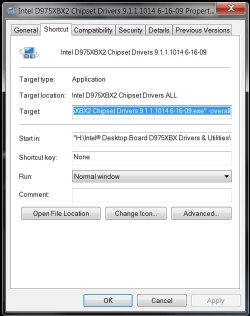
To do this create a shortcut of the chipset drivers, then click properties & at the end of the Target line add -overall.

Example of mine-Screenshot below
"H:\Intel D975XBX2 Chipset Drivers 9.1.1.1014.exe" -overall

Also, if you want the front audio panel to work correctly use the latest audio driver if you are using the onboard audio chipset like I am. After I did this my headset worked fine including the mic.
Hope this also helps you some... ;)
You can download all the drivers for your board here...
Download Search Results!
 

Attachments

  • Image 0.jpg
    Image 0.jpg
    39.4 KB · Views: 564

My Computer

Computer Manufacturer/Model Number
ABS Tech Ultimate X9
OS
Windows® 7 Ultimate x64 SP1
CPU
Intel Core 2 Duo E8400 (E0) @ 4.0GHz
Motherboard
ASUS P5Q Pro Turbo / 1780 FSB
Memory
G.SKILL-F2-8500CL5D-4GBPK (2x2Gbs) (5-5-5-15) @ 1067Mhz
Graphics Card(s)
EVGA GTX 470 SC (845/1690/2000) 160Gbs
Sound Card
VIA HD Audio / Boston Acoustics
Monitor(s) Displays
Acer X222W HD 22" LCD 2500:1 / 5ms
Screen Resolution
1680x1050
Hard Drives
Seagate Barracuda SATAII 2 x 320GB
Seagate Barracuda SATAII 1Tb
Intel® Rapid Storage Technology v10.1.0.1008
AHCI-NCQ Enabled
PSU
Silent Pro GOLD 80 PLUS 800w /95% efficiency / SLI-Crossfire
Case
ABS Stealth Black-Custom
Cooling
CoolerMaster V6GT 6 Heatpipe 200w CPU Cooler
Keyboard
Logitech G15 Gaming Keyboard (Old Style Blue!)
Mouse
Logitech MX518 Gaming Mouse
Internet Speed
1Mbs-up/ 6Mbs-down
wow! that was quick!

thanks. hmmm... so i take it i should use 32-bit vista drivers for the mobo, right?

ok... i'll post results once am done installing the drivers.

thanks again.
 

My Computer

Computer Manufacturer/Model Number
HP Mini 2140/Clone PC
OS
Windows 7 RC 32-bit
CPU
Atom N270/C2D E6750
Motherboard
Mobile Intel 945GSE/Intel DP35DP
Memory
2GB DDR2 800MHz for both
Graphics Card(s)
Intel GMA 950/inno3D GF8600GT 1GB DDR2
Sound Card
on board
Monitor(s) Displays
LG W1945T
Screen Resolution
1024x576; 1440x900
Hard Drives
160GB 5400rpm SATA - HP
2 units 160GB 7200rpm SATA - desktop
PSU
generic 500watt
Keyboard
HP/Logitech
Mouse
HP/Logitech
Internet Speed
DSL 384kbps
wow! that was quick!

thanks. hmmm... so i take it i should use 32-bit vista drivers for the mobo, right?

ok... i'll post results once am done installing the drivers.

thanks again.
Since you are running Windows 7 32bit OS, YES!
Not only did installing the newest drivers using the -overall
command line solve a bunch of problems for me, it also really
improved the performance of my system!
The chipset drivers alone increase my memory throughput by 1000mbs! :D

Yea, this is a great forum for Windows 7 info!!!
Enjoy your stay & learn tons more like I have about this new OS! :p
 

My Computer

Computer Manufacturer/Model Number
ABS Tech Ultimate X9
OS
Windows® 7 Ultimate x64 SP1
CPU
Intel Core 2 Duo E8400 (E0) @ 4.0GHz
Motherboard
ASUS P5Q Pro Turbo / 1780 FSB
Memory
G.SKILL-F2-8500CL5D-4GBPK (2x2Gbs) (5-5-5-15) @ 1067Mhz
Graphics Card(s)
EVGA GTX 470 SC (845/1690/2000) 160Gbs
Sound Card
VIA HD Audio / Boston Acoustics
Monitor(s) Displays
Acer X222W HD 22" LCD 2500:1 / 5ms
Screen Resolution
1680x1050
Hard Drives
Seagate Barracuda SATAII 2 x 320GB
Seagate Barracuda SATAII 1Tb
Intel® Rapid Storage Technology v10.1.0.1008
AHCI-NCQ Enabled
PSU
Silent Pro GOLD 80 PLUS 800w /95% efficiency / SLI-Crossfire
Case
ABS Stealth Black-Custom
Cooling
CoolerMaster V6GT 6 Heatpipe 200w CPU Cooler
Keyboard
Logitech G15 Gaming Keyboard (Old Style Blue!)
Mouse
Logitech MX518 Gaming Mouse
Internet Speed
1Mbs-up/ 6Mbs-down
thanks so much for the very warm welcome.

yes... i do agree very much about this new OS. i've used vista once with my laptop before my netbook now... and comparing both i must say i like 7 a lot, lot more.

anyway... i won't be able to update the bios though. i've been updating, at least tried to once i had internet late last year... and it just can't get updated. i've tried both express and the CD method (linux something, i think)... and it just says updating was successful... but when i check it, it's still the old bios. well, that's another problem not of 7 so i'll just leave it at that.

am downloading the drivers now... and might be doing so for my netbook as well.

thanks again and i think am gonna like this place, too. :D
 

My Computer

Computer Manufacturer/Model Number
HP Mini 2140/Clone PC
OS
Windows 7 RC 32-bit
CPU
Atom N270/C2D E6750
Motherboard
Mobile Intel 945GSE/Intel DP35DP
Memory
2GB DDR2 800MHz for both
Graphics Card(s)
Intel GMA 950/inno3D GF8600GT 1GB DDR2
Sound Card
on board
Monitor(s) Displays
LG W1945T
Screen Resolution
1024x576; 1440x900
Hard Drives
160GB 5400rpm SATA - HP
2 units 160GB 7200rpm SATA - desktop
PSU
generic 500watt
Keyboard
HP/Logitech
Mouse
HP/Logitech
Internet Speed
DSL 384kbps
thx alot dear.
actually ,i m running xp now and i already have driver on cd but i think these driver for xp so can driver max find drivers after installing win7?
 

My Computer

OS
xp
thx alot dear.
actually ,i m running xp now and i already have driver on cd but i think these driver for xp so can driver max find drivers after installing win7?

I can't answer this question as I've always used manual installations of all my drivers for my system.
I've never relied on a driver updating program of any kind as they don't usually get the drivers I need or want. :sarc:

Don't use your driver CD as those are not valid for Windows 7! You can use Vista drivers with no problem though & that is what I use on my system & they work quite well.
The only drivers I use that a Windows 7 specific are the new Nvidia Windows 7 drivers which are made for this OS! ;)
 

My Computer

Computer Manufacturer/Model Number
ABS Tech Ultimate X9
OS
Windows® 7 Ultimate x64 SP1
CPU
Intel Core 2 Duo E8400 (E0) @ 4.0GHz
Motherboard
ASUS P5Q Pro Turbo / 1780 FSB
Memory
G.SKILL-F2-8500CL5D-4GBPK (2x2Gbs) (5-5-5-15) @ 1067Mhz
Graphics Card(s)
EVGA GTX 470 SC (845/1690/2000) 160Gbs
Sound Card
VIA HD Audio / Boston Acoustics
Monitor(s) Displays
Acer X222W HD 22" LCD 2500:1 / 5ms
Screen Resolution
1680x1050
Hard Drives
Seagate Barracuda SATAII 2 x 320GB
Seagate Barracuda SATAII 1Tb
Intel® Rapid Storage Technology v10.1.0.1008
AHCI-NCQ Enabled
PSU
Silent Pro GOLD 80 PLUS 800w /95% efficiency / SLI-Crossfire
Case
ABS Stealth Black-Custom
Cooling
CoolerMaster V6GT 6 Heatpipe 200w CPU Cooler
Keyboard
Logitech G15 Gaming Keyboard (Old Style Blue!)
Mouse
Logitech MX518 Gaming Mouse
Internet Speed
1Mbs-up/ 6Mbs-down
win 7 driver

thx for ur reply
but how to know if the cd that i have is not suit for vista?

If the driver is on an XP disk its not suitable for win 7, if its on an vista disk it is. If not the right driver do a google search for it and download the correct one for your system.

Hope this helps ken
 

My Computer

Computer Manufacturer/Model Number
HP Pavillion dv-7 1005 Tx
OS
Win 8 Release candidate 8400
CPU
[email protected]
Memory
4 gigs
Graphics Card(s)
Nvidia 9600M
Sound Card
HD built-in
Monitor(s) Displays
17" Wxga
Screen Resolution
1440x900
Cooling
none
Internet Speed
45Mb down 5Mb up
Since you are running Windows 7 32bit OS, YES!
Not only did installing the newest drivers using the -overall
command line solve a bunch of problems for me, it also really
improved the performance of my system!
The chipset drivers alone increase my memory throughput by 1000mbs! :D

Yea, this is a great forum for Windows 7 info!!!
Enjoy your stay & learn tons more like I have about this new OS! :p

thanks for the tips.

i've installed both the chipset and audio... and i now have the headphone jacks working again. some changes in the options as well i guess.

i also tried updating the drivers for lan but the vista drivers from intel didn't work... but there're drivers for win7 beta for both the chipset and lan. i checked the chipset version and publish dates and these were the same with the vista drivers so i didn't update it anylonger. the win7 beta lan drivers however were different and installed without a glitch.

you mentioned something bout memory throughput?!? how would i test that?

anyway... the headphone jacks are working, and the mic. so am good... real good.

now am left with my just my problem with the wifi card.

hmmm... :sarc:

still, thanks a mill. really appreciate it. :D
 

My Computer

Computer Manufacturer/Model Number
HP Mini 2140/Clone PC
OS
Windows 7 RC 32-bit
CPU
Atom N270/C2D E6750
Motherboard
Mobile Intel 945GSE/Intel DP35DP
Memory
2GB DDR2 800MHz for both
Graphics Card(s)
Intel GMA 950/inno3D GF8600GT 1GB DDR2
Sound Card
on board
Monitor(s) Displays
LG W1945T
Screen Resolution
1024x576; 1440x900
Hard Drives
160GB 5400rpm SATA - HP
2 units 160GB 7200rpm SATA - desktop
PSU
generic 500watt
Keyboard
HP/Logitech
Mouse
HP/Logitech
Internet Speed
DSL 384kbps
I can't answer this question as I've always used manual installations of all my drivers for my system.
I've never relied on a driver updating program of any kind as they don't usually get the drivers I need or want. :sarc:

Don't use your driver CD as those are not valid for Windows 7! You can use Vista drivers with no problem though & that is what I use on my system & they work quite well.
The only drivers I use that a Windows 7 specific are the new Nvidia Windows 7 drivers which are made for this OS! ;)

Driver Agent? Driver Detective? Driver Whatever is a load of .... :rolleyes: I don't blame you one bit for manually updating things as that usually proves itself to be the most reliable method! I've had a few problems right after Vista first came where the Windows updater would see Vista drivers installed on XP at the time! :mad: GGrrr... 'wats dis?!" Upon going to the manufacturer's support site they had a Vista update mixed with the ones for XP! when selecting XP as the OS.
 

My Computers

System One System Two

  • Computer type
    PC/Desktop
    Computer Manufacturer/Model Number
    Custom builds = 2
    OS
    W7 Ultimate x64/W10 Pro x64/W11 Pro Triple Boot - Main PC W7 Remote PC Micro ATX W7 Pro x64/W11 Pro
    CPU
    AMD Phenom II X4 975 Deneb 3.6ghz - 965 2nd remote pc
    Motherboard
    Gigabyte GA-790XTA-UD4-Gigabyte GA-880GM-D2H remote pc
    Memory
    Kingston Hyper X DDR3 1600 1.5v 16gb - Hyper X Fury 8gb 2nd
    Graphics Card(s)
    MSI HD Radeon 5750 1gb - MSI HD Radeon 6450 on mini tower
    Sound Card
    Creative Labs X-Fi Xtreme Audio P - Realtek onooard 2nd case
    Monitor(s) Displays
    ASUS VW199T-P 19" HP 2082a Main-HP 2082a 20" remote pc
    Screen Resolution
    Asus 1440x900 - HP 1600x900
    Hard Drives
    WD Black 1TB HD per OS W7, W10, and pending W11 presently on 500gb OS Drive - Pending Triple 1TB HDs for Spanned Storage/backup volume
    Single 2TB external USB enclosure, single 1TB System 7 Host/Boot drive, Pending 8TB external HD for system image b
    PSU
    Corsair 750TX - primary / Corsair CX600 - second
    Case
    Antec 900-2 - SSD compatible / NZXT Vulcan mini tower
    Cooling
    Zalman CNPS9900A
    Keyboard
    AZIO L70 Backlit Letters Gaming - ONN Cordless/USB
    Mouse
    MSI DS200 Programmable, Logitech Cordless
    Internet Speed
    30mbps upgrade - primary hard wired - mini tower usb WiFi
    Antivirus
    GFI VIPRE Internet Security 2014 on W7 2016 beta on W10,
    Browser
    Cyberfox, WaterFox 64bit FF variants, FireFox x64, Pale Moon
    Other Info
    Accomdata fan cooled usb 2.0 PIDE/Sata II, III external enclosure.
    Sambient usb/eSata PATA/Sata II, III external enclosure.
  • Computer type
    PC/Desktop
    System Manufacturer/Model Number
    CUSTOM ASSEMBLY
    OS
    W7 Pro x64/W11 Pro
    CPU
    AMD Deneb 3.6ghz - 965
    Motherboard
    Gigabyte GA-880GM-D2H remote pc
    Memory
    Kingston Hyper X Fury 8gb
    Graphics Card(s)
    MSI HD Radeon 6450 DVI Output
    Sound Card
    Realtek onooard Creative or Other separate PENDING
    Monitor(s) Displays
    VIZIO 32" LCD TV Separate LCD Pending
    Screen Resolution
    1600x1080
    Hard Drives
    WD 500GB OS Host/Boot WD Green 1TB Storage/Backup
    PSU
    Corsair 600W - THERMALTAKE 600W spare case
    Case
    NZXT Vulcan mini tower
    Cooling
    Twin 120mm Top Fans - 240mm Side Cover
    Keyboard
    ONN Cordless/USB Logitech Cordless
    Mouse
    ONN USB/Cordless - Logitech Cordless
    Internet Speed
    DSL 5G
    Browser
    MS Edge, FireFox, WaterFox x64, FireFox Nightly
    Other Info
    OS Testing-Remote Access to Main TeamViewer
Driver Agent? Driver Detective? Driver Whatever is a load of .... :rolleyes: I don't blame you one bit for manually updating things as that usually proves itself to be the most reliable method! I've had a few problems right after Vista first came where the Windows updater would see Vista drivers installed on XP at the time! :mad: GGrrr... 'wats dis?!" Upon going to the manufacturer's support site they had a Vista update mixed with the ones for XP! when selecting XP as the OS.
Yea Hawk I agree 100% about using any kind of driver updating program. A waste of money in my book & usually used by let's say those that are less that articulate when it comes to computers... ;)

thanks for the tips.

i've installed both the chipset and audio... and i now have the headphone jacks working again. some changes in the options as well i guess.

i also tried updating the drivers for lan but the vista drivers from intel didn't work... but there're drivers for win7 beta for both the chipset and lan. i checked the chipset version and publish dates and these were the same with the vista drivers so i didn't update it anylonger. the win7 beta lan drivers however were different and installed without a glitch.

you mentioned something bout memory throughput?!? how would i test that?

anyway... the headphone jacks are working, and the mic. so am good... real good.

now am left with my just my problem with the wifi card.

hmmm... :sarc:

still, thanks a mill. really appreciate it. :D

Glad I was able to help you dude! :D
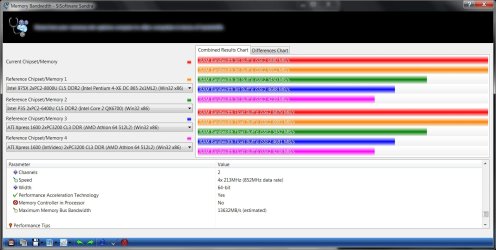
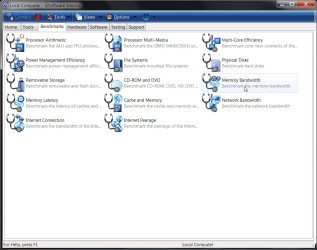
What I use to test my memory throughput is SiSoftware Sandra Engineer XI SP4 which is an older version of this software & the test I use is Memory Bandwidth ( Benchmark the Memory Bandwidth) under the Benchmark tab. (Screenshots)

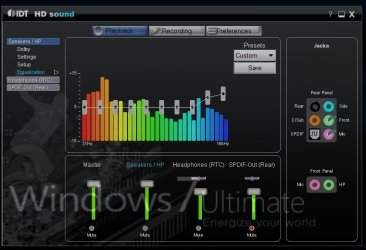
I also like the way the new Intel HD Audio Control Panel looks!
Yea, they got more options in there now which is good! :)
It also sounds better! :p

Stick around as there's a lot more to learn!
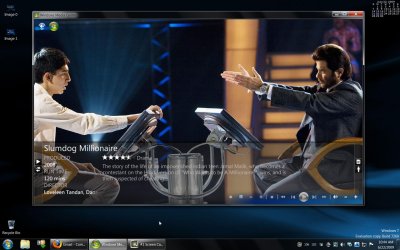
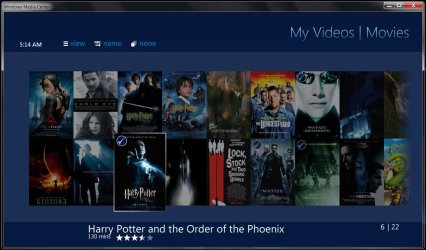
Check out the Customizing Windows 7 & Media Center!
You are gonna love what Media Browser does with it!
Very, very cool plugin! ;) (Screenshots)
 

Attachments

  • Benchmark Selection.jpg
    Benchmark Selection.jpg
    85.9 KB · Views: 78
  • Memory Bandwidth Throuput 13,632Mbs.jpg
    Memory Bandwidth Throuput 13,632Mbs.jpg
    121.7 KB · Views: 56
  • Intel HD Audio Control Panel.jpg
    Intel HD Audio Control Panel.jpg
    45.9 KB · Views: 296
  • Windows Media Center-3.jpg
    Windows Media Center-3.jpg
    173 KB · Views: 229
  • Windows Media Center-6.jpg
    Windows Media Center-6.jpg
    121.1 KB · Views: 144
Last edited:

My Computer

Computer Manufacturer/Model Number
ABS Tech Ultimate X9
OS
Windows® 7 Ultimate x64 SP1
CPU
Intel Core 2 Duo E8400 (E0) @ 4.0GHz
Motherboard
ASUS P5Q Pro Turbo / 1780 FSB
Memory
G.SKILL-F2-8500CL5D-4GBPK (2x2Gbs) (5-5-5-15) @ 1067Mhz
Graphics Card(s)
EVGA GTX 470 SC (845/1690/2000) 160Gbs
Sound Card
VIA HD Audio / Boston Acoustics
Monitor(s) Displays
Acer X222W HD 22" LCD 2500:1 / 5ms
Screen Resolution
1680x1050
Hard Drives
Seagate Barracuda SATAII 2 x 320GB
Seagate Barracuda SATAII 1Tb
Intel® Rapid Storage Technology v10.1.0.1008
AHCI-NCQ Enabled
PSU
Silent Pro GOLD 80 PLUS 800w /95% efficiency / SLI-Crossfire
Case
ABS Stealth Black-Custom
Cooling
CoolerMaster V6GT 6 Heatpipe 200w CPU Cooler
Keyboard
Logitech G15 Gaming Keyboard (Old Style Blue!)
Mouse
Logitech MX518 Gaming Mouse
Internet Speed
1Mbs-up/ 6Mbs-down
If you can't load driver vista for windows 7, you can use DriverMax (Free, search by google) to backup driver from Windows Vista (Network, printer,Sound or Graphics cards...).Then set up windows 7 and restore driver.All is OK.

Using DriverMax
1, Download DriverMax - FREE driver download program for Windows XP & Vista .
2, Export Driver (best way is export all driver to "X" folder of D:\ or E:\ (not OS installation disk)
3, Install Windows 7
4, Import Driver from "X".
5, Wait and OK.

There is something wrong with this explanation. It is not that simple. As soon as Win 7 tries to install the Vista printer driver it states that I have the wrong OS and stops. What gives?
 

My Computer

Computer Manufacturer/Model Number
AOpen EZ solution case (self build) desktop, Acer Extensa 5620Z Notebook.
OS
Win 7 64 bit Home Premium (desktop), Win 7 32 bit Home Premium(Notebook) (3user pack).
CPU
Intel core2quad Q8200 2.33GHz, Intel dual core T2310 1.46GHz
Motherboard
Asus P5Q-EM, unknown.
Memory
Apacer 8Gb (4x2) 800Mhz DDR2, 3 Gb (2+1) 600Hhz.
Graphics Card(s)
Sapphire 5770 Vapor-X water cooled, unknown.
Sound Card
Integrated Realtek alc1200, unknown.
Monitor(s) Displays
ASUS PA246Q 60cm P-IPS LCD, LG L1710S 17" LCD, multi screens
Screen Resolution
Max 1920 X 1200
Hard Drives
Samsung SATA F3 spinpoint 1x1TB(OS), Samsung SATA 7200 1x300Gb(data), 2xWD SATA 5400 1TB (media and backup). Notebook IDE 80Gb.
PSU
OCZ ModXstream Pro 700W
Case
AOpen ez solution
Cooling
3x chassis fans- front 8cm, rear 9cm, side to CPU 12cm.
Keyboard
Logitech cordless.
Mouse
Logitech cordless
Internet Speed
Wireless line speed 475 kb/s. download speed 59 kb/s.
Other Info
IE9. Logitech speakers & sub woofer. Huawei modem, NetComm router, D-Link powerline adapters. Still camera Sony a350, Movie camera Sony handycam. Printers Canon LBP3000, MP520.
OK, I'm here ;) During installation, you'll be prompted to choose the partition to install to. Click advanced. Click load driver. Insert CD media with the required driver 32 and 64 bit and click next. Install should continue with the XP driver and allow you to update it when you get into 7.

Oh, I forgot -- if you're using 64-bit you need to make sure the drivers are signed!

How do I "sign" drivers in 64 bit? I go to Device Manager and it says my LBP 3000 USB printer is working properly, BUT when I right click on Properties, then I click on Driver it says that the driver has not been Digitally Signed.
 
Last edited:

My Computer

Computer Manufacturer/Model Number
AOpen EZ solution case (self build) desktop, Acer Extensa 5620Z Notebook.
OS
Win 7 64 bit Home Premium (desktop), Win 7 32 bit Home Premium(Notebook) (3user pack).
CPU
Intel core2quad Q8200 2.33GHz, Intel dual core T2310 1.46GHz
Motherboard
Asus P5Q-EM, unknown.
Memory
Apacer 8Gb (4x2) 800Mhz DDR2, 3 Gb (2+1) 600Hhz.
Graphics Card(s)
Sapphire 5770 Vapor-X water cooled, unknown.
Sound Card
Integrated Realtek alc1200, unknown.
Monitor(s) Displays
ASUS PA246Q 60cm P-IPS LCD, LG L1710S 17" LCD, multi screens
Screen Resolution
Max 1920 X 1200
Hard Drives
Samsung SATA F3 spinpoint 1x1TB(OS), Samsung SATA 7200 1x300Gb(data), 2xWD SATA 5400 1TB (media and backup). Notebook IDE 80Gb.
PSU
OCZ ModXstream Pro 700W
Case
AOpen ez solution
Cooling
3x chassis fans- front 8cm, rear 9cm, side to CPU 12cm.
Keyboard
Logitech cordless.
Mouse
Logitech cordless
Internet Speed
Wireless line speed 475 kb/s. download speed 59 kb/s.
Other Info
IE9. Logitech speakers & sub woofer. Huawei modem, NetComm router, D-Link powerline adapters. Still camera Sony a350, Movie camera Sony handycam. Printers Canon LBP3000, MP520.
First off welcome to the sevenforums! The initial problems to solve when first connecting online in 7 are the basics like adode flash player, Java runtime, adobe reader still won't open pdf files here, plus your active x control settings in IE 8 may need to see a few changes from the defaults.

Yes Night Hawk, I have 64 bit cause I use Adobe LightRoom 64 bit for my photo editing, and it flies under 7x64. IE was a disaster for my web work, with Flash not installing, but FireFox 3.5 saved the day, as it has all the bells and whistles already to go. Well done Mozilla.
 

My Computer

Computer Manufacturer/Model Number
AOpen EZ solution case (self build) desktop, Acer Extensa 5620Z Notebook.
OS
Win 7 64 bit Home Premium (desktop), Win 7 32 bit Home Premium(Notebook) (3user pack).
CPU
Intel core2quad Q8200 2.33GHz, Intel dual core T2310 1.46GHz
Motherboard
Asus P5Q-EM, unknown.
Memory
Apacer 8Gb (4x2) 800Mhz DDR2, 3 Gb (2+1) 600Hhz.
Graphics Card(s)
Sapphire 5770 Vapor-X water cooled, unknown.
Sound Card
Integrated Realtek alc1200, unknown.
Monitor(s) Displays
ASUS PA246Q 60cm P-IPS LCD, LG L1710S 17" LCD, multi screens
Screen Resolution
Max 1920 X 1200
Hard Drives
Samsung SATA F3 spinpoint 1x1TB(OS), Samsung SATA 7200 1x300Gb(data), 2xWD SATA 5400 1TB (media and backup). Notebook IDE 80Gb.
PSU
OCZ ModXstream Pro 700W
Case
AOpen ez solution
Cooling
3x chassis fans- front 8cm, rear 9cm, side to CPU 12cm.
Keyboard
Logitech cordless.
Mouse
Logitech cordless
Internet Speed
Wireless line speed 475 kb/s. download speed 59 kb/s.
Other Info
IE9. Logitech speakers & sub woofer. Huawei modem, NetComm router, D-Link powerline adapters. Still camera Sony a350, Movie camera Sony handycam. Printers Canon LBP3000, MP520.
Back
Top