Windows 7 Dual Boot with XP

rcblythe

New member
Local time
2:06 PM
Messages
11
Hi, I hope someone can help me with loading Windows 7 and keep my Windows XP. I have Widows XP installed on my C drive and recently installed another 2TB drive which I wanted to load Windows 7 on. I formatted and partitioned the new drive in XP and have them as D and E and want to install the Win 7 on partition D. When I boot from the Win 7 CD and start the install it gets partially through the install and on one of the reboots it doesn't reboot, it just has a blank screen. I tried it several times and it does the same thing. I tried to start it in safe mode but it says that it has not finished installing and to reboot but ends the same way. I hope you can help! :cry:
 

My Computer

OS
Windows XP

My Computer

Computer Manufacturer/Model Number
built up
OS
windows 7
CPU
Phenom II AMD Dragon 3.5Ghz
Memory
DDR3 4GB
Graphics Card(s)
ATI Radeon 512Mb
Monitor(s) Displays
HP L1506
Screen Resolution
1152 x 864
Hard Drives
WDC 1 TB SATA-II Green Power
Keyboard
HP wireless keyboard
Mouse
HP Optic
Internet Speed
1GB
Hi, I hope someone can help me with loading Windows 7 and keep my Windows XP. I have Widows XP installed on my C drive and recently installed another 2TB drive which I wanted to load Windows 7 on. I formatted and partitioned the new drive in XP and have them as D and E and want to install the Win 7 on partition D. When I boot from the Win 7 CD and start the install it gets partially through the install and on one of the reboots it doesn't reboot, it just has a blank screen. I tried it several times and it does the same thing. I tried to start it in safe mode but it says that it has not finished installing and to reboot but ends the same way. I hope you can help! :cry:
Hello rcblythe, and welcome to Windows Seven Forums.

One suggestion for you, when you are installing a second OS on a separate hard drive, some of us find it easier to only have that hard drive connected during the install. Then when the install is successful and setup the way you like it, you can use the BIOS boot menu to choose which OS to boot to and also setup a dual boot menu at your leisure.

There is some additional reading material in the links at the bottom of my post. Please have a look to see if they provide you with any answers.

Cheers!
Robert
 

My Computer

OS
...
One suggestion for you, when you are installing a second OS on a separate hard drive, some of us find it easier to only have that hard drive connected during the install. Then when the install is successful and setup the way you like it, you can use the BIOS boot menu to choose which OS to boot to and also setup a dual boot menu at your leisure.

There is some additional reading material in the links at the bottom of my post. Please have a look to see if they provide you with any answers.

Cheers!
Robert

That's exactly the way I have installed Ubuntu and use it. I found it is better to have a dual boot menu.
 

My Computer

Computer type
PC/Desktop
Computer Manufacturer/Model Number
Self Assembled
OS
Microsoft Windows 10 Pro Insider Preview 64-bit
CPU
Intel(R) Core(TM) i3-4130 CPU @ 3.40GHz
Motherboard
Gigabyte Technology Co., Ltd. B85M-D3H
Memory
Corsair Vengence 4GB x2 (8.00GB Dual-Channel DDR3 @ 798MHz)
Graphics Card(s)
2047MB GeForce GTS 450 (ZOTAC International)
Sound Card
Onboard (Realtek High Definition Audio)
Monitor(s) Displays
LG Flatron E2040T
Screen Resolution
1600x900
Hard Drives
Western Digital 1 TB
Seagate 500 GB
PSU
Corsair VS550
Case
Cooler Master K380
Cooling
Cooler Master Seidon 120V Plus
Keyboard
Logitech MK260r
Mouse
Logitech MK260r
Internet Speed
PMPL Broadband
Antivirus
Windows Defender + MBAM
Browser
Firefox
Other Info
Dell Studio 15" Laptop
When you give drive letters, it concerns me that you might be assigning those yourself. Hopefully you are just installing to partitions and not drive letters. After you install, the boot partition normally tries to be C: so they may be different depending on what OS you boot to.

There are some instances where it may take longer than you might think in some areas, perhaps give it more time. Also, having more precise information about when it stalls might help someone see where it might be having problems. What messages are shown prior to the reboot and what does it say after?

Using just the one drive to load Win 7 is a good idea, it keeps other problems from cropping up later. After you have Win 7 installed, post back or check some of the threads or tutorials.

Is this an upgrade version of Win 7?
 

My Computer

Computer Manufacturer/Model Number
Homebuilt
OS
Windows 7 x64
CPU
i7-2600K
Motherboard
Asus P8Z77-v Pro
Memory
8 G
Graphics Card(s)
GTX 480
Sound Card
Onboard
Monitor(s) Displays
LG W2753V
Screen Resolution
1920x1080
Hard Drives
Crucial M4 128 G SSD
found this on another site
I was setting up a RAID with 3 1.5tb seagates in RAID 5 (total capacity: 3.0tb). However, in digging around, it appears that standard bios usage of MBR dictates that you cannot *boot* from a drive larger than 2tb. This isn't an OS limitation - but a limitation of every CMOS bios. The only solution appears to use EFI bios that supports GPT partitions. Unfortunately, it appears that only apple, itanium, and a few other server hardware vendors support GPT booting at the moment.

Is this correct? I have an intel dp35dp and would love to use my bits all in one bucket. Currently I can set up the 3.0tb RAID5, but it needs to be the non-boot drive - so I know my board supports it ok. Just sad I can't have it as my main drive...


That is correct you cant boot from a GPT partition except with certain server platforms.
 
Last edited by a moderator:

My Computer

Computer Manufacturer/Model Number
asus
OS
windows 7 prof
CPU
i7 920 quad
Motherboard
asus
Memory
3gb triple memory 1333
Graphics Card(s)
nvidia gts 250 1gb
Sound Card
on board
Monitor(s) Displays
22inch hannsg
Screen Resolution
1680 x1050
Hard Drives
1x1tb 1x 250gb 1x320 ext
PSU
650
Case
wizard
Cooling
3 fans
Keyboard
microsoft laser wireless
Mouse
microsoft laser wireless
Internet Speed
20mb
Other Info
wireless network n netgear 2000
Thanks to all who replied, Saltgrass I did give it a lot of time through the install but it just stalled and I am not sure on which reboot it did it on but I can try it again to get more info. I did rename my partitions on the new hard drive after formatting and partitioning but would that make a difference? I know for sure the partition that I was installing it on. Iseeuu, when you say to have only the one drive hooked up when installing the new Win 7 OS wouldn't it automatically name that partition C and then when I hook up both drives it would have two C drives? If that would work I will try it for sure? Please let me know your thoughts.
 

My Computer

OS
Windows XP
Iseeuu, when you say to have only the one drive hooked up when installing the new Win 7 OS wouldn't it automatically name that partition C and then when I hook up both drives it would have two C drives? If that would work I will try it for sure? Please let me know your thoughts.
For me personally, that is an ideal situation. Windows assigns drive letters when it boots, so when XP boots it will be C and Windows 7 will be another letter. When Windows 7 boots it will be C and XP will be another letter. Perfect.

Check out this link: http://www.sevenforums.com/installation-setup/57634-quad-boot-windows-2000-xp-vista-7-ubuntu.html

Cheers!
Robert
 

My Computer

OS
...
Thanks again iseeuu, if I can ask you one more thing before I begin. Could you explain how to change the "BIOS boot menu to choose which OS to boot to" and also how to "setup a dual boot menu". I appreciate all your help, Rob
 

My Computer

OS
Windows XP
Thanks again iseeuu, if I can ask you one more thing before I begin. Could you explain how to change the "BIOS boot menu to choose which OS to boot to" and also how to "setup a dual boot menu". I appreciate all your help, Rob
Sure Rob, no problem. If I knew what model computer / motherboard you had I could be more specific. Most newer motherboards have a key (F12 or F10 or ?) that will open a boot menu while you are booting the computer, and let you choose which hard drive to boot to. So if XP is on drive A and 7 is on drive B, if you choose to boot to drive A, XP will start and if you choose drive B. 7 will start.

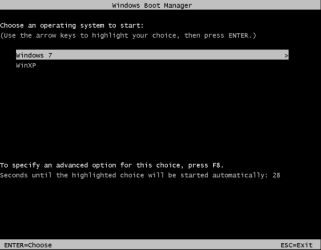
To have a dual boot menu, you will need to use the Windows 7 boot manager and add a menu entry for XP. Then when you reboot, before you start Windows, you will see a menu so you can choose.

win7_plus_XP_02.PNG

We can do that when the time comes, no problem.

Cheers!
Robert
 

My Computer

OS
...
Hi Robert, it is a Dell Dimension XPS 600 Gen 3 - 3.4GHz and I am somewhat familiar with the bios but not sure about these two points. I did read in the manual the following, "NOTE: If you insert a boot device and restart the computer, this option appears in the system setup menu. To boot from a USB memory device, select the USB device and move it so it becomes the first device in the list." so does that mean it will show both drives after I install the Win 7 on the one and then hookup the other and reboot? I have changed the boot sequence many times but all I have seen is boot from CD ROM, SATA drive, floppy drive, USB device etc... but it only lists the one SATA hard drive but will that change when I have two of them each with an OS? I am not too familiar with Win 7 yet so I don't know about it's boot manager but I have seen the one in EasyBCD so I imagine it is the same?
 

My Computer

OS
Windows XP
Hi Robert, it is a Dell Dimension XPS 600 Gen 3 - 3.4GHz and I am somewhat familiar with the bios but not sure about these two points. I did read in the manual the following, "NOTE: If you insert a boot device and restart the computer, this option appears in the system setup menu. To boot from a USB memory device, select the USB device and move it so it becomes the first device in the list." so does that mean it will show both drives after I install the Win 7 on the one and then hookup the other and reboot? I have changed the boot sequence many times but all I have seen is boot from CD ROM, SATA drive, floppy drive, USB device etc... but it only lists the one SATA hard drive but will that change when I have two of them each with an OS? I am not too familiar with Win 7 yet so I don't know about it's boot manager but I have seen the one in EasyBCD so I imagine it is the same?
I can't say for sure because I don't own one, but the Dell web site says that the boot menu key is F12. So instead of pressing F2 to enter the BIOS, you would press F12 and a boot menu would appear allowing you to choose. Now Dell severely limits the options available in their BIOS menus, but you should see all the hard drives in the boot menu so you can choose.

Another temporary option is to actually enter the BIOS and set the hard drive of choice as first in boot order. Usually this is two steps. Step one is to set hard drive as first in boot order. Step two is to set the order of the hard drives.

One last option, when all else fails, I have connected the hard drive to the SATA post that makes it show up to the BIOS as the first hard drive. Hope you won't have to go that far though.

Cheers!
 

My Computer

OS
...
Hi, I hope someone can help me with loading Windows 7 and keep my Windows XP. I have Widows XP installed on my C drive and recently installed another 2TB drive which I wanted to load Windows 7 on. I formatted and partitioned the new drive in XP and have them as D and E and want to install the Win 7 on partition D. When I boot from the Win 7 CD and start the install it gets partially through the install and on one of the reboots it doesn't reboot, it just has a blank screen. I tried it several times and it does the same thing. I tried to start it in safe mode but it says that it has not finished installing and to reboot but ends the same way. I hope you can help! :cry:


Open this PDF file and read how you solve your problem.

PDF FILE:View attachment DUALLBOOT XP_7.pdf;)
 

My Computer

Computer Manufacturer/Model Number
HP
OS
WIN,XP,7,VISTA,SERVER
CPU
DualCore Intel Pentium D 925, 3000 MHz
Motherboard
Asus P5LP-LE (Leonite)
Memory
3072 MB (DDR2 SDRAM)
Graphics Card(s)
NVIDIA GeForce 7500 LE (256 MB)
Sound Card
Creative SB X-Fi Xtreme Audio
Monitor(s) Displays
19", 1024x768
Screen Resolution
1024x768
Hard Drives
WDC WD2500AAKS-00L9A0
SAMSUNG HD250HJ (250
Internet Speed
100.0 mbps
Set the preferred HD to boot first in BIOS boot order, after DVD drive.

Then use the F12 BIOS Boot Menu shortcut key at bootup to trigger the other HD instead.
 
Hi Iseeuu, Ok so far it is good and I was able to install Win 7 without a problem and can boot into Win 7 just fine but my only problem now is when I boot into Win XP it is giving me an error saying to put in the XP disk because there is a problem with /ntldr so can I do this without messing up the Win 7 OS? Thanks King64 I will look at your link as soon as I install my Acrobat.
 

My Computer

OS
Windows XP
Hi Iseeuu, Ok so far it is good and I was able to install Win 7 without a problem and can boot into Win 7 just fine but my only problem now is when I boot into Win XP it is giving me an error saying to put in the XP disk because there is a problem with /ntldr so can I do this without messing up the Win 7 OS? Thanks King64 I will look at your link as soon as I install my Acrobat.
OK this is not hard to fix. First, what happens when the hard drive with XP is the only hard drive plugged in and you boot the computer?
 

My Computer

OS
...
Not sure but I could try it, almost posative that it would boot fine. I did notice that when I am in Win 7 and look at the drives the one with XP does not show so does this mean anything?
 

My Computer

OS
Windows XP
Not sure but I could try it, almost posative that it would boot fine. I did notice that when I am in Win 7 and look at the drives the one with XP does not show so does this mean anything?
That is not a good sign, no. If you can boot to XP with no problem when it is the only hard drive, the fix should be easy.
 

My Computer

OS
...
Did you install Win7 with XP HD uplugged?

Make sure XP HD is assigned a letter in Win7 Disk Mgmt.

While both HD's are plugged in: Can you post back a screenshot of your full Win7 Disk management drive map, using Snipping Tool in Start Menu attaching file using Paper Clip in Reply Box.
 
OK so I looked in the Win 7 disk manager and there is no letter assigned to XP so what letter do I assign it?
 

My Computer

OS
Windows XP
Back
Top