Windows 7 Error

Well i had UAC off already and i just dl the file and executed and did what you said and nothing, still having the problem.
 

My Computer

OS
Windows 7 Ultimate
Well i had UAC off already and i just dl the file and executed and did what you said and nothing, still having the problem.

You took Ownership of the whole Windows folder ??
 

My Computer

Computer Manufacturer/Model Number
Samsung NP550P5C-S02IN
OS
Windows 7 Ultimate - 64-bit | Windows 8 Pro - 64-bit
CPU
Intel® Core™ i7 Processor 3,610QM (2.30Hz, 6MB L3 Cach
Memory
8 GB
Graphics Card(s)
NVIDIA® GeForce® GT 650M 2GB Graphics, Optimus™ techno
Sound Card
SoundAlive™ JBL 3 Speakers (With sub-Woofer)
Monitor(s) Displays
39.62cm (15.6) SuperBright 300nit HD+ LED Display
Screen Resolution
1,600 x 900, Anti-Reflective
Hard Drives
1TB S-ATA II Hard Drive (5,400RPM)
Well i had UAC off already and i just dl the file and executed and did what you said and nothing, still having the problem.

Wait hold on a minute i did something wrong i was taking ownership on my normal admin account not the administrator one i enable, now is taking ownership lets see what happens "finger crossed"

Well after it finished i tried again and nothing :shock:
 

Attachments

  • Untitled.jpg
    Untitled.jpg
    240.8 KB · Views: 17

My Computer

OS
Windows 7 Ultimate
LordWolf, is the program capable of copying system files while they are running? Not many do it. I think the error is because it can't access that file since it is reserved / locked by the OS.
What are you trying to accomplish? If you need to transfer a whole partition, for example, I recommend you use EaseUS, I used it and it can copy a whole drive with Windows running no problem. Macrium is another good one
 

My Computer

Computer Manufacturer/Model Number
Wally, Innc.
OS
Windows 7 x64 finally!
CPU
AMD Athlon II X2 240
Motherboard
Biostar TA790GX XE
Memory
OCZ Platinum 4GB DDR2 1066 (will not work past 800MHz)
Graphics Card(s)
MSI R4670-MD1G Radeon HD 4670 1GB 128-bit GDDR3
Sound Card
ATI High Definition Audio Device Realtek ALC888
Monitor(s) Displays
HP w19e
Screen Resolution
1440x900
Hard Drives
Western Digital Caviar Green WD5000AADS 500GB SATA
Western Digital Caviar Blue WD5000AAKS 500GB SATA
PSU
Athena Power Micro ATX 400W
Case
HEC 6T 6T10BB Black MicroATX Mini Tower
Cooling
stock
Keyboard
wired, many keys
Mouse
HP wireless, 2 buttons, 1 wheel
Internet Speed
DSL 2Mb (recently getting 1.65M!)
Have you tried to copy the dll to the system32 folder and retry?(the dll is available to d/l from here)
 

My Computer

Computer type
PC/Desktop
Computer Manufacturer/Model Number
Custom
OS
Windows 7 SP1 x64
CPU
Intel E8400 3.0 GHz
Motherboard
Gigabyte EP45-DS3R
Memory
4x1 Trascend DDR2 800 Mhz
Graphics Card(s)
Gainward 8800GT 512 Mb
Sound Card
Realtek HD Audio 889A
Monitor(s) Displays
LG L204WS
Screen Resolution
1680x1050
Hard Drives
Intel 520 Series 120Gb SSD (System)
Western Digital 6400AAKS 640Gb (Data)
PSU
Cooler Master 650W
Case
Cooler Master Centurion 532
Cooling
2x 12 cm fans
Keyboard
Logitech Wave
Mouse
Logitech G5
Internet Speed
10 Mbit Cable Flat
Antivirus
NOD32 Smart Security
Browser
Google Chrome
Have you tried to copy the dll to the system32 folder and retry?(the dll is available to d/l from here)
Was just about to recommend this...I think the dll itself doesn't exist...

Take Rate's advice and copy the dll to /System32. If it asks you to overwrite...don't. If you add it successfully then it didn't exist to begin with so try the program again
 

My Computer

Computer Manufacturer/Model Number
Compal JFT02 (Custom Build Laptop)
OS
Windows 7 Home Premium x64 - Mac OS X 10.6.4 x64
CPU
Intel Core 2 Duo T9300 2.5 GHz
Motherboard
JFT02
Memory
4GB Kingston DDR2-800
Graphics Card(s)
NVIDIA Geforce 8600M GT (512MB Model)
Sound Card
Realtek HD Audio
Monitor(s) Displays
WUXGA Standard Laptop Display
Screen Resolution
1680*1050
Hard Drives
Toshiba 320GB 5400RPM Laptop HD
PSU
Standard Laptop Power Supply
Case
Standard Laptop Case
Cooling
Standard Laptop Cooling
Keyboard
Standard Laptop 105 Key-Keyboard
Mouse
Synaptics Touchpad
Internet Speed
Verizion Online DSL 3360/864 kbs (dl/up)
Thanks guys for the replies, but that app I'm trying to install is very important for my work have u tried to dl the app and install it? Check that out, another thing is that the DLL is in system32 I can't replace the file cause is in use
 

My Computer

OS
Windows 7 Ultimate
Hey hey don't leave me alone here please someone download the app and try it please
 

My Computer

OS
Windows 7 Ultimate

My Computer

Computer Manufacturer/Model Number
Custom
OS
Windows 7 Professional x64
CPU
Intel i7 2600K OC'd @ 4620 MHz
Motherboard
Asus P8Z68-V Pro
Memory
16GB GSkill Sniper 2133 Mhz (4x4GB)
Graphics Card(s)
EVGA GeForce GTX 480 SuperClocked+
Sound Card
Realtek High Definition Audio
Monitor(s) Displays
2x Acer S273HLbmii 27"
Screen Resolution
2 x 1920x1080
Hard Drives
64GB Crucial M4 SSD

Storage: Hitachi 1TB 5400RPM, Samsung 1.5TB 5400RPM
PSU
Corsair HW Series 750w (modular)
Case
Cooler Master HAF 932 Advanced Blue Edition
Cooling
CM Hyper 212+ CPU cooler, 3x 230mm + 1x 140mm case fans
Keyboard
Logitech MK320 (wireless)
Mouse
Logitech MK320 (wireless)
Internet Speed
30 Mb/s : 2 Mb/s
Have you tried to copy the dll to the system32 folder and retry?(the dll is available to d/l from here)
On this site are only 32bit modules for XP. msvcrt.dll is native library in Windows 7 and you can't raplece with it from XP or Vista otherwise you can even harm your system.Besides you even don't know he have 32bit or 64bit system,if it is 64bit system you can't place 32bit modules in system32 folder!


32bit module View attachment msvcrt_x32.zip
64bit module View attachment msvcrt-x64.zip

EDIT

But I suspect your module is fine it doesn't require to fix,only it is locked by any process

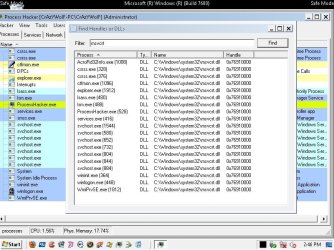
Dwnload.install & run Process Hacker https://www.ohloh.net/p/processhacker/download?package=Process+Hacker

in this program

Hacker>>Show details for all processes

next

Hacker>>Find handles or DLLs

in Filter tab type msvcrt.dll,clik FIND buttom and post results
 
Last edited:

My Computer

Computer Manufacturer/Model Number
Custom made
OS
Windows 7 Professional x64 PL
CPU
AMD Athlon 4450e
Motherboard
Giga-Byte GA-MA69G-S3H
Memory
GoodRam DDR2 2x2048MB (FSB 800MHz)
Graphics Card(s)
nVidia GeForce 9600GT (G94-300) 1024 MB
Monitor(s) Displays
SAMSUNG SyncMaster HS2P301688
Hard Drives
Seagate ST3750330AS 750GB
PSU
Corsair 550W
Cooling
AeroCool ExtremeEngine 3T
Ok going to try it out. Ok here is the info
 

Attachments

  • msvcrt.jpg
    msvcrt.jpg
    140.3 KB · Views: 12

My Computer

OS
Windows 7 Ultimate
Full of them :confused:

Boot into safe mode,open task manager,kill explorer.exe process,next run installer through task manager (File>>new task>>browse and choose installer)
 

My Computer

Computer Manufacturer/Model Number
Custom made
OS
Windows 7 Professional x64 PL
CPU
AMD Athlon 4450e
Motherboard
Giga-Byte GA-MA69G-S3H
Memory
GoodRam DDR2 2x2048MB (FSB 800MHz)
Graphics Card(s)
nVidia GeForce 9600GT (G94-300) 1024 MB
Monitor(s) Displays
SAMSUNG SyncMaster HS2P301688
Hard Drives
Seagate ST3750330AS 750GB
PSU
Corsair 550W
Cooling
AeroCool ExtremeEngine 3T
Full of them :confused:

Boot into safe mode,open task manager,kill explorer.exe process,next run installer through task manager (File>>new task>>browse and choose installer)

Hey bro i did it in save mode and i had the same problem, this is so weird dude try to download the app from the link in the first page, that's the only way to see if its a WIN7 issue.

Link to download the app http://rapidshare.com/files/356272877/FT2Setup.zip.html
 

Attachments

  • Error Save Mode.jpg
    Error Save Mode.jpg
    101 KB · Views: 3

My Computer

OS
Windows 7 Ultimate
On my Win 7 x64 I don't have any problem with this program.Kill processes AcroRd32Info.exe and WMIPrvSE.exe and let see...

If it also fail replace msvcrt.dll but from my post and applicable for your system architecture (x32 or x64)
 

My Computer

Computer Manufacturer/Model Number
Custom made
OS
Windows 7 Professional x64 PL
CPU
AMD Athlon 4450e
Motherboard
Giga-Byte GA-MA69G-S3H
Memory
GoodRam DDR2 2x2048MB (FSB 800MHz)
Graphics Card(s)
nVidia GeForce 9600GT (G94-300) 1024 MB
Monitor(s) Displays
SAMSUNG SyncMaster HS2P301688
Hard Drives
Seagate ST3750330AS 750GB
PSU
Corsair 550W
Cooling
AeroCool ExtremeEngine 3T
On my Win 7 x64 I don't have any problem with this program.Kill processes AcroRd32Info.exe and WMIPrvSE.exe and let see...

If it also fail replace msvcrt.dll but from my post and applicable for your system architecture (x32 or x64)

x32
 

My Computer

OS
Windows 7 Ultimate

My Computer

Computer Manufacturer/Model Number
Custom made
OS
Windows 7 Professional x64 PL
CPU
AMD Athlon 4450e
Motherboard
Giga-Byte GA-MA69G-S3H
Memory
GoodRam DDR2 2x2048MB (FSB 800MHz)
Graphics Card(s)
nVidia GeForce 9600GT (G94-300) 1024 MB
Monitor(s) Displays
SAMSUNG SyncMaster HS2P301688
Hard Drives
Seagate ST3750330AS 750GB
PSU
Corsair 550W
Cooling
AeroCool ExtremeEngine 3T
On my Win 7 x64 I don't have any problem with this program.Kill processes AcroRd32Info.exe and WMIPrvSE.exe and let see...

If it also fail replace msvcrt.dll but from my post and applicable for your system architecture (x32 or x64)

Fail again dont know what to do :confused: please anybody using WIN7 x32 download the app and try it out.
 

My Computer

OS
Windows 7 Ultimate
1.Again boot into safe mode,run Process Hacker

Go to
Hacker>>Save ->save as *.txt file and log attache to post

2.Download handle http://technet.microsoft.com/en-us/sysinternals/bb896655.aspx

and place handle.exe in C:\Windows\System32

In safe mode type following command in cmd.exe

handle -a >%userprofile%\Desktop\handle.txt

On your desktop appear handle.txt -.this file also attache to post
 

My Computer

Computer Manufacturer/Model Number
Custom made
OS
Windows 7 Professional x64 PL
CPU
AMD Athlon 4450e
Motherboard
Giga-Byte GA-MA69G-S3H
Memory
GoodRam DDR2 2x2048MB (FSB 800MHz)
Graphics Card(s)
nVidia GeForce 9600GT (G94-300) 1024 MB
Monitor(s) Displays
SAMSUNG SyncMaster HS2P301688
Hard Drives
Seagate ST3750330AS 750GB
PSU
Corsair 550W
Cooling
AeroCool ExtremeEngine 3T
The problem may be as simple as: This software was programmed for Windows XP only. The msvcrt.dll is used by programmers for their software to run correctly. There are many many versions of that DLL. My bet is the software is using an older version so it needs to copy it to the "system32" folder because it thinks it needs to be there. Windows 7 is doing its job and protecting your system by not letting it over write the one you have which most likely is newer. The newer version may work, but in many cases if the software is written with an old complier or written in an old style the software will only work with the msvcrt.dll that is provide with the software. - Just a thought.
 

My Computer

Computer type
PC/Desktop
Computer Manufacturer/Model Number
Dell OP7010
OS
Windows 7 Enterprise (x64); Windows Server 2008 R2 (x64)
Memory
16GB
Monitor(s) Displays
4 Dell 24" LCD
Screen Resolution
1280x1024
Keyboard
Dell
Mouse
Dell Optical
Internet Speed
40meg
The problem may be as simple as: This software was programmed for Windows XP only. The msvcrt.dll is used by programmers for their software to run correctly. There are many many versions of that DLL. My bet is the software is using an older version so it needs to copy it to the "system32" folder because it thinks it needs to be there. Windows 7 is doing its job and protecting your system by not letting it over write the one you have which most likely is newer. The newer version may work, but in many cases if the software is written with an old complier or written in an old style the software will only work with the msvcrt.dll that is provide with the software. - Just a thought.

So how to explain I don't have any problem with install it in Win7 x32 and Win7 x64?I gave him msvcrt.dll applicable for his system(see previous post)
 

My Computer

Computer Manufacturer/Model Number
Custom made
OS
Windows 7 Professional x64 PL
CPU
AMD Athlon 4450e
Motherboard
Giga-Byte GA-MA69G-S3H
Memory
GoodRam DDR2 2x2048MB (FSB 800MHz)
Graphics Card(s)
nVidia GeForce 9600GT (G94-300) 1024 MB
Monitor(s) Displays
SAMSUNG SyncMaster HS2P301688
Hard Drives
Seagate ST3750330AS 750GB
PSU
Corsair 550W
Cooling
AeroCool ExtremeEngine 3T
Back
Top