
Solved Windows 7 failed to start File: \Boot\BCD Status: 0xc0000225

user0088

New member
Local time
4:48 AM
Messages
4
Hello all,

I bought a HP laptop, which came with Windows 7 and with one partition (C).
“Language” of windows wasn’t English, that’s why I decided to format a laptop, to install a Windows 7 English and to create two partitions – one for OS and the other one for my personal data. Then I have done it……… I have installed Windows 7, I have installed drivers, software, etc, but after rebooting everything was crashed…
I do not know why, and what happened, but windows failed to start. I have got the following massage:

Windows boot manager

Windows failed to start. A recent hardware or software change might be the cause.

File: \Boot\BCD
Status: 0xc0000225

Info: an error occurred while attempting to read the boot configuration data.


Reinstallation of the Windows doesn’t help. Windows can’t start.
I can “log in” into Windows environment only by one more time formatting and installing it.

Please note, that I don’t have a “recovery disk”.

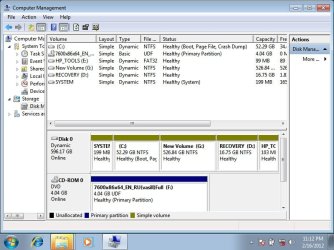
As seen from the attached picture of the “Disc Management” :


- All partitions are “Dynamic”; partition C, where I have installed OS is a dynamic as well. Most probably, I have changed it during resizing of the partition….
- is it ok, if there is no “SYSTEM” word near “C” partition, where is noted – “Boot, Page File, Crash Dump)?
- Why there is no “Primary partition” in Disk 0 ???? Why all is “Simple volume” ?

Please note that “SYSTEM” volume came from factory. I do not know it’s contain.


Please, help me to solve the problem. I haven’t met such an issue before.

Thanks in advance.
 

Attachments
  • Disk_Management.jpg
    Disk_Management.jpg
    73.7 KB · Views: 1,012

My Computer My Computer

At a glance

Windows 7 Ultimate x64
OS
Windows 7 Ultimate x64
simple volume is normal!
win7 changed partitions to dynamic... because you have more than 4 partitions!! if you use more than 3 partitions... create an extended partition and put logical partitions in it.

Now we gonna fix everything.
Do you still need HP_TOOLS partition?
Recovery partition is useless... other language I assume
"new volume" partition. Does it contain importatnt files? Do you mind if I let you destroy it?
 

My Computer My Computer

At a glance

Microsoft Windows 7 Home Premium 64-bits 7601...Intel(R) Core(TM) i3 CPU M 370 @ 2.40GHz4,00 GBATI Mobility Radeon HD 5400 Series
Computer type
Laptop
Computer Manufacturer/Model Number
ACER ASPIRE 5742G
OS
Microsoft Windows 7 Home Premium 64-bits 7601 Multiprocessor Free Service Pack 1
CPU
Intel(R) Core(TM) i3 CPU M 370 @ 2.40GHz
Motherboard
Acer Aspire 5742G
Memory
4,00 GB
Graphics Card(s)
ATI Mobility Radeon HD 5400 Series
Sound Card
(1) AMD High Definition Audio Device (2) Realtek High Defi
Screen Resolution
1366 x 768 x 32 bits (4294967296 colors) @ 60 Hz
Hard Drives
WDC WD5000BEVT-22ZAT0
Hello all,

I bought a HP laptop, which came with Windows 7 and with one partition (C).
“Language” of windows wasn’t English, that’s why I decided to format a laptop, to install a Windows 7 English and to create two partitions – one for OS and the other one for my personal data. Then I have done it……… I have installed Windows 7, I have installed drivers, software, etc, but after rebooting everything was crashed…
I do not know why, and what happened, but windows failed to start. I have got the following massage:

Windows boot manager

Windows failed to start. A recent hardware or software change might be the cause.

File: \Boot\BCD
Status: 0xc0000225

Info: an error occurred while attempting to read the boot configuration data.


Reinstallation of the Windows doesn’t help. Windows can’t start.
I can “log in” into Windows environment only by one more time formatting and installing it.

Please note, that I don’t have a “recovery disk”.

As seen from the attached picture of the “Disc Management” :


- All partitions are “Dynamic”; partition C, where I have installed OS is a dynamic as well. Most probably, I have changed it during resizing of the partition….
- is it ok, if there is no “SYSTEM” word near “C” partition, where is noted – “Boot, Page File, Crash Dump)?
- Why there is no “Primary partition” in Disk 0 ???? Why all is “Simple volume” ?

Please note that “SYSTEM” volume came from factory. I do not know it’s contain.


Please, help me to solve the problem. I haven’t met such an issue before.

Thanks in advance.
No primary partition on disk 0.... because it's not a standard dik but a dynamic one!
 

My Computer My Computer

At a glance

Microsoft Windows 7 Home Premium 64-bits 7601...Intel(R) Core(TM) i3 CPU M 370 @ 2.40GHz4,00 GBATI Mobility Radeon HD 5400 Series
Computer type
Laptop
Computer Manufacturer/Model Number
ACER ASPIRE 5742G
OS
Microsoft Windows 7 Home Premium 64-bits 7601 Multiprocessor Free Service Pack 1
CPU
Intel(R) Core(TM) i3 CPU M 370 @ 2.40GHz
Motherboard
Acer Aspire 5742G
Memory
4,00 GB
Graphics Card(s)
ATI Mobility Radeon HD 5400 Series
Sound Card
(1) AMD High Definition Audio Device (2) Realtek High Defi
Screen Resolution
1366 x 768 x 32 bits (4294967296 colors) @ 60 Hz
Hard Drives
WDC WD5000BEVT-22ZAT0
simple volume is normal!
win7 changed partitions to dynamic... because you have more than 4 partitions!! if you use more than 3 partitions... create an extended partition and put logical partitions in it.

Now we gonna fix everything.
Do you still need HP_TOOLS partition?
Recovery partition is useless... other language I assume
"new volume" partition. Does it contain importatnt files? Do you mind if I let you destroy it?

Thanks for your reply.
I would like to note, that there were 4 partitions at the beginning - all partitions shown in the picture, except "New volume".

- To tell the truth, I do not know what "HP_TOOLS" partition contains.
- I also think that "Recovery" partition is useless. I guess it is not English.
- "New volume" doesn't contain any information. We can delete/format it.
- I do not know what contains "System" partition as well!!!

Kaktussoft, please note, that I can “log in” into Windows only by one more time formatting and installing it.

Thank you very much.
Looking forward to your reply.
 

My Computer My Computer

At a glance

Windows 7 Ultimate x64
OS
Windows 7 Ultimate x64
So if you reinstall windows you can login succesfully? If you shutdown, so don't install any software and startup again the bsod screen appears?

HP_TOOLS is mainly for special hp tools and drivers. not needed at all!
"system" partition is normally called "system reserved". It's the boot partition with the bootmenu containing one or more ooperating systems. Also not needed at all. It is only needed if you use bitlocker. It will be recreated automatically in case of reinstall.

So you can remove hp_tools, new_volume, recovery and system.
We do that later. OK?
 

My Computer My Computer

At a glance

Microsoft Windows 7 Home Premium 64-bits 7601...Intel(R) Core(TM) i3 CPU M 370 @ 2.40GHz4,00 GBATI Mobility Radeon HD 5400 Series
Computer type
Laptop
Computer Manufacturer/Model Number
ACER ASPIRE 5742G
OS
Microsoft Windows 7 Home Premium 64-bits 7601 Multiprocessor Free Service Pack 1
CPU
Intel(R) Core(TM) i3 CPU M 370 @ 2.40GHz
Motherboard
Acer Aspire 5742G
Memory
4,00 GB
Graphics Card(s)
ATI Mobility Radeon HD 5400 Series
Sound Card
(1) AMD High Definition Audio Device (2) Realtek High Defi
Screen Resolution
1366 x 768 x 32 bits (4294967296 colors) @ 60 Hz
Hard Drives
WDC WD5000BEVT-22ZAT0
Did you move hp_tools or recovery partition with any partition tool?
Did you move C-partition with any partition tools?

File: \Boot\BCD
Status: 0xc0000225


Means normally that it can't find the partition with the operation system. Reason can be:
-you changed th disk signature (very unlikely)
-you moved the OS-partition. (The start-point of the partition changed)
 

My Computer My Computer

At a glance

Microsoft Windows 7 Home Premium 64-bits 7601...Intel(R) Core(TM) i3 CPU M 370 @ 2.40GHz4,00 GBATI Mobility Radeon HD 5400 Series
Computer type
Laptop
Computer Manufacturer/Model Number
ACER ASPIRE 5742G
OS
Microsoft Windows 7 Home Premium 64-bits 7601 Multiprocessor Free Service Pack 1
CPU
Intel(R) Core(TM) i3 CPU M 370 @ 2.40GHz
Motherboard
Acer Aspire 5742G
Memory
4,00 GB
Graphics Card(s)
ATI Mobility Radeon HD 5400 Series
Sound Card
(1) AMD High Definition Audio Device (2) Realtek High Defi
Screen Resolution
1366 x 768 x 32 bits (4294967296 colors) @ 60 Hz
Hard Drives
WDC WD5000BEVT-22ZAT0

My Computer My Computer

At a glance

Microsoft Windows 7 Home Premium 64-bits 7601...Intel(R) Core(TM) i3 CPU M 370 @ 2.40GHz4,00 GBATI Mobility Radeon HD 5400 Series
Computer type
Laptop
Computer Manufacturer/Model Number
ACER ASPIRE 5742G
OS
Microsoft Windows 7 Home Premium 64-bits 7601 Multiprocessor Free Service Pack 1
CPU
Intel(R) Core(TM) i3 CPU M 370 @ 2.40GHz
Motherboard
Acer Aspire 5742G
Memory
4,00 GB
Graphics Card(s)
ATI Mobility Radeon HD 5400 Series
Sound Card
(1) AMD High Definition Audio Device (2) Realtek High Defi
Screen Resolution
1366 x 768 x 32 bits (4294967296 colors) @ 60 Hz
Hard Drives
WDC WD5000BEVT-22ZAT0
Kaktussoft,

1. Yes, if I reinstall a windows I can login succesfully. If I shutdown, Windows failed to start. It trying but didn't succeed.
2. I will remove "HP_TOOLS", "system" and "recovery" partitions. I will do it by “Disc Management” or I will do it during reformatting a windows.
But what to do with "C" partition ? I will format it and then I will install a Windows on it. Is it ok?
3. Yes, I already tried to start from Windows 7 installation DVD and select "repair your computer". It didn't help.
But I have done it only one time. I will do it 3 times as you have suggested.

I will keep you informed as soon as possible.

Thanks in advance.
 

My Computer My Computer

At a glance

Windows 7 Ultimate x64
OS
Windows 7 Ultimate x64
Very strange windows boots only once!!
But you are willing to remove the unwanted partitions.
You want to format C as well... but more important make the disk standard instead of dynamic.
So all information can be removed. I say ALL information.

Start from installation DVD and select "repair your computer" and then enter "command prompt"

DISKPART
SELECT DISK 0
LIST PART

Very sure this is the right disk????

CLEAN
EXIT

harddisk is totally cleaned. No partition information is on it now.
Now reboot and install win7. Good luck. have to go now
 

My Computer My Computer

At a glance

Microsoft Windows 7 Home Premium 64-bits 7601...Intel(R) Core(TM) i3 CPU M 370 @ 2.40GHz4,00 GBATI Mobility Radeon HD 5400 Series
Computer type
Laptop
Computer Manufacturer/Model Number
ACER ASPIRE 5742G
OS
Microsoft Windows 7 Home Premium 64-bits 7601 Multiprocessor Free Service Pack 1
CPU
Intel(R) Core(TM) i3 CPU M 370 @ 2.40GHz
Motherboard
Acer Aspire 5742G
Memory
4,00 GB
Graphics Card(s)
ATI Mobility Radeon HD 5400 Series
Sound Card
(1) AMD High Definition Audio Device (2) Realtek High Defi
Screen Resolution
1366 x 768 x 32 bits (4294967296 colors) @ 60 Hz
Hard Drives
WDC WD5000BEVT-22ZAT0
It helps. Thank You very much.
 

My Computer My Computer

At a glance

Windows 7 Ultimate x64
OS
Windows 7 Ultimate x64
Still don't understand what corrupted the BCD after first shutdown. I saw a strange thing in diskmanagement screen. It didn't have an active partition!!! How the heck were you able to boot?!
 

My Computer My Computer

At a glance

Microsoft Windows 7 Home Premium 64-bits 7601...Intel(R) Core(TM) i3 CPU M 370 @ 2.40GHz4,00 GBATI Mobility Radeon HD 5400 Series
Computer type
Laptop
Computer Manufacturer/Model Number
ACER ASPIRE 5742G
OS
Microsoft Windows 7 Home Premium 64-bits 7601 Multiprocessor Free Service Pack 1
CPU
Intel(R) Core(TM) i3 CPU M 370 @ 2.40GHz
Motherboard
Acer Aspire 5742G
Memory
4,00 GB
Graphics Card(s)
ATI Mobility Radeon HD 5400 Series
Sound Card
(1) AMD High Definition Audio Device (2) Realtek High Defi
Screen Resolution
1366 x 768 x 32 bits (4294967296 colors) @ 60 Hz
Hard Drives
WDC WD5000BEVT-22ZAT0
Acer aspire 5532 win7 home edition 64 bit

Hi my laptop has been playing about past few days I get the screen that says. Windows failed to start.a recent hardware or software change ,could be the cause

When I go to launch startup repair it starts then screen goes black I can't do anything else I have followed the advise of taking out battery and unplugging it holding the on button for 30 secs still nothing,I'm pretty screwed by this as I have a industrial tribunal case coming up very soon and all m notes are stored on it yes I know I was stupid by not backing it up to an external drive but I didn't expect it to do this now can anyone plebe help me ASAP thank you Obadiya
 

My Computer My Computer

At a glance

Wndows 7 home premium 64 bit
OS
Wndows 7 home premium 64 bit
It's not even allowing me to go into safe mode some times it lights up but says nothing about starting in safe mode
 

My Computer My Computer

At a glance

Wndows 7 home premium 64 bit
OS
Wndows 7 home premium 64 bit
Then move to the next step in tutorial. You need to disinfect before attempting repairs.

What "lights up?" Are you tapping the F8 key at boot and getting Advanced Boot Options ?

If none of the Safe Modes will boot then try Last Known Good Config.
 
I faced the same issue. My friend had moved files and folders from "Program Files (x86)" to my documents. Many issued happened to Windows. I decided to reinstall a new Windows. But I had encountered the same error, when I was trying to go to BIOS for choosing DVD-ROM as the primary boot;
File: \Boot\BCD
Status: 0xc0000225


I found how to go to bios and bypass the error;
1- Press F8 to go to "Safe Mode"
2- Select "Enable Boot Logging". System will restart.
3- Hit "Esc" to go to "Boot Manager". You will see a list of functions with hot-keys to them.
4- Hit "F9" to go to "Boot Order" and select your DVD-ROM as your first boot.
5- Put your Windows 7's disk and now you can install your Windows and finally get rid of this issue.
* You can format "HP TOOLS" and "HP Recovery" partitions. They're no good. Download your drivers again.

Model of Laptop: HP Pavilion g6-1301eo Notebook PC
Bassir Shirzad from Herat, Afghanistan
 

My Computer My Computer

At a glance

Windowds 7 Professional - 64 bitIntel® Celeron® Processor 9002GB DDR3 memoryIntel® Graphics Media Accelerator 4500M
Computer Manufacturer/Model Number
Toshiba Satellite C655-S5049
OS
Windowds 7 Professional - 64 bit
CPU
Intel® Celeron® Processor 900
Memory
2GB DDR3 memory
Graphics Card(s)
Intel® Graphics Media Accelerator 4500M
Sound Card
Standard stereo speakers, Microphone jack (mono), Headphone
Monitor(s) Displays
1366x768 (HD), HD TruBrite LCD Display, 15.6 Inch
Hard Drives
250GB HDD (5400rpm)
Back
Top