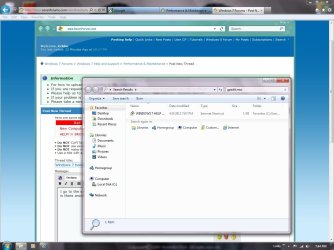
E Eckho New member Local time 8:57 AM Messages 1 Apr 9, 2012 #1 I go to the start menu and type in gpedit.msc and hit enter and nothing happens, is there another way to get rid of windows 7 thumb nails? They r driving me crazy. The attached pic shows u what happens when I type gpedit.msc Attachments Untitled.jpg 110 KB · Views: 21 My Computer OSWindows 7 Home Premium 64 bit
I go to the start menu and type in gpedit.msc and hit enter and nothing happens, is there another way to get rid of windows 7 thumb nails? They r driving me crazy. The attached pic shows u what happens when I type gpedit.msc
koolkat77 New member Guru VIP Local time 7:57 PM Messages 14,164 Apr 9, 2012 #2 Gpedit is not available in Windows 7 Home premium. take a look at this thread http://www.sevenforums.com/tutorials/11738-thumbnail-previews-enable-disable.html My Computer Computer typePC/DesktopComputer Manufacturer/Model NumberSelf assembledOSWindows 10 Home 64BitCPUIntel Core i5 10400 @ 2.90GHzMotherboardIntel Corporation DG41WV (PROCESSOR)Memory8.00GB Single-Channel Unknown @ 1329MHz (16-20-20-38)Sound CardRealtek High Definition AudioMonitor(s) DisplaysDELL E170SScreen Resolution1280x1024 pixelsHard Drives931GB TOSHIBA DT01ACA100 (SATA) 238GB TEAM TM8PS7256G (SATA SSD)CaseNothing FancyCoolingFansKeyboardA4 Tech Co LTDMouseA4 Tech Co Ltd/LogitechInternet Speed25 Mbps
Gpedit is not available in Windows 7 Home premium. take a look at this thread http://www.sevenforums.com/tutorials/11738-thumbnail-previews-enable-disable.html