Windows 7 installation problems with new hard drive

RobertC1987

New member
Local time
4:21 AM
Messages
14
Hello all,

I'm new to this forum and have a problem i was hoping you could help me with, i have a relatively old Samsung RV511S02UK laptop and I've been trying to upgrade it and have hit a problem with installation of windows 7 on my new Seagate 1Tb Laptop SSHD.
After putting the disk into the drive and booting from the windows disk,it comes up with the preparing files white bar which fills but once filled the screen goes to the Windows 7 start up screen but immediately restarts and starts the whole process over again and i have no idea why this is. Any help with this problem will be greatly appreciated.
 

My Computer

Computer type
Laptop
Computer Manufacturer/Model Number
Samsung RV511S02UK
OS
Windows 7 32 bit
CPU
Intel Core i5 [email protected]
Motherboard
Unknown
Memory
8GB
Graphics Card(s)
NVIDIA Geforce 315M
Browser
Firefox
Where did you get the Win7 disk? How was it burned? What was the source of the ISO file if applicable? Obtaining good media is discussed in Step 1 of Clean Reinstall Windows 7 which are the steps you should follow to get and keep a perfect install on your Samsung. There is even a Special Note to Samsung owners at the end to study.

Is the hard drive detected in BIOS setup correctly? Try resetting the BIOS to defaults.

Then work through the rest of the steps to Troubleshoot Windows 7 Installation Failures - Windows 7 Help Forums
 
booting from the windows disk,

Describe this windows disk.

Bought from a brick-and-mortar store? Burned from an ISO? Borrowed? Bought from eBay?

Is the new hard drive the only connected hard drive during these failed attempts?

SSHD? I'm guessing this is a so-called "hybrid" drive that has the components of an SSD and a standard spinning hard drive, all in one housing?
 

My Computer

Computer type
PC/Desktop
Computer Manufacturer/Model Number
Ignatz Special; 4 speed manual gearbox; factory air conditioning; one of one
OS
Windows 7 Home Premium SP1, 64-bit
CPU
Intel Skylake i5-6600K, not overclocked
Motherboard
AsRock Z170M Extreme 4, micro ATX
Memory
8 GB HyperX DDR4-2666 (2 x 4 GB)
Graphics Card(s)
none; graphics are integrated on CPU
Sound Card
onboard: Realtek ALC1150; external: USB Behringer UF0-202
Monitor(s) Displays
Dell S2340M 23 inch IPS
Screen Resolution
1600 x 900
Hard Drives
System: Crucial MX100 series SSD, 128 GB;
Data: Samsung Spinpoint 103SJ, 1 TB;
Backup: WD Caviar Green WD30EZRX-00D8PB0, 3 TB
PSU
Rosewill SilentNight 500 watt fanless, semi-modular
Case
Antec Solo II
Cooling
Noctua NH-U12S; Noctua F12 intake, Noctua S12A exhaust
Keyboard
Microsoft 200 6JH-00001 USB
Mouse
Dell or Microsoft optical wired; USB
Antivirus
Microsoft Security Essentials and Malwarebytes Premium
Browser
Pale Moon
Other Info
All fans PWM; speeds at idle: CPU circa 500 rpm; intake circa 600 rpm; exhaust circa 600 rpm; CPU temps 27 idle and 47 C load in a warm room (27 C/81 F) when running Intel Extreme Tuning Utility stress test.
The Windows 7 disk is one I already had and had used on the hard drive I'm trying to replace, yes the hard drive is a "hybrid" drive and the only one connected when the installation fails.
 

My Computer

Computer type
Laptop
Computer Manufacturer/Model Number
Samsung RV511S02UK
OS
Windows 7 32 bit
CPU
Intel Core i5 [email protected]
Motherboard
Unknown
Memory
8GB
Graphics Card(s)
NVIDIA Geforce 315M
Browser
Firefox
Does the Seagate come with instructions on how to enable the SSD caching chip included on most hybrid drives? This may be a necessary part of the installation process, similar to Install Windows on MSATA (SSD) Drive - Windows 7 Help Forums or Install Windows on System with MSATA and ISRT - Windows 7 Help Forums.

All I find with a cursory search is How to Upgrade a Laptop Hard Drive with Solid State Hybrid Drive (SSHD) Technology | Seagate

I see no reply indicating you are working through the steps to Troubleshoot Windows 7 Installation Failures - Windows 7 Help Forums which solve almost all installation problems, so don't know what you have tried yet. Please reply to each step which is given so we know what else to suggest.

Check the installation disk for dirt or scratches, wash it if necessary, try booting it in another PC to see if it goes further.
 
I will try your troubleshooting guide once I finish work,thank you.
 

My Computer

Computer type
Laptop
Computer Manufacturer/Model Number
Samsung RV511S02UK
OS
Windows 7 32 bit
CPU
Intel Core i5 [email protected]
Motherboard
Unknown
Memory
8GB
Graphics Card(s)
NVIDIA Geforce 315M
Browser
Firefox
Went into the BIOS before i booted from the disk this time and changed Legacy off and UEFI on but has the same outcome,i've tried the disk in the drive when current HD is in and it has the same outcome,but it'll read the disk if placed in when the laptop it is on,which doesn't make sense to me. I could try see if the 32bit disk works but installing that will render the 8GB of ram i have pointless.
 

My Computer

Computer type
Laptop
Computer Manufacturer/Model Number
Samsung RV511S02UK
OS
Windows 7 32 bit
CPU
Intel Core i5 [email protected]
Motherboard
Unknown
Memory
8GB
Graphics Card(s)
NVIDIA Geforce 315M
Browser
Firefox
Once again there's no interactive response to a series of steps given including tutorials that have multiple steps which all need to be tried. How do we know what you've tried if no reply to steps given? Is there someone there who can help you work through them?

If not I would call Seagate Support which is Included in drive purchase and have them help you try the install and then test the drive. You can even test it yourself using Seatools burned to CD to boot. Downloads | Seagate

More likely the problem is the disk. Where diid you get it and how is it burned. I asked you to check its condition? Did you boot the disk as UEFI DVD drive?

Answer all question and reply to all steps if you want help.
 
I apologise if it seems like I'm not heeding the tutorial,i will have to get a large enough USB drive to try a UEFI boot using a ISO on a USB drive as i currently only have a 1GB and seen I'd need at least a 4GB one for it to work.
 

My Computer

Computer type
Laptop
Computer Manufacturer/Model Number
Samsung RV511S02UK
OS
Windows 7 32 bit
CPU
Intel Core i5 [email protected]
Motherboard
Unknown
Memory
8GB
Graphics Card(s)
NVIDIA Geforce 315M
Browser
Firefox
I believe the disk was bought from amazon a couple of years ago,the disk isn't scratched or damaged in anyway,it's in a official Windows 7 SP1 case with both 32bit and 64 bit disks,neither or which work
 

My Computer

Computer type
Laptop
Computer Manufacturer/Model Number
Samsung RV511S02UK
OS
Windows 7 32 bit
CPU
Intel Core i5 [email protected]
Motherboard
Unknown
Memory
8GB
Graphics Card(s)
NVIDIA Geforce 315M
Browser
Firefox
I have now answered your questions on the DVDs orgin and conditon.
 

My Computer

Computer type
Laptop
Computer Manufacturer/Model Number
Samsung RV511S02UK
OS
Windows 7 32 bit
CPU
Intel Core i5 [email protected]
Motherboard
Unknown
Memory
8GB
Graphics Card(s)
NVIDIA Geforce 315M
Browser
Firefox
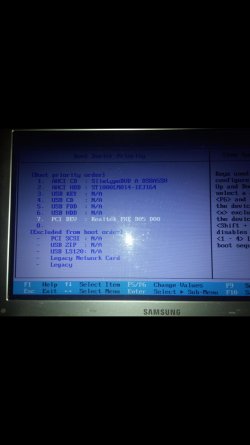
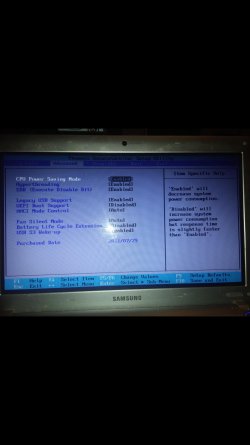
I have 8gb RAM on board,UEFI boot support is Enabled,So is Legacy USB support,i don't see CSM could it be called something else? Boot priority is AHCI CD first then ACHI HDD HDDfollowed by USB Key
 

My Computer

Computer type
Laptop
Computer Manufacturer/Model Number
Samsung RV511S02UK
OS
Windows 7 32 bit
CPU
Intel Core i5 [email protected]
Motherboard
Unknown
Memory
8GB
Graphics Card(s)
NVIDIA Geforce 315M
Browser
Firefox
With 64 bit disk or UEFI formatted flash stick in drive you need to get UEFI drive choice for DVD or Flash to show up in F12 boot menu. Then it should default during install to Windows boot manager as first boot device in BIOS setup or you'll have to set it that way.

What if you disable UEFI to boot DVD as plain DVD?

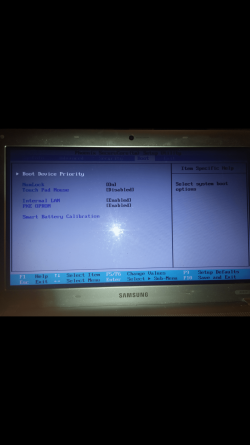
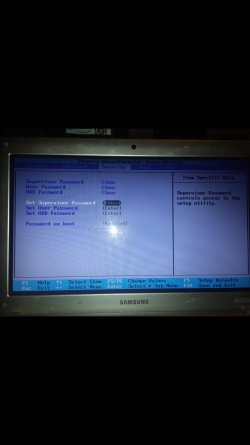
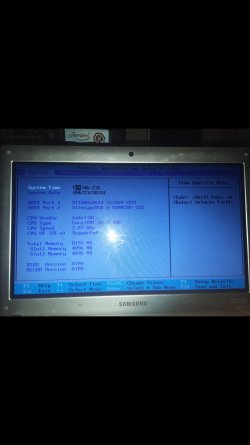
You must be missing settings. Can you take pics of every BIOS tab? Attach using paper clip icon.

Also check if there is a UEFI firmware update on
The laptops Support Downloads webpage. This may
Be what's needed. But lets see the BIOS pics first.
 
Sorry it took so long to reply,i tried disabling UEFI and booted and got the same result as with it enabled.
 

Attachments

  • Screenshot_2015-04-23-01-24-28.jpg
    Screenshot_2015-04-23-01-24-28.jpg
    226 KB · Views: 2
  • Screenshot_2015-04-23-01-24-37.png
    Screenshot_2015-04-23-01-24-37.png
    1.8 MB · Views: 0
  • Screenshot_2015-04-23-01-24-44.jpg
    Screenshot_2015-04-23-01-24-44.jpg
    187.9 KB · Views: 0
  • Screenshot_2015-04-23-01-24-51.jpg
    Screenshot_2015-04-23-01-24-51.jpg
    209.6 KB · Views: 1
  • Screenshot_2015-04-23-01-24-59.jpg
    Screenshot_2015-04-23-01-24-59.jpg
    185.9 KB · Views: 0

My Computer

Computer type
Laptop
Computer Manufacturer/Model Number
Samsung RV511S02UK
OS
Windows 7 32 bit
CPU
Intel Core i5 [email protected]
Motherboard
Unknown
Memory
8GB
Graphics Card(s)
NVIDIA Geforce 315M
Browser
Firefox
Ok,i will do this in the morning as it's 2am here and could do with the sleep,thank you for all your help so far and i hope i get it sorted soon.
 

My Computer

Computer type
Laptop
Computer Manufacturer/Model Number
Samsung RV511S02UK
OS
Windows 7 32 bit
CPU
Intel Core i5 [email protected]
Motherboard
Unknown
Memory
8GB
Graphics Card(s)
NVIDIA Geforce 315M
Browser
Firefox
I have already updated the BIOS before i started the thread on this forum,it hadn't been updated at all till i did it earlier was 02PA and is now 07PA.
 

My Computer

Computer type
Laptop
Computer Manufacturer/Model Number
Samsung RV511S02UK
OS
Windows 7 32 bit
CPU
Intel Core i5 [email protected]
Motherboard
Unknown
Memory
8GB
Graphics Card(s)
NVIDIA Geforce 315M
Browser
Firefox
Very good.

So let's make sure you don't get a UEFI DVD boot option with the DVD in the drive. If not then it's not performing as it should with UEFI boot enabled.

So disable UEFI and if it won't install from Legacy DVD choice with UEFI disabled then we need to try another installer to compare. You had a good idea to format a stick using the special tool I linked you. Another idea is to burn another DVD using Windows 7 USB-DVD Download Tool. If you don't have a fresh ISO download for your version of Win7 I will loan you mine.
 
With UEFI off and legacy enabled it does the same thing again.Interestingly i have another Windows 7 set of disks without SP1 which were for a computer we no longer have or use and have tried both of them and get the same outcome so that points to me to be a problem with it reading boot disks.
 

My Computer

Computer type
Laptop
Computer Manufacturer/Model Number
Samsung RV511S02UK
OS
Windows 7 32 bit
CPU
Intel Core i5 [email protected]
Motherboard
Unknown
Memory
8GB
Graphics Card(s)
NVIDIA Geforce 315M
Browser
Firefox
Back
Top