
Solved Windows 7 Installation

I don't know if I am digging my way out or digging a deeper hole.

I just downloaded a different driver from the NiVidia site and now I have this status in Device Manager:
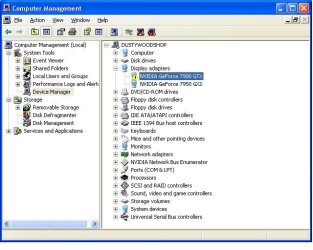
New Graphics Driver.JPG

The GeForce 7900 GTX is a GPU that I do not have but that apparently the driver will support. Can I just ignore the alert in Device Manager?
 

My Computer

Computer Manufacturer/Model Number
Polywell
OS
Windows 7x32 Home Premium & XP SP3 x86
CPU
Athlon 64FX
Motherboard
ASUS M2N32SLI Delux
Memory
Corsair CM2X1024-8500C5
Graphics Card(s)
GeForce 7950X2 (Dual)
Monitor(s) Displays
ViewSonic A90f+ (Two)
Screen Resolution
1280x1024
Hard Drives
WD1500ADFD-00NLR1 (Originally Raid5)

Changed to three individual drives after HD crashed. May return to RAID5 if I locate a suitable HD.
PSU
TurboColl 1KW
Case
Polywell
Cooling
Cool'n'Quiet (Questionable Operation)
Keyboard
Logitech
Mouse
Logitech
Internet Speed
1GHertz (I think)
Other Info
Sony CD-RW CRX320EE

HP DVD Writer 1140d (may need to replace??)
Driver installation in XP for the video card will have no bearing on Win7's installation success. The card or chip's driver should be in the installer or it will provide a placeholder Standard VGA driver.

Again, try a booted installation first to the partition created for Win7 installation.
 
Driver installation in XP for the video card will have no bearing on Win7's installation success. The card or chip's driver should be in the installer or it will provide a placeholder Standard VGA driver.

Again, try a booted installation first to the partition created for Win7 installation.

I gotta make sure I am up for this routine again before I take the plunge.

I think the hardware is ready (except for disabling Cool'and'Quiet).

When I do this (Clean Install from disc), do I select "Windows 7" or "Windows Setup Rollback"? Is this question already answered in your highlighted statement above?

"Earlier Version of Windows" is what I now select to boot into XP. Can that be changed to state Windows XP?
 

My Computer

Computer Manufacturer/Model Number
Polywell
OS
Windows 7x32 Home Premium & XP SP3 x86
CPU
Athlon 64FX
Motherboard
ASUS M2N32SLI Delux
Memory
Corsair CM2X1024-8500C5
Graphics Card(s)
GeForce 7950X2 (Dual)
Monitor(s) Displays
ViewSonic A90f+ (Two)
Screen Resolution
1280x1024
Hard Drives
WD1500ADFD-00NLR1 (Originally Raid5)

Changed to three individual drives after HD crashed. May return to RAID5 if I locate a suitable HD.
PSU
TurboColl 1KW
Case
Polywell
Cooling
Cool'n'Quiet (Questionable Operation)
Keyboard
Logitech
Mouse
Logitech
Internet Speed
1GHertz (I think)
Other Info
Sony CD-RW CRX320EE

HP DVD Writer 1140d (may need to replace??)
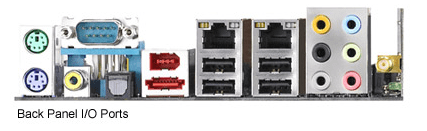
Does your motherboard back panel, the connections at the back of your computer, have a VGA connection?
According to this snip from your motherboard site, there is no VGA connection, this indicates there may be no on board graphics.
Looking through your manual there is no mention of it.

ASUS M2N32SLI Delux Back panel.PNG

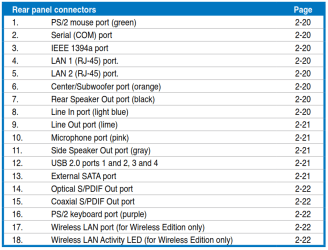
This is the list of back panel connectors from your motherboard manual, no VGA connection is listed.
ASUS M2N32SLI Delux Rear panel connectors.PNG


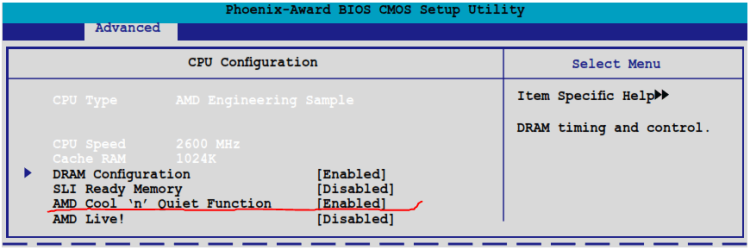
To disable the 'Cool 'n Quiet' setting in your BIOS,
ASUS M2N32SLI Delux BIOS Advanced.PNGASUS M2N32SLI Delux BIOS Advanced CPU Configuration.PNG
Go to 'Advanced' and then 'CPU Configuration' and select 'Disable'.
 
Last edited:

My Computer

Computer type
PC/Desktop
Computer Manufacturer/Model Number
76~2.0
OS
Windows 7 Ult x64 - SP1/ Windows 8 Pro x64
CPU
Intel Core i5-3570K 4.6GHz
Motherboard
Gigabyte GA-Z77X UD3H, f18
Memory
8GB (2X4GB) DDR3 1600 Corsair Vengeance CL8 1.5v
Graphics Card(s)
Sapphire HD 7770 Vapor-X OC 1GB DDR5
Sound Card
Onboard VIA VT2021
Monitor(s) Displays
22" LCD Dell
Screen Resolution
1680x1050
Hard Drives
Samsung 840Pro 128GB SSD,
Seagate Barracuda 500GB SATA2 7200rpm 32MB cache, Seagate Barracuda 1TB SATA2 7200rpm 32MB cache,
PSU
Corsair HX650W
Case
Cooler Master Storm Scout
Cooling
Corsair H80 2x12cm Noctua NF P12 , 2x14cm case fans
Keyboard
Logitech Wave
Mouse
CM Sentinel
Internet Speed
Dismal
Antivirus
Avast
Browser
Opera Next
Other Info
Haswell laptop: HP Envy 17t-j, i7-4700MQ, GeForce 740M 2GB DDR3, 17.3" Full HD 1920x1080, 16GB RAM, Samsung 840 Pro 128GB, 1TB Hitachi 7200 HDD,
Desktop: eSATA ports,
External eSATA Seagate 500GB SATA2 7200rpm,
External WD USB 500GB
Does your motherboard back panel, the connections at the back of your computer, have a VGA connection?
According to this snip from your motherboard site, there is no VGA connection, this indicates there may be no on board graphics.
Looking through your manual there is no mention of it.

View attachment 171867

This is the list of back panel connectors from your motherboard manual, no VGA connection is listed.
View attachment 171868

This is a valid presentation of my MOBO.

BTW I attempted to start the installation this morning, booting from the installation CD. It still does not seem to be working; same as before.

There are some screen shots (digital camera images) of what I have in this thread.

#314 and #316
 

My Computer

Computer Manufacturer/Model Number
Polywell
OS
Windows 7x32 Home Premium & XP SP3 x86
CPU
Athlon 64FX
Motherboard
ASUS M2N32SLI Delux
Memory
Corsair CM2X1024-8500C5
Graphics Card(s)
GeForce 7950X2 (Dual)
Monitor(s) Displays
ViewSonic A90f+ (Two)
Screen Resolution
1280x1024
Hard Drives
WD1500ADFD-00NLR1 (Originally Raid5)

Changed to three individual drives after HD crashed. May return to RAID5 if I locate a suitable HD.
PSU
TurboColl 1KW
Case
Polywell
Cooling
Cool'n'Quiet (Questionable Operation)
Keyboard
Logitech
Mouse
Logitech
Internet Speed
1GHertz (I think)
Other Info
Sony CD-RW CRX320EE

HP DVD Writer 1140d (may need to replace??)
What is the Polywell PC model No?

I am unable to answer that question. I did not buy this computer and I have none of the paper work that one might receive.

It is labeled "CMSTACKER", "Cooler Master" but I believe that all applies to just the chassis.

It is my understanding that this unit was custom built for a guy who was into "railroad station emulations". It was loaded with all sorts of applications about railroads. I discarded nearly everything that was on the HD other than the OS. Due to a HD crash (RAID5) and my inability to recover without loosing the OS, I have now loaded it with my own OS which was from an old Dell system that I have also dismantled.
 

My Computer

Computer Manufacturer/Model Number
Polywell
OS
Windows 7x32 Home Premium & XP SP3 x86
CPU
Athlon 64FX
Motherboard
ASUS M2N32SLI Delux
Memory
Corsair CM2X1024-8500C5
Graphics Card(s)
GeForce 7950X2 (Dual)
Monitor(s) Displays
ViewSonic A90f+ (Two)
Screen Resolution
1280x1024
Hard Drives
WD1500ADFD-00NLR1 (Originally Raid5)

Changed to three individual drives after HD crashed. May return to RAID5 if I locate a suitable HD.
PSU
TurboColl 1KW
Case
Polywell
Cooling
Cool'n'Quiet (Questionable Operation)
Keyboard
Logitech
Mouse
Logitech
Internet Speed
1GHertz (I think)
Other Info
Sony CD-RW CRX320EE

HP DVD Writer 1140d (may need to replace??)
Does your motherboard back panel, the connections at the back of your computer, have a VGA connection?
According to this snip from your motherboard site, there is no VGA connection, this indicates there may be no on board graphics.
Looking through your manual there is no mention of it.

View attachment 171867

This is the list of back panel connectors from your motherboard manual, no VGA connection is listed.
View attachment 171868


To disable the 'Cool 'n Quiet' setting in your BIOS,
View attachment 171879View attachment 171878
Go to 'Advanced' and then 'CPU Configuration' and select 'Disable'.

Thank you. That is done. It is my understanding that with Cool,n,Quiet disabled the fans simple run at full rpm all the time. Not a cooling issue. Am I correct?
 

My Computer

Computer Manufacturer/Model Number
Polywell
OS
Windows 7x32 Home Premium & XP SP3 x86
CPU
Athlon 64FX
Motherboard
ASUS M2N32SLI Delux
Memory
Corsair CM2X1024-8500C5
Graphics Card(s)
GeForce 7950X2 (Dual)
Monitor(s) Displays
ViewSonic A90f+ (Two)
Screen Resolution
1280x1024
Hard Drives
WD1500ADFD-00NLR1 (Originally Raid5)

Changed to three individual drives after HD crashed. May return to RAID5 if I locate a suitable HD.
PSU
TurboColl 1KW
Case
Polywell
Cooling
Cool'n'Quiet (Questionable Operation)
Keyboard
Logitech
Mouse
Logitech
Internet Speed
1GHertz (I think)
Other Info
Sony CD-RW CRX320EE

HP DVD Writer 1140d (may need to replace??)
How is the graphics card listed in BIOS? What are it's settings choices?

If you click on the Chipset VGA (Disabled) BIOS listing you referenced earlier can you Enable it? What are the options?

If you are getting the Windows Boot Menu as shown in screenshot linked then the DVD does not appear to be booting. Try booting the flashstick installer. Use Custom install>Drive Options to delete failed Win7 install, create new partition, format, install.
 
Does your motherboard back panel, the connections at the back of your computer, have a VGA connection?
According to this snip from your motherboard site, there is no VGA connection, this indicates there may be no on board graphics.
Looking through your manual there is no mention of it.

View attachment 171867

This is the list of back panel connectors from your motherboard manual, no VGA connection is listed.
View attachment 171868


To disable the 'Cool 'n Quiet' setting in your BIOS,
View attachment 171879View attachment 171878
Go to 'Advanced' and then 'CPU Configuration' and select 'Disable'.

Thank you. That is done. It is my understanding that with Cool,n,Quiet disabled the fans simple run at full rpm all the time. Not a cooling issue. Am I correct?

Cool 'n Quiet lowers the CPU frequency and voltage when the computer doesn't need the full speed, and brings it back to full speed when needed.
When the computer is idling it doesn't generate much heat and this allows the fans to slow down, this is the 'Quiet' part.

This works great and reduces the stress on your computer.
I use a similar function on mine, it is a very good option.

Your computer will run cooler with this function.
After the installation is complete go back and 'Enable' it.


Did you take out one of the RAM sticks?
Leaving only one installed.
 

My Computer

Computer type
PC/Desktop
Computer Manufacturer/Model Number
76~2.0
OS
Windows 7 Ult x64 - SP1/ Windows 8 Pro x64
CPU
Intel Core i5-3570K 4.6GHz
Motherboard
Gigabyte GA-Z77X UD3H, f18
Memory
8GB (2X4GB) DDR3 1600 Corsair Vengeance CL8 1.5v
Graphics Card(s)
Sapphire HD 7770 Vapor-X OC 1GB DDR5
Sound Card
Onboard VIA VT2021
Monitor(s) Displays
22" LCD Dell
Screen Resolution
1680x1050
Hard Drives
Samsung 840Pro 128GB SSD,
Seagate Barracuda 500GB SATA2 7200rpm 32MB cache, Seagate Barracuda 1TB SATA2 7200rpm 32MB cache,
PSU
Corsair HX650W
Case
Cooler Master Storm Scout
Cooling
Corsair H80 2x12cm Noctua NF P12 , 2x14cm case fans
Keyboard
Logitech Wave
Mouse
CM Sentinel
Internet Speed
Dismal
Antivirus
Avast
Browser
Opera Next
Other Info
Haswell laptop: HP Envy 17t-j, i7-4700MQ, GeForce 740M 2GB DDR3, 17.3" Full HD 1920x1080, 16GB RAM, Samsung 840 Pro 128GB, 1TB Hitachi 7200 HDD,
Desktop: eSATA ports,
External eSATA Seagate 500GB SATA2 7200rpm,
External WD USB 500GB
Does your motherboard back panel, the connections at the back of your computer, have a VGA connection?
According to this snip from your motherboard site, there is no VGA connection, this indicates there may be no on board graphics.
Looking through your manual there is no mention of it.

View attachment 171867

This is the list of back panel connectors from your motherboard manual, no VGA connection is listed.
View attachment 171868


To disable the 'Cool 'n Quiet' setting in your BIOS,
View attachment 171879View attachment 171878
Go to 'Advanced' and then 'CPU Configuration' and select 'Disable'.

Thank you. That is done. It is my understanding that with Cool,n,Quiet disabled the fans simple run at full rpm all the time. Not a cooling issue. Am I correct?

Cool 'n Quiet lowers the CPU frequency and voltage when the computer doesn't need the full speed, and brings it back to full speed when needed.
When the computer is idling it doesn't generate much heat and this allows the fans to slow down, this is the 'Quiet' part.

This works great and reduces the stress on your computer.
I use a similar function on mine, it is a very good option.

Your computer will run cooler with this function.
After the installation is complete go back and 'Enable' it.


Did you take out one of the RAM sticks?
Leaving only one installed.

No. I missed that request. It shall be done.

I will leave A1 unless I hear otherwise.
 

My Computer

Computer Manufacturer/Model Number
Polywell
OS
Windows 7x32 Home Premium & XP SP3 x86
CPU
Athlon 64FX
Motherboard
ASUS M2N32SLI Delux
Memory
Corsair CM2X1024-8500C5
Graphics Card(s)
GeForce 7950X2 (Dual)
Monitor(s) Displays
ViewSonic A90f+ (Two)
Screen Resolution
1280x1024
Hard Drives
WD1500ADFD-00NLR1 (Originally Raid5)

Changed to three individual drives after HD crashed. May return to RAID5 if I locate a suitable HD.
PSU
TurboColl 1KW
Case
Polywell
Cooling
Cool'n'Quiet (Questionable Operation)
Keyboard
Logitech
Mouse
Logitech
Internet Speed
1GHertz (I think)
Other Info
Sony CD-RW CRX320EE

HP DVD Writer 1140d (may need to replace??)
Leave A1 installed.

Your motherboard will run fine with one RAM stick in slot A1 or B1.
 

My Computer

Computer type
PC/Desktop
Computer Manufacturer/Model Number
76~2.0
OS
Windows 7 Ult x64 - SP1/ Windows 8 Pro x64
CPU
Intel Core i5-3570K 4.6GHz
Motherboard
Gigabyte GA-Z77X UD3H, f18
Memory
8GB (2X4GB) DDR3 1600 Corsair Vengeance CL8 1.5v
Graphics Card(s)
Sapphire HD 7770 Vapor-X OC 1GB DDR5
Sound Card
Onboard VIA VT2021
Monitor(s) Displays
22" LCD Dell
Screen Resolution
1680x1050
Hard Drives
Samsung 840Pro 128GB SSD,
Seagate Barracuda 500GB SATA2 7200rpm 32MB cache, Seagate Barracuda 1TB SATA2 7200rpm 32MB cache,
PSU
Corsair HX650W
Case
Cooler Master Storm Scout
Cooling
Corsair H80 2x12cm Noctua NF P12 , 2x14cm case fans
Keyboard
Logitech Wave
Mouse
CM Sentinel
Internet Speed
Dismal
Antivirus
Avast
Browser
Opera Next
Other Info
Haswell laptop: HP Envy 17t-j, i7-4700MQ, GeForce 740M 2GB DDR3, 17.3" Full HD 1920x1080, 16GB RAM, Samsung 840 Pro 128GB, 1TB Hitachi 7200 HDD,
Desktop: eSATA ports,
External eSATA Seagate 500GB SATA2 7200rpm,
External WD USB 500GB
Leave A1 installed.

Your motherboard will run fine with one RAM stick in slot A1 or B1.

A1 only is my current configuration.

I am reviewing greg's instruction for cleaning the HD partition in preparation for the next attempt.

I don't want to screw up because I need this machine to carry on with this.
 

My Computer

Computer Manufacturer/Model Number
Polywell
OS
Windows 7x32 Home Premium & XP SP3 x86
CPU
Athlon 64FX
Motherboard
ASUS M2N32SLI Delux
Memory
Corsair CM2X1024-8500C5
Graphics Card(s)
GeForce 7950X2 (Dual)
Monitor(s) Displays
ViewSonic A90f+ (Two)
Screen Resolution
1280x1024
Hard Drives
WD1500ADFD-00NLR1 (Originally Raid5)

Changed to three individual drives after HD crashed. May return to RAID5 if I locate a suitable HD.
PSU
TurboColl 1KW
Case
Polywell
Cooling
Cool'n'Quiet (Questionable Operation)
Keyboard
Logitech
Mouse
Logitech
Internet Speed
1GHertz (I think)
Other Info
Sony CD-RW CRX320EE

HP DVD Writer 1140d (may need to replace??)
It appears you do have onboard video chip you can use to try install instead of card:

Observation: Don't understand While browsing through the BIOS I noticed Chipset - "NiVidia GPU (Disabled)" - Is this consistent with the fact that I am using a GeForce GPU.

You would need to disable card when enabling the onboard chipset. There should be a way in BIOS but if not you can just unplug it, since reinstalling card is one of the troubleshooting steps when GPU is indicated.

It's possible that the 3D video element showing in error in Device Manager is hanging install, or something else about the card whose driver is apparently not loading in final drivers-loading phase which is why it shows in error in Device manager.

What do you think, Dave?

When I exchanged GPUs - the reference to 3D Graphics and the VGA were eliminated. There are NO ALERTS left in the category OTHER. In fact - there is no longer a category OTHER.

I must apologize for allowing your other question unanswered. In Chipset there is an entry "NiVidia GPU Ex with options to be Disabled or Auto.

There is additional information that reads "Enabled eith Optimized NiVideo EX graphics driver. Requires NiVidia Forceware Graphics Driver with NiVidia Ex support.

From device manager: I am now using driver dated 8/3/2011. Just recently downloaded. Sorry but I know not what was there before. I D/L 6.14.12.8026 from here.
 
Last edited:

My Computer

Computer Manufacturer/Model Number
Polywell
OS
Windows 7x32 Home Premium & XP SP3 x86
CPU
Athlon 64FX
Motherboard
ASUS M2N32SLI Delux
Memory
Corsair CM2X1024-8500C5
Graphics Card(s)
GeForce 7950X2 (Dual)
Monitor(s) Displays
ViewSonic A90f+ (Two)
Screen Resolution
1280x1024
Hard Drives
WD1500ADFD-00NLR1 (Originally Raid5)

Changed to three individual drives after HD crashed. May return to RAID5 if I locate a suitable HD.
PSU
TurboColl 1KW
Case
Polywell
Cooling
Cool'n'Quiet (Questionable Operation)
Keyboard
Logitech
Mouse
Logitech
Internet Speed
1GHertz (I think)
Other Info
Sony CD-RW CRX320EE

HP DVD Writer 1140d (may need to replace??)
Use SATA mode.

Haven't heard of UPgrade advisor being offered by installer before. Might be something new. What does advisor report?

If USB isn't listed in BIOS Boot order or one-time BIOS Boot Menu key when plugged in, look under HD's or Removable. It should list the stick model, select it to boot. Clean Install Windows 7

I am rereading the thread:

If the flash stick is installed when I enter the BIOS Boot Menu, there is an option that is not there otherwise. I assume this is USB boot option.
 

My Computer

Computer Manufacturer/Model Number
Polywell
OS
Windows 7x32 Home Premium & XP SP3 x86
CPU
Athlon 64FX
Motherboard
ASUS M2N32SLI Delux
Memory
Corsair CM2X1024-8500C5
Graphics Card(s)
GeForce 7950X2 (Dual)
Monitor(s) Displays
ViewSonic A90f+ (Two)
Screen Resolution
1280x1024
Hard Drives
WD1500ADFD-00NLR1 (Originally Raid5)

Changed to three individual drives after HD crashed. May return to RAID5 if I locate a suitable HD.
PSU
TurboColl 1KW
Case
Polywell
Cooling
Cool'n'Quiet (Questionable Operation)
Keyboard
Logitech
Mouse
Logitech
Internet Speed
1GHertz (I think)
Other Info
Sony CD-RW CRX320EE

HP DVD Writer 1140d (may need to replace??)
Wipe a Partition vs Format a Partition

I assume that wiping the partition is an erase operation or a write 0 operation. Is that correct?

Would either result in eliminating an OS that was on that partition?

I am contemplating trying to get to a "Start from Scratch" position.

REASON: Nothing that I seem to do now results in the sequence of events that is depicted in the installation tutorials.

Using the Explore function, both the Windows 7 Installation Disc and the ISO Flashstick that I created seem to be the same (size and folders, etc).

They both perform the same way - not to the script.

I am either doing something wrong or I have some bad tools -and- I do not believe the installation discs are defective. The 32 bit and the 64 bit act the same way.
 

My Computer

Computer Manufacturer/Model Number
Polywell
OS
Windows 7x32 Home Premium & XP SP3 x86
CPU
Athlon 64FX
Motherboard
ASUS M2N32SLI Delux
Memory
Corsair CM2X1024-8500C5
Graphics Card(s)
GeForce 7950X2 (Dual)
Monitor(s) Displays
ViewSonic A90f+ (Two)
Screen Resolution
1280x1024
Hard Drives
WD1500ADFD-00NLR1 (Originally Raid5)

Changed to three individual drives after HD crashed. May return to RAID5 if I locate a suitable HD.
PSU
TurboColl 1KW
Case
Polywell
Cooling
Cool'n'Quiet (Questionable Operation)
Keyboard
Logitech
Mouse
Logitech
Internet Speed
1GHertz (I think)
Other Info
Sony CD-RW CRX320EE

HP DVD Writer 1140d (may need to replace??)

My Computer

Computer Manufacturer/Model Number
* BFK Customs *
OS
W 7 64-bit Ultimate
CPU
Intel Q9550 Yorkfield
Motherboard
ASUS P5Q Pro
Memory
8GB Dominator 8500C5D
Graphics Card(s)
ATI : XFX 5870
Sound Card
Realtek HD Audio 7-1
Monitor(s) Displays
1x 47" LCD HDMI & 3x 26" LCD HDMI
Screen Resolution
1920x1080P & 1920x1200
Hard Drives
1x 80GB Intel X25-M G2 SSD : 1x 500GB & 1x 640GB WD Caviar Black(s)
PSU
Corsair 620HX
Case
Cooler Master RC-690
Cooling
Tuniq Tower 120, 2x 140mm and 3x 120mm case fans
Keyboard
Microsoft 500
Mouse
Razer Diamondback 3G
Internet Speed
14 Mb/s
Other Info
1x Koutech 3Gb/s SATA HDD Hot Swap Rack

My Computer

Computer Manufacturer/Model Number
Polywell
OS
Windows 7x32 Home Premium & XP SP3 x86
CPU
Athlon 64FX
Motherboard
ASUS M2N32SLI Delux
Memory
Corsair CM2X1024-8500C5
Graphics Card(s)
GeForce 7950X2 (Dual)
Monitor(s) Displays
ViewSonic A90f+ (Two)
Screen Resolution
1280x1024
Hard Drives
WD1500ADFD-00NLR1 (Originally Raid5)

Changed to three individual drives after HD crashed. May return to RAID5 if I locate a suitable HD.
PSU
TurboColl 1KW
Case
Polywell
Cooling
Cool'n'Quiet (Questionable Operation)
Keyboard
Logitech
Mouse
Logitech
Internet Speed
1GHertz (I think)
Other Info
Sony CD-RW CRX320EE

HP DVD Writer 1140d (may need to replace??)
Leave A1 installed.

Your motherboard will run fine with one RAM stick in slot A1 or B1.

Thank you Dave. I am about ready to give this another go.

I think I need to clean the partition where I intend to put Windows 7 though. That partition already contains what was supposed to be a W7 installation from the flash stick that I created but it doesn't seem to work correctly.

At the moment, the plan is to prepare the partition, verify that Cool'and'Quiet is disabled and boot W7 from disc.

Won't happen today. I need to get away from this for a couple hours.
 

My Computer

Computer Manufacturer/Model Number
Polywell
OS
Windows 7x32 Home Premium & XP SP3 x86
CPU
Athlon 64FX
Motherboard
ASUS M2N32SLI Delux
Memory
Corsair CM2X1024-8500C5
Graphics Card(s)
GeForce 7950X2 (Dual)
Monitor(s) Displays
ViewSonic A90f+ (Two)
Screen Resolution
1280x1024
Hard Drives
WD1500ADFD-00NLR1 (Originally Raid5)

Changed to three individual drives after HD crashed. May return to RAID5 if I locate a suitable HD.
PSU
TurboColl 1KW
Case
Polywell
Cooling
Cool'n'Quiet (Questionable Operation)
Keyboard
Logitech
Mouse
Logitech
Internet Speed
1GHertz (I think)
Other Info
Sony CD-RW CRX320EE

HP DVD Writer 1140d (may need to replace??)
Back
Top