Solved Windows 7 Installation

If it gets to Installing Devices and won't finish, you may then have access to Device Manager to uninstall Display or other hanging driver to see if installation will complete to desktop where you can install driver.

Device Manager - Access During Windows 7 Installation

However it is likely not a driver which would be dragging out install as you're seeing, but hardware like RAM or the actual display device.

But access to the Device Manager may get it over the hump of failing during Device Install phase so that you have an install.
 
If it gets to Installing Devices and won't finish, you may then have access to Device Manager to uninstall Display or other hanging driver to see if installation will complete to desktop where you can install driver.

Device Manager - Access During Windows 7 Installation

However it is likely not a driver which would be dragging out install as you're seeing, but hardware like RAM or the actual display device.

But access to the Device Manager may get it over the hump of failing during Device Install phase so that you have an install.

This is becoming quite an experience for me. A long and tedious experience.

Right now it has advanced to "Completing Installation..."

I am hesitant to do anything other than let it run the course. I don't want to upset the sequence if it might work out.
 

My Computer

Computer Manufacturer/Model Number
Polywell
OS
Windows 7x32 Home Premium & XP SP3 x86
CPU
Athlon 64FX
Motherboard
ASUS M2N32SLI Delux
Memory
Corsair CM2X1024-8500C5
Graphics Card(s)
GeForce 7950X2 (Dual)
Monitor(s) Displays
ViewSonic A90f+ (Two)
Screen Resolution
1280x1024
Hard Drives
WD1500ADFD-00NLR1 (Originally Raid5)

Changed to three individual drives after HD crashed. May return to RAID5 if I locate a suitable HD.
PSU
TurboColl 1KW
Case
Polywell
Cooling
Cool'n'Quiet (Questionable Operation)
Keyboard
Logitech
Mouse
Logitech
Internet Speed
1GHertz (I think)
Other Info
Sony CD-RW CRX320EE

HP DVD Writer 1140d (may need to replace??)
Have never heard of a 24 hour install, as it normally takes about 24 minutes.

RAM is what jumps out, especially since you said you pulled a stick and I'm wondering if you left remaining stick in first slot (next to CPU), what would have happened with other Stick, or stress tested with memtest.

I'm asking for more help because this is something else.
 
Have never heard of a 24 hour install, as it normally takes about 24 minutes.

RAM is what jumps out, especially since you said you pulled a stick and I'm wondering if you left remaining stick in first slot (next to CPU), what would have happened with other Stick, or stress tested with memtest.

I'm asking for more help because this is something else.

Are you saying that the two memory sticks may not be in the right slots?

The memory sockets are color coded (two yellow and two black).

I have the two yellow sockets (DIMM A1 and DIMM B1) occupied.
 
Last edited:

My Computer

Computer Manufacturer/Model Number
Polywell
OS
Windows 7x32 Home Premium & XP SP3 x86
CPU
Athlon 64FX
Motherboard
ASUS M2N32SLI Delux
Memory
Corsair CM2X1024-8500C5
Graphics Card(s)
GeForce 7950X2 (Dual)
Monitor(s) Displays
ViewSonic A90f+ (Two)
Screen Resolution
1280x1024
Hard Drives
WD1500ADFD-00NLR1 (Originally Raid5)

Changed to three individual drives after HD crashed. May return to RAID5 if I locate a suitable HD.
PSU
TurboColl 1KW
Case
Polywell
Cooling
Cool'n'Quiet (Questionable Operation)
Keyboard
Logitech
Mouse
Logitech
Internet Speed
1GHertz (I think)
Other Info
Sony CD-RW CRX320EE

HP DVD Writer 1140d (may need to replace??)
Sorry if I misunderstood - thought you said you had removed a RAM stick to try this install.

If these are matched DIMM's let's make sure you have them in the correct slots, and that the sticks and slots are tested following Jonathan's process here for 5-6 passes or overnight: RAM - Test with Memtest86+
 
It sounds like the sticks are in the correct slots.

Memory slots are usually color coded. When you have 2 memory sticks, you will want to install both modules in the same color slots. If you do not have color coded slots, then look in your motherboard manual for the 2 slots that go together.

Source
 

My Computer

Computer type
Laptop
Computer Manufacturer/Model Number
Sony Vaio VPCEB47GM Laptop
OS
Win 7 Pro 64-bit
CPU
Intel i5 2.4 Ghz
Memory
8GB DDR3
Graphics Card(s)
Intel HD 3000
Sound Card
IDT High Definition
Monitor(s) Displays
15.6 WGXA Anti-Glare LED
Screen Resolution
1280x800
Hard Drives
640Gb 7200rpm
Antivirus
MSE
Browser
Opera (primary) with IE9 backup
Sorry if I misunderstood - thought you said you had removed a RAM stick to try this install.

If these are matched DIMM's let's make sure you have them in the correct slots, and that the sticks and slots are tested following Jonathan's process here for 5-6 passes or overnight: RAM - Test with Memtest86+

I did remove a RAM stick to get down to the recommended 2GBs. This machine originally had 3GB. One stick was removed due to a memory failure. I have been operating on 3GB until I started this.
 

My Computer

Computer Manufacturer/Model Number
Polywell
OS
Windows 7x32 Home Premium & XP SP3 x86
CPU
Athlon 64FX
Motherboard
ASUS M2N32SLI Delux
Memory
Corsair CM2X1024-8500C5
Graphics Card(s)
GeForce 7950X2 (Dual)
Monitor(s) Displays
ViewSonic A90f+ (Two)
Screen Resolution
1280x1024
Hard Drives
WD1500ADFD-00NLR1 (Originally Raid5)

Changed to three individual drives after HD crashed. May return to RAID5 if I locate a suitable HD.
PSU
TurboColl 1KW
Case
Polywell
Cooling
Cool'n'Quiet (Questionable Operation)
Keyboard
Logitech
Mouse
Logitech
Internet Speed
1GHertz (I think)
Other Info
Sony CD-RW CRX320EE

HP DVD Writer 1140d (may need to replace??)
It sounds like the sticks are in the correct slots.

Memory slots are usually color coded. When you have 2 memory sticks, you will want to install both modules in the same color slots. If you do not have color coded slots, then look in your motherboard manual for the 2 slots that go together.
Source

My manual is a little confusing to me.

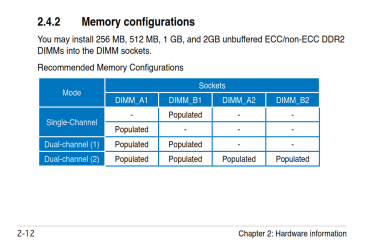
I have the 2GBs in the yellow slots (A1 and B1). The two black slots are unocuppied (A2 and B2).

If testing a single stick, intuitively I would do that in either A1 or B1. I don't know for certain that is correct. I will try to make more sense out of the chart in the manual.
 

My Computer

Computer Manufacturer/Model Number
Polywell
OS
Windows 7x32 Home Premium & XP SP3 x86
CPU
Athlon 64FX
Motherboard
ASUS M2N32SLI Delux
Memory
Corsair CM2X1024-8500C5
Graphics Card(s)
GeForce 7950X2 (Dual)
Monitor(s) Displays
ViewSonic A90f+ (Two)
Screen Resolution
1280x1024
Hard Drives
WD1500ADFD-00NLR1 (Originally Raid5)

Changed to three individual drives after HD crashed. May return to RAID5 if I locate a suitable HD.
PSU
TurboColl 1KW
Case
Polywell
Cooling
Cool'n'Quiet (Questionable Operation)
Keyboard
Logitech
Mouse
Logitech
Internet Speed
1GHertz (I think)
Other Info
Sony CD-RW CRX320EE

HP DVD Writer 1140d (may need to replace??)
It ran all night long "Completing Installation..". I think the next scripted step is a restart.

Since it did not restart after all this time (over 12 hours doing "Completing Installation"), my question is "What now".

Should I just throw in the towel and power down or are there ways to get into the inner workings without disrupting what might have been loaded.

Sure hope it comes up operating in one of the two (XP or W7). If it doesn't, I have no way to test the memory or anything else without reloading xp. I've put xp back soooo many times.
 
Last edited:

My Computer

Computer Manufacturer/Model Number
Polywell
OS
Windows 7x32 Home Premium & XP SP3 x86
CPU
Athlon 64FX
Motherboard
ASUS M2N32SLI Delux
Memory
Corsair CM2X1024-8500C5
Graphics Card(s)
GeForce 7950X2 (Dual)
Monitor(s) Displays
ViewSonic A90f+ (Two)
Screen Resolution
1280x1024
Hard Drives
WD1500ADFD-00NLR1 (Originally Raid5)

Changed to three individual drives after HD crashed. May return to RAID5 if I locate a suitable HD.
PSU
TurboColl 1KW
Case
Polywell
Cooling
Cool'n'Quiet (Questionable Operation)
Keyboard
Logitech
Mouse
Logitech
Internet Speed
1GHertz (I think)
Other Info
Sony CD-RW CRX320EE

HP DVD Writer 1140d (may need to replace??)
Here is a snip from the manual. It looks like the RAM has been installed correctly according to the manual.

If you are going to test with only one stick it is always best to use slot A1.
 

Attachments

  • Capture.PNG
    Capture.PNG
    26.8 KB · Views: 10

My Computer

Computer type
PC/Desktop
Computer Manufacturer/Model Number
Home Built - Jan 2013
OS
Windows 7 64 Bit Home Premium SP1
CPU
i7-3820
Motherboard
Asus P9X79-PRO - Bios 4608
Memory
GSkill F3-14900CL9Q - 16GB
Graphics Card(s)
EVGA GeForce GTX660 - Driver 352.86
Sound Card
On board Realtek ALC898
Monitor(s) Displays
Acer S271HL
Screen Resolution
1920 x 1080
Hard Drives
#1- Samsung 840 Pro Series
#2- Western Digital WD1002FAEX Sata3 Black
#3- Western Digital WD1002FAEX Sata3 Black
PSU
Corsair CMPSU-850TX-V2 - 850 watt (by Seasonic)
Case
Corsair Obsidian 550D
Cooling
Standard 3 120mm case fans, Cooler Master Hyper 212 EVO
Keyboard
MS KC-0405
Mouse
Intellimouse 5-button
Internet Speed
56 Mbits/Sec (on a good day)
Antivirus
Avast & Malwarebytes
Browser
Firefox
Other Info
Asus DVD - DRW-24B1ST 24X
Sorry if I misunderstood - thought you said you had removed a RAM stick to try this install.

If these are matched DIMM's let's make sure you have them in the correct slots, and that the sticks and slots are tested following Jonathan's process here for 5-6 passes or overnight: RAM - Test with Memtest86+

I have checked the manual for directions and I have checked the machine for compliance. The DIMM are located in the two yellow slots (A1 and B1) nearest the processor.

The sticks may be marginal but they are properly located.

My ASUS manual does recommend that for XP I operate with less than 3GB of ram. It goes on to state that operating with 3GB will cause no operational difficulties but that there is no performance advantage.

Until I removed one stick a couple days ago, I have been operating with 3GB.

When I get W7 operational, what should I do (2GB or 3GB). That may be a rhetorical question because I may have to replace it all. In which case I will likely go to either 4GB or 8GB.
 

My Computer

Computer Manufacturer/Model Number
Polywell
OS
Windows 7x32 Home Premium & XP SP3 x86
CPU
Athlon 64FX
Motherboard
ASUS M2N32SLI Delux
Memory
Corsair CM2X1024-8500C5
Graphics Card(s)
GeForce 7950X2 (Dual)
Monitor(s) Displays
ViewSonic A90f+ (Two)
Screen Resolution
1280x1024
Hard Drives
WD1500ADFD-00NLR1 (Originally Raid5)

Changed to three individual drives after HD crashed. May return to RAID5 if I locate a suitable HD.
PSU
TurboColl 1KW
Case
Polywell
Cooling
Cool'n'Quiet (Questionable Operation)
Keyboard
Logitech
Mouse
Logitech
Internet Speed
1GHertz (I think)
Other Info
Sony CD-RW CRX320EE

HP DVD Writer 1140d (may need to replace??)
Here is a snip from the manual. It looks like the RAM has been installed correctly according to the manual.

If you are going to test with only one stick it is always best to use slot A1.

Thank you for that feedback.
 

My Computer

Computer Manufacturer/Model Number
Polywell
OS
Windows 7x32 Home Premium & XP SP3 x86
CPU
Athlon 64FX
Motherboard
ASUS M2N32SLI Delux
Memory
Corsair CM2X1024-8500C5
Graphics Card(s)
GeForce 7950X2 (Dual)
Monitor(s) Displays
ViewSonic A90f+ (Two)
Screen Resolution
1280x1024
Hard Drives
WD1500ADFD-00NLR1 (Originally Raid5)

Changed to three individual drives after HD crashed. May return to RAID5 if I locate a suitable HD.
PSU
TurboColl 1KW
Case
Polywell
Cooling
Cool'n'Quiet (Questionable Operation)
Keyboard
Logitech
Mouse
Logitech
Internet Speed
1GHertz (I think)
Other Info
Sony CD-RW CRX320EE

HP DVD Writer 1140d (may need to replace??)
It sounds like the sticks are in the correct slots.

Memory slots are usually color coded. When you have 2 memory sticks, you will want to install both modules in the same color slots. If you do not have color coded slots, then look in your motherboard manual for the 2 slots that go together.
Source

Thanks for the feedback.

I did locate a version of my MOBO that co-mingles the slots; ie, yellow-black-yellow-black where mine are yellow-yellow,black-black.
 

My Computer

Computer Manufacturer/Model Number
Polywell
OS
Windows 7x32 Home Premium & XP SP3 x86
CPU
Athlon 64FX
Motherboard
ASUS M2N32SLI Delux
Memory
Corsair CM2X1024-8500C5
Graphics Card(s)
GeForce 7950X2 (Dual)
Monitor(s) Displays
ViewSonic A90f+ (Two)
Screen Resolution
1280x1024
Hard Drives
WD1500ADFD-00NLR1 (Originally Raid5)

Changed to three individual drives after HD crashed. May return to RAID5 if I locate a suitable HD.
PSU
TurboColl 1KW
Case
Polywell
Cooling
Cool'n'Quiet (Questionable Operation)
Keyboard
Logitech
Mouse
Logitech
Internet Speed
1GHertz (I think)
Other Info
Sony CD-RW CRX320EE

HP DVD Writer 1140d (may need to replace??)
It ran all night long "Completing Installation..". I think the next scripted step is a restart.

Since it did not restart after all this time (over 12 hours doing "Completing Installation"), my question is "What now".

Should I just throw in the towel and power down or are there ways to get into the inner workings without disrupting what might have been loaded.

Sure hope it comes up operating in one of the two (XP or W7). If it doesn't, I have no way to test the memory or anything else without reloading xp. I've put xp back soooo many times.

I gave you what to do next earlier:

If it gets to Installing Devices and won't finish, you may then have access to Device Manager to uninstall Display or other hanging driver to see if installation will complete to desktop where you can install driver.

Device Manager - Access During Windows 7 Installation

However it is likely not a driver which would be dragging out install as you're seeing, but hardware like RAM or the actual display device.

But access to the Device Manager may get it over the hump of failing during Device Install phase so that you have an install.
 
You can download your motherboard manual from here:
M2N32-SLI Deluxe User's Manual for English Edtion(E2697)

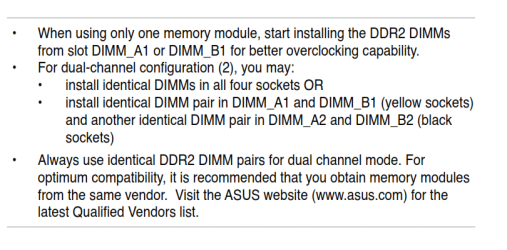
This manual shows the two yellow RAM slots closest to the CPU, the two black slots on the outside.
If this is the same as your motherboard, this manual you need to use.
If you have a manual that shows yellow-black-yellow-black RAM slots and your motherboard isn't configured that way, it is the wrong manual.

You can install your RAM cards in the two yellow RAM slots, they should be together and closest to the CPU.
When running memtest86+ you can put a single RAM card in any slot for the test. It is best to test with the slots that you are using now.

I recommend running memtest86+ with both RAM cards installed, in slots A1 and B1.
It is best to run the test for a full 7 passes, overnight is the easiest.
If you get any errors you can stop the test.

If the tests has no errors or does not stop by itself, that means it has passed this test.

If you get any errors in the first test, then follow the instructions below.

For the single RAM card test:
Take the RAM card out of slot B1, test the RAM card that is in slot A1.
It is best to run the test for a full 7 passes, overnight is the easiest.
If you get any errors you can stop the test.

Pass or fail, take the RAM card out of slot A1 and put the other RAM card into slot B1 and run memtest86+ again, same as above.


Have you checked you CPU core temperatures recently?

Are you installing Windows 7 32 bit or Windows 7 64bit?
 

My Computer

Computer type
PC/Desktop
Computer Manufacturer/Model Number
76~2.0
OS
Windows 7 Ult x64 - SP1/ Windows 8 Pro x64
CPU
Intel Core i5-3570K 4.6GHz
Motherboard
Gigabyte GA-Z77X UD3H, f18
Memory
8GB (2X4GB) DDR3 1600 Corsair Vengeance CL8 1.5v
Graphics Card(s)
Sapphire HD 7770 Vapor-X OC 1GB DDR5
Sound Card
Onboard VIA VT2021
Monitor(s) Displays
22" LCD Dell
Screen Resolution
1680x1050
Hard Drives
Samsung 840Pro 128GB SSD,
Seagate Barracuda 500GB SATA2 7200rpm 32MB cache, Seagate Barracuda 1TB SATA2 7200rpm 32MB cache,
PSU
Corsair HX650W
Case
Cooler Master Storm Scout
Cooling
Corsair H80 2x12cm Noctua NF P12 , 2x14cm case fans
Keyboard
Logitech Wave
Mouse
CM Sentinel
Internet Speed
Dismal
Antivirus
Avast
Browser
Opera Next
Other Info
Haswell laptop: HP Envy 17t-j, i7-4700MQ, GeForce 740M 2GB DDR3, 17.3" Full HD 1920x1080, 16GB RAM, Samsung 840 Pro 128GB, 1TB Hitachi 7200 HDD,
Desktop: eSATA ports,
External eSATA Seagate 500GB SATA2 7200rpm,
External WD USB 500GB
The chart says you can run a single RAM card in slot A1 or B1.

For testing the RAM, use the slot that it is in now.

ASUS M2N32SLI Delux 1.PNG ASUS M2N32SLI Delux 2.PNG
 

My Computer

Computer type
PC/Desktop
Computer Manufacturer/Model Number
76~2.0
OS
Windows 7 Ult x64 - SP1/ Windows 8 Pro x64
CPU
Intel Core i5-3570K 4.6GHz
Motherboard
Gigabyte GA-Z77X UD3H, f18
Memory
8GB (2X4GB) DDR3 1600 Corsair Vengeance CL8 1.5v
Graphics Card(s)
Sapphire HD 7770 Vapor-X OC 1GB DDR5
Sound Card
Onboard VIA VT2021
Monitor(s) Displays
22" LCD Dell
Screen Resolution
1680x1050
Hard Drives
Samsung 840Pro 128GB SSD,
Seagate Barracuda 500GB SATA2 7200rpm 32MB cache, Seagate Barracuda 1TB SATA2 7200rpm 32MB cache,
PSU
Corsair HX650W
Case
Cooler Master Storm Scout
Cooling
Corsair H80 2x12cm Noctua NF P12 , 2x14cm case fans
Keyboard
Logitech Wave
Mouse
CM Sentinel
Internet Speed
Dismal
Antivirus
Avast
Browser
Opera Next
Other Info
Haswell laptop: HP Envy 17t-j, i7-4700MQ, GeForce 740M 2GB DDR3, 17.3" Full HD 1920x1080, 16GB RAM, Samsung 840 Pro 128GB, 1TB Hitachi 7200 HDD,
Desktop: eSATA ports,
External eSATA Seagate 500GB SATA2 7200rpm,
External WD USB 500GB
It ran all night long "Completing Installation..". I think the next scripted step is a restart.

Since it did not restart after all this time (over 12 hours doing "Completing Installation"), my question is "What now".

Should I just throw in the towel and power down or are there ways to get into the inner workings without disrupting what might have been loaded.

Sure hope it comes up operating in one of the two (XP or W7). If it doesn't, I have no way to test the memory or anything else without reloading xp. I've put xp back soooo many times.

I gave you what to do next earlier:

If it gets to Installing Devices and won't finish, you may then have access to Device Manager to uninstall Display or other hanging driver to see if installation will complete to desktop where you can install driver.

Device Manager - Access During Windows 7 Installation

However it is likely not a driver which would be dragging out install as you're seeing, but hardware like RAM or the actual display device.

But access to the Device Manager may get it over the hump of failing during Device Install phase so that you have an install.
Thank you for the response, greg but I was asking about right now while it is still in the installation mode. In view of your response, I will shut her down and see what happens when I turn it back on.
 

My Computer

Computer Manufacturer/Model Number
Polywell
OS
Windows 7x32 Home Premium & XP SP3 x86
CPU
Athlon 64FX
Motherboard
ASUS M2N32SLI Delux
Memory
Corsair CM2X1024-8500C5
Graphics Card(s)
GeForce 7950X2 (Dual)
Monitor(s) Displays
ViewSonic A90f+ (Two)
Screen Resolution
1280x1024
Hard Drives
WD1500ADFD-00NLR1 (Originally Raid5)

Changed to three individual drives after HD crashed. May return to RAID5 if I locate a suitable HD.
PSU
TurboColl 1KW
Case
Polywell
Cooling
Cool'n'Quiet (Questionable Operation)
Keyboard
Logitech
Mouse
Logitech
Internet Speed
1GHertz (I think)
Other Info
Sony CD-RW CRX320EE

HP DVD Writer 1140d (may need to replace??)
If you can't enter Device Manager to uninstall Device(s) in error - likely vid card driver - following the tutorial's final steps, then work back through the thread to complete all of the steps starting with Dave's suggested hardware checks.
 
Sorry if I misunderstood - thought you said you had removed a RAM stick to try this install.

If these are matched DIMM's let's make sure you have them in the correct slots, and that the sticks and slots are tested following Jonathan's process here for 5-6 passes or overnight: RAM - Test with Memtest86+

I have checked the manual for directions and I have checked the machine for compliance. The DIMM are located in the two yellow slots (A1 and B1) nearest the processor.

The sticks may be marginal but they are properly located.

My ASUS manual does recommend that for XP I operate with less than 3GB of ram. It goes on to state that operating with 3GB will cause no operational difficulties but that there is no performance advantage.

Until I removed one stick a couple days ago, I have been operating with 3GB.

When I get W7 operational, what should I do (2GB or 3GB). That may be a rhetorical question because I may have to replace it all. In which case I will likely go to either 4GB or 8GB.

I am a little confused. I have the referenced memory test operating right now. It has been stated that I should run this test multiple times or maybe overnight.

I see no option to define the number of times that the test shall be run. Therefore I assume that if I boot with that CD and run the test for an hour or so that counts as one test. Reboot for test #2, etc.

OR

Start this test and go to bed. Check the results in the morning.

Is this a correct interpretation?

Similarly, I was told to test one stick at a time. At the moment I am not doing that. I started the test with both sticks installed; not in defiance but rather neglect. If I continue to run like this, is the test equally revealing as doing the same thing one stick at a time?

If not, I will do it all again.

Last Question (for now
 

My Computer

Computer Manufacturer/Model Number
Polywell
OS
Windows 7x32 Home Premium & XP SP3 x86
CPU
Athlon 64FX
Motherboard
ASUS M2N32SLI Delux
Memory
Corsair CM2X1024-8500C5
Graphics Card(s)
GeForce 7950X2 (Dual)
Monitor(s) Displays
ViewSonic A90f+ (Two)
Screen Resolution
1280x1024
Hard Drives
WD1500ADFD-00NLR1 (Originally Raid5)

Changed to three individual drives after HD crashed. May return to RAID5 if I locate a suitable HD.
PSU
TurboColl 1KW
Case
Polywell
Cooling
Cool'n'Quiet (Questionable Operation)
Keyboard
Logitech
Mouse
Logitech
Internet Speed
1GHertz (I think)
Other Info
Sony CD-RW CRX320EE

HP DVD Writer 1140d (may need to replace??)
The memtest86 CD will continue running passes until you stop it. I would run at least 5-6 passes, or overnight to really stress test the RAM good.

What happened when you tried to get into Device Manager using steps in tutorial?

Have you looked over the rest of Dave's posts? Follow his guidance closely.
 
Back
Top