Solved Windows 7 Installation

Did you re-apply the CPU thermal Paste?
Did you have only one RAM card installed?
Did you disable Cool 'n Quiet?

Any of these could have caused/contributed to the BSoD.

Your BSoD:
STOP 0x00000050: PAGE_FAULT_IN_NONPAGED_AREA
Usual causes: Defective hardware (particularly memory - but not just RAM), Faulty system service, Device driver, NTFS corruption, BIOS
Invalid system memory was referenced.

This can be caused by the CPU overheating, questionable RAM, graphics card RAM.
A device driver shouldn't be a cause during installation.


If your boot manager has three versions of Windows 7 and XP, you need to do as Greg suggested, wipe the entire HDD and start the installation on a clean hard drive.

Can you use the Partition Wizard CD and get a picture of the hard disk layout, and post here?
 

My Computer

Computer type
PC/Desktop
Computer Manufacturer/Model Number
76~2.0
OS
Windows 7 Ult x64 - SP1/ Windows 8 Pro x64
CPU
Intel Core i5-3570K 4.6GHz
Motherboard
Gigabyte GA-Z77X UD3H, f18
Memory
8GB (2X4GB) DDR3 1600 Corsair Vengeance CL8 1.5v
Graphics Card(s)
Sapphire HD 7770 Vapor-X OC 1GB DDR5
Sound Card
Onboard VIA VT2021
Monitor(s) Displays
22" LCD Dell
Screen Resolution
1680x1050
Hard Drives
Samsung 840Pro 128GB SSD,
Seagate Barracuda 500GB SATA2 7200rpm 32MB cache, Seagate Barracuda 1TB SATA2 7200rpm 32MB cache,
PSU
Corsair HX650W
Case
Cooler Master Storm Scout
Cooling
Corsair H80 2x12cm Noctua NF P12 , 2x14cm case fans
Keyboard
Logitech Wave
Mouse
CM Sentinel
Internet Speed
Dismal
Antivirus
Avast
Browser
Opera Next
Other Info
Haswell laptop: HP Envy 17t-j, i7-4700MQ, GeForce 740M 2GB DDR3, 17.3" Full HD 1920x1080, 16GB RAM, Samsung 840 Pro 128GB, 1TB Hitachi 7200 HDD,
Desktop: eSATA ports,
External eSATA Seagate 500GB SATA2 7200rpm,
External WD USB 500GB
Did you re-apply the CPU thermal Paste? Yes
Did you have only one RAM card installed? Yes, I now have the other 1GB stick that was stress tested installed.
Did you disable Cool 'n Quiet? Yes

Any of these could have caused/contributed to the BSoD.

Your BSoD:
STOP 0x00000050: PAGE_FAULT_IN_NONPAGED_AREA
Usual causes: Defective hardware (particularly memory - but not just RAM), Faulty system service, Device driver, NTFS corruption, BIOS
Invalid system memory was referenced.

This can be caused by the CPU overheating, questionable RAM, graphics card RAM.
A device driver shouldn't be a cause during installation.

The original graphics card has also been replaced.

If your boot manager has three versions of Windows 7 and XP, you need to do as Greg suggested, wipe the entire HDD and start the installation on a clean hard drive.

That has already been done but not deliberately. I wanted to keep that XP OS. It happened because I did the diskpart clean all without reading all of the instructions (cautions/warnings).

Can you use the Partition Wizard CD and get a picture of the hard disk layout, and post here?

I think so. I used PW initially to clean the partition where I wanted W7 . That was quit some time back before I did the diskpart 2 days ago.

Speaking of multiple W7 entries in the MBR:

1) Is a new entry made every time I boot from the W7 installation disc?

2) Is there any way to delete the unwanted ones without doing a diskpart and starting over. Reason I ask is because I believe I have rebooted from disk twice since I did the diskpart.


My Computer

Computer Manufacturer/Model Number
Polywell
OS
Windows 7x32 Home Premium & XP SP3 x86
CPU
Athlon 64FX
Motherboard
ASUS M2N32SLI Delux
Memory
Corsair CM2X1024-8500C5
Graphics Card(s)
GeForce 7950X2 (Dual)
Monitor(s) Displays
ViewSonic A90f+ (Two)
Screen Resolution
1280x1024
Hard Drives
WD1500ADFD-00NLR1 (Originally Raid5)

Changed to three individual drives after HD crashed. May return to RAID5 if I locate a suitable HD.
PSU
TurboColl 1KW
Case
Polywell
Cooling
Cool'n'Quiet (Questionable Operation)
Keyboard
Logitech
Mouse
Logitech
Internet Speed
1GHertz (I think)
Other Info
Sony CD-RW CRX320EE

HP DVD Writer 1140d (may need to replace??)
Try the install first to see what happens.

If it fails again, wipe the HD with Diskpart Clean All as you were advised days ago and repeatedly since.

You have four HD's so you should be able to consolidate your data so you can wipe one. These HD's should have already been tried as alternatives.

I asked you if you could consolidate your data to free up a HD awhile back and you ignored it as you have other steps. It is your responsibility to go back over the thread to make sure every step has been tried, not wait for us to do it for you.
 
Try the install first to see what happens.

If it fails again, wipe the HD with Diskpart Clean All as you were advised days ago and repeatedly since.

I have wiped the HD twice before with diskpart and once (earlier) with PW. In response to your recommendations.

You have four HD's so you should be able to consolidate your data so you can wipe one. These HD's should have already been tried as alternatives.

I only have three HDs, one failed long ago. This was a RAID5 failure. That is why I had 4 drives.

I asked you if you could consolidate your data to free up a HD awhile back and you ignored it as you have other steps. It is your responsibility to go back over the thread to make sure every step has been tried, not wait for us to do it for you.

I know you suggested that I incorporate another HD. I did not ignore that but I did reject the idea because I can not take a chance with the data on those two drives. I do believe I responded with that as well. Those drives have been reloacted to another machine where they are used daily.

I totally accept your proclamation that recovery from this problem is MY responsibility and I have repeatedly gone back over the contents of the threads in an effort to take full advantage of the suggestions being given by you and others. I have printed the thread and carry it with me as reading material when I must be away from the computer.

I am sorry if it seems I am ungrateful. I equally regret that it seems I am waiting for directions from the forum. I do not do that. I have spent nearly all my waking hours for about the last two weeks.

I do very much appreciate this thread and all the members that have contributed. Believe, I am not ungrateful for your assistance. I do not take it for granted.
 

My Computer

Computer Manufacturer/Model Number
Polywell
OS
Windows 7x32 Home Premium & XP SP3 x86
CPU
Athlon 64FX
Motherboard
ASUS M2N32SLI Delux
Memory
Corsair CM2X1024-8500C5
Graphics Card(s)
GeForce 7950X2 (Dual)
Monitor(s) Displays
ViewSonic A90f+ (Two)
Screen Resolution
1280x1024
Hard Drives
WD1500ADFD-00NLR1 (Originally Raid5)

Changed to three individual drives after HD crashed. May return to RAID5 if I locate a suitable HD.
PSU
TurboColl 1KW
Case
Polywell
Cooling
Cool'n'Quiet (Questionable Operation)
Keyboard
Logitech
Mouse
Logitech
Internet Speed
1GHertz (I think)
Other Info
Sony CD-RW CRX320EE

HP DVD Writer 1140d (may need to replace??)
If you have wiped this HD, how is XP still on it? A partition-specific wipe does not clean the boot sector which is the point of wiping on install failure.

Have you tried another of your HD's as suggested, and did you wipe that HD?
 
If you have wiped this HD, how is XP still on it? A partition-specific wipe does not clean the boot sector which is the point of wiping on install failure. Please read post #155. I no longer have XP.

Have you tried another of your HD's as suggested, and did you wipe that HD?
I have NO OTHER HDs that are available for use. Those HDs have critical information on them that I cannot take a chance of losing. I may need to purchase another HD but those are out of the question.

I am sorry for the impatience, but out of perhaps 10,000 users helped here I've never seen anything like this where I've had to repeat steps 2-3 times per day.

I hope I am not the only one having fun.:sarc:
 
Last edited:

My Computer

Computer Manufacturer/Model Number
Polywell
OS
Windows 7x32 Home Premium & XP SP3 x86
CPU
Athlon 64FX
Motherboard
ASUS M2N32SLI Delux
Memory
Corsair CM2X1024-8500C5
Graphics Card(s)
GeForce 7950X2 (Dual)
Monitor(s) Displays
ViewSonic A90f+ (Two)
Screen Resolution
1280x1024
Hard Drives
WD1500ADFD-00NLR1 (Originally Raid5)

Changed to three individual drives after HD crashed. May return to RAID5 if I locate a suitable HD.
PSU
TurboColl 1KW
Case
Polywell
Cooling
Cool'n'Quiet (Questionable Operation)
Keyboard
Logitech
Mouse
Logitech
Internet Speed
1GHertz (I think)
Other Info
Sony CD-RW CRX320EE

HP DVD Writer 1140d (may need to replace??)
Speaking of multiple W7 entries in the MBR:

1) Is a new entry made every time I boot from the W7 installation disc?

2) Is there any way to delete the unwanted ones without doing a diskpart and starting over. Reason I ask is because I believe I have rebooted from disk twice since I did the diskpart.


1. A new entry can be made each time you INSTALL the OS and it fails.
2. You can FORMAT the drive/partition, but it is FAR better to wipe it clean again after each failed installation.

But now you need to focus on the MEMORY problem.
Try to install with only one stick of RAM in Slot A1.
If that fails, wipe the disk, and try to install with the other (one) stick of RAM in Slot A1.
 

My Computer

Computer type
PC/Desktop
Computer Manufacturer/Model Number
Home Built - Jan 2013
OS
Windows 7 64 Bit Home Premium SP1
CPU
i7-3820
Motherboard
Asus P9X79-PRO - Bios 4608
Memory
GSkill F3-14900CL9Q - 16GB
Graphics Card(s)
EVGA GeForce GTX660 - Driver 352.86
Sound Card
On board Realtek ALC898
Monitor(s) Displays
Acer S271HL
Screen Resolution
1920 x 1080
Hard Drives
#1- Samsung 840 Pro Series
#2- Western Digital WD1002FAEX Sata3 Black
#3- Western Digital WD1002FAEX Sata3 Black
PSU
Corsair CMPSU-850TX-V2 - 850 watt (by Seasonic)
Case
Corsair Obsidian 550D
Cooling
Standard 3 120mm case fans, Cooler Master Hyper 212 EVO
Keyboard
MS KC-0405
Mouse
Intellimouse 5-button
Internet Speed
56 Mbits/Sec (on a good day)
Antivirus
Avast & Malwarebytes
Browser
Firefox
Other Info
Asus DVD - DRW-24B1ST 24X
Speaking of multiple W7 entries in the MBR:

1) Is a new entry made every time I boot from the W7 installation disc?

2) Is there any way to delete the unwanted ones without doing a diskpart and starting over. Reason I ask is because I believe I have rebooted from disk twice since I did the diskpart.


1. A new entry can be made each time you INSTALL the OS and it fails.
2. You can FORMAT the drive/partition, but it is FAR better to wipe it clean again after each failed installation.

But now you need to focus on the MEMORY problem.
Try to install with only one stick of RAM in Slot A1.
If that fails, wipe the disk, and try to install with the other (one) stick of RAM in Slot A1.

My last two failed attempts (BSoD after "Completing Installation") were done with a single stick (1GB) located in A1.

I have just finished a wipe of the HD (diskpart) and I removed that memory stick and installed a different one in B1. If more meaningful, I will move it back to A1 before I go for another installation (tomorrow).

I made some changes in partition size (after the diskpart mentioned above) using PW.
 

My Computer

Computer Manufacturer/Model Number
Polywell
OS
Windows 7x32 Home Premium & XP SP3 x86
CPU
Athlon 64FX
Motherboard
ASUS M2N32SLI Delux
Memory
Corsair CM2X1024-8500C5
Graphics Card(s)
GeForce 7950X2 (Dual)
Monitor(s) Displays
ViewSonic A90f+ (Two)
Screen Resolution
1280x1024
Hard Drives
WD1500ADFD-00NLR1 (Originally Raid5)

Changed to three individual drives after HD crashed. May return to RAID5 if I locate a suitable HD.
PSU
TurboColl 1KW
Case
Polywell
Cooling
Cool'n'Quiet (Questionable Operation)
Keyboard
Logitech
Mouse
Logitech
Internet Speed
1GHertz (I think)
Other Info
Sony CD-RW CRX320EE

HP DVD Writer 1140d (may need to replace??)
If you have wiped this HD, how is XP still on it? A partition-specific wipe does not clean the boot sector which is the point of wiping on install failure.

Have you tried another of your HD's as suggested, and did you wipe that HD?

Greg, XP has been gone from that HD (my one and only HD on this computer) for a couple days. It was taken off about three diskparts back.
 

My Computer

Computer Manufacturer/Model Number
Polywell
OS
Windows 7x32 Home Premium & XP SP3 x86
CPU
Athlon 64FX
Motherboard
ASUS M2N32SLI Delux
Memory
Corsair CM2X1024-8500C5
Graphics Card(s)
GeForce 7950X2 (Dual)
Monitor(s) Displays
ViewSonic A90f+ (Two)
Screen Resolution
1280x1024
Hard Drives
WD1500ADFD-00NLR1 (Originally Raid5)

Changed to three individual drives after HD crashed. May return to RAID5 if I locate a suitable HD.
PSU
TurboColl 1KW
Case
Polywell
Cooling
Cool'n'Quiet (Questionable Operation)
Keyboard
Logitech
Mouse
Logitech
Internet Speed
1GHertz (I think)
Other Info
Sony CD-RW CRX320EE

HP DVD Writer 1140d (may need to replace??)
Did you re-apply the CPU thermal Paste?
Did you have only one RAM card installed?
Did you disable Cool 'n Quiet?

Any of these could have caused/contributed to the BSoD.

Your BSoD:
STOP 0x00000050: PAGE_FAULT_IN_NONPAGED_AREA
Usual causes: Defective hardware (particularly memory - but not just RAM), Faulty system service, Device driver, NTFS corruption, BIOS
Invalid system memory was referenced.

This can be caused by the CPU overheating, questionable RAM, graphics card RAM.
A device driver shouldn't be a cause during installation.


If your boot manager has three versions of Windows 7 and XP, you need to do as Greg suggested, wipe the entire HDD and start the installation on a clean hard drive.

Can you use the Partition Wizard CD and get a picture of the hard disk layout, and post here?

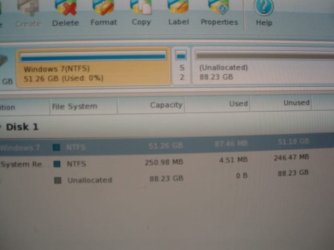
I just finished another "diskpart clean all" on my HD. As you requested, I ran PW to get an image of the current layout. While there, I tweaked the sizes and edited the labels using PW.

I have never done this before so I might have done it wrong. Please do critique.

P8260080.JPG

I did some things while I was trying tyo get W7 up and running that I now regret. I am preparing to recover from those mistakes but I feel a need to double check before I screw up.

My hard drive (Disk 0) is divided into three sections: 50 GB for a partition that has the OS; 200MB for a partition I labeled System Reserve and 90GB unallocated.

I expected the System Reserve was going to be used by Windows for some sort of recovery system. Obviously, I was wrong.

Now I would like to utilize at least some of the available space (System Reserve and Unallocated) for "Applications" (MS Office, AutoCad, etc). Can I do that without putting the OS in jeopardy or have I just wasted away 90GB.
 
Last edited:

My Computer

Computer Manufacturer/Model Number
Polywell
OS
Windows 7x32 Home Premium & XP SP3 x86
CPU
Athlon 64FX
Motherboard
ASUS M2N32SLI Delux
Memory
Corsair CM2X1024-8500C5
Graphics Card(s)
GeForce 7950X2 (Dual)
Monitor(s) Displays
ViewSonic A90f+ (Two)
Screen Resolution
1280x1024
Hard Drives
WD1500ADFD-00NLR1 (Originally Raid5)

Changed to three individual drives after HD crashed. May return to RAID5 if I locate a suitable HD.
PSU
TurboColl 1KW
Case
Polywell
Cooling
Cool'n'Quiet (Questionable Operation)
Keyboard
Logitech
Mouse
Logitech
Internet Speed
1GHertz (I think)
Other Info
Sony CD-RW CRX320EE

HP DVD Writer 1140d (may need to replace??)
If you have wiped this HD, how is XP still on it? A partition-specific wipe does not clean the boot sector which is the point of wiping on install failure.

Have you tried another of your HD's as suggested, and did you wipe that HD?

Greg, XP has been gone from that HD (my one and only HD on this computer) for a couple days. It was taken off about three diskparts back.

Then what was the boot manager you posted yesterday with "Earlier Version on Windows" and "Win7 Install Rollback?" This made it appear that the disk was not booting (defaulting to HD) and XP was still present.

Carry on.
 
During a Windows 7 Installation, there are multiple restarts. There is more than one point where I see "Press any key to Boot from DVD". Should I be doing that for every stated opportunity.

I have not been doing so. Only the first time after a Boot.
 
Last edited:

My Computer

Computer Manufacturer/Model Number
Polywell
OS
Windows 7x32 Home Premium & XP SP3 x86
CPU
Athlon 64FX
Motherboard
ASUS M2N32SLI Delux
Memory
Corsair CM2X1024-8500C5
Graphics Card(s)
GeForce 7950X2 (Dual)
Monitor(s) Displays
ViewSonic A90f+ (Two)
Screen Resolution
1280x1024
Hard Drives
WD1500ADFD-00NLR1 (Originally Raid5)

Changed to three individual drives after HD crashed. May return to RAID5 if I locate a suitable HD.
PSU
TurboColl 1KW
Case
Polywell
Cooling
Cool'n'Quiet (Questionable Operation)
Keyboard
Logitech
Mouse
Logitech
Internet Speed
1GHertz (I think)
Other Info
Sony CD-RW CRX320EE

HP DVD Writer 1140d (may need to replace??)
Did you re-apply the CPU thermal Paste?
Did you have only one RAM card installed?
Did you disable Cool 'n Quiet?

Any of these could have caused/contributed to the BSoD.

Your BSoD:
STOP 0x00000050: PAGE_FAULT_IN_NONPAGED_AREA
Usual causes: Defective hardware (particularly memory - but not just RAM), Faulty system service, Device driver, NTFS corruption, BIOS
Invalid system memory was referenced.

This can be caused by the CPU overheating, questionable RAM, graphics card RAM.
A device driver shouldn't be a cause during installation.


If your boot manager has three versions of Windows 7 and XP, you need to do as Greg suggested, wipe the entire HDD and start the installation on a clean hard drive.

Can you use the Partition Wizard CD and get a picture of the hard disk layout, and post here?

I just finished another "diskpart clean all" on my HD. As you requested, I ran PW to get an image of the current layout. While there, I tweaked the sizes and edited the labels using PW.

I have never done this before so I might have done it wrong. Please do critique.

View attachment 172253

Your disk layout looks ok.

Good idea to use the other RAM stick in slot B1.
 

My Computer

Computer type
PC/Desktop
Computer Manufacturer/Model Number
76~2.0
OS
Windows 7 Ult x64 - SP1/ Windows 8 Pro x64
CPU
Intel Core i5-3570K 4.6GHz
Motherboard
Gigabyte GA-Z77X UD3H, f18
Memory
8GB (2X4GB) DDR3 1600 Corsair Vengeance CL8 1.5v
Graphics Card(s)
Sapphire HD 7770 Vapor-X OC 1GB DDR5
Sound Card
Onboard VIA VT2021
Monitor(s) Displays
22" LCD Dell
Screen Resolution
1680x1050
Hard Drives
Samsung 840Pro 128GB SSD,
Seagate Barracuda 500GB SATA2 7200rpm 32MB cache, Seagate Barracuda 1TB SATA2 7200rpm 32MB cache,
PSU
Corsair HX650W
Case
Cooler Master Storm Scout
Cooling
Corsair H80 2x12cm Noctua NF P12 , 2x14cm case fans
Keyboard
Logitech Wave
Mouse
CM Sentinel
Internet Speed
Dismal
Antivirus
Avast
Browser
Opera Next
Other Info
Haswell laptop: HP Envy 17t-j, i7-4700MQ, GeForce 740M 2GB DDR3, 17.3" Full HD 1920x1080, 16GB RAM, Samsung 840 Pro 128GB, 1TB Hitachi 7200 HDD,
Desktop: eSATA ports,
External eSATA Seagate 500GB SATA2 7200rpm,
External WD USB 500GB
I have made two more unsuccessful attempts to install W7, each preceded by a diskpart. There has been some change however. I do not have a restart until later in the script. The first being right before "Completing Installation". This gave me reason to think I was actually going to get done with this but no such luck.

These attempts were made after changing memory sticks and installing in B1 rather than A1. I have not changed to the other DVD.

Beginning to wonder about all the changes I had made, I needed to do something different so I did another diskpart and installed XP. It installed right according to script.

HD passes test, memory passes test, DVD-ROM operates properly, diskparts now preceding every installation attempt, XP works fine, W7 fails at Completing Installation.

I am at a loss. I have begun looking for a different machine to try this installation on. I don't think this one will ever have W7 unless I find out that I have a bad W7 disk.

You guys have been great and what I have learned has been phenomenal. The tutorials and the one-on-one advice has been fantastic. Thank you all. Sorry to have been such a pain and to have taken up more than my fair share of your time. This forum is unbelievable.
 

My Computer

Computer Manufacturer/Model Number
Polywell
OS
Windows 7x32 Home Premium & XP SP3 x86
CPU
Athlon 64FX
Motherboard
ASUS M2N32SLI Delux
Memory
Corsair CM2X1024-8500C5
Graphics Card(s)
GeForce 7950X2 (Dual)
Monitor(s) Displays
ViewSonic A90f+ (Two)
Screen Resolution
1280x1024
Hard Drives
WD1500ADFD-00NLR1 (Originally Raid5)

Changed to three individual drives after HD crashed. May return to RAID5 if I locate a suitable HD.
PSU
TurboColl 1KW
Case
Polywell
Cooling
Cool'n'Quiet (Questionable Operation)
Keyboard
Logitech
Mouse
Logitech
Internet Speed
1GHertz (I think)
Other Info
Sony CD-RW CRX320EE

HP DVD Writer 1140d (may need to replace??)
IMO, coming down to two thnigs.

You need to find
1) A known good DVD Drive.
2) A known good Windows 7 disk.
 

My Computer

OS
ME/XP/Vista/Win7
Where did you acquire the Windows 7 installation media?
 

My Computer

Computer Manufacturer/Model Number
* BFK Customs *
OS
W 7 64-bit Ultimate
CPU
Intel Q9550 Yorkfield
Motherboard
ASUS P5Q Pro
Memory
8GB Dominator 8500C5D
Graphics Card(s)
ATI : XFX 5870
Sound Card
Realtek HD Audio 7-1
Monitor(s) Displays
1x 47" LCD HDMI & 3x 26" LCD HDMI
Screen Resolution
1920x1080P & 1920x1200
Hard Drives
1x 80GB Intel X25-M G2 SSD : 1x 500GB & 1x 640GB WD Caviar Black(s)
PSU
Corsair 620HX
Case
Cooler Master RC-690
Cooling
Tuniq Tower 120, 2x 140mm and 3x 120mm case fans
Keyboard
Microsoft 500
Mouse
Razer Diamondback 3G
Internet Speed
14 Mb/s
Other Info
1x Koutech 3Gb/s SATA HDD Hot Swap Rack
Where did you acquire the Windows 7 installation media?

I purchased it at Office Depot. Originally I bought the Upgrade Version thinking I would upgrade from XP to Windows 7. When that did not work, I was able to make an exchange (+$) for the Full Version. It is the full version 32 bit that I have been using.
 

My Computer

Computer Manufacturer/Model Number
Polywell
OS
Windows 7x32 Home Premium & XP SP3 x86
CPU
Athlon 64FX
Motherboard
ASUS M2N32SLI Delux
Memory
Corsair CM2X1024-8500C5
Graphics Card(s)
GeForce 7950X2 (Dual)
Monitor(s) Displays
ViewSonic A90f+ (Two)
Screen Resolution
1280x1024
Hard Drives
WD1500ADFD-00NLR1 (Originally Raid5)

Changed to three individual drives after HD crashed. May return to RAID5 if I locate a suitable HD.
PSU
TurboColl 1KW
Case
Polywell
Cooling
Cool'n'Quiet (Questionable Operation)
Keyboard
Logitech
Mouse
Logitech
Internet Speed
1GHertz (I think)
Other Info
Sony CD-RW CRX320EE

HP DVD Writer 1140d (may need to replace??)
IMO, coming down to two thnigs.

You need to find
1) A known good DVD Drive.
2) A known good Windows 7 disk.

I thought about using the 64 bit disk but my system has some hardware compatibility issues with 64 bit.

Since the DVD Drive reads time after time, why do you still suspect the DVD Drive? I do not mean to be challenging you thoughts; just trying to learn.
 

My Computer

Computer Manufacturer/Model Number
Polywell
OS
Windows 7x32 Home Premium & XP SP3 x86
CPU
Athlon 64FX
Motherboard
ASUS M2N32SLI Delux
Memory
Corsair CM2X1024-8500C5
Graphics Card(s)
GeForce 7950X2 (Dual)
Monitor(s) Displays
ViewSonic A90f+ (Two)
Screen Resolution
1280x1024
Hard Drives
WD1500ADFD-00NLR1 (Originally Raid5)

Changed to three individual drives after HD crashed. May return to RAID5 if I locate a suitable HD.
PSU
TurboColl 1KW
Case
Polywell
Cooling
Cool'n'Quiet (Questionable Operation)
Keyboard
Logitech
Mouse
Logitech
Internet Speed
1GHertz (I think)
Other Info
Sony CD-RW CRX320EE

HP DVD Writer 1140d (may need to replace??)
IMO, coming down to two thnigs.

You need to find
1) A known good DVD Drive.
2) A known good Windows 7 disk.

I thought about using the 64 bit disk but my system has some hardware compatibility issues with 64 bit.

Since the DVD Drive reads time after time, why do you still suspect the DVD Drive? I do not mean to be challenging you thoughts; just trying to learn.

But will the DVD Drive fully read DVD's?
 

My Computer

OS
ME/XP/Vista/Win7
Back
Top