Windows 7 LAN Setup

grungero

New member
Local time
9:22 AM
Messages
6
I have 2 PC's using at home.

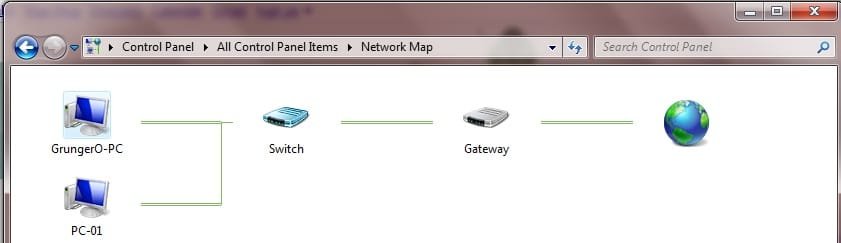
I have a router and a switch. Router is DHCP enabled. Both my PC's are in DHCP clients.

Now, i test ping my PC-1 to PC-2 and it's ok but when i test ping PC-2 to PC-1 it shows "request timed out". They have the same WORKGROUP, subnet mask and gateway of course.

What's wrong with my SETUP?
 

Attachments

  • lan.jpg
    lan.jpg
    17.5 KB · Views: 279

My Computer

OS
Vista Ultimate 32-bit
I have 2 PC's using at home.

I have a router and a switch. Router is DHCP enabled. Both my PC's are in DHCP clients.

Now, i test ping my PC-1 to PC-2 and it's ok but when i test ping PC-2 to PC-1 it shows "request timed out". They have the same WORKGROUP, subnet mask and gateway of course.

What's wrong with my SETUP?

Both machines win 7? using IPv4 or IPv6? does manually assigned IP work? Try ipconfig /release then ipconfig /renew


Ken
 

My Computer

Computer Manufacturer/Model Number
HP Pavillion dv-7 1005 Tx
OS
Win 8 Release candidate 8400
CPU
[email protected]
Memory
4 gigs
Graphics Card(s)
Nvidia 9600M
Sound Card
HD built-in
Monitor(s) Displays
17" Wxga
Screen Resolution
1440x900
Cooling
none
Internet Speed
45Mb down 5Mb up
Both machines win 7? using IPv4 or IPv6? does manually assigned IP work? Try ipconfig /release then ipconfig /renew


Ken

Both machines is win7. I'm using IPv4 and disabled IPv6. Manually assigned don't work.

Ok i will try and will let you know.
 

My Computer

OS
Vista Ultimate 32-bit
Still no luck.

The one i'm using now is PC-1.
 

My Computer

OS
Vista Ultimate 32-bit
What do you mean manually assigned addresses dont work? Could you post the IP address, subnet, gateway and DNS address that you are using on both machines?
 

My Computer

Computer Manufacturer/Model Number
Custom Built
OS
Windows 7 Professional 64bit
CPU
Dual Xenon X5272 3.4Ghz
Motherboard
Tyan S5397
Memory
Kingston 16 Gig PC6400 (4 DIMMs)
Graphics Card(s)
Nvidia GTX 280
Sound Card
Soundblaster X-Fi Fatal1ty
Monitor(s) Displays
Samsung SyncMaster 24
Screen Resolution
1920 x 1200
Hard Drives
LSI - 4 SAS 15K in Raid 0
Adaptec - 4 SAS 15K in Raid 0
Cooling
Water Cooled
What do you mean manually assigned addresses dont work? Could you post the IP address, subnet, gateway and DNS address that you are using on both machines?

What about firewalls, and av on both?
 

My Computer

Computer Manufacturer/Model Number
HP Pavillion dv-7 1005 Tx
OS
Win 8 Release candidate 8400
CPU
[email protected]
Memory
4 gigs
Graphics Card(s)
Nvidia 9600M
Sound Card
HD built-in
Monitor(s) Displays
17" Wxga
Screen Resolution
1440x900
Cooling
none
Internet Speed
45Mb down 5Mb up
Code:
Windows IP Configuration

   Host Name . . . . . . . . . . . . : GrungerO-PC
   Primary Dns Suffix  . . . . . . . :
   Node Type . . . . . . . . . . . . : Hybrid
   IP Routing Enabled. . . . . . . . : No
   WINS Proxy Enabled. . . . . . . . : No

Ethernet adapter Local Area Connection 3:

   Connection-specific DNS Suffix  . :
   Description . . . . . . . . . . . : Realtek RTL8168/8111 PCI-E Gigabit Ethern
et NIC
   Physical Address. . . . . . . . . : 00-1C-25-39-77-BE
   DHCP Enabled. . . . . . . . . . . : Yes
   Autoconfiguration Enabled . . . . : Yes
   IPv4 Address. . . . . . . . . . . : 192.168.1.10(Preferred)
   Subnet Mask . . . . . . . . . . . : 255.255.255.0
   Lease Obtained. . . . . . . . . . : Friday, February 26, 2010 12:14:03 AM
   Lease Expires . . . . . . . . . . : Friday, February 26, 2010 2:14:02 AM
   Default Gateway . . . . . . . . . : 192.168.1.1
   DHCP Server . . . . . . . . . . . : 192.168.1.1
   DNS Servers . . . . . . . . . . . : 121.1.3.81
                                       121.1.3.16
   NetBIOS over Tcpip. . . . . . . . : Enabled

Tunnel adapter isatap.{A18CA08E-6D6B-4C98-9C01-03877FB7B9F9}:

   Media State . . . . . . . . . . . : Media disconnected
   Connection-specific DNS Suffix  . :
   Description . . . . . . . . . . . : Microsoft ISATAP Adapter #2
   Physical Address. . . . . . . . . : 00-00-00-00-00-00-00-E0
   DHCP Enabled. . . . . . . . . . . : No
   Autoconfiguration Enabled . . . . : Yes

Tunnel adapter Local Area Connection* 12:

   Connection-specific DNS Suffix  . :
   Description . . . . . . . . . . . : Teredo Tunneling Pseudo-Interface
   Physical Address. . . . . . . . . : 00-00-00-00-00-00-00-E0
   DHCP Enabled. . . . . . . . . . . : No
   Autoconfiguration Enabled . . . . : Yes
   IPv6 Address. . . . . . . . . . . : 2001:0:cf2e:3096:1055:1c6e:3f57:fef5(Pref
erred)
   Link-local IPv6 Address . . . . . : fe80::1055:1c6e:3f57:fef5%14(Preferred)
   Default Gateway . . . . . . . . . : ::
   NetBIOS over Tcpip. . . . . . . . : Disabled

Firewall of both machines is off.
 

My Computer

OS
Vista Ultimate 32-bit
Solved it. I just uninstalled my AV.

I can view my homegroup but can't access it. Here is the error.

Please help guys!
 

Attachments

  • 4234.png
    4234.png
    1.9 KB · Views: 75

My Computer

OS
Vista Ultimate 32-bit
Back
Top
