windows 7 mass storagecontroller driver help needed

chet380

New member
Local time
8:47 AM
Messages
14
When I tried to connect my HP LaserJet 1012 printer I found that HP didn't provide MS with the driver for Windows 7. Thru forum help I was able to connect by downloading the driver for 3055PCL5 (DOT4) and Printer Wizard did the rest. Worked great.

However yesterday the printer connected to the pc but would not print the data. I eventually found that the mass storage controller didn't have the appropriate driver. When I tried to "Update Drivers", I had no luck in finding the driver.

Bearing in mind that I am not as computer-savvy as the posters on this forum, can anyone help with this problem?

Thx in advance.
 

My Computer

OS
windows 7
When I tried to connect my HP LaserJet 1012 printer I found that HP didn't provide MS with the driver for Windows 7. Thru forum help I was able to connect by downloading the driver for 3055PCL5 (DOT4) and Printer Wizard did the rest. Worked great.

However yesterday the printer connected to the pc but would not print the data. I eventually found that the mass storage controller didn't have the appropriate driver. When I tried to "Update Drivers", I had no luck in finding the driver.

Bearing in mind that I am not as computer-savvy as the posters on this forum, can anyone help with this problem?

Thx in advance.

Hi Chet and welcome

Can you type device manager in search. go to the unknown device (it will have a yellow triangle on it) right click the device>properties>details>use the pull down till you get to the hardware id. cut the data and google it. they will tell you the device mfr and then you can get a driver for it

Let us know if you need help with this


Kenn J++
 
Last edited:

My Computer

Computer Manufacturer/Model Number
HP Pavillion dv-7 1005 Tx
OS
Win 8 Release candidate 8400
CPU
[email protected]
Memory
4 gigs
Graphics Card(s)
Nvidia 9600M
Sound Card
HD built-in
Monitor(s) Displays
17" Wxga
Screen Resolution
1440x900
Cooling
none
Internet Speed
45Mb down 5Mb up
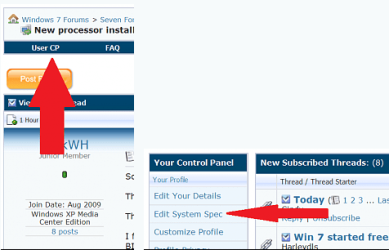
Also if you would fill in your system specs this would help especially 32bit or 64bit OS. for finding drivers. Thanks Fabe usercp 1.png
 

My Computer

Computer Manufacturer/Model Number
Self Built
OS
Windows 7 ultimate 64 bit / XP Home sp3
CPU
intel Core 2 Duo E8400 3.0ghz
Motherboard
Asus P5ND bios 1401
Memory
8 gigs 1066 OCZ Fata1ty
Graphics Card(s)
EVGA GTX 580 Call of Duty Black Ops Edition
Sound Card
Creative Soundblaster Audigy 2zs
Monitor(s) Displays
Asus 24in LCD's 2MS X2
Screen Resolution
1920x1080p @60Hz
Hard Drives
WD Caviar 500 Black/ WD Caviar 200 Blue
PSU
OCZ 700W GameXtreme
Case
NZXT Apollo
Cooling
Corsair H50 CPU/120mm x3 /60mm x2 /Corsair Dominator Ram
Keyboard
Logitech Bluetooth Wireless MX5000
Mouse
Logitech Bluetooth Wireless MX1000
Internet Speed
Download 19.83 Upload 0.97
Other Info
Logitech Z2300 Speakers/ Bose Noise Cancelling Headphones/Avermedia PCI-e Hybrid TV Bravo/Epson NX415 all in one/ 4 Port Powered USB Hub/ LG 10x Bluray Burner /TSST Corp DVDRW External
Hi Kenn and Fabe -

Thx for yr replies

The OS is Windows 7 32 bit - as to the other specs, I don't know how to find them.

As to the "manufacturer" for the mass storage device, it shows as "unknown" in Properties.

If the mass storage deice refers to something like an external hard drive, then I may have misled you - it is only the printer that I am concerned with.

Since the "fix" I described in my original post worked for several weeks, something must have caused it to change. Is it possible that a Windows Update somehow changed the driver that I had installed for the "fix" and made it inoperable with the HP 1012 printer?

Thx again

chet
 

My Computer

OS
windows 7
Type in System Information into the start/Search and it will be on top of the Menu
click it, and what you need should be on the first page.
 

My Computer

Computer Manufacturer/Model Number
Self Build 64bit
OS
Vista Ult64, Win7600
CPU
Intel Core 2 Quad Q6600 @ 2400 MHz 64bit OS
Motherboard
Asus P5E3 Deluxe WiFi @p 64 bit OS
Memory
4096 MB DDR3-SDRAM
Graphics Card(s)
ATI Radeon HD 3870 Series x2 Crossfired
Sound Card
Realtek on board
Monitor(s) Displays
Samsung SyncMaster - 23 inches
Screen Resolution
1680x1050 pixels at 60 Hz in True Colors
Hard Drives
Hitachi (250 GB)/Samsung 750 GB. /Barracuda 160 GB.
My Book 1 TB external..
PSU
Cooler Master 1000w
Case
Cooler Master Cosmos 1000.
Cooling
Fans and fresh air,
Keyboard
Wireless
Mouse
Wireless
Internet Speed
Never fast enough
Other Info
I use a Magnum.

My Computer

Computer Manufacturer/Model Number
Self Build 64bit
OS
Vista Ult64, Win7600
CPU
Intel Core 2 Quad Q6600 @ 2400 MHz 64bit OS
Motherboard
Asus P5E3 Deluxe WiFi @p 64 bit OS
Memory
4096 MB DDR3-SDRAM
Graphics Card(s)
ATI Radeon HD 3870 Series x2 Crossfired
Sound Card
Realtek on board
Monitor(s) Displays
Samsung SyncMaster - 23 inches
Screen Resolution
1680x1050 pixels at 60 Hz in True Colors
Hard Drives
Hitachi (250 GB)/Samsung 750 GB. /Barracuda 160 GB.
My Book 1 TB external..
PSU
Cooler Master 1000w
Case
Cooler Master Cosmos 1000.
Cooling
Fans and fresh air,
Keyboard
Wireless
Mouse
Wireless
Internet Speed
Never fast enough
Other Info
I use a Magnum.

My Computer

OS
XP, Vista, W7 64bit Home Premium
CPU
Intel Core Duo 6850 3.0 ghz @ 3.7 ghz
Motherboard
Asus P5E
Memory
4GB Corsair DDR 2 PC-6400
Graphics Card(s)
Ati 4870 1ghz
Sound Card
Supreme FX 11
Monitor(s) Displays
View Sonic VX1962wm
Screen Resolution
1680 X1050
Hard Drives
3 Seagate Sata Drives 160gb 250gb 500gb
PSU
Thermaltake 600 watt
Case
NZXT Alpha
Cooling
3X120cm Fans
Keyboard
Microsoft Digital Media Pro Keyboard
Mouse
Microsoft Wheel Mouse Optical
Internet Speed
1.5Mb to 8Mb/384k

My Computer

Computer Manufacturer/Model Number
Self Built
OS
Windows 7 ultimate 64 bit / XP Home sp3
CPU
intel Core 2 Duo E8400 3.0ghz
Motherboard
Asus P5ND bios 1401
Memory
8 gigs 1066 OCZ Fata1ty
Graphics Card(s)
EVGA GTX 580 Call of Duty Black Ops Edition
Sound Card
Creative Soundblaster Audigy 2zs
Monitor(s) Displays
Asus 24in LCD's 2MS X2
Screen Resolution
1920x1080p @60Hz
Hard Drives
WD Caviar 500 Black/ WD Caviar 200 Blue
PSU
OCZ 700W GameXtreme
Case
NZXT Apollo
Cooling
Corsair H50 CPU/120mm x3 /60mm x2 /Corsair Dominator Ram
Keyboard
Logitech Bluetooth Wireless MX5000
Mouse
Logitech Bluetooth Wireless MX1000
Internet Speed
Download 19.83 Upload 0.97
Other Info
Logitech Z2300 Speakers/ Bose Noise Cancelling Headphones/Avermedia PCI-e Hybrid TV Bravo/Epson NX415 all in one/ 4 Port Powered USB Hub/ LG 10x Bluray Burner /TSST Corp DVDRW External
All help appreciated

Thank you all for trying to help with my problem - very much appreciated.

For Fabe -

I downloaded the 64 bit version as you recommended, but I don't know what program to deal with in Compatablity Mode. The recommended tutorial for it is too much for my limited computer skills.

More instruction would be appreciated.

chet
 

My Computer

OS
windows 7
Thank you all for trying to help with my problem - very much appreciated.

For Fabe -

I downloaded the 64 bit version as you recommended, but I don't know what program to deal with in Compatablity Mode. The recommended tutorial for it is too much for my limited computer skills.

More instruction would be appreciated.

chet

Hi chett


No problem we are here to help. we all stated with little or no experience. to run iin compatibility mode just right click the installer and go to then compatibility tab. check vista save done. se the pic

KenN J++

edit chet if you need help let us know. there are several us out and about now <g> ken
 
Last edited:

My Computer

Computer Manufacturer/Model Number
HP Pavillion dv-7 1005 Tx
OS
Win 8 Release candidate 8400
CPU
[email protected]
Memory
4 gigs
Graphics Card(s)
Nvidia 9600M
Sound Card
HD built-in
Monitor(s) Displays
17" Wxga
Screen Resolution
1440x900
Cooling
none
Internet Speed
45Mb down 5Mb up
You might also click - run as as administrator in the compatibility options( rarely though, this is needed). Another point is you should install the software firstly before connecting the printer, and wait till the software instructs you to connect the printer - this was the case with my hp 7150 printer for XP but this changed with Vista and W7 when they supplied a functional driver, and then it wasnt necessary - you could just leave it connected when you installed the OS, and then download and install the driver from WINDOWS UPDATE by selecting optional updates. So its hard to say, but if you connect it after the software is installed you cant loose.
 

My Computer

OS
XP, Vista, W7 64bit Home Premium
CPU
Intel Core Duo 6850 3.0 ghz @ 3.7 ghz
Motherboard
Asus P5E
Memory
4GB Corsair DDR 2 PC-6400
Graphics Card(s)
Ati 4870 1ghz
Sound Card
Supreme FX 11
Monitor(s) Displays
View Sonic VX1962wm
Screen Resolution
1680 X1050
Hard Drives
3 Seagate Sata Drives 160gb 250gb 500gb
PSU
Thermaltake 600 watt
Case
NZXT Alpha
Cooling
3X120cm Fans
Keyboard
Microsoft Digital Media Pro Keyboard
Mouse
Microsoft Wheel Mouse Optical
Internet Speed
1.5Mb to 8Mb/384k
Hi Ken -

I've downloaded the Vista file again and unzipped the folders and there is no prompt for "Run" or "Install" - I'm sorry to be such a pain in the a** but I don't know how to proceed.

chet
 

My Computer

OS
windows 7
Hi again Ken -

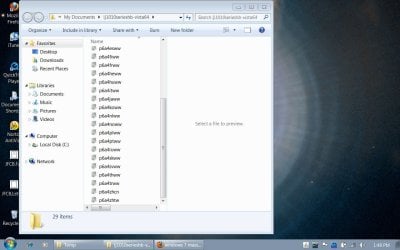
I'm trying to use the Snipping Tool to show you the page I got after unzipping the downloaded files - hope it works

chetvista.unzip.JPG
 

My Computer

OS
windows 7
To install a driver OR program in compatibility mode - right click the setup.exe file - click properties - click compatibility - check run in compatibility with vista/xp etc - check run as administrator - leave the rest blank. Start setup.exe and install.
 

My Computer

OS
XP, Vista, W7 64bit Home Premium
CPU
Intel Core Duo 6850 3.0 ghz @ 3.7 ghz
Motherboard
Asus P5E
Memory
4GB Corsair DDR 2 PC-6400
Graphics Card(s)
Ati 4870 1ghz
Sound Card
Supreme FX 11
Monitor(s) Displays
View Sonic VX1962wm
Screen Resolution
1680 X1050
Hard Drives
3 Seagate Sata Drives 160gb 250gb 500gb
PSU
Thermaltake 600 watt
Case
NZXT Alpha
Cooling
3X120cm Fans
Keyboard
Microsoft Digital Media Pro Keyboard
Mouse
Microsoft Wheel Mouse Optical
Internet Speed
1.5Mb to 8Mb/384k
unable to continue

Hi Whest -

Thx for yr help.

I'm sorry I'm so ignorant, but I don't how to find the setup.exe from the files I've extracted. The unzipping seems not to have opened them.

chet
 

My Computer

OS
windows 7
Before I start it says on the HP SITE your printer isnt supported by W7 -click on your printer listed and it direct you to where it says this on this page :
HP Color LaserJet CP6015 Printer series- HP LaserJet, Color LaserJet and LaserJet MFP Products - Product Support for Microsoft Windows 7 - c01856597 - HP Business Support Center

Sorry had to go for walk - what you will have to do if there is no setup.exe is to go into device manager (right click computer - select properties - select device manager) find the printer - right click on it - click update driver - browse computer for driver - click browse - locate the folder you unzipped them to (put it on the desktop) then the desktop is the top folder in browse - locate the setup information file and select.
I dowloaded the driver and checked it has a set information file (the one with the cog)- ok I m not sure how this will go but as your printer isnt supported this is probably you last shot - good luck! post back

If you cant locate the printer in device manager it will be an unknown device with a yellow asterisk next to it.

*Damn you have downloaded the 64bit driver version I saw that in one of the posts, and then I was reading thru all the posts and you have a 32bit OS of W7 is that correct? Well you will have to download the 32 bit version of the vista driver FOR W7 32bit and do the same as outlined above.
Pls make sure before you begin.
 
Last edited:

My Computer

OS
XP, Vista, W7 64bit Home Premium
CPU
Intel Core Duo 6850 3.0 ghz @ 3.7 ghz
Motherboard
Asus P5E
Memory
4GB Corsair DDR 2 PC-6400
Graphics Card(s)
Ati 4870 1ghz
Sound Card
Supreme FX 11
Monitor(s) Displays
View Sonic VX1962wm
Screen Resolution
1680 X1050
Hard Drives
3 Seagate Sata Drives 160gb 250gb 500gb
PSU
Thermaltake 600 watt
Case
NZXT Alpha
Cooling
3X120cm Fans
Keyboard
Microsoft Digital Media Pro Keyboard
Mouse
Microsoft Wheel Mouse Optical
Internet Speed
1.5Mb to 8Mb/384k
*Pls read my previous post about which W7 version you have.
 

My Computer

OS
XP, Vista, W7 64bit Home Premium
CPU
Intel Core Duo 6850 3.0 ghz @ 3.7 ghz
Motherboard
Asus P5E
Memory
4GB Corsair DDR 2 PC-6400
Graphics Card(s)
Ati 4870 1ghz
Sound Card
Supreme FX 11
Monitor(s) Displays
View Sonic VX1962wm
Screen Resolution
1680 X1050
Hard Drives
3 Seagate Sata Drives 160gb 250gb 500gb
PSU
Thermaltake 600 watt
Case
NZXT Alpha
Cooling
3X120cm Fans
Keyboard
Microsoft Digital Media Pro Keyboard
Mouse
Microsoft Wheel Mouse Optical
Internet Speed
1.5Mb to 8Mb/384k
Using compatibility mode just fixes the issue the installer has with the different OS - when there is no setup.exe you can install the driver in device manager which bypasses the installer, and goes directly to the setup info file.
 

My Computer

OS
XP, Vista, W7 64bit Home Premium
CPU
Intel Core Duo 6850 3.0 ghz @ 3.7 ghz
Motherboard
Asus P5E
Memory
4GB Corsair DDR 2 PC-6400
Graphics Card(s)
Ati 4870 1ghz
Sound Card
Supreme FX 11
Monitor(s) Displays
View Sonic VX1962wm
Screen Resolution
1680 X1050
Hard Drives
3 Seagate Sata Drives 160gb 250gb 500gb
PSU
Thermaltake 600 watt
Case
NZXT Alpha
Cooling
3X120cm Fans
Keyboard
Microsoft Digital Media Pro Keyboard
Mouse
Microsoft Wheel Mouse Optical
Internet Speed
1.5Mb to 8Mb/384k
Thx for all yr help, Whest

The 64 bit driver I downloaded was the one recommended by TheFabe in an earlier post. When I went to hp.com, I couldn't find a 32 bit driver for a HP LaseJet 1012.

chet
 

My Computer

OS
windows 7

My Computer

OS
XP, Vista, W7 64bit Home Premium
CPU
Intel Core Duo 6850 3.0 ghz @ 3.7 ghz
Motherboard
Asus P5E
Memory
4GB Corsair DDR 2 PC-6400
Graphics Card(s)
Ati 4870 1ghz
Sound Card
Supreme FX 11
Monitor(s) Displays
View Sonic VX1962wm
Screen Resolution
1680 X1050
Hard Drives
3 Seagate Sata Drives 160gb 250gb 500gb
PSU
Thermaltake 600 watt
Case
NZXT Alpha
Cooling
3X120cm Fans
Keyboard
Microsoft Digital Media Pro Keyboard
Mouse
Microsoft Wheel Mouse Optical
Internet Speed
1.5Mb to 8Mb/384k
Back
Top