Solved Windows 7 not booting or recovering saying 0 os installed

shaundak21

New member
Local time
9:29 AM
Messages
13
My sister's Dell inspiron 1545 was having issues with power. It would not charge the battery but used the plug supply and would shut off when not plugged in. Well, one faithful day last week it wouldn't come on at all. (okay, it comes on and shuts of immediately after) had weird orange light.
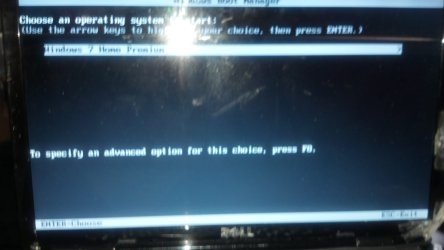
That is all just background info. Yesterday, morning I turned in on and it stayed on but wouldn't boot. I kept getting the launch startup repair option. start windows normally was also an option but it always brought me back to this same screen.

After looking online a bit, using the windows 7 disk that came with the laptop I was able to follow some posts and get out of that death loop. I then kept getting the message "bootmgr missing press ctrl+alt+del to restart" death loop.

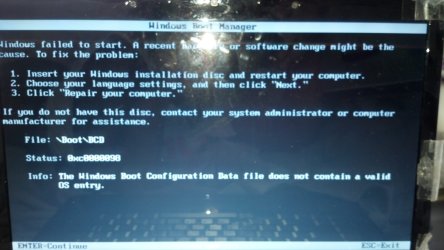
using cmd I was able to copy it straight off the disk into the computer so I no longer get that message. I now get a "use install cd to repair/ file:boot\bcd status:0xc0000098. Info:the windows boot configuration data file does not contain a valid OS entry

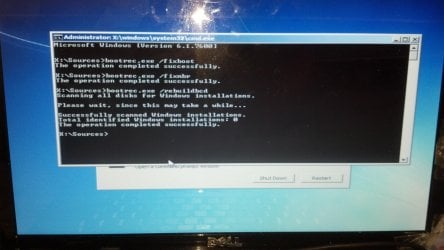
My os is C:, My recovery is D:, The disk I am using to repair is in E:, I have Boot X: that comes up. f: is for usb and none are in. I already tried bootrec /RebuildBCD it's how I got past the other loops along with running chkdsk Drive(i did c:,d: ) /f/r. I cannot run this check for x: (protected) . At the end of the checks it looks correct with the exception of the Failed to transfer logged messages to event with status 50. line I cannot run sfc scan due to pending blah, blah ,blah reboot required restart computer. restart does zippo

I already tried all the bootrec /fix.... in cmd. f8 last known good configure.... sends me to the external disk (E: )

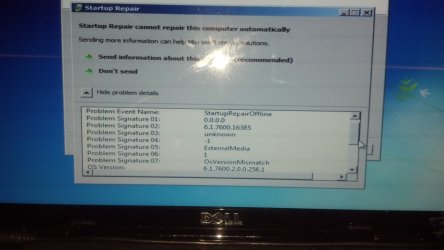
Startup repair cannot repair this computer automatically <---tried many, many times
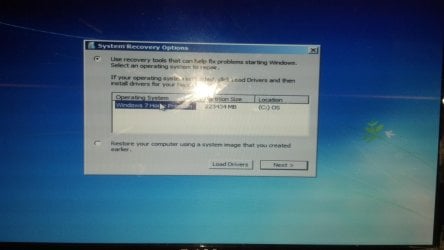
System recovery options menu has no os in the list. When load drivers is selected (as it tells you to do) all my C: D: X: E: F: come up and are explore able, but anything you select you get the THE SPECIFIED LOCATION DOES NOT CONTAIN INFORMATION ABOUT YOUR HARDWARE message:rolleyes:


Please help, I don't want her to lose everything by just fresh installing. If someone knows how to fix the bcd that would be awesomesauce. ;) yes, I'm a noob
 

My Computer My Computer

At a glance

NY
OS
NY

My Computer My Computer

At a glance

NY
OS
NY
Here is some additional info. I now can see a operating system:

Microsoft windows 223434 mb (c:) OS

This is after the rebuild. It should say windows 7, being that my os is windows 7 home premium. The error I get after startup repair is ran states: Problem Details
Problem Event Name: StatupRepairOffline
Problem Signature 01: 0.0.0.0
Problem Signature 02: 6.1.7600.16385
Problem Signature 03: unknown
Problem Signature 04: -1
Problem Signature 05: ExternalMedia
Problem Signature 06: 1
Problem Signature 07: OsVersionMismatch
OS Version: 6.1.7600.2.0.0.2561
Locale ID: 1033

also,
after I try sfc /scannow
There is a system repair pending which requires reboot to complete. Restart windows and run sfc again.
I sure you know how that turns out :(
 

My Computer My Computer

At a glance

NY
OS
NY
Enter BIOS setup by tapping the key given on first boot screen, look under Storage devices for HD's. If it's not there check the cables to make sure they're good and connected securely. If so, replace the HD.

If HD is registered in BIOS, test it as given in the Steps then continue with the troubleshooting steps.
 
Last edited:
Enter BIOS setup by tapping the key given on first boot screen, look under Storage devices for HD's. If it's not there check the cables to make sure they're good and connected securely. If so, replace the HD.

If HD is registered in HD, test it as given in the Steps then continue with the troubleshooting steps.

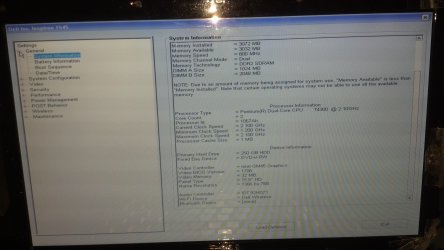
Is This what you mean? I don't see storage i any of the trees.
 

Attachments

  • 2012-06-22_00-26-11_320.jpg
    2012-06-22_00-26-11_320.jpg
    384.4 KB · Views: 59

My Computer My Computer

At a glance

NY
OS
NY
It appears BIOS recognizes a HD although it doesn't specify it's model as normal. What is under Configuration? There should be a section where SATA controller is set nearby the HD listings. What is the SATA controller setting?

It appears you've gotten the Repair to recognize the installation, now work through all of the steps in Troubleshooting Windows 7 Failure to Boot to try to get it to start. You must check for infection since a badly infected system will not repair and boot until it is cleaned up.
 
It appears BIOS recognizes a HD although it doesn't specify it's model as normal. What is under Configuration? There should be a section where SATA controller is set nearby the HD listings. What is the SATA controller setting?

It appears you've gotten the Repair to recognize the installation, now work through all of the steps in Troubleshooting Windows 7 Failure to Boot to try to get it to start. You must check for infection since a badly infected system will not repair and boot until it is cleaned up.


I really appreciate you taking the time to help me <3

System Configuration
intergrated NIC-> enabled w/PXE
SATA Operation->AHCI
Miscellaneous Devices->enable external usb port checked, enable module Bay checked
function key behavior-> Multimedia key first is active


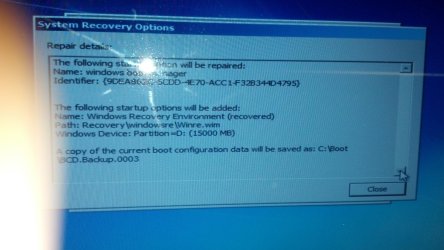
Since I last posted I tried a few things. I attempted del the mismatched bcd and rebuild it that resulted in the activation of the recovery drive D: recovering some missing stuff , like the locale and it became the active partition. I then set the active partition back to c: which is my os. windows automatically recognized that it was the correct install path and updated the info in the operating system list in the system repair box. found an error fixed it and told me to restart. I did.
(this was after I copied bootmgr.efi, bootmgr, Winload.exe, reg.exe, windowsanytimeupgrade(all3files),entirebootfolder and wininit.exe) from my laptop to a usb-> from usb to the correct locations on the c: of the laptop with the issues)


Now get the error message at startup about missing or corrupt regisrty file :huh:
 

Attachments

  • 2012-06-21_15-59-54_116.jpg
    2012-06-21_15-59-54_116.jpg
    300.4 KB · Views: 41
  • 2012-06-21_16-15-03_93.jpg
    2012-06-21_16-15-03_93.jpg
    459.3 KB · Views: 50
  • 2012-06-21_20-28-02_627.jpg
    2012-06-21_20-28-02_627.jpg
    791.9 KB · Views: 45
  • 2012-06-21_20-28-17_722.jpg
    2012-06-21_20-28-17_722.jpg
    531.7 KB · Views: 39
  • 2012-06-22_16-06-55_331.jpg
    2012-06-22_16-06-55_331.jpg
    220.6 KB · Views: 31

My Computer My Computer

At a glance

NY
OS
NY
The last picture in the above post is me running the recovery dvd of the cd/dvd drive. when you press f8 it just restarts the computer. When you select windows 7 it starts recovery cd. (please note that it only says windows 7 home premium because that's what I set the Identifier as while rebuilding the bcd and set it to partition=c: ) also that before d:recovered the location the location in the system recovery options box was (C: ) local disk and now says os

so back to the "missing or corrupt registry" message. 0xc000000f
So, I'm guessing I need to rebuild the registry from backup? if so how do I do that using cmd
 

Attachments

  • 2012-06-22_16-54-45_305.jpg
    2012-06-22_16-54-45_305.jpg
    396 KB · Views: 22
  • 2012-06-22_16-56-13_215.jpg
    2012-06-22_16-56-13_215.jpg
    312.4 KB · Views: 18

My Computer My Computer

At a glance

NY
OS
NY
so here is an update of my progress. I custom installed to the recovery disk D: this partition works I can use it normally but my primary goal is to repair C:
So I copied over the system32 folder, boot folder, and registry from the newly installed D: to the C: this Fixed the registry error message. :0) I now get a new error message about what I think are kernal files still working on it. I'll let you know how it turns out.
 

My Computer My Computer

At a glance

NY
OS
NY
I wish you well but almost nothing you have done is a recognized repair step for Troubleshooting Windows 7 Failure to Boot.

Those steps start with confirming the OS is free of infection as it often won't repair if so. Then it proceeds through the steps which have worked best in thousands of cases here to help get Win7 started.

Yet you ignore these proven steps and shower us with random and unguided steps you've run which almost always add up to corrupting the OS beyond Repair.

If Startup Repair can't sort it out then it's unlikely to repair. The exception is that sometimes bootrec commands (all automated in Startup Repair) can jumpstart repair if no OS appears. We also have success with Rebuilding MBR using Partition Wizard boot CD which gives you a picture of what you're doing. These steps are all compiled in Troubleshooting Windows 7 Failure to Boot, often with illustrated tutorials.
 
I wish you well but almost nothing you have done is a recognized repair step for Troubleshooting Windows 7 Failure to Boot.

Those steps start with confirming the OS is free of infection as it often won't repair if so. Then it proceeds through the steps which have worked best in thousands of cases here to help get Win7 started.

Yet you ignore these proven steps and shower us with random and unguided steps you've run which almost always add up to corrupting the OS beyond Repair.

If Startup Repair can't sort it out then it's unlikely to repair. The exception is that sometimes bootrec commands (all automated in Startup Repair) can jumpstart repair if no OS appears. We also have success with Rebuilding MBR using Partition Wizard boot CD which gives you a picture of what you're doing. These steps are all compiled in Troubleshooting Windows 7 Failure to Boot, often with illustrated tutorials.

I did go through the steps on the link you posted. AND THEY DIDN'T work hence the other seemingly random steps I've been taking.


But here are details of those attempts:
step 1: Couldn't run in safemode of any kind. it wasn't even booting and No f8 was not a viable option/selectable/ not even showing up
step 2: can not burn images of any kind to anything. + already using install disk
step 3: sfc scan done 100% resulted in no integrity problems
step 4/5: system recovery option did zip, ran it dozens of times not just 3
step 6/7/8: minus the third party tools got me back to the missing bootmgr error

At that point I copied the bootmgr from my good laptop to the one I'm trying to fix. It also uses win 7. and it worked to get ride of that error message. so when it says error message missing-blah, I find blah on the newly installed copy or from off my other laptop if it's not in system32 of new install. that's not random :0(

and I try to post in the off chance that this works someone else can find this and take what they need to fix theirs. I've been reading up on this issue and the most likely cause of the problem for this laptop is due to the power issue not a virus. I've also been look through the forums and youtube every time a different error comes up and follow posted proven steps to fix that issue. so it isn't really unguided but I get that you really don't know how to fix my issue and it's frustrating but you don't have to be mean.
 

My Computer My Computer

At a glance

NY
OS
NY
Fresh Re-install in C:\ is best alternative but you fresh installed in D:\ and transferred the files (system32, boot folder and registry) to C:\, good if it works for you but it may create a problem for you again in future and you are still facing the kernel problem, so best is to backup if you have anything salvageable in c:\ and fresh reinstall C:\
 

My Computer My Computer

At a glance

Windows 8.1u1 x64i3DDR3 6GBNvidia 410
Computer type
Laptop
Computer Manufacturer/Model Number
Sony Vaio VPCEH25EN
OS
Windows 8.1u1 x64
CPU
i3
Memory
DDR3 6GB
Graphics Card(s)
Nvidia 410
Screen Resolution
1366*768
Hard Drives
Toshiba 1TB
Internet Speed
Dial Up 56kbps
Fresh Re-install in C:\ is best alternative but you fresh installed in D:\ and transferred the files (system32, boot folder and registry) to C:\, good if it works for you but it may create a problem for you again in future and you are still facing the kernel problem, so best is to backup if you have anything salvageable in c:\ and fresh reinstall C:\

you guys are right, I was just trying to avoid having to re-install all her stuff but I'll most likely end up doing that anyway. Windows 7 :o
 

My Computer My Computer

At a glance

NY
OS
NY
Now that you're booting porperly, what contents do you see on C: vs. D:?
 

My Computer My Computer

At a glance

Windows 7 Ultimate x64
OS
Windows 7 Ultimate x64
I just reinstalled to c: and deleted the install on D: since I was going to have to start from scratch anyway. And put her files back (music,pics,vids etc) from other sources. Thanks anyway.
 

My Computer My Computer

At a glance

NY
OS
NY
You say you did all of the troubleshooting steps but admit you did no virus scan or half of the steps which require burning a disk, even though you have a laptop you used for other things. Then you say you "get" that we can't help fix it even though you've just admitted you didn't even get started with the steps (Step 1: Virus boot scan) which work best to start Win7.

On top of that you accuse me of being "mean" because I inquired why you appeared to follow none of the steps but instead went off on random steps which do nothing.

Somehow you seem to miss that the steps you skimmed over are the ones which have helped the most for tens of thousands of users we've helped get unbootable Win7 started since it's release.
 
You say you did all of the troubleshooting steps but admit you did no virus scan or half of the steps which require burning a disk, even though you have a laptop you used for other things. Then you say you "get" that we can't help fix it even though you've just admitted you didn't even get started with the steps (Step 1: Virus boot scan) which work best to start Win7.

On top of that you accuse me of being "mean" because I inquired why you appeared to follow none of the steps but instead went off on random steps which do nothing.

Somehow you seem to miss that the steps you skimmed over are the ones which have helped the most for tens of thousands of users we've helped get unbootable Win7 started since it's release.

You seem to miss the whole cant burn cds part, so obviously I couldn't do that step, or anything REQUIRING me burning iso to cd/usb. It had to by skipped or alternative found. the space needed for these things was not available to me so did I "CHOOSE To ignore" once again no. Furthermore it's not your inquiry that was mean; it was the condescending tone in which you wrote it, and being that the issue is over, your need to continue to reply complaining about what I didn't do solves what exactly.
 

My Computer My Computer

At a glance

NY
OS
NY
Back
Top