Windows 7 on B550 With Ryzen 5 CPU

Remeber to select the edition you want to install in the Options dropdown where it says "edition"
 

My Computers My Computers

  • At a glance

    7 X64i5 84002x8gb 3200mhz
    Computer type
    PC/Desktop
    OS
    7 X64
    CPU
    i5 8400
    Motherboard
    gigabyte b365m ds3h
    Memory
    2x8gb 3200mhz
    Hard Drives
    various
    PSU
    pure power 11 400w cm
    Case
    Coolermaster
    Cooling
    cryorig m9i
  • At a glance

    7x64g54008gb ddr4 2400
    Computer type
    PC/Desktop
    OS
    7x64
    CPU
    g5400
    Motherboard
    ga b365m ds3h
    Memory
    8gb ddr4 2400
    PSU
    xfx pro 450w
Couldn't find a suitable option for the boot drive in winntsetup. Decided to download Windows 10 again, but from the link you gave me. I'll remake the bootable USB and hopefully it works this time. This time I'll try use 1904v3.iso and see how that goes. If you have any other advice please let me know, I'm thinking I maybe need to format the SSD in some way, it's split into two partitions and I don't know if that's causing any issue.
 

My Computers My Computers

  • At a glance

    Windows 7 Ultimate x64AMD Ryzen 5 5600 3.5 GHz 6-Core Processor
    Computer type
    PC/Desktop
    OS
    Windows 7 Ultimate x64
    CPU
    AMD Ryzen 5 5600 3.5 GHz 6-Core Processor
    Motherboard
    MSI B550-A PRO ATX AM4 Motherboard
  • Computer type
    PC/Desktop
winntsetup does not create partitions.

The boot drive would be the esp partition.

You can use bootice to create an esp, or diskgenius. usually created at the beginning of the disk i.e. on the left

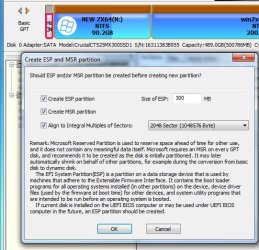
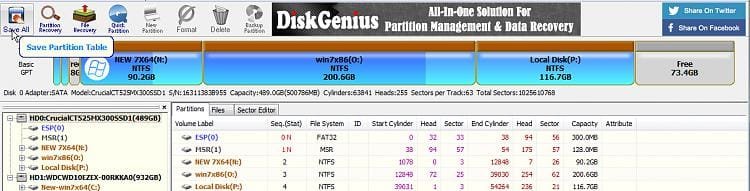
with diskgenius RT click an area of unallocated space and select create esp\msr from the context menu. It defaults to 300mb which is fine, then click Save All at top left.
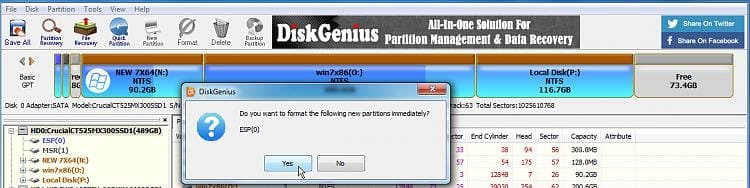
It asks if you want to format the esp immediately, say yes.


Then you can point winntsetup at the esp, which it will usually find automatically and mount as Z

- - - Updated - - -

rt click unallocated space and select cretae esp/msr
dg-esp-1.jpg


OK the defaults offered
dg-esp-2.jpg

yes to format
dg-esp-3.jpg


dg-esp-4.jpg
 

My Computers My Computers

  • At a glance

    7 X64i5 84002x8gb 3200mhz
    Computer type
    PC/Desktop
    OS
    7 X64
    CPU
    i5 8400
    Motherboard
    gigabyte b365m ds3h
    Memory
    2x8gb 3200mhz
    Hard Drives
    various
    PSU
    pure power 11 400w cm
    Case
    Coolermaster
    Cooling
    cryorig m9i
  • At a glance

    7x64g54008gb ddr4 2400
    Computer type
    PC/Desktop
    OS
    7x64
    CPU
    g5400
    Motherboard
    ga b365m ds3h
    Memory
    8gb ddr4 2400
    PSU
    xfx pro 450w
All fixed guys, I will rewrite what I did in order to potentially help anyone else reading this. I didn't need to use that winntsetup, I needed to redownload the .iso from TechBench (Rather than from Microsoft, which is what's recommended ironically enough). Then I remade the USB bootable with Usb7ice, using the 1904v3.iso - after this I opened the Windows 10 .iso file with 7-zip and moved all the files into a new folder named Windows 10 on the USB bootable, the only file I couldn't move was install.wim due to it's size and the format of the drive. For this, I used gimagex to split the .wim file into two .swm files, these go into the same folder the install.wim was in (something like Windows 10/sources).

After this, I had trouble booting. I would get white lines on the monitor. This was due to boot settings in the BIOS, I can't remember what I changed, but changing from CSM or UEFI or vice versa wasn't enough, I had to manually change something to legacy or UEFI or something (sorry I don't remember now). This fixed it though and booted normally afterwards. After booting into the USB drive, all I had to do was open the Windows 10 folder and run setup. No issues afterwards, except a relatively long (around almost 1hr) screen saying "Windows is configuring, don't turn off" upon restarting - everything is working just fine now. I can definitely say I'm already missing Windows 7 though.

Thank you so much SIW2 and Megahertz07, I have learned a lot in the last few days thanks to your help in this thread. I really hope this helps someone else in the future, thank you again for the kindness and patience you showed when helping me.

 

My Computers My Computers

  • At a glance

    Windows 7 Ultimate x64AMD Ryzen 5 5600 3.5 GHz 6-Core Processor
    Computer type
    PC/Desktop
    OS
    Windows 7 Ultimate x64
    CPU
    AMD Ryzen 5 5600 3.5 GHz 6-Core Processor
    Motherboard
    MSI B550-A PRO ATX AM4 Motherboard
  • Computer type
    PC/Desktop
:-)
 

My Computers My Computers

  • At a glance

    7 X64i5 84002x8gb 3200mhz
    Computer type
    PC/Desktop
    OS
    7 X64
    CPU
    i5 8400
    Motherboard
    gigabyte b365m ds3h
    Memory
    2x8gb 3200mhz
    Hard Drives
    various
    PSU
    pure power 11 400w cm
    Case
    Coolermaster
    Cooling
    cryorig m9i
  • At a glance

    7x64g54008gb ddr4 2400
    Computer type
    PC/Desktop
    OS
    7x64
    CPU
    g5400
    Motherboard
    ga b365m ds3h
    Memory
    8gb ddr4 2400
    PSU
    xfx pro 450w
For anybody who is interested:

Windows 7 can run on MSI and gigabyte 550 and 570 motherboards ( avoid Asrock motherboards ) using amd 3000 or 5000 cpu.

The simplest way is to pre-integrate canonkongs drivers into windows 7 install.wim.

I would suggest using dism++ to mount win7 install.wim and integrate the drivers

Integrate win7 sha2 update first

https://catalog.s.download.windowsu..._b5614c6cea5cb4e198717789633dca16308ef79c.msu

Ryzen apu video driver ( for the cpu graphics)
Forum - [Solution] Win7/8.1 x64 Ryzen APU Video driver


Forum - RE: [Solution] Win7/8.1 Drivers for USB 3.0/3.1 Controllers of new AMD Chipset Systems - 49

Forum - RE: [Solution] Win7/8.1 Drivers for USB 3.0/3.1 Controllers of new AMD Chipset Systems - 50

Yes,all of them can work with win7, except its' wifi6 devices
Canonkong

-Modified USB3 Drivers for Windows 7 for B550/X570 boards. Courtesy of canonking password: xiaofengmod
AMD_AM4_X399_TRX40_Drivers_B9_Win7_8.1_SHA256.7z — Yandex.Disk

amd motherboard drivers
AMD_AM4_X399_TRX40_Drivers_win7_81.7z — Яндекс.Диск


One way to do the installation is to download win10 installation media and replace win10 install.wim with the modified win7 install.wim

Or boot up the 1904v3.iso and run the included winntsetup to point at the modified win7 install.wim and apply the image that way.
 
Last edited:

My Computers My Computers

  • At a glance

    7 X64i5 84002x8gb 3200mhz
    Computer type
    PC/Desktop
    OS
    7 X64
    CPU
    i5 8400
    Motherboard
    gigabyte b365m ds3h
    Memory
    2x8gb 3200mhz
    Hard Drives
    various
    PSU
    pure power 11 400w cm
    Case
    Coolermaster
    Cooling
    cryorig m9i
  • At a glance

    7x64g54008gb ddr4 2400
    Computer type
    PC/Desktop
    OS
    7x64
    CPU
    g5400
    Motherboard
    ga b365m ds3h
    Memory
    8gb ddr4 2400
    PSU
    xfx pro 450w
Thanks SIW2
 

My Computers My Computers

  • At a glance

    Windows 7 HP 64i5 6600K - 800MHz to 4200MHz4+4G GSkill DDR4 3000IG - Intel 530
    Computer type
    PC/Desktop
    Computer Manufacturer/Model Number
    custom build
    OS
    Windows 7 HP 64
    CPU
    i5 6600K - 800MHz to 4200MHz
    Motherboard
    GA-Z170-HD3P
    Memory
    4+4G GSkill DDR4 3000
    Graphics Card(s)
    IG - Intel 530
    Monitor(s) Displays
    Samsung 226BW
    Screen Resolution
    1680x1050
    Hard Drives
    (1) -1 SM951 – 128GB M.2 AHCI PCIe SSD drive for Windows 7 and Lubuntu
    (2) -1 WD SATA 3 - 1T for Data
    (3) -1 WD SATA 3 - 1T for backup
    PSU
    Thermaltake 450W TR2 gold
    Keyboard
    Old and good Chicony mechanical keyboard
    Mouse
    Logitech mX performance - 9 buttons (had to disable some)
    Internet Speed
    500Mb/s
    Browser
    Firefox 64
    Other Info
    TinyWall firewall
  • At a glance

    Windows 7 Proi7-4500U 800MHz to 3.0GHz(4+4)G DDR3 1600IG intel 4400 + NVIDIA GeForce GT 745M
    Computer type
    Laptop
    System Manufacturer/Model Number
    Asus Q550LF
    OS
    Windows 7 Pro
    CPU
    i7-4500U 800MHz to 3.0GHz
    Motherboard
    Asus Q550LF
    Memory
    (4+4)G DDR3 1600
    Graphics Card(s)
    IG intel 4400 + NVIDIA GeForce GT 745M
    Sound Card
    Realtek
    Monitor(s) Displays
    LG Display LP156WF4-SPH1
    Screen Resolution
    1920 x 1080
    Hard Drives
    BX500 120G SSD for Windows and programs +
    1T HDD for data
    Internet Speed
    500 Mb/s
    Browser
    Firefox
    Other Info
    TinyWall firewall

My Computers My Computers

  • At a glance

    Windows 7 Home Premium x64i5 9400F16GB DDR4 4X4GB 3200MHzNvidia GeForce GTX 970
    Computer type
    PC/Desktop
    Computer Manufacturer/Model Number
    ASUS
    OS
    Windows 7 Home Premium x64
    CPU
    i5 9400F
    Motherboard
    ASUS Prime Z390-P
    Memory
    16GB DDR4 4X4GB 3200MHz
    Graphics Card(s)
    Nvidia GeForce GTX 970
    Monitor(s) Displays
    Dell Ultrasharp 2007WFPb
    Screen Resolution
    1600x1200
    Hard Drives
    1TB Samsung 870 evo
    PSU
    EVGA Supernova 1000 GT
    Case
    Viper GX ATX
    Cooling
    Noctua NH-D15
    Keyboard
    Frutiger Aero
    Mouse
    HP M-UAE96
    Internet Speed
    900 MBPS download l 880 MBPS upload
    Antivirus
    Microsoft Security Essentials
    Browser
    Supermium
  • Computer type
    PC/Desktop
For anybody who is interested:
The simplest way is to pre-integrate canonkongs drivers into windows 7 install.wim.
I would suggest using dism++ to mount win7 install.wim and integrate the drivers
One way to do the installation is to download win10 installation media and replace win10 install.wim with the modified win7 install.wim
Or boot up the 1904v3.iso and run the included winntsetup to point at the modified win7 install.wim and apply the image that way.

Is this the strategery for installing Win 7 using the Win 10 bootloader? By using my Win 10 installation media and replacing the install.wim with Win 7's install.wim?


If I'm understanding this correctly, it would seem to be the elegant solution for me. The reason I say that is I'm installing to hardware that doesn't need all those drivers (Optiplex 7050 has enough native support to get a good result without slipstreaming any drivers).
 

My Computers My Computers

  • At a glance

    10 trying for 7x64i7 6th gen32G
    Computer type
    PC/Desktop
    Computer Manufacturer/Model Number
    Dell Opti 7050
    OS
    10 trying for 7x64
    CPU
    i7 6th gen
    Memory
    32G
    Hard Drives
    1T SSD; 2T HDD
  • Computer type
    PC/Desktop
Back
Top