Windows 7 Picture/File Loading

wazawak

New member
Local time
3:15 PM
Messages
12
Is there any way to switch back to the old XP style of loading files in a folder? I use Windows 7 x64 and when I try to open a folder with a very large number of files, it takes 5-10 seconds for Windows to load all the thumbnails etc and then another few seconds to arrange them properly.
 

My Computer

Computer Manufacturer/Model Number
ASUS G60JX
OS
Windows 7 Premium 64 bit
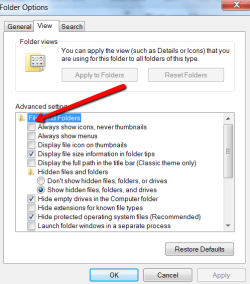
What you need for the thumbnails is a better graphics card. Else you can set it to "Always show icons". But the delay should only be for the first time you open them in that session. After that, they should be cached in RAM (provided you have enough RAM for caching).
 

Attachments

  • 2010-12-02_1611.png
    2010-12-02_1611.png
    18 KB · Views: 2

My Computer

Computer Manufacturer/Model Number
HP, Dell, Gateway, Toshiba - 4 laptops and 2 desktops
OS
Vista, Windows7, Mint Mate, Zorin, Windows 8
CPU
from 1.6GHz Duo to i7
Monitor(s) Displays
2x HP w2207
Hard Drives
5x HDD, 7x SSD, 12x Externals
Keyboard
with trackball - no mices
Mouse
Trackball mice
Internet Speed
DSL 6000
or just change the view for that folder so it shows icons, tiles, list, etc...that way other folders can still load with thumbnail view...
 

My Computer

Computer Manufacturer/Model Number
Dell Precision 380
OS
Windows 7 Pro
CPU
P4 3.4 GHz
Memory
2 GB
Graphics Card(s)
NVIDIA Quadro FX 1400
Sound Card
Audigy 2 ZS
Monitor(s) Displays
Dell 1907FP
Screen Resolution
1280x1024
Hard Drives
WDC WD800JD 80 GB
Seagate FreeAgent Pro 320GB
Seagate FreeAgent 1T
Internet Speed
10mb cable
What you need for the thumbnails is a better graphics card. Else you can set it to "Always show icons". But the delay should only be for the first time you open them in that session. After that, they should be cached in RAM (provided you have enough RAM for caching).

I already have a mighty graphics card. Windows XP could load this whole mess of files bam instantly, but I suspect Windows 7 is trying to do some additional processing or something that I don't need. Might there be some way to turn this off?

As for RAM, I have 4 gig but I do a lot of gaming, so that probably puts a bit of a squeeze on it. My old computer had much less RAM and ran the same programs, though, so I don't think RAM is the issue.
 

My Computer

Computer Manufacturer/Model Number
ASUS G60JX
OS
Windows 7 Premium 64 bit
Right, RAM is not the issue. I just mentioned that in the context of caching.

1. Do you have the same delay when you open the picture folder a second time?
2. Did you try the "icons" setting and did that work faster?
 

My Computer

Computer Manufacturer/Model Number
HP, Dell, Gateway, Toshiba - 4 laptops and 2 desktops
OS
Vista, Windows7, Mint Mate, Zorin, Windows 8
CPU
from 1.6GHz Duo to i7
Monitor(s) Displays
2x HP w2207
Hard Drives
5x HDD, 7x SSD, 12x Externals
Keyboard
with trackball - no mices
Mouse
Trackball mice
Internet Speed
DSL 6000
whs i too have noticed on my home rig that it seems to have to reload all the thumbs too...i just wasn't overly worried about it and haven't dug too deep into it and thought that it might be my vid card as well...so i'll be interested to see what the problem might be...
 

My Computer

Computer Manufacturer/Model Number
Dell Precision 380
OS
Windows 7 Pro
CPU
P4 3.4 GHz
Memory
2 GB
Graphics Card(s)
NVIDIA Quadro FX 1400
Sound Card
Audigy 2 ZS
Monitor(s) Displays
Dell 1907FP
Screen Resolution
1280x1024
Hard Drives
WDC WD800JD 80 GB
Seagate FreeAgent Pro 320GB
Seagate FreeAgent 1T
Internet Speed
10mb cable
lavee, at this moment I am a bit puzzled because I have only observed that phenomenon with weak graphics. But the OP has a gaming graphics which should not produce that effect. Maybe my proposed little "experiments" will give us some clues.
 

My Computer

Computer Manufacturer/Model Number
HP, Dell, Gateway, Toshiba - 4 laptops and 2 desktops
OS
Vista, Windows7, Mint Mate, Zorin, Windows 8
CPU
from 1.6GHz Duo to i7
Monitor(s) Displays
2x HP w2207
Hard Drives
5x HDD, 7x SSD, 12x Externals
Keyboard
with trackball - no mices
Mouse
Trackball mice
Internet Speed
DSL 6000
1. Yes, I encounter the same delay upon the second load.
2. Where do I access the folder options?

It seems to be related to W7 loading the folder through the 'libraries' section instead of straight through the directory. When I open it the old school way everything is fine.

On a side note, how can I show the file extensions?
 

My Computer

Computer Manufacturer/Model Number
ASUS G60JX
OS
Windows 7 Premium 64 bit
On a side note, how can I show the file extensions?
control panel...folder options...view tab...take check off of "Hide extensions..."
 

My Computer

Computer Manufacturer/Model Number
Dell Precision 380
OS
Windows 7 Pro
CPU
P4 3.4 GHz
Memory
2 GB
Graphics Card(s)
NVIDIA Quadro FX 1400
Sound Card
Audigy 2 ZS
Monitor(s) Displays
Dell 1907FP
Screen Resolution
1280x1024
Hard Drives
WDC WD800JD 80 GB
Seagate FreeAgent Pro 320GB
Seagate FreeAgent 1T
Internet Speed
10mb cable
lavee, at this moment I am a bit puzzled because I have only observed that phenomenon with weak graphics. But the OP has a gaming graphics which should not produce that effect. Maybe my proposed little "experiments" will give us some clues.
don't remember right off hand but when i go home i'll check to see if i can provide you with any other clues...
lv
 

My Computer

Computer Manufacturer/Model Number
Dell Precision 380
OS
Windows 7 Pro
CPU
P4 3.4 GHz
Memory
2 GB
Graphics Card(s)
NVIDIA Quadro FX 1400
Sound Card
Audigy 2 ZS
Monitor(s) Displays
Dell 1907FP
Screen Resolution
1280x1024
Hard Drives
WDC WD800JD 80 GB
Seagate FreeAgent Pro 320GB
Seagate FreeAgent 1T
Internet Speed
10mb cable
Folder Options are top left under Organize.
 

My Computer

Computer Manufacturer/Model Number
HP, Dell, Gateway, Toshiba - 4 laptops and 2 desktops
OS
Vista, Windows7, Mint Mate, Zorin, Windows 8
CPU
from 1.6GHz Duo to i7
Monitor(s) Displays
2x HP w2207
Hard Drives
5x HDD, 7x SSD, 12x Externals
Keyboard
with trackball - no mices
Mouse
Trackball mice
Internet Speed
DSL 6000
This should help, load a folder with lot of files faster.
 

My Computer

Computer type
Laptop
Computer Manufacturer/Model Number
HP ENVY 17-1150eg
OS
Windows 10 Pro x64 EN-GB
CPU
1.6 GHz Intel Core i7-720QM Processor
Memory
6 GB
Graphics Card(s)
ATI Mobility Radeon HD 5850 Graphics
Sound Card
Beats sound system with integrated subwoofer
Monitor(s) Displays
17" laptop display, 22" LED and 32" Full HD TV through HDMI
Screen Resolution
1600*900 (1), 1920*1080 (2&3)
Hard Drives
Internal: 2 x 500 GB SATA Hard Disk Drive 7200 rpm
External: 2TB for backups, 3TB USB3 network drive for media
Cooling
As Envy runs a bit warm, I have it on a Cooler Master pad
Keyboard
Logitech diNovo Media Desktop Laser (bluetooth)
Mouse
Logitech Performance Mouse MX
Internet Speed
50/10 Mbps VDSL
Antivirus
Windows Defender 4.3.9431.0
Browser
Maxthon 3.5.2., IE11
Back
Top