
Solved Windows 7: Problem with wireless adapter or access point

BrokenRecord

New member
Local time
9:26 AM
Messages
5
Hi guys, I'm still a noob when it comes to fixing network problems such as this topic. I usually turn off the router for 10 seconds and turn it back on and it has worked fine in the past. However, a couple of days ago, the router started kicking out everyone on the connection. The turning off the router method would only work for 15 minutes before giving me trouble again. I decided to do a hard reset and restored it to factory default. Worked fine for day until the nightmare began again.

So, when I got kicked out again after a hard reset, I used the "turn off router for 10 seconds" method again. This time it only worked for an hour before giving me the horrendous message "Problem with wireless adapter or access point" :mad::mad::mad:. I can keep shutting the router off but it gets annoying doing it so often.
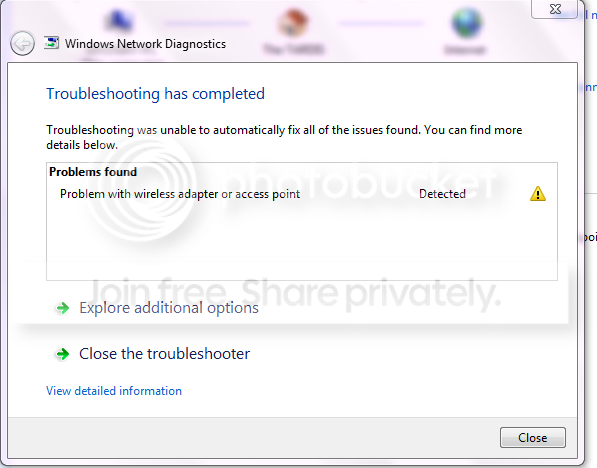
wirelessproblem.png


Now, the problem is not with my computer only. My iPod, laptop, PS3 and my family's wireless devices won't work either. The router I currently use is D-LINK DIR 657 Media Router and it's only a year old. The Belkin router (which I thought was inferior to the current router) lasted me almost 3 years before switching to D-LINK.

The WiFi Miniport adapters are disabled since that was the solution on another thread but that solution did not work for me hence why I'm here. I've connected to the modem directly via ethernet cable and that works fine. Is this a problem with the router directly and should I get a new one as a solution?

I'm a gamer and currently about 6 to 7 devices use wireless connection in my family. Any help on how to proceed with this problem would be greatly helpful.
 

My Computer

Computer type
PC/Desktop
Computer Manufacturer/Model Number
Custom Build
OS
Windows 7 Professional x64
CPU
Intel Core i7-3770
Motherboard
ASUS P8Z77-V LK
Memory
Corsair Vengeance 8GB DDR3
Graphics Card(s)
EVGA GeForce GTX 660Ti
Hard Drives
Seagate Barracuda 2TB
Antivirus
Bitdefender Total Security 2013
Browser
Firefox
So in short:
  • routerproblem.... all computers have problems.
  • Only wireless devices have problems.
  • It works fine for a few hours
When connecting computer wired it keeps working all the time(?) If so... not a provider problem.
Resetting only the router fixes the problem (for few hours).
correct?
 

My Computer

Computer type
Laptop
Computer Manufacturer/Model Number
ACER ASPIRE 5742G
OS
Microsoft Windows 7 Home Premium 64-bits 7601 Multiprocessor Free Service Pack 1
CPU
Intel(R) Core(TM) i3 CPU M 370 @ 2.40GHz
Motherboard
Acer Aspire 5742G
Memory
4,00 GB
Graphics Card(s)
ATI Mobility Radeon HD 5400 Series
Sound Card
(1) AMD High Definition Audio Device (2) Realtek High Defi
Screen Resolution
1366 x 768 x 32 bits (4294967296 colors) @ 60 Hz
Hard Drives
WDC WD5000BEVT-22ZAT0
So in short:
  • routerproblem.... all computers have problems.
  • Only wireless devices have problems.
  • It works fine for a few hours
When connecting computer wired it keeps working all the time(?) If so... not a provider problem.
Resetting only the router fixes the problem (for few hours).
correct?

Yes, that sums it up. No computer or wireless device can connect to the internet via wireless.

Plugging the computer directly to modem gives me internet connection so yes, ISP is not the problem.

Resetting router doesn't help at all now. Now I'm receiving a new message. "Your DNS server might be unavailable" :banghead::mad2:. Went to CMD and typed in ipconfig/flushdns and still the problem wasn't fixed. :cry:

On the D-Link router, there is a power symbol and a world symbol. The world symbol represents internet activity/connection. When I use to lose connection, the world symbol would blink but after a 2nd reset of router, the world light doesn't even turn on.

My gaming sessions are being destroyed because of this. Is it time for a new router? And which would you recommend? Range to about $100.
 

My Computer

Computer type
PC/Desktop
Computer Manufacturer/Model Number
Custom Build
OS
Windows 7 Professional x64
CPU
Intel Core i7-3770
Motherboard
ASUS P8Z77-V LK
Memory
Corsair Vengeance 8GB DDR3
Graphics Card(s)
EVGA GeForce GTX 660Ti
Hard Drives
Seagate Barracuda 2TB
Antivirus
Bitdefender Total Security 2013
Browser
Firefox
Indeed time for a new router. I don't recommend a specific one...
 

My Computer

Computer type
Laptop
Computer Manufacturer/Model Number
ACER ASPIRE 5742G
OS
Microsoft Windows 7 Home Premium 64-bits 7601 Multiprocessor Free Service Pack 1
CPU
Intel(R) Core(TM) i3 CPU M 370 @ 2.40GHz
Motherboard
Acer Aspire 5742G
Memory
4,00 GB
Graphics Card(s)
ATI Mobility Radeon HD 5400 Series
Sound Card
(1) AMD High Definition Audio Device (2) Realtek High Defi
Screen Resolution
1366 x 768 x 32 bits (4294967296 colors) @ 60 Hz
Hard Drives
WDC WD5000BEVT-22ZAT0
Hi guys, I'm still a noob when it comes to fixing network problems such as this topic. I usually turn off the router for 10 seconds and turn it back on and it has worked fine in the past. However, a couple of days ago, the router started kicking out everyone on the connection. The turning off the router method would only work for 15 minutes before giving me trouble again. I decided to do a hard reset and restored it to factory default. Worked fine for day until the nightmare began again.

So, when I got kicked out again after a hard reset, I used the "turn off router for 10 seconds" method again. This time it only worked for an hour before giving me the horrendous message "Problem with wireless adapter or access point" :mad::mad::mad:. I can keep shutting the router off but it gets annoying doing it so often.

wirelessproblem.png


Now, the problem is not with my computer only. My iPod, laptop, PS3 and my family's wireless devices won't work either. The router I currently use is D-LINK DIR 657 Media Router and it's only a year old. The Belkin router (which I thought was inferior to the current router) lasted me almost 3 years before switching to D-LINK.

The WiFi Miniport adapters are disabled since that was the solution on another thread but that solution did not work for me hence why I'm here. I've connected to the modem directly via ethernet cable and that works fine. Is this a problem with the router directly and should I get a new one as a solution?

I'm a gamer and currently about 6 to 7 devices use wireless connection in my family. Any help on how to proceed with this problem would be greatly helpful.

Lots of problems with wireless stability using the original firmware on this router. The new firmware is supposed to fix the problem. :)

Source: FIRMWARE

Firmware D-Link site> D-Link Technical Support
 

My Computer

Computer type
PC/Desktop
Computer Manufacturer/Model Number
Home built
OS
Windows 7 Ult, Windows 8.1 Pro,
CPU
Q9650-4.275GHz, E8600 4.5GHz, E6750-3.8GHz
Motherboard
Evga 780i FTW
Memory
G.Skill PC2 9600 1200Mhz 5 5 5 15 2T
Graphics Card(s)
GTX480
Sound Card
Asus Xonar D2
Monitor(s) Displays
HannsG
Screen Resolution
1680X1050
Hard Drives
GSkill Phoenix Pro 120GB SSD
PSU
ThermalTake Toughpower 1000Watt modular
Case
ThermalTake XaserV
Cooling
Xigmatek S1283
Keyboard
Logitech G15
Mouse
Logitech G9
Internet Speed
T1
Thank you guys for replying and helping me out. Since the router gave me so much trouble and I don't want to go through that for at least a couple years :p I'm going to just get a new and better router that meets the needs more efficiently.

I think part of the problem was also having too many wireless devices on the connection and the router couldn't dish out that much. I guess that's what happens when I go cheap haha.
 

My Computer

Computer type
PC/Desktop
Computer Manufacturer/Model Number
Custom Build
OS
Windows 7 Professional x64
CPU
Intel Core i7-3770
Motherboard
ASUS P8Z77-V LK
Memory
Corsair Vengeance 8GB DDR3
Graphics Card(s)
EVGA GeForce GTX 660Ti
Hard Drives
Seagate Barracuda 2TB
Antivirus
Bitdefender Total Security 2013
Browser
Firefox
Thank you guys for replying and helping me out. Since the router gave me so much trouble and I don't want to go through that for at least a couple years :p I'm going to just get a new and better router that meets the needs more efficiently.

I think part of the problem was also having too many wireless devices on the connection and the router couldn't dish out that much. I guess that's what happens when I go cheap haha.

Well actually this router can easily be fixed by simply installing the latest firmware which I posted a link to.

This has been a confirmed fix for the problems with this particular router according the D-Link forum. Too many wireless devices is not the problem I can assure you. :)
 

My Computer

Computer type
PC/Desktop
Computer Manufacturer/Model Number
Home built
OS
Windows 7 Ult, Windows 8.1 Pro,
CPU
Q9650-4.275GHz, E8600 4.5GHz, E6750-3.8GHz
Motherboard
Evga 780i FTW
Memory
G.Skill PC2 9600 1200Mhz 5 5 5 15 2T
Graphics Card(s)
GTX480
Sound Card
Asus Xonar D2
Monitor(s) Displays
HannsG
Screen Resolution
1680X1050
Hard Drives
GSkill Phoenix Pro 120GB SSD
PSU
ThermalTake Toughpower 1000Watt modular
Case
ThermalTake XaserV
Cooling
Xigmatek S1283
Keyboard
Logitech G15
Mouse
Logitech G9
Internet Speed
T1
Thank you guys for replying and helping me out. Since the router gave me so much trouble and I don't want to go through that for at least a couple years :p I'm going to just get a new and better router that meets the needs more efficiently.

I think part of the problem was also having too many wireless devices on the connection and the router couldn't dish out that much. I guess that's what happens when I go cheap haha.

Well actually this router can easily be fixed by simply installing the latest firmware which I posted a link to.

This has been a confirmed fix for the problems with this particular router according the D-Link forum. Too many wireless devices is not the problem I can assure you. :)


Ended up buying the new Netgear Nighthawk AC1900. Really worth the money and wouldn't get trouble at least for 5 years. I'll add the latest firmware to the D-Link router and gift it to a friend in need I suppose. Try to help out the community like the community helped me out. :cool:
 

My Computer

Computer type
PC/Desktop
Computer Manufacturer/Model Number
Custom Build
OS
Windows 7 Professional x64
CPU
Intel Core i7-3770
Motherboard
ASUS P8Z77-V LK
Memory
Corsair Vengeance 8GB DDR3
Graphics Card(s)
EVGA GeForce GTX 660Ti
Hard Drives
Seagate Barracuda 2TB
Antivirus
Bitdefender Total Security 2013
Browser
Firefox
Thank you guys for replying and helping me out. Since the router gave me so much trouble and I don't want to go through that for at least a couple years :p I'm going to just get a new and better router that meets the needs more efficiently.

I think part of the problem was also having too many wireless devices on the connection and the router couldn't dish out that much. I guess that's what happens when I go cheap haha.

Well actually this router can easily be fixed by simply installing the latest firmware which I posted a link to.

This has been a confirmed fix for the problems with this particular router according the D-Link forum. Too many wireless devices is not the problem I can assure you. :)


Ended up buying the new Netgear Nighthawk AC1900. Really worth the money and wouldn't get trouble at least for 5 years. I'll add the latest firmware to the D-Link router and gift it to a friend in need I suppose. Try to help out the community like the community helped me out. :cool:

With AC routers there have been many compatibility problems with many older N clients and often times they will only work with AC NIC's either USB or PCI/e. If the signal drops with certain N clients you can be sure it's a compatibility problem.
 

My Computer

Computer type
PC/Desktop
Computer Manufacturer/Model Number
Home built
OS
Windows 7 Ult, Windows 8.1 Pro,
CPU
Q9650-4.275GHz, E8600 4.5GHz, E6750-3.8GHz
Motherboard
Evga 780i FTW
Memory
G.Skill PC2 9600 1200Mhz 5 5 5 15 2T
Graphics Card(s)
GTX480
Sound Card
Asus Xonar D2
Monitor(s) Displays
HannsG
Screen Resolution
1680X1050
Hard Drives
GSkill Phoenix Pro 120GB SSD
PSU
ThermalTake Toughpower 1000Watt modular
Case
ThermalTake XaserV
Cooling
Xigmatek S1283
Keyboard
Logitech G15
Mouse
Logitech G9
Internet Speed
T1
So far the AC router has worked good but then again it has only been one day. Got connected with no problems and it provides 2 signals too. One for 2.4ghz and the other 5ghz. I've setup different devices on different connections just so it doesn't interfere with connectivity.

If problems do arise in the future (which I'm hoping they won't), I'll know where to go to get the answers. People in this website's forums seems to be pretty helpful for just about any computer problem :D
 

My Computer

Computer type
PC/Desktop
Computer Manufacturer/Model Number
Custom Build
OS
Windows 7 Professional x64
CPU
Intel Core i7-3770
Motherboard
ASUS P8Z77-V LK
Memory
Corsair Vengeance 8GB DDR3
Graphics Card(s)
EVGA GeForce GTX 660Ti
Hard Drives
Seagate Barracuda 2TB
Antivirus
Bitdefender Total Security 2013
Browser
Firefox
Back
Top