Windows 7 Ram usage overload

trex1989

New member
Local time
9:28 PM
Messages
15
i read some forums on this already and sadly none of them helped i searched all over google and just the web period and nothing this problem just started on august 23 2010 and ive had windows 7 ultimate like a week after it came out and NEVER had this problem.

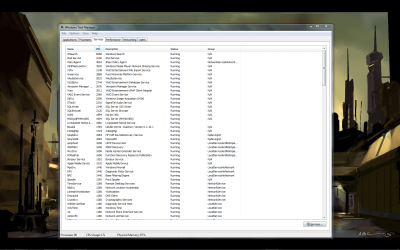
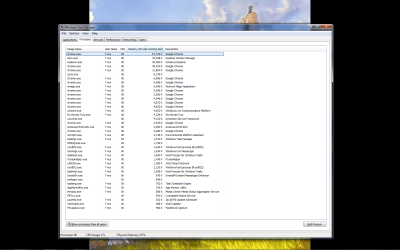
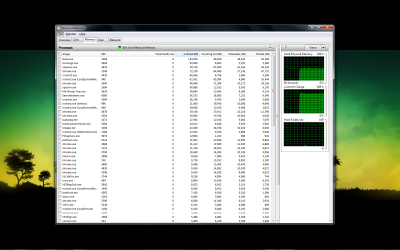
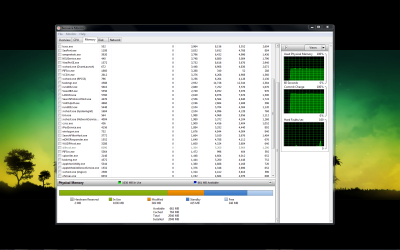
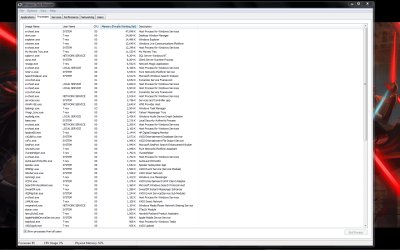
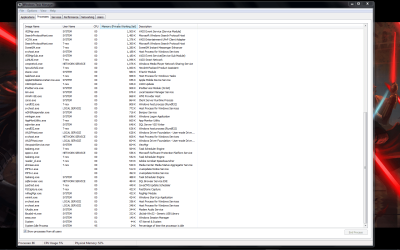
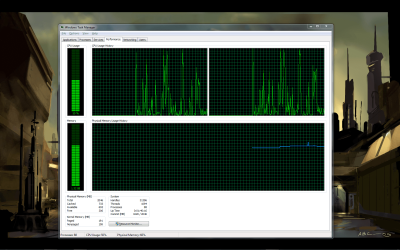
as soon as i turn my computer on the ram usage shots up to over half of the available ram ive cleaned all my caches temporary internet files and all ill post screenshots and hopefully u guys can help
 

Attachments
  • 2010-08-25_020138.png
    2010-08-25_020138.png
    200.4 KB · Views: 131
  • 2010-08-25_020158.png
    2010-08-25_020158.png
    215.7 KB · Views: 57
  • 2010-08-25_020208.png
    2010-08-25_020208.png
    98.1 KB · Views: 38
  • 2010-08-25_020314.png
    2010-08-25_020314.png
    138.8 KB · Views: 30
  • 2010-08-25_020327.png
    2010-08-25_020327.png
    135.8 KB · Views: 42

My Computer

OS
windows 7

My Computer

Computer type
PC/Desktop
Computer Manufacturer/Model Number
Dell XPS 420
OS
Windows 10, Home Clean Install
CPU
Intel Core2 processsor Q8200(2.33Ghz 1333FSB) Quad Core Tech
Motherboard
Dell
Memory
6 gb
Graphics Card(s)
ATI Radeon 256MB HD3650
Sound Card
Intergrated 7.1 Channel Audio
Monitor(s) Displays
Dell SP2009W 20"
Hard Drives
640 GB Serial ATA Hard drive
Cooling
Fan
Keyboard
Dell USB Keyboard
Mouse
Dell Premium Optical USB
Internet Speed
DSL 2.85
A couple of questions. First, did anything change on 8/23 in particular that you would be aware of? Secondly, I see many instances of Chrome open in these cases ... did you open Chrome or do these just show up without intervention? Additionally, you may want to check your Start-Up Programs using msconfig to ensure something isn't starting up that hogs up your resources. Also, just out of curiosity, how much RAM do you have total (I'm assuming 2 GB) and what CPU do you have? Specs would help a bit in this case.
 

My Computer

OS
Windows 7 Ultimate x64 SP1
CPU
Intel Core i3 530 2.93 Ghz Clarkdale
Motherboard
ASRock P55 PRO/USB3 LGA 1156
Memory
4 GB OCZ DDR3 1600 (PC12800) Low Voltage Desktop Memory
Graphics Card(s)
Nvidia GeForce GTX 550 Ti with 1 GB of RAM
Sound Card
Realtek HD ALC892
Monitor(s) Displays
20'' eMachines E202HDbmd Glare Panel Widescreen
Screen Resolution
1600 x 900
Hard Drives
Western Digital 1 TB Caviar Black Edition (7200 RPM) SATA
Hitachi Deskstar 500 GB (7200 RPM) SATA
Samsung SpinPoint 400 GB (7200 RPM) SATA
PSU
Rosewill Xtreme Series RX750-D-B ATX12V v2.2 & EPS12V (750W)
Case
Cooler Master Centurion 534 RC-534-KKN2-GP Mid-Tower
Cooling
Standard Case Fans and Stock CPU Heatsink
Keyboard
Microsoft Wireless Optical Desktop Elite
Mouse
Microsoft Wireless Optical Desktop Elite
Internet Speed
7.1 Mbps Verizon DSL
It might be useful at this point to use procmon to look at the memory usage counters of each process to see if any particular process is especially "hungry". I'm guessing you saw far more cache and less actual usage previously. A good point by Darician, though, is to look through your App and System event logs around the time you noticed the change (a day or two before, up to the last reboot after) and see if anything changed, or started (or stopped) logging, etc.
 

My Computer

Computer type
PC/Desktop
Computer Manufacturer/Model Number
Custom
OS
Windows 10 Pro x64
CPU
Intel Core i7 4790K @ 4.5GHz
Motherboard
Asus Maximus Hero VII
Memory
32GB DDR3
Graphics Card(s)
Nvidia GeForce GTX970
Sound Card
Realtek HD Audio
Screen Resolution
1920x1200
Hard Drives
1x Samsung 250GB SSD
4x WD RE 2TB (RAIDZ)
PSU
Corsair AX760i
Case
Fractal Design Define R4
Cooling
Noctua NH-D15
@rich its not only at the start its all the time now

@darician not that i know of im the only person that uses this computer only thing i can think of is me updating norton 360 to v.4 and the chrome stuff u see is because i was using it to write the forum lol all the other chrome things r the widget or gadgets like cooloris and google voice plug ins

Computer Specs:

Sony vaio lt15e
cpu intel cuo duo 1.5 ghz
ram 2gb ddr2
hdd 320gb
graphics nvidia geforce 8400m gt gpu
running windows 7 x32
 

My Computer

OS
windows 7
@rich its not only at the start its all the time now

@darician not that i know of im the only person that uses this computer only thing i can think of is me updating norton 360 to v.4 and the chrome stuff u see is because i was using it to write the forum lol all the other chrome things r the widget or gadgets like cooloris and google voice plug ins

Computer Specs:

Sony vaio lt15e
cpu intel cuo duo 1.5 ghz
ram 2gb ddr2
hdd 320gb
graphics nvidia geforce 8400m gt gpu
running windows 7 x32
Yes, but with the clean boot, it may not happen at all. You can see what is causing the problem.
 

My Computer

Computer type
PC/Desktop
Computer Manufacturer/Model Number
Dell XPS 420
OS
Windows 10, Home Clean Install
CPU
Intel Core2 processsor Q8200(2.33Ghz 1333FSB) Quad Core Tech
Motherboard
Dell
Memory
6 gb
Graphics Card(s)
ATI Radeon 256MB HD3650
Sound Card
Intergrated 7.1 Channel Audio
Monitor(s) Displays
Dell SP2009W 20"
Hard Drives
640 GB Serial ATA Hard drive
Cooling
Fan
Keyboard
Dell USB Keyboard
Mouse
Dell Premium Optical USB
Internet Speed
DSL 2.85
The list shows 39 processes running but down the bottom it shows 90 processes running. Click on show processes from all users and re-post screen shot.
 

My Computer

OS
Windows 7 Home Premium 64 Bit
CPU
Intel I7 920
Motherboard
ASUS P6T
Memory
6 GB CORSAIR DOMINATOR DDR3-1333
Graphics Card(s)
Nvidia GT 9800
Sound Card
Prodigy 7.1
Monitor(s) Displays
Vizio 25.5 inch 1920 X 1200 FULL HIGH DEFINITION
Screen Resolution
1920 X 1200
Hard Drives
OCZ 100 GB VERTEX SSD and 1 TERABYTE SEAGATE BARRACUDA
PSU
580 Watt
Case
Coolermaster
Cooling
Coolermaster V8 and 3 120 mm case fans.
Keyboard
LogiTech G11
Mouse
Microsoft Track Ball
Internet Speed
15 Megabits/s down - 2 Megabits/s up
wow ur right never saw that

i tried clean reboot it still was using over half of my ram had nothing opened and 55% was in use
 

Attachments

  • 2010-08-25_054150.png
    2010-08-25_054150.png
    116.4 KB · Views: 51
  • 2010-08-25_054155.png
    2010-08-25_054155.png
    114.9 KB · Views: 24

My Computer

OS
windows 7
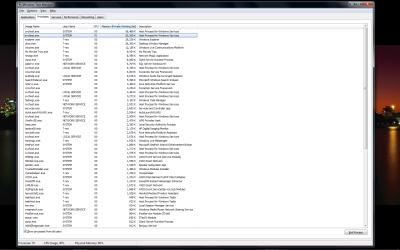
Now theres 2 of these svhost things on top
 

Attachments

  • 2010-08-25_055247.png
    2010-08-25_055247.png
    90.6 KB · Views: 35

My Computer

OS
windows 7
wow ur right never saw that

i tried clean reboot it still was using over half of my ram had nothing opened and 55% was in use

I see you have 2 GB of RAM. Your Windows 7 32 BIT can see 4 GB so you might want to add 2 more GB. Another suggestion, In Task manager, sort by column "User Name"

I counted T-Rex 31 times. That is what you named your computer. Mine only shows 5 running. You are severely pushing the limits of 2 GB of RAM with up to 90 processes running. I only have 39 running and I have Windows 7 64 Bit and 6 GB of RAM. Those are items you have running and have nothing to do with Windows, per say.

If you are not sure what each item is, Google each file name and you should find what program or utility each file belongs to, configure each to only run when you really want them running. You will be much happier.
 

My Computer

OS
Windows 7 Home Premium 64 Bit
CPU
Intel I7 920
Motherboard
ASUS P6T
Memory
6 GB CORSAIR DOMINATOR DDR3-1333
Graphics Card(s)
Nvidia GT 9800
Sound Card
Prodigy 7.1
Monitor(s) Displays
Vizio 25.5 inch 1920 X 1200 FULL HIGH DEFINITION
Screen Resolution
1920 X 1200
Hard Drives
OCZ 100 GB VERTEX SSD and 1 TERABYTE SEAGATE BARRACUDA
PSU
580 Watt
Case
Coolermaster
Cooling
Coolermaster V8 and 3 120 mm case fans.
Keyboard
LogiTech G11
Mouse
Microsoft Track Ball
Internet Speed
15 Megabits/s down - 2 Megabits/s up
i sorted it before by username theres 20 running in my username on a regular but what u need 2 know is ive been doing this forever with this computer id have opera google chrome folders open and itunes and not have any problems but now i get a message saying close these programs because of low space and if u saw in the screen shot up top the 5th one it shows 700mb of cached ram and thats low now it show over 900 of cached ram and idk how to clear that ive been fine with 2gb of ram for years and all of a sudden i get this problem if i cant fix i guess ima have 2 upgrade
 

My Computer

OS
windows 7
If all you're seeing is an increase in cache, short of disabling superfetch (and that would definitely not be recommended) you won't "get it back" unless the system has applications running that need it. Unused RAM is wasted RAM, so Windows tries to be aggressive with it and pre-cache all sorts of things based on your usage patterns, because accessing executables and libraries when starting a new program is much faster from system RAM than it is from disk.

If you're getting low virtual memory warnings however, it might be useful to use perfmon to watch all of the process counters for the <All Instances> item, to see which application or applications are consuming a good amount of memory. Without a baseline perfmon from before it's impossible to compare, but we could at least help you determine which app is consuming memory now, if any one app is doing so.
 

My Computer

Computer type
PC/Desktop
Computer Manufacturer/Model Number
Custom
OS
Windows 10 Pro x64
CPU
Intel Core i7 4790K @ 4.5GHz
Motherboard
Asus Maximus Hero VII
Memory
32GB DDR3
Graphics Card(s)
Nvidia GeForce GTX970
Sound Card
Realtek HD Audio
Screen Resolution
1920x1200
Hard Drives
1x Samsung 250GB SSD
4x WD RE 2TB (RAIDZ)
PSU
Corsair AX760i
Case
Fractal Design Define R4
Cooling
Noctua NH-D15
If you are sure this started just 3 days ago, I think I would do a System Restore to 4 days ago and see what happens.
 

My Computer

Computer Manufacturer/Model Number
BrightWorks Systems B4
OS
Windows 7 Profession 64-bit
CPU
Intel Core i7-860 Quad
Motherboard
Gigabyte P55-UD4P
Memory
Mushkin 4x2Gb PC12800
Graphics Card(s)
Gigabyte GTX260 896Mb
Sound Card
Integrated 7.1 HD Dolby
Monitor(s) Displays
2 Samsung 2220wm-HAS 22"
Screen Resolution
1680 x 1050 | 1680 x 1050
Hard Drives
WD HE 1Tb
PSU
Corsair TX-750W
Case
Ultra M998
Cooling
OEM
Keyboard
MS Wireless Comfort 5000
Mouse
MS Wireless 5000
Internet Speed
Cable and pretty darn fast
Back
Top